
Thermalright TL-C12C-S X3 CPU Fan 120mm ARGB
4.7Editor score
4pin PWM silent control
S-FDB bearing included
66.17CFM air flow
Discover the best Be Quiet case fans for cooling and silence. This guide compares top models like Pure Wings and Light Wings for airflow and noise.
Finding the right cooling solution is essential for any PC build. Be Quiet case fans are known for their German engineering and low noise profiles. They help maintain optimal temperatures while keeping your system whisper quiet during intense workloads.
We have analyzed ten top rated models from Be Quiet and other trusted brands. Each product was evaluated based on airflow, static pressure, bearing type, and overall build quality. This ensures you get reliable performance for your specific cooling needs without unnecessary noise.
Each pick highlights key strengths and ideal use cases for different builds. Whether you need RGB lighting or pure silence, there is a fan here for you. Please note that prices and availability can change frequently on major online retailers.
4.7Editor score

4.7Editor score

4.8Editor score
This table provides a side by side comparison of all ten top rated fans. You can quickly see key specifications and ratings to decide which fits your build best.


The be quiet! Pure Wings 3 is our top pick for overall performance and silence. It holds a 4.7 rating from users and delivers maximum airflow with minimal noise. This fan is perfect for those who want pure cooling without flashy lights.
We may earn a commission when you buy through this link, at no additional cost to you.
Its standout quality is the rifle bearing design which offers an operating lifetime of 80000 hours. The optimized frame outlet ensures peak performance on radiators while reducing noise. The 7 airflow optimized blades ensure performance under demanding configurations without generating excess sound.
While it lacks RGB lighting, this is a trade-off for its superior acoustic profile and longevity. The very low minimum rpm allows for very quiet operation even at lower speeds. This makes it ideal for silent PC builds where aesthetics are secondary to silence.
Anyone building a silent workstation or high performance PC should consider this fan. It offers the best balance of cooling and quietness in this lineup. We highly recommend it for those prioritizing German quality and long term reliability.
The fan frame outlet is designed to reduce noise while maintaining high airflow. This ensures your system stays cool without disturbing your environment.
With 80000 hours of operating lifetime, this fan is built to last through many years of use. The rifle bearing technology ensures smooth rotation over time.
We may earn a commission when you buy through this link, at no additional cost to you.
This 3-pack of Light Wings fans brings vibrant ARGB lighting to your build. With a 4.7 rating, users appreciate the balance of light and silence. It includes an HUB for easy control and synchronization of up to six components.
We may earn a commission when you buy through this link, at no additional cost to you.
The nine silence optimized fan blades reduce noise generating turbulences while maintaining high pressure. This makes it ideal for radiators and heat sinks where airflow is critical. The ARGB Hub allows synchronization for a unified look across your case.
The main trade-off is the need for ARGB headers on your motherboard. Without these, the lighting may not function as intended. However the performance to noise ratio of 31dB(A) at 2500rpm is remarkable for RGB fans.
Gamers and enthusiasts who want visible cooling should choose this set. It offers a complete solution with three fans and a hub. The individual look thanks to 18 LEDs adds a custom touch to any PC case.
Multiple colors and modes allow you to match your PC to your room aesthetic. The ARGB Hub makes managing these lights simple and effective.
The blades are optimized to reduce turbulence which helps in high resistance areas like radiators. This ensures efficient cooling without raising noise levels unnecessarily.
We may earn a commission when you buy through this link, at no additional cost to you.
The Light Wings LX 120mm PWM Reverse Black upgrades your PC case with spectacular lighting. It features reversed blades that allow airflow from the back of the frame. This is perfect for side or bottom intakes where you want to see the hub.
We may earn a commission when you buy through this link, at no additional cost to you.
With 16 LEDs inside the hub, light shines onto frosted fan blades for a soft look. The ARGB connection cable allows daisy chaining which simplifies cable management. This is the best-in-class choice for show cases like the Light Base series.
You might find the reverse blade concept unusual at first. It is designed specifically to improve airflow in tight intake spaces. The rifle bearing technology offers an average lifespan of 60000 hours for reliability.
Show builders should use these to maximize the aesthetic appeal of your rig. They let friends and family gaze in awe with your setup. The frosted blades create an unmistakable look that expresses your creativity effectively.
The frosted blades and internal lighting create a stunning visual effect. This is ideal for clear side panel cases where internal components are visible.
The fan frame outlet minimizes air leaks while the blades are optimized for maximum airflow. This ensures efficient cooling regardless of the intake position.
We may earn a commission when you buy through this link, at no additional cost to you.
This 140mm option delivers premium low noise cooling with ARGB lighting. Users rate it 4.7 stars for its quiet operation and style. It features seven silence-optimized fan blades for high airflow and low noise generating turbulences.
We may earn a commission when you buy through this link, at no additional cost to you.
The ARGB lighting on front and rear uses 20 LEDs for individual looks. This model operates with max 23.3dB(A) which is exceptionally quiet for its size. It is perfect for cases that support larger fans for better static pressure.
The larger footprint means it will not fit smaller cases. You need to verify your case supports 140mm fans before buying. However the operating lifetime of 60000 hours ensures long term durability.
Choose this if you want a larger fan that moves more air quietly. It adds a unique look to your PC while keeping noise low. The lighting modes are perfect for matching your PC theme.
140mm fans move more air at lower RPM. This naturally reduces noise compared to smaller faster spinning fans.
ARGB lighting on both sides ensures the fan looks great from any angle. This adds value to open cases or tempered glass panels.
We may earn a commission when you buy through this link, at no additional cost to you.
The Noctua NF-P12 redux holds a 4.8 rating which is the highest in this guide. It is a high performance cooling fan with over 100 awards. This redux edition offers proven Noctua quality at an attractive price point.
We may earn a commission when you buy through this link, at no additional cost to you.
Its pressure-optimised blade design provides high static pressure and strong CFM. This makes it great for CPU coolers and water cooling radiators. The 1700rpm 4-pin PWM version supports automatic motherboard speed control effectively.
The lack of RGB might be a downside for RGB lovers. The brown color is distinct and may not match all builds. However the quietness of operation and high pressure are unmatched in this range.
Workstation builders seeking pure silence should choose this fan. It supports automatic speed control for powerful airflow when required and virtually silent at idle. The wide range of optional accessories like anti-vibration mounts adds value.
The blade design is tuned for high pressure which helps push air through dense radiators. This ensures cooling efficiency even in constrained spaces.
PWM control ensures the fan runs only when needed. This saves power and reduces noise during idle tasks.
We may earn a commission when you buy through this link, at no additional cost to you.
Thermalright offers excellent value with this 3-pack ARGB fan set. It scores 4.7 from users who love the cooling and price. The automatic speed control via 4PIN PWM helps determine speed based on temperature.
We may earn a commission when you buy through this link, at no additional cost to you.
Quality S-FDB bearings solve problems of blade shaking in lifting mode. This keeps fan noise to a minimum while providing maximum cooling performance. The high-brightness LED atomizing blade reflects light for a soft effect.
While the bearings are good they may not be as silent as rifle bearings. The build quality is decent but not premium. However at this price point the airflow of 66.17CFM is hard to beat.
Budget builders should pick this set for full case cooling. It offers up to 17 modes of light effects with ARGB support. The cable length of up to 55cm helps with complex cases easily.
Getting three RGB fans with a hub option for this price is rare. It allows for full case lighting without high cost.
The 66.17CFM rating ensures strong cooling performance. This helps lower CPU temperatures even during gaming or rendering.
We may earn a commission when you buy through this link, at no additional cost to you.
This white triple pack upgrades PC cases with spectacular lighting and performance. Users rate it 4.7 for the balance of looks and function. The 16 LEDs inside the hub create an unmistakable look for show cases.
We may earn a commission when you buy through this link, at no additional cost to you.
The fan frame outlet minimizes air leaks which maximizes cooling efficiency. It offers best-in-class choice for virtually any case configuration including show cases. The daisy chain option simplifies connections between fans effectively.
White fans require more cleaning to look their best. Dust shows up easily on the white frame. But for those building a white PC this is the ideal match for aesthetics and quality.
White PC builders should choose this for a cohesive look. The optimized blades ensure extraordinary air pressure. It lets friends and family gaze in awe with your clean and bright setup.
The ARGB cable supports daisy chaining for a tidy setup. This reduces cable clutter on your motherboard.
White fans blend perfectly with white cases and components. This creates a premium and professional look.
We may earn a commission when you buy through this link, at no additional cost to you.
This slim 120mm fan is ideal for small form factor cases. It has a 4.6 rating for reliability. The installation height of only 15 mm makes it suitable where 25 mm fans do not fit.
We may earn a commission when you buy through this link, at no additional cost to you.
High static pressure guarantees efficient cooling even with increased air resistance. This suits use on heat sinks and radiators. The upgraded engine technology improves performance significantly over older models.
The airflow is lower than standard fans at 34.51 cfm. This is expected for slim fans due to reduced blade surface. If you need maximum air volume avoid slim fans.
SFF builders should use these for compact cases. They keep noise to a minimum while ensuring maximum cooling. The PST control keeps speed stable and efficient for your system.
Slim fans are essential for tight spaces inside Mini-ITX cases. This allows for better clearance with other components.
High static pressure helps push air through dense components. This ensures radiators stay effective even with small fans.
We may earn a commission when you buy through this link, at no additional cost to you.
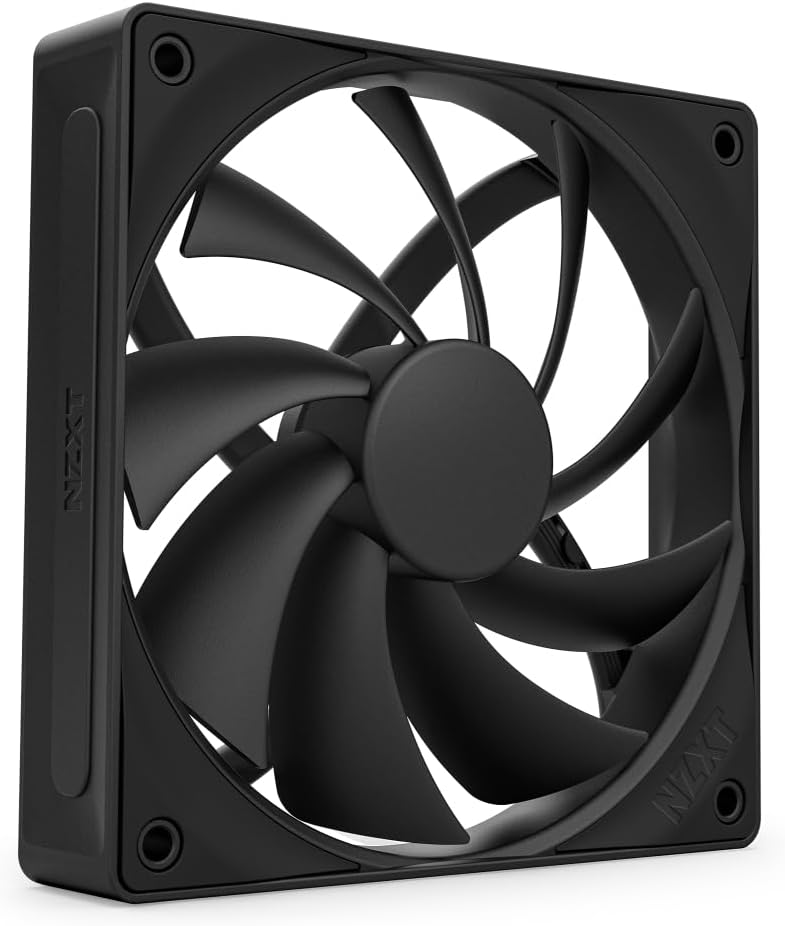
The NZXT F120Q focuses on high airflow for cooling. It scores 4.6 for reliability and simplicity. Nine sickle-style blades move large amounts of air for versatile use.
We may earn a commission when you buy through this link, at no additional cost to you.
Its minimal gap between blade edges and frame maximizes spinning area. The chamfered frame design directs air in a concentrated flow. This ensures vital components stay cool during demanding tasks.
This fan lacks RGB lighting and fancy features. It is a utilitarian option for those who prioritize function over form. The 60000-hour lifespan and fluid dynamic bearings ensure durability.
Silent PC builders should choose this for intake and exhaust. It works smarter with PWM control based on system temperatures. This offers reliable cooling without extra cost or complexity.
The frame design focuses air to specific areas. This increases cooling efficiency where it is needed most.
Fluid dynamic bearings provide stability and low noise. This ensures smooth operation for the lifespan of the fan.
We may earn a commission when you buy through this link, at no additional cost to you.
This premium fan offers the best warranty and lifespan in our list. It holds a 4.8 rating for superior engineering. The MagLev bearing stabilizes the rotor and offers 400,000-hour life span.
We may earn a commission when you buy through this link, at no additional cost to you.
It is whisper-quiet at 22.5 dB(A) with tuned smooth stable sound. The aerodynamic blade design minimizes turbulence for high airflow. Anti-vibration pads reduce rattling to ensure silence.
This fan costs more but offers incredible longevity and warranty. Not every PC needs a 400000 hour fan. But for critical servers or long builds it offers peace of mind.
Enthusiasts who want premium parts should choose this. The 5 Year Warranty is rare in this category. It ensures your investment is protected while keeping noise low.
A five year warranty covers most users beyond typical use. This shows the brand confidence in their product quality.
MagLev bearings reduce friction which lowers noise and wear. This helps maintain performance over many years.
We may earn a commission when you buy through this link, at no additional cost to you.
Choosing the right fan involves considering size, noise, and airflow. This guide helps you understand key factors to make the best choice.
Ensure your case supports the fan size you choose. Common sizes are 120mm and 140mm. Slim fans exist for compact builds where space is limited.
Always check your case manual before buying to avoid fit issues.
Look for decibel ratings to understand sound output. Be Quiet fans are famous for being under 25dB. Lower dB means a quieter environment for work or gaming.
Prioritize low dB if silence is your main goal.
High airflow fans are for open cases. High static pressure fans are for radiators or heat sinks. Use high airflow for intake and pressure for restricted areas.
Match the fan type to its placement for best cooling.
Bearing types affect lifespan and noise. Rifle and Magnetic-Levitation bearings are more durable. Fluid dynamic bearings are good but may not last as long.
Choose bearing types based on your expected usage years.
Decide if you want lighting effects. ARGB fans need specific headers on your motherboard. Plain fans are cheaper and quieter but lack color.
Avoid RGB fans if you do not have motherboard headers.
PWM fans use 4-pin connectors for speed control. This allows fans to spin down at idle. DC fans use 3-pin and have less precise control.
PWM is preferred for modern motherboards.
Check the warranty duration offered by the brand. Longer warranties protect your investment. ASUS offers 5 years which is rare.
Warranty terms can save money on replacements.
Buying packs of 3 is often cheaper than singles. Ensure you need three fans for your build. This saves money and ensures matching look.
Pack deals are ideal for full case cooling.
Install fans with correct airflow direction. The side with the arrow should point towards the rear or top.
Clean fans regularly to remove dust buildup. Use compressed air to maintain performance.
Ensure cables are connected to PWM headers for speed control.
140mm fans move more air at lower speeds and are generally quieter. 120mm fans are more common and fit smaller cases.
No. Pure Wings fans focus on silence and do not have lights. Light Wings fans include ARGB lighting options.
Most fans have a life of 60000 to 80000 hours. Some premium models last much longer.
PWM fans allow automatic speed control based on temperature. This saves noise and power when not needed.
Reverse blade fans help with intake airflow without blocking view. They are best for show cases with tempered glass.
A minimum of two is best for intake and exhaust. Three to five provides balanced airflow for most builds.
We reviewed ten top fans to help you find the right fit. Be Quiet and other brands offer reliable cooling solutions.
Prioritize silence if noise bothers you. Look for high static pressure for radiators.
Always check current prices and availability. Fans change in stock and cost often.