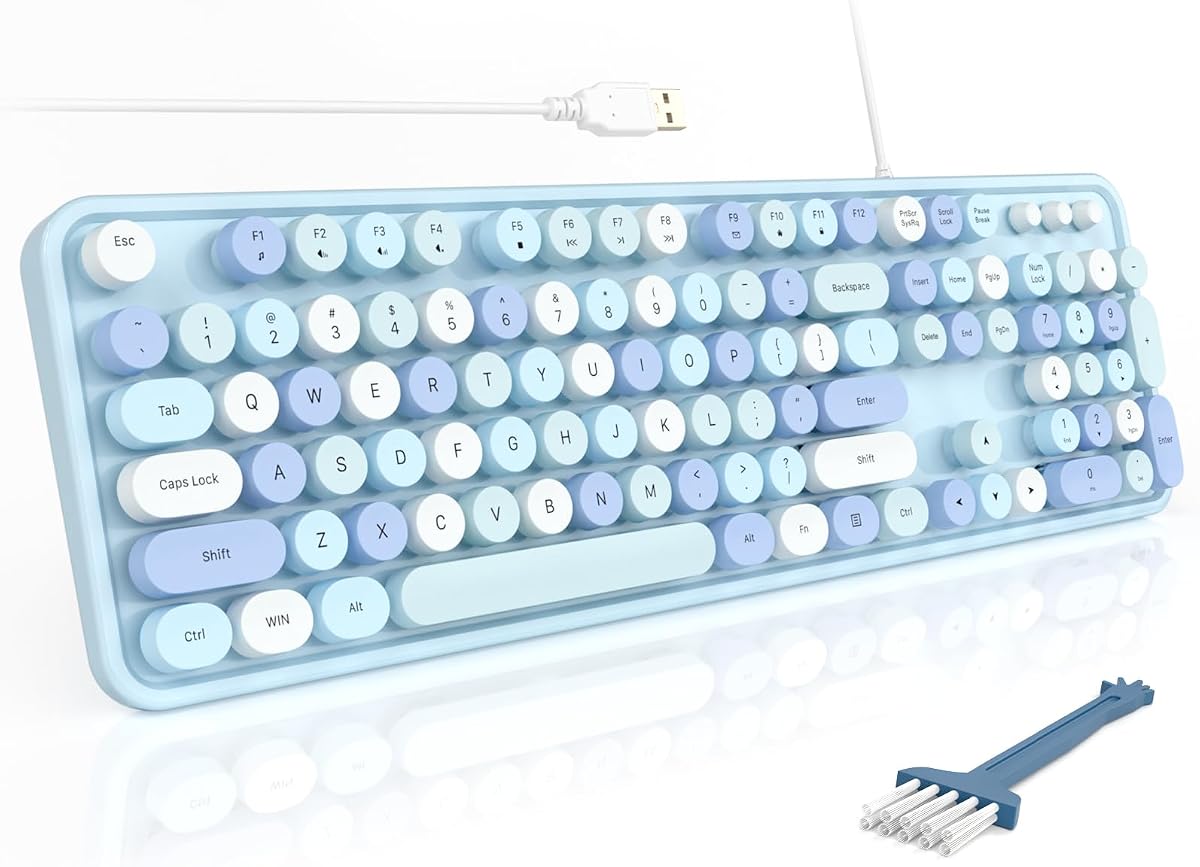
MOFII Computer Keyboards Wired
4.6Editor score
Retro Typewriter Style
Plug and Play USB
Foldable Stands Included
This guide compares the top colorful keyboards for style and function, featuring wireless and wired options with retro designs and vibrant aesthetics for any
Colorful keyboards bring personality to your workspace while delivering reliable performance for daily tasks. Whether you prefer retro typewriter styles or modern LED lighting, there is a vibrant option to match your setup.
We evaluated ten standout models based on build quality, connectivity, and design aesthetics. Our analysis covers wireless combos, wired full-size layouts, and mechanical alternatives that stand out from standard black peripherals.
Each pick highlights unique features like detachable keycaps, multimedia controls, and ergonomic stands. Note that product availability and pricing can shift frequently, so verify current details before purchasing.
4.6Editor score

4.2Editor score

4.7Editor score
The following table offers a side-by-side comparison of all ten models, highlighting key specifications like connectivity type, key layout, and unique design features to help you narrow down your choices quickly.


The KNOWSQT Wireless Keyboard and Mouse Combo stands out for its unique MilkTea color scheme, which brings a fresh and inviting vibe to any desk. With a 4.4 star rating from users, this full-sized wireless set offers reliability alongside its distinctive look. The round keycaps echo the style of vintage typewriters, making typing feel both nostalgic and comfortable.
We may earn a commission when you buy through this link, at no additional cost to you.
Key strengths include the detachable keycap design, which allows for deep cleaning without disassembling the whole unit. The floating button mechanism provides a soft and quiet typing experience, ideal for shared workspaces. Additionally, the 2.4GHz wireless connection ensures a stable link up to 35 feet, keeping your desk clutter-free with just one nano receiver.
Trade-offs involve the need for battery replacements, though the auto-sleep function helps extend their life. Some users note that Mac-specific shortcut keys may not function as expected, limiting full utility for Apple users. However, for Windows and PC environments, the setup is straightforward and functional.
This model is perfect for users seeking a cheerful, retro aesthetic without sacrificing practical functionality. It works well in personal offices, dorms, or creative studios where desk style matters. We recommend it for those who prioritize visual appeal and ease of maintenance in their input devices.
The round concave keycaps mimic the tactile experience of old typewriters, offering a pleasant click without excessive noise.
Detachable keycaps and a included brush make it simple to keep the keyboard clean from dust and debris over time.
We may earn a commission when you buy through this link, at no additional cost to you.
The MOFII Computer Keyboards Wired delivers a high-quality retro experience at a budget-friendly price point. Rated 4.6 stars, this blue colorful keyboard satisfies users looking for style without wireless complexity. Its wired design eliminates battery concerns, making it a reliable choice for stationary desktop setups.
We may earn a commission when you buy through this link, at no additional cost to you.
Standout features include the foldable stands that provide an ergonomic typing angle, reducing wrist strain during long sessions. The plug-and-play USB connection means no drivers are required, ensuring compatibility across most Windows versions. Cleaning is also straightforward with the included dust brush.
While the cable restricts mobility compared to wireless models, it ensures a stable connection without interference. The limited color options may not suit all decor preferences, but the blue variant offers a cheerful, professional look. It remains a top choice for those who prioritize function and cost over wireless freedom.
We recommend this keyboard for home offices or students who want a durable, stylish input device without extra costs. It is especially suitable for users who prefer the consistency of a wired connection and appreciate the retro typewriter aesthetic.
The adjustable stand ensures the keyboard sits at an optimal angle for comfortable typing over extended periods.
As a wired model, it requires no battery replacements, saving money and reducing electronic waste over the long term.
We may earn a commission when you buy through this link, at no additional cost to you.
This retro wireless combo combines practical design with a colorful twist, earning a solid 4.4 star rating. The Black-Colorful style balances professionalism with creativity, making it versatile for both work and leisure. It features a full-size layout with a numeric keypad, catering to users who need frequent number entry.
We may earn a commission when you buy through this link, at no additional cost to you.
Key benefits include the shared 2.4GHz receiver that connects both keyboard and mouse, reducing USB port usage. The auto-sleep function extends battery life significantly, with claims of up to 36 months of use. Multimedia hotkeys provide quick access to volume and playback, enhancing productivity during media consumption.
Some users may find the battery requirements slightly cumbersome since the keyboard needs an AAA and the mouse an AA battery. The receiver is stored separately in packaging, which might cause confusion upon unboxing. Despite these minor issues, the performance remains stable and responsive.
We suggest this model for users seeking a balanced wireless solution with a retro flair. It is ideal for small offices or home desks where cable management is a priority. The combination of style and functionality makes it a reliable choice for everyday typing tasks.
Using one nano receiver for both devices simplifies setup and keeps your USB ports available for other peripherals.
The deep sleep mode ensures batteries last for months, reducing the frequency of replacements and maintenance effort.
We may earn a commission when you buy through this link, at no additional cost to you.
The UBOTIE Wireless Keyboards and Mouse Combo stands out with its vibrant Purple Rainbow finish, designed to brighten any workspace. Rated 4.2 stars, it appeals to users who value visual impact alongside functional wireless performance. The fade-resistant materials ensure the colors stay vivid even with daily use.
We may earn a commission when you buy through this link, at no additional cost to you.
Features like independent power switches for keyboard and mouse allow you to control battery usage more efficiently. The typewriter-style keys provide a satisfying clicky feel, appealing to those who enjoy mechanical feedback without the noise. The 33-foot wireless range ensures stable connectivity across most desks.
Users note that build quality is decent but not premium, with some plastic parts feeling lighter than expected. Additionally, Mac users may find certain shortcut keys non-functional. These factors limit its appeal for professional macOS environments but remain acceptable for casual use.
We recommend this set for students or home users looking to add a splash of color to their setup. It serves well as a gift for friends who appreciate retro aesthetics. The balance of style and standard functionality makes it a solid contender in the colorful keyboard market.
Upgraded materials resist fading, ensuring the purple and rainbow hues remain attractive over months of regular use.
Individual power switches let you turn off devices separately, conserving battery life when only one is needed.
We may earn a commission when you buy through this link, at no additional cost to you.
The MOFII Green Colorful Wireless Combo focuses on ergonomic design and practical functionality. With a 4.2 star rating, it offers a comfortable typing experience through its folding stand and anti-slide pads. The green finish adds a refreshing contrast to standard office equipment.
We may earn a commission when you buy through this link, at no additional cost to you.
Its ergonomic stand helps maintain a natural wrist position, reducing fatigue during long work sessions. The full-size layout includes a number pad for data entry, while the mouse features a contoured shape for comfort. Auto-sleep mode extends battery life significantly, minimizing maintenance.
Trade-offs include the lack of included batteries and a slightly heavier build compared to slim wireless models. The setup requires minimal effort, and the 12-month warranty provides peace of mind for new buyers. Overall, it balances comfort and usability well.
This keyboard is recommended for users who spend hours typing and prioritize wrist comfort. It fits well in home offices where a stable, ergonomic setup is needed. The retro green aesthetic also appeals to those wanting a unique but professional look.
The folding stand adjusts the keyboard angle to reduce strain on wrists and hands during extended typing sessions.
A full number pad supports faster data entry, making it suitable for accounting, spreadsheets, and general productivity.
We may earn a commission when you buy through this link, at no additional cost to you.
The FOPETT Blue Colorful Wireless Set emphasizes quiet operation and durability. Rated 4.3 stars, it is ideal for shared environments where noise can be distracting. The silent micro-motion technology ensures mouse clicks remain virtually inaudible while maintaining precision.
We may earn a commission when you buy through this link, at no additional cost to you.
Features like the splash-resistant conductive film protect against minor spills, adding longevity to the device. The anti-slip silicone base keeps the keyboard stable during vigorous typing. Additionally, a three-year warranty shows confidence in product quality and customer support.
Some limitations exist for macOS users regarding hotkey compatibility, and the keyboard lacks extensive RGB customization. However, for general Windows use, it provides reliable performance. The power-saving switch further conserves battery, reducing long-term costs.
We recommend this set for office workers or family users who need a quiet, reliable input solution. Its durability and warranty make it a sound investment for daily use. The blue colorful design adds a touch of style without overpowering the desk.
Silent click technology minimizes disturbance, making it perfect for libraries, shared offices, or late-night work.
Water-resistant internal films allow liquid to flow out, reducing the risk of damage from accidental spills.
We may earn a commission when you buy through this link, at no additional cost to you.
The Atelus Computer Wired Keyboard offers a straightforward solution for users preferring wired stability. With a 4.6 star rating, its purple colorful finish adds personality while ensuring consistent performance. The large number pad supports efficient data entry for office tasks.
We may earn a commission when you buy through this link, at no additional cost to you.
Its plug-and-play USB design requires no driver installation, making setup immediate. Foldable stands adjust the angle for comfort, while the detachable keycaps simplify cleaning. The reliable connection eliminates interference issues common with wireless models.
The main drawback is the cable, which limits positioning flexibility compared to wireless alternatives. This may be inconvenient for users who switch devices frequently. However, for a fixed desktop setup, the reliability and cost-effectiveness are strong advantages.
We suggest this keyboard for users who value simplicity and dependability over wireless features. It works well for school assignments, data entry, and general typing. The purple design offers a nice contrast to standard equipment.
Wired USB connectivity ensures zero lag and no battery anxiety, ideal for consistent daily productivity.
Detachable keycaps allow thorough cleaning without special tools, maintaining hygiene and performance over time.
We may earn a commission when you buy through this link, at no additional cost to you.
The Womier SK80 75% Mechanical Keyboard stands out as a premium choice with its integrated multimedia display. Rated 4.7 stars, it offers advanced customization including GIFs, system info, and RGB settings directly on the keyboard. The Frog Green theme provides a cohesive and modern aesthetic.
We may earn a commission when you buy through this link, at no additional cost to you.
Key features include hot-swappable sockets that allow switch changes without soldering, and a gasket mount design that enhances typing comfort. The Type-C connection is detachable, supporting both Mac and Windows systems for versatility. RGB backlighting adds further visual flair.
The main trade-offs are the higher cost and limited macOS software support for customization. Users who prefer standard mechanical keyboards might find the complexity unnecessary. However, for enthusiasts, the customization options are unmatched in this price range.
We recommend this keyboard for gamers and tech enthusiasts who want control over their setup. It suits setups where visual customization and mechanical feedback are priorities. The display screen adds a unique touch not found in standard boards.
The built-in screen lets you visualize status updates and GIFs, turning your keyboard into an interactive display.
Hot-swap capability and RGB controls allow deep personalization to match your style and tactile preferences.
We may earn a commission when you buy through this link, at no additional cost to you.
The UBOTIE Colorful Wireless Combo introduces a distinctive mirror-finish panel that elevates desktop aesthetics. Rated 4.3 stars, this Black-Colorful model blends modern elegance with retro typewriter keys. The updated 2026 color coating resists fading, ensuring lasting vibrancy.
We may earn a commission when you buy through this link, at no additional cost to you.
Features like the shared nano receiver reduce USB clutter, while the responsive wireless chip ensures fast typing and cursor movement. The mirror surface reflects subtle highlights, creating a premium look. Auto sleep mode extends battery life effectively.
Potential buyers should note that the mirror surface may show fingerprints and require regular cleaning. Mac users might find some shortcut keys limited. However, the design remains unique in the market and appeals to those seeking something different.
We recommend this set for style-conscious users who appreciate modern design. It suits creative workspaces where visual impact matters. The balance of form and function makes it a compelling choice for daily tasks.
The mirror-finish panel reflects light uniquely, adding an elegant touch to any desk setup.
Auto sleep mode conserves battery by entering standby quickly during inactivity periods.
We may earn a commission when you buy through this link, at no additional cost to you.
The HUO JI Wired Gaming Keyboard offers dynamic RGB lighting with practical durability features. Rated 4.4 stars, its rainbow LED backlight supports gaming and late-night work in dim environments. The purple blue finish complements the lighting effects visually.
We may earn a commission when you buy through this link, at no additional cost to you.
Water-resistant triple protection design protects against spills, while double-shot injection keycaps ensure legends never fade. The ergonomic arc keycap shape fits comfortably under fingers, reducing fatigue during long sessions. Non-conflict keys support multiple simultaneous presses.
Limitations include fixed RGB modes without full software customization. It is less suited for users wanting complex lighting effects. However, the hardware quality remains solid for the price. and reliability stands out among gaming keyboards.
We recommend this keyboard for gamers and casual users who want vibrant lighting and durability. It suits gaming setups where visual flair is desired. The water resistance adds extra peace of mind for long-term use.
Water-resistant internal layers and sturdy ABS construction ensure longevity against spills and heavy typing.
Adjustable rainbow backlight modes create ambiance and visibility in low-light gaming or work settings.
We may earn a commission when you buy through this link, at no additional cost to you.
Selecting the right colorful keyboard requires balancing aesthetics with performance features that match your workflow and environment.
Decide between wired and wireless options based on your need for mobility. Wired keyboards offer zero latency and no battery dependence, while wireless models keep desks tidy with Bluetooth or 2.4GHz dongles. Wireless setups often include shared receivers for keyboard and mouse combos to save USB ports.
For stationary workstations, wired connections ensure reliability. For flexible setups, wireless provides freedom and cleanliness. Check battery life or charging methods for wireless models to avoid unexpected downtime.
Retro typewriter keycaps offer a vintage look and often deliver a softer touch, while standard flat keycaps suit ergonomic needs. Detachable keycaps simplify cleaning and maintenance over time. The shape of the keycap influences comfort during long sessions.
Choose round keycaps for nostalgia and style or standard ones for familiarity. Detachable options help keep the board clean. Match the design to your desk theme for a cohesive appearance.
Full-size keyboards include a number pad useful for data entry, while tenkeyless or compact models save desk space. Consider your screen real estate and typing habits when selecting size. Compact boards suit smaller desks or mobile setups better.
Opt for full-size if you frequently use numbers. Compact layouts benefit those with limited space. Always verify key count and dimensions before purchasing.
Materials like ABS plastic, splash resistance, and metal plates affect longevity. Look for fade-resistant coatings to maintain vibrant colors over time. Build quality determines how well the keyboard withstands daily use and accidental spills.
Prioritize reinforced construction and water-resistant features for longevity. Check warranty terms as an indicator of build confidence. Strong bases prevent flexing during typing.
Ensure the keyboard works with your operating system, whether Windows, macOS, or Linux. Some models have limited Mac hotkey support or require adapters for Type-C ports. Cross-platform compatibility expands usage options.
Verify system requirements in product descriptions. If you use multiple devices, choose universal models. Consider adapters if your laptop lacks standard USB ports.
Multimedia keys, adjustable stands, and RGB lighting add convenience and flair. Ergonomic stands reduce wrist strain, while RGB modes personalize your setup. Check for included accessories like brushes or extra receivers.
Select models with useful extras like power switches or ergonomic stands. RGB lighting enhances visibility in low light. Ensure included accessories meet your maintenance needs.
Wireless keyboards vary significantly in battery longevity, often ranging from months to over a year. Auto-sleep functions help conserve energy during idle periods. Wired models eliminate battery needs entirely.
Choose long battery life if you prefer minimal maintenance. Auto-sleep modes are essential for energy efficiency. Consider rechargeable options if available to reduce waste.
A solid warranty indicates manufacturer confidence and protects your investment. Typical periods range from one to three years. Check for customer service availability and return policies before purchase.
Prioritize brands offering clear support channels and generous warranty terms. This reduces risk if defects arise. Review user feedback on service responsiveness.
Clean your colorful keyboard regularly using the included dust brush or a soft microfiber cloth to remove debris from between keycaps. Avoid using water directly on the electronics unless the model is explicitly water-resistant or has detachable keycaps for soaking.
For wireless models, manage battery life by enabling power-saving modes and turning off switches when not in use. Replace batteries promptly when the low-power indicator triggers to maintain consistent performance and avoid unexpected interruptions during work.
Adjust the folding stands to a comfortable angle that supports your wrists, reducing strain over time. Keep the keyboard out of direct sunlight to prevent color fading and maintain the vibrancy of the cosmetic design for years.
Yes, most modern colorful keyboards use fade-resistant coatings and sturdy ABS construction to ensure durability. Models with water-resistant layers further enhance longevity. Regular cleaning and proper handling will maintain both function and appearance over time.
Most of these models are compatible with macOS, but some shortcut keys may not function as intended on Apple systems. Check product descriptions for specific macOS support details. Wired models usually have broader cross-platform compatibility.
Use a soft brush or compressed air to remove dust. If keycaps are detachable, wash them gently in water and dry completely before reattaching. Avoid abrasive cleaners that could strip the color finish or scratch the surface.
Only mechanical models like the Womier SK80 offer deep RGB customization through software. Wired and wireless retro models typically have fixed lighting modes. Check product specs if specific lighting effects are a priority.
No, most modern 2.4GHz wireless connections provide lag-free performance comparable to wired setups. Interference can occur near other wireless signals but is rare. Ensure the receiver has a clear path for best results.
Wired models eliminate battery waste entirely, and rechargeable wireless options reduce disposable battery use. Look for devices with energy-saving sleep modes. Detachable keycaps prolong device life, reducing electronic waste over time.
This guide highlights ten colorful keyboards that blend style with performance for diverse needs. From budget retro options to premium mechanical boards, each model offers unique features like detachable keycaps, ergonomic stands, or multimedia displays.
When choosing, prioritize your preferred connectivity, layout size, and aesthetic impact. Consider battery needs and compatibility with your system to ensure a smooth experience. Comfort during long typing sessions should guide your final decision.
Product details and pricing can change frequently, so check current listings before purchasing. Verify warranty terms and return policies to protect your investment. With the right colorful keyboard, your workspace becomes more inviting and functional.