
Harvopu for iPad A16
4.3Editor score
Seven RGB backlit colors
Magnetically detachable keyboard
Multiple viewing angles included
This guide compares the top 10 iPad A16 Folio Case with Keyboard options for protection, typing comfort, and trackpad functionality in October 2026.
Finding the right accessory for your new tablet can transform how you work and create on the go. A high-quality case with an integrated keyboard offers the perfect blend of protection and productivity for students and professionals alike.
We have evaluated ten leading models based on build quality, typing experience, trackpad responsiveness, and overall value. Each option brings unique features like magnetic detachment, backlighting, and stand versatility to suit different needs.
This list highlights standout picks ranging from budget-friendly options to premium designs. Remember that availability and pricing fluctuate, so verify the latest details before making your final purchase decision online.
4.3Editor score

4.4Editor score

4.4Editor score
This side-by-side comparison highlights the key specifications and unique features of each model to help you decide which keyboard case fits your workflow and budget best.




The Apple Magic Keyboard Folio stands out as the premier choice for users seeking an official accessory that blends seamlessly with their device. With a high rating of 4.4 stars, it offers a premium typing experience without the need for Bluetooth pairing or charging.
We may earn a commission when you buy through this link, at no additional cost to you.
Its two-piece design allows for magnetic detachment, giving you the flexibility to use the keyboard separately or as a protective shell. The built-in trackpad supports multi-touch gestures, enhancing navigation and productivity significantly compared to standard touch interfaces.
While it lacks backlighting which might be a downside for low-light environments, the quality of construction and the ease of use make up for it. The adjustable stand ensures smooth viewing angles, and the protective back panel keeps your device safe from scratches and bumps.
This keyboard case is ideal for professionals and students who prioritize reliability and ease of use over flashy features. If you want a seamless experience that feels native to your iPad, this is the top recommendation for the A16 model.
The keyboard attaches magnetically without any setup, ensuring a stable connection every time you start working.
Multi-touch gestures allow for smooth scrolling and app switching, making your workflow more efficient.
We may earn a commission when you buy through this link, at no additional cost to you.
The Harvopu keyboard case delivers impressive features for a very competitive price, making it a top contender for budget-conscious buyers. It includes a high-sensitivity trackpad and a full row of shortcuts, enhancing productivity without breaking the bank.
We may earn a commission when you buy through this link, at no additional cost to you.
One of its standout features is the RGB backlighting which offers seven colors and three brightness levels. This allows you to personalize your setup and type comfortably even in dim lighting conditions. The detachable keyboard design adds versatility for different use cases.
While the trackpad is functional, some users might find the sensitivity slightly less precise than premium options. Additionally, the requirement to pair via Bluetooth adds a small step compared to smart connector models. However, the overall value is hard to beat.
If you need a reliable typing solution with stylish backlighting and solid protection, this model is an excellent choice. It is perfect for home, office, or school use where cost-effectiveness is key.
Choose from seven vibrant colors to match your mood or environment while typing at night.
The TPU interior features a honeycomb pattern that helps protect your tablet from overheating.
We may earn a commission when you buy through this link, at no additional cost to you.
The typecase Edge elevates the standard folio design with a unique floating magnetic stand that keeps your iPad elevated above the keyboard. This design creates a comfortable laptop-like setup ideal for long typing sessions and professional use.
We may earn a commission when you buy through this link, at no additional cost to you.
With 11 backlight colors and three brightness levels, you can customize the look to fit any setting. The synthetic vegan leather exterior adds a touch of sophistication, while the built-in Pencil holder ensures your stylus is always within reach.
The precision multi-touch trackpad supports familiar gestures, and palm rejection helps reduce accidental cursor movement while typing. While the price is higher than basic options, the build quality and aesthetic appeal justify the investment for those who value design.
This case is best for users who want a premium feel and a robust typing experience. It is a great choice for professionals or creatives who need their device to look as good as it performs.
The magnetic hold keeps your iPad elevated securely, providing a better viewing angle for typing.
Keys are spaced for comfort, reducing finger fatigue during extended writing or coding sessions.
We may earn a commission when you buy through this link, at no additional cost to you.
This ultra-light folio case from typecase is designed for users who prioritize portability above all else. With a high rating of 4.6 stars, it offers a slim profile that does not add bulk to your device while still providing essential protection.
We may earn a commission when you buy through this link, at no additional cost to you.
The scissor-style keys ensure a quiet typing experience, which is ideal for use in libraries or quiet offices. The built-in Pencil holder keeps your stylus secure, and the seven-color backlight allows for personalized visibility in dark settings.
While the stand options are standard compared to some floating designs, the stability is sufficient for most tasks. The synthetic leather and TPU edges protect against daily scratches and bumps, making it a durable daily driver.
For travelers and students who need to keep their weight down, this is an excellent option. It strikes a great balance between protection, functionality, and portability for everyday use.
The lightweight design fits easily into backpacks, making it perfect for commuting or class.
Scissor-style keys reduce noise, ensuring you do not disturb others while you work.
We may earn a commission when you buy through this link, at no additional cost to you.
The CHESONA keyboard case offers a unique advantage with its ability to pair with up to two devices simultaneously. This feature makes it incredibly versatile for users who switch between an iPad and another device frequently during their workday.
We may earn a commission when you buy through this link, at no additional cost to you.
The integrated multi-touch trackpad adapts well to the iOS system, providing smooth scrolling and navigation. The backlight offers three levels of adjustable brightness and seven pure LED colors, ensuring visibility in various lighting conditions.
With a powerful 500mAh battery, the standby time can last up to 120 days, which is impressive for a wireless keyboard. The precise cutouts allow full access to all ports and sensors, maintaining functionality without removing the case.
This model is ideal for power users who need to manage multiple workflows efficiently. The convenience of switching between devices with a single click saves time and enhances productivity significantly.
Easily switch between two devices with a single click, streamlining your workflow between tools.
The 500mAh battery ensures you do not need to charge frequently, even with daily use.
We may earn a commission when you buy through this link, at no additional cost to you.
For those who need maximum durability, the Logitech Rugged Folio is built to withstand tough environments. It exceeds military standard drop tests, ensuring your device is protected from accidental drops and mishaps during transport or outdoor use.
We may earn a commission when you buy through this link, at no additional cost to you.
The Smart Connector technology allows for instant connection without Bluetooth pairing, and it sources power directly from the iPad. This means you never have to worry about charging the keyboard separately. The waterproof membrane seals in the keyboard to protect against spills.
Four unique use modes give you flexibility to Type, Write & Sketch, View, or Read, adapting to different tasks. The flexible kickstand offers 40 degrees of tilt, helping you find the right angle for any situation.
This case is perfect for field workers or students who need rugged protection. While it is heavier, the peace of mind regarding durability makes it a worthy investment for heavy-duty users.
Connects instantly without pairing, drawing power directly from the iPad for seamless use.
The sealed membrane protects against spills, allowing you to wipe it clean after accidents.
We may earn a commission when you buy through this link, at no additional cost to you.
The typecase Folio Duo adapts effortlessly from productivity to pure tablet mode by allowing you to detach the keyboard in seconds. This flexibility is great for users who want a laptop setup for work but a slim tablet for media consumption.
We may earn a commission when you buy through this link, at no additional cost to you.
It supports both portrait and landscape viewing angles, offering stable support that holds its position without wobbling. The precision trackpad enables smooth multi-touch gestures for efficient navigation and app switching without constant screen tapping.
The refined leather-style exterior adds a touch of elegance, while the soft shock-absorbing inner case protects against bumps and scratches. A 12-month warranty and responsive support provide extra peace of mind for your purchase.
This option is ideal for users who value versatility and design. If you want a case that transforms from a workstation to a media center easily, this Folio Duo is a strong candidate.
Snap on the keyboard for typing, or detach it for a slimmer tablet experience in seconds.
Enjoy comfortable viewing in both portrait and landscape modes, adapting to your task.
We may earn a commission when you buy through this link, at no additional cost to you.
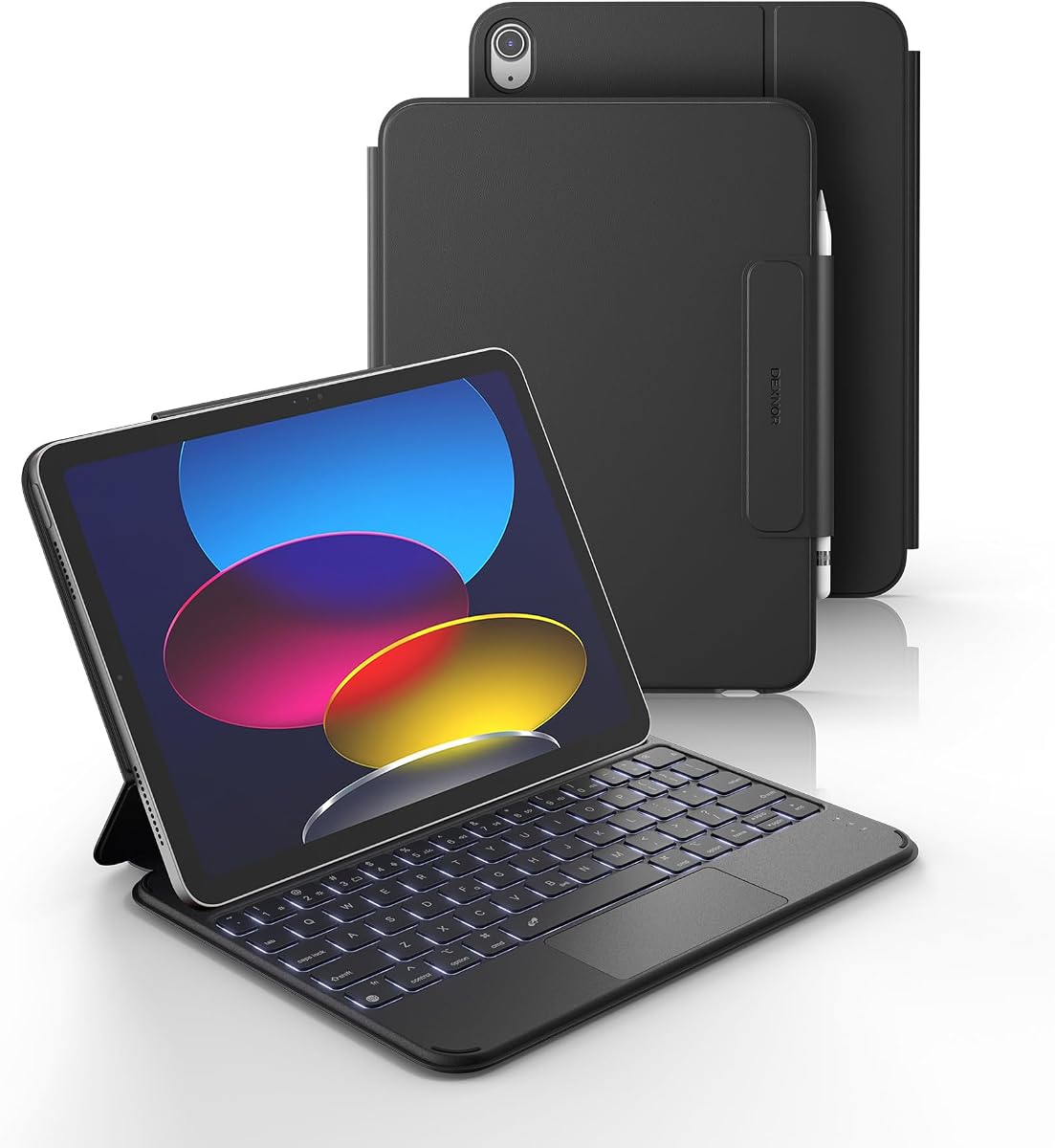
The Dexnor keyboard case is designed for life on the move with a focus on portability and battery endurance. It weighs just 1.16 lbs, making it a great choice for commuting and business trips where every ounce counts.
We may earn a commission when you buy through this link, at no additional cost to you.
It features a powerful 650mAh lithium polymer battery that supports up to 200 hours of typing without backlight and an impressive 1200 hours of standby. This reliability ensures you can work through long days or trips without frequent charging.
The 120 degree ergonomic viewing angle delivers all-day comfort for emails, streaming, and note-taking. While the backlight is solid white, the brightness is adjustable to fit dark rooms or cabins. The magnetic system anchors the iPad securely to the base.
This case is perfect for business travelers and students who need a lightweight, long-lasting solution. The balance of battery life and portability makes it a practical choice for daily use.
With up to 200 hours of typing time, you can work for weeks without charging the keyboard.
Weighing only 1.16 lbs, it is easy to carry in a backpack for on-the-go productivity.
We may earn a commission when you buy through this link, at no additional cost to you.
The ESR keyboard case distinguishes itself with an extra-large precision trackpad that is 65 percent larger than those on regular keyboards. This provides a more seamless and productive way to use your iPad without constantly reaching for the screen.
We may earn a commission when you buy through this link, at no additional cost to you.
At just 6.9 mm thick, it is super slim and easy to carry anywhere, fitting perfectly into your daily routine without adding extra bulk. The magnetic detachable design lets you use it remotely for typing or detach for pure tablet mode.
Air Guard corners help protect your iPad from drops, while the durable form-fit cover keeps it safe from scratches and dust. Although it lacks backlighting, the two viewing angles provide solid support for working or watching videos.
This is the best choice for users who prioritize navigation and portability. The large trackpad is a game-changer for productivity, making it a top pick for efficient workflow management.
The larger surface supports intuitive gestures from one-finger drag to three-finger scroll smoothly.
At 6.9 mm thick, it adds minimal bulk while providing all the protection you need.
We may earn a commission when you buy through this link, at no additional cost to you.
The CC Store keyboard case is powered by a large capacity battery that delivers over 200 hours of working time. This marathon battery capability ensures you can rely on your device for days without needing to recharge the keyboard.
We may earn a commission when you buy through this link, at no additional cost to you.
It features an adjustable kickstand that offers multiple tilt angles for ideal typing or viewing, whether you are working at a desk or lounging on the couch. The magnetic detach design allows you to store the keyboard away for easy carrying.
The case is encased in premium PU leather which defends against scratches, spills, and fingerprints while adding minimal bulk. A convenient pencil holder on the back makes it easy to access your stylus whenever you need it.
If you need a reliable, long-lasting accessory at a reasonable price, this is a great option. The combination of battery life and protection makes it a practical choice for students and professionals.
With 200+ hours of working time, this keyboard keeps you productive for days on end.
The premium PU leather finish looks professional and protects against daily wear and tear.
We may earn a commission when you buy through this link, at no additional cost to you.
Selecting the right keyboard case involves considering compatibility, build quality, and essential features that match your workflow. This guide breaks down the key factors to help you make an informed choice.
Always check the model number on the back of your iPad before purchasing. The A16 models have specific dimensions that differ from older generations, so ensuring the case matches your exact device number is crucial for a proper fit.
Verify the model number starting with 'A' to confirm the case supports your specific tablet before buying.
Bluetooth keyboards offer flexibility but require pairing and charging. In contrast, Smart Connector models connect instantly and draw power from the iPad, eliminating the need for a separate battery. Consider which setup fits your routine better.
Choose Bluetooth for versatility or Smart Connector for convenience and power savings.
A high-quality trackpad with multi-touch gesture support can greatly improve navigation and productivity. Look for models with palm rejection to avoid accidental clicks, and larger surfaces for better control during editing.
Prioritize a responsive trackpad with gestures to reduce reliance on the touch screen.
Backlighting allows you to type comfortably in low-light environments. Some models offer multiple colors and brightness levels, while others are unlit. Decide if customization or cost is more important to your usage scenarios.
Opt for backlighting if you work often in dimly lit spaces or want visual customization.
Wireless keyboards rely on internal batteries that need recharging. Check the capacity and standby time to ensure it lasts through your work sessions. USB-C charging is faster and more modern than micro-USB.
Look for a battery that supports your daily usage without frequent recharges.
The case should protect your device from drops, scratches, and daily wear. Materials like vegan leather or rugged plastics vary in toughness. Some models include military standard drop testing or waterproof membranes for extra safety.
Ensure the material and construction match the environments where you use your device most.
Adjustable stands allow you to find the best angle for typing or viewing. Some cases offer multiple settings, while others have a fixed position. Floating stands provide a unique elevated view for a better ergonomic experience.
Choose a stand design that offers stability and flexibility for your preferred working posture.
Budget options often cut corners on build quality but still provide solid functionality. Premium models offer better materials and features like advanced trackpads. Determine your budget and prioritize features that matter most to you.
Balance the cost with the features you need to get the best value for your money.
Start by aligning the magnetic connectors or Bluetooth pairing instructions provided with the case. Ensure the iPad sits securely in the stand to prevent wobbling during typing sessions.
Regularly clean the keys and trackpad with a soft dry cloth to avoid dust buildup. If your case is waterproof, you can wipe it down with a slightly damp cloth for deeper cleaning.
Store the keyboard in a cool, dry place when not in use to extend battery life. If you are not using the keyboard for long periods, switch it off or let it enter sleep mode.
Most models in this guide are specifically designed for the A16 and 10th generation iPad. You should check your device model number on the back of the case to ensure compatibility.
If the keyboard uses Bluetooth, it requires its own battery and regular charging. However, models with Smart Connector technology draw power directly from the iPad and do not need separate charging.
For keyboards supporting multiple devices, there is usually a specific function key or button combination to switch connections. Refer to the user manual for the specific pairing instructions for your model.
Many of the keyboard cases come with a built-in pencil holder or slot. This allows you to store the Apple Pencil securely while keeping it accessible for notes or drawing.
Most recommended cases feature multi-touch trackpads that support standard iOS gestures like scrolling and switching apps. However, responsiveness can vary between models so check reviews for specific feedback.
First ensure the keyboard is turned on and charged. Then try disconnecting and reconnecting via Bluetooth settings. If issues persist, resetting the pairing might be necessary to resolve the connection.
Choosing the right keyboard case depends on your specific needs for protection, typing comfort, and budget. The top picks offer a range of options from rugged durability to sleek, lightweight designs that suit different users.
Consider features like backlighting, trackpad size, and battery life when making your decision. These factors significantly impact your daily workflow and overall experience with the device.
Prices and availability change regularly so verify the latest details before purchasing. We hope this guide helps you find the perfect accessory to enhance your iPad experience.