
Thermaltake View 380 TG ARGB
4.7Editor score
Dual tempered glass panels
Pre-installed ARGB fans
Hidden connector support
This guide compares the top dual system PC cases for 2026, evaluating cooling, build quality, and design for multi-component setups.
Finding the right dual system PC case can transform your computing experience by offering unparalleled flexibility and cooling potential for complex builds.
We evaluated ten leading models based on airflow, modularity, cable management, and support for high-end components to help you choose wisely.
Each pick highlights unique strengths and trade-offs so you can find the perfect chassis while keeping in mind that prices may change over time.
4.7Editor score

5.0Editor score
The following table provides a concise side-by-side overview of the ten featured cases to help you quickly compare key specifications and features.


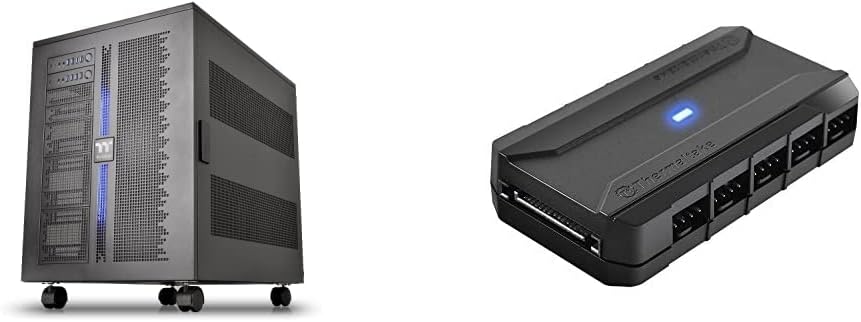
The Thermaltake Core W200 Bundle stands out as a unique choice for enthusiasts needing true dual system capability within one chassis.
We may earn a commission when you buy through this link, at no additional cost to you.
Its fully modular design allows for incredible flexibility when building two separate systems back-to-back while including a powerful fan hub.
While the complexity and size may deter casual users, the cooling potential and unique architecture justify the investment for serious builders.
This case is best suited for labs or studios needing parallel compute power without wasting desk space on multiple towers.
The back-to-back configuration allows for two independent systems sharing one footprint for maximum efficiency.
The included hub simplifies cooling management by controlling up to ten fans from a single power source.
We may earn a commission when you buy through this link, at no additional cost to you.
The NZXT H9 Flow RGB+ offers a premium experience with its dual-chamber design that separates components for better cooling and looks.
We may earn a commission when you buy through this link, at no additional cost to you.
Its panoramic glass view and rear-connect compatibility make it an ideal choice for modern high-end builds prioritizing aesthetics.
The price is steep but justified by the build quality and thoughtful features like extensive fan and radiator support options.
Buyers looking for a polished finish and future-proof features will find this case delivers on both performance and style.
Perforated panels and angled fans ensure efficient cooling for high-performance components without noise.
Wide channels and tie-down points make routing cables clean and simple for any builder.
We may earn a commission when you buy through this link, at no additional cost to you.
The Thermaltake View 380 TG ARGB delivers strong value with its dual glass design and included fans at an accessible price point.
We may earn a commission when you buy through this link, at no additional cost to you.
Its support for hidden-connector motherboards adds a layer of modernity that enhances aesthetics without requiring expensive upgrades.
While it lacks some advanced airflow features of pricier cases, it remains a solid choice for standard ATX builds.
For budget-conscious users wanting a clean look and functional features this case offers a compelling starting point.
The pillarless glass offers an unobstructed view of your build components from multiple angles.
Four pre-installed ARGB fans provide immediate visual appeal without additional purchases.
We may earn a commission when you buy through this link, at no additional cost to you.
The Thermaltake Capo X allows for parallel operation of two independent systems within a single chassis footprint.
We may earn a commission when you buy through this link, at no additional cost to you.
Its individual I/O ports and hidden connector support make it a versatile choice for specialized workstation needs.
The high fan capacity ensures both systems stay cool even under heavy load without requiring extra hardware.
This case is ideal for testers or creators who need distinct environments without sacrificing desk space.
Housing two mATX systems simultaneously allows for flexible multi-tasking workflows in one unit.
Separate ports at top and bottom ensure easy access for each system's peripherals.
We may earn a commission when you buy through this link, at no additional cost to you.
The ASUS TUF Gaming GT502 offers a robust mid-tower experience with independent cooling zones for CPU and GPU components.
We may earn a commission when you buy through this link, at no additional cost to you.
Its vertical mounting option and panoramic glass provide flexibility for showcasing high-end graphics cards effectively.
Tool-free panels simplify maintenance while the fast USB ports ensure connectivity keeps up with modern hardware speeds.
Gamers wanting a balance of performance and aesthetics will appreciate its durable build and thoughtful layout.
Included support brackets allow for vertical or horizontal GPU placement to prevent sag.
Internal separation helps manage heat effectively for demanding workloads without thermal interference.
We may earn a commission when you buy through this link, at no additional cost to you.
The Cooler Master HAF II 500 prioritizes raw cooling power with oversized fans designed for maximum throughput.
We may earn a commission when you buy through this link, at no additional cost to you.
Its low airflow resistance design ensures heat is quickly expelled keeping components cool during intense sessions.
The MasterRail mounting system provides flexibility for custom setups while cable management is optimized for space.
Enthusiasts needing top-tier thermal performance without water cooling will find this case highly effective.
Large intake and exhaust fans move more air efficiently compared to standard 120mm units.
Clamps single GPUs or supports two GPUs for multi-GPU configurations seamlessly.
We may earn a commission when you buy through this link, at no additional cost to you.
The ASUS ROG Strix Helios II is designed for showcase builds with premium materials and top-tier EATX compatibility.
We may earn a commission when you buy through this link, at no additional cost to you.
Its advanced I/O panel includes modern ports while the detachable PSU bracket simplifies cable routing significantly.
High-end graphics card support and robust airflow make it ideal for those pushing hardware limits daily.
Investors looking for a luxury case that balances performance and aesthetics will find it worth the investment.
Diamond-grille aluminum and structured filter ensure cooling efficiency and stylish visuals.
Multifunction covers and clips enable a clean look that highlights your internal components.
We may earn a commission when you buy through this link, at no additional cost to you.
The Antec Flux Pro combines metal glass and wood for a high-quality look and powerful thermal performance.
We may earn a commission when you buy through this link, at no additional cost to you.
Its multi-directional vent design allows for 12 fans ensuring comprehensive airflow for demanding builds.
The iShift PSU mount and dual radiator support offer flexibility for complex custom cooling configurations.
Users needing a full-tower with unique aesthetics and strong airflow options should consider this case.
Vents across the chassis optimize airflow paths to keep all components cool efficiently.
The 90-degree iShift mount creates more room for storage and radiator setup.
We may earn a commission when you buy through this link, at no additional cost to you.
The HAVN HS 420 uses a hybrid structure to direct cool air to the GPU while maintaining a traditional size.
We may earn a commission when you buy through this link, at no additional cost to you.
Its SimpliCable routing system ensures clean aesthetics and the curved glass minimizes visual distortion.
High fan capacity and radiator support make it a versatile option for custom cooling enthusiasts.
Builders seeking unique design elements with strong cooling performance will appreciate this balanced approach.
Cool air is directed directly onto the GPU for better thermal management under load.
Curved glass provides a clear panoramic view of the internal components without distortion.
We may earn a commission when you buy through this link, at no additional cost to you.
The NZXT H6 RGB+ offers a compact dual-chamber design that isolates components for better thermal management.
We may earn a commission when you buy through this link, at no additional cost to you.
Its seamless curved glass creates a modern look while the anti-sag bracket ensures stability for heavy GPUs.
Although it does not include fans the flexible mounting supports a wide variety of cooling solutions.
Those wanting a small form factor without sacrificing cooling efficiency will find this case ideal.
Single-piece glass with tight radius provides a clear view without seams blocking your build.
Ultra-fine mesh panels improve airflow without restricting intake for high-performance parts.
We may earn a commission when you buy through this link, at no additional cost to you.
Choosing the right case involves evaluating factors like size cooling and expandability to meet your specific needs effectively.
Determine if you need true dual motherboard support or just a dual-chamber layout for cooling isolation.
True dual systems require specific chassis like the Thermaltake Capo X while others focus on airflow separation.
Look for cases with large fan slots and mesh panels to maximize airflow for high-performance components.
Cases like the Cooler Master HAF II 500 offer oversized fans that deliver exceptional cooling power.
Efficient cable routing tools and channels are essential for a clean build that improves airflow.
SimpliCable systems and wide channels help keep your build looking neat and professional.
Ensure the case supports your motherboard size GPU length and radiator requirements without constraints.
Check for features like vertical GPU mounting and support for extended power supply units.
Select between glass panels for visibility or mesh panels for airflow based on your visual preferences.
Curved glass designs provide a modern look that enhances the overall appearance of your setup.
Materials like steel and aluminum contribute to the durability and sturdiness of the chassis.
Tool-free panels simplify maintenance while sturdy frames protect your expensive hardware components.
Modern cases offer USB-C ports and dedicated controls for fans and lighting for easier connectivity.
Hidden connector support helps achieve a cleaner look by routing cables behind the motherboard tray.
Ensure proper ventilation by keeping at least three inches of space around all air intakes and vents.
Regularly clean dust filters and fans every three months to prevent heat buildup and component stress.
Secure cables using ties to avoid obstructing airflow paths and to maintain a clean build interior.
A dual system PC case typically refers to a chassis with a dual-chamber design separating power and storage to improve airflow. Some models allow two separate motherboards for parallel operation within one footprint.
Not all cases support E-ATX boards so check the specifications for clearance before purchasing. Most full-tower models accommodate larger boards but mid-towers may have limitations.
Dual-chamber designs isolate heat from the PSU and drives improving thermal performance for sensitive components. They also help with cable management and aesthetics.
Yes several models like the Thermaltake Capo X and View 380 TG support hidden connector motherboards to hide cable clutter for a cleaner look.
Fan support varies but most cases support 120mm or 140mm fans. Some allow massive 220mm fans or multiple 140mm units for maximum airflow.
Yes many cases support large radiators like 420mm or even 360mm options for custom water cooling loops. Check top and front radiator support before buying.
Most cases include cable ties velcro straps and dedicated routing channels. Use these features to keep cables out of airflow paths.
This guide highlights ten versatile cases ranging from true dual system support to advanced airflow designs for demanding builds.
Prioritize airflow capacity and motherboard compatibility to ensure your hardware runs cool and reliable for years to come.
Remember that prices and availability change so always check current listings before making your final purchase.