
CyberPower AVRG900LCD Intelligent LCD UPS
4.6Editor score
900VA 480W Simulated Sine
12 Outlets Included
Data Line Protection
This guide compares the top battery backup solutions for gaming laptops to ensure uninterrupted power and surge protection during intense gaming sessions and
Gaming laptops require stable power to maintain performance during intense sessions. A reliable battery backup prevents data loss and hardware damage caused by sudden outages or voltage spikes.
We evaluated ten top-rated uninterruptible power supplies and inverters based on output capacity, waveform quality, outlet count, and safety features. Each option offers unique benefits for different gaming setups.
Each pick highlights key specifications and real-world performance. Prices may vary based on availability and promotions. Check current listings before purchasing to ensure you get the best value for your needs.
4.6Editor score

4.5Editor score

4.7Editor score
This side-by-side comparison highlights the key specifications of every model reviewed. Use this table to quickly identify which unit matches your power requirements and budget constraints.




This UPS leads the list with 1500VA output and true PFC Sinewave technology. It holds a 4.5 rating for reliability. Its sinewave output ensures compatibility with modern gaming power supplies.
We may earn a commission when you buy through this link, at no additional cost to you.
It offers 12 outlets including six backup and six surge only. The color LCD panel displays real-time battery data. AVR corrects minor voltage issues without switching to battery.
The unit is heavy and takes up desk space. It costs more than basic models. Still the sinewave protection is worth the investment for expensive gaming rigs.
Buyers needing robust protection should choose this model. It protects critical equipment from surges and outages effectively. The 3-year warranty adds peace of mind.
Gaming power supplies with Active PFC require true sinewave to avoid shutdowns or damage. This unit provides that standard output.
The color display shows battery level and load instantly. Alerts warn you of potential issues before downtime occurs.
We may earn a commission when you buy through this link, at no additional cost to you.
This model focuses on energy efficiency with its ECO Mode feature. It rates well for users wanting to reduce power waste. It offers reliable backup for mid-range gaming laptops.
We may earn a commission when you buy through this link, at no additional cost to you.
The ECO Mode turns off peripherals when the PC sleeps. This saves electricity over time. The LCD shows power conditions clearly for monitoring.
It may not handle full gaming desktops under load. The simulated sine wave might not suit all PFC units. Ensure your hardware compatibility before buying.
Choose this if you prioritize efficiency and basic protection. It works well for laptops and low-power setups. The battery is included in the warranty period.
When the computer sleeps, ECO outlets cut power to connected devices like monitors or routers. This lowers overall energy usage significantly.
The three-year warranty includes the battery itself. This reduces long-term ownership costs compared to non-included options.
We may earn a commission when you buy through this link, at no additional cost to you.
The CP1500AVRLCD3 offers high capacity with a color LCD panel. It rates 4.5 for consistent performance. It is a solid choice for those wanting visual status monitoring.
We may earn a commission when you buy through this link, at no additional cost to you.
It features 12 outlets and two USB charge ports. The AVR function stabilizes voltage to save battery life. The color screen alerts for issues before they affect equipment.
The simulated sine wave limits use with Active PFC PSUs. It is heavy and not ideal for mobile gaming. Check your power supply requirements carefully.
Buyers needing high VA and USB charging pick this. It offers good protection for general home or office systems. The warranty covers the battery fully.
The USB-A and USB-C ports allow quick charging of phones during power outages. This keeps communication tools operational.
AVR corrects minor voltage spikes without using battery power. This extends the usable battery life during brownouts.
We may earn a commission when you buy through this link, at no additional cost to you.
This unit is a top budget choice with a 4.6 rating. It protects laptops and network gear economically. The data line protection is a key feature for home offices.
We may earn a commission when you buy through this link, at no additional cost to you.
It safeguards telephone lines from surges. This protects your modem and router. The 12 outlets provide flexibility for multiple devices. The LCD gives essential status info.
The wattage is lower than premium models. It suits lighter loads like laptops not full desktops. The display is functional but not as detailed as others.
Choose this for affordable protection. It handles common power issues well. The included software allows for shutdowns.
Data line protection stops surges traveling through telephone lines. This prevents damage to modems and routers.
The free management software lets you shut down safely during outages. It monitors battery status over the network.
We may earn a commission when you buy through this link, at no additional cost to you.
This model emphasizes Automatic Voltage Regulation to extend battery life. It rates 4.3 for durability. It is suitable for areas with unstable voltage grids.
We may earn a commission when you buy through this link, at no additional cost to you.
The AVR corrects fluctuations without draining the battery. This preserves the battery cycle count. The 10 outlets offer ample space for devices. LED lights show wiring faults clearly.
It lacks modern USB charging ports. The interface is minimal compared to LCD models. It may feel dated for tech-savvy users.
Users needing stability over features choose this. It protects hardware in fluctuating power zones. The battery warranty is included for three years.
AVR prevents unnecessary battery switching during minor voltage drops. This keeps the battery fresh for actual outages.
LED lights indicate power-on status and wiring issues immediately. This helps quickly identify installation errors.
We may earn a commission when you buy through this link, at no additional cost to you.
This listing features two APC units totaling ten outlets. They provide flexibility for different devices. User replaceable batteries extend long-term use significantly.
We may earn a commission when you buy through this link, at no additional cost to you.
One unit offers 1050VA while the other is 500VA. They cover various device needs together. The USB-C ports on both help charge tablets quickly.
Buying two units might cost more than one. The total capacity is split. It requires managing two separate devices for power.
Choose this if you need many outlets. It separates critical and non-critical loads well. The coverage policies add value to the purchase.
Using two smaller units allows distributed protection across a desk. You can plug critical gear into the higher VA unit.
The design allows you to swap old batteries for new ones. This saves money compared to buying a new unit.
We may earn a commission when you buy through this link, at no additional cost to you.
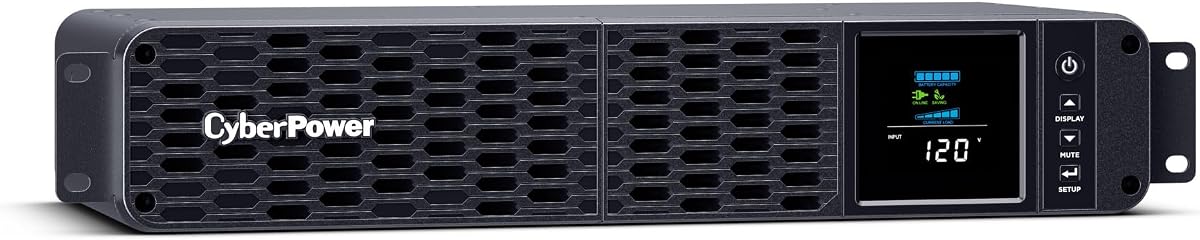
This unit is designed for short-depth rack installations. It provides high output for demanding gear. The rackmount design saves valuable desk space effectively.
We may earn a commission when you buy through this link, at no additional cost to you.
It outputs true sinewave for Active PFC power supplies. The LCD panel monitors battery health and voltage. It protects network devices connected in the rack.
You need a rack or server cabinet to use it. It is not a plug-and-play desktop unit. The investment is significant for home setups.
Pros and server admins choose this model. It ensures reliable power in compact server closets. The warranty covers the battery for three years.
The shallow depth fits cabinets where space is tight. It allows other equipment to share the same rack easily.
The sine wave output supports advanced power supplies. This ensures compatibility with modern network hardware.
We may earn a commission when you buy through this link, at no additional cost to you.
This inverter converts 60V DC to 110V AC power. It provides high continuous power for travel. It is useful for camping or remote gaming sessions.
We may earn a commission when you buy through this link, at no additional cost to you.
The pure sine wave ensures stable power for electronics. It includes dual cooling fans to manage heat. The aluminum shell protects it during transport.
It needs an external battery to work. It is not a plug-in UPS device. You must connect it to a 60V DC source manually.
Outdoor enthusiasts should consider this unit. It supports large appliances during trips. Check battery compatibility before buying to ensure it fits your needs.
The sine wave ensures stable power for sensitive devices. This prevents glitches on gaming hardware and laptops.
Built-in fans dissipate heat quickly during heavy use. Thermal protection prevents overheating and damage.
We may earn a commission when you buy through this link, at no additional cost to you.
This model boasts a five-year warranty including the battery. It rates 4.7 for customer satisfaction. It is ideal for long-term users needing extra security.
We may earn a commission when you buy through this link, at no additional cost to you.
The warranty period exceeds the standard three years. The color LCD provides detailed status updates. USB charge ports keep mobile devices powered during outages.
Remote management requires an optional card. It does not have it built-in. The simulated sine wave is a trade-off for cost.
Buyers seeking long-term coverage choose this. It reduces replacement worries for several years. The battery is covered fully for five years.
A five-year warranty covers the battery fully. This reduces total cost of ownership for the device.
Ports for Type-A and Type-C are included. You can charge phones directly from the UPS.
We may earn a commission when you buy through this link, at no additional cost to you.
This inverter features a smart LED display for monitoring. It offers 3500W continuous power for demanding tasks. It is similar to the previous model with enhanced display.
We may earn a commission when you buy through this link, at no additional cost to you.
It includes multiple protection features for safety. Overload and voltage protection guard connected devices. The smart screen provides clear status feedback.
It requires a DC battery to function. It is not a standalone power source. Ensure you have the correct 60V battery for use.
Choose this for smart monitoring features. It is great for off-grid needs. The protection systems help prevent device damage during operation.
The LED screen shows real-time input and output info. It helps monitor performance during critical use.
Built-in fuses and alarms warn of faults quickly. Thermal protection ensures safe operation in hot conditions.
We may earn a commission when you buy through this link, at no additional cost to you.
Selecting the right battery backup requires understanding technical specs and your specific hardware needs. This section breaks down critical factors to help you make an informed decision.
VA measures apparent power while wattage measures real power. Ensure the UPS watts exceed your laptop and monitor usage. A higher rating gives longer runtime during outages.
Match the VA rating to your load requirements carefully.
True sine wave is required for Active PFC power supplies. Simulated sine may cause instability with some gaming PCs. Check your PSU compatibility before purchasing.
Choose sine wave for sensitive modern electronics.
Count the outlets needed for your setup. Some UPS units separate backup from surge-only outlets. Plan for monitors and peripherals carefully.
Verify outlet count matches your device count.
Runtime depends on load and battery health. High power draw reduces minutes available. Consider how long you need to finish a game.
Expect shorter runtime at full load.
LCD panels provide detailed status info. LED indicators are simpler but less informative. Color screens help identify issues faster.
Choose based on your monitoring preference.
Warranties vary from three to five years. Some cover the battery only for part of that term. Longer terms reduce replacement costs.
Check if battery is fully included.
Towers fit on desks while rackmounts need cabinets. Ensure the unit fits your workspace. Ventilation matters for cooling.
Measure space before finalizing choice.
USB or Ethernet ports enable software integration. Remote management cards allow network monitoring. USB charging adds convenience.
Look for ports if you need network integration.
Plug the UPS into a dedicated wall outlet. Ensure the input plug is secure. Connect your laptop and peripherals to the backup outlets marked battery.
Keep the unit in a well-ventilated area. Dust can clog vents causing overheating. Clean dust off the exterior regularly with a dry cloth.
Perform monthly load tests to verify battery health. Replace the battery if runtime drops significantly. Store the unit in a dry environment when not in use.
Yes if your laptop power supply has Active PFC. Simulated sine wave may trigger safety shutdowns during outages. True sine wave ensures compatibility and prevents hardware damage.
Runtime depends on load and unit size. Expect 10 to 30 minutes for light loads. Higher power draws reduce this duration significantly.
Yes but monitor power draw reduces runtime. Check outlet ratings before plugging heavy devices. Use surge-only outlets for non-critical peripherals.
Most batteries last 2 to 5 years. Test annually to check remaining capacity. Replace when runtime decreases noticeably during normal use.
AVR stabilizes voltage without using battery power. It corrects minor spikes and drops. This preserves battery life for actual outages.
Yes because it provides surge protection and battery backup. Power strips only offer surge protection. A UPS protects data and hardware during outages.
The CyberPower CP1500PFCLCD leads with reliable sine wave power. The AVRG900LCD offers great value for budget buyers. The BRG1500AVRLCD2 stands out for long warranty coverage.
Prioritize waveform compatibility with your power supply. Ensure VA ratings match your gaming setup. Choose units with clear monitoring interfaces.
Check current listings for availability and deals. Prices fluctuate based on stock. Verify warranty terms before completing your purchase.