
2026 Mac OS Shortcuts Sticker for MacBook Neo, Air & Pro (1-Pack)
4.6Editor score
52 essential shortcuts on palm rest
Residue-free adhesive vinyl
Ultra-thin 0.10mm design
Unlock the full potential of your new device with the right MacBook Neo accessories. Whether you need protection, connectivity, or productivity boosts, finding the right gear is essential for modern workflows and daily use across various environments.
We compared ten top-rated products based on compatibility, durability, and user feedback. Our list covers hard cases, privacy screens, hubs, and shortcut stickers designed specifically for the 2026 MacBook Neo 13-inch model with the A3404 chassis.
Each pick highlights unique features and potential trade-offs to help you decide. Note that availability and pricing may fluctuate, so check current details before purchasing. This guide ensures you invest in quality gear that protects and enhances your computing experience.
4.6Editor score
4.6Editor score

4.2Editor score
As an Amazon Associate we earn from qualifying purchases.
This table compares all ten top-rated accessories for the 2026 MacBook Neo. Review key specs like compatibility, material, and included items to find the perfect match for your needs and usage style.


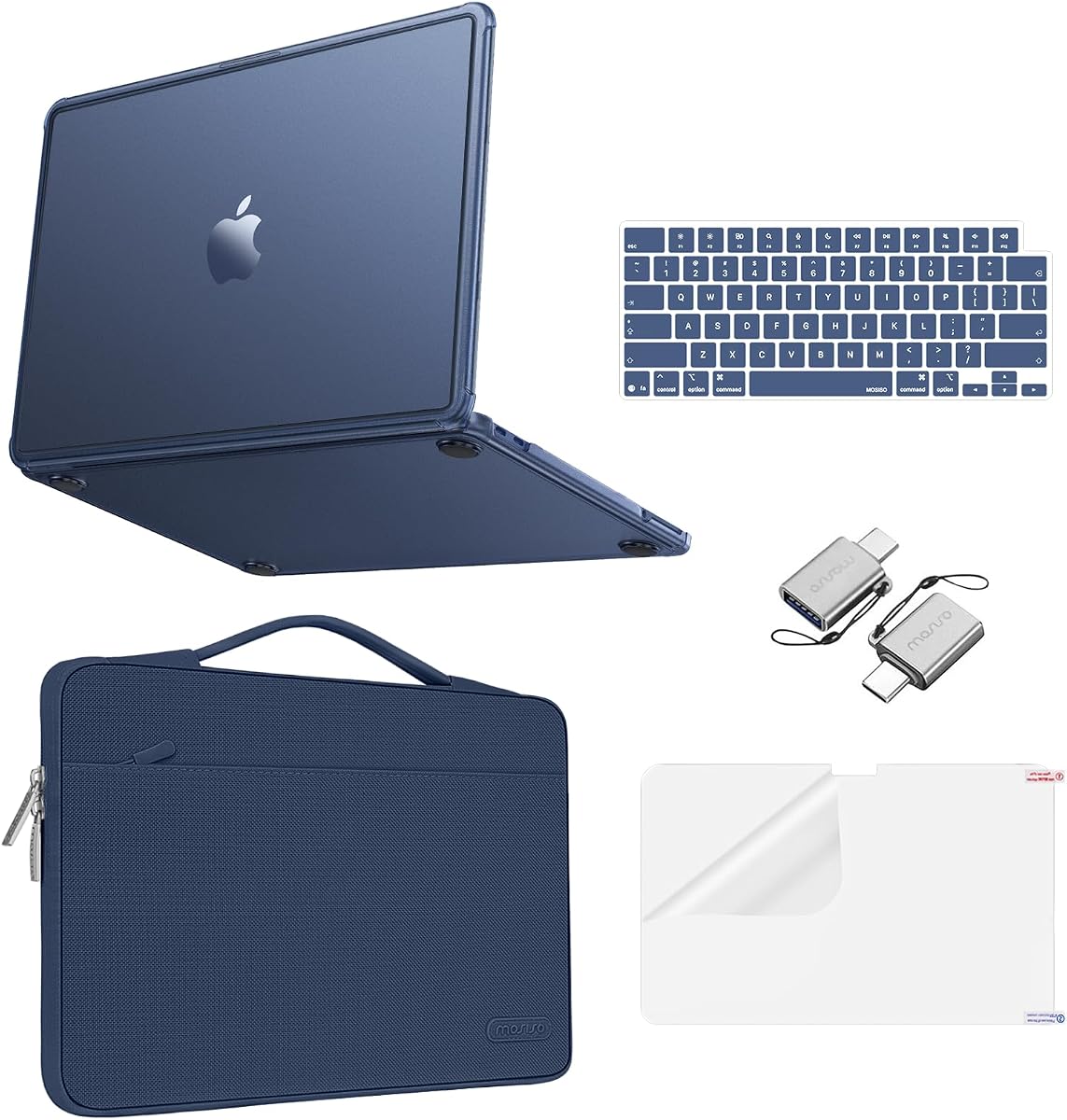
This comprehensive kit from MOSISO stands out as the top choice for new MacBook Neo owners seeking complete protection. With a solid 4.6 rating, it offers a precision-molded hard shell case paired with a protective sleeve and accessories.
We may earn a commission when you buy through this link, at no additional cost to you.
The matte finish actively repels fingerprints and smudges, keeping the device looking pristine. The included 360-degree sleeve protects against bumps during transport. It includes keyboard covers and a screen protector for full-body defense.
While the kit provides great coverage, it might add slight bulk compared to a simple hard shell. Users should check their model number A3404 carefully before purchasing. It fits only the 13-inch 2026 Neo.
Ideal for travelers and students, this kit ensures peace of mind. The combination of shell and sleeve is a complete package. We recommend this for anyone prioritizing long-term protection over minimalism.
Everything you need for full-body protection comes right out of the box. Includes 2 keyboard covers and 1 screen protector to shield against spills and scratches.
The precision-molded matte finish is designed to actively repel fingerprints and daily scuffs. Your laptop stays cleaner longer with this engineered surface.
We may earn a commission when you buy through this link, at no additional cost to you.
This sticker sheet offers an affordable way to boost productivity on your MacBook Neo. It places 52 essential macOS shortcuts directly on your palm rest, reducing the need to search for commands during work.
We may earn a commission when you buy through this link, at no additional cost to you.
Made from premium vinyl, it is water repellent and fade-resistant. The residue-free adhesive lifts off cleanly without leaving marks. You can choose colors like Clear Black or Opaque Pink to match your device.
It is ultra-thin at 0.10mm, so you won't feel it under your wrists. The layout groups shortcuts by task like Basics and Navigation. It is perfect for beginners or power users who want quick reference.
Perfect for students and freelancers, this sticker keeps you efficient. It fits the 13-inch MacBook Neo and other models. Choose the right color variant for your laptop finish.
Shortcuts sit on your palm rest in your sightline. Stop Googling and glance down to find commands like screenshot instantly.
Matte vinyl shrugs off coffee spills and smudges. The fade-resistant print stays sharp for years of daily use.
We may earn a commission when you buy through this link, at no additional cost to you.
The VENTION hub delivers high-performance connectivity for your MacBook Neo. With 80Gbps Thunderbolt transmission, it supports ultra-clear 8K@240Hz video output. This is ideal for creative work and external displays.
We may earn a commission when you buy through this link, at no additional cost to you.
Its detachable magnetic USBC connector allows effortless attachment. You can plug and play without frequent plugging. The hub supports up to 140W PD pass-through charging while using other ports.
Note that the standard connection may not fit if you have a case. Using the 7-shaped single plug is recommended. The aluminum shell ensures durability and heat dissipation.
Best for business trips and home offices, this dock handles multiple devices. It works with Windows and Android too. Prioritize this if you need high-speed data and video transfer.
Equipped with 2 USBC ports matching your laptop parameters. Supports blazing-fast bandwidth for ultra-clear video output.
Detachable magnetic USBC connector design is compatible with MacBook. Ensures effortless attachment and detachment without wear.
We may earn a commission when you buy through this link, at no additional cost to you.
This MOSISO case is designed specifically for the A3404 model. It features a high-transparency shell that lets your laptop's design shine. The case resists yellowing to maintain a polished look.
We may earn a commission when you buy through this link, at no additional cost to you.
It includes a storage bag, dustproof keyboard covers, and a screen protector. The smooth surface reduces fingerprints and smudges. Built with crack-resistant materials for daily protection.
Installation is easy with no tools required. However, be sure to check your model number before buying. It fits the 13-inch 2026 MacBook Neo with Liquid Retina Display.
Best for those who want to show off their device color, this case offers solid protection. The added accessories make it a value pack. Check compatibility to ensure a perfect fit.
High-transparency shell stays crystal-clear without yellowing. Your laptop's design shines through the smooth surface.
Includes precision-molded hard shell and 2 dustproof keyboard covers. Also provides a clear screen protector for full defense.
We may earn a commission when you buy through this link, at no additional cost to you.
This bundle features a Sixteen Grid puffy laptop sleeve. It offers plush interior cushioning against scratches and shocks. The square quilted polyester material protects against accidental spills.
We may earn a commission when you buy through this link, at no additional cost to you.
It includes a crack-resistant case and keyboard covers. The sleeve is lightweight and slides into backpacks easily. It maintains a sleek profile while providing travel security.
Make sure to verify your model number A3404. This kit is designed for the 13-inch 2026 release. The case wraps every side in sturdy defense.
Ideal for commuters, this sleeve provides extra comfort. The puffy design absorbs impacts. Combine it with the included case for total protection.
Square quilted puffy polyester material protects against spills. Internal dimensions are designed for snug fit.
Portable and lightweight, does not bulk your device up. Slide easily into your briefcase or backpack.
We may earn a commission when you buy through this link, at no additional cost to you.
This case uses transparent PC material to show off your MacBook Neo. It is ultra-slim and lightweight, adding minimal bulk. The durable hard plastic exterior shields against daily scratches.
We may earn a commission when you buy through this link, at no additional cost to you.
It includes a matching keyboard cover and versatile USB-C to USB-A adaptors. The design is perfect for office or classroom use. Full edge wrap protects against debris and oil stains.
It has a high 4.7 rating for durability. It fits only the 13-inch 2026 Neo. Double-check your model before purchase to ensure compatibility.
Best for users who dislike bulky cases, this is a great choice. The included adapters add utility. Keep your laptop looking brand new effortlessly.
Transparent PC material fully shows off your Mac Book Neo design. Ultra-slim design adds minimal bulk to the device.
Includes matching keyboard cover and versatile USB-C to USB-A adaptors. Protect against spills and scratches with the protector.
We may earn a commission when you buy through this link, at no additional cost to you.
This screen protector is custom-designed for the A3404 model. Strong magnetic attachment enables one-second installation and removal. It fully protects screen integrity and coating.
We may earn a commission when you buy through this link, at no additional cost to you.
Advanced 30-degree privacy technology blocks side views. Perfect for cafes and airports. It adopts anti-glare and blue light blocking technology to relieve eye strain.
It is ultra-thin at 0.065mm. It fits most protective cases without affecting lid closure. The PET material ensures crystal-clear visual quality.
Ideal for remote workers, this screen protects your data. It keeps your screen clear while hiding it from prying eyes. Consider this for privacy-sensitive tasks.
Blocks side views beyond plus or minus 30 degrees. Ensures clear visibility only from the front for privacy.
Effectively relieves eye strain during long-time use. Reduces glare and reflections while retaining high screen brightness.
We may earn a commission when you buy through this link, at no additional cost to you.
This removable privacy screen comes with a storage clip. It allows you to take it off when not needed. The reinforced magnetic strip ensures it aligns easily with the bezel.
We may earn a commission when you buy through this link, at no additional cost to you.
High-quality materials from Japan reduce 95% of blue light. The matte surface intercepts 95% of reflected light. It protects your screen and eyesight effectively.
The filter layer is corrected over 5000 times. It ensures data privacy from peeking. The magnetic strip can make it stick tightly to the screen.
Best for frequent travelers, the storage clip is a bonus. It provides stunning privacy protection. Check compatibility with your A3404 model.
Designed an innovative magnetic mounting method. Align with the top bezel and press gently to install.
High-quality filter layer that can reduce 95% of blue light. Anti-glare surface effectively intercepts 95% of reflected light.
We may earn a commission when you buy through this link, at no additional cost to you.
This sticker is designed for Air and Pro models but explicitly states not for MacBook Neo. It helps beginners and power users master commands. It is made in the USA with trusted quality.
We may earn a commission when you buy through this link, at no additional cost to you.
The adhesive leaves a light residue but wipes off easily. The peel-and-stick method requires care. It is perfect for anyone learning new skills to boost productivity.
It includes a satisfaction guarantee and responsive support. Note the symbol for Shift key. It works regardless of CPU type or macOS version.
Choose this if you have an older model. It speeds up tasks and avoids frustration. Check compatibility before purchasing for the best fit.
Learn and use essential Mac commands without searching online. Boost your skills and speed up everyday tasks instantly.
Designed, printed, and packaged in the USA. Backed by responsive customer support and a satisfaction guarantee.
We may earn a commission when you buy through this link, at no additional cost to you.
This 7-piece set is designed for the 2026 MacBook Neo 13 inch. The dust plugs are made of high-quality silicone. They protect ports from debris and liquid splashes without damage.
We may earn a commission when you buy through this link, at no additional cost to you.
The set includes covers for USB-C, MagSafe 3, HDMI, SDXC, and headphone jack. It also has webcam covers and a gift plastic case. The plugs are flexible yet durable.
They are low-profile and maintain aesthetics. Effortless insertion and removal. They stay securely in place during daily use. It is ideal for keeping ports clean.
Best for maintaining your device, this set prevents dust buildup. The webcam cover adds privacy. Check your ports to ensure perfect fit.
Made of high-quality silicone, flexible yet durable to protect ports from scratches and liquid splashes.
Effortless insertion and removal. Stays securely in place but won't leave residue on your MacBook.
We may earn a commission when you buy through this link, at no additional cost to you.
Choosing the right accessories for your MacBook Neo involves considering compatibility, material quality, and your specific needs for protection or productivity.
The 2026 MacBook Neo 13-inch has a specific model number A3404. Ensure that your case or accessory is explicitly designed for this model to guarantee a perfect fit. Mismatched models may result in loose covers or blocked ports.
Always check the product description and model number before purchasing. A precise fit ensures that buttons and ports remain accessible.
Look for durable materials such as polycarbonate for hard cases or silicone for dust plugs. Matte finishes resist fingerprints while clear shells show off your device. High-quality materials extend the life of your accessories.
Avoid cheap plastics that crack easily. Invest in robust materials that can withstand daily drops and bumps.
Protect your ports from dust and debris with silicone plugs. This keeps your connectors clean for future use. It also prevents scratches from bag contents.
Ensure the plugs fit snugly but can be removed when needed. Quality plugs do not leave residue behind.
If you work in public spaces, consider a privacy screen protector. Magnetic screens are easy to install and remove. They block side views to keep data secure.
Look for anti-blue light features to reduce eye strain during long work sessions. Balance privacy with visual clarity.
A USB-C hub can expand your laptop capabilities. Check for ports you need like HDMI or USB-A. Ensure the hub supports the required charging speed.
Select a hub with good heat dissipation. High-speed data transfer requires stable power delivery.
Shortcuts stickers help you learn keyboard commands faster. Choose a layout that suits your workflow. Vinyl stickers should be residue-free to avoid damage.
These tools are affordable and effective for boosting efficiency. They are great for students and new users.
Hard cases offer permanent protection while sleeves are removable for travel. A bundle often provides both. A plush interior prevents scratches in a bag.
Choose based on your transport habits. Travelers need heavy-duty sleeves; home users may prefer a slim shell.
Check user ratings to verify quality. A high rating often indicates durability and good fit. Compare features to ensure you get the best value.
Prioritize accessories with comprehensive kits. Bundles often save money and provide all necessary protection.
To install a hard case, ensure your device is clean and dry. Align the top and bottom covers carefully before pressing them into place. Do not force the pieces together to avoid cracks.
Clean your screen protector or privacy filter with a soft cloth. Avoid harsh chemicals that may damage coatings. Remove magnetic screens gently to prevent scratching the display.
For USB hubs, connect the magnetic adapter securely. Avoid bending cables excessively to maintain durability. Store accessories in their included bags to prevent loss.
Check if your case has a bottom cutout. Some hubs may not fit if the case blocks ports. It is often better to remove the case for certain hubs.
Magnetic privacy screens are very easy to install. Just align them with the bezel and press. They can be removed in seconds without residue.
Use a soft microfiber cloth to wipe down the case. You can also use mild soap and water if needed. Ensure it is completely dry before putting it on your laptop.
Quality silicone plugs are designed to leave no residue. They fit snugly without sticking. If any residue appears, wipe it with a damp cloth.
Silicone is flexible and easy to clean. It protects keys from spills and dust. Ensure it matches your keyboard layout for ease of use.
Yes, many hubs support pass-through charging. Look for PD support to ensure your laptop charges while in use. This allows you to use ports without draining battery.
Match the sticker to your MacBook finish. Clear Black works for light colors while Opaque works for dark ones. Test a corner first to ensure it looks good.
Sleeves offer portable protection for travel while cases offer permanent protection. A combination is ideal. Use a case daily and a sleeve for commutes.
We reviewed ten top accessories including cases, privacy screens, and hubs. The MOSISO kit offers complete protection while the shortcut sticker boosts productivity. Each product serves specific needs for your MacBook Neo.
Prioritize compatibility and material quality when selecting gear. Check model numbers like A3404 before buying. This ensures your accessories fit perfectly and last longer.
Prices and availability may change over time. Always check current prices on Amazon before purchasing. This ensures you get the best deal for your MacBook Neo.