
Hard Drive Reader USB 3.0 & Type C
4.1Editor score
Supports USB-C and USB-A
Universal drive compatibility
Plug-and-play operation
Modern computers often lack legacy ports, making external access to internal drives difficult. A quality adapter kit bridges this gap, allowing you to connect SATA or IDE drives directly to USB ports for immediate data access without opening your machine.
We evaluated ten top-rated kits based on compatibility, transfer speeds, power stability, and ease of use. Each selection supports a range of drive sizes and interfaces, ensuring you can recover files from older hardware or expand storage efficiently across modern systems.
Each pick highlights specific strengths like dual-drive support or M.2 compatibility to help you choose the right tool for your needs. Note that product availability and pricing may change, so verify current details before purchasing to ensure you get the exact features you require.
4.1Editor score

4.4Editor score
4.6Editor score
As an Amazon Associate we earn from qualifying purchases.
This side-by-side comparison highlights key specifications for each adapter kit to help you identify the best match for your specific drive types and transfer needs.


The Unitek adapter stands out as a reliable choice for accessing both old IDE and modern SATA drives with high-speed USB 3.0 connectivity. Its dual-drive design allows simultaneous connections for efficient migration tasks and data backups without needing multiple adapters.
We may earn a commission when you buy through this link, at no additional cost to you.
Its SATA III interface delivers up to 6Gbps speeds, ensuring quick file transfers between drives or to your PC. The included 12V power adapter guarantees stable operation for larger drives, and the LED indicators make it easy to monitor activity and power status.
While it only supports USB-A ports, it includes essential cables for broad compatibility. The hot-swapping feature protects drives from wear during changes, but the adapter requires a separate power supply for certain IDE configurations which adds slight bulk to your setup.
This kit is ideal for professionals needing a versatile bridge between legacy and modern storage. Its robust build and wide support make it a top pick for reliable data recovery and backup operations across varied hardware environments.
You can connect one IDE and one SATA drive at once, streamlining data migration workflows significantly without needing extra adapters.
Supporting SATA III speeds up to 6Gbps, this adapter ensures fast and efficient data movement between drives and your computer.
We may earn a commission when you buy through this link, at no additional cost to you.
This reader offers an affordable entry point for connecting SATA and IDE drives to modern systems via USB 3.0 or Type-C ports. It supports a wide range of drive types and capacities, making it suitable for casual users and home backups.
We may earn a commission when you buy through this link, at no additional cost to you.
Its universal compatibility with Windows and Mac OS allows broad usage across different devices. The plug-and-play design eliminates the need for driver installation, and the included USB-C adapter adds flexibility for newer laptops without traditional ports.
While the build quality is basic, it covers essential data transfer needs effectively. The maximum capacity support up to 20TB ensures future-proofing, but the lower rating suggests potential inconsistency in cable quality or compatibility checks needed.
It is a smart buy for users on a budget needing occasional drive access. With professional support available, you can resolve usage issues quickly, making it a practical tool for simple data recovery tasks.
Supports 2.5 and 3.5 inch SATA and IDE drives, providing versatile connectivity for a range of storage devices.
Equipped with USB-C and USB adapters, it offers transmission rates suitable for efficient data recovery and transfers.
We may earn a commission when you buy through this link, at no additional cost to you.
This reader focuses on universal compatibility and reliable data recovery from various internal drives using USB 3.0. It handles both IDE and SATA interfaces with dedicated connectors and includes the necessary power adapter for stable operation of larger drives.
We may earn a commission when you buy through this link, at no additional cost to you.
With transfer speeds up to 5Gbps, it facilitates quick file duplication and backups. The compact design is user-friendly, and support for systems like Windows, Mac, and Linux ensures broad usability across different professional environments.
Some older IDE drives might require jumper settings for proper recognition, which could be a hurdle for non-technical users. Despite this, the reliable power inclusion and hot-swap feature make it a strong tool for retrieving valuable data safely.
It is a robust choice for IT professionals or home users needing versatile access. The included power supply ensures drives spin up consistently, making it dependable for recovering lost files or migrating data from aging hardware.
Allows connection of SATA and IDE devices via USB 3.0 for easy external access and data transfer tasks.
Includes a 12V 2A power supply ensuring consistent performance when using 3.5 inch IDE or HDD devices.
We may earn a commission when you buy through this link, at no additional cost to you.
This reader fits various users from home to professional recovery, with a flexible design that addresses common connectivity issues. It supports SATA and IDE drives with an extended body that improves accessibility and cable management during use.
We may earn a commission when you buy through this link, at no additional cost to you.
Stable high-speed performance is ensured with a dedicated 12V power supply and a soft 4-pin cable for secure IDE connections. The USB 3.0 cable is flexible and durable, ensuring stable connections even during prolonged data transfers or backups.
While it is a budget option, the inclusion of all necessary cables and robust support sets it apart. Some users may find the power supply bulky, but it ensures drives function correctly without power dropouts during critical data operations.
It is recommended for those seeking a reliable and well-supported solution. The clear operation guidance and after-sales service make it a trustworthy choice for regular data migration and recovery tasks in diverse computing environments.
Fits home users and data recovery pros with broad support for SATA and IDE drives including Blu-ray options.
Solves unreadable drive issues and power shortages for 3.5 inch drives ensuring data safety during transfers.
We may earn a commission when you buy through this link, at no additional cost to you.
This docking station offers a dedicated bay for rapid tool-free access to SATA drives, ideal for frequent users needing quick swaps. It includes a 12V power adapter ensuring all 3.5 inch drives spin up reliably without interruption during transfers.
We may earn a commission when you buy through this link, at no additional cost to you.
USB 3.0 speeds support high-performance data transfers, with backward compatibility for older systems. The LED indicator clearly shows activity and power status, making it easy to monitor drive operations and prevent accidental removals during critical tasks.
It does not support IDE or M.2 drives, limiting its use to SATA interfaces. However, for users with multiple SATA drives or SSDs, its hot-swappable design and USB-A connection make it efficient and straightforward to integrate into any workflow.
Recommended for users needing a simple and robust docking solution. Its straightforward design and reliable power support ensure consistent performance when managing multiple drives for backups, archives, or system upgrades.
Lay-flat bay accepts bare drives without tools and allows swapping without rebooting for seamless operation.
Supports typical mechanical HDD speeds up to 160 MB/s ensuring efficient file transfer rates for backups.
We may earn a commission when you buy through this link, at no additional cost to you.
This simple adapter cable is perfect for laptop SSDs and smaller internal drives, offering UASP support for faster performance. It is bus-powered, meaning no external power is needed for most 2.5 inch drives, making it highly portable.
We may earn a commission when you buy through this link, at no additional cost to you.
With a rating of 4.7, users appreciate its plug-and-play simplicity and reliability. It works with Windows, Mac, and Linux systems seamlessly, allowing quick access to SSD data without needing bulky docking stations or power adapters.
It only supports 2.5 inch SATA drives, so it is not suitable for desktop HDDs. Despite this limitation, its compact size and ease of use make it an excellent travel accessory for anyone needing to access a laptop drive regularly.
Recommended for users with laptop SSDs needing quick access. Its high reliability and small footprint ensure you can carry it easily and get reliable data access without extra power requirements or setup complications.
Compatible with standard 2.5 inch SATA SSDs and laptop HDDs offering a simple portable connection.
Powers most 2.5 inch drives directly from USB eliminating the need for external power supplies.
We may earn a commission when you buy through this link, at no additional cost to you.
This enclosure transforms internal SSDs into secure external drives, with UASP support for optimized SSD performance. Its tool-free design and dual Type-C/Type-A plug make it easy to install and use with modern systems.
We may earn a commission when you buy through this link, at no additional cost to you.
It supports drives up to 6TB and is specifically designed for 7 or 9.5mm thickness, covering most laptop SSDs. The fast transfer speeds up to 5Gbps ensure efficient data migration and backups for daily usage needs.
It is not meant for desktop drives or older IDE hardware. However, for users looking to repurpose laptop SSDs into external backups, its durability and warranty coverage make it a strong and reliable long-term solution.
Recommended for users seeking a portable external drive solution. Its robust build and optimized SSD support ensure reliable performance for daily data storage and transfer needs in professional or home environments.
Easily hooks up your 2.5 inch SATA drive to transfer files or use as an external drive.
Supports UASP SATA III protocol for up to 70 percent faster transfers than traditional USB 3.0.
We may earn a commission when you buy through this link, at no additional cost to you.
This kit offers a 2-in-1 design with USB 3.0 and Type-C ports, ensuring compatibility with newer laptops without ports. It supports simultaneous access to one IDE and one SATA drive for flexible backup and transfer workflows.
We may earn a commission when you buy through this link, at no additional cost to you.
With transfer speeds up to 5Gbps, it ensures quick file transfers and security during operations. The included 12V power adapter ensures stable power for older drives, and LED indicators clearly show drive activity during tasks.
Some drives may require initialization via Disk Management or jumper settings to work correctly. Despite this, the dual interface design and robust power supply make it a versatile and reliable tool for accessing varied drive types.
Recommended for users needing dual drive support and modern ports. Its thoughtful design ensures flexibility and stability, making it a practical choice for recovering data from mixed drive environments.
Supports SATA and IDE drives up to 6TB capacity for versatile compatibility across systems.
Adopting USB 3.0 and Type C ports for various computer types and laptop needs.
We may earn a commission when you buy through this link, at no additional cost to you.
This adapter covers a wide range of drives, including optical options, making it exceptionally versatile. Its 2-in-1 design offers both USB and Type-C ports, ensuring you can connect to almost any computer without adapters.
We may earn a commission when you buy through this link, at no additional cost to you.
With data transfer speeds up to 5Gbps, it handles large files efficiently. The included power adapter ensures stable connections for 3.5 inch drives, and hot-swapping allows seamless drive changes without restarting your system.
Some desktop IDE drives may need jumper settings to function correctly, which can be confusing. However, the humanized design and clear indicators make it easy to manage operations, ensuring safe and quick data access.
Recommended for users needing broad compatibility and stable power. Its universal support and modern connectivity options make it a top choice for comprehensive recovery and transfer tasks across varied environments.
Supports SATA IDE and optical drives with dual head IDE and SATA III connectors.
High speed data transfer up to 5Gbps ensuring efficient and seamless data process.
We may earn a commission when you buy through this link, at no additional cost to you.
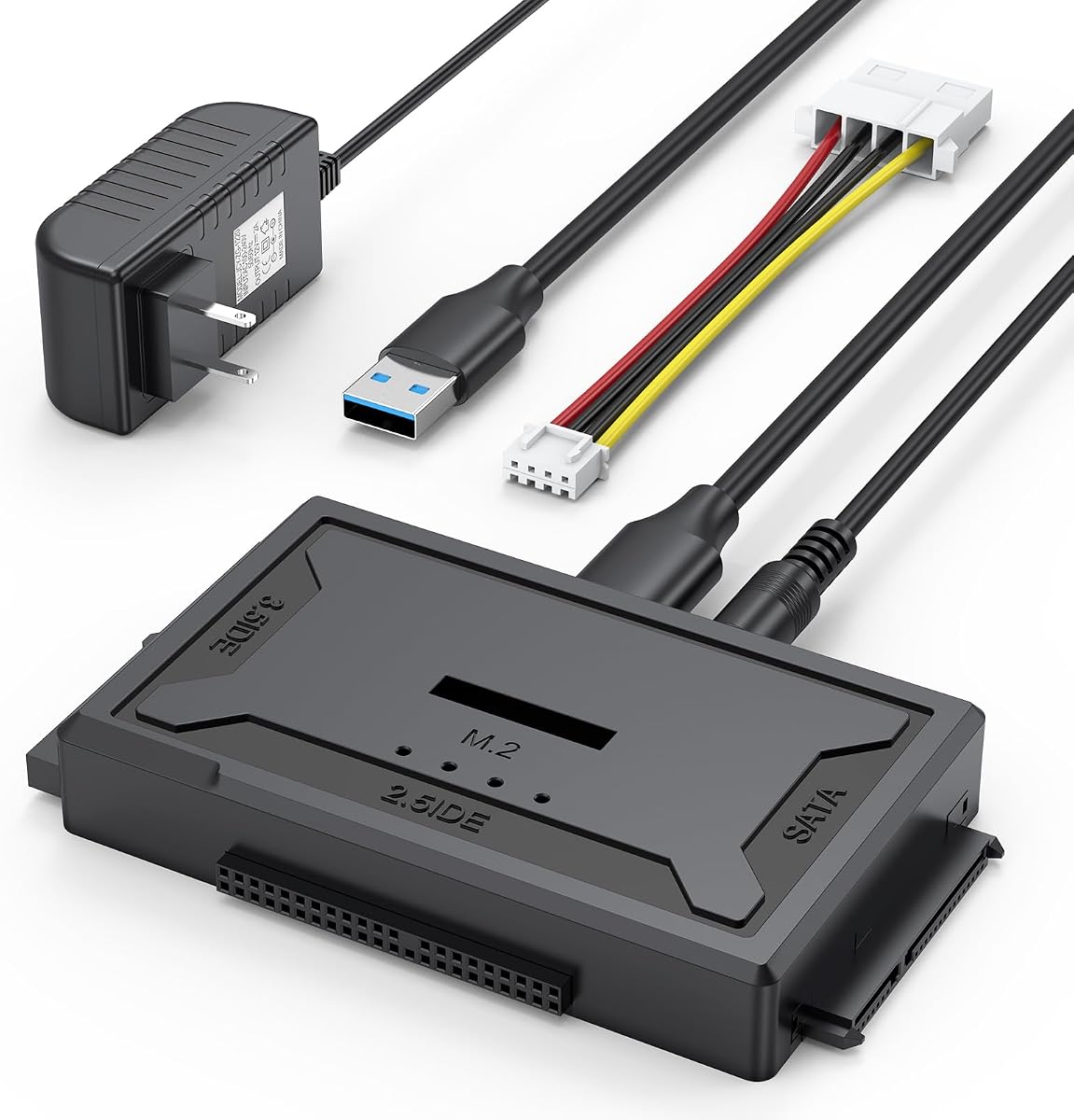
This upgraded 4-in-1 reader adds rare M.2 support alongside SATA and IDE, making it a comprehensive premium tool. Its high-speed 10Gbps interface ensures rapid access to modern M.2 drives for efficient data retrieval.
We may earn a commission when you buy through this link, at no additional cost to you.
Dual IDE connectors allow reading 2.5 and 3.5 inch IDE drives with a flexible 4-pin cable. The open design supports various M.2 sizes, ensuring broad compatibility with modern storage while maintaining legacy support.
Some M.2 variants are not supported, so checking your drive type is essential. Despite this, its versatility and speed make it an invaluable tool for professionals managing diverse storage types across different system generations.
Recommended for professionals needing wide coverage and speed. Its unique combination of modern and legacy interfaces ensures you can access any drive type efficiently and reliably.
Capable of reading IDE, SATA, and M.2 hard drives at the same time.
Supports ultra-fast transfer speed up to 10Gbps for M.2 SSDs.
We may earn a commission when you buy through this link, at no additional cost to you.
Choosing the right adapter requires evaluating interface compatibility, power needs, and port types. These factors determine whether the kit works with your drives and how efficiently it transfers data.
Ensure the kit supports both SATA and IDE drives if you plan to access older hardware. Most kits cover both, but some focus on SATA only, which limits their use to modern internal drives and excludes legacy IDE disks.
3.5 inch drives typically need an external 12V adapter to spin up reliably. Kits without this may fail with desktop drives, while 2.5 inch drives often run on USB power alone, reducing cable clutter and setup needs.
Modern laptops may only have USB-C ports, so look for kits including USB-C or a USB-C adapter. USB-A ports remain common on desktops, but flexibility in connection options ensures your adapter works across all devices you own.
USB 3.0 interfaces deliver speeds up to 5Gbps for fast backups and file transfers. Some premium kits support M.2 NVMe at 10Gbps, which significantly reduces wait times when handling large datasets or media files.
Some kits allow connecting two drives at once for direct drive-to-drive cloning. This feature simplifies backups without needing to move data through your computer, saving time and reducing wear on both drives during operations.
Plug-and-play functionality and hot-swapping capabilities enhance usability. Drivers-free operation saves time, and on/off switches protect drives from accidental damage during disconnection or while powering up for data access.
Flexible cables and sturdy connectors ensure longevity and reliable connections. Avoid kits with brittle cables or tight connectors that may wear out, as they can interrupt data transfers or damage ports during routine use over time.
Look for kits with clear manuals and responsive customer support. Good after-sales service helps resolve compatibility or driver issues quickly, ensuring you get the most out of your adapter kit without prolonged downtime or confusion.
Start by connecting the adapter to your computer's USB port. If using a 3.5 inch drive, connect the power adapter and ensure the power switch is turned on. This prevents drive errors during connection and ensures stable operation.
Connect the drive to the adapter using the appropriate SATA or IDE cable. Once detected, access the drive through File Explorer on Windows or Finder on Mac. Always eject safely before unplugging to prevent file corruption.
Store the adapter and cables in a dry, cool place. Avoid bending cables sharply or exposing connectors to dust, which can degrade signal quality over time. Periodically check connectors for debris to maintain reliable performance.
Standard adapters usually support SATA and IDE drives only. However, premium 4-in-1 kits include dedicated M.2 slots for NVMe and SATA M.2 drives. Always check the product specifications before purchasing to ensure support for your specific drive type.
Most modern adapter kits work on Windows and Mac without additional drivers. They use built-in USB bridge drivers for instant use. If issues arise, check for firmware updates from the manufacturer website to ensure compatibility.
3.5 inch drives typically require external power from the included adapter. Without it, they cannot spin due to USB power limits. Ensure the power adapter is plugged in and the power switch is on for reliable operation.
USB-C often supports USB 3.1 and later, which can be faster than USB-A. However, speed depends on the adapter's interface. USB 3.0 over USB-C delivers similar speeds, while M.2 kits can reach 10Gbps with proper support.
Yes, dual-drive kits allow direct cloning between two connected drives. Without dual ports, you can clone by copying files to another drive via the adapter. Both methods help migrate data or backup systems efficiently.
Some kits support optical drives like CD-ROMs or DVD-RWs. These are often needed for data recovery from older media. Verify compatibility in the product details before purchasing if you plan to access optical disc drives.
From budget options to premium 4-in-1 kits, the best choice depends on your specific drive types and connectivity needs. The top three picks offer reliable performance for most users seeking to access SATA and IDE drives.
Prioritize compatibility and power stability to ensure smooth data recovery operations. Kits with Type-C support and clear driver-free designs simplify usage across modern and legacy computing environments seamlessly.
Remember to verify current availability and features before purchasing. Regularly check product details and user reviews to confirm the adapter meets your needs for reliable and efficient data management.