
Adesso Easy Touch 630Ub
4.2Editor score
Waterproof IP67 rated design
Large durable high contrast keys
Plug and play USB connectivity
Finding the right input device for your point of sale setup is crucial for daily operations and customer experience. A dedicated keyboard ensures quick data entry and smooth transaction processing without the frustration of standard office peripherals.
We evaluated ten top models based on build quality, key layout, interface options, and specialized features like integrated touchpads or magnetic stripe readers. Our analysis focuses on reliability and efficiency in high-volume retail environments.
Each selection highlights unique strengths suited to different business needs from compact kiosks to full service counters. Keep in mind that availability and pricing can fluctuate so verify current details before making your final purchase decision.
4.2Editor score

4.2Editor score
As an Amazon Associate we earn from qualifying purchases.
The following table provides a side by side overview of all ten models evaluated in this guide to help you compare key specifications and features at a glance.


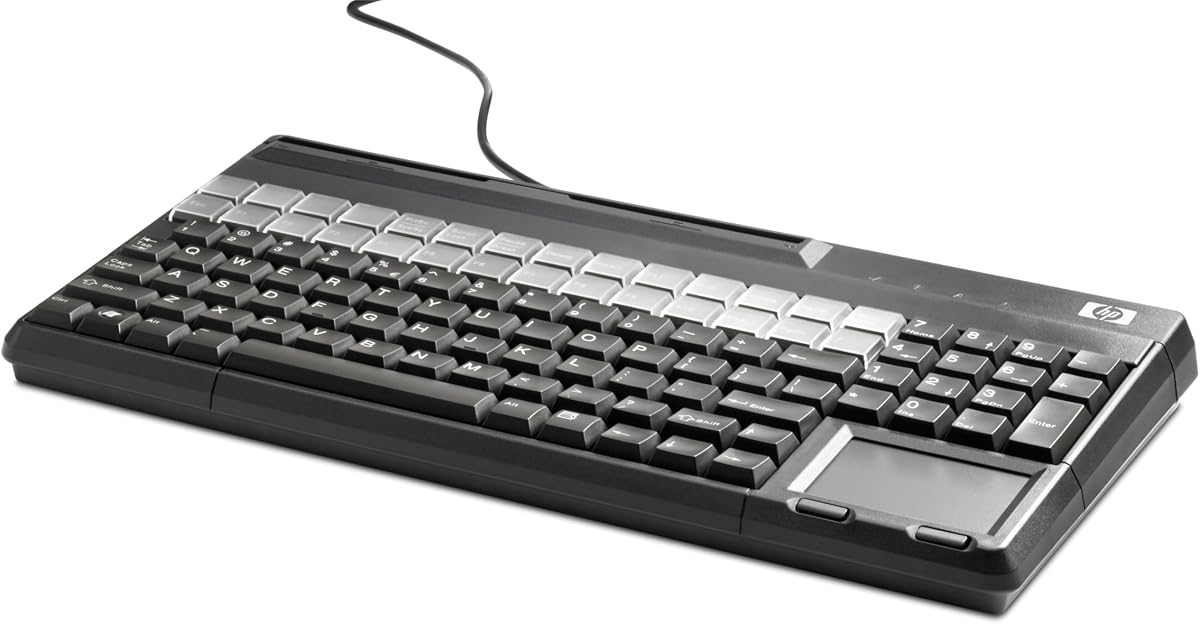
The HP POS Keyboard stands out as a premium option for retail environments needing integrated payment processing. It offers a full 106 key layout with a dedicated magnetic stripe reader built directly into the unit for convenience.
We may earn a commission when you buy through this link, at no additional cost to you.
This model features 28 relegendable keys that allow businesses to customize shortcuts for specific applications or inventory systems. The USB interface ensures straightforward connectivity with most point of sale terminals without requiring additional adapters or drivers.
While it delivers robust functionality its higher cost and limited stock availability might be considerations for smaller retailers. However for businesses prioritizing all in one efficiency this keyboard reduces desk clutter and streamlines transaction workflows significantly.
If your operations require frequent card swipes and custom key mappings this unit provides a specialized solution tailored for high volume retail counters. It remains a strong choice for stores looking to optimize their point of sale input setup.
The built in magnetic stripe reader eliminates the need for separate card readers keeping your counter organized and efficient.
With 28 relegendable keys you can adapt the keyboard to match your specific POS software shortcuts and workflows easily.
We may earn a commission when you buy through this link, at no additional cost to you.
The Cherry G86-62401 earns our Editor's Choice for balancing compact design with essential POS features. It integrates a touchpad directly into the keyboard frame saving valuable counter space while maintaining a standard QWERTY layout.
We may earn a commission when you buy through this link, at no additional cost to you.
Its spill resistant construction protects internal components from accidental liquid exposure common in busy retail or cafe settings. The USB connection ensures reliable communication with your POS system without requiring extra power sources or complex setup procedures.
Though it lacks a built-in card reader it offers great value for environments using separate payment terminals. The touchpad functionality might feel limited for heavy mouse users but serves well for basic navigation and menu selection tasks.
This model is ideal for businesses needing a space-saving yet durable input device that can handle daily wear and tear. It combines practicality with Cherry's reputation for quality making it a top contender for general POS applications.
The integrated touchpad removes the need for a separate mouse freeing up precious counter space for other essential tools.
Spill resistant materials ensure the keyboard can withstand minor accidents without failing protecting your investment over time.
We may earn a commission when you buy through this link, at no additional cost to you.
The Adesso Easy Touch 630Ub offers exceptional value for businesses needing a rugged and affordable input solution. Its IP67 waterproof rating means it can withstand submersion making it suitable for messy environments or areas prone to spills.
We may earn a commission when you buy through this link, at no additional cost to you.
Large keys with high contrast print improve readability and reduce typing errors for staff working in fast paced conditions. The plug and play USB connectivity ensures it works immediately with most Windows based POS systems without extra configuration steps.
While it lacks advanced features like touchpads or card readers it excels at durability and ease of maintenance. The membrane switches provide a reliable typing feel that holds up well under constant daily use in retail or warehouse settings.
Choose this model if your primary concern is budget and resilience against harsh conditions. It provides a no fuss reliable option for basic data entry where specialized features are not required for operations.
The IP67 waterproof rating allows the keyboard to survive full submersion ensuring reliability even in the toughest environments.
Its sealed design makes cleaning simple with just a rinse or wipe so sanitation is effortless in food service settings.
We may earn a commission when you buy through this link, at no additional cost to you.
The Logitech K120 brings familiar office ergonomics to POS environments at an accessible price point. Its full size layout with number pad supports efficient data entry while spill proofing protects against accidental liquid exposure.
We may earn a commission when you buy through this link, at no additional cost to you.
The deep profile keys and adjustable tilt legs offer a comfortable typing experience that reduces fatigue during long shifts. USB plug and play connectivity ensures immediate setup without installing additional software or drivers on your POS terminal.
Although it lacks features like touchpads or custom relegendable keys it delivers consistent performance for standard retail tasks. This model works well for businesses that prefer a simple reliable keyboard without specialized hardware integrations.
Ideal for small shops or secondary stations where a standard keyboard suffices this option balances comfort with durability. It is a solid choice if you need a dependable input device without paying for features you will not use.
Deep profile keys and adjustable legs provide a comfortable typing experience that supports staff during long work shifts.
Spill proof construction protects internal components from minor accidents keeping your equipment operational in busy settings.
We may earn a commission when you buy through this link, at no additional cost to you.
The Cherry Lpos G86-71411 offers an extensive key count and customization options for complex POS environments. With 169 keys and 42 relegendable options it allows businesses to map numerous functions directly to physical keys for quick access.
We may earn a commission when you buy through this link, at no additional cost to you.
Its integrated magnetic stripe reader supports seamless payment processing directly from the keyboard surface. The USB interface connects reliably to systems terminals and ensures stable communication during high volume transaction periods.
The large footprint may require significant counter space which could be a limitation in smaller setups. However for businesses needing deep customization and frequent card swipes this model provides comprehensive functionality in one device.
This unit suits large retail or service counters where workflow efficiency depends on customized shortcuts and integrated payment tools. It prioritizes functionality over compact design making it a specialized tool for specific operational needs.
With 42 relegendable keys you can tailor the layout to match your unique software requirements and workflow processes.
The magnetic stripe reader allows customers to swipe cards directly at the keyboard speeding up checkout times.
We may earn a commission when you buy through this link, at no additional cost to you.
The Perixx PERIBOARD-513III combines a full size layout with an integrated touchpad to save desk space. Its quiet scissor switches provide a smooth laptop like typing experience that reduces noise in shared workspaces.
We may earn a commission when you buy through this link, at no additional cost to you.
Multimedia hotkeys offer quick access to system controls without needing to leave your typing position. The USB cable provides a stable wired connection and the all-in-one design eliminates the need for a separate mouse.
While the scissor mechanism feels light it offers precision and reduced finger fatigue over long periods. This model works well for environments where desk space is limited and quiet operation is valued over mechanical feedback.
Choose this keyboard if you need a compact yet complete input solution for kiosks or small POS stations. It delivers practical features at a reasonable cost making it a versatile option for varied business setups.
The scissor switch mechanism delivers a quiet typing experience ideal for environments where noise reduction is important.
Integrating keyboard and touchpad saves valuable counter space and reduces clutter in tight work areas.
We may earn a commission when you buy through this link, at no additional cost to you.
The Cherry G86-71401 offers extensive programmability with 127 programmable keys for detailed workflow customization. An integrated touchpad provides navigation convenience without requiring additional peripherals on your counter.
We may earn a commission when you buy through this link, at no additional cost to you.
The USB interface ensures stable connectivity and the black finish matches typical POS hardware aesthetics. However user feedback indicates potential variability in performance which may require careful evaluation before bulk deployment.
While it features premium customization capabilities the mixed reviews suggest testing with your specific software is essential. It remains an option for businesses needing deep key mapping but verify compatibility thoroughly.
Consider this model if customization is your top priority and you can test units before full implementation. It offers advanced features but requires due diligence to ensure reliable performance in your specific environment.
With 127 programmable keys you can create complex workflows tailored to your unique application requirements.
The integrated touchpad allows for cursor movement and selection without cluttering your workspace with a mouse.
We may earn a commission when you buy through this link, at no additional cost to you.
The Cherry KC 1000 is designed for secure transactions with an integrated smartcard reader and PIN entry. It supports EMV compliance and multiple card protocols making it suitable for regulated financial or identity verification tasks.
We may earn a commission when you buy through this link, at no additional cost to you.
Its thin design saves space while maintaining robust security features that standard keyboards lack. The USB connection ensures reliable communication for secure data entry and card reading functions simultaneously.
This model serves specialized environments like banks or secure facilities rather than general retail counters. It prioritizes security and compliance over general typing features making it a targeted tool for regulated transactions.
Choose this keyboard if your operations require secure card authentication and encrypted PIN entry directly at the terminal. It delivers enterprise grade security features in a compact form factor for sensitive applications.
The built-in smartcard reader and PIN entry support EMV compliance for secure and regulated payment processing.
The thin design allows secure features to be integrated without taking up excessive counter space.
We may earn a commission when you buy through this link, at no additional cost to you.
The Cherry G80-1800 delivers industrial grade durability with Cherry MX mechanical switches rated for 100 million actuations. Its compact design saves space while providing reliable performance in harsh or demanding environments.
We may earn a commission when you buy through this link, at no additional cost to you.
Gold crosspoint contacts ensure long-lasting connectivity and the support for both USB and PS/2 offers flexibility with legacy systems. The space-saving form factor fits well in 19 inch rack applications or tight workstations.
While the build quality is exceptional it comes at a higher cost than standard office keyboards. It suits businesses that prioritize reliability and longevity over initial savings especially in continuous use scenarios.
Choose this model if you need a keyboard that can withstand constant heavy usage and varying environmental conditions. It offers proven mechanical durability for demanding industrial or retail applications requiring consistent uptime.
MX mechanical switches rated for 100 million actuations ensure the keyboard remains functional for years of daily use.
Support for both USB and PS/2 allows compatibility with modern and legacy point of sale hardware.
We may earn a commission when you buy through this link, at no additional cost to you.
The Logitech K270 offers wireless freedom for POS setups where cable management is a priority. It provides a full size layout with spill proof protection and a 24 month battery life reducing maintenance interruptions.
We may earn a commission when you buy through this link, at no additional cost to you.
The reliable 2.4 GHz wireless connection supports up to 33 feet of range for flexible placement around your counter. Multimedia hotkeys add convenience for system control without needing separate applications or software interfaces.
While wireless offers mobility it requires occasional battery changes and can be susceptible to interference in crowded RF environments. However for clean setups where cable clutter is a concern it provides a practical alternative.
Choose this model if you want to eliminate cables while maintaining standard typing comfort and durability. It balances convenience with reliability making it a solid choice for modern wireless POS terminals.
A 33 foot wireless range allows you to position the keyboard where it best suits your workflow.
The 24 month battery life minimizes interruptions and ensures consistent operation over extended periods.
We may earn a commission when you buy through this link, at no additional cost to you.
Selecting the right POS keyboard involves balancing durability, layout, and specialized features to match your operational needs.
POS keyboards face constant use spills and potential drops so choose models with robust construction. Look for spill resistant or waterproof ratings to protect internal components from accidental liquid damage.
Assess whether your workflow needs a standard layout or customizable function keys. Relegendable keys allow you to map specific POS commands for faster access reducing training time and errors.
Consider models with built-in touchpads magnetic stripe readers or smartcard terminals. These features can reduce desk clutter and streamline transactions by combining multiple tools into one device.
Wired USB offers reliable connectivity but wireless provides flexibility for cable management. Ensure wireless models have strong battery life and interference resistance suitable for your environment.
Measure your counter space to determine if a compact or full size layout fits best. Space-saving designs with integrated touchpads can free up room for other essential POS equipment.
Verify that the keyboard supports your POS software and operating system. Most modern models support Windows but checking driver requirements ensures seamless plug and play setup.
Staff type for long shifts so choose keys with comfortable travel and low fatigue. Scissor or mechanical switches can reduce finger strain compared to basic membrane alternatives.
Balance upfront costs against long term durability and feature needs. Investing in a more durable model can reduce replacement frequency and total cost of ownership over time.
Connect your keyboard to the POS terminal using the provided USB cable or wireless receiver. Ensure the connection is secure and the operating system recognizes the device before starting transactions.
Keep the keyboard clean by regularly wiping keys with a slightly damp cloth. Avoid using harsh chemicals that could damage key legends or the protective coating on the surface.
If using a wired model route cables neatly to prevent tripping or strain. For wireless versions check battery levels periodically to ensure uninterrupted operation during peak business hours.
Yes standard keyboards can work for basic entry but specialized POS keyboards offer better durability and features like relegendable keys or built-in card readers that streamline retail workflows.
Relegendable keys can be customized with printed labels or stickers to map specific POS commands reducing training time and increasing data entry speed for staff members.
Waterproof keyboards are essential for environments with frequent spills or food service areas ensuring hygiene and protecting equipment from liquid damage that could cause costly downtime.
Mechanical switches offer longer lifespan and tactile feedback while membrane switches are quieter and more affordable. Choose based on how often the keyboard will be used daily.
Most wireless keyboards work with modern terminals via USB receivers but check your POS software for driver requirements and wireless interference issues in crowded RF environments.
A quality POS keyboard can last several years with proper care. Replace it if keys become unresponsive or the casing shows significant wear affecting usability or cleanliness.
Many modern POS keyboards support Windows macOS and Linux but verify system compatibility before purchase to ensure full functionality and driver support for your setup.
An integrated touchpad saves counter space by eliminating the need for a separate mouse which is ideal for compact setups or kiosks with limited surface area.
The top three picks highlighted in this guide cover various needs from budget durability to premium customization features. Each option offers distinct advantages depending on your specific retail or service environment.
Prioritize factors like waterproofing key layout and integrated features that directly impact your daily operations and staff efficiency. A well chosen keyboard can significantly reduce friction during peak transaction times.
Always verify current availability and compatibility with your existing POS hardware before making a purchase decision. Ensuring the right fit will protect your investment and maintain smooth workflow for years to come.