
Official Ender 3 V2 Heated Bed
4.5Editor score
Official Creality Ender 3 V2 Replacement
220W 24V Power Rating
Aluminum Platform with Cable
This expert guide compares the top ten heated beds for 3D printers to help you find the perfect upgrade for your specific printer model and printing needs.
Finding the right heated bed for your 3D printer is essential for achieving consistent adhesion and preventing warping on your prints. A reliable heating element ensures that your filament stays warm enough to bond properly with the build surface throughout the entire print job. Without proper heating, even the most skilled operators can struggle with failed prints and poor quality results.
We have carefully selected ten top-rated heated bed options to help you navigate the crowded market of 3D printer upgrades. Each product was evaluated based on its compatibility, heating efficiency, build quality, and user feedback from real-world printing scenarios. Our goal is to provide you with a comprehensive overview that simplifies the decision-making process for your next upgrade.
Every pick in this list highlights specific strengths such as budget-friendly pricing, premium materials, or specialized compatibility with popular printer models. Keep in mind that product availability and stock levels can change rapidly, so we recommend checking the latest details before making your final purchase decision. Our team continues to monitor the market to ensure our recommendations remain accurate and useful for makers worldwide.
4.5Editor score

5.0Editor score

2.8Editor score
The following table provides a side-by-side comparison of all ten heated bed options we reviewed, allowing you to quickly identify the model that best fits your printer's dimensions and power requirements.

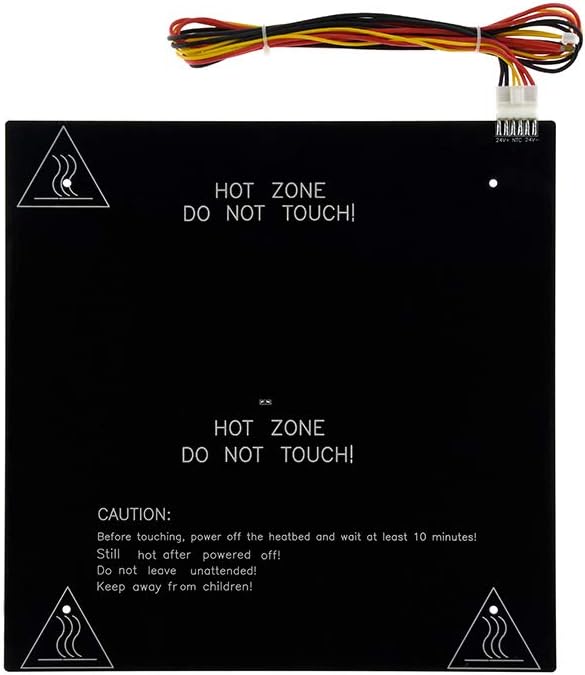


The Official Ender 3 V2 Heated Bed is a direct replacement part designed specifically for Creality Ender 3 series printers. It holds a strong 4.5-star rating from users who appreciate its reliability and ease of installation. This heated bed comes with all necessary cables pre-assembled, making it an ideal choice for those seeking a straightforward swap without additional wiring complexity.
We may earn a commission when you buy through this link, at no additional cost to you.
This product excels in providing a reliable heating surface that matches the original specifications of your printer. The aluminum platform ensures even heat distribution across the 235x235mm print area. Operating at 24V and 220W, it delivers consistent power that helps maintain stable temperatures during long print jobs. The inclusion of the cable means you do not have to source compatible wiring separately.
While the aluminum surface is durable, it may require additional adhesion aids like painter's tape or glue for certain filaments. Users should ensure they remove any protective films if present before first use to guarantee proper heating. Despite this minor consideration, the performance remains solid for everyday printing tasks involving PLA and ABS materials without significant issues.
If you own an Ender 3 V2 or compatible model and need a reliable replacement, this official part is a smart buy. It balances cost and quality effectively, ensuring your printer gets back to work quickly. For hobbyists looking to extend the life of their machine without breaking the bank, this heated bed delivers excellent value and performance.
Designed specifically for Ender 3 V2 and Neo models to ensure perfect mechanical alignment and electrical connection without modification.
Includes assembled cables so you can swap the old bed for the new one quickly without needing extra tools or wiring knowledge.
We may earn a commission when you buy through this link, at no additional cost to you.
The HICTOP Heated Bed offers a versatile solution for owners of various Ender 3 variants and the Voxelab Aquila X2. With a 4.5-star rating, users report reliable performance that matches factory standards. This aluminum hot bed operates at 24V and 220W, providing sufficient power to reach temperatures up to 110 degrees Celsius for more demanding materials.
We may earn a commission when you buy through this link, at no additional cost to you.
Its main strength lies in its broad compatibility and sturdy construction. The 235x235mm size ensures it fits standard frames without issue. The aluminum material conducts heat efficiently, reducing hot spots that can lead to uneven printing. Users appreciate that it comes with cables included, simplifying the replacement process significantly.
As a third-party product, quality control might vary slightly between batches compared to official parts. The surface may be more prone to scratches if not handled carefully during installation or maintenance. However, for most users, this does not impact the print quality significantly as long as the bed remains level and clean.
This option is perfect for those who want a reliable replacement without paying premium prices for branded components. It is an excellent choice for maintaining your printer's performance over time. If you value versatility and cost-effectiveness, this heated bed provides a solid foundation for consistent 3D printing results.
Fits Ender 3, Pro, V2, Neo, and Voxelab Aquila X2 making it a versatile choice for multiple printer setups.
Reaches up to 110 degrees Celsius allowing you to print higher temperature materials with reduced risk of warping.
We may earn a commission when you buy through this link, at no additional cost to you.
The Tosuny Silicone Heated Bed stands out with a perfect 5.0-star rating, indicating exceptional customer satisfaction. This heating pad is designed for Ender 3 and CRX models, offering high temperature resistance and fast heat-up capabilities. The silicone material provides a safe and durable alternative to traditional rigid aluminum beds, making it a top choice for many makers.
We may earn a commission when you buy through this link, at no additional cost to you.
Silicone beds are known for their flexibility and ability to distribute heat evenly across the print surface. This model operates at 24V and 200W, balancing power and efficiency effectively. Users report that it heats up quickly, reducing wait times before starting a print. The flexibility also allows for easier removal of prints after cooling.
One limitation is the temperature ceiling of silicone materials, which is around 200 degrees. Exceeding this limit can damage the pad, so users must monitor their settings carefully. Additionally, care must be taken during installation to avoid puncturing or tearing the silicone layer. Despite these points, the benefits often outweigh the risks for careful users.
This heating pad is ideal for those seeking a flexible upgrade that improves adhesion and print quality. Its perfect rating suggests it performs well under various conditions. If you want to enhance your Ender 3 or CRX printer with a reliable and safe heating solution, this product is highly recommended.
Uses high resistance silicone material that minimizes burn risks while ensuring even heat distribution across the entire bed surface.
Flexible surface allows prints to pop off easily once cooled reducing the effort needed to remove finished objects.
We may earn a commission when you buy through this link, at no additional cost to you.
This aluminum heat bed is engineered specifically for the Creality CR-10 3D printer, offering a robust 3mm thick platform. With a rating of 3.8 stars, it serves as a reliable replacement for larger format printers. The bed measures 310x310mm and includes a full power wire kit to streamline the upgrade process for users.
We may earn a commission when you buy through this link, at no additional cost to you.
The standout feature is the inclusion of pre-drilled mounting holes and a protective film on the back. This setup minimizes preparation time, allowing you to install the bed directly without drilling. The 24V 220W power rating ensures that it can handle the thermal demands of larger prints without sagging or uneven heating.
Users note that the protective film on the back must be removed before use to ensure proper electrical connection and heating. Some reports suggest mixed experiences with longevity, likely due to handling during installation. Ensuring the bed is level and properly aligned is crucial for success with this model.
For CR-10 owners looking to refresh their setup, this kit provides a convenient and complete solution. The sturdy construction supports heavy printing needs effectively. If you need a reliable large bed upgrade with minimal setup hassle, this option offers practical value for your 3D printing workspace.
Tailored specifically for the CR-10 frame dimensions to ensure perfect alignment and stability during long print jobs.
Comes with power wire kit and pre-drilled holes to save time and effort during the replacement process.
We may earn a commission when you buy through this link, at no additional cost to you.
The YWBL-WH Heated Bed is designed for large format printing with an expansive 500x500mm surface area. Despite a rating of 2.8 stars, it offers significant power with 350W output at 24V. The aluminum alloy structure ensures durability and stability for industrial-grade projects that require consistent heating over vast areas.
We may earn a commission when you buy through this link, at no additional cost to you.
Its integrated heating design combines the plate and substrate into one unit which optimizes heat conduction. This feature helps reduce warping and edge curling on large prints. The high power output ensures rapid heating speeds, minimizing the time you spend waiting for the bed to reach target temperatures.
The lower rating may reflect compatibility issues or installation complexity for smaller setups. This bed is not a standard drop-in replacement for entry-level printers due to its size and power needs. Users should verify their frame dimensions and power supply capacity before purchasing to avoid any mismatches.
This option is best suited for users with large machines who need serious heating power for demanding materials. If you work with ABS or PETG on a big scale, this bed provides the necessary stability and heat retention. It is a premium choice for professionals looking to upgrade their capabilities without compromising on surface area.
Supports massive 500x500mm prints allowing you to create large parts in one piece without needing to split them up.
350W power delivers fast heat up times to reduce downtime and keep production lines moving efficiently.
We may earn a commission when you buy through this link, at no additional cost to you.
The FYSETC Silicone Heating Plate is a high-performance upgrade for Voron 2.4 and Trident printers. It boasts a perfect 5-star rating from users who value its safety and power. Operating at AC 110V with 750W output, it provides rapid heating and consistent temperature control essential for high-quality FDM prints.
We may earn a commission when you buy through this link, at no additional cost to you.
A standout feature is the inclusion of a thermistor sensor and a bimetal thermal fuse. This fuse disconnects power if the temperature exceeds 120 degrees Celsius protecting your bed from overheating. This safety measure ensures peace of mind during long printing sessions where temperature stability is critical for success.
It is important to note that this plate requires a solid state relay for proper control. Direct connection to standard controllers may damage the system. Additionally, the mat should not be trimmed or drilled as this can void safety and performance. Careful installation following manufacturer guidelines is essential.
For Voron builders, this plate offers superior performance and safety compared to stock options. Its high wattage ensures the bed reaches and maintains temperature quickly. If you prioritize safety and fast heating for your Voron build, this upgrade is a valuable investment for your printer setup.
Built-in fuse disconnects power at 120 degrees to protect the mat from damage due to overheating during operation.
750W rating ensures rapid heating speeds reducing preheat time and maintaining stable temperatures throughout prints.
We may earn a commission when you buy through this link, at no additional cost to you.
This heated bed is specifically designed for Anet A8 and A6 printers offering a direct 12V upgrade option. With a solid 4.5-star rating, it delivers reliable performance for budget-conscious makers. The black aluminum surface ensures durability and provides a stable base for various filament types during printing.
We may earn a commission when you buy through this link, at no additional cost to you.
The 120W power rating is efficient for smaller prints ensuring adequate heat distribution without excessive power consumption. The aluminum substrate helps in maintaining consistent temperatures across the 220x220mm print area. Users appreciate the included cable which simplifies the wiring process significantly during installation.
While the surface is durable, it may require additional adhesion aids like tape for better results. The 12V rating means it is limited to specific power supply configurations common in older kits. Ensuring your power supply matches is critical to avoid under-powering the bed or risking electrical issues.
For Anet A8 owners, this bed is a practical and affordable replacement option. It restores lost functionality and ensures reliable adhesion for prints. If you need a simple and effective upgrade that keeps costs low, this heated bed provides a solid foundation for your 3D printing projects.
Designed to match the Anet A8 and A6 mounting points exactly so you can swap it out with minimal adjustments needed.
120W power usage ensures stable heating without overloading older 12V power supplies commonly found in budget printers.
We may earn a commission when you buy through this link, at no additional cost to you.
This 400x400mm Heated Bed offers a versatile middle ground between standard small beds and massive industrial plates. Although no rating is available yet, its design features suggest strong performance. The aluminum alloy kit is compatible with Ender 3 Pro and CR-10 models providing robust support for larger prints.
We may earn a commission when you buy through this link, at no additional cost to you.
The countersunk hole design ensures board flatness and saves printing space by keeping screws flush. This feature prevents nozzle collisions and improves overall print quality. The integrated heating bed and substrate maintain consistent power output reducing the risk of warping on larger objects.
Installation may require modifying your existing frame to accommodate the larger dimensions and mounting points. The 280W power ensures fast heating and uniform temperature distribution across the surface. Users should verify their printer's frame compatibility before purchasing to avoid fitting issues during setup.
If you want to expand your print area without moving to a whole new machine, this bed is a smart choice. It provides a stable foundation for larger projects while maintaining compatibility with popular printer frames. For those seeking a balance of size and performance this option delivers practical value.
Flattened screw holes prevent nozzle collisions and maximize usable print space on the bed surface.
Combines heating plate and substrate for consistent power output reducing warping risks on larger prints.
We may earn a commission when you buy through this link, at no additional cost to you.
This Hot Bed is designed for handcraft applications with a massive 500x500mm surface area. It delivers high power heating at 350W ensuring rapid temperature reach and stability. The aluminum alloy structure provides durability and stability for long print jobs involving various materials without deformation.
We may earn a commission when you buy through this link, at no additional cost to you.
The included silicone heating pad ensures excellent thermal stability and insulation. Users report enhanced first layer quality and reduced warping due to the uniform heat distribution. The countersunk hole design enhances flatness preventing nozzle collisions and improving the overall printing experience significantly.
Due to the large size, this bed requires a frame capable of supporting 500x500mm dimensions. It is not a standard replacement for small printers but fits specific industrial or large DIY setups. Ensure your frame supports the weight and mounting points before purchasing to avoid installation issues.
For serious crafters needing a large work area, this bed offers exceptional utility. Its high power and sturdy construction support demanding printing tasks. If you work on large scale projects and need reliable heat control, this option provides the necessary performance for your workspace.
Silicone pad ensures even heat distribution reducing hot spots and helping prevent warping on large prints.
350W power ensures fast heating speeds reducing wait time and maintaining consistent temperatures during prints.
We may earn a commission when you buy through this link, at no additional cost to you.
This Silicone Heated Bed Heating Pad is optimized for Voron 2.4 R2 and Trident printers. It offers high voltage operation at 220V with power options up to 1000W ensuring rapid heat-up and even distribution. The perforated design allows for seamless installation without needing additional modifications to your printer frame.
We may earn a commission when you buy through this link, at no additional cost to you.
Operating at 220V reduces preheating time significantly saving valuable production time. The stable power supply design minimizes temperature fluctuations reducing warping risks on printed parts. Users appreciate the ease of installation and the consistent performance this pad delivers during long print sessions.
It is crucial to verify your power supply voltage before installing this pad as it requires 220V compatibility. The perforated design is convenient but requires careful handling during installation. Ensure all connections are secure to maintain performance and safety throughout the lifetime of the product.
For Voron and Trident users looking for a high-performance upgrade, this pad is a practical choice. Its high power and easy install make it a strong contender. If you prioritize speed and stability in your large format prints, this heating pad provides solid utility for your setup.
220V operation reduces preheat time ensuring you start printing faster with consistent power for long jobs.
Perforations allow for seamless installation and quick fitting to your printer frame without cutting or drilling.
We may earn a commission when you buy through this link, at no additional cost to you.
Selecting the right heated bed involves understanding your printer model, voltage requirements, and material needs. Below are key factors to consider before making your purchase to ensure compatibility and performance.
Always check the dimensions and mounting holes of your existing printer frame. A bed that is too large or has incorrect hole spacing will not fit securely. Verify the manufacturer model names to ensure a direct match before buying a replacement part.
Ensure the bed dimensions match your printer frame exactly to avoid installation issues and maintain mechanical stability during operation.
Most modern printers use 24V systems while older models may still operate on 12V. Using the wrong voltage can damage the heater or cause it to underperform. Check your printer's power supply label to confirm the required voltage for the heated bed.
Confirming voltage matches your power supply prevents electrical damage and ensures the heater performs as expected.
Heated beds come in various materials such as aluminum, silicone, or glass. Aluminum offers durability and rigidity while silicone provides flexibility and safety. Choose a material that aligns with your typical filament types and removal preferences.
Selecting the right material improves adhesion and makes removing finished prints easier and safer.
Higher wattage means faster heating times which is essential for high temperature materials like ABS. Ensure your power supply can handle the wattage load without overloading. A 240W to 350W range is typical for most consumer printers.
Matching the power rating ensures fast heating without overloading your power supply system.
Some beds come with a coated surface while others are bare aluminum. A smooth surface may need additional tape or glue for adhesion. Consider if you need a ready-to-use surface or if you are comfortable adding your own texture.
A smooth surface may need tape for adhesion whereas coated surfaces often provide better grip out of the box.
Thicker beds retain heat better and are less likely to warp under high loads. Common thicknesses range from 2mm to 4mm. For larger prints prioritize thicker plates to ensure stability and consistent heat distribution across the entire surface.
Thicker plates retain heat better and are less likely to warp under high loads.
Look for beds that include thermal fuses or overheat protection. These safety features protect the heating element from damage if the printer loses control. Ensure proper insulation is used during installation to prevent electrical shorts.
Look for beds that include thermal fuses or overheat protection to ensure safety and longevity.
Check if the package includes cables or if you need to buy them separately. Ensure the connectors match your motherboard or control board. Pre-assembled cables save time and reduce wiring errors during installation.
Check if the package includes cables to simplify installation and reduce wiring errors.
Before first use, inspect the heated bed for any protective films and remove them carefully. Connect the cables securely to the control board ensuring the voltage matches your supply to avoid damage. Level the bed properly to ensure consistent nozzle height across the entire surface.
For daily printing, apply adhesion aids like glue stick or tape if using bare aluminum. Monitor the bed temperature during prints to ensure it remains stable. Clean the surface regularly with isopropyl alcohol to remove oils that can affect adhesion.
After long print sessions, allow the bed to cool completely before handling or removing prints. Avoid using sharp tools to scrape off prints as this can damage the surface. Store the printer in a dry environment to prevent corrosion on electrical connections.
Yes, a heated bed is compatible with most filaments like PLA and ABS. However, some flexible filaments may require lower bed temperatures. Check your filament manufacturer's guidelines for optimal temperature settings to avoid warping or adhesion issues.
You can use a multimeter to measure resistance across different points of the bed. If readings vary significantly, the heating element may be damaged. Alternatively, observe prints for uneven warping which often indicates temperature inconsistency.
Yes, you can use a heated bed without a cooling fan though a fan helps stabilize temperature. Without a fan ensure your supply voltage is stable to avoid fluctuations. Some printers use external fans specifically for bed temperature regulation.
Most modern printers use 24V systems for faster heating and efficiency. Older models may use 12V. Always match the bed voltage to your existing power supply to prevent electrical damage and ensure proper operation.
Heated beds can last years but may fail due to wear or physical damage. Inspect for burns or cracks regularly. If your bed fails to reach temperature or shows inconsistent heat replace it to avoid print failures.
Silicone beds offer flexibility and safety but have lower heat resistance. Aluminum is rigid and durable making it standard for most printers. Choose based on your safety needs and printer frame compatibility.
Choosing the right heated bed depends on your printer model and specific printing needs. Whether you need a standard Ender replacement or a large format upgrade this guide highlights the best options available in the market.
Prioritize compatibility and safety features when making your final decision. Ensure the voltage matches your power supply and the dimensions fit your frame perfectly. A well chosen bed improves adhesion and prevents warping on your prints.
Always check the latest pricing and availability before purchasing a heated bed. Prices can vary by retailer and stock levels change frequently. By following these tips you can find a reliable upgrade that extends your printer's life.