
msi Gaming GeForce GT 1030 4GB DDR4
4.5Editor score
Low profile design
4GB DDR4 memory
Single fan cooling
Find the best GPU for Optiplex systems with this guide comparing low-profile cards for gaming, workstations, and compact desktop upgrades in October 2026.
Choosing the right GPU for Optiplex desktops requires careful attention to physical size and power limits. Many office PCs have slim cases that need low-profile cards. This guide helps you find compatible upgrades.
We compared ten real products based on performance, form factor, and compatibility with Dell systems. Our analysis covers gaming, creative work, and professional rendering needs. Each card fits specific use cases.
Every pick shows exact specs and links to current availability. Prices can change quickly on Amazon. Always verify your case dimensions and power supply before buying to ensure a smooth upgrade process.
4.5Editor score

4.7Editor score

4.3Editor score
This side-by-side comparison highlights the top ten low-profile graphics cards compatible with Dell Optiplex desktops. We examine key specifications like memory, clock speeds, and output options to help you choose the right card for your specific workstation or gaming needs.
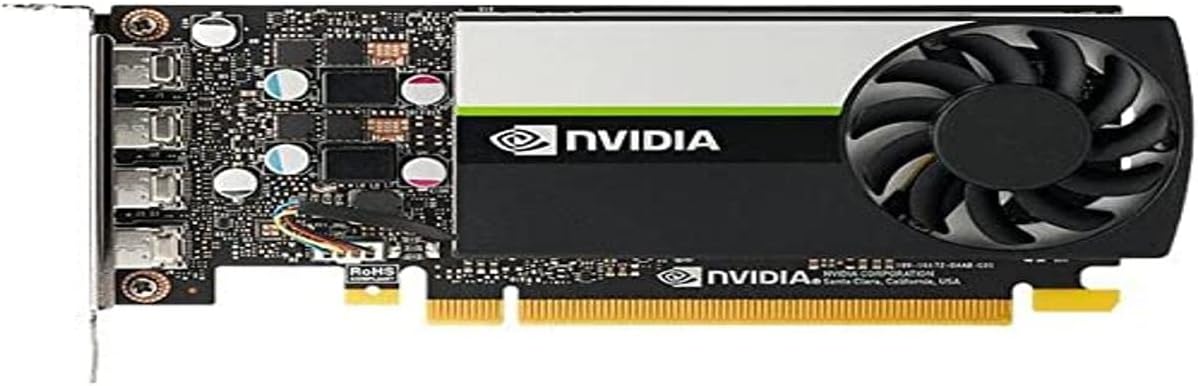


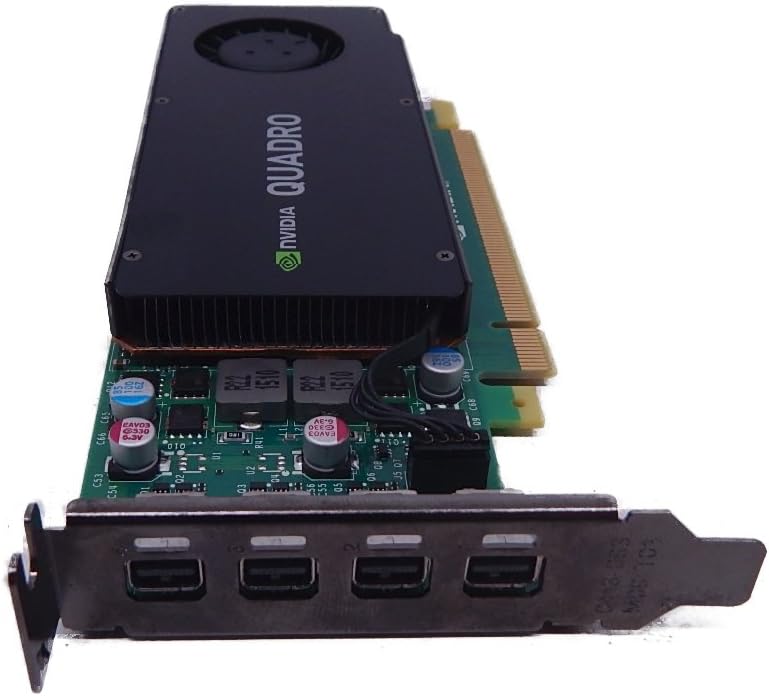
This PNY RTX A400 stands out as the top choice for Optiplex upgrades. Its single-slot low-profile design fits perfectly in small form factor cases. With a 4.7 rating, users praise its professional reliability and compact build quality.
We may earn a commission when you buy through this link, at no additional cost to you.
Powered by the Nvidia Ampere architecture, it delivers strong compute power for AI and rendering tasks. The 4GB GDDR6 memory ensures high-speed data transfer across demanding apps like video production and 3D modeling. The 768 CUDA cores handle professional workflows efficiently.
While it lacks extra physical features like RGB lighting, the focus remains on stability and performance. The 50W power draw is low enough for most office power supplies. These trade-offs are acceptable for business users needing quiet, reliable workstations.
Professional users and designers should buy this card for its certified compatibility with over 100 software apps. It enables seamless multitasking across high-resolution displays. This is the most balanced GPU for Optiplex systems today.
The single-slot design ensures it fits in tight spaces while delivering desktop-class performance for creative work and modeling.
NVIDIA ISV certifications mean your professional apps run smoothly without crashes or glitches during long production sessions.
We may earn a commission when you buy through this link, at no additional cost to you.
The msi GT 1030 is the most budget-friendly card for basic Optiplex upgrades. It scores a 4.5 rating thanks to its simplicity and reliability. Users appreciate how easy it is to install in office environments without extra power cables.
We may earn a commission when you buy through this link, at no additional cost to you.
Its 4GB DDR4 memory supports basic gaming and media playback well. The 1430 MHz boost clock ensures smooth 1080p performance for older titles. The single fan keeps temperatures low while maintaining silent operation during daily tasks.
Performance is limited compared to newer RTX cards, but it is ideal for general office work. The 64-bit memory interface slows data transfer but saves on costs. These limits are acceptable for users prioritizing value over high-end gaming.
Buy this if you need a simple graphics boost for web browsing or light gaming. It connects easily via DisplayPort and HDMI. This card makes budget Optiplex upgrades possible without breaking the bank.
At the lowest price point, this card offers basic graphical power for systems that previously had integrated graphics only.
No external power connector is required so users can install it quickly without modifying their existing system setup.
We may earn a commission when you buy through this link, at no additional cost to you.
This maxsun RTX 3050 offers premium gaming features in a compact Optiplex package. It holds a 4.3 rating from users who value modern architecture. The slim low-profile design fits mini cases while delivering solid 1080p gaming performance.
We may earn a commission when you buy through this link, at no additional cost to you.
Powered by the NV Ampere architecture, it includes AI-specialized Tensor Cores for DLSS technology. The 6GB GDDR6 memory enables smooth multitasking and high-speed data transfer. PCI Express 4.0 provides enhanced bandwidth for next-gen connectivity.
Core clock speeds are lower than full-size cards, limiting peak performance. The 96-bit memory interface is narrower but balances power draw for slim cases. These trade-offs are acceptable for users prioritizing size over maximum frame rates.
Gamers with small Optiplex systems should buy this for its blend of power and compact size. It supports 8K resolution output and multiple monitors. This card turns slim desktops into capable gaming PCs.
AI-driven upscaling improves frame rates in supported games without sacrificing image quality during intense sessions.
HDMI 2.1 and DisplayPort 1.4a support future displays and multi-monitor setups for immersive viewing experiences.
We may earn a commission when you buy through this link, at no additional cost to you.
The ASUS Dual RTX 3050 combines high performance with robust build quality. Its 4.7 rating reflects excellent cooling and reliability. Users note the Axial-tech fan design keeps noise low while maintaining high throughput during gaming sessions.
We may earn a commission when you buy through this link, at no additional cost to you.
With 2X the FP32 throughput of previous gen, this card handles ray-tracing and shading efficiently. The 2nd generation RT Cores boost gaming visuals significantly. OC Mode boosts clock speeds to 1500 MHz for extra performance.
While the 2-slot design is larger than single slot options, it maximizes cooling efficiency. The stainless steel bracket adds durability against corrosion. These features are acceptable for users who prioritize cooling and longevity in small cases.
Buy this if you want reliable performance in compact Optiplex chassis. The dust resistance protects internal components from debris. This card is ideal for enthusiasts seeking power in small spaces.
Longer blades with a barrier ring increase downward air pressure for more effective cooling without loud fans.
IP5X dust resistance and stainless steel brackets ensure the card stays protected in demanding office environments.
We may earn a commission when you buy through this link, at no additional cost to you.
The PNY T600 delivers powerful visualization capabilities for creative workflows. It holds a 4.6 rating from users in design fields. The Turing architecture provides double the performance of previous generations for 3D graphics workloads.
We may earn a commission when you buy through this link, at no additional cost to you.
It enables work with larger models and scenes during design visualization. Hardware compatibility is ensured through NVIDIA support of latest graphics standards. ISV engagements confirm stability across professional software applications.
Gaming performance is secondary to productivity here, which limits its appeal for gamers. The dedicated encode engines support H.264 and HEVC video playback. These limits are acceptable for professionals needing reliable creative tools.
Designers and engineers should buy this for its multi-display support and stable architecture. It drives up to four 5K displays per card. This card ensures smooth rendering during complex visualization projects.
Connect up to four high-resolution displays to expand your visual workspace for detailed project work.
ISV certifications guarantee your critical apps run without crashing during intensive 3D modeling tasks.
We may earn a commission when you buy through this link, at no additional cost to you.
The GIGABYTE RTX 3050 provides a balanced solution for gaming and work. Its 4.6 rating comes from robust cooling and performance. Users note the 2X WINDFORCE fans effectively manage heat during extended gaming sessions.
We may earn a commission when you buy through this link, at no additional cost to you.
Powered by Ampere architecture, it includes 3rd gen Tensor Cores for DLSS boosts. The 6GB GDDR6 memory ensures seamless multitasking across demanding apps. 2nd generation RT Cores provide a whole new level of ray-tracing performance.
While it lacks advanced cooling systems, the fan design improves thermal efficiency over budget models. The 96-bit memory interface balances speed and cost. These trade-offs are acceptable for users needing a reliable mid-range card.
Gamers with Optiplex systems should buy this for its mix of speed and stability. It handles modern titles with DLSS enabled. This card delivers consistent performance in compact chassis.
Tensor cores enable AI algorithms that boost frame rates while maintaining visual clarity during gameplay.
Dual fan design increases airflow to keep components cool without adding excessive noise to the room.
We may earn a commission when you buy through this link, at no additional cost to you.
The msi RTX 3050 LP fits low-profile systems while offering strong performance. It holds a 4.5 rating for its reliable build and speed. Users appreciate the 1492 MHz boost clock for responsive gaming in small cases.
We may earn a commission when you buy through this link, at no additional cost to you.
Powered by Ampere architecture, it delivers efficient power and compute power. The 6GB GDDR6 memory supports high-speed data transfer and seamless multitasking. HDMI and DP outputs allow multiple high-resolution display connections.
The 96-bit memory interface is narrower than desktop cards but sufficient for small form factors. Single slot cooling limits airflow but fits tight spaces. These trade-offs are acceptable for users prioritizing space efficiency.
Buy this if you need a low-profile card with modern architecture. The 14 Gbps memory speed ensures smooth rendering. This card transforms Optiplex systems into capable gaming PCs.
Boost clocks near 1500 MHz provide smooth gaming performance without needing external power connections.
Multiple HDMI and DisplayPort outputs let you connect several monitors for expanded workspace.
We may earn a commission when you buy through this link, at no additional cost to you.
The PNY Quadro K1200 offers professional stability for older systems. It holds a 4.4 rating from IT managers valuing warranty support. The four Mini DisplayPort connectors enable multi-display setups in compact footprints.
We may earn a commission when you buy through this link, at no additional cost to you.
It delivers reliable 3D application performance for business use. The PCI Express 2.0 slot ensures compatibility with older motherboards. Certified applications ensure stability for daily work tasks and reporting tools.
Modern gaming performance is weak due to older architecture and narrower memory. The 3-year warranty provides peace of mind for business deployments. These trade-offs are acceptable for users needing legacy support.
System administrators should buy this for reliable multi-display connectivity. The warranty covers unexpected hardware failures. This card is ideal for business PCs requiring stable visuals.
Four connectors allow you to view multiple documents and spreadsheets simultaneously during work.
Three years of coverage reduce maintenance costs for companies deploying these cards across offices.
We may earn a commission when you buy through this link, at no additional cost to you.
The NVIDIA P1000 is a powerful low-profile professional graphics solution. It scores a 4.5 rating from creative professionals. The Pascal architecture delivers 60% better performance than previous generations for rendering tasks.
We may earn a commission when you buy through this link, at no additional cost to you.
It supports 4K and 5K displays for stunning visual detail. Extensive ISV certifications ensure reliability for demanding applications like CAD and 3D modeling. The compact form factor fits small workstations easily.
Gaming features are limited compared to consumer cards, focusing on stability and precision. The 4GB GDDR5 memory provides efficient data transfer. These trade-offs are acceptable for users prioritizing professional tool support.
Architects and designers should buy this for its reliable high-resolution support. The compact size fits small desktops. This card ensures accurate rendering for professional projects.
Certified apps guarantee consistent performance during critical design work without unexpected crashes.
Connect to 5K displays for maximum workspace and detail in your visual projects.
We may earn a commission when you buy through this link, at no additional cost to you.
The NVIDIA Quadro K1200 provides reliable legacy support for older Optiplex models. It holds a 4.2 rating for its consistent performance. The PCI Express 2.0 slot ensures compatibility with older systems needing professional stability.
We may earn a commission when you buy through this link, at no additional cost to you.
With 4GB GDDR5 memory, it supports basic 3D tasks effectively. The low profile design fits slim cases without sacrificing connectivity. It includes DVI and DP outputs for older monitor compatibility.
Modern features like high-speed video encoding are absent, limiting current use cases. The 4GB memory capacity handles basic workloads but not heavy rendering. These trade-offs are acceptable for older office systems.
System admins should buy this for replacing broken legacy cards reliably. The design fits older chassis perfectly. This card ensures continuous operation for long-term deployments.
Works with older motherboards that do not support newer PCIe standards effectively.
Designed for continuous operation in office environments where uptime is critical.
We may earn a commission when you buy through this link, at no additional cost to you.
Selecting the right GPU requires evaluating physical size, power, and performance needs. This guide outlines key factors to ensure compatibility with Dell Optiplex systems.
Optiplex systems often use Small Form Factor (SFF) cases that cannot accommodate standard graphics cards. Look for low-profile brackets and single-slot or 2-slot designs. Verify the maximum card length your case allows before purchasing.
Always choose a low-profile card to fit slim cases without modifications.
Many Optiplex systems have limited power supplies ranging from 180W to 260W. Cards that draw power from the PCIe slot alone are ideal. Check if your model supports additional power connectors if needed.
Prioritize cards with low power draw to ensure system stability.
GDDR6 memory offers faster data transfer than DDR4 or DDR5. For creative workflows, 4GB to 6GB is standard. Consider memory bandwidth for handling large textures and models.
Choose higher memory capacity and faster bandwidth for better multitasking.
Ensure the card supports your display connections like HDMI 2.1 or DisplayPort 1.4a. Multi-monitor users need multiple outputs or dual-link DVI. Future-proof your setup with modern standards.
Verify output types match your monitors for seamless setup.
Gaming needs RTX cards with DLSS and ray-tracing support. Professional work requires ISV certified Quadro or RTX A-series. General office tasks can work with basic GT or P-series cards.
Select a card aligned with your primary workload for optimal value.
Reputable brands like ASUS, PNY, MSI, and GIGABYTE offer better build quality and support. Look for warranties and customer service records. Reliable cards reduce the risk of hardware failure.
Stick with known brands for consistent performance and support.
Small cases restrict airflow so fans must be efficient. Axial-tech designs help reduce noise while cooling. Ensure the card fits thermally within your chassis.
Prioritize efficient cooling to avoid thermal throttling.
Balance cost with performance needs. Budget cards like GT 1030 are cheap but slow. Mid-range RTX cards offer better value for gaming and work.
Invest in cards that fit your budget and performance requirements.
Install the GPU by shutting down your Optiplex and unplugging the power cable. Remove the rear panel screw and slide the card into the PCIe slot. Secure the bracket screw to hold the card in place firmly.
After installation, power on the system and install the latest NVIDIA drivers. Use GeForce Experience or NVIDIA Studio for game optimization. Regularly update drivers for performance fixes and compatibility.
Clean dust from fans and filters using compressed air. Ensure case ventilation is not blocked by nearby furniture. Monitor temperatures to avoid overheating during long sessions.
No. Most Optiplex SFF cases require low-profile cards with small height. You must verify case dimensions and power limits before buying. Standard gaming cards often will not fit or connect.
RTX 3050 cards offer the best balance for small cases. They support DLSS and ray-tracing while staying low-profile. Check power supply limits before installation.
Low-profile Optiplex GPUs usually draw power from the motherboard slot. Avoid cards needing PCIe power connectors unless your system supports them. Most 50W cards fit directly.
RTX cards offer better AI features and gaming performance. Quadro and RTX A-series offer ISV certifications for professional apps. Choose based on your software needs.
Open the system and check the PSU label for wattage. Optiplex systems vary between 180W and 260W. Ensure your GPU fits within that limit for stability.
They fit compact desktops like Optiplex. They consume less power and produce less noise. Ideal for office and home compact setups.
Some Optiplex models allow GPU upgrades. Check the manual for compatible models. Most support low-profile cards without needing extra power.
Yes. Drivers ensure your GPU works correctly with your system. Install them from NVIDIA for optimal performance and stability.
This guide highlights the top options for upgrading Dell Optiplex systems. Our picks range from budget-friendly GT cards to powerful RTX 3050 models. Each offers distinct benefits for specific needs.
Prioritize physical fit and power supply before choosing features. Low-profile designs and single-slot options are critical for SFF cases. Match the card to your work or gaming goals.
Prices and availability change frequently on Amazon. Always verify current specs and links before buying to ensure compatibility with your specific model.