
hohem iSteady X3 SE
4.2Editor score
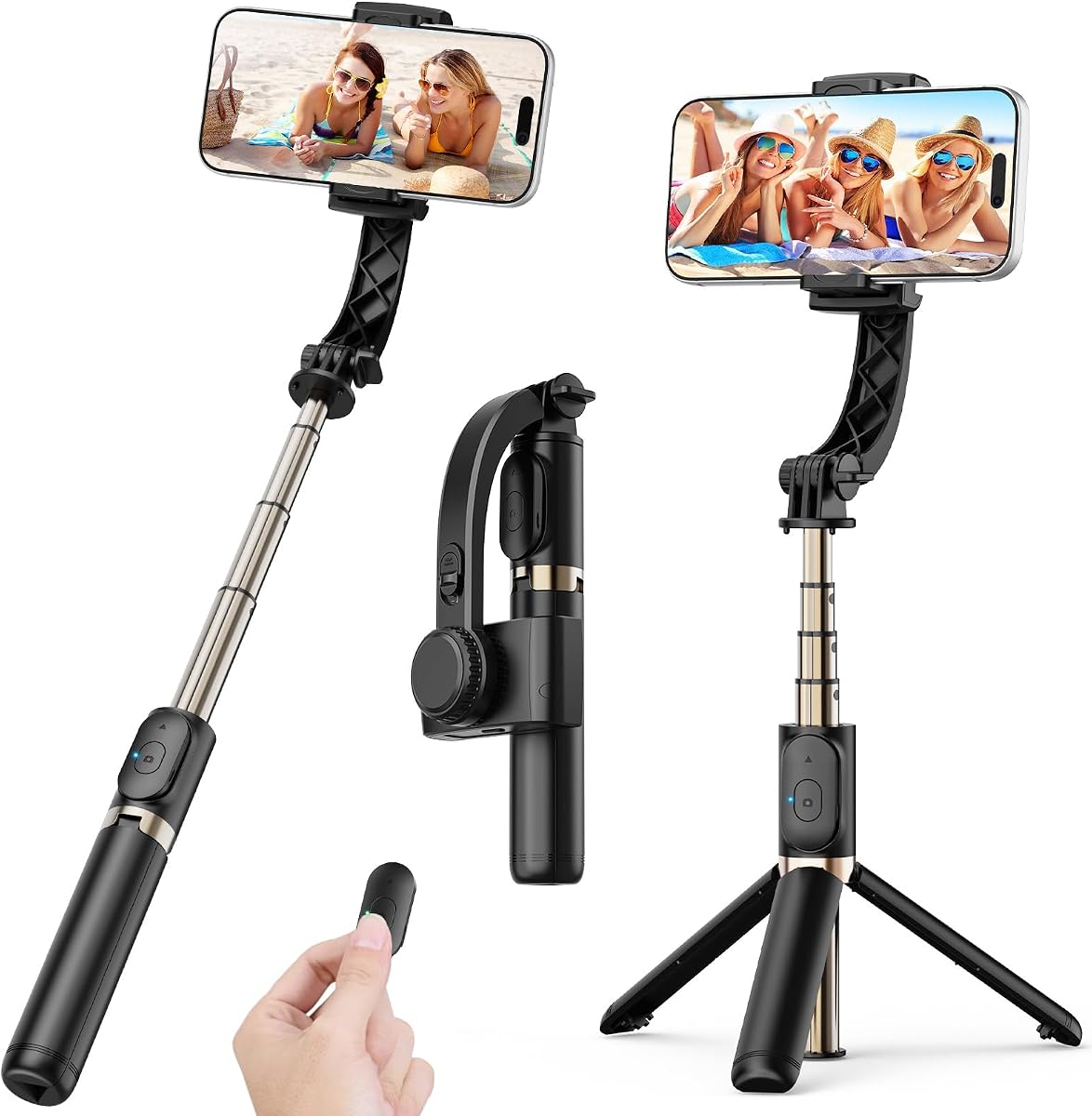
Detachable remote controller
11 hour battery life
Portable foldable design
Discover the top gimbals for Pixel 10a in October 2026. Our expert guide compares stabilization, tracking, and features to help you choose the perfect device.
Choosing the right gimbal for Pixel 10a ensures smooth footage and professional results. A good stabilizer locks camera movement while tracking subjects effortlessly for vlogging and social media.
We evaluated ten leading gimbal models based on stabilization quality, battery life, and smart tracking features. Each entry offers unique benefits for creators seeking reliable handheld video tools.
Every pick highlights key strengths and ideal use cases for your Pixel 10a. Note that pricing and availability may change, so check current offers before purchasing your new gear.
4.2Editor score

4.4Editor score

4.5Editor score
This side-by-side comparison highlights key specs across all ten selected gimbal models. Use this table to quickly identify the right stabilization tool for your Pixel 10a filming needs.




The DJI Osmo Mobile 8 stands out with a 4.4 rating for its seamless stabilization and tracking capabilities. It ensures your Pixel 10a footage remains smooth during dynamic movements or extended sessions.
We may earn a commission when you buy through this link, at no additional cost to you.
Its native tracking works with audio and lighting to elevate content quality. Features like 360° pan rotation and a built-in tripod allow versatile shooting without needing extra accessories.
While the DJI Mimo app has been removed from Google Play, the gimbal’s hardware remains top-tier. This trade-off is acceptable for creators who value performance and flexibility over software convenience.
Best for vloggers and event shooters, this model delivers professional results. Invest in the Osmo Mobile 8 if you prioritize reliability and advanced stabilization for your Pixel 10a.
Direct phone connection enables quick setup and intelligent subject tracking for dynamic shots.
A 10-hour battery life ensures uninterrupted filming with charging capabilities for your phone.
We may earn a commission when you buy through this link, at no additional cost to you.
The DJI Osmo Mobile 7 offers a 4.4 rating and is ideal for creators needing portability. It provides stable, lossless stabilization that handles quick movements with ease.
We may earn a commission when you buy through this link, at no additional cost to you.
At just 300 grams, this gimbal features a foldable design and built-in tripod. It supports ActiveTrack 7.0 for smooth subject tracking across diverse scenarios and environments.
While it lacks advanced lighting, its ergonomic grip and 10-hour battery life make it practical. The app limitation is minor given the overall hardware performance and ease of use.
Choose this model for travel and social media content where weight matters. It balances affordability and professional stabilization for daily use with your Pixel 10a.
The anti-slip handle ensures comfortable handling during long filming sessions without fatigue.
ShotGuides and One-Tap Edit tools help you film and edit like a pro instantly.
We may earn a commission when you buy through this link, at no additional cost to you.
With a 4.5 rating, the DJI Osmo Mobile 7P excels in tracking and creative features. It combines stable stabilization with a multifunctional module for enhanced content creation capabilities.
We may earn a commission when you buy through this link, at no additional cost to you.
The built-in extension rod and tripod allow versatile angles for vlogs or group shots. Pairing with DJI Mimo provides ShotGuides and editing tools for streamlined workflow efficiency.
Though setup is simple, the app remains unavailable on Google Play. This minor hurdle does not outweigh the benefits of integrated mic reception and advanced tracking for creators.
Opt for the 7P if you want all-in-one creative flexibility. It is perfect for vloggers seeking professional-quality tracking and lighting without bulky accessories.
The built-in extension rod and tripod let you capture wide selfies effortlessly.
The module supports DJI Mic 2 reception for clearer audio during recordings.
We may earn a commission when you buy through this link, at no additional cost to you.
The Insta360 Flow 2 Pro earns a 4.2 rating for its comprehensive creator kit. It offers seamless native camera tracking across apps and advanced active zoom tracking for precision.
We may earn a commission when you buy through this link, at no additional cost to you.
Features like built-in lighting and a teleprompter elevate content quality. The all-in-one design simplifies your gear while ensuring smooth, professional-grade video recording results.
While the higher price reflects its premium tools, the versatility is unmatched. Some users may need time to master the full feature set, but it pays off.
Ideal for serious creators and streamers, this gimbal offers unmatched versatility. Choose it if you want a complete setup for travel and YouTube content.
Multi-person tracking ensures everyone stays in the shot during group events.
Free tilt mode allows consistent angles while moving your phone up and down.
We may earn a commission when you buy through this link, at no additional cost to you.
Rated 4.2, the hohem iSteady X3 SE is a perfect entry-level gimbal. It offers advanced stabilization and a detachable remote for solo shooting flexibility and ease of use.
We may earn a commission when you buy through this link, at no additional cost to you.
At 11 hours of battery life, it supports extended shoots. The foldable design and Hohem Joy app enhance its utility for beginners looking to create professional-grade content.
While the app lacks some advanced tools, it covers all basics well. The remote control allows capturing moments from a distance without needing a helper or tripod.
Great for travelers and first-time users, this model delivers value. Prioritize the X3 SE if you want quality stabilization without breaking the budget.
Simple controls and gesture support make it easy to start filming quickly.
Weighing only 0.79 lbs, it folds into a pocket-sized tool for travel.
We may earn a commission when you buy through this link, at no additional cost to you.
With a 4.7 rating, the COOVOAMAE Gimbal is a solid pick for casual users. Its 1-axis stabilization reduces shake, while its extendable design supports creative angles and group shots.
We may earn a commission when you buy through this link, at no additional cost to you.
No app is needed; simple buttons handle vertical and horizontal switching. The tripod mode turns it into a stable stand for hands-free calls or recording sessions.
Battery life is short at 2 hours, but for quick clips, it suffices. The 1-axis limit may show some sway during fast movements, but stability remains strong for most use cases.
Choose this for social media and travel. If you want a simple, lightweight solution without complexity, this gimbal offers high value and ease of use.
A 31.5-inch extendable rod helps capture wide angles and group shots easily.
Instant tripod conversion allows hands-free video recording on any flat surface.
We may earn a commission when you buy through this link, at no additional cost to you.
Rated 4.3, the hohem iSteady V3 Ultra delivers smooth, buttery shots with advanced iSteady 9.0 tech. The detachable touchscreen remote provides precise control over tracking and settings.
We may earn a commission when you buy through this link, at no additional cost to you.
Features like built-in fill light and extension rod enhance creative flexibility. It is compact and folds to 6.3 inches, making it a powerful pocket-sized tool for serious creators.
The app is key for full functionality, so download it before traveling. The weight and complexity are worth it for those who demand remote control and pro lighting options.
Ideal for fitness and travel vloggers, this gimbal balances portability with power. Choose it if you need remote monitoring and high payload capacity for accessories.
Adjust brightness and color temp remotely for perfect lighting in any condition.
Supports phones up to 14.11 oz, ideal for larger-screen devices and cases.
We may earn a commission when you buy through this link, at no additional cost to you.
With a 4.5 rating, the hohem iSteady M7 offers top-tier performance for creators. Its magnetic AI tracker ensures precise recognition without extra setup or calibration steps needed.
We may earn a commission when you buy through this link, at no additional cost to you.
The detachable 1.4-inch touchscreen remote allows full shot control. A 500g payload supports accessories like mics and lights, while RGB CCT fill light adds cinematic quality.
The price is high, but the build and features justify it. It may be heavy for travel, but its expandability and control options are unmatched in this category.
Best for pro creators and filmmakers, this gimbal delivers studio-quality results. Choose the M7 if you need advanced tracking, lighting, and payload versatility for complex shoots.
Select tracking targets by tapping or dragging on the detachable touchscreen.
Three expansion ports allow adding microphones, fill lights, and phone lenses.
We may earn a commission when you buy through this link, at no additional cost to you.
Rated 4.4, the DJI OM 5 is a lightweight, palm-sized tool that unlocks full smartphone potential. It delivers flawless selfies and smooth video with ActiveTrack 4.0 tracking precision.
We may earn a commission when you buy through this link, at no additional cost to you.
ShotGuides recognize your environment and recommend shot sequences with tutorials. The built-in extension rod supports comfortable low-angle filming and includes friends in group selfies.
Though newer models exist, this remains a reliable, affordable option. It lacks integrated lighting but excels in portability and ease of use for casual content creators.
Great for beginners and travelers, this gimbal combines stability with fun features. Choose the OM 5 if you want a compact, user-friendly stabilizer without extra bulk.
ShotGuides provide tutorials and shot sequences so first-time users get epic results.
Magnetically secure your phone in seconds without calibration or balancing steps.
We may earn a commission when you buy through this link, at no additional cost to you.
The hohem iSteady M7 earns a 4.5 rating for all-day shooting and versatile control. Its 12-hour battery supports uninterrupted recording with reverse charging to keep your phone powered up.
We may earn a commission when you buy through this link, at no additional cost to you.
Integrated RGB and CCT fill light illuminate shots effectively in low-light environments. The built-in 193mm extension pole supports seamless transitions between high and low shooting angles.
While the price reflects its premium features, it is worth it for serious users. It may be heavier than competitors, but the battery and control options justify the investment.
Ideal for travelers and vloggers, this gimbal balances power with portability. Choose it if you need reliable battery life and lighting for all-day content creation.
The 12-hour battery life supports entire days of filming without needing a charge.
The 193mm extension pole allows seamless transitions between high and low angles.
We may earn a commission when you buy through this link, at no additional cost to you.
Selecting the right gimbal for your Pixel 10a requires understanding key factors like stabilization, battery, and smart features.
Look for 3-axis stabilization to eliminate shake across all angles. This ensures your video remains smooth even during active or fast-paced movement.
Prioritize models with proven motor performance and sensor accuracy for the best results.
Choose a gimbal with at least 10 hours of runtime to support extended filming sessions. Consider if it offers reverse charging to power your phone.
Longer battery life ensures you capture entire events or travel days without interruption.
ActiveTrack or AI tracking keeps subjects in frame automatically. Native camera compatibility reduces lag and improves responsiveness.
Verify if your Pixel 10a is supported by the tracking system before purchasing.
Opt for foldable and lightweight designs if you plan to travel frequently. A compact build reduces strain during handheld shooting.
Ensure the folded size fits easily into your bag or pocket for convenience.
Check for payload capacity and expansion ports to attach mics or lights. This flexibility helps future-proof your setup.
Higher payload limits allow for more professional and versatile shooting configurations.
User-friendly controls and clear apps simplify setup. Look for features like auto-leveling or quick-release clamps.
Beginner-friendly tools save time and reduce frustration when shooting on the go.
Ensure the companion app supports your operating system and phone model. Some apps may have compatibility issues affecting functionality.
Download and test the app before finalizing your purchase to confirm it works well.
Set a budget that matches your content needs without overspending. Basic stabilizers offer great value for casual users.
Balance price with essential features to ensure you get the best return on investment.
Start by balancing your phone on the gimbal mount to ensure smooth operation. Align the center of gravity carefully before turning on the motors.
Use the companion app to calibrate settings and activate tracking features. Keep the firmware updated for optimal performance and new feature access.
Store the gimbal in a dry, protected place when not in use. Regularly check screws and joints for wear and clean the surfaces to maintain functionality.
While the Pixel 10a has good stabilization, a gimbal provides superior smoothness for video. It is essential for professional or dynamic shots where hand shake is noticeable.
Most modern gimbals support Android devices like the Pixel 10a, but verify weight and app compatibility. Always check the manufacturer’s official compatibility list before buying.
Loosen the axes, slide the phone until it stays level on its own, then tighten. Proper balancing ensures motors run smoothly and extends battery life significantly.
For vlogging, prioritize tracking, battery life, and portability. Features like built-in tripods and quick-release mounts enhance solo shooting efficiency and flexibility.
Most gimbals are not water-resistant. Protect your device from rain or extreme moisture to prevent damage to the motors and electronics during use.
Wipe it with a dry, soft cloth and avoid liquids near the motors. Store it properly in a padded case to prevent scratches or impact damage.
Most smartphone gimbals support up to 500 grams. The Pixel 10a fits easily within this limit even with a protective case attached.
Ensure your phone's Bluetooth and camera settings are enabled. Some apps may need permissions to access full tracking and editing features.
Our top picks include the DJI Osmo Mobile 8 for overall performance and the hohem iSteady X3 SE for budget-friendly value.
Prioritize battery life and stabilization quality to match your specific content creation goals. Choose advanced features if you plan to shoot professionally.
Always check current pricing and availability as offers change regularly. The right gimbal enhances your Pixel 10a to deliver stunning video results.