
Anker Prime Charger
4.6Editor score
160W power in AirPods size
Real-time monitoring via app
Smart power distribution system
This guide compares the best Gan Charger with Display options for 2026, reviewing top models for power, size, screen clarity, and safety features.
Finding the right power solution for modern devices requires more than just high wattage. You need visibility and control over how your electronics receive energy. A Gan Charger with Display offers exactly this, combining advanced silicon technology with real-time monitoring screens.
We evaluated ten leading models based on power output, port configuration, display quality, and safety features. Each product was analyzed for its ability to handle multiple devices simultaneously while maintaining compact dimensions for travel and desk use.
Each pick highlights specific strengths like smart power allocation or touch controls. Remember that availability and specifications can shift over time so always verify details before purchasing your next charging solution for laptops and phones.
4.6Editor score

4.7Editor score

4.7Editor score
This side-by-side comparison details the specifications and capabilities of every top-rated model to help you find the perfect match for your specific power needs.




The UGREEN Nexode Pro Charger stands out as a powerful solution for users needing high wattage with visual feedback. Its 160W total output ensures that even the most demanding laptops can charge at full speed while the smart display keeps you informed.
We may earn a commission when you buy through this link, at no additional cost to you.
Key strengths include its five port configuration which allows simultaneous charging of a laptop and multiple accessories. The rotatable touch control panel provides intuitive access to real-time data like wattage and temperature without needing an app.
While the display adds convenience it does mean the unit is slightly larger than basic chargers. Additionally the touch screen requires minimal power to operate which is a small trade-off for the enhanced user experience it provides.
Anyone needing a reliable desktop or travel charging station for multiple high power devices should consider this model. It balances raw power with smart features effectively making it a top choice for power users.
The animated display shows exact wattage and temperature allowing users to verify charging speeds instantly.
Works with over 1000 device types including iOS and Android phones as well as Windows laptops.
We may earn a commission when you buy through this link, at no additional cost to you.
The Anker Prime Charger delivers exceptional power in a remarkably small form factor. With 160W output packed into a size comparable to an AirPods case it sets a new standard for portable high-wattage charging solutions.
We may earn a commission when you buy through this link, at no additional cost to you.
Its main strength lies in maintaining full 140W output on a single port without derating. This ensures your MacBook Pro charges at maximum speed consistently. The smart distribution allows multiple devices to share power efficiently.
While it offers advanced features like Bluetooth monitoring the setup process might be too much for casual users. The price is also higher than average which might be a barrier for some buyers looking for basic charging.
This model is ideal for professionals who need reliability and speed without carrying bulky adapters. If you value premium build quality and smart features this charger justifies its cost with performance.
Advanced GaN tech allows this unit to be smaller than standard chargers despite its high power output.
Users can switch modes instantly via the screen or customize settings through the Anker app.
We may earn a commission when you buy through this link, at no additional cost to you.
Anker 140W Max 4-Port offers a balanced mix of power and price for most users. It provides enough wattage for laptops and phones simultaneously without costing as much as the premium models available in the market.
We may earn a commission when you buy through this link, at no additional cost to you.
The four port layout ensures you can connect your laptop phone and tablet at once. The color display gives a clear view of status and temperature which adds confidence during long charging sessions.
However the display is not as interactive as some competitors offering basic information only. Also the weight is slightly higher than others meaning it adds a bit more to your travel bag load.
This charger is a practical choice for home or office use where extreme portability is not the main priority. It delivers solid performance and essential safety features at a competitive price point.
Optimized GaN technology enables fast charging for four devices at the same time effectively.
ActiveShield 4.0 monitors temperature millions of times daily to keep your devices safe.
We may earn a commission when you buy through this link, at no additional cost to you.
The Anker 100W Max 3-Port is designed for users who need consistent power without unnecessary bulk. It supports high-power devices well while remaining compact enough for daily carry in a coat pocket or small bag.
We may earn a commission when you buy through this link, at no additional cost to you.
Its ability to sustain peak performance for longer than average chargers is a key benefit. The display shows temperature and port details clearly so you always know the charging status at a glance.
For those needing to charge multiple laptops at once the total wattage might be limiting. But for phones tablets and one laptop it is more than enough to handle modern power requirements.
This model suits commuters and students who value reliability and simplicity. It provides a smart viewing experience without overcomplicating the design making it a great everyday travel companion.
Automatically switches to low current mode to safely charge sensitive earbuds and wearables.
Foldable plug and reduced frame size make it easy to store during transit.
We may earn a commission when you buy through this link, at no additional cost to you.
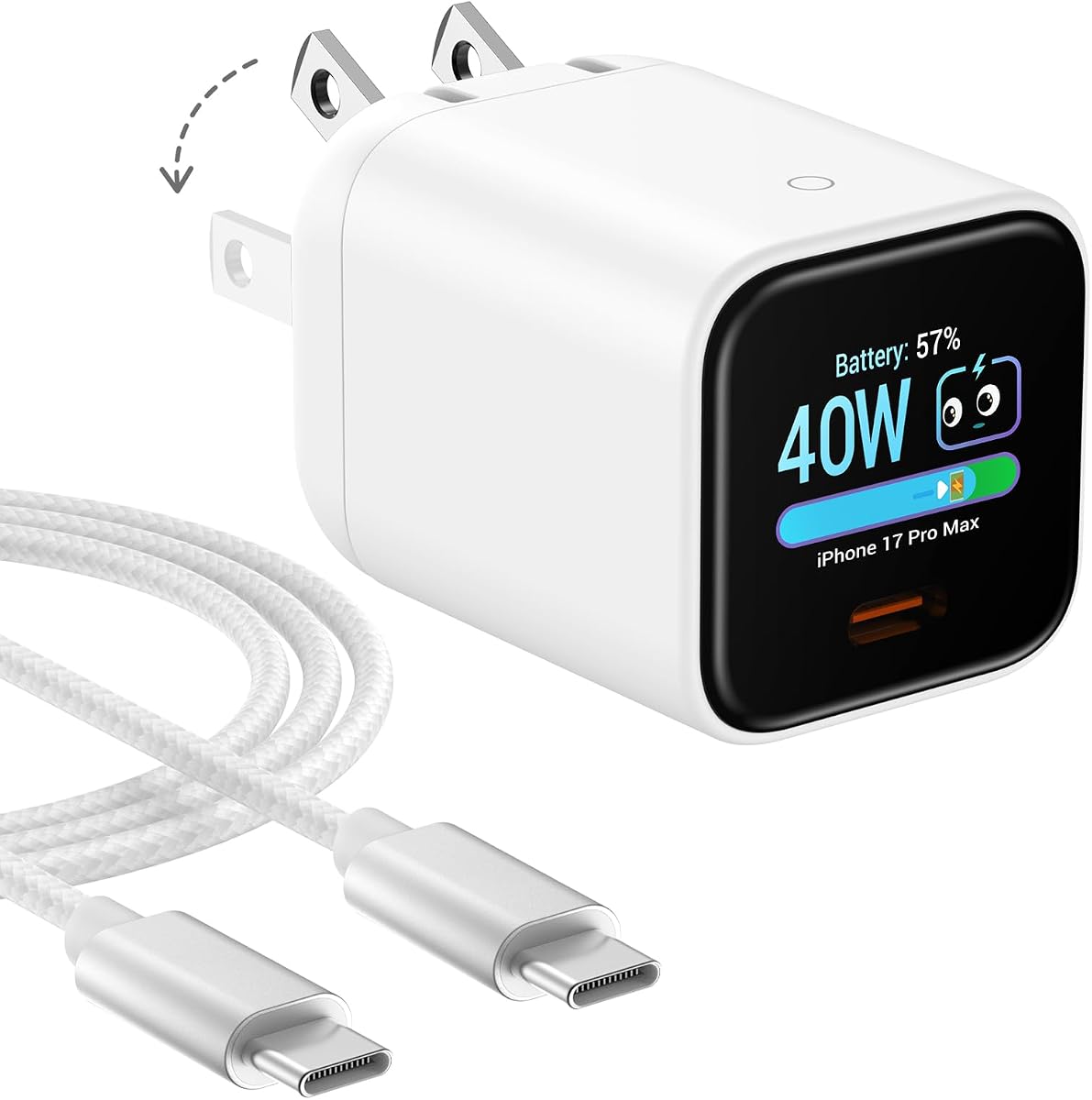
The Smart Charging Butler focuses heavily on extending battery lifespan through intelligent power management. By dynamically adjusting output based on temperature and charge level it protects your device health better than standard chargers.
We may earn a commission when you buy through this link, at no additional cost to you.
Its 45W capacity is sufficient for most phones and small tablets. The included braided cable adds significant value by ensuring you have a durable connection from the start without needing extra purchases.
Because it is not meant for high-wattage laptops users needing more power may find it insufficient. The screen rotation features are unique but might feel unnecessary to those who just want a plug-and-play solution.
This charger is perfect for users who prioritize battery health over raw speed. It is especially useful for overnight charging where thermal management is critical for long-term device longevity.
Built-in AI monitors battery status to prevent overheating and extend overall lifespan.
Tap or long press actions allow quick access to real-time charging speed data.
We may earn a commission when you buy through this link, at no additional cost to you.
The Anker Prime Charging Station is built for users who need to power an entire desk of devices simultaneously. With 250W total output it handles high demands efficiently and keeps all your essential gear charged and ready.
We may earn a commission when you buy through this link, at no additional cost to you.
Its large LCD display provides instant updates on charging status which is useful for managing complex setups. The control dial allows for immediate adjustments to energy output ensuring each device receives optimal power levels.
While powerful it is not suitable for travel due to its size and weight. It is intended for stationary use where you need a central hub rather than a portable solution for on-the-go charging needs.
This unit is ideal for creative professionals or home offices with multiple high-power devices. If you need a single point to charge laptops phones and accessories efficiently this station delivers unmatched versatility.
Supports up to 140W on a single port for fast laptop charging without slowdown.
Display updates clear on charging status and speed for immediate awareness.
We may earn a commission when you buy through this link, at no additional cost to you.
MOKiN 70W USB C Charger offers a compact solution for those needing moderate power in a small size. It is designed to be significantly smaller than traditional laptop chargers making it easy to carry in a backpack or handbag.
We may earn a commission when you buy through this link, at no additional cost to you.
The interactive display provides detailed port-by-port info and temperature data which helps ensure safe operation. It also offers a charging summary view after disconnecting devices which adds a unique layer of transparency.
While efficient for phones and one laptop the total wattage limits its ability to handle multiple heavy loads. Also the lack of a included cable means you need to have one handy for use.
This model is great for students and travelers who need a light charging option. Its balance of size and display features makes it a strong contender for daily commute use.
Advanced technology reduces bulk by up to 90% compared to standard chargers.
Rotate the display 90 degrees to fit your viewing angle preference easily.
We may earn a commission when you buy through this link, at no additional cost to you.
MOKiN 140W USB C Charger provides high power at a competitive price point. It supports four devices simultaneously and includes a high-quality cable in the box which adds immediate value to the purchase.
We may earn a commission when you buy through this link, at no additional cost to you.
The live screen display keeps you informed of charging status and temperature ensuring peace of mind during use. It handles MacBook Pro charging efficiently refueling devices quickly for long work sessions.
While a capable charger the brand is less known than some competitors so warranty support might vary. The physical size is slightly larger than the ultra-compact options so it may not fit in small pockets.
This unit is well-suited for home office or casual travel use. It balances power and affordability effectively making it a practical choice for users with standard charging needs.
Charge MacBook Pro from 0 to 50% in about 25 minutes with fast power delivery.
High-definition color display shows power output details per port in real time.
We may earn a commission when you buy through this link, at no additional cost to you.
The DJI Power 140W GaN Combo is a specialized solution designed to handle multiple battery charging needs efficiently. It includes a unique digital display cable that shows power output directly on the cable itself.
We may earn a commission when you buy through this link, at no additional cost to you.
Its main strength is optimizing power for DJI devices while still supporting laptops and phones. The GaN tech ensures stable cool operation which is crucial for sensitive drone equipment during charging.
For general users who do not have DJI gear the specialized features may not be fully utilized. The price is higher than standard chargers but justified if you rely heavily on drone batteries for your work.
This combo is essential for drone pilots and professionals needing reliable power on the go. It combines charger and cable into a robust set designed for durability and performance.
Cable displays charging status instantly so you can verify connection without the main unit.
Compatible with PD 3.1 to power various devices efficiently at once.
We may earn a commission when you buy through this link, at no additional cost to you.
The Anker Nano Smart Display Charger is designed for portability and smart iPhone charging features. It fits easily in a pocket and offers fast 45W charging which is enough for most daily smartphone needs.
We may earn a commission when you buy through this link, at no additional cost to you.
Its smart recognition identifies compatible iPhone models to adjust power delivery safely. This feature helps extend battery life and keeps the charging process optimized without user intervention.
Since it has only one port you cannot charge a laptop and phone simultaneously. But for travelers needing a light charger for phones and small tablets it offers excellent convenience and reliability.
This model is perfect for daily commuters or anyone needing a secondary charger. It provides smart features in a tiny package making it a practical addition to any tech kit.
Automatically detects supported iPhone models and adjusts charging for safer power delivery.
Foldable prongs and small frame make it easy to use in tight spaces.
We may earn a commission when you buy through this link, at no additional cost to you.
Choosing the right charger involves more than checking wattage. This guide outlines key factors to help you select a model that fits your power needs and lifestyle.
Total wattage determines how much power the charger can deliver across all ports combined. For laptops you generally need at least 65W to charge efficiently while high-performance models require 100W or more. Always ensure the total output exceeds the combined needs of your devices.
Choose a higher wattage model if you plan to charge multiple power-hungry devices at once.
Ports define how many devices you can charge simultaneously. Look for a mix of USB-C and USB-A if you still use older accessories. Ensure at least one USB-C port supports high wattage for laptop charging.
Verify that port distribution allows your main devices to charge at full speed without slowdown.
Displays provide real-time data like temperature and wattage. Touch screens add convenience but may use battery power. Consider if you need detailed views or just basic status lights.
Opt for high-definition displays if visual clarity is important for your usage routine.
High-wattage chargers can be bulky. Check dimensions and weight to ensure it fits in your bag. Foldable plugs are essential for travel to save space.
Prioritize compact designs if you need to carry the charger daily with your devices.
Look for built-in safety protections like overheat and overvoltage prevention. Advanced cooling systems prevent device damage. Some chargers use GaN technology to stay cooler than older tech.
Always select models with multiple safety certifications to protect your expensive electronics.
Some chargers come with high-quality cables while others do not. Ensure the included cable matches your device ports and supports fast charging speeds. Buying separate cables can add to the total cost.
Check if the cable length is sufficient for your desk or travel setup needs.
Some models offer Bluetooth app control for customization. This can be useful for setting schedules or optimizing modes. Decide if this extra layer of control is needed for your workflow.
Consider if app integration adds value or complicates your charging routine unnecessarily.
Prices vary widely based on features and brand. Compare the total cost including accessories to see value. Sometimes paying slightly more adds essential safety or warranty benefits.
Balance your initial spend against long-term reliability and feature requirements.
To maximize efficiency plug high-wattage devices into the primary USB-C ports labeled for maximum output. This ensures your laptop receives sufficient power without throttling speed.
Avoid stacking the charger under heavy objects or fabrics during operation to prevent overheating. Allow airflow around the unit to keep the internal temperature low for safety.
Regularly check the display for status updates and clean the screen with a soft dry cloth. This maintains visibility and protects the interface from dust and grime buildup.
Display screens do use a small amount of power but it is negligible compared to charging a device. Most units turn off the screen automatically after a period of inactivity.
Not necessarily. High-wattage output is often limited to specific ports. Check the manual to identify which port supports your laptop's full speed requirements.
Yes when using units with safety features like overheat and overvoltage protection. However it is always safer to unplug devices once charged to save energy.
GaN technology allows for smaller and more efficient chargers that generate less heat. This improves portability and protects connected devices from thermal stress.
Yes most fast chargers require a high-quality cable that supports the specific wattage. Using a low-quality cable may limit charging speeds.
It is better to use one multi-port charger to reduce clutter and save outlets. A single charger can power a laptop phone and tablet simultaneously efficiently.
If the display fails the charger may still function normally for charging. Contact the manufacturer if the device itself stops working due to internal issues.
Use a soft microfiber cloth to wipe the screen gently. Avoid using wet wipes or chemicals as they can damage the display coating.
The top picks cover a wide range of needs from budget-friendly daily travel to professional high-power desktop setups. Each model offers unique strengths depending on your device mix and usage habits.
Focus on total wattage and port distribution first to ensure your main devices charge fully. Display features add valuable visibility but should not be the only factor in your decision.
Always check the latest specifications and compatibility details before buying to ensure the model suits your current setup. Prices and features can shift so current data is key.