
ASUS ROG Strix G16 (2025)
4.3Editor score
Intel Core Ultra 9 275HX Processor
NVIDIA GeForce RTX 5070 Ti GPU
240Hz 2.5K Nebula Display
Finding the right gaming laptop for Diablo 4 requires balancing power, display quality, and portability. This guide explores ten top models designed to handle intense gaming sessions with ease.
We compared these laptops based on processor speed, graphics capability, screen refresh rates, and overall build quality. Each selection aims to deliver smooth gameplay and reliable performance for fans of the genre.
Every pick highlights key strengths and ideal user scenarios to help you choose confidently. Please note that specifications and availability can change, so always verify details before purchasing.
4.3Editor score

4.4Editor score

4.5Editor score
As an Amazon Associate we earn from qualifying purchases.
This side-by-side comparison highlights the key specifications and capabilities of each selected laptop to help you make an informed decision based on your specific needs.



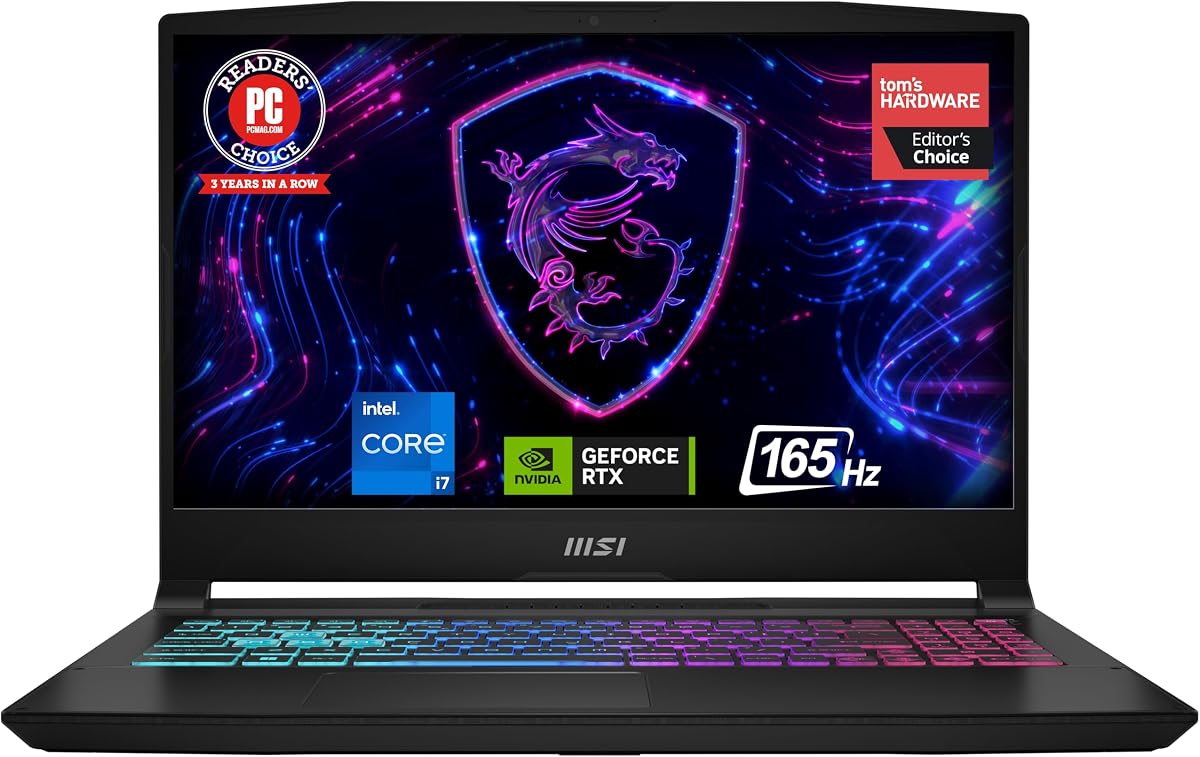

This laptop stands out for its balanced performance and premium features making it an excellent choice for Diablo 4 enthusiasts seeking reliability and visual fidelity.
We may earn a commission when you buy through this link, at no additional cost to you.
The combination of the Intel Core i7 14650HX and RTX 5060 ensures seamless multitasking and high frame rates even during complex in-game scenarios.
While it is robust, the cooling system keeps temperatures in check allowing for extended gaming sessions without significant performance throttling or excessive noise.
Gamers looking for a premium experience with solid build quality and advanced display technologies will find this model highly satisfying for their gaming needs.
The NVIDIA GeForce RTX 5060 brings DLSS 4 and Max-Q technologies for optimized performance and energy efficiency during intense gameplay.
The 165Hz FHD+ display with ACR film enhances contrast and reduces glare ensuring your adventures look crisp and vibrant.
We may earn a commission when you buy through this link, at no additional cost to you.
This model brings AI-driven enhancements to the forefront with a robust processor and GPU setup designed for future-proof gaming and content creation tasks.
We may earn a commission when you buy through this link, at no additional cost to you.
The AMD Ryzen 7 260 and RTX 5060 combine to offer cutting-edge performance with 572 AI TOPS ensuring smooth streaming and high-end gaming experiences.
With 32GB of DDR5 memory you can handle heavy multitasking and large game libraries without worrying about bottlenecks during extended sessions.
Content creators and gamers who prioritize AI acceleration and visual fidelity will appreciate the comprehensive specs and reliable performance of this laptop.
Powered by NVIDIA Blackwell architecture the RTX 5060 unlocks full ray tracing for realistic lighting and cinematic quality visuals at unprecedented speeds.
DLSS 4 enhances image quality and reduces latency making the 180Hz display ideal for fluid motion and accurate color representation.
We may earn a commission when you buy through this link, at no additional cost to you.
This laptop delivers exceptional value by combining a reliable Intel processor with capable RTX graphics making it perfect for budget-conscious gamers.
We may earn a commission when you buy through this link, at no additional cost to you.
The Core i7 13620H allows you to stream and record while playing ensuring you don't sacrifice performance for affordability in your setup.
While the RTX 4050 is not the most powerful it still supports DLSS 3.5 to enhance visuals and frame rates for a smoother gaming experience.
If you need a portable and cost-effective solution that handles modern games well this model offers a compelling entry point into serious gaming.
The Intel Core i7 processor and RTX 4050 graphics work together to support high FPS gaming and heavy multitasking workloads efficiently.
Enjoy vibrant Full HD visuals on a 165Hz display and stay connected with fast Wi-Fi 6 and Thunderbolt 4 for seamless peripheral support.
We may earn a commission when you buy through this link, at no additional cost to you.
This premium model is designed for enthusiasts who demand the highest levels of performance and visual fidelity in their gaming experience.
We may earn a commission when you buy through this link, at no additional cost to you.
The Intel Core Ultra 9 and RTX 5070 Ti combination ensures that even the most demanding games run smoothly with maximum detail settings enabled.
The Nebula display offers stunning resolution and refresh rates providing an immersive viewing experience that enhances every aspect of gameplay.
Gamers seeking the best available hardware and a polished build quality will find this laptop to be a worthy investment for high-end gaming.
Experience next-level performance with the Intel Core Ultra 9 and RTX 5070 Ti powered by NVIDIA Blackwell architecture for future-ready gaming.
Immerse yourself in ultra-fast 240Hz visuals with enhanced contrast and reduced glare thanks to the new ACR film technology.
We may earn a commission when you buy through this link, at no additional cost to you.
The Cyborg 17 offers a larger display for those who prefer expansive visuals while maintaining a surprisingly portable and lightweight chassis for travel.
We may earn a commission when you buy through this link, at no additional cost to you.
Equipped with the RTX 5060 and Intel Core 7 processor it delivers smooth gameplay and efficient performance for both gaming and daily tasks.
Its thin design makes it easy to carry yet it includes robust cooling to ensure that performance remains consistent during long sessions.
Gamers who want a bigger screen without the bulk of traditional desktop replacements will appreciate this blend of size portability and power.
Experience big-screen immersion in a portable design that is just 0.83 inches thin and 5.5 lbs making it easy to carry anywhere.
Unlock advanced gaming with real-time ray tracing and DLSS 4 for higher FPS and AI-accelerated visuals in any competitive scenario.
We may earn a commission when you buy through this link, at no additional cost to you.
This laptop offers a well-rounded experience with strong CPU performance and ample memory making it ideal for multitasking and moderate gaming.
We may earn a commission when you buy through this link, at no additional cost to you.
The Ryzen 7 7445HS paired with the RTX 4050 ensures responsive gaming and smooth streaming without compromising on everyday productivity tasks.
With 32GB of DDR5 RAM you can run multiple applications simultaneously ensuring that your workflow remains efficient during intense gaming sessions.
Users seeking a reliable machine for both work and play will find the connectivity options and build quality highly satisfactory for their needs.
Enjoy responsive gaming and smooth multitasking with the AMD Ryzen 7 processor and RTX 4050 graphics for GPU-accelerated applications.
The fast refresh rate and anti-glare coating provide smooth responsive visuals that enhance fast-paced gaming and everyday entertainment.
We may earn a commission when you buy through this link, at no additional cost to you.
This entry-level model provides a solid foundation for gamers looking to step into high refresh rate gaming without a large financial commitment.
We may earn a commission when you buy through this link, at no additional cost to you.
The Intel Core i5 and RTX 4050 offer a capable combo for modern titles and the display ensures smooth visuals during fast-paced action.
While 8GB of RAM is standard for this tier users should be aware that upgrading may be necessary for heavy multitasking or modern demands.
If you need a reliable laptop that handles gaming well on a budget this option delivers strong performance and essential features effectively.
The Intel Core i5 processor and RTX 4050 graphics work together to support high FPS gaming and heavy multitasking workloads efficiently.
Enjoy vibrant Full HD visuals on a 165Hz display and stay connected with fast Wi-Fi 6 and Thunderbolt 4 for seamless peripheral support.
We may earn a commission when you buy through this link, at no additional cost to you.
This model integrates modern hybrid architecture to boost performance allowing you to manage games and productivity tasks with greater ease.
We may earn a commission when you buy through this link, at no additional cost to you.
The RTX 5050 brings AI-powered rendering and DLSS 4 which enhances frame rates and visual quality for a smoother gaming experience.
With a 16-inch WUXGA display you get a balance of resolution and refresh rate that ensures clarity and fluidity in your gameplay.
Users who value a mix of connectivity options and efficient cooling will find this laptop well-suited for diverse gaming and work tasks.
The Intel Core 7 processor enables seamless multitasking with Application Optimization allocating resources intelligently in real time.
Powered by the RTX 5050 you get next-level graphics fidelity and AI horsepower for cinematic quality visuals at unprecedented speeds.
We may earn a commission when you buy through this link, at no additional cost to you.
This model is ideal for gamers who prioritize display resolution and GPU power to enjoy vivid colors and detailed game environments.
We may earn a commission when you buy through this link, at no additional cost to you.
The RTX 4070 with Ada architecture delivers impressive ray tracing and performance ensuring that you can enjoy games at high settings.
Cooler Boost 5 technology helps maintain optimal thermal levels allowing for sustained performance during intense gameplay without overheating.
If you seek a high-resolution gaming experience without sacrificing processing power this laptop offers a compelling combination for visual enthusiasts.
The 13th Gen Intel Core i7 processor delivers the ultimate immersive experience in gameplay multitask work and productivity.
Enjoy the latest generation of Windows 11 and a QHD display that brings more vivid colors and pixel density for the ultimate gaming experience.
We may earn a commission when you buy through this link, at no additional cost to you.
This laptop introduces an innovative AI interface that transforms how you interact with your system offering a personalized and intuitive experience.
We may earn a commission when you buy through this link, at no additional cost to you.
The AMD Ryzen 7 260 and RTX 5060 ensure fast multimedia processing and seamless gaming for both work and entertainment needs.
With a slim chassis and 180-degree hinge it adapts to various scenarios making it flexible for different usage environments.
Tech-savvy gamers who want a unique user interface and solid hardware performance will find this model particularly interesting for their setup.
GiMATE creates an intelligent interface that understands your needs making control more intuitive intelligent and personal.
Stream record gameplay and run multiple applications without compromise with fast multimedia processing and the smoothest gaming experience.
We may earn a commission when you buy through this link, at no additional cost to you.
Choosing the right gaming laptop requires balancing several key factors to ensure smooth gameplay and long-term satisfaction.
A capable processor is essential for handling game logic and physics without lag. Look for Intel Core i7 or AMD Ryzen 7 options to ensure smooth multitasking and high frame rates.
Prioritize processors with higher core counts and faster clock speeds for consistent performance during intense gaming sessions.
The GPU determines how well you can render high-resolution textures and ray-traced effects. NVIDIA GeForce RTX 4050 or higher models are recommended for modern gaming.
Opt for a dedicated GPU with DLSS support to boost frame rates while maintaining visual fidelity.
Sufficient RAM and fast storage ensure quick loading times and smooth multitasking. Aim for at least 16GB DDR5 and 1TB PCIe SSDs for comfortable operation.
Upgradable memory slots are a plus allowing future expansion as software requirements grow.
A high refresh rate screen makes gameplay feel smoother and more responsive. Look for displays with 144Hz or higher refresh rates for competitive gaming.
Prioritize IPS panels for better color accuracy and viewing angles to enhance your overall visual experience.
Effective cooling prevents overheating and performance throttling during long sessions. Vapor chambers and multiple fans are indicators of robust thermal management.
Ensure the laptop maintains reasonable noise levels while keeping components cool under load.
If you plan to travel with your laptop consider weight and thickness alongside battery life. Slim designs are convenient but may compromise thermal performance.
Choose a build that suits your lifestyle whether you need a portable device or a stationary powerhouse.
Access to fast connectivity options like Wi-Fi 6 or 7 is crucial for online gaming. Ensure there are enough USB ports and HDMI outputs for your peripherals.
Thunderbolt support allows for faster data transfer and external display connectivity.
Gaming laptops often have limited battery life so expect to stay plugged in during intensive use. Look for models with efficient power management features.
Check that the power supply is sufficient to handle peak performance without interruption.
Keep your laptop clean by regularly dusting vents and keyboards to prevent overheating and ensure consistent performance during gaming sessions.
Update your graphics drivers and system software frequently to maintain compatibility and optimize performance for new game patches.
Use a cooling pad if you notice high temperatures during extended play and avoid using the laptop on soft surfaces that block airflow.
For Diablo 4 a dedicated NVIDIA GeForce RTX 4050 or higher is recommended to handle ray tracing and high settings. Models with RTX 50 series offer even better performance and future-proofing.
16GB of DDR5 RAM is the standard minimum for smooth gaming performance. If you plan on multitasking or streaming consider upgrading to 32GB for better headroom.
Yes a high refresh rate like 144Hz or more makes gameplay smoother and more responsive. It helps reduce motion blur and enhances your overall experience during fast action.
Many laptops allow upgrades to RAM and storage but this varies by model. Check if the laptop has accessible slots or if it uses soldered components before purchasing.
A 15 to 16-inch display offers a good balance between screen real estate and portability. Larger screens provide immersion but add weight and bulk to your setup.
Gaming laptops generally have shorter battery life due to high power demands. Expect a few hours for normal use and less during gaming so plan to keep chargers handy.
Yes Wi-Fi 6 offers lower latency and better connection stability which is crucial for online gaming. It also handles multiple devices more efficiently in a busy network.
Use a cooling pad ensure vents are clean and avoid using the laptop on soft surfaces. Adjusting performance settings to balance power and heat can also help maintain cooler temps.
These ten laptops offer a range of options from budget-friendly to premium models ensuring there is a suitable choice for every gamer seeking a smooth Diablo 4 experience.
Prioritize performance factors like GPU and display quality that align with your gaming preferences and consider portability if you plan to travel with your device.
Always verify current specifications and availability before making a decision to ensure you select the right laptop that meets your needs and expectations today.