
Logitech G F310 Wired Gamepad Controller Console
4.4Editor score
Familiar Xbox 360 layout
Six-foot cord for comfort
Broad game support
This guide compares the top ten fightpads for PC gamers, evaluating design, input precision, and compatibility to help you choose the best controller.
Finding the right fightpad for PC can be challenging given the wide variety of options available today. A quality controller needs to offer precise inputs, durable components, and a layout that supports complex combos without fatigue during long gaming sessions. The best fightpads bridge the gap between console comfort and PC customization, ensuring every move registers accurately.
We evaluated ten top-rated fightpads designed for PC compatibility, focusing on build quality, input mechanisms, and feature sets. Each product was analyzed based on its suitability for fighting games, including D-Pad accuracy, button responsiveness, and connectivity options. This list covers wired and wireless models, from budget-friendly options to premium tournament-grade tools.
Each pick below highlights key strengths, ideal user scenarios, and specific technical details to inform your decision. Remember that product availability and pricing can change frequently, so verify current stock and deals before purchasing. We aim to provide a clear, unbiased overview to help you invest in the right gear for your fighting game journey.
4.4Editor score

4.1Editor score

4.2Editor score
This side-by-side comparison summarizes the core attributes of each controller, highlighting their primary platforms, unique features, and overall ratings to help you quickly identify the best fit.


The HORI Fighting Commander OCTA stands out as a tournament-grade fightpad designed specifically for fighting games and broader use on PC, PlayStation 4, and PlayStation 5. With a solid 4.1 rating, it balances performance and reliability effectively. Its core appeal lies in top-quality components like Micro Switch buttons that ensure accuracy and durability during intense sessions.
We may earn a commission when you buy through this link, at no additional cost to you.
Key strengths include the Short Throw Analog Stick with an 8-way gate, which increases execution speed and accuracy for precise moves. The adjustable D-Pad sensitivity allows players to fine-tune inputs to their preference, while the easy-to-use six button layout reduces clutter. Headset input and onboard audio controls add convenience, making it a versatile tool for gamers who demand precision.
Trade-offs include the relatively higher price point compared to standard gamepads, which might not suit casual players. Additionally, while it is wired, some users may prefer wireless freedom, though the included companion app helps mitigate this by offering deep customization. These trade-offs are acceptable given the tournament-grade build and licensed reliability.
Ideal for serious fighters and enthusiasts looking for a reliable, high-performance controller that integrates well with multiple platforms. If you prioritize input accuracy and durability over wireless convenience, this pad delivers excellent value and performance for competitive play and casual sessions alike.
The Micro Switch buttons provide rapid actuation and durability, reducing the time between input and in-game response for critical combos.
A companion app allows you to customize settings and save profiles, adapting the controller to different games or playstyles effortlessly.
We may earn a commission when you buy through this link, at no additional cost to you.
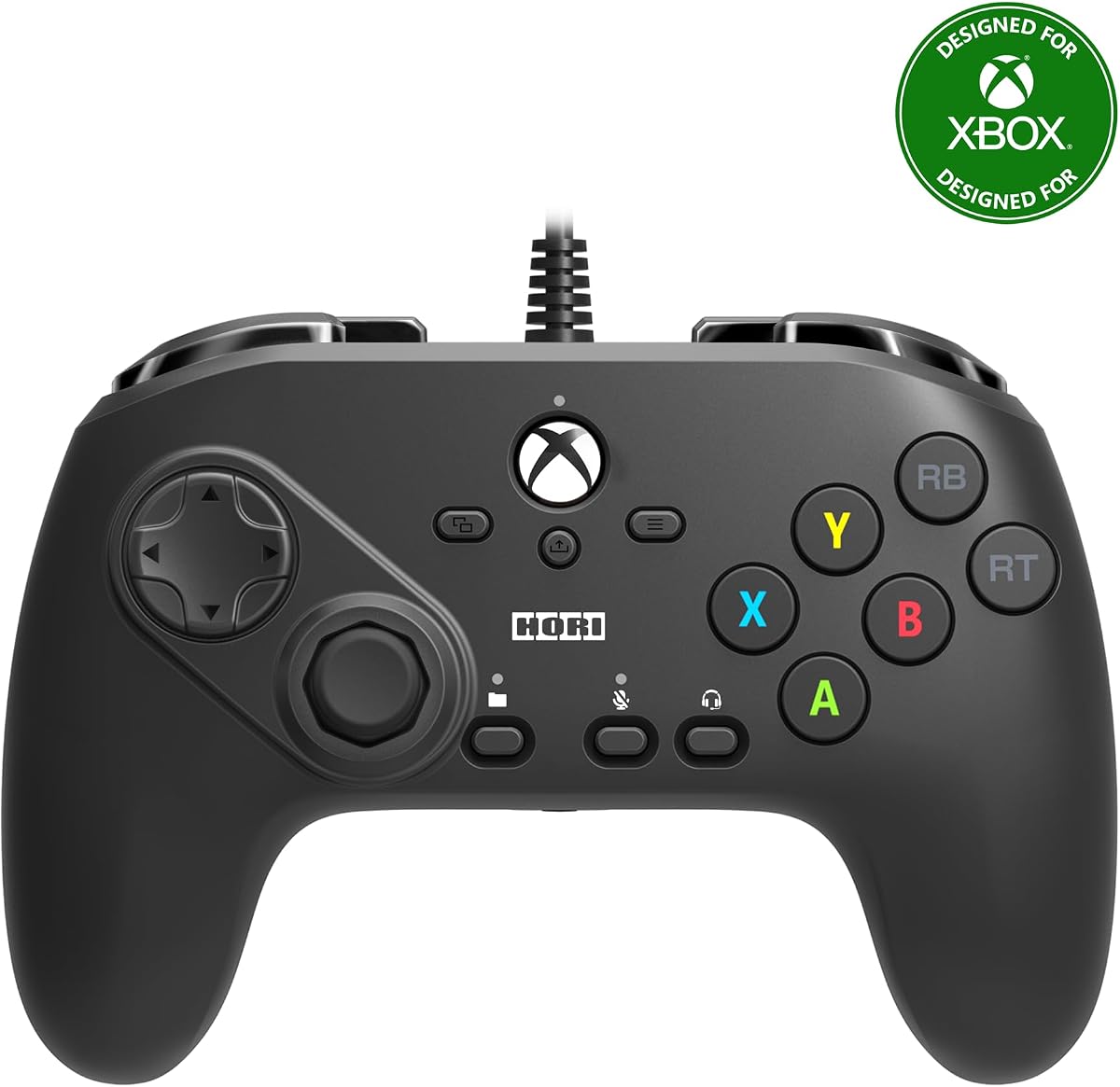
Designed for Xbox Series X|S, this wired controller is optimized for fighting games with a six-button layout, micro Switch Buttons, and an adjustable d-pad. It features a short throw analog stick with an 8-way Gate for increased accuracy and execution speed. The companion app allows customization and saving up to four profiles, making it versatile for multiple players or game modes.
We may earn a commission when you buy through this link, at no additional cost to you.
Its main strengths lie in compatibility with Xbox Series X|S, Xbox One, and Windows 10, ensuring broad utility across Microsoft platforms. The officially licensed status guarantees a reliable build that matches console standards, while the short throw stick enhances responsiveness for quick directional inputs. Profile management via the app adds a layer of convenience for competitive users.
However, the lower rating compared to other models suggests potential usability or build quality issues some users experience. Profile switching depends on the companion app, which might be inconvenient for quick changes during gaming. These factors may limit appeal for those seeking plug-and-play simplicity without software dependencies.
Best for Xbox users who need a dedicated fighting controller and are comfortable using the companion app for customization. If you prioritize Xbox compatibility and micro-switch speed, this pad offers solid performance despite the minor drawbacks noted by some reviewers.
Officially Licensed by Microsoft ensures seamless compatibility with Xbox consoles, reducing driver issues and guaranteeing consistent performance.
The companion app lets you save and switch between up to four profiles, allowing rapid adaptation to different games or team setups.
We may earn a commission when you buy through this link, at no additional cost to you.
The 8Bitdo M30 Wired Controller is officially licensed by Xbox, offering compatibility with Xbox Series X|S, Xbox One, and Windows. Featuring a 6-Button Layout, 2 bumpers, 2 triggers, and 2 button layout switches, it supports USB-C wired connection for virtually lag-free performance. It is perfect for fighting games and other classics, with support for 8BitDo Ultimate Software and custom profile switching on the fly.
We may earn a commission when you buy through this link, at no additional cost to you.
Its strengths include a solid 4.2 rating reflecting user satisfaction with its build and performance. The USB-C wired connection ensures stable, low-latency input crucial for fighting games, while the included audio jack and volume control add multimedia convenience. The ability to switch profiles on the fly allows quick adjustments between games without software interruption.
Drawbacks include a retro-inspired design that might not appeal to modern players seeking ergonomic curves, and a limited button count compared to full fight sticks or pads. For complex combos requiring extensive button mapping, it might feel restrictive. However, its simplicity and reliability make it ideal for classic titles and streamlined setups.
Ideal for retro gaming enthusiasts and fighters who value lag-free wired connections and easy profile switching. If you prefer a compact, classic layout with modern connectivity and software support, this controller offers a balanced, user-friendly experience.
USB-C wired connection ensures virtually lag-free input, which is critical for precise timing in competitive fighting matches and rapid combos.
A custom profile switch button lets you change configurations on the fly, enhancing flexibility without leaving your game or setup.
We may earn a commission when you buy through this link, at no additional cost to you.
This leverless controller supports PC, PS4, PS3, Nintendo Switch, and Steam Deck, featuring a reinforced USB-C port for durability and a detachable 1.5m braided cable. An OLED display shows input mode, SOCD settings, and Turbo status instantly. It offers hot-swappable switches, 16-button hitbox-style layout, and SOCD with 3 clean modes, ensuring tournament-level control depth and stable lap or desk play.
We may earn a commission when you buy through this link, at no additional cost to you.
A standout feature is the web-based customization that needs no software, letting you tweak settings via a browser interface. The hot-swappable switches allow you to tune the feel from day one, including spare keycaps and a switch puller in the package. Non-slip rubber feet and a 29.6×21cm base provide stability, making it reliable for intense competitive matches.
The leverless design presents a learning curve for players accustomed to traditional sticks, which may limit immediate appeal. Additionally, the hitbox-style layout may not suit players who prefer analog sticks for certain games. However, for those committed to competitive precision and customization, these trade-offs are outweighed by performance gains.
Perfect for competitive players seeking deep customization and rapid input without soldering. If you value modularity, SOCD modes, and multi-platform support with a hitbox-style approach, this controller offers exceptional value and versatility.
Swap mechanical switches in seconds without soldering to personalize tactile feedback and response feel tailored to your preference.
Five input modes including XInput and DInput ensure seamless compatibility across PC, consoles, and portable devices like Steam Deck.
We may earn a commission when you buy through this link, at no additional cost to you.
The Akko FUNBOX Leverless Arcade Controller features Next‑Generation Hall Effect Switches with Zero Wear, using Kailh Star Mini 2.8mm low‑profile magnetic switches for contactless operation. Rapid Trigger is adjustable from 0.1mm to 2.8mm, backed by 50KHz scan rate and 8,000Hz polling on PC. It includes a Full‑Color LCD, Aluminum Multi‑Function Dial, and Tournament‑Ready SOCD Management, making it a premium choice for competitive players.
We may earn a commission when you buy through this link, at no additional cost to you.
Key strengths lie in its durability and precision, with contactless switches eliminating wear and debris buildup. The Rapid Trigger allows feather-light taps to deliberate presses, giving decisive edges in fast-paced games. The LCD acts as a control hub for mode switching and custom animations, while the dial provides tactile access without menus, enhancing focus during gameplay.
The high price point may deter budget-conscious buyers, and browser-based driver customization can introduce lag compared to native apps. However, these are minor compared to the tournament-grade performance and modularity. The included Tournament Lock mode ensures compliance with rules, adding professional appeal.
Ideal for serious competitors who demand top-tier inputs and customization without compromise. If you seek zero-wear switches, rapid trigger precision, and premium build quality, this controller delivers exceptional performance and long-term reliability.
Hall Effect magnetic switches eliminate physical friction and debris, ensuring consistent performance and longevity without degradation over time.
Adjustable trigger sensitivity from 0.1mm to 2.8mm lets you fine-tune input depth for optimal speed and accuracy in every match.
We may earn a commission when you buy through this link, at no additional cost to you.
Designed for Windows PC, this tournament grade fightpad features top-quality components including microswitch buttons, six button layout, and accurate D-Pad. It includes a short throw left analog stick with 8-way gate for accuracy and execution speed. Officially Licensed by Bandai Namco, it offers specialized appeal for TEKKEN 8 fans and competitive players seeking licensed reliability.
We may earn a commission when you buy through this link, at no additional cost to you.
Its strengths mirror the standard OCTA but with specific branding that appeals to TEKKEN enthusiasts. The microswitch buttons ensure precise inputs, while the short throw stick enhances execution speed. The licensed status guarantees compatibility and build quality that meets tournament standards for fighting games across PC.
The TEKKEN branding may limit broader appeal for players not focused on that series. The price may be slightly higher than the standard version without significant functional differences, though the theme adds collectible value. These trade-offs are acceptable for fans seeking a dedicated thematic controller.
Best for TEKKEN 8 players and collectors who want a tournament-grade controller with specific licensed aesthetics. If you value brand alignment and licensed durability, this pad offers solid performance and thematic pride for your setup.
Officially Licensed by Bandai Namco ensures the controller meets game-specific design standards for optimal compatibility and competitive fairness.
Microswitch buttons provide rapid, consistent actuation essential for precise combos and timing in fast-paced fighting games.
We may earn a commission when you buy through this link, at no additional cost to you.
This wireless fightpad supports PlayStation5 and Windows 11/10 PC with 8-gate analog stick, 6-button Microswitch button layout, and programable rear buttons. It includes an analog slider pad, swappable D-pad with three options, and a USB-C charging cable with lock to prevent disconnects. Officially licensed by Sony, it delivers tournament-grade performance with wireless freedom and customization.
We may earn a commission when you buy through this link, at no additional cost to you.
Strengths include wireless convenience combined with professional features like Microswitch buttons and rear programmable buttons. The swappable D-pad allows you to choose the best fit for your style, while the included lock on the charging cable ensures stable connections during gameplay. The wireless option enhances mobility for couch play or larger setups.
Users must download and install the latest firmware before using, adding a setup step. The higher price reflects the wireless technology and premium build, which may be prohibitive for budget-conscious buyers. These are minor trade-offs for those seeking wireless reliability and Sony licensing.
Ideal for players who value wireless freedom without sacrificing tournament-grade features. If you want Sony compatibility, rear buttons, and customizable D-pads in a wireless design, this pad provides a polished, high-end experience.
Wireless connectivity removes cable constraints while maintaining precise inputs for unrestricted play across PS5 and PC environments.
Three swappable D-pad options allow you to select the perfect layout for comfort and accuracy based on your preferred fighting style.
We may earn a commission when you buy through this link, at no additional cost to you.
This officially licensed tournament grade fightpad for PS5, PS4 and PC features an eight-button layout, touchpad and programmable macros. As a renewed product, it provides access to the same build quality as the new version at a reduced price. Its compatibility spans multiple platforms, ensuring versatility for players transitioning between systems or using mixed setups.
We may earn a commission when you buy through this link, at no additional cost to you.
Strengths include the proven design of the OCTA with eight-button layout and programmable macros, offering deep customization. The renewed label suggests cost savings while maintaining Sony licensing, which guarantees build integrity. It suits players seeking tournament features without paying full price for a new unit.
Renewed products may have varied conditions or limited warranty compared to new units. The lack of specific rating for this version makes performance predictions harder. However, the OCTA line is generally reliable, reducing risks of functional issues.
Ideal for budget-aware buyers wanting a premium OCTA controller with platform versatility. If you prioritize value and proven design over brand-new packaging, this renewed option delivers solid performance and compatibility.
Renewed units provide access to high-end tournament features and licensed build quality at a lower price point than new models.
Compatibility with PS5, PS4, and PC ensures flexibility across home consoles and gaming PCs without needing multiple controllers.
We may earn a commission when you buy through this link, at no additional cost to you.
With broad game support, the Logitech Gamepad F310 works with old standbys to today's biggest titles, making setup easy. Profiler software allows keyboard and mouse commands for games without gamepad support. The familiar layout, unique floating D-pad, and six-foot cord ensure comfort and flexibility. It supports 10 programmable buttons and an 8-way programmable D-pad via USB.
We may earn a commission when you buy through this link, at no additional cost to you.
Its strengths include the familiar layout with no learning curve and responsive floating D-pad for quick directional changes. The six-foot cord allows comfortable distance from monitors, and broad support means it works with many PC titles. With a 4.4 rating, users appreciate its reliability and value.
It requires software installation for customization, which may inconvenience users wanting plug-and-play. Not optimized for fighting games like pro pads, it may lack specialized features like microswitches. Still, its affordability and versatility make it a strong entry-level choice.
Best for casual gamers and newcomers seeking a reliable, budget-friendly controller. If you want solid performance and broad compatibility without high costs, this pad offers excellent value and easy setup.
Familiar Xbox 360-style layout reduces learning time and ensures comfort during extended gaming sessions across various titles.
Profiler software enables mapping to keyboard and mouse actions, extending functionality for games lacking native gamepad support.
We may earn a commission when you buy through this link, at no additional cost to you.
This small form factor fight stick features an 8-button layout and 8ft cable, making it compact, lightweight and portable. It includes HORI Original Joystick with V-cut Housing and Classic 8-Button Layout, optimized for arcade and fighting games. Officially Licensed by Sony, it ensures compatibility with PS5, PS4, and PC for consistent performance.
We may earn a commission when you buy through this link, at no additional cost to you.
Strengths include portability without sacrificing core fighting features like a joystick and eight buttons. The V-cut housing provides reliable movement, while the official license guarantees durability and input quality. It suits players wanting stick mechanics in a space-saving design.
Not a traditional pad layout, some may find the joystick takes adjustment compared to D-Pad models. Stick feel varies from larger arcade sticks, which may limit appeal for purists. However, its size and official branding make it a solid compromise.
Best for players seeking arcade-style controls in a portable package. If you want classic stick input without sacrificing space or platform compatibility, this mini stick offers reliable, licensed performance.
Compact size and lightweight design let you bring classic arcade feel anywhere without bulky equipment or space constraints.
HORI Original Joystick with V-cut Housing provides smooth, precise movement and durability for consistent directional inputs during play.
We may earn a commission when you buy through this link, at no additional cost to you.
Selecting the ideal fightpad involves weighing several critical factors to match your playstyle and technical needs. This section outlines the most important aspects to evaluate before making a purchase decision.
Fightpads typically range from standard six-button configurations to full layouts with 10 or more buttons. A six-button layout mimics arcade standards, ideal for fighters using punch, kick, and special moves. More buttons allow mapping additional macros or commands without remapping software.
Choose a layout that aligns with the fighting game titles you play most frequently. For classic games, six buttons suffice; for modern titles with complex inputs, expanded options provide flexibility.
The input mechanism determines responsiveness and durability. Micro Switch buttons offer rapid actuation and are common in tournament-grade pads. Hall Effect switches provide contactless durability without wear over time.
For competitive play, prioritize high-quality switches that minimize input delay and ensure consistent registration. Casual users may find standard membrane buttons acceptable but less durable.
Most fightpads are wired to reduce latency, but wireless options exist for greater freedom. Wired connections ensure stable input without battery concerns. Wireless models often come with USB-C charging and locking cables to prevent disconnects.
Decide based on your gaming environment. Wired is best for competitive setups; wireless suits living room or multi-device users who value mobility.
Ensure the controller supports PC and any other platforms you use, such as PlayStation or Xbox. Official licensing guarantees better driver support and consistent performance across devices.
Check compatibility lists carefully. Some models target specific consoles but work with PC via XInput or DInput modes. Verify software requirements for full feature access.
Advanced fightpads include companion apps or browser-based tools to remap buttons, create profiles, and adjust sensitivity. Customization allows tailoring the controller to your specific game needs and playstyle preferences.
If deep customization is important, choose a model with robust software. Simpler pads may offer fewer options but are easier to set up and use immediately.
A durable, ergonomic controller reduces fatigue during long sessions. Look for reinforced ports, stable bases, and comfortable grip shapes. Non-slip feet help keep the pad in place during intense play.
Invest in a model that feels solid and fits your hand size. Build quality directly affects longevity and consistent performance over time.
Prices vary widely depending on features and build. Budget models provide reliable basics for casual play, while premium options offer tournament-grade components and advanced customization. Renewed versions can offer value without sacrificing much.
Determine your spending limit and prioritize features that matter most. A mid-range model often balances cost and performance effectively for most users.
For competitive play, look for SOCD settings, anti-cheat locks, and certified tournament modes. These features ensure compliance with official rules and fairness during matches.
Check if the model supports standard competitive settings. Licensed pads often include these out-of-the-box, making them safer for official events and leagues.
Connect the controller to your PC via USB or paired wireless receiver and install any required companion software. Calibrate input settings in the game or controller app to ensure accurate response and no dead zones affecting gameplay.
Regularly inspect the cable and ports for wear, especially if using a detachable cord. Keep the surface clean with a dry cloth and avoid exposing it to liquids or excessive dust to prolong lifespan and maintain hygiene.
For hot-swappable models, periodically check switch condition and replace if needed to keep input consistent. Store the fightpad flat in a safe place when not in use to prevent accidental damage or button degradation.
A fightpad is optimized for fighting games with a six-button layout, micro switches for speed, and adjustable D-Pads. These features support precise combos and fast inputs that standard pads lack. The design prioritizes tournament-grade accuracy and durability.
Wired fightpads generally offer lower latency and no battery dependency, which is critical for competitive play. Wireless options provide mobility but require charging and may have slight lag. Choose based on your need for speed versus convenience.
Many fightpads support PC via XInput or DInput modes. Officially licensed models often work plug-and-play on Windows. Verify compatibility and install companion software if remapping or advanced features are required.
Most modern fightpads include companion apps or browser-based drivers for remapping buttons and saving profiles. Access these tools through the manufacturer’s website or included software to tailor controls to your preference.
SOCD (Simultaneous Opposing Cardinal Directions) handling determines how a controller processes conflicting directional inputs. Tournament-ready pads offer clean modes to prevent glitches, ensuring fair and consistent competitive performance.
Most companion apps support Windows 10 and 11. Some browser-based tools work cross-platform. Check the manufacturer’s system requirements to ensure compatibility with your PC setup before purchasing.
Our top picks include the HORI Fighting Commander OCTA for overall balance, the Akko FUNBOX for premium Hall Effect tech, and the Logitech G F310 for budget value. Each excels in specific areas tailored to different player needs and skill levels.
Prioritize input speed, platform compatibility, and customization when selecting. A controller that supports competitive features will grow with your skills and provide reliable performance across various fighting titles.
Prices and availability can fluctuate, so check current listings before purchasing. Confirm that the model matches your PC setup and preferred fighting game requirements for optimal experience.