
PXN X8 Arcade Stick
4.7Editor score
Mechanical buttons for durability
Keyboard like directional inputs
Turbo function support included
Discover the top rated Fight Stick for Console Fighting Games available in 2026. Our guide compares features, compatibility, and build quality to help you
Finding the right Fight Stick for Console Fighting Games can transform your gaming experience significantly. A high quality controller offers precision and durability that standard gamepads simply cannot match during intense competitive matches.
We evaluated ten top rated models based on build quality, button responsiveness, and platform compatibility. Each product was analyzed for its potential to enhance performance in titles like Street Fighter and Tekken.
This guide details the strengths and weaknesses of each option to help you decide. Keep in mind that prices and availability fluctuate frequently so check current listings before making your final purchase decision.
4.7Editor score

4.6Editor score

4.6Editor score
This side by side comparison highlights the key specifications of each model to help you quickly identify which device matches your specific console requirements and performance expectations.




The 8Bitdo Arcade Stick stands out as a top choice for gamers seeking flexibility and quality without breaking the bank. With a strong rating from users it delivers reliable performance across multiple platforms including Switch and Windows systems.
We may earn a commission when you buy through this link, at no additional cost to you.
Its standout feature is the dynamic button layout which changes functionally and visually depending on the mode you select. This adaptability makes it incredibly useful for players who switch between different games or need specific macro setups regularly.
While it lacks official licensing for some consoles the universal mounting plate allows you to swap in premium Sanwa parts easily. This moddability ensures the stick grows with your skill level without needing a complete replacement.
If you value versatility and the ability to customize your setup the 8Bitdo Arcade Stick is an excellent investment. It bridges the gap between casual play and serious competitive needs perfectly.
Connect via Bluetooth or the included 2.4G receiver for a wire free experience without lag or input delay issues.
Use the ultimate software to map buttons and create macros tailored to your specific fighting game requirements.
We may earn a commission when you buy through this link, at no additional cost to you.
For players on a tight budget the PXN X8 Arcade Stick offers a surprisingly robust entry point into the world of arcade controllers. It features mechanical buttons that provide a tactile click similar to arcade machines found in public venues.
We may earn a commission when you buy through this link, at no additional cost to you.
The keyboard like directional buttons replace the traditional joystick allowing for precise movement and combo execution. This unique design appeals to players who prefer distinct directional inputs over analog stick movements for better accuracy.
Although it does not include a physical joystick the design focuses on accessibility and function. The build quality is adequate for casual gaming sessions and the mechanical buttons ensure longevity despite heavy use.
If you are looking for the most affordable way to get mechanical feedback and broad compatibility the PXN X8 is hard to beat. It is perfect for beginners or those testing the waters of competitive play.
Blue Switch mechanical buttons offer over 50 million presses of life with a sharp tactile feel for every input.
The turbo button allows quick combination attacks helping you perform rapid strikes with ease during combat.
We may earn a commission when you buy through this link, at no additional cost to you.
The HORI PlayStation 5 Fighting Stick Alpha represents the pinnacle of officially licensed peripherals for the PS5 platform. It comes fully certified by Sony ensuring seamless integration and performance consistency during competitive matches and casual play.
We may earn a commission when you buy through this link, at no additional cost to you.
It uses HORI's proprietary Hayabusa buttons and joystick which are renowned for their durability and responsiveness. These components are designed to withstand the rigors of high level tournament play without degrading over time.
The unit opens up easily for maintenance and customization allowing users to swap parts or update artwork as needed. This moddability combined with the licensed status makes it a safe and powerful choice for serious competitors.
If you want a premium experience that guarantees compatibility and performance the Alpha is the top tier choice. It balances official certification with the flexibility needed for long term use.
Officially licensed by Sony to ensure full compatibility and zero input delay issues on PlayStation systems.
Features proprietary Hayabusa buttons and joystick known for smooth action and long service life.
We may earn a commission when you buy through this link, at no additional cost to you.
The MAYFLASH F300 is celebrated for its broad compatibility list making it a go to for gamers who own multiple systems. Whether you play on Xbox PlayStation or Switch this stick adapts to your hardware requirements easily.
We may earn a commission when you buy through this link, at no additional cost to you.
It supports XINPUT and DINPUT modes on PC which ensures smooth integration with various fighting games and emulators. The ability to swap in Sanwa Denshi parts means you can upgrade the feel over time as budget allows.
Turbo functions are built in with different speed settings adding extra utility for games that allow such inputs. The design is straightforward and functional prioritizing utility over flashy aesthetics.
For those needing a single stick for multiple consoles the F300 delivers exceptional value. It is a practical tool that works well right out of the box without complex setup requirements.
Supports XINPUT and DINPUT on PC for seamless integration with Windows based fighting games and emulators.
Compatible with Sanwa Denshi buttons and joystick for easy customization and performance upgrades.
We may earn a commission when you buy through this link, at no additional cost to you.
The Nacon Daija Arcade Stick brings a professional touch to the PS5 and PC fighting game scene with its dedicated audio capabilities. It includes a 3.5mm jack allowing direct headset connection without needing extra controllers or adapters.
We may earn a commission when you buy through this link, at no additional cost to you.
Button mapping is handled through intuitive software on PC and Mac letting you create profiles for different games easily. The textured palm rest ensures comfort during long matches and provides sturdy support for your hands.
You can switch between two different joystick heads to find the perfect control and precision for your playstyle. This adjustability helps tailor the device to your specific needs without buying extra hardware.
If you want the convenience of direct audio and deep customization the Nacon Daija is a strong contender. It blends premium features with official licensing effectively.
Includes a 3.5mm jack for direct headset connection to output background music and chat audio.
Use the dedicated software to map buttons and create game profiles with an intuitive interface.
We may earn a commission when you buy through this link, at no additional cost to you.
The MAYFLASH F700 expands on the success of previous models by adding Bluetooth wireless support for consoles like PS5 and Switch. This eliminates cable clutter while maintaining reliable input precision for competitive gameplay.
We may earn a commission when you buy through this link, at no additional cost to you.
It includes a hidden compartment for the 2.4G receiver keeping your setup organized and the receiver safe when not in use. The firmware updates ensure ongoing support for new consoles like Switch 2 over time.
Turbo functions and Sanwa compatibility give you the tools to optimize performance without external tools. The wired headset support adds audio convenience for chat and music during matches on supported platforms.
If wireless convenience is important to you and you do not need Xbox support the F700 is an ideal choice. It combines modern connectivity with traditional arcade reliability.
Connect via Bluetooth or the included 2.4G receiver to reduce cable clutter during competitive sessions.
Update to the latest firmware to work with newer consoles like Switch 2 ensuring long term compatibility.
We may earn a commission when you buy through this link, at no additional cost to you.
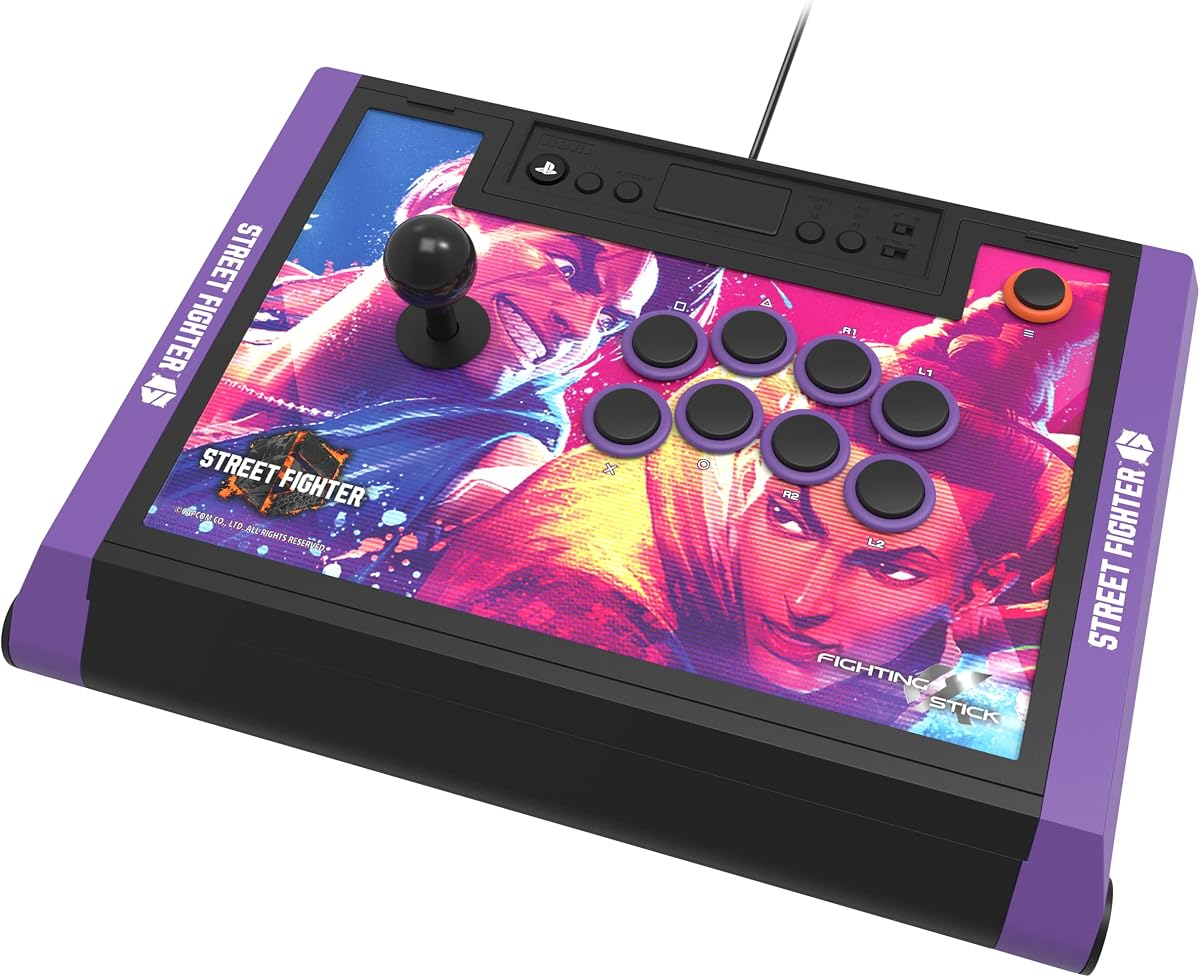
The HORI PlayStation 5 Fighting Stick Alpha (Street Fighter 6 Edition) brings exclusive Capcom licensed art to your gaming desk. It features downloadable high resolution images for the top panel so you can switch looks easily.
We may earn a commission when you buy through this link, at no additional cost to you.
As a tournament grade device it maintains the same durability and responsiveness as the standard Alpha model. The official licensing ensures full support for all PlayStation 5 and PlayStation 4 fighting titles.
The Hayabusa components are standard here providing consistent performance for pro level inputs. This edition is designed for fans who want a premium stick that matches their favorite game visually and functionally.
If you love Street Fighter 6 and want a licensed high performance stick this edition is a perfect match. It delivers both visual flair and tournament reliability in one package.
Includes a link to 18 downloadable images of characters for top panel customization options.
Officially licensed by both Sony and Capcom to ensure full authenticity and compatibility.
We may earn a commission when you buy through this link, at no additional cost to you.
The Qanba Sapphire S1 takes a different approach with its leverless design which removes the traditional joystick for button based inputs. This design allows for rapid directional changes and unique movement patterns favored by some pros.
We may earn a commission when you buy through this link, at no additional cost to you.
It includes 18 adjustable throw distance buttons that work with Cherry MX switches allowing you to tailor the tactile feedback. This level of control helps refine your technique for fast paced fighting game scenarios.
A detachable wrist rest is included to maintain comfort during long matches which is crucial for avoiding fatigue. The device is fully compatible with PlayStation 5 and PC systems seamlessly.
If you are interested in trying a leverless setup the Qanba Sapphire S1 offers a polished experience. It balances advanced functionality with official licensing well.
The leverless design removes the joystick for unique movement patterns and rapid directional changes.
18 adjustable throw distance buttons let you customize the switch to match your personal preferences.
We may earn a commission when you buy through this link, at no additional cost to you.
The MAYFLASH F500 Bundle includes the Magic Boots adapter which simplifies PS5 connectivity without needing another controller plugged in. This makes it a versatile choice for those with mixed console setups.
We may earn a commission when you buy through this link, at no additional cost to you.
It supports XINPUT and DINPUT on PC ensuring flexibility for gaming on Windows systems. The turbo functions allow different speed settings for rapid attacks during gameplay sessions.
Audio output is supported on PS5 and Xbox allowing background music and chat to be routed through the headset. This feature is particularly useful for staying engaged with online matches.
If you want a bundle that covers many consoles including the Magic Boots convenience the F500 is a practical solution. It provides a lot of utility for the price point.
Plug and Play using the Magic Boots for PS5 without needing the original PS4 or PS5 controller.
Supports headsets to output background music and online chat on PS5 Xbox and PC.
We may earn a commission when you buy through this link, at no additional cost to you.
The HORI PlayStation 5 Fighting Stick Alpha (TEKKEN 8 Edition) brings official Bandai Namco licensed artwork to your setup. It features specific top panel artwork and downloadable options to customize the look further.
We may earn a commission when you buy through this link, at no additional cost to you.
Like other Alpha models it uses proprietary Hayabusa buttons and joystick for smooth and responsive inputs. This design ensures you have the precision needed for complex Tekken combos and defensive moves.
The tournament ready hardware is built to withstand heavy use which is essential for serious Tekken players. It maintains the high build quality and official licensing you expect from HORI.
If you play Tekken 8 and want a licensed high performance controller this edition is a top pick. It delivers both visual appeal and the reliability required for high level play.
Features TEKKEN 8 top panel artwork and downloadable alternate artwork to print for customization.
Officially licensed by Sony and Bandai Namco Entertainment to ensure full compatibility.
We may earn a commission when you buy through this link, at no additional cost to you.
Choosing the right arcade stick involves evaluating several key factors to ensure performance and longevity.
Verify that the stick supports your specific console model and gaming platform to avoid connectivity issues. Some sticks require adapters for newer consoles while others have native support built in for seamless operation.
Decide between traditional arcade buttons and mechanical switches based on your tactile preference. Mechanical switches often offer longer life and a distinct click while arcade buttons provide a softer feel.
Look for materials that ensure stability during intense matches to prevent slipping or shifting on your surface. A solid base and durable casing contribute to a consistent experience over years of use.
Check if the device allows for part replacements so you can upgrade components as you improve. Sticks with universal plates let you swap in high end parts without replacing the whole unit.
Choose between wired and wireless depending on your tolerance for cables versus battery management. Wireless options provide freedom but may introduce slight latency or require periodic charging.
Ensure there is accessible software for button mapping and macros to customize the layout for different games. Good software makes it easier to switch profiles and optimize your controller for specific titles.
Consider officially licensed models for guaranteed compatibility with console security systems and updates. Licensed products often receive better support and are less likely to have firmware compatibility issues.
Evaluate the size and wrist rest options to ensure comfort during long gaming sessions. A design that supports your posture helps reduce strain and prevents fatigue over time.
Connect your fight stick directly to a USB port on your console or PC for the most stable connection. If using wireless mode ensure you pair the device via Bluetooth or insert the 2.4G receiver securely into the port.
Map your buttons to your preferred layout using the included software or console settings to match your gameplay style. Customizing button positions can significantly improve reaction times and reduce finger strain during complex combos.
Keep the device clean by wiping down buttons and surfaces with a soft dry cloth regularly to prevent dust buildup. Periodically check and tighten screws on the casing to maintain structural integrity and prevent rattling.
Not always as some sticks come with Magic Boots adapters that allow direct connection without an extra controller. However most standard PS5 licensed sticks work natively via USB without needing additional hardware.
Yes most modern arcade sticks support PC with XINPUT or DINPUT modes for seamless integration. Ensure you download any required drivers to map keys correctly for specific games.
Sanwa parts are known for their soft and responsive feel ideal for quick combos while Seimitsu parts offer a crisp and precise response suited for accuracy. Both are high quality and compatible with most moddable sticks.
Modern wireless sticks are generally reliable for competitive play with minimal latency compared to wired versions. Ensure you use the 2.4G receiver instead of Bluetooth for the lowest input lag possible.
Remove the ball gently and wipe the surrounding area with a lightly dampened cloth to remove grime. Avoid harsh chemicals that might degrade the plastic or internal electronics.
It depends on your interest level as casual players might prefer simpler controllers but enthusiasts gain precision. If you play fighting games regularly a fight stick improves control and immersion significantly.
Selecting the right Fight Stick for Console Fighting Games enhances your performance and enjoyment in competitive titles. Our top picks like the 8Bitdo and HORI models offer reliable performance across various platforms for different needs.
Prioritize factors such as build quality and moddability to ensure your controller grows with your skills over time. A well chosen stick provides a consistent platform for mastering complex mechanics and combos.
Remember that prices change frequently so checking current listings ensures you get the best deal at purchase. Use this guide to find the perfect match for your playstyle and budget today.