
SSK Portable SSD 1TB External Solid State Hard Drive
4.5Editor score
Lightweight at 36.6 grams
Up to 1050MB/s transfer rate
Includes USB-C and USB-A cables
This guide compares the top 10 external SSDs for Linux systems based on speed, durability, and compatibility for reliable storage.
Finding the right external SSD for Linux can be tricky with so many options available today. You need a drive that offers fast speeds and reliable performance without compromising on security or durability for your daily workflow.
We have carefully selected and analyzed ten top-rated portable SSDs that work seamlessly with Linux distributions. Our comparison focuses on transfer speeds, build quality, encryption features, and overall value to help you make an informed decision.
Each pick below highlights specific strengths like ruggedness or high throughput. Please note that availability and pricing may change over time. Always verify current specs before purchasing to ensure the drive meets your specific Linux environment requirements.
4.5Editor score

4.7Editor score

4.6Editor score
This side-by-side comparison highlights key specifications across all ten models to help you quickly identify the best fit for your Linux setup and usage needs.





The Samsung T7 Portable SSD stands out as a top contender for Linux users seeking reliable external storage. With its high rating and robust build quality, it delivers consistent performance across various operating systems including Linux distributions.
We may earn a commission when you buy through this link, at no additional cost to you.
Its embedded PCIe NVMe technology ensures that read and write speeds reach up to 1050MB/s. This makes it significantly faster than traditional hard drives, allowing for quick backups and file transfers essential for developers and creators.
While the drive performs exceptionally well, the included Magician software is primarily designed for Windows and Mac. Linux users might find the software less useful, though the drive itself remains fully functional via standard plug-and-play protocols.
This drive is ideal for professionals who need a balance of speed and durability. The shock resistance and compact form factor make it perfect for on-the-go workstations running Linux without compromising on storage needs.
Transfer large files quickly with speeds up to 1050MB/s ensuring minimal wait times during critical workflows.
The aluminum unibody provides excellent heat dissipation and protection against accidental drops up to six feet.
We may earn a commission when you buy through this link, at no additional cost to you.
The SSK Portable SSD offers an impressive combination of speed and portability at a budget-friendly price. It is an excellent choice for Linux users who need reliable storage without breaking the bank.
We may earn a commission when you buy through this link, at no additional cost to you.
Weighing only 36.6 grams, this drive is incredibly light and easy to carry. The aluminum case helps dissipate heat effectively, ensuring that performance remains steady even during extended file transfer sessions.
Although it lacks the extensive software ecosystem of bigger brands, the drive works seamlessly with Linux file systems. The included SLC caching helps maintain high speeds during short bursts of heavy data writing.
For students or hobbyists running Linux, this drive provides the best value. It handles everyday tasks like document storage and backups with ease while keeping costs low and performance high.
At just over 36 grams, this drive is easy to slip into a pocket or bag for travel.
The thin aluminum alloy case ensures the drive stays cool during use without needing active cooling.
We may earn a commission when you buy through this link, at no additional cost to you.
The Samsung T9 Portable SSD is a powerhouse designed for demanding creative workflows. It pushes the boundaries of portable storage with speeds that far exceed standard external drives in the market.
We may earn a commission when you buy through this link, at no additional cost to you.
Its Dynamic Thermal Guard technology ensures that the drive maintains optimal temperatures even under heavy loads. This stability is crucial for Linux servers or workstations running intensive tasks like video rendering or database backups.
To achieve its top speeds, the T9 requires a USB 3.2 Gen 2×2 port. While not all systems have this yet, having it means the drive is future-proof and ready for next-gen hardware upgrades.
Professionals who need maximum throughput will appreciate this drive. It is perfect for handling large media files securely and efficiently while ensuring data integrity through reliable firmware management tools.
Experience sustained speeds up to 2000MB/s for rapid access to your largest project files.
The thermal solution prevents throttling during long sessions, keeping performance consistent.
We may earn a commission when you buy through this link, at no additional cost to you.
The Sandisk Extreme Portable SSD is built to survive harsh conditions. With its IP65 rating, it resists water and dust, making it suitable for fieldwork where Linux laptops might be exposed to elements.
We may earn a commission when you buy through this link, at no additional cost to you.
It offers a massive 2TB capacity for storing extensive backups and datasets. The drive can withstand drops up to three meters, which is a significant advantage for mobile users traveling between locations.
Security is handled through hardware encryption that protects your data without requiring extra software. This feature is particularly useful for Linux users who prioritize privacy and secure data handling on portable devices.
This drive is perfect for field researchers or IT professionals. If you need a rugged drive that can handle rough environments while protecting your Linux system data, this is a strong choice.
The IP65 rating ensures the drive keeps working even when exposed to dust or water splashes.
Built-in 256-bit AES encryption keeps your files safe from unauthorized access effectively.
We may earn a commission when you buy through this link, at no additional cost to you.
The Samsung T7 Shield takes durability to the next level. It is designed for extreme environments, offering robust protection against water, dust, and significant physical impacts.
We may earn a commission when you buy through this link, at no additional cost to you.
With a drop resistance of up to 9.8 feet, this drive can handle accidental drops better than many competitors. Its IP65 rating ensures that it remains functional in dusty or wet conditions.
While the size is slightly larger than standard portable drives, the peace of mind it offers is worth it. The drive maintains consistent speeds even when subjected to physical stress or temperature variations.
For Linux users in industrial or outdoor settings, this drive provides reliable storage. It ensures that your data remains safe and accessible even when the physical environment is challenging.
The rugged design withstands drops up to 9.8 feet, ensuring survival in tough conditions.
IP65 rated protection means water and dust won't interfere with your drive's operation.
We may earn a commission when you buy through this link, at no additional cost to you.
The Western Digital My Passport SSD is a secure option for those who value data protection. It features password-enabled hardware encryption that secures your files right from the source.
We may earn a commission when you buy through this link, at no additional cost to you.
It delivers blazing fast speeds suitable for daily work tasks. The drive is shock resistant and can withstand drops up to 6.5 feet, adding a layer of physical security to your digital storage.
Linux users will appreciate that the drive works without needing proprietary software for basic mounting. The password feature ensures that even if the drive is stolen, data remains inaccessible without credentials.
If security is your top priority, this drive is a solid candidate. It balances performance and protection well, making it suitable for business or personal use on Linux machines.
256-bit AES hardware encryption ensures your personal data stays private and secure.
Built to withstand drops up to 6.5 feet, it protects your data during transit.
We may earn a commission when you buy through this link, at no additional cost to you.
The Lexar ES3 is designed for users who prioritize portability without sacrificing speed. It is incredibly thin and lightweight, making it easy to carry in a pocket or bag.
We may earn a commission when you buy through this link, at no additional cost to you.
Despite its size, it supports USB 3.2 Gen 2 speeds up to 1050MB/s. This allows for fast data transfers which is essential for maintaining productivity on Linux systems.
While the included software is geared towards Windows users, the drive itself works natively with Linux. It provides reliable storage for documents, media, and other essential files.
This drive is ideal for travelers who need extra storage on the go. Its slim design ensures it doesn't add bulk to your setup while still delivering solid performance.
With a weight of only 42 grams, it is easy to carry anywhere without worry.
Transfer files quickly with up to 1050MB/s speeds supported by USB 3.2 Gen 2.
We may earn a commission when you buy through this link, at no additional cost to you.
This version of the Samsung T7 comes in vibrant colors to help distinguish your drive visually. It offers the same performance benefits as the larger model but in a smaller capacity.
We may earn a commission when you buy through this link, at no additional cost to you.
It features Dynamic Thermal Guard to prevent overheating during heavy usage. This ensures that the drive maintains its speed and reliability over time without performance degradation.
The 500GB capacity is sufficient for documents and moderate media storage. For Linux users who do not need massive capacity but want speed and reliability, this is a good fit.
Ideal for students or light users, this drive is stylish and functional. It provides a solid storage solution for daily tasks while keeping your tech setup looking fresh.
Choose from different colors to easily identify your drive among multiple devices.
Dynamic Thermal Guard automatically manages heat to prevent throttling during use.
We may earn a commission when you buy through this link, at no additional cost to you.
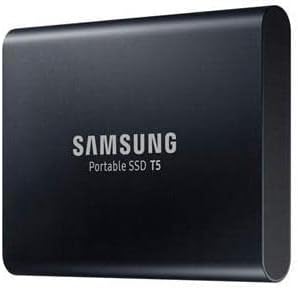
The Samsung T5 has been a reliable choice for many years. It features a classic design with a metal body that is durable and fits comfortably in the palm of your hand.
We may earn a commission when you buy through this link, at no additional cost to you.
Although it offers lower speeds compared to newer models, it remains stable and dependable. Linux users who prioritize consistency over raw speed will find this drive meets their needs well.
It includes password protection and hardware encryption for securing your data. The drive is fully plug-and-play, making it easy to set up on any Linux distribution without issues.
This drive is great for archival storage or older systems. It provides a proven level of performance that many users trust for long-term data storage solutions.
The top to bottom metal design protects internal components from damage effectively.
Secure your files with optional password protection and AES encryption features.
We may earn a commission when you buy through this link, at no additional cost to you.
This 500GB model from the T5 series offers an entry-level solution for portable storage. It is highly rated by users for its reliability and ease of use across different platforms.
We may earn a commission when you buy through this link, at no additional cost to you.
It supports standard USB 3.1 speeds which are sufficient for general file backups. The compact metal design ensures it is durable enough for daily transport and storage in a bag.
Linux compatibility is seamless, requiring no special drivers to mount. The 3-year warranty provides additional peace of mind for those looking for a budget-friendly and secure option.
For casual users needing extra space for photos or documents, this drive is practical. It delivers solid performance without requiring high-end specs, making it accessible for everyone.
Get a 3-year limited warranty that covers defects and ensures long-term reliability.
The compact design allows you to carry your drive anywhere without taking up much space.
We may earn a commission when you buy through this link, at no additional cost to you.
Selecting the right external SSD requires understanding several technical factors that affect performance and compatibility on Linux systems.
USB 3.2 Gen 2 drives offer the fastest speeds available for consumer use. Ensure your Linux system has the correct ports to utilize these speeds effectively.
Look for drives with USB-C connectors that support high bandwidth transfer rates.
Linux supports many file systems like EXT4 or Btrfs but sometimes requires reformatting. Check if the drive works out of the box or needs setup.
Ensure the drive can be formatted to your preferred Linux file system.
Hardware encryption is crucial for sensitive data protection. Linux users should look for drives with password protection capabilities.
Verify that encryption does not require proprietary software to function securely.
If you travel often, a rugged drive with drop protection is essential. Look for ratings like IP65 for water and dust resistance.
Choose a drive that matches your physical activity level to prevent data loss.
Choose a capacity that fits your data needs without overspending. Consider if you need to store large media files or just documents.
Higher capacities usually cost more but offer better value per gigabyte.
Solid state drives can generate heat during heavy use. Look for models with thermal guards or aluminum bodies that dissipate heat.
Proper cooling ensures consistent performance over long periods of usage.
While Linux users rely on open tools, having reliable manufacturer support is a bonus. Check if firmware updates can be applied easily.
Avoid drives that lock essential features behind Windows-only software.
A solid warranty protects your investment against hardware failures. Look for terms that cover defects and provide replacement services.
Ensure the manufacturer offers support that meets your regional needs.
To use your new SSD, plug it into a USB port and wait for it to be mounted by your system. Most modern distributions will recognize it automatically without needing drivers.
Regularly check the health of your drive using standard Linux tools. Keeping the drive updated and properly ejected after use prevents file corruption.
Store your drive in a cool, dry place when not in use. Avoid exposing it to extreme temperatures or physical shocks to maintain its longevity and performance.
Most modern external SSDs are plug-and-play on Linux. They mount automatically via standard USB drivers included in the kernel.
Use a disk utility tool to format the drive to a Linux-native file system like EXT4. This ensures full compatibility with your system.
EXT4 is widely supported and reliable for general use. Btrfs offers advanced features like snapshots but requires more configuration.
Yes, if your laptop has a USB 3.0 or newer port. You might need a USB-A to USB-C adapter for older systems.
SSDs are generally safer due to their lack of moving parts. They are less prone to physical damage during travel.
Use SMART tools like smartmontools to check drive health. These provide detailed insights into the status of your drive.
Hardware encryption works, but you may need specific tools for setup. Software encryption via LUKS is also a viable option.
Most SSDs last several years with normal use. Heavy write cycles might reduce lifespan, so monitor drive health periodically.
The Samsung T7 stands out as a top choice for balance, while the T9 offers premium speed for power users. The SSK drive provides excellent budget performance for everyday needs.
Prioritize speed and durability based on your specific workflow. If you work with large files, invest in a faster drive with better thermal management.
Always verify current specifications and availability before buying. Prices change often, so checking the latest data ensures you get the best value available today.