
ACEMAX 4K@60Hz Offline Media Player
3.5Editor score
HDD Enclosure 2-in-1
Auto Play and Loop
Metal Housing Design
This guide compares ten top external hard drive media players for 4K playback, USB connectivity, and digital signage use to help you choose the right device
Finding the right external hard drive media player can transform your viewing experience by allowing you to play high-resolution content directly from local storage. These devices connect to your TV or monitor and support a wide range of file formats without requiring a internet connection or subscription fees.
We evaluated ten leading models based on their video resolution support, codec compatibility, storage connectivity options, and ease of use. Our analysis focuses on performance reliability, format support, and suitability for both home entertainment and commercial digital signage applications across various budget ranges.
Each pick below highlights specific strengths such as 4K6, HDD enclosure integration, or budget-friendly pricing. Please note that product availability and pricing can change frequently, so we recommend verifying current details before making your final purchase decision online.
3.5Editor score

4.1Editor score

5.0Editor score
The following table provides a side-by-side comparison of the top ten external hard drive media players available in the current market. Review these specifications to identify which model best matches your specific resolution, storage, and connectivity requirements.



The Micca 4K Ultra-HD media player stands out as a versatile device for anyone looking to enhance their TV with local media playback. With a rating of 4.1 stars, it offers a balance of affordability and performance that appeals to home users and small businesses alike.
We may earn a commission when you buy through this link, at no additional cost to you.
Its standout quality lies in its ability to handle high-resolution content up to 4096×2304 at 30fps over HDMI. The dual USB and microSD reader configuration allows you to connect multiple storage devices simultaneously, making it easy to switch between drives without constantly unplugging cables. This flexibility is ideal for those who maintain separate libraries for music, photos, and videos.
However, users should note that this model is limited to 30fps for 4K content, which might not suit high-motion sports or gaming footage. Additionally, it relies entirely on external storage, so there is no internal drive included. These trade-offs are acceptable for most users who already own large external hard drives or microSD cards.
We recommend this player for households wanting to transform any TV into a smart media hub without complex setup. It is also excellent for simple digital signage applications like menu boards. If you need reliable 4K playback with extensive format support, this is a top choice.
The dual USB ports and microSD slot allow simultaneous connection of multiple drives, streamlining access to diverse media collections.
Automatic playback and looping features make it perfect for unattended displays in restaurants or lobbies.
We may earn a commission when you buy through this link, at no additional cost to you.
This compact HDMI media player is designed for users who prioritize portability and basic HD playback. With a 4.1-star rating, it serves as an excellent travel companion for showing videos on different TVs or projectors without needing a laptop.
We may earn a commission when you buy through this link, at no additional cost to you.
Its aluminum alloy material ensures durability during transport, making it resistant to minor bumps and scratches. The device supports full HD 1080p at 60Hz, which provides smooth motion for standard content. The included composite AV output allows you to connect to older analog TVs, expanding its usability beyond modern screens.
The main limitation is the lack of 4K support, which may deter users with high-resolution TVs. However, for standard HD viewing or travel purposes, this is often sufficient. The device also supports subtitle files and loop playback, adding value for presentations or repeated viewing.
Ideal for frequent travelers or office environments where a lightweight solution is needed, this player delivers reliable performance. If you do not need 4K and want a rugged, pocket-sized device, this model is worth considering.
The aluminum alloy casing protects the device during travel, ensuring longevity even with frequent use on the go.
Composite AV output enables connection to older televisions, extending the device's utility beyond modern HDMI setups.
We may earn a commission when you buy through this link, at no additional cost to you.
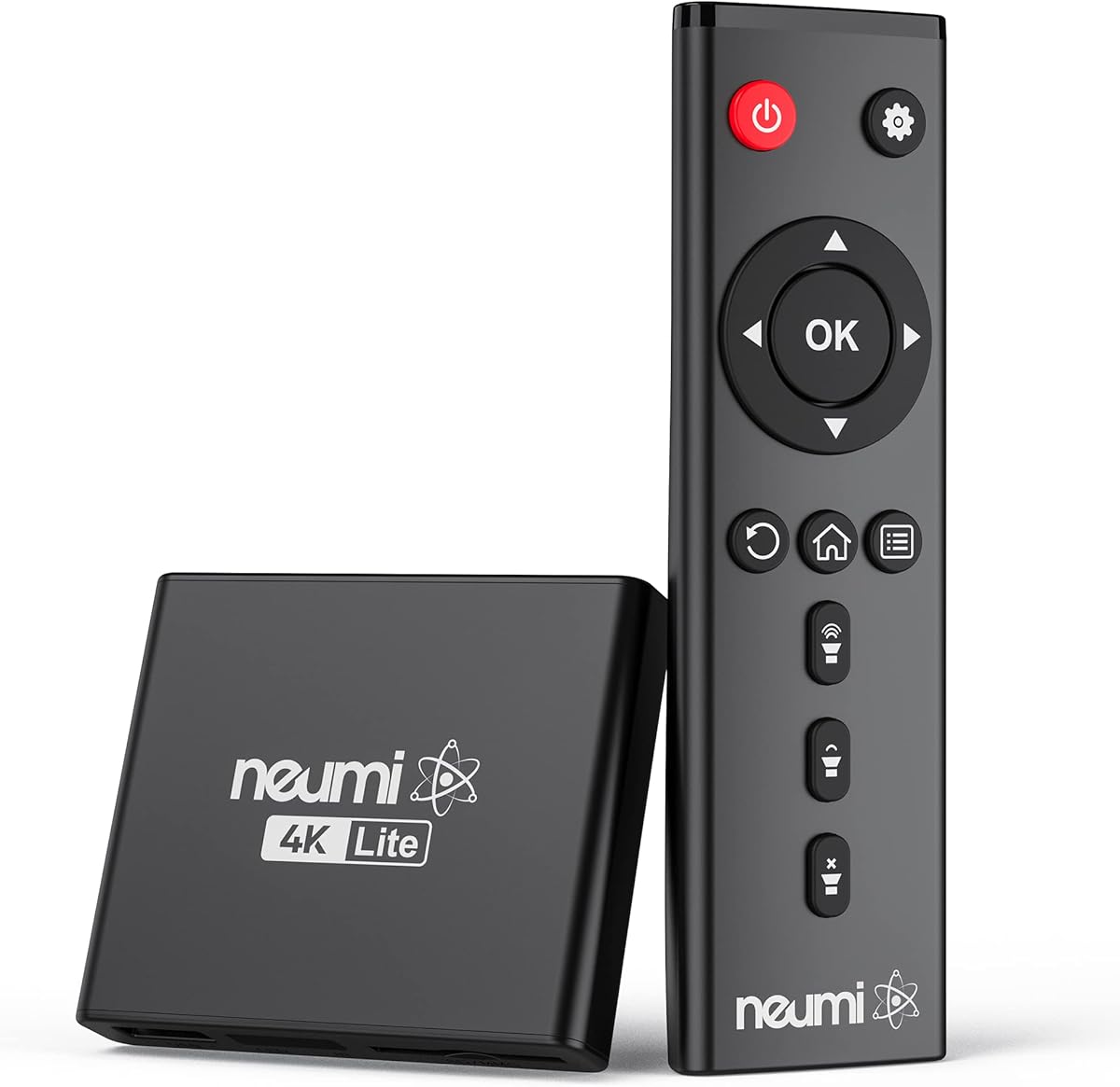
The NEUMI Atom 4K Lite distinguishes itself with a unique trigger sensor input that enables interactive digital signage. Rated at 4.3 stars, it is tailored for art galleries, museums, or custom installations where media playback needs to respond to external events.
We may earn a commission when you buy through this link, at no additional cost to you.
Its standout feature is the ability to play different videos when triggered by a push-button or motion sensor. This functionality transforms a simple media player into an engaging interactive display. The device also offers 4K video playback at 60Hz, ensuring smooth and sharp visuals for high-resolution content.
While the trigger function is powerful, the required sensors are sold separately, which adds to the initial cost. The device is smaller than a deck of cards, making it easy to hide behind screens or in tight spaces. The resume playback feature ensures users can pick up where they left off, enhancing usability.
This player is best suited for creative professionals and small businesses looking to build custom interactive experiences. If you need a device that can respond to physical triggers while maintaining high-quality video output, the NEUMI Atom is a strong contender.
Support for external sensors allows media to play automatically based on motion or button presses, ideal for interactive exhibits.
Its small footprint allows the player to be easily concealed, keeping the focus on the display screen.
We may earn a commission when you buy through this link, at no additional cost to you.
The ACEMAX 4K@60Hz offers a unique 2-in-1 solution that combines a media player with a 2.5-inch SATA HDD enclosure. Despite a lower rating of 3.5 stars, it provides significant value for users looking to install a drive directly into the unit for offline playback.
We may earn a commission when you buy through this link, at no additional cost to you.
Its primary strength is the metal housing which aids in heat dissipation during extended playback sessions, crucial for signage applications. The device supports 4K video at 60Hz and includes essential features like auto play, loop, and resume. This makes it highly suitable for unattended displays like menu boards or welcome videos.
A notable caveat is that the hard drive is not included, so you must purchase one separately. Additionally, compatibility may depend on specific file formats and storage partitions, so checking specifications before purchase is recommended. The remote control requires line of sight, which can be limiting in some setups.
We suggest this unit for budget-conscious buyers who need a dedicated offline player with built-in storage capability. If you want to avoid external cables by housing the drive inside, this device offers a clean and efficient solution.
The built-in HDD enclosure reduces cable clutter and allows for direct playback from an internal drive.
The metal housing helps dissipate heat, ensuring stable performance during long-term operation.
We may earn a commission when you buy through this link, at no additional cost to you.
This media player is tailored for users who prioritize audio quality alongside standard 4K video. With a 4.0 rating, it supports HDMI audio up to 7.1 surround sound, which is beneficial for home theater systems or music playback.
We may earn a commission when you buy through this link, at no additional cost to you.
The standout feature is the optical output, allowing you to connect to high-quality external speakers or soundbars. Additionally, it supports vertical display modes, which can be useful for digital signage that needs to fit portrait screens. H.265 decoding ensures efficient playback with reduced bandwidth usage.
While it supports two USB ports, only one can be read at a time, which may limit multitasking. The 4K resolution is capped at 30fps, which is standard for many media formats but might feel less smooth than 60fps options. However, the audio capabilities often outweigh this for music lovers.
Ideal for home entertainment setups where sound is as important as video, this player offers versatile connectivity. If you want to stream music directly from a drive to an optical system, this model is a strong recommendation.
Support for 7.1 surround sound and optical output ensures high-fidelity audio delivery to external systems.
Vertical screen support allows for creative signage placements in portrait-oriented environments.
We may earn a commission when you buy through this link, at no additional cost to you.
This HDMI media player is designed with advertising and multimedia playback in mind. With a 4.2-star rating, it offers a wide range of video format support including AVI, MKV, and TS, making it versatile for various content types.
We may earn a commission when you buy through this link, at no additional cost to you.
Its standout feature is the inclusion of VGA and fiber optic outputs alongside HDMI and AV. This multi-output flexibility allows you to connect to older monitors or specific audio systems easily. The device supports direct playback of files from Blu-ray discs, which is a niche but useful feature for high-quality media libraries.
While powerful, it requires files to be in the first-level directory for automatic playback on some content types. This can be a minor inconvenience during setup. The decoding efficiency of H.265 helps maintain speed, but the 30Hz limit is standard for this price point.
We recommend this for businesses needing a versatile player for digital signage or presentations. If you need to connect to diverse display types including VGA monitors, this model provides the necessary flexibility.
Multiple output options including VGA and fiber optic enable connection to a wider range of legacy and modern devices.
Direct support for Blu-ray files allows for immediate playback of high-resolution content without conversion.
We may earn a commission when you buy through this link, at no additional cost to you.
While not a media player itself, the WD 2TB Elements is a highly rated external hard drive that serves as a critical companion to media players. With a 4.7-star rating, it offers vast storage up to 6TB and fast SuperSpeed USB 3.2 Gen 1 speeds for quick file transfers.
We may earn a commission when you buy through this link, at no additional cost to you.
Its strength lies in its plug-and-play compatibility with both Windows and Mac systems, requiring no software installation to access files. This reliability and speed make it an ideal storage source for large video libraries that you intend to play on a separate media device.
However, it lacks any decoding capabilities or HDMI outputs, meaning it must be paired with a media player to function as a standalone entertainment device. The compact design allows for easy portability, but it is strictly a storage solution.
We recommend this drive for anyone needing massive storage space to hold 4K movies and music collections. Pairing it with a compatible media player creates a complete offline entertainment system.
Up to 6TB of space allows you to store thousands of high-definition videos and music files on a single drive.
USB 3.2 Gen 1 speeds ensure that loading large video files onto the drive is quick and efficient.
We may earn a commission when you buy through this link, at no additional cost to you.
This device combines a 4K media player with an HDD enclosure, earning a perfect 5.0-star rating for its stability and features. It is designed for users who want a premium offline experience with reliable performance and modern connectivity options.
We may earn a commission when you buy through this link, at no additional cost to you.
The standout feature is its support for 4K video at 60Hz using H.265 decoding, which ensures sharp visuals and smooth motion. The included Type-C cable allows for fast data transfer to laptops, making it easy to update content. Its 2-in-1 design reduces the need for separate enclosures.
While the HDD is not included, the ability to connect it internally keeps the setup tidy. The device offers various playback modes including shuffle and continuous slide shows, making it suitable for both home and commercial use. This premium option offers a balance of modern tech and utility.
Ideal for those who want the highest reliability and smooth playback available, this unit is worth the investment. If you value 60Hz performance and Type-C convenience, this is the top pick for premium users.
Support for 4K at 60Hz provides fluid motion and sharper images compared to standard 30Hz players.
The included Type-C cable allows for fast and easy file transfers between the drive and your computer.
We may earn a commission when you buy through this link, at no additional cost to you.
This media player offers a 2-in-1 solution similar to the premium models but at a more accessible price point. With a 3.8 rating, it supports 4K at 60Hz and includes an integrated enclosure for a 2.5-inch SATA HDD, making it a solid choice for commercial setups.
We may earn a commission when you buy through this link, at no additional cost to you.
The support for 200Mbps data rates ensures that high-bitrate video files play smoothly without stuttering. The inclusion of a one-year warranty provides peace of mind for businesses using it for unattended displays. Type-C data transfer allows for easy management of files on a laptop.
A drawback is that the device itself does not include a battery, and the remote requires two AA batteries which are not included. This means it requires constant power and you must purchase batteries separately for the remote. However, the value proposition remains strong for commercial users.
We recommend this for restaurant menu boards or lobby displays where a reliable and affordable solution is needed. If you need a player that supports high bitrate files and offers a warranty, this is a practical option.
The ability to handle 200Mbps data rates ensures high-quality video playback without buffering or stuttering.
A one-year warranty adds reliability and value, making it suitable for business environments.
We may earn a commission when you buy through this link, at no additional cost to you.
This player is designed to be a simple and affordable way to upgrade any TV into a media hub. With a 3.0 rating, it offers basic but effective features like auto playback and resume, making it a decent entry-level option for small businesses.
We may earn a commission when you buy through this link, at no additional cost to you.
Its standout feature is the configurable video rotation which allows you to display content in 90, 180, or 270 degrees. This flexibility is useful for digital signage where the screen might be mounted vertically or in odd orientations. It also supports auto resume, which continues playback from where it stopped.
However, the lower rating suggests some users may experience connectivity or reliability issues. It requires external power and does not have a battery for portability. If you are on a tight budget and need basic features, this unit might suffice but expect fewer frills.
We suggest this for simple home setups or small shop displays where cost is the primary concern. If you need a player that can rotate video and costs little, this might be the choice for you.
Configurable rotation settings allow for creative display orientations suitable for different physical setups.
Its low price point makes it an accessible option for those just starting with local media playback.
We may earn a commission when you buy through this link, at no additional cost to you.
Choosing the right media player requires understanding your specific needs regarding video resolution, storage connectivity, and display environment. We break down the key factors to help you make an informed decision that matches your budget and usage requirements.
The primary consideration for any media player is its ability to handle the resolution of your content. While many budget models support up to 1080p Full HD, others offer true 4K Ultra HD playback. If you have a 4K TV and high-resolution files, ensure the device supports 4K at 60Hz for smooth motion or at least 4K at 30fps for static content.
Prioritize players that explicitly state support for the resolutions you intend to play to avoid pixelation or stuttering during playback.
Video and audio files use various codecs that determine how the data is compressed. Modern players often support H.265/HEVC which is efficient for 4K files. Older models might only support H.264/AVC. Check if the device supports the formats you use, such as MKV, MP4, AVI, or ISO.
A player with broad codec support ensures you do not have to convert files before transferring them to your storage drive.
External hard drive media players connect to USB drives, SD cards, or internal HDDs. Some models feature 2-in-1 designs that include an enclosure for a 2.5-inch SATA drive. Others rely solely on external USB ports. Consider how much storage you need and whether you prefer a built-in solution or an external drive.
Select a device with USB 3.0 or higher for faster data transfer speeds which helps with large high-resolution files.
If you plan to use the player for commercial displays like menu boards, look for features like auto play, loop, and resume. Some models offer trigger inputs that start playback based on motion or button presses. These features ensure the device can run unattended without user intervention.
For signage, reliability and the ability to loop content endlessly are often more important than advanced audio settings.
Audio quality depends on the output options available on the device. Standard players offer HDMI audio which sends sound to your TV speakers. For better sound, look for models with optical audio outputs or AV jacks that allow connection to external speakers or soundbars.
Prioritize players with diverse audio outputs if you want to upgrade your sound system without changing your video source.
Media players can generate heat during long playback sessions. Devices with metal housings dissipate heat better than those with plastic cases. This is crucial for 24/7 operation in offices or retail spaces where the device will run continuously.
Choose a model with a sturdy build to ensure longevity and prevent overheating issues over time.
Storage drives are formatted using file systems like FAT32, exFAT, or NTFS. While FAT32 is widely supported, it limits file sizes to 4GB. If you have large movie files, ensure the player supports NTFS or exFAT to handle them without error.
Check compatibility with your specific drive format to avoid issues where the device cannot read the media correctly.
Ease of use is determined by the interface and the quality of the remote control. Some players require a clear line of sight which might be a limitation if the device is hidden. Others support wireless remotes that work without direct aiming.
Ensure the menu system is intuitive and the remote is functional for the way you plan to navigate your media.
To begin using your player, connect it to your TV via an HDMI cable and plug it into a power source. If your TV is older, use the included AV cables instead. Turn on the TV and switch the input source to the correct HDMI or AV port.
Insert your external hard drive or SD card into the appropriate slot. The device should automatically detect the media. Use the remote control to navigate to the file menu and select the video or audio file you wish to play.
To ensure longevity, keep the player in a well-ventilated area to prevent overheating. Avoid exposing it to moisture or direct sunlight. If you are not using the device for a long period, disconnect it from the power source to save energy and protect the internal components.
Most players operate offline and do not require Wi-Fi to play local files. They read content directly from connected USB drives or SD cards. Internet access is only needed if you wish to update firmware or download apps if supported.
Not all players support 4K. Only those explicitly listing 4K resolution in their specifications will handle ultra-high-definition files. Check the video output specs before purchasing to ensure your content matches the device's capabilities.
Most models support FAT32, exFAT, and NTFS. Some may support Mac-formatted drives. Ensure your hard drive is formatted correctly so the player can read the files without issues.
Most players do not include an internal drive unless specified as a 2-in-1 model. You must purchase a compatible drive separately to use the enclosure feature. Standard models rely entirely on external storage.
Some models allow you to connect a USB keyboard or mouse for easier navigation. This can be helpful for typing or browsing large file libraries. Check the specifications to confirm if USB input devices are supported.
Firmware updates are typically done by downloading the file from the manufacturer's website and copying it to a USB drive. Insert the drive and follow the on-screen instructions to install the update. Always ensure the device does not lose power during the process.
Most devices are designed for extended use especially those intended for signage. However, ensure the unit has good airflow to dissipate heat. Metal enclosures are generally better for heat management during long playback sessions.
This is often due to incompatible file systems or power issues. Ensure the drive is formatted to FAT32, NTFS, or exFAT. Also try a different USB port or power supply as some drives require more power than the player provides.
We have reviewed ten distinct options ranging from budget-friendly models to premium 2-in-1 solutions. The Micca 4K Ultra-HD stands out for general users, while the ACEMAX 4K@60Hz offers great value for those needing offline signage capabilities.
When prioritizing your choice, consider whether you need advanced audio features or simple video playback. Ensure the device supports the specific video codecs and file systems you use to avoid compatibility issues during your viewing experience.
Prices and availability change frequently so we recommend checking current listings before finalizing your purchase. By selecting a device that aligns with your specific needs you can enjoy seamless high-quality media playback from your local storage drives.