
Omada Gigabit SFP to RJ45 Media Converter
4.7Editor score
Hot-Swappable SFP Port
Auto Negotiation Support
Plug and Play Setup
This guide compares the top ten Ethernet Fiber Media Converter options for extending networks reliably using copper and fiber optics across diverse enterprise
Ethernet Fiber Media Converter bridges the gap between traditional copper cabling and high-speed fiber optic networks. These devices allow organizations to extend their network range far beyond the limits of standard Ethernet cables while maintaining gigabit speeds and reliable connectivity for critical infrastructure.
We evaluated ten leading models based on compatibility, build quality, and real-world performance. Our analysis focused on fiber types, transmission distances, and ease of installation to help you choose the right converter for your specific network topology and operational requirements without unnecessary complexity.
Each pick in this list highlights key strengths and ideal use cases to simplify your decision process. Keep in mind that availability and pricing may fluctuate over time, so always verify current stock and vendor support before finalizing your purchase for mission-critical deployments.
4.7Editor score

4.8Editor score

4.6Editor score
The following comparison table provides a side-by-side overview of all ten selected products. It highlights essential specifications such as fiber types, port speeds, and supported distances to help you quickly identify the model that aligns with your infrastructure needs.


This 10Gtek converter stands out as the top choice for users needing reliable single-mode fiber extension up to twenty kilometers. It earns its Editor's Choice badge through consistent performance and the inclusion of two units for end-to-end deployment.
We may earn a commission when you buy through this link, at no additional cost to you.
The dual SC fiber ports support 1000Base-LX standards, ensuring compatibility with existing single-mode infrastructure. Gigabit RJ45 ports handle full-duplex communication with auto-negotiation for seamless integration into mixed-speed networks.
While it lacks advanced management features, its simplicity ensures stability. The UL-certified power supply adds a layer of safety for unattended environments, making it suitable for warehouses or remote sites.
Network administrators seeking cost-effective long-range solutions should prioritize this model. Its proven reliability and straightforward installation make it a dependable pick for expanding connectivity across large facilities.
The 20km range supports wide-area networks without signal loss or requiring repeaters.
Buying a pair ensures you have both ends ready for immediate deployment.
We may earn a commission when you buy through this link, at no additional cost to you.
The Omada Gigabit SFP to RJ45 Media Converter is an excellent budget-friendly option for extending networks without breaking the bank. It offers flexibility through a hot-swappable SFP port, allowing customization based on specific distance needs.
We may earn a commission when you buy through this link, at no additional cost to you.
Auto-negotiation ensures seamless connectivity with various Ethernet speeds, supporting 10/100/1000Base-T standards. The device is fully compatible with both single-mode and multi-mode modules, providing versatility for different fiber infrastructures.
While the initial cost is low, users must source their own SFP modules for optimal range. This modularity allows upgrades but adds complexity for those preferring a pre-configured solution out of the box.
Budget-conscious buyers looking for customizable range options will find this converter highly valuable. Its ease of use and robust compatibility make it a staple for small to medium business deployments.
The open SFP slot allows users to swap modules as network needs evolve.
Supports varying speeds automatically, simplifying connections with legacy devices.
We may earn a commission when you buy through this link, at no additional cost to you.
This high-end converter delivers premium performance with 10Gigabit capabilities for both fiber and copper ports. It earns its Best Premium status by bridging the gap between traditional gigabit copper and next-generation fiber networks efficiently.
We may earn a commission when you buy through this link, at no additional cost to you.
The RJ45 port auto-adapts to speeds ranging from 100M to 10G, offering incredible flexibility. The SFP+ slot exclusively supports 10G transceivers, ensuring high-throughput data transfer for demanding applications like video streaming or large file backups.
While expensive, the investment pays off in data centers or offices requiring future-proof infrastructure. The included warranty and technical support provide peace of mind for mission-critical systems where downtime is unacceptable.
Organizations planning network upgrades should consider this converter for its speed and adaptability. It effectively handles high-bandwidth tasks while maintaining backward compatibility with older network segments.
Fully supports 10Gigabit standards for modern high-performance network environments.
The RJ45 port adjusts to device speeds automatically for maximum utility.
We may earn a commission when you buy through this link, at no additional cost to you.
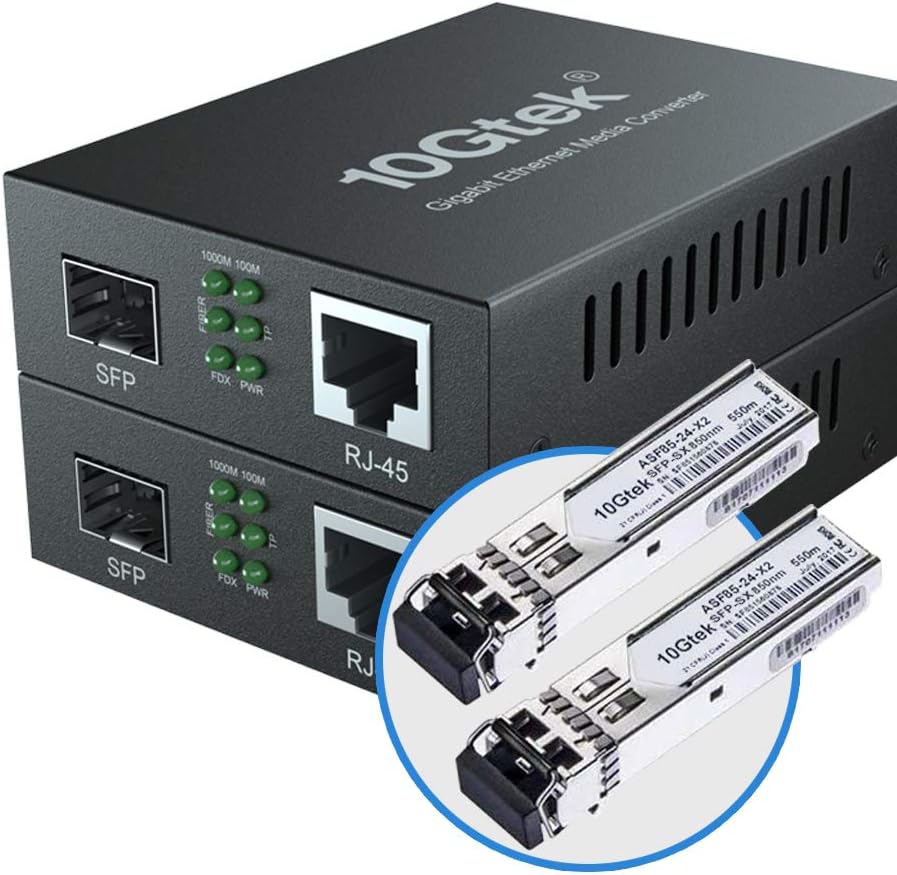
The 10Gtek Gigabit Ethernet Media Converter is a solid choice for multimode environments needing up to 550 meters of range. It comes with included SFP modules, reducing the effort required to get started with fiber connectivity.
We may earn a commission when you buy through this link, at no additional cost to you.
Its dual LC fiber ports support 1000Base-SX standards, ensuring stable gigabit performance across office buildings or campuses. The RJ45 port auto-negotiates speeds, making it easy to connect various devices like routers or switches.
While it lacks single-mode support for longer distances, it is optimized for typical campus deployments. The UL certification adds safety for power supplies, which is crucial for unmanaged equipment running continuously.
Users needing a quick setup for multimode fiber should look at this pack. It balances cost and functionality well for standard enterprise networking tasks without requiring advanced configuration.
Pre-installed SFP modules streamline installation and reduce sourcing time.
550m range covers most medium-sized office or campus buildings effectively.
We may earn a commission when you buy through this link, at no additional cost to you.
This bidirectional converter pair allows fiber transmission over a single strand, optimizing cable usage in dense wiring closets. It includes transceivers and supports wide voltage inputs, making it versatile for different power environments.
We may earn a commission when you buy through this link, at no additional cost to you.
Jumbo frame support enhances performance for large data transfers, which is vital for backup or storage networks. The device operates between 0 and 60 degrees Celsius, ensuring stability in standard office or mild industrial conditions.
Bidirectional setups can be tricky to manage if not planned correctly. However, for users needing to save fiber strands, this efficiency makes it a compelling option despite the minor complexity in setup.
Facilities managers dealing with cabling constraints will appreciate this solution. It effectively maximizes existing fiber resources while maintaining high-speed gigabit connectivity across the network.
Uses a single fiber strand for transmit and receive, saving cable resources.
Supports 100V to 240V, ideal for international or variable power settings.
We may earn a commission when you buy through this link, at no additional cost to you.
This converter pair comes pre-loaded with 20km single-mode modules, simplifying setup for long-distance links. Its high user rating reflects strong performance and reliability for standard gigabit networking tasks.
We may earn a commission when you buy through this link, at no additional cost to you.
Link fault pass-through helps identify issues quickly, ensuring uptime by alerting connected switches to fiber breaks. Jumbo frames are supported to maintain throughput for storage traffic, which benefits networked storage environments.
The availability of US-based technical support adds confidence for buyers needing assistance. While it lacks advanced configuration features, its plug-and-play nature is a plus for non-technical staff managing remote offices.
Organizations looking for a reliable long-distance solution without complexity will find this pair excellent. It offers a straightforward path to extending networks across campuses or between buildings.
Notifies remote switches of fiber issues to prevent connection hanging.
US-based support provides peace of mind for enterprise deployments.
We may earn a commission when you buy through this link, at no additional cost to you.
This unit ships with a pre-installed LC SFP module, eliminating the need to source compatible optics separately. It supports 20km single-mode transmission and features DIP switches for basic configuration like speed selection.
We may earn a commission when you buy through this link, at no additional cost to you.
The included wall-mount ears allow secure installation in utility closets or server racks. LEDs for power and link status simplify troubleshooting, providing visual confirmation of connectivity issues without extra tools.
While it lacks sophisticated management features, its robustness makes it suitable for remote sites. The wide temperature range ensures it operates reliably even in environments without climate control.
Small businesses needing a simple fiber solution should find this device adequate. It combines ease of use with essential reliability features for standard enterprise applications.
Includes LC SFP module out of the box for immediate use.
DIP switches allow simple toggling of speeds and link features.
We may earn a commission when you buy through this link, at no additional cost to you.
StarTech offers a TAA-compliant solution ideal for government or enterprise contracts requiring domestic manufacturing compliance. The open SFP slot allows users to choose modules based on specific distance requirements.
We may earn a commission when you buy through this link, at no additional cost to you.
Support for VLAN tagging ensures network segmentation remains intact across fiber links. This feature is crucial for complex network topologies where data separation is necessary for security or traffic management.
The device is designed for durability and easy installation in various mounting scenarios. Lifetime technical support provides reassurance that help is available whenever network issues arise during long deployments.
Procurement teams prioritizing compliance and long-term support should choose this model. It bridges enterprise-grade requirements with practical networking performance for secure environments.
TAA compliance meets procurement standards for specific government projects.
Preserves VLAN tags across the link, aiding complex network setups.
We may earn a commission when you buy through this link, at no additional cost to you.
This multimode converter comes with a factory-matched SFP module and a Cat6 patch cord for immediate use. It supports OM1 to OM5 fiber grades, ensuring compatibility with various existing infrastructure types.
We may earn a commission when you buy through this link, at no additional cost to you.
DIP switches allow control over broadcast storms and link fault forwarding, adding flexibility for network management. The unit runs cool without fans, making it suitable for office desks or server racks.
While the range is limited to 550 meters, it is sufficient for most campus needs. The inclusion of a patch cord reduces the total cost and time to deploy the device.
Users requiring a quick multimode solution with some control features will appreciate this kit. It balances convenience and functionality well for standard office network expansions.
Comes with patch cord and dust caps to start installation immediately.
Supports various multimode grades like OM3 and OM4 seamlessly.
We may earn a commission when you buy through this link, at no additional cost to you.
This StarTech converter boasts a perfect rating, reflecting its reliability in enterprise environments. It features an open SFP slot for flexibility and supports remote monitoring for proactive network management.
We may earn a commission when you buy through this link, at no additional cost to you.
Link-loss forwarding ensures that fiber breaks are immediately visible to network switches. This capability helps administrators isolate faults quickly, minimizing downtime in critical data center or office settings.
While it requires sourcing a module separately, its robustness and TAA compliance make it a top choice for procurement. The device is built to handle continuous operation with minimal intervention.
IT managers prioritizing uptime and compliance should consider this converter highly. Its solid build and advanced features align well with demanding professional networking needs.
Allows status checks from remote locations, aiding centralized management.
Designed for mission-critical deployments with high reliability standards.
We may earn a commission when you buy through this link, at no additional cost to you.
Selecting the right Ethernet Fiber Media Converter requires understanding several critical factors to ensure optimal performance and longevity. This guide breaks down the essential considerations to help you make an informed decision.
Determining whether you need single-mode or multi-mode support is the first step. Single-mode allows for longer distances up to 20km, while multi-mode is cost-effective for shorter runs under 550m.
Always verify your existing cabling type before purchasing to avoid mismatched hardware.
The range you require depends on the physical distance between your network points. Ensure the converter's rated distance exceeds your actual needs to maintain signal integrity.
Shorter ranges are generally cheaper and sufficient for campus buildings, while longer ranges suit remote sites.
Decide between fixed SFP modules or open slots. Open slots offer flexibility to upgrade distance capabilities later, whereas fixed modules simplify setup.
Choose a configuration that balances your current needs with future expansion possibilities.
Check that the converter supports the necessary data rates such as Gigabit or 10Gigabit. Compatibility with IEEE standards ensures smooth integration with existing switches and routers.
Prioritize models that support auto-negotiation to handle mixed-speed networks effortlessly.
Look for devices with efficient power supplies and passive cooling systems for reliability. Fanless designs reduce noise and maintenance, making them ideal for office environments.
Ensure the power adapter meets your local voltage standards to prevent electrical issues.
If installing in uncontrolled environments, select units with wide temperature ratings. Industrial-grade converters can withstand extreme conditions better than standard desktop models.
Robust build quality ensures consistent operation regardless of external temperature fluctuations.
Advanced features like link-fault pass-through help in troubleshooting network issues quickly. Some converters offer LEDs to indicate link status clearly for easier monitoring.
Choose models with diagnostic tools if you manage complex or remote network deployments.
Evaluate the total cost including any necessary SFP modules or cables. A higher upfront cost may be justified by longer warranties and better support options.
Invest in quality hardware to reduce long-term operational costs and downtime.
Start by connecting the Ethernet cable from your network device to the RJ45 port. Ensure the cable is undamaged and securely inserted to prevent connection drops.
Next, insert the fiber optic cable into the SFP or fiber port depending on your hardware. Handle fiber ends with care to avoid contamination or bending damage.
Finally, plug in the power adapter and wait for the status LEDs to stabilize. Monitor the link lights to confirm connectivity and troubleshoot if issues persist.
An Ethernet Fiber Media Converter bridges the gap between copper and fiber networks by converting electrical signals into optical ones. This allows data to travel over longer distances while maintaining speed and reliability. It is essential for extending networks beyond the 100-meter copper limit.
Not always. Some converters come with pre-installed SFP modules for specific distances. Others offer open slots for flexibility. Check your product specifications to see if a module is included or needs to be purchased separately.
Yes, you can use a media converter to connect fiber lines to Wi-Fi access points via Ethernet. This is common in large buildings where running copper to remote APs is impractical due to distance.
Single-mode uses thin fibers for long distances, typically up to 20km. Multi-mode uses thicker fibers for shorter distances, usually under 550m. The choice depends on your specific distance needs and budget constraints.
Most standard converters do not support Power over Ethernet directly. You may need a PoE switch or injector before the converter to power devices like cameras or access points over the fiber link.
Check all physical connections and ensure the cables are not damaged. Verify that the fiber strands are clean and properly inserted. LED indicators can help identify if the issue is on the fiber or copper side.
Our top picks highlight the 10Gtek SingleMode Converter for its balance of performance and value. The Omada and StarTech models offer flexibility for those needing specific configurations or compliance.
Prioritize compatibility with your existing infrastructure to avoid costly retrofits. Consider future needs like speed upgrades or longer distances to ensure longevity.
Prices and availability vary, so verify current stock and warranty details before purchasing. Investing in the right converter ensures a reliable and scalable network foundation.