
Sonnet Breakaway Box 850 T5
4.5Editor score
850W Power Supply
Includes Thunderbolt 5 Dock
Triple Wide GPU Support
This comprehensive guide compares the top ten external GPU enclosures for laptops and handhelds, evaluating performance, connectivity, and value for users
External GPU enclosures transform ordinary laptops into powerful workstations by allowing users to connect high-performance desktop graphics cards. This technology bridges the gap between portable convenience and raw graphical horsepower, making it essential for creators and gamers.
Our selection process involved analyzing technical specifications, compatibility ranges, and real-world performance metrics across the most current models available. We focused on Thunderbolt 5 and USB4 support to ensure future-proofing and optimal data throughput for demanding applications.
Each pick in this guide highlights unique strengths such as power delivery, cooling efficiency, and modular design options. Please note that availability and specific configurations can change frequently, so verify details before making your final purchase decision today.
4.5Editor score

4.0Editor score
5.0Editor score
The following table provides a side-by-side comparison of all ten featured external GPU enclosures to help you quickly identify the model that best fits your specific hardware requirements and budget constraints.


The Razer Core X V2 stands out as a leading choice for users seeking next-generation connectivity with Thunderbolt 5 support. It offers a robust chassis that accommodates large graphics cards while delivering 140W power delivery for connected laptops.
We may earn a commission when you buy through this link, at no additional cost to you.
Its standout qualities include support for PCIe 4.0 graphics cards which ensures maximum performance for modern GPUs. The active cooling system with a 120 mm fan helps maintain optimal temperatures during intensive gaming or rendering tasks.
Users should note that the enclosure does not include a graphics card or power supply, requiring separate purchases for a complete setup. Additionally, Mac devices with M1 or later chipsets are not supported, which limits its ecosystem compatibility.
This enclosure is ideal for Windows users who need a future-proof solution with high-speed data transfer and excellent thermal management. It is highly recommended for those building a powerful portable workstation or gaming station.
Thunderbolt 5 support provides up to 80 Gbps bandwidth for unmatched data speeds.
The steel chassis and active cooling ensure durability and thermal efficiency.
We may earn a commission when you buy through this link, at no additional cost to you.
The Sonnet Breakaway Box 850 T5 is designed for professionals needing immense power and connectivity options. It features an 850W power supply capable of driving even the most demanding graphics cards without power throttling.
We may earn a commission when you buy through this link, at no additional cost to you.
Key strengths include a built-in Thunderbolt 5 dock that adds USB ports and Ethernet connectivity to your setup. This makes it not just an eGPU enclosure but a comprehensive docking station for a clean desk setup.
The large size and requirement for a dedicated power outlet may be a consideration for small workspaces. However, the benefits of having triple-wide GPU support and 80 Gbps bandwidth outweigh these drawbacks for most power users.
This enclosure is perfect for video editors, 3D artists, and AI researchers who require stable high-performance computing. It delivers near-desktop power to laptops with ease and extensive connectivity options.
An 850W PSU ensures that high-end GPUs receive ample power without limitations.
Integrated ports reduce cable clutter and simplify peripheral connections.
We may earn a commission when you buy through this link, at no additional cost to you.
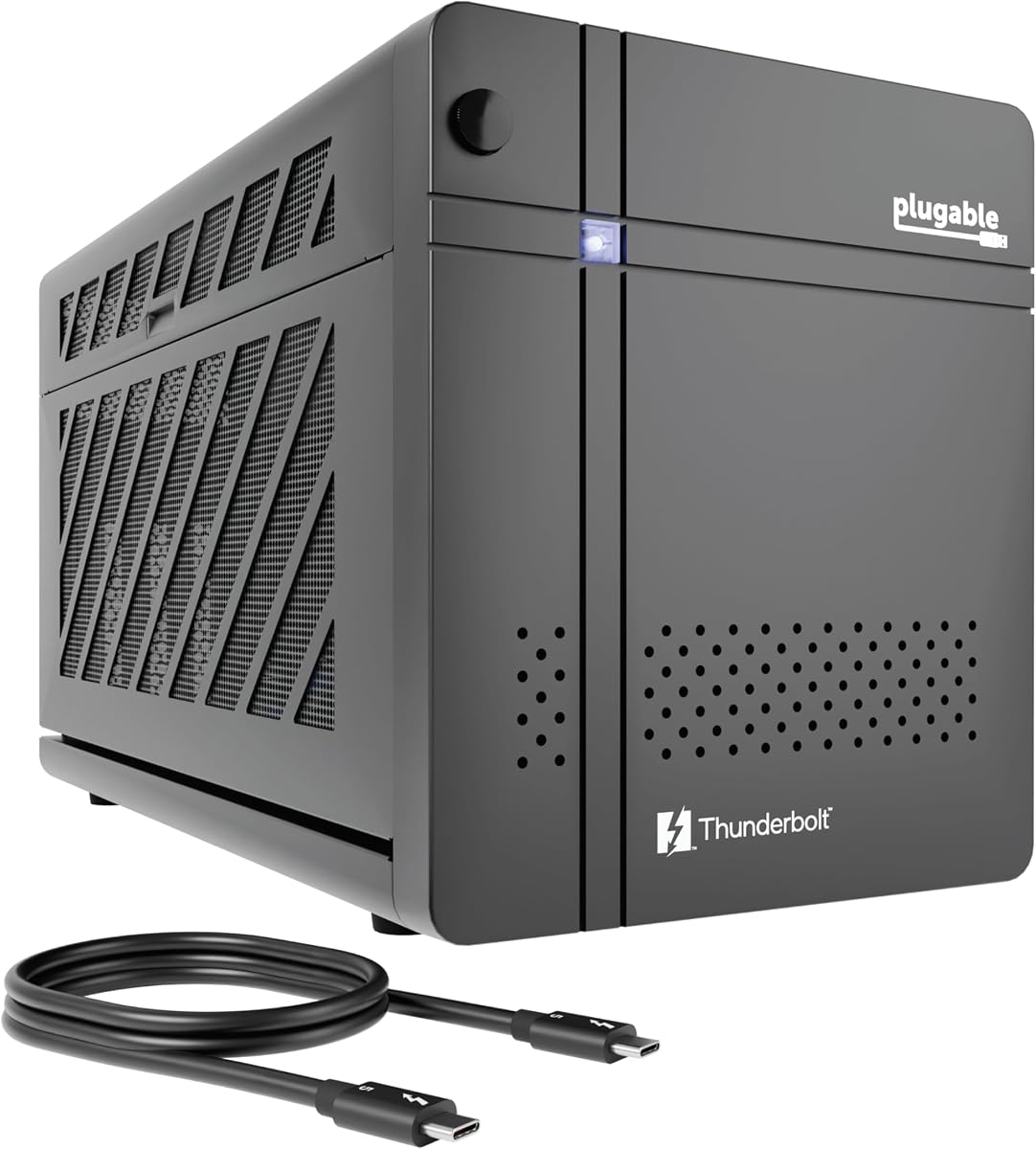
The Plugable Thunderbolt 5 AI enclosure offers a unique solution optimized for running local AI models securely. It allows users to host their own GPUs for privacy-focused AI tasks without relying on cloud services.
We may earn a commission when you buy through this link, at no additional cost to you.
Its strengths lie in its specialized design for AI inference and training, ensuring sensitive data remains on your local machine. It includes an 850W PSU and supports PCIe 4.0 for top-tier GPU performance.
Users should be aware that macOS and Linux support are limited, making it best suited for Windows 11 environments. Additionally, it is tailored for AI workflows which may not be the primary need for all buyers.
This enclosure is ideal for developers and researchers needing secure offline AI capabilities. It provides the necessary hardware foundation for high-performance computing with a focus on data privacy and control.
Designed specifically to run large language models locally for enhanced privacy.
Supports air-gapped setups ensuring prompts and data never leave your perimeter.
We may earn a commission when you buy through this link, at no additional cost to you.
This external GPU enclosure offers a complete solution with a 240W power supply and carrying case included. It is well suited for users needing a portable graphics boost for laptops or handheld consoles.
We may earn a commission when you buy through this link, at no additional cost to you.
Key strengths include its compact design which allows for easy transport and setup anywhere. It supports Thunderbolt 4 and provides adequate power for mid-range graphics cards used in gaming or light rendering.
The limitation on GPU size means larger triple-slot cards will not fit inside this enclosure. Additionally the 240W PSU may be insufficient for high-end GPUs that require more power for full performance.
This is a great option for travelers or handheld users looking to upgrade their graphics performance on the go. It provides a plug-and-play experience with everything needed in one package.
Includes a custom carrying case for protection during travel and transport.
Everything from cables to PSU is included so no extra purchases are needed.
We may earn a commission when you buy through this link, at no additional cost to you.
The ANQ-L336 Mini eGPU enclosure is designed for compatibility with handheld consoles like ROG Ally and Claw 8. It supports a variety of power supplies including SFX and flex making it flexible for different setups.
We may earn a commission when you buy through this link, at no additional cost to you.
Its strengths include broad operating system support covering Windows Linux and macOS unlike many competitors. The compact size ensures it does not hinder the portability of handheld gaming devices.
However the limited GPU length restricts which graphics cards can be used inside the chassis. Additionally users need to source their own power supply and may need to perform some DIY configuration.
This option is excellent for handheld gamers wanting a lightweight portable eGPU solution. It offers flexibility and broad compatibility at a budget-friendly price point for casual users.
Designed to work seamlessly with popular handheld gaming consoles for on-the-go play.
Supports multiple PSU types allowing users to choose their preferred power source.
We may earn a commission when you buy through this link, at no additional cost to you.
The VK-Y900 enclosure is a versatile choice that supports both Thunderbolt 3 and 4 standards. It is designed to work with standard ATX power supplies which are widely available and cost-effective.
We may earn a commission when you buy through this link, at no additional cost to you.
Strengths include dual Thunderbolt ports that allow for daisy-chaining additional devices and 85W power delivery for laptop charging. It also includes a DisplayPort for direct monitor connections without needing extra adapters.
Users should note that the power supply is not included and must be purchased separately. This may add to the setup complexity for those expecting a complete ready-to-use package out of the box.
This enclosure is suitable for users comfortable with customizing their power setup. It offers broad compatibility with NVIDIA and AMD GPUs at a budget-friendly price point.
Compatible with common ATX power supplies reducing the need for proprietary hardware.
Two Thunderbolt ports allow for expanded peripheral connections and daisy-chaining.
We may earn a commission when you buy through this link, at no additional cost to you.
The Sonnet Breakaway Box 750ex is a reliable external GPU enclosure that has been trusted by creative professionals for years. It features a 750W power supply capable of supporting a wide range of graphics cards.
We may earn a commission when you buy through this link, at no additional cost to you.
Its strengths include a built-in Ethernet port and USB Type A ports which expand connectivity without needing extra adapters. It is compatible with both Mac and Windows systems except for M1 chips.
The main drawback is its reliance on Thunderbolt 3 which offers lower bandwidth compared to newer standards. Users seeking maximum future-proofing might prefer a Thunderbolt 4 or 5 model instead.
This enclosure remains a solid choice for existing Thunderbolt 3 users needing stable and reliable performance. It is ideal for creative professionals who value reliability over cutting-edge speed.
Optimized for professional creative workflows including video editing and 3D rendering.
Built-in USB and Ethernet ports simplify connections to peripherals and networks.
We may earn a commission when you buy through this link, at no additional cost to you.
This Mini eGPU enclosure is designed for users needing a small footprint solution on a budget. It supports Thunderbolt 3 and 4 and includes a USB-A port for basic peripheral connectivity.
We may earn a commission when you buy through this link, at no additional cost to you.
Strengths include its compact design which makes it easy to fit on a desk or laptop setup. It allows for flexible power supply options so users can choose what works best for them.
The lack of an included power supply and cooling limitations mean it is best suited for lower power GPUs. Users should carefully check compatibility before purchase to avoid fitting issues.
This option is suitable for budget-conscious users needing a portable eGPU solution. It offers essential features without the cost of a premium enclosure.
Small size ensures it fits easily in bags or on small desks.
USB-A port allows for simple peripheral connections without extra hubs.
We may earn a commission when you buy through this link, at no additional cost to you.
The MINISFORUM DEG2 offers a unique dual interface supporting both USB4 V2 and OCuLink for optimized performance. It includes a built-in M.2 NVMe slot for storing projects directly on the dock.
We may earn a commission when you buy through this link, at no additional cost to you.
Strengths include an internal re-drive signal booster that enhances data stability during high bandwidth tasks. It supports a wide range of power supplies providing flexibility for various GPU configurations.
The complexity of managing dual modes and needing a separate power supply may deter casual users. However for performance-focused individuals these features offer significant advantages over standard enclosures.
This enclosure is ideal for enthusiasts wanting maximum performance and storage flexibility. It provides a seamless single-cable workflow with enhanced signal reliability.
Switch between Thunderbolt and OCuLink for flexibility and performance options.
Built-in M.2 slot allows for fast local storage access without extra drives.
We may earn a commission when you buy through this link, at no additional cost to you.
This External eGPU Enclosure provides a complete kit with a 240W power supply and carrying case included. It is designed for easy plug and play setup with minimal configuration needed.
We may earn a commission when you buy through this link, at no additional cost to you.
Strengths include its compact and lightweight design which makes it highly portable for travelers. It includes everything needed to get started with a graphics boost on supported laptops or handhelds.
The limited GPU size and lower wattage PSU mean it works best with mid-range cards. Users should verify graphics card dimensions to ensure they fit within the enclosure housing.
This bundle is ideal for users seeking a hassle-free portable solution. It offers simplicity and convenience for upgrading graphics performance on the go.
Includes PSU case and cables for a ready to use experience out of the box.
Lightweight and compact design fits easily in travel bags for on-the-go power.
We may earn a commission when you buy through this link, at no additional cost to you.
Selecting the right external GPU enclosure depends on several factors including connectivity interface GPU size compatibility and power requirements.
Check whether your laptop or handheld supports Thunderbolt 3 4 5 or USB4 as this determines data speeds and compatibility. Newer interfaces like Thunderbolt 5 offer higher bandwidth which is essential for maxing out high-end GPUs.
Ensure the enclosure supports a power supply wattage that meets your GPU requirements since some models require 850W or more for top-tier cards. Verify whether the PSU is included or if you need to buy it separately to avoid extra costs.
Measure your graphics card dimensions to ensure they fit inside the enclosure since some models support only single slot cards while others allow triple wide setups. Larger enclosures may reduce portability but offer greater GPU flexibility.
Confirm that the enclosure is compatible with your operating system as some models do not support macOS with Apple Silicon or Linux distributions. Compatibility varies so check manufacturer documentation carefully before purchasing.
Consider extra features like USB hubs Ethernet ports or NVMe slots that can add convenience and functionality to your setup. These features reduce the need for additional docks and streamline your workspace.
Look for enclosures with steel or aluminum chassis and active cooling fans to ensure durability and thermal efficiency during long usage sessions. Good cooling prevents throttling and maintains consistent GPU performance.
If you plan to move your setup frequently choose a compact enclosure that fits easily in bags and does not add excessive weight. Smaller enclosures are ideal for travelers but may limit GPU compatibility.
Check the warranty terms and customer support options provided by the manufacturer to ensure you have assistance if issues arise. Lifetime support or extended warranties can provide peace of mind for long-term use.
First ensure your host device has a compatible Thunderbolt or USB4 port and update its drivers before connecting the enclosure for stable communication and performance.
Second install your graphics card and connect the power supply ensuring all cables are securely seated to prevent loose connections that could cause instability or overheating.
Third maintain your enclosure by keeping it in a well-ventilated area and cleaning dust regularly to ensure the cooling fans operate efficiently over time.
Not all laptops support external GPUs. Your device must have a Thunderbolt 3 4 5 or USB4 port with eGPU support. Check your laptop specifications to confirm compatibility before purchasing.
Most enclosures do not include a graphics card or power supply so you will need to purchase them separately. Some complete bundles include a PSU but verify product details before buying.
Many enclosures support macOS but Apple Silicon Macs like M1 or M2 chips are not supported. Older Intel-based Macs usually work well with Thunderbolt external GPU setups.
Thunderbolt 5 offers higher bandwidth up to 80 Gbps compared to Thunderbolt 4 which supports up to 40 Gbps. This provides better performance for demanding tasks like gaming or AI workloads.
Yes most enclosures require an external power supply for the graphics card. Ensure you have a dedicated power outlet and the correct wattage PSU to power your GPU effectively.
You should not hot swap graphics cards while the enclosure is powered on as this may damage hardware. Power down the system before installing or removing the GPU to ensure safety.
Expect some performance loss compared to an internal desktop GPU due to bandwidth limitations typically around 10 to 20 percent. Modern Thunderbolt 5 setups minimize this loss significantly.
Mini enclosures often have size and power limitations making them best suited for low to mid-range GPUs. High-end cards usually require larger enclosures with higher wattage power supplies.
This guide has highlighted top picks including the Razer Core X V2 and Sonnet Breakaway Box 850 T5 offering varied solutions for different needs and budgets.
Prioritize compatibility with your current laptop and future expansion plans when selecting an enclosure to ensure you get lasting value from your investment.
Remember to check the latest product details and availability before buying since specifications and bundles can change frequently in this fast-moving market.