
Smart Digital Calendar 10.1 Inch
4.4Editor score
No hidden subscription fees
Interactive chore tracking for kids
Compact 10.1-inch design
Finding the right digital chore chart can transform how your household manages daily tasks and schedules. These smart devices combine calendars, to-do lists, and interactive chore tracking into one central display that keeps everyone informed and motivated throughout the day.
We evaluated ten leading models based on screen quality, ease of setup, synchronization options, and built-in reward systems for children. Each product was assessed for its ability to function as a family command center while maintaining the elegance of a modern digital photo frame.
Every pick in this list highlights unique strengths, from budget-friendly options to premium displays with advanced AI features. Note that pricing and availability may fluctuate over time, so verify current details before making your final decision on which model fits your home best.
4.4Editor score

4.4Editor score

4.4Editor score
As an Amazon Associate we earn from qualifying purchases.
The following comparison outlines key specifications across all ten models to help you quickly identify which device matches your specific family organization needs and display preferences.
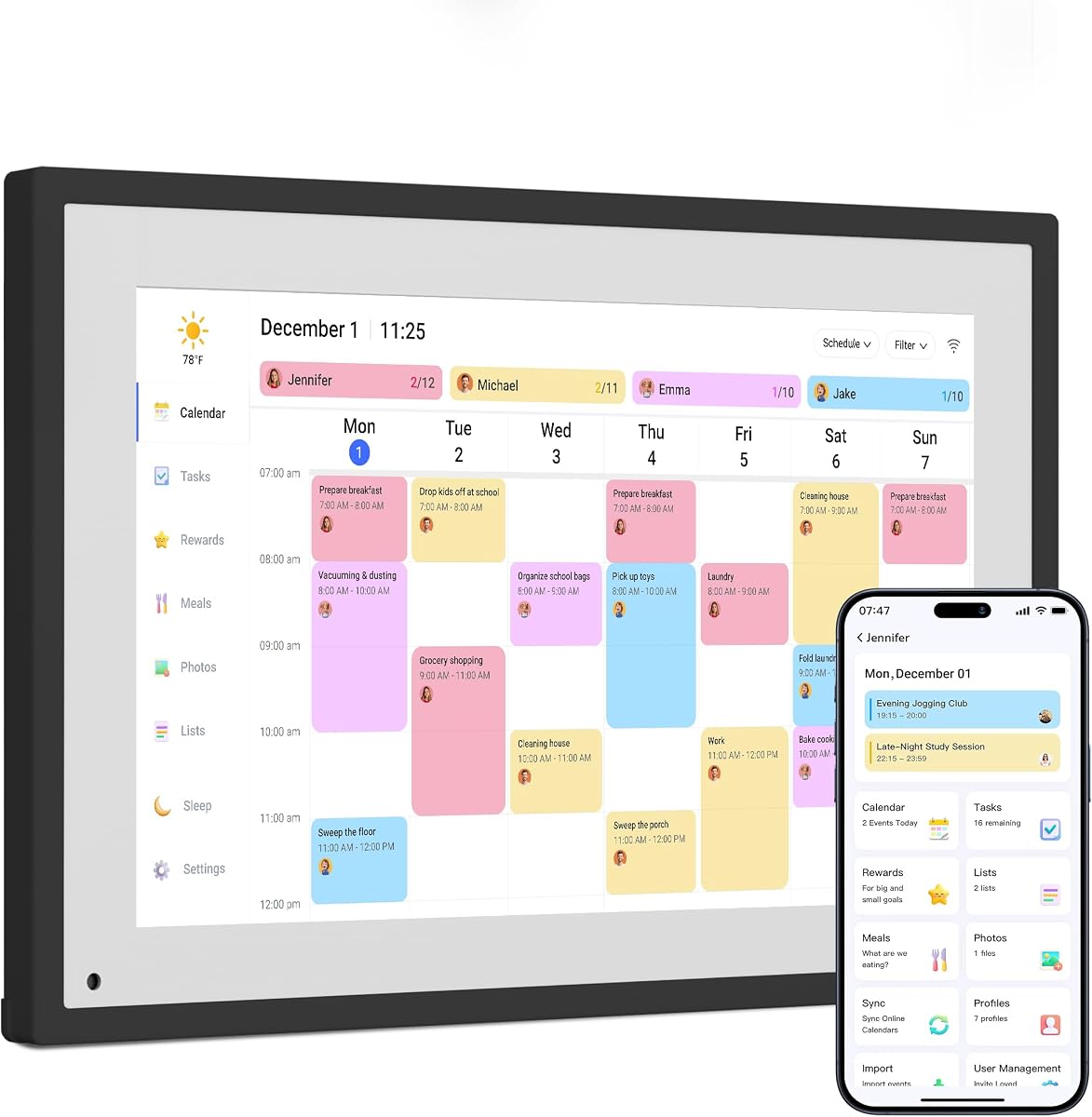



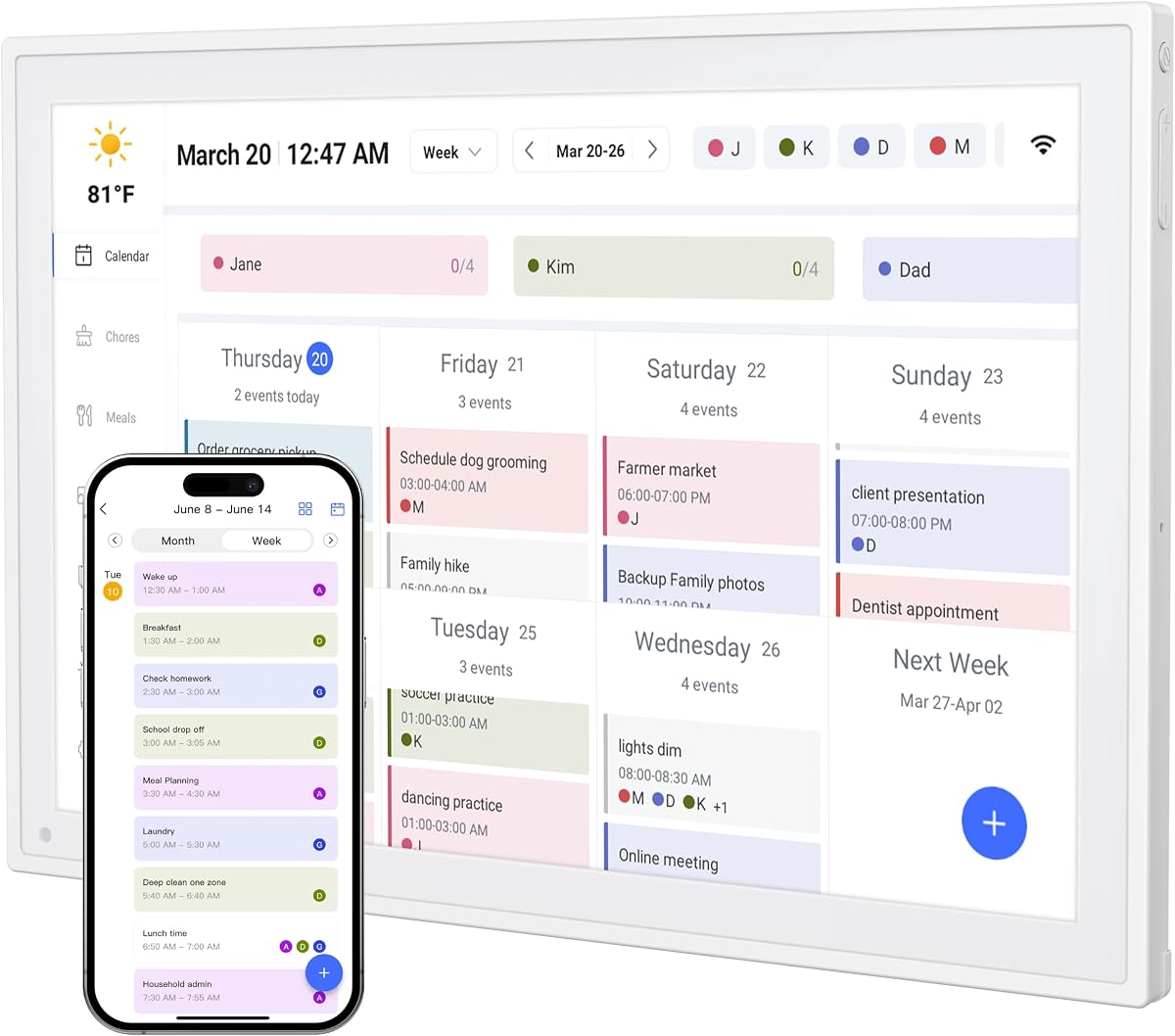

This 15.6-inch digital calendar stands out as a comprehensive command center that integrates scheduling, chore tracking, and photo display into a single elegant unit. With a high rating from users, it delivers a robust experience for busy households needing reliable organization tools.
We may earn a commission when you buy through this link, at no additional cost to you.
The standout feature is its seamless real-time sync with Google, Outlook, iCloud, and other platforms, allowing multiple family members to edit schedules simultaneously without conflicts. The built-in motivational chore system turns daily tasks into a gamified experience, encouraging children to check off tasks for reward points.
While the price point is higher than smaller models, the 15.6-inch glare-free HD touchscreen ensures crystal-clear visibility from across a room. The only minor trade-offs are the need for careful installation planning and the premium cost, but these are acceptable given the device's versatility and durability.
This device is ideal for large families or multi-generational homes where coordination is essential. It serves as a practical gift that helps busy parents coordinate schedules while keeping grandparents connected to family events through a user-friendly interface.
The ability for multiple users to update schedules in real-time prevents double-booking and ensures everyone knows their responsibilities without verbal reminders.
Beyond planning, the device cycles through enhanced family memories using AI restoration, adding emotional warmth to your home decor when not displaying schedules.
We may earn a commission when you buy through this link, at no additional cost to you.
The Smart Digital Calendar 10.1 Inch offers exceptional value for families seeking a budget-friendly digital chore chart that does not compromise on core functionality. It combines planning tools with a responsive touchscreen at a price that appeals to cost-conscious buyers.
We may earn a commission when you buy through this link, at no additional cost to you.
Its strengths lie in the intuitive interface that allows parents to assign custom colors to family members and kids to check off tasks with a simple tap. The dual-band Wi-Fi ensures updates happen instantly, merging appointments from Google, iCloud, and Outlook into one unified display.
Trade-offs include a smaller 10.1-inch screen which might be harder to read from a distance compared to 15-inch models, and limited storage for photos. However, for a compact desk or counter setup, these limitations are minor compared to the significant savings.
This model is best suited for smaller households or those just starting to adopt digital organization tools. It provides a clutter-free, paperless way to manage chores and meal plans without requiring a large financial commitment upfront.
Priced competitively, this device brings the benefits of a smart command center to families who might otherwise hesitate due to cost concerns.
The interactive chore tracking turns daily responsibilities into a rewarding game, helping children build lasting habits independently.
We may earn a commission when you buy through this link, at no additional cost to you.
The Skylight Calendar represents the premium tier of digital chore charts, featuring a stunning HD smart display designed to fit naturally into modern home decor. It targets users willing to pay more for a refined user experience and exclusive content like Disney Mode.
We may earn a commission when you buy through this link, at no additional cost to you.
Its standout qualities include the ability to mount easily on walls or sit on countertops, combined with effortless syncing across major calendar platforms. The Disney Mode adds a unique layer of engagement for children, using animations and avatars to make routine tasks more appealing.
However, the premium experience comes with a subscription model for accessing advanced features like Magic Import and photo screensavers. While the device is robust, the ongoing cost may be a deterrent for some buyers compared to one-time purchase alternatives.
This product is perfect for families who prioritize design aesthetics and want unique features to engage children. It serves as a central hub that keeps everyone in sync while adding a touch of elegance to any room.
With 16 iconic characters, this feature encourages teamwork and makes scheduling feel less like a chore for young kids.
The sleek white frame and minimal footprint make it look like high-end decor rather than a utilitarian tech device.
We may earn a commission when you buy through this link, at no additional cost to you.
The Dragon Touch 10.1 inch Digital Calendar offers a straightforward approach to family organization with a focus on visual clarity and simplicity. It is designed to help families track schedules and chores without overwhelming them with too many features.
We may earn a commission when you buy through this link, at no additional cost to you.
Its strengths include a crystal-clear touchscreen that makes assigning different colors and tasks to each family member intuitive. When not in use, it transforms into a beautiful digital picture frame, adding elegance to any room as modern home decor.
Users may find the lack of wall mount support limits placement options compared to other models. Additionally, advanced syncing capabilities are less extensive than competitors, but this is acceptable for those who value simplicity over complex integrations.
This device is best for families who want a reliable, no-fuss tool to manage daily routines. It is ideal for desk placement where its decorative qualities can be fully appreciated without installation concerns.
The clear display ensures that schedules are easy to read at a glance, reducing confusion during busy mornings.
By doubling as a digital photo frame, it maintains the aesthetic of your home while providing utility.
We may earn a commission when you buy through this link, at no additional cost to you.
This interactive digital calendar focuses on making family planning simpler with features like a dedicated dinner planner to eliminate daily questions. It offers a user-friendly setup and auto-sync capabilities that streamline the process of managing schedules.
We may earn a commission when you buy through this link, at no additional cost to you.
The ability to manage calendars from anywhere via the powerful eCalendar App is a significant advantage for busy parents. It allows you to access and edit tasks on the go, ensuring the family stays coordinated even when away from home.
The trade-offs include the requirement for a consistent Wi-Fi connection and the lack of wall mounting options. However, for a desk-based command center, these limitations are minor compared to the convenience of remote management.
This device is perfect for families who want to keep dinner plans organized alongside daily chores. It serves as a thoughtful gift that combines utility with a sleek design suitable for any room.
Displaying family dinner plans directly on the screen helps streamline meal prep and reduces daily decision fatigue.
The companion app ensures you can update schedules from anywhere, keeping everyone informed in real-time.
We may earn a commission when you buy through this link, at no additional cost to you.
This model stands out for its commitment to providing a full-featured digital calendar without hidden subscription fees. It is designed to be a smart organizer that manages schedules, chores, and meal plans in one central spot.
We may earn a commission when you buy through this link, at no additional cost to you.
The built-in interactive chore list lets children earn stars and unlock rewards, turning routines into a fun game. This gamification approach builds responsibility and self-discipline, resulting in a calmer and happier home environment.
While the screen size is standard at 10.1 inches, the device remains highly functional for most households. The trade-off is a somewhat basic interface compared to premium models, but it ensures simplicity and reliability.
This device is an excellent gift for busy moms or grandmas who hold the family together. It offers a practical way to stay organized without the stress of recurring costs.
Kids naturally engage more with tasks when they can earn stars and rewards, reducing the need for nagging.
Zero hidden fees mean you get all the core features right out of the box without worrying about ongoing costs.
We may earn a commission when you buy through this link, at no additional cost to you.
This 15.6-inch smart calendar is powered by a refined operating system that delivers snappier responses and optimized sync performance. It is designed for families seeking a high-quality display with significant storage for media and schedules.
We may earn a commission when you buy through this link, at no additional cost to you.
The built-in 64GB storage allows you to hold thousands of HD media files, switching automatically to photo frame mode when idle. Adaptive HD touch display with built-in sensor auto rotating landscape or portrait mode adds to its convenience.
Users may find that some features rely heavily on the AiMOR app for syncing and sharing, which adds a dependency on external software. However, the large screen and storage capacity make up for this minor inconvenience.
This product is ideal for large families with extensive media archives who want a single device for both organization and entertainment. It serves as a reliable command center for daily living.
With 64GB of internal storage, you never have to worry about deleting photos to make room for new ones.
The auto-dimming brightness and rotation sensors ensure the display is always comfortable to view at any time.
We may earn a commission when you buy through this link, at no additional cost to you.
This device earns a perfect user rating for its simplicity and effectiveness in managing household schedules. It serves as a powerful command center combining shared calendars, color-coded schedules, and task management in one place.
We may earn a commission when you buy through this link, at no additional cost to you.
Getting started takes just minutes with a simple plug-and-play setup that connects to Wi-Fi instantly. The interface allows you to add or update events directly on the screen, ensuring everyone stays on top of daily routines.
While the screen size is standard, the inclusion of real-time weather forecasts and smart reminders adds significant utility to daily planning. The trade-off is a lack of advanced customization, but this keeps the experience intuitive.
This model is perfect for families who want a reliable tool without a steep learning curve. It is an excellent choice for busy moms who need a practical way to keep track of appointments and tasks.
The ability to sync schedules immediately ensures that any changes made are visible to everyone in real-time.
Real-time weather updates help you plan your day effectively without needing to check multiple apps.
We may earn a commission when you buy through this link, at no additional cost to you.
This calendar distinguishes itself with a built-in silent vibration motor that wakes you for appointments without disturbing others. It is a smart family calendar that keeps your household running smoothly with practical features.
We may earn a commission when you buy through this link, at no additional cost to you.
The silent vibration alerts are ideal for nightstand use, offering a discreet way to manage your wake-up time. It also supports multi-device syncing, meaning schedule changes update instantly on all connected phones and tablets.
Trade-offs include the lack of a wall mount and a simpler design aesthetic compared to modern premium options. However, the functionality remains robust for those prioritizing utility over style.
This product is best for households that need reliable alerts and sync capabilities without noise. It is a practical choice for parents who want to keep everyone on track discreetly.
The silent vibration motor ensures you never miss an appointment while keeping the peace in the bedroom.
Multi-device syncing ensures that updates on your phone reflect immediately on the calendar screen.
We may earn a commission when you buy through this link, at no additional cost to you.
This device emphasizes convenience with features like a Smart Sleep Mode that ensures zero light pollution at night. It is a family command center that functions as both a functional desk calendar and a decorative electronic calendar.
We may earn a commission when you buy through this link, at no additional cost to you.
The ultra-thin design complements modern home decor, while the automatic sleep schedule matching your routine helps save energy. It syncs seamlessly with Apple and Google calendars, keeping your work and personal life organized.
The main trade-offs are a basic interface and a standard screen size that might limit visibility from across a large room. However, the no-subscription model ensures long-term affordability for all users.
This product is ideal for those who value energy efficiency and modern aesthetics. It serves as a thoughtful gift that helps keep the whole family informed about meal plans and tasks.
Smart Sleep Mode allows you to set automatic on and off times, saving power without sacrificing utility.
The sleek, ultra-thin profile ensures it looks like a piece of art rather than just a tech gadget.
We may earn a commission when you buy through this link, at no additional cost to you.
Selecting the right digital chore chart involves considering screen size, syncing capabilities, and interactive features that fit your family's lifestyle.
Screen size determines how many family members can view the display simultaneously from across a room. Larger screens like 15.6 inches are ideal for kitchens where multiple people gather, while 10.1-inch models suit compact desks.
Choose a high-resolution HD display to ensure text is readable from a distance and photos look vibrant.
Seamless syncing with major platforms like Google Calendar, iCloud, and Outlook is essential for keeping everyone informed. Real-time updates prevent double-booking and ensure schedules stay current without manual data entry.
Look for models that support dual-band Wi-Fi to maintain a stable connection during busy family hours.
Gamified features like earning stars or unlocking rewards help children develop responsibility and independence. Interactive task tracking turns daily chores into a fun challenge rather than a burden for young users.
Ensure the reward system is customizable to match your family's specific discipline and motivation goals.
Some devices support wall mounting for a central command center view, while others are designed for desk or countertop placement. Consider the layout of your kitchen or living area when choosing a mounting style.
Flexible mounting options provide versatility so the device fits naturally into your home's existing design.
Many digital planners come with optional subscriptions for advanced features, but others offer all core functions for free. Avoid hidden monthly fees by checking if basic scheduling and chore features are available without a plan.
Opt for a one-time purchase model if you want to keep long-term costs predictable and low.
Many models double as digital photo frames that display cherished memories when not actively managing schedules. This adds aesthetic value to your home, turning the device into a decorative element rather than just a tool.
Look for AI restoration features that enhance old photos to maintain the quality of your family archive.
Remote management via a companion app allows you to update schedules from your phone without touching the main screen. This is crucial for busy parents who need to make quick changes on the go.
Check compatibility with iOS and Android to ensure you can manage the device with your existing smartphone.
Begin by plugging the device into a power source and connecting it to your home Wi-Fi network. Follow the setup guide to link your preferred calendar services such as Google Calendar or iCloud so all events sync automatically.
Assign colors to each family member to distinguish their schedules at a glance. Create specific chore tasks and link them to rewards to encourage participation. Keep the screen updated with new meal plans weekly to maintain clarity.
Clean the touchscreen with a soft microfiber cloth to avoid scratches. Avoid placing the device in direct sunlight or near heat sources to protect the display. Enable sleep mode at night to save energy and reduce light pollution.
Most models do not require a subscription for core features like scheduling and task tracking. Some premium devices offer optional paid plans for advanced extras, but many provide full functionality with zero hidden fees. Always check the product details before purchasing.
Yes, modern digital calendars support real-time syncing allowing multiple family members to edit schedules simultaneously. This ensures that changes are reflected instantly for everyone without conflicts or delays in communication.
Setup is designed to be simple with plug-and-play instructions. Most devices require only a Wi-Fi connection and basic login credentials to start syncing data immediately. User-friendly interfaces make it easy for anyone to manage.
The device will continue to display stored schedules locally even if the internet connection drops. However, syncing changes from other devices will pause until the connection is restored. It still functions as a local display in this state.
Absolutely, these devices often include meal planners, to-do lists, and photo displays. They serve as a comprehensive family command center that organizes various aspects of household management beyond simple task lists.
With proper care, digital displays can last several years without significant issues. Avoiding heat and direct sunlight helps maintain the longevity of the screen. Most come with a warranty period for additional peace of mind.
We reviewed ten top models ranging from budget-friendly options to premium displays with unique features. The 15.6-inch wall touch screen offers the best overall experience, while the 10.1-inch smart calendar provides great value.
When making your choice prioritize screen size and syncing capabilities that fit your home layout. Consider whether you need a simple paperless system or one with advanced gamification features for children.
Always verify current pricing and availability before buying as market conditions change regularly. Select the model that best supports your family's unique organizational needs and lifestyle habits.