
Rongta Bluetooth Shipping Label Printer
4.0Editor score
Wireless Bluetooth connectivity
Automatic label identification
Compact portable design
This guide compares the best DHL label printers for small businesses, evaluating speed, connectivity, and compatibility to help you choose the right thermal
Finding the right DHL label printer is essential for efficient shipping operations. A good printer delivers crisp barcodes, supports various label sizes, and connects easily to your devices for seamless integration with shipping platforms.
We compared ten top thermal printers based on speed, connectivity options, platform compatibility, and ease of use. Our analysis covers models ranging from budget-friendly options to commercial-grade units suitable for high-volume shipping environments.
Each pick highlights key features, pros, and cons to help you make an informed decision. Prices and availability change frequently, so check current listings before purchasing to ensure you get the best deal for your business needs.
4.0Editor score

4.6Editor score

4.1Editor score
This side-by-side comparison highlights the key specifications of each printer to help you quickly identify the model that best fits your shipping volume and budget requirements.






The Rollo USB Shipping Label Printer stands out as a top choice for businesses needing reliability and speed. With a 4.6 rating from users, it delivers consistent performance for high-volume shipping tasks.
We may earn a commission when you buy through this link, at no additional cost to you.
Its direct thermal technology prints up to 150mm/s, ensuring clear 203 DPI labels that scan easily. It connects via USB to Windows and Mac systems and works seamlessly with platforms like DHL, Amazon, and Shopify.
While it lacks wireless options, the stable USB connection reduces interference issues common with Bluetooth. The included Rollo Ship app offers competitive shipping rates without needing third-party services.
This printer is ideal for small to medium businesses prioritizing durability and speed. It handles 4×6 labels and other sizes well, making it a versatile tool for diverse shipping needs.
Prints up to one 4×6 label per second, reducing wait times during peak shipping hours.
Works with major marketplaces and carriers including DHL, FedEx, UPS, and Etsy for seamless integration.
We may earn a commission when you buy through this link, at no additional cost to you.
The Rongta Bluetooth Shipping Label Printer offers an accessible entry point for small businesses needing wireless shipping solutions. It balances cost and functionality with a straightforward design.
We may earn a commission when you buy through this link, at no additional cost to you.
It connects via Bluetooth to phones and computers, supporting iOS and Android through the RONGTA app. The automatic label identification feature reduces manual adjustments when changing label sizes.
While it does not match the speed of high-end models, its 150mm/s printing is sufficient for moderate volumes. The compact size makes it easy to store or transport between workspaces.
This printer is best for startups or home businesses prioritizing portability and affordability. It handles 4×6 labels effectively and integrates with popular platforms like Amazon and eBay.
Print directly from your smartphone using the RONGTA app for quick label creation on the go.
Its compact footprint fits easily on small desks or in storage drawers for organized workspaces.
We may earn a commission when you buy through this link, at no additional cost to you.
The Rollo Wireless Shipping Label Printer brings premium connectivity with Wi-Fi and AirPrint support, eliminating cables for Apple devices. It suits businesses needing flexible placement and robust performance.
We may earn a commission when you buy through this link, at no additional cost to you.
iOS users can print directly via AirPrint without drivers, while Android and Windows connect through Wi-Fi. The 203 DPI resolution ensures crisp labels with clear text and barcodes for scanning.
Its printhead is rated for 650,000 labels, offering longevity that justifies the higher cost. The Rollo Ship Manager app provides discounted shipping rates across multiple carriers including DHL.
This model is ideal for offices where cable management matters. It handles diverse label sizes and integrates smoothly with major e-commerce platforms, enhancing workflow efficiency.
Use AirPrint to print from iPhone or iPad without installing additional software or drivers.
The durable printhead supports hundreds of thousands of labels, reducing long-term maintenance needs.
We may earn a commission when you buy through this link, at no additional cost to you.
The JADENS Bluetooth Thermal Shipping Label Printer offers solid performance for diverse shipping needs. It combines wireless and USB connections to suit various user preferences and office setups.
We may earn a commission when you buy through this link, at no additional cost to you.
Its Japanese thermal print head delivers 203 DPI quality with no ink or toner. Bluetooth works well on Mac and Windows, while iOS users rely on the Jadens printer app for mobile tasks.
Compatibility covers major platforms like DHL, Shopify, and eBay, making it versatile for multi-channel sellers. The included U-Disk contains drivers and troubleshooting videos to simplify setup.
This printer is a practical choice for small businesses needing reliability at a mid-range price. It supports multiple label types and maintains consistent output for professional results.
Accommodates both fanfold and roll labels for flexibility based on your preferred packaging style.
Access drivers and video guides on the included U-Disk for smooth installation and maintenance.
We may earn a commission when you buy through this link, at no additional cost to you.
This Thermal Shipping Label Printer is designed for efficiency and ease of use. It offers a complete package with labels included, making it ready for immediate deployment in shipping workflows.
We may earn a commission when you buy through this link, at no additional cost to you.
Direct thermal printing ensures crisp barcodes and text at 203 DPI, with speeds up to 150mm/s. Bluetooth connectivity pairs via the FlashLabel Pro app, which also provides offline template storage.
The printer integrates with major carriers like DHL, USPS, and FedEx. Its built-in overheat protection supports continuous operation during busy periods without compromising performance.
Ideal for small businesses needing a plug-and-play solution, it balances cost and capability. The included labels and accessories reduce initial setup time and additional purchases.
Includes power cord, USB cable, and 25 labels so you can begin printing right away.
Access over 1800 customizable templates for diverse labeling needs beyond just shipping.
We may earn a commission when you buy through this link, at no additional cost to you.
The KNAON Bluetooth Thermal Shipping Label Printer offers robust features in a compact form. It supports a wide array of templates and platforms, catering to varied labeling requirements.
We may earn a commission when you buy through this link, at no additional cost to you.
At 180mm/s, it prints quickly, and its 7-inch design saves desk space. The FlashLabel Pro app provides access to over 3000 templates and 5000 icons for customization across uses.
It connects via Bluetooth or USB to iOS, Android, Windows, and Mac. DHL compatibility ensures smooth integration for shipping workflows, with PDF import options for labels.
This printer suits businesses needing flexibility and speed without bulk. The included test papers and USB drive with drivers streamline setup for immediate productivity.
Choose from thousands of templates and icons to match your brand or organizational needs.
Operates seamlessly across Windows, Mac, and mobile devices for versatile connectivity.
We may earn a commission when you buy through this link, at no additional cost to you.
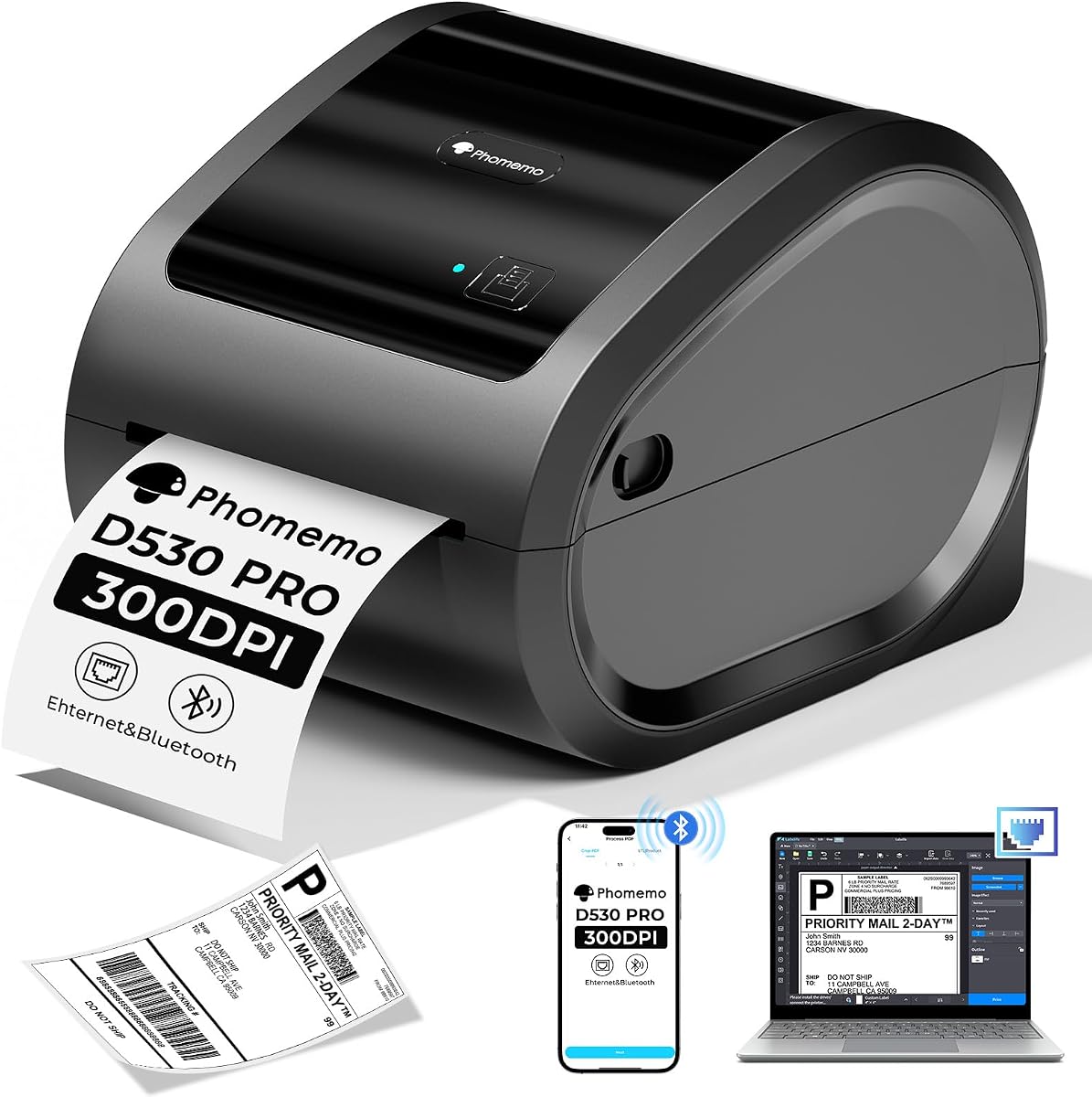
The Phomemo 300DPI Ethernet Thermal Label Printer delivers exceptional print quality with 300 DPI resolution. It suits environments where label clarity is critical for scanning and identification.
We may earn a commission when you buy through this link, at no additional cost to you.
It supports Ethernet, USB, and Bluetooth connections, offering flexibility for wired or wireless needs. The built-in paper bin holds up to 500 rolls, reducing frequent refills in busy settings.
Its label return function helps minimize waste by reusing unprinted labels. The wide platform compatibility includes DHL and major marketplaces, ensuring seamless workflow integration.
Best for businesses prioritizing print quality and capacity, it maintains a compact footprint. While initial setup varies by connection type, the performance justifies the investment for high standards.
300 DPI resolution ensures sharp text and barcodes that scan reliably even at small sizes.
The internal bin holds substantial rolls, ideal for uninterrupted operations during peak times.
We may earn a commission when you buy through this link, at no additional cost to you.
The MUNBYN Bluetooth Thermal Label Printer emphasizes precision and quiet operation. Its DAC Dynamic Algorithm Tech reduces misalignment, ensuring accurate placement for shipping and inventory labels.
We may earn a commission when you buy through this link, at no additional cost to you.
It operates at just 60 dB, making it suitable for shared workspaces. The printer is rated for 970,000 labels, offering durability that supports long-term cost efficiency.
With support for labels from 1.57 to 4.25 inches, it handles most shipping needs. Bluetooth pairing indicates stability through a dedicated indicator light, improving connection confidence.
This model fits offices prioritizing user experience and reliability. While priced higher, its efficiency and low waste design deliver value over time for consistent operations.
Whisper-quiet performance maintains focus in home offices or open work areas without disruption.
Auto-calibration ensures labels print correctly aligned, reducing errors and material waste.
We may earn a commission when you buy through this link, at no additional cost to you.
The Nelko Bluetooth Thermal Shipping Label Printer balances speed and affordability. Its 150mm/s performance supports efficient workflows for small businesses needing reliable label output.
We may earn a commission when you buy through this link, at no additional cost to you.
Direct thermal technology eliminates ink costs, and it handles both fanfold and roll labels. The NELKO app simplifies mobile printing, while USB connects to Windows and Mac for desktop use.
Compatibility covers Amazon, eBay, and DHL, with PDF upload for logistics labels. The compact footprint saves space, and driver videos on a U-Disk aid setup.
Best for cost-conscious users seeking versatility, it meets diverse labeling needs. While some platforms require manual PDF steps, the overall performance remains strong for daily tasks.
No ink or toner needed lowers ongoing expenses for high-volume printing operations.
Handle both fanfold and roll labels to match your existing stock and workflow preferences.
We may earn a commission when you buy through this link, at no additional cost to you.
The DYMO LabelWriter 550 Series focuses on precision and sustainability. It uses direct thermal printing without ink, reducing maintenance needs for simple labeling tasks.
We may earn a commission when you buy through this link, at no additional cost to you.
It prints precise quantities to eliminate waste from sheet labels, using only authentic DYMO labels for reliability. The packaging is plastic-free, aligning with eco-friendly business practices.
While compatible with many systems, it is restricted to DYMO branded labels, which may increase costs. The automatic recognition feature streamlines setup for basic shipping and office uses.
Best for environmentally conscious users with low to medium volume needs, it offers simplicity. However, broader compatibility may be limited compared to multi-brand thermal printers.
Print exact label quantities to avoid excess waste from cutting and trimming sheet labels.
Uses FSC certified paper and plastic-free packaging to support environmental goals.
We may earn a commission when you buy through this link, at no additional cost to you.
Selecting the right DHL label printer involves evaluating speed, connectivity, and platform support to match your business requirements.
Print speed determines how quickly you can process shipping orders. Models range from 100mm/s to 180mm/s, with faster speeds beneficial for high-volume operations during peak seasons. Consider your daily label output to choose a printer that minimizes bottlenecks without overpaying for unused capacity.
For small businesses, 150mm/s is usually sufficient. Larger operations may benefit from models exceeding 180mm/s to maintain throughput during busy periods.
Connectivity impacts where and how you print labels. USB offers stable wired connections ideal for fixed workstations, while Bluetooth enables mobile printing via apps. Wi-Fi models provide the most flexibility, allowing placement anywhere on your network without cables.
If you print from multiple devices or locations, prioritize Wi-Fi or dual connectivity. For dedicated office use, USB may suffice and reduce potential connection issues.
Ensure the printer works with your shipping and e-commerce platforms. Most thermal printers support DHL, Amazon, Shopify, and others through drivers or apps. Check if specific platforms require PDF uploads or direct integration to avoid workflow disruptions.
Review the manufacturer's compatibility list before purchasing. Some models offer dedicated shipping apps that simplify label generation and carrier selection for better efficiency.
Printers vary in supported label widths, commonly ranging from 1.5 to 4.6 inches. Confirm the printer handles your standard shipping sizes and any specialty labels for product identification or returns. Fanfold and roll options affect reloading convenience and cost.
Select a model covering your widest label requirement. Using incompatible sizes can lead to jams or calibration issues affecting print quality and productivity.
Commercial-grade printers often feature longer printhead lifespans and robust casings for continuous use. Look for specifications like label counts before head replacement, such as 650,000 or more. Durable units reduce downtime and maintenance costs over time.
For occasional use, consumer models may suffice. However, frequent daily printing warrants investment in a unit with higher durability ratings to ensure reliability.
User-friendly setup saves time and reduces frustration. Models with included driver disks, video tutorials, or intuitive apps simplify installation. Automatic label calibration minimizes manual adjustments when changing label formats.
Prioritize printers with clear instructions and responsive customer support. Smooth initial setup sets the stage for efficient long-term operation without technical hurdles.
Consider both upfront and ongoing costs. Thermal printers save money by eliminating ink and toner, but proprietary labels like DYMO may cost more. Check if the printer accepts generic thermal rolls to reduce consumable expenses.
Balance initial price with expected lifespan and feature set. A slightly more expensive printer with lower maintenance needs might offer better value over its lifetime.
Warranty coverage protects your investment against defects. Look for at least one year of support, with access to technical assistance via phone or email. Responsive service ensures quick resolution of any operational issues.
Verify the availability of replacement parts like printheads or power supplies. Strong support networks minimize downtime and maintain business continuity during unexpected problems.
Start by installing the necessary drivers on your computer or downloading the companion app for mobile devices. Connect the printer via USB, Bluetooth, or Wi-Fi following the manufacturer's instructions to ensure proper communication with your system.
Load the thermal label roll or fanfold correctly into the slot, ensuring the adhesive side faces up. Use the feed button to align the labels and calibrate the printer to avoid printing errors or misalignment during operation.
Regularly clean the print head with a soft cloth to remove dust and debris that can affect clarity. Keep the printer in a cool, dry place away from direct sunlight to prevent overheating and extend its lifespan significantly.
No, thermal label printers use direct thermal technology that reacts to heat, eliminating the need for ink or toner. This reduces maintenance costs and simplifies the printing process for shipping labels.
Most models support mobile printing via Bluetooth or apps. iOS and Android users typically download a companion app to create and print labels directly from their devices for convenient on-the-go shipping.
Common thermal printers handle widths from 1.5 to 4.6 inches, including standard 4×6 shipping labels. Some models also support smaller sizes for product tags or custom labels depending on configuration.
Durability varies by model, with commercial heads rated for 650,000 to 970,000 labels. Proper maintenance and avoiding overheating can extend the lifespan significantly for consistent daily performance.
Most accept generic thermal rolls, but some brands like DYMO require proprietary labels. Check the specifications to ensure compatibility and avoid potential issues with label feeding or adhesion.
No, you can print PDFs or manually create labels using built-in software. However, platform integrations simplify the process by pulling customer data directly for accurate and efficient label generation.
DPI indicates print resolution. 300 DPI offers sharper details better for small barcodes or fine text, while 203 DPI is sufficient for standard addresses and common shipping label requirements.
Ensure labels are loaded correctly and the printer is calibrated. Check connections, update drivers if needed, and clean the print head regularly to resolve issues like smudges or alignment problems.
Choosing the right DHL label printer depends on your specific shipping volume, budget, and connectivity needs. The Rollo USB model stands out for reliability, while budget-conscious users may prefer the Rongta Bluetooth option for essential features.
Prioritize factors like speed, platform compatibility, and durability to ensure long-term satisfaction. A printer that integrates smoothly with your workflow saves time and reduces operational friction during busy periods.
Always verify current prices and availability before purchasing, as deals change frequently. This guide provides a solid foundation to select a printer that supports efficient and professional shipping operations.