
Power Strips with Surge Protection
4.8Editor score
12 AC outlets available
4 smart USB ports
Flat plug design
Explore our expert guide comparing the top ten desk mounted outlet towers for 2026, featuring detailed reviews on surge protection, USB charging speed, and
Desk mounted outlet towers have become essential tools for modern workspaces. They consolidate multiple power sources into a single vertical unit, reducing clutter significantly. A good tower offers ample ports, robust surge protection, and a design that fits comfortably on your desk without taking up too much room.
To compile this list, we analyzed customer feedback, technical specifications, and real-world performance data. We focused on models that balance power capacity with safety features and usability. This list covers the most reliable options available for home offices, dorm rooms, and professional settings alike.
Each pick below highlights key strengths, potential weaknesses, and ideal use cases for different users. Note that product availability and pricing can change rapidly due to market demand and supply chain factors. Always verify the latest details before making your final purchasing decision to ensure you get the best value.
4.8Editor score

4.5Editor score

4.8Editor score
This side-by-side comparison highlights the key differences between the top ten models. You will see variations in port counts, surge protection ratings, and unique features like retractable cords or desk clamps to help you choose the right fit for your needs.




The TenTrend Power Strip Tower stands out as a highly versatile charging solution for modern desks. With a robust 230W total output and a mix of AC and USB ports, it handles diverse device needs effectively. Its 4.5-star rating reflects consistent performance and reliability reported by numerous users.
We may earn a commission when you buy through this link, at no additional cost to you.
Key strengths include two orange USB-C ports capable of 65W fast charging, which is ideal for laptops. Additionally, four blue USB-A ports provide ample power for phones and accessories simultaneously. The flat plug design ensures it fits snugly against the wall, preventing interference with adjacent outlets.
While it lacks individual switches for each outlet, the overall design prioritizes simplicity and space-saving. The five-foot cord is sufficient for most desk setups but might fall short if your power source is further away. However, the build quality and safety features make these trade-offs acceptable.
This tower is perfect for users needing a central hub for multiple devices without cluttering their workspace. Whether you are in a dorm or home office, its ability to charge up to fourteen devices at once is unmatched. We recommend it for those seeking high power density at an affordable price.
The 65W USB-C ports allow fast charging for laptops while the other ports handle smaller devices simultaneously.
The ultra-slim plug prevents the tower from blocking neighboring outlets, making it ideal for crowded power strips.
We may earn a commission when you buy through this link, at no additional cost to you.
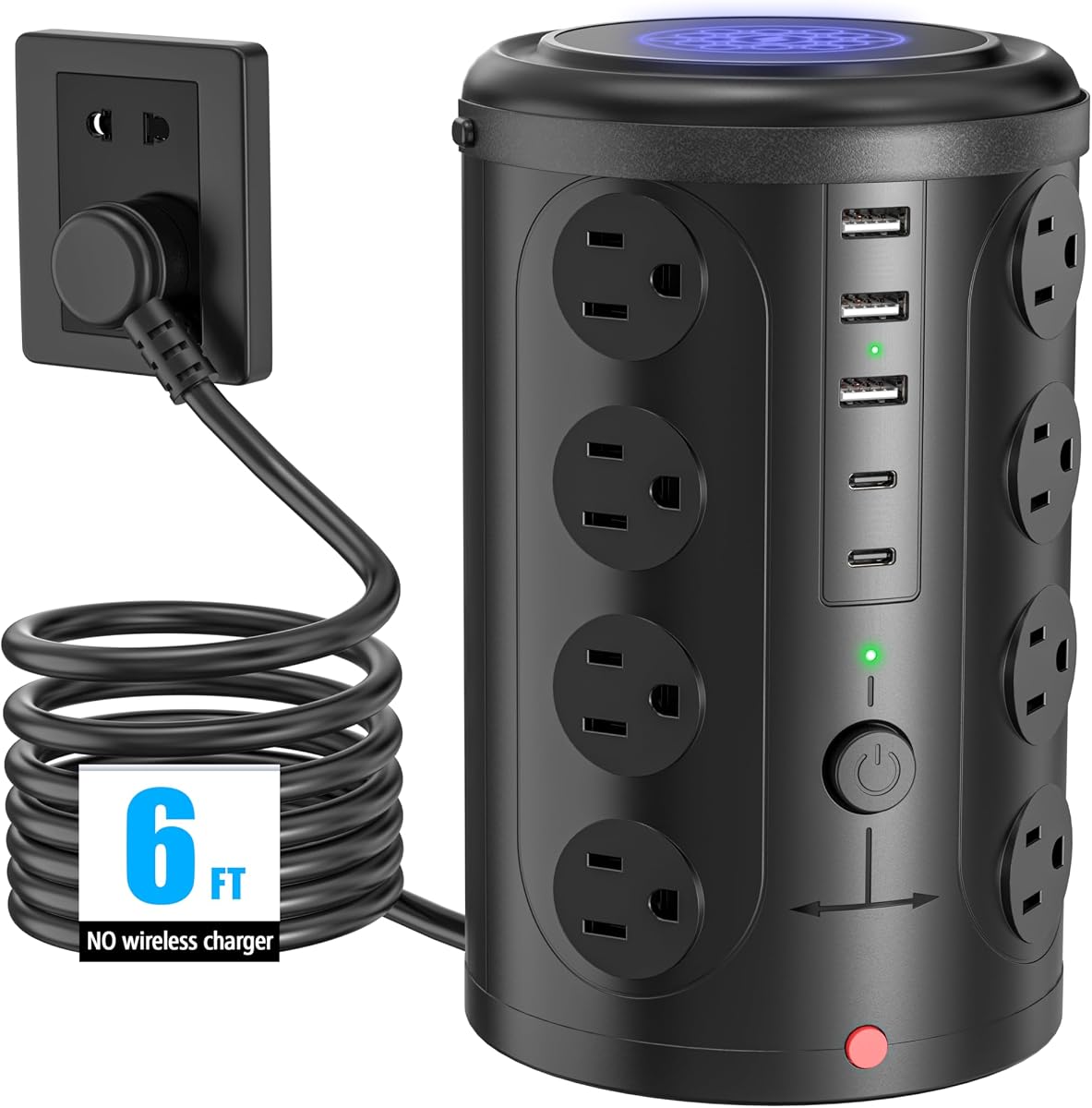
The Power Strips with Surge Protection tower offers incredible value for budget-conscious shoppers. It provides twelve AC outlets and four USB ports, allowing you to power many devices without a steep cost. Users praise its simple yet effective design and sturdy build quality.
We may earn a commission when you buy through this link, at no additional cost to you.
Its braided fabric cord stands out from typical rubber cables, offering better flexibility and resistance to tangling. The flat plug ensures easy access to wall sockets even in tight spaces behind furniture. This feature is particularly useful in dorms where outlet access is limited.
While the USB charging speeds are standard compared to faster PD options, they suffice for phones and tablets. The lack of individual switches means you must unplug devices to save energy, but the circuit breaker ensures overall safety. This trade-off is worth it given the low price point.
Ideal for students or anyone needing a basic, reliable power hub, this model handles everyday tasks well. It keeps your desk organized and reduces the need for multiple extension cords. We suggest it for those prioritizing cost and outlet count over advanced features.
The braided material makes the cord more flexible and tangle-free compared to standard plastic coated cables.
The twelve outlets are spaced widely enough to accommodate large adapters without blocking neighboring ports.
We may earn a commission when you buy through this link, at no additional cost to you.
The Anker Nano Power Strip redefines desk organization with its innovative clamp-on design. This unit eliminates floor clutter by attaching directly to your work surface, offering a premium experience. It holds a strong 4.8-star rating thanks to its reliable performance and clever engineering.
We may earn a commission when you buy through this link, at no additional cost to you.
Key features include dual USB-C ports capable of 70W charging, sufficient for most modern laptops. The dual-zone layout separates AC and USB outlets to reduce cable tangling. The adjustable clamp fits various desk thicknesses, allowing one-handed access to ports while keeping the strip stable.
Though more expensive than standard towers, the space savings and convenience justify the cost. Note that it requires a flat edge to clamp properly, so it may not fit curved desks. The surge protection rating is high, ensuring your devices are safe from power spikes.
This model is ideal for professionals who want a clean, cable-free workspace without sacrificing power access. It transforms any desk into a powerful station instantly. We recommend it for users willing to invest in a high-quality, space-saving solution.
The clamp design removes the need for a base, freeing up valuable desk real estate for keyboards or paperwork.
The USB-C ports support GaN technology, delivering fast and efficient charging for laptops and tablets.
We may earn a commission when you buy through this link, at no additional cost to you.
The Uncaged Ergonomics tower features a unique retractable cord that winds automatically into the base. This design ensures no loose cables lie around to trip over or get tangled. It has received a perfect 5.0-star rating from early users who value this convenience.
We may earn a commission when you buy through this link, at no additional cost to you.
Although it has fewer AC outlets than some rivals, the four provided are sufficient for moderate setups. The mountable feet allow you to fix the tower to a wall or under-desk surface, further freeing up space. This versatility makes it a standout for organized workspaces.
The cord system works smoothly but limits your reach to the retracted length. You cannot customize the length, which might be a drawback for larger rooms. However, for standard desk setups, the clean look and stability are significant advantages.
Perfect for users who hate managing cables, this model simplifies power access significantly. It is a great choice for home offices where aesthetics and neatness are priorities. We suggest it for those who appreciate innovative mechanical features over raw port counts.
The cord rewinds when released, keeping your floor tidy and preventing tripping hazards immediately.
Feet can be used to mount the unit on walls, saving space on desks or workbenches.
We may earn a commission when you buy through this link, at no additional cost to you.
This SMALLRT tower is designed for dorm rooms where outlets are scarce and needs are high. With twelve AC outlets and a long 6.5-foot cord, it reaches deep into corners easily. Its 4.7-star rating highlights its reliability in challenging student environments.
We may earn a commission when you buy through this link, at no additional cost to you.
The four separated switches let you control different sections of outlets independently. This feature helps save energy and allows you to turn off devices easily without unplugging. The heavy-duty construction ensures it can handle the daily wear and tear of student life.
The unit is somewhat bulky and heavy, which might make it less portable than smaller models. However, the stability this weight provides is beneficial for preventing accidental falls. The safety protections are robust, offering peace of mind for expensive electronics.
This tower is an essential for students needing a reliable central power station. It handles everything from laptops to coffee makers efficiently. We recommend it for anyone needing a long cord and switch control in a single unit.
Individual switches allow you to cut power to specific sections, reducing phantom energy consumption effectively.
The 6.5-foot cord provides ample reach to place the tower wherever needed without extension cords.
We may earn a commission when you buy through this link, at no additional cost to you.
The VILONG tower features a dual-layer design that allows access to outlets from both sides. This setup is ideal for shared desks or collaborative workspaces. It attaches via a clamp that requires no drilling, making it a safe and easy choice for renters.
We may earn a commission when you buy through this link, at no additional cost to you.
Ten AC outlets provide ample space for various devices, and the USB ports add modern convenience. The 700J surge protection rating is standard for this category, protecting against common power spikes. The unit is built with fire-resistant materials to enhance safety further.
The clamp fits desks up to 1.6 inches thick, which covers most standard tables. However, if your desk is thicker or curved, installation might be tricky. The USB-C port is limited to 20W, which is slower than some competitors offering higher wattage.
This model is great for offices where flexibility and shared access are key. It saves desk space and keeps cables managed. We suggest it for users with flat-edged desks who want a mountable power solution.
Outlets on both sides allow multiple users to plug in without reaching over the tower.
The clamp secures quickly without tools, allowing for instant setup and easy removal when moving.
We may earn a commission when you buy through this link, at no additional cost to you.
For those needing the most ports, this 21-in-1 tower offers sixteen AC outlets and five USB ports. It can charge up to twenty-one devices at once, making it perfect for media centers or heavy tech setups. Users rate it highly for its capacity and stability.
We may earn a commission when you buy through this link, at no additional cost to you.
The outlets are wide-spaced, which prevents bulky adapters from blocking neighbors. This is a common issue with smaller towers but is resolved here. The compact design ensures it does not take up much desk space despite the high port count.
While it lacks advanced smart charging features, the raw power is sufficient for most tasks. The safety features are standard, with overload protection included. It is a straightforward, effective solution for those who simply need many plug-ins.
This model is best for workspaces with many devices, such as recording studios or gaming rooms. It keeps everything connected and accessible. We recommend it for users prioritizing outlet quantity over extra features.
With twenty-one total ports, this tower handles extensive setups without needing additional strips.
Generous spacing between outlets accommodates large adapters without blocking adjacent sockets.
We may earn a commission when you buy through this link, at no additional cost to you.
SMALLRT's 16-in-1 tower focuses heavily on safety and durability. It uses pure copper wires to reduce heat and voltage drop, ensuring efficient power delivery. The shell is flame resistant, providing an extra layer of protection for your home or office.
We may earn a commission when you buy through this link, at no additional cost to you.
Twelve AC outlets and four USB ports cover most needs without crowding. The base includes anti-slip mats to keep the tower steady on desks. Users appreciate the robust build quality and the reliable performance over time.
The unit is quite large and may not fit well on very small desks. However, the stability this size offers is a plus for heavy-duty use. The USB ports are standard speed, but they are smart enough to optimize charge rates.
This tower is ideal for those worried about safety and build quality. It is perfect for long-term use where reliability matters most. We suggest it for home offices requiring a safe, strong power center.
Pure copper reduces electrical resistance and heat, enhancing safety and power efficiency significantly.
The fire-resistant plastic housing adds a critical layer of safety for high-usage environments.
We may earn a commission when you buy through this link, at no additional cost to you.
The TESSAN tower excels in spaces where wall access is tight. Its ultra-thin flat plug allows it to sit flush against the wall, avoiding obstructions. The right-angle design ensures it does not block the outlet below it.
We may earn a commission when you buy through this link, at no additional cost to you.
It provides eleven AC outlets and three USB ports, enough for most daily devices. The surge protection is robust, safeguarding electronics against common power spikes. Users praise its neat grey look and solid construction.
While it lacks USB-C fast charging, the standard USB-A ports are sufficient for phones. The base has rubber feet to prevent slipping on smooth surfaces. It is a well-rounded option for those prioritizing plug access.
This model is best for living rooms or bedrooms where space is limited. It keeps the area tidy and functional. We recommend it for users needing a reliable flat-plug power solution.
The 0.31-inch flat plug fits easily into tight wall spaces without blocking neighboring outlets.
The angled plug creates extra room for other plugs below, maximizing wall socket usage.
We may earn a commission when you buy through this link, at no additional cost to you.
This 6FT Power Strip Tower is one of the narrowest options available. At just over three inches wide, it fits on narrow desks or shelves easily. It provides twelve wide-spaced outlets to handle larger adapters comfortably.
We may earn a commission when you buy through this link, at no additional cost to you.
The flat plug design helps it sit flush against walls, which is useful for tight spots. Users appreciate the stable base and the protection it offers against power surges. The price point makes it an accessible choice for many.
It lacks USB-C fast charging capabilities, relying on standard USB ports. However, for basic charging needs, it performs well. The reset switch allows easy power cycling without unplugging the tower.
This tower is ideal for small apartments or compact workspaces. It saves room while still offering many outlets. We recommend it for anyone needing a small, functional power tower.
With a 3.15-inch width, it fits on narrow surfaces that other towers cannot accommodate.
The flat plug ensures the tower sits flush against the wall, avoiding unnecessary space usage.
We may earn a commission when you buy through this link, at no additional cost to you.
Choosing the right tower involves looking at port types, safety ratings, and physical design. This guide breaks down the most critical factors to consider before buying.
Consider how many devices you need to charge simultaneously. Look for a mix of AC outlets for larger appliances and USB ports for phones. Ensure the USB-C ports support fast charging if you have laptops.
Aim for at least eight total ports to handle daily needs without overcrowding.
Surge protection is vital for protecting expensive electronics from power spikes. Look for ratings of at least 600 joules, with higher values offering better protection. This feature can save you from costly hardware failures.
Always verify the joule rating on the product specs to ensure adequate safety for your devices.
The extension cord should reach your power source comfortably without stretching. Flat plugs are better for tight spaces as they sit flush against the wall. Retractable cords can help reduce clutter in organized workspaces.
A length of six feet is generally sufficient for most desk setups to reach nearby outlets.
High-quality materials like flame-resistant plastic and copper wiring ensure safety and longevity. Avoid units with thin casings that feel cheap. A solid build prevents overheating and accidental damage.
Check for certifications from recognized testing labs to guarantee safety standards.
Decide if you want a standing tower or a clamp-on unit. Clamp-on models save desk space but require a flat edge. Standing towers are more versatile but take up vertical room.
Choose a design that fits your desk layout and keeps cables organized effectively.
Some towers offer individual switches for each outlet, allowing you to cut power to specific devices. This feature helps save energy and manage power usage more precisely.
If you have devices that need frequent on/off cycles, look for a model with these switches.
USB ports vary in output speed. Standard ports deliver 5V/2.4A while fast charging ports offer higher wattage. Check the max wattage per port if you need to charge laptops quickly.
Ensure the tower supports the charging protocol your devices require for optimal speed.
Budget-friendly models often lack advanced features but still offer basic protection. Premium options might include clamps or higher power outputs. Consider how long you plan to keep the unit when evaluating cost.
Look for warranties of at least one year to ensure peace of mind after purchase.
Place the tower on a stable, flat surface to prevent tipping. Avoid placing heavy objects on top of it which could damage the housing. Ensure the cord is not twisted or kinked to maintain proper electrical flow.
Plug high-power appliances like heaters into AC outlets rather than USB ports. Check that the total wattage does not exceed the tower's maximum rating to avoid overheating. Use individual switches if available to turn off unused outlets.
Clean the exterior with a dry cloth to remove dust. Keep liquids away from the ports to prevent short circuits. Regularly check the cord for signs of wear to ensure safe operation.
Yes, most tower models comply with safety standards required for dorm use. Check your dorm's policy on extension cords and surge protectors before buying. Many towers are designed specifically for student needs and offer high port counts.
Most high-quality towers include surge protection and overload features to safeguard devices. Look for models with higher joule ratings for better protection. However, always use a dedicated line for high-value equipment if possible.
Only towers with high-wattage USB-C ports can charge laptops effectively. Ensure the port supports at least 45W to 65W for most models. Check the product specifications for supported wattage before buying.
No, most towers come with an integrated extension cord ranging from five to six feet. This eliminates the need for an extra cord unless you require a longer reach. Check the cord length listed in the specs.
Turn off the tower and unplug it before cleaning. Use a soft brush or dry cloth to remove dust from the ports. Avoid using liquids directly on the outlets to prevent damage.
Clamp-on towers require a flat edge to attach properly. If your desk is curved or sloped, choose a standing tower instead. This ensures stability and prevents damage to your desk surface.
We have reviewed ten top-tier desk outlet towers, each offering unique benefits for different needs. Whether you want a budget option or a premium clamp-on design, there is a model here for you. The TenTrend and SMALLRT towers offer great value, while Anker stands out for premium quality.
Prioritize safety features and port counts that match your daily usage. A good tower should simplify your setup without introducing new risks. Look for surge protection and robust build quality to ensure longevity in your workspace.
Remember that prices and availability can change quickly. Always check the latest offers and reviews before finalizing your purchase. With the right tower, you can keep your workspace organized and power-ready for anything.