
Gwolves Skoll Mini SK-S Black 50g Ultralight Weight Honeycomb Design
4.4Editor score
3389 Sensor
50g Lightweight
Detachable Cable
This guide compares the best claw grip gaming mouse for small hands, evaluating sensors, weight, ergonomics, and wireless performance to help you choose the
Finding the perfect claw grip gaming mouse for small hands is essential for competitive play and comfort. Small hands need specific ergonomics to prevent fatigue and ensure precision during long sessions. This guide highlights top models designed for claw users with compact dimensions.
We compared ten leading mice based on sensor accuracy, weight, button layout, and build quality. Each product was evaluated for its suitability for small hands and claw grip styles. Our analysis focuses on performance metrics and user feedback to ensure reliable recommendations.
Each pick showcases key features and real-world performance data to help you decide. Prices and availability change frequently so check the latest links before purchasing. We aim to provide honest insights to guide your next gaming peripheral upgrade effectively.
4.4Editor score

4.6Editor score

4.1Editor score
This table compares the top ten claw grip gaming mice for small hands side by side. You can quickly see key specs like weight, sensor, and connectivity to find the best fit for your setup.


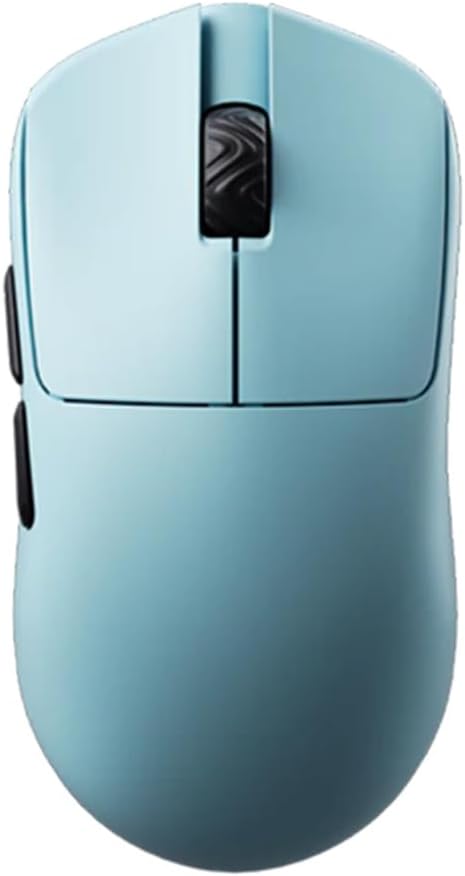

The Gwolves Skoll Mini is an exceptional budget option for claw grip users. It weighs only 50 grams and features a high-quality 3389 sensor for accurate tracking. The compact size makes it ideal for smaller hands needing precision.
We may earn a commission when you buy through this link, at no additional cost to you.
Its honeycomb design reduces weight without sacrificing structural integrity. The detachable cable ensures flexibility and easy transport. PTFE skates provide smooth gliding on most surfaces making it great for FPS games.
While it lacks wireless connectivity the wired connection ensures zero latency. The RGB is basic but functional. Some users might find the holes trap dust over time but cleaning is simple.
This mouse is perfect for budget-conscious gamers needing reliable performance. Its lightweight build reduces fatigue during long sessions. For those starting out or upgrading on a budget this is a top recommendation.
The 50 gram weight reduces wrist strain and allows quicker movements during gameplay.
The 3389 sensor delivers consistent tracking without spin outs even at high speeds.
We may earn a commission when you buy through this link, at no additional cost to you.
The Lamzu Atlantis Mini stands out as a premium wireless option for small hands. Weighing just 51 grams it pairs a flagship sensor with excellent build quality. The hourglass symmetry supports claw grip perfectly.
We may earn a commission when you buy through this link, at no additional cost to you.
Its 8K compatibility offers incredibly low latency for competitive play. The optical switches ensure durability and fast response times. Dust proof encoders extend the lifespan of the scroll wheel significantly.
The price point is higher than wired alternatives but performance justifies it. Some may find it hard to find due to popularity. However the engineering and ergonomics make it worth seeking out.
This mouse is ideal for serious gamers who value wireless freedom. Its balanced design prevents fatigue while maintaining control. For those willing to invest in top performance this is the best choice.
The Nordic 52840 MCU ensures seamless connection with minimal lag for responsive gaming.
The curved top and broad back prevent finger cramps during extended use sessions.
We may earn a commission when you buy through this link, at no additional cost to you.
The Bloody V7 is designed for users needing extensive programmability. It features eight buttons and robust software for macros. The rubberized coating ensures a secure grip even during intense sessions.
We may earn a commission when you buy through this link, at no additional cost to you.
While the sensor is older at 3200 DPI it remains sufficient for casual play. The ergonomic shape supports claw grip well for small hands. It is a practical tool for work and gaming alike.
It is heavier than modern esports mice which might not suit everyone. The software is functional but could use updates. However for budget buyers needing macros it delivers solid value.
This mouse is recommended for productivity and casual gaming. Its button layout allows customization for various tasks. If you need scripting capabilities without breaking the bank this fits well.
Eight programmable buttons let you map complex commands for games or apps easily.
The rubberized coating provides texture that prevents slipping during long use.
We may earn a commission when you buy through this link, at no additional cost to you.
The Pulsar X3 LHD is a rare find for left handed gamers. Weighing just 43 grams it is among the lightest mice available. Its hybrid ergonomic shape blends palm and claw comfort perfectly.
We may earn a commission when you buy through this link, at no additional cost to you.
The XS-1 sensor offers top tier tracking speeds and resolution. Optical switches minimize double clicks ensuring reliability. DOT skates provide low friction gliding on all surfaces for smooth movement.
Its high price reflects the specialized engineering and materials used. Since it is left handed it is not for everyone. But for lefties needing precision this is unmatched in its class.
This mouse is perfect for competitive left handed players. Its weight reduces fatigue significantly during long tournaments. If you are left handed this is the premium option to consider seriously.
Asymmetrical shape contours specifically for left hands ensuring lasting comfort.
TTC Golden dustproof switches offer tactile feedback without unintended clicks.
We may earn a commission when you buy through this link, at no additional cost to you.
The Pulsar X2H mini offers premium features at a renewed price point. It weighs 52 grams and features a high performance PAW3395 sensor. The shape supports aggressive claw grip with stability.
We may earn a commission when you buy through this link, at no additional cost to you.
Optical switches provide reliable clicks with a satisfying feel. Battery life can reach 100 hours at standard polling rates. This is a smart choice for buyers wanting high end specs without full cost.
As a renewed item condition may vary slightly from new. Some might prefer brand new for warranty peace of mind. Still the specs are identical to new models making it good value.
This mouse is best for budget conscious enthusiasts. Its performance matches full price models making it attractive. If you trust renewed market this delivers excellent gaming capability affordably.
Extended battery usage ensures you can game for days without recharging often.
PAW3395 sensor handles fast movements accurately without acceleration issues.
We may earn a commission when you buy through this link, at no additional cost to you.
The Corsair IRONCLAW Wireless SE offers extensive customization for work and play. Ten buttons allow mapping many commands while surface calibration adjusts to different textures. Its battery life is impressive for wireless use.
We may earn a commission when you buy through this link, at no additional cost to you.
RGB lighting adds style with front grill options. The ergonomic shape suits larger hands but may be tight for small claw users. iCUE software simplifies setup significantly for non tech users.
Its heavier design might cause fatigue during fast gaming. The rating reflects some build issues but most functions work well. It balances features well for hybrid work and gaming setups.
This mouse is ideal for multitaskers needing buttons and battery life. If you use your mouse for work often this delivers utility. For pure gaming smaller options might fit better.
Up to 532 hours on Bluetooth means weeks of use between charges.
iCUE software provides easy profile switching and macro management for all users.
We may earn a commission when you buy through this link, at no additional cost to you.
The V8 Gaming Mouse delivers elite specs at a competitive price. Weighing only 36 grams it uses a top tier PAW3950 sensor for tracking. The symmetrical shape works well for claw and fingertip grips.
We may earn a commission when you buy through this link, at no additional cost to you.
Web based driver means no heavy software installation needed for tweaks. It includes an 8K dongle for low latency wireless connection. Optical switches ensure consistent clicks over millions of uses.
Its light weight reduces strain during fast movement. Some may find it very small for comfort in large hands. But for small hands it offers excellent precision without unnecessary bulk.
This mouse is best for competitive gamers needing light weight. Its specs rival premium brands at lower cost. If you want 8K wireless without the price this is a smart pick.
Adjust DPI and settings directly in browser without downloading extra apps.
Kailh optical switches provide instant actuation with minimal debounce delay.
We may earn a commission when you buy through this link, at no additional cost to you.
The Pulsar X2H Wireless in white offers a clean aesthetic for setups. Its 26000 DPI sensor ensures precise tracking for competitive play. The narrow waist supports aggressive claw grip without fatigue.
We may earn a commission when you buy through this link, at no additional cost to you.
Direct wheel clicks provide smooth rotations without rattling. The white finish looks premium but requires care to stay clean. It is a great choice for those prioritizing style alongside performance.
Its build rigidity ensures consistent clicks over time. Some users prefer black for less visible wear. Still the look is unique and matches many modern gaming environments perfectly.
This mouse is ideal for style conscious gamers. Its performance matches the design with high reliability. If you want a white wireless mouse this delivers quality and looks.
Nordic MCU ensures low latency and precise battery status readings always.
4K polling ready ensures high responsiveness for competitive gaming scenarios.
We may earn a commission when you buy through this link, at no additional cost to you.
The V6 Gaming Mouse uses a solid shell for durability without holes. Weighing 40 grams it reduces fatigue during competitive play. Concave buttons fit fingers naturally for better control.
We may earn a commission when you buy through this link, at no additional cost to you.
Its lack of holes means less dust and debris inside. The sensor matches premium models for accurate tracking on all surfaces. Web driver access simplifies setup for casual users quickly.
It is not customizable but reliable for daily use. Some may miss RGB but function is prioritized. This is a no frills option for those wanting clean design.
This mouse is best for users needing solid build. Its shape supports claw grip well while protecting internals. If you want simplicity and performance this fits well.
Solid shell design prevents dust from entering internal components during use.
Concave main buttons provide clear positioning for rapid clicking.
We may earn a commission when you buy through this link, at no additional cost to you.
The BenQ Zowie S2-C is designed for esports without software. It uses a dedicated sensor and DPI steps for consistent performance. The paracord cable reduces drag significantly on all surfaces.
We may earn a commission when you buy through this link, at no additional cost to you.
Driverless setup means plug and play without installing apps. Its small size is ideal for claw grip with precise movement. Matte black finish resists fingerprints for a clean look always.
Lack of wireless might limit mobility. However many pros prefer wired for zero latency. This is a trusted choice for tournament setups and consistency.
This mouse is ideal for competitive players preferring simplicity. If you value reliability over features this delivers. For pure gaming focus this is a classic solid pick.
Plug and play means no installation needed for immediate performance.
Trusted by pros for consistency in high pressure tournament environments.
We may earn a commission when you buy through this link, at no additional cost to you.
Selecting the right gaming mouse for claw grip and small hands involves several key factors to ensure performance and comfort.
The shape of the mouse must support the claw grip where only fingertips touch the buttons. Look for symmetrical or ergonomic models with a raised hump for palm support.
Ensure the mouse matches your hand size to prevent cramping during long gaming sessions.
Lightweight mice are critical for claw gamers to reduce fatigue and improve reaction times. Aim for models between 40g and 60g for optimal agility.
Avoid heavier mice that cause wrist strain over time during extended play.
A high quality sensor like PAW3395 or 3950 ensures precise tracking without spin outs. This is vital for aiming in competitive shooters.
Check that the sensor has high IPS and acceleration specs to match your play style.
Decide between wired and wireless. Wireless offers freedom but choose models with low latency and strong battery life.
Wired mice guarantee zero interference but limit movement range slightly.
Optical switches are preferred for faster response and durability. Mechanical switches are also fine but may experience double clicks over time.
Look for dust proof encoders to ensure scroll wheel longevity.
Some models offer many buttons for macros while others focus on simplicity. Choose based on your game needs and preference.
Too many buttons can be distracting if not used regularly.
Look for solid construction with minimal flex. Honeycomb designs are light but may trap dust more easily.
Ensure the mouse has quality PTFE feet for smooth gliding.
Proper grip technique is essential to maximize performance and prevent injury. Hold the mouse with fingertips on buttons and palm resting lightly on the back.
Keep the sensor area clean from dust and debris to maintain tracking accuracy. Use a soft cloth to wipe the surface periodically.
Adjust DPI and polling rate to match your mousepad and screen resolution for the best response during gameplay.
A claw grip mouse for small hands typically has a symmetrical shape with a raised back hump. It should weigh under 60g to reduce strain on smaller hands.
Yes modern wireless mice with low latency are excellent for claw grip. Look for 8K dongles to ensure minimal delay during competitive play.
Measure your hand from wrist to longest finger. If the mouse length is close to your measurement it should fit well. Also check user reviews for small hand feedback.
Optical switches often last longer with less risk of double clicks because they use light instead of physical contact to register actions.
Lighter mice are generally better for speed but too light may feel flimsy. Balance weight with build quality for the best experience.
Yes many claw mice support productivity tasks. The ergonomic shape can reduce strain during long work days if used correctly.
High DPI allows fast cursor movement across large screens. Most users benefit from 1600 DPI to 3200 DPI range for balanced precision.
We reviewed the top models to help you find the perfect claw grip mouse for small hands. Each option offers unique benefits suited for different needs and budgets.
Prioritize ergonomics and sensor quality to ensure long term comfort and accuracy. Wireless freedom is also a key feature to consider for setup flexibility.
Check current prices and availability as deals may vary. Invest in a mouse that matches your play style for optimal results.