
Acer Chromebook Plus Spin 714
4.0Editor score
Intel Core Ultra 5 Processor
120Hz WUXGA Touchscreen
Thunderbolt 4 Support
Chromebooks for AI represent the next evolution in lightweight computing, blending secure cloud-first operating systems with powerful generative artificial intelligence tools. These devices now include dedicated hardware acceleration and integrated software suites designed to help users write, design, and analyze data faster than ever before.
To compile this list, we evaluated ten leading models based on their processor capabilities, memory configurations, display quality, and specific AI feature integration. We focused on devices that offer Google AI Pro trials, Gemini capabilities, and robust multitasking performance suitable for students, professionals, and creative users alike.
Each pick below highlights unique strengths such as battery life, screen resolution, storage options, and connectivity standards. Please note that pricing and availability fluctuate frequently, so verify current offers before making your final decision to ensure you get the best value for your specific needs.
4.0Editor score

4.9Editor score

5.0Editor score
As an Amazon Associate we earn from qualifying purchases.
The following table provides a side-by-side overview of key specifications across all ten reviewed models, allowing you to quickly compare processors, memory, storage, and display features to find the right fit for your AI-driven workflow.


The Acer Chromebook Plus 514 stands out as the top choice for users seeking a balanced blend of performance and artificial intelligence features. With an impressive 4.9 rating from users, it delivers on its promise of enhanced productivity through Google AI integration and a responsive touch interface suitable for creative tasks.
We may earn a commission when you buy through this link, at no additional cost to you.
At its core lies the Intel Core i3-1315U processor which offers significantly faster speeds compared to previous generation Chromebooks. This device includes 8GB of LPDDR5 memory ensuring smooth multitasking even when running multiple browser tabs and AI-powered applications simultaneously. The 14-inch WUXGA touch display provides crisp visuals ideal for editing documents and viewing media.
While the build quality is functional and durable, it relies on plastic materials which may feel less premium than metal alternatives. Additionally, port options are somewhat limited requiring dongles for certain legacy peripherals. However, these trade-offs are acceptable given the robust feature set and extended battery life that supports all-day usage without constant charging.
This model is ideal for students and professionals who need reliable access to Gemini tools and cloud storage. It effectively bridges the gap between traditional computing and modern AI-assisted workflows making it a versatile choice for daily productivity and creative projects.
Gemini integration allows users to convert handwriting into text and summarize complex documents instantly improving workflow efficiency across various applications.
The included 5TB of cloud storage via Google AI Pro ensures ample space for large files and collaborative projects without local storage constraints.
We may earn a commission when you buy through this link, at no additional cost to you.
The ASUS Chromebook Plus CX34 offers a compelling entry point for users interested in AI features without breaking the budget. It features an Intel Core i3-1215U processor paired with 8GB of RAM providing decent performance for everyday tasks and web-based AI tools.
We may earn a commission when you buy through this link, at no additional cost to you.
A key selling point is the inclusion of the Google One AI Premium plan for twelve months which grants access to advanced Gemini features and two terabytes of cloud storage. The device also supports noise cancellation and lighting enhancement for video calls enhancing communication quality during remote work or study sessions.
However, the display resolution is limited to Full HD which may appear less sharp compared to higher resolution alternatives. Battery life is also somewhat shorter than competitors limiting its utility for users who are frequently away from power outlets. These factors should be considered when evaluating long-term value.
Despite these limitations the CX34 remains a strong contender for basic productivity and creative work. Its integration with Google AI tools makes it a practical choice for those looking to explore generative AI features on a Chrome OS platform.
Built-in AI features assist with writing design and photo editing tasks streamlining creative workflows for students and casual users alike.
The balance of hardware specifications and software benefits offers a cost-effective way to access high-end AI capabilities.
We may earn a commission when you buy through this link, at no additional cost to you.
The Acer Chromebook Plus 515 caters to users who prioritize screen real estate over extreme portability. With a 15.6-inch Full HD touch display it provides more workspace for multitasking and viewing detailed content compared to smaller 14-inch models.
We may earn a commission when you buy through this link, at no additional cost to you.
Powered by an Intel Core i3-1305U processor this model supports efficient multitasking and includes 8GB of LPDDR5X memory for faster data access. The inclusion of Google AI Pro with NotebookLM adds significant value for researchers and students managing large documents and data sources.
The larger form factor naturally adds weight making it less ideal for frequent travelers or students walking across campus daily. Additionally, battery life is moderate compared to some competitors meaning users may need to carry a charger for extended use away from outlets.
Overall this device is an excellent choice for stationary work environments where screen size matters most. Its combination of hardware capabilities and AI software integration supports complex tasks while maintaining the simplicity and security of Chrome OS.
The expansive display allows for easier window management and side-by-side application use enhancing productivity for research and content creation.
NotebookLM provides powerful capabilities for analyzing text and generating insights helping users process information more effectively.
We may earn a commission when you buy through this link, at no additional cost to you.
The Acer Chromebook Plus Spin 714 represents a premium tier of Chromebooks designed for users demanding higher performance and versatility. The Intel Core Ultra 5 processor brings dedicated AI acceleration capabilities enabling more efficient local processing of complex tasks.
We may earn a commission when you buy through this link, at no additional cost to you.
One of its standout features is the 120Hz WUXGA touchscreen which delivers exceptionally smooth visuals ideal for drawing and scrolling through content. The convertible design allows the device to be used as a tablet providing flexibility for different usage scenarios from typing notes to viewing media.
While the advanced hardware justifies the higher price tag it may be overkill for users with basic web browsing needs. The complexity of features also requires a learning curve for those unfamiliar with hybrid device functionalities. However, power users will appreciate the enhanced connectivity options.
This model is recommended for professionals and creatives who need robust performance and flexible interaction modes. It combines high-end specs with AI tools to deliver a comprehensive computing experience that extends beyond standard laptop capabilities.
The dedicated engine in the processor supports advanced AI experiences improving responsiveness and efficiency in generative tasks.
The high refresh rate screen ensures fluid interactions and vibrant visuals enhancing the overall user experience for creative applications.
We may earn a commission when you buy through this link, at no additional cost to you.
This version of the Acer Chromebook Plus 514 distinguishes itself with significantly increased storage capacity of 512GB. This is particularly beneficial for users who need to store large media files or offline applications without relying solely on cloud storage.
We may earn a commission when you buy through this link, at no additional cost to you.
The device features an Intel Core i3-N355 processor which provides efficient performance for daily tasks. It is built to MIL-STD 810H standards ensuring durability against drops and spills making it suitable for rugged environments or active lifestyles.
While the storage is ample the processor is slightly less powerful than the latest Ultra series limiting high-end performance potential. Users may also find the chassis feels less premium compared to metal alternatives. However, these are acceptable trade-offs for the increased storage and durability.
This model is well-suited for students and professionals who need reliable local storage and durable construction. It offers a balanced package of hardware features that support a wide range of educational and business applications.
The 512GB SSD provides generous space for applications and files reducing dependence on internet connectivity for file access.
Military-grade standards ensure the device can withstand physical stress making it ideal for frequent travel or school use.
We may earn a commission when you buy through this link, at no additional cost to you.
The Lenovo Chromebook 14 offers exceptional value for students and casual users seeking a reliable device without high costs. It features a bright 14-inch WUXGA touch display that provides clear visuals for reading and interactive learning tasks.
We may earn a commission when you buy through this link, at no additional cost to you.
Powered by an 8-core MediaTek Kompanio 540 processor this model ensures smooth performance for web browsing and media consumption. The lightweight design makes it easy to carry in backpacks supporting students who need a portable tool for campus use.
Storage and RAM are limited compared to premium models which may affect multitasking capabilities with many applications. Users should rely on cloud storage and efficient tab management to maximize performance. These limitations are expected at this price point and do not hinder basic functionality.
This Chromebook is perfect for educational environments where affordability and battery life are priorities. It provides a solid foundation for learning and remote work while maintaining access to essential Google apps and basic AI tools.
The lightweight build and long battery life support all-day classroom use without the need for frequent recharging.
The high resolution anti-glare screen ensures comfortable viewing even in bright lighting conditions like lecture halls.
We may earn a commission when you buy through this link, at no additional cost to you.
Similar to previous models this Acer Chromebook Plus 514 emphasizes storage capacity and build quality. It features a 512GB SSD which ensures ample space for users needing to store significant amounts of local data or offline applications.
We may earn a commission when you buy through this link, at no additional cost to you.
The Intel Core i3-N355 processor provides reliable performance for everyday computing tasks including document editing and web browsing. Additional features like a backlit keyboard and Wi-Fi 6E enhance usability in various environments and improve connectivity speeds.
Performance is adequate for general use but may struggle with resource-intensive AI tasks or heavy multitasking. The limited port variety requires dongles for connecting certain peripherals which can be inconvenient. However the value proposition remains strong for basic productivity needs.
This device is suitable for home users and students who prioritize storage and connectivity. It offers a balanced mix of features that support efficient workflows without the premium price tag of higher-end models.
Wi-Fi 6E support ensures fast wireless speeds reducing latency during video calls and large file transfers.
The backlit keyboard allows for comfortable typing in dim environments enhancing usability for evening work sessions.
We may earn a commission when you buy through this link, at no additional cost to you.
This model continues the trend of offering balanced specifications at an accessible price point. The 512GB SSD ensures that users can store multiple applications and files locally without immediate need for cloud storage expansions.
We may earn a commission when you buy through this link, at no additional cost to you.
The Intel Core 3 Processor N355 delivers efficient performance suitable for web-based tasks and media consumption. The 8GB of LPDDR5X memory supports smooth switching between open tabs ensuring a responsive user experience.
While it is a solid daily driver it may not be the best choice for users with high-performance computing requirements. The plastic build and standard design lack the premium feel of higher-end laptops. However these choices help keep costs down for budget-conscious buyers.
This Chromebook is ideal for general home use and light professional tasks. It provides necessary features for productivity and creativity without unnecessary expenses making it a practical choice for many households.
The processor and memory combination ensures that daily workflows remain smooth and responsive without significant lag.
The touch display allows for intuitive interaction with content enhancing usability for navigating documents and media.
We may earn a commission when you buy through this link, at no additional cost to you.
This model distinguishes itself with an AMD Ryzen 3 processor offering competitive performance and power efficiency. It is designed to deliver strong multitasking capabilities while maintaining long battery life for portable use throughout the day.
We may earn a commission when you buy through this link, at no additional cost to you.
The integrated AI tools enhance video calls by automatically improving clarity and noise cancellation. This feature ensures professional-grade communication without needing additional software or hardware accessories. The display quality also supports clear viewing of documents and media.
Storage is a limitation with only 128GB which may require frequent reliance on cloud services for file management. Connectivity options are also somewhat restricted requiring adapters for external displays or peripherals. These constraints are manageable for users with primarily cloud-based workflows.
The device is well-suited for students and professionals who prioritize battery life and call quality. It offers a robust platform for daily tasks while integrating essential AI tools to streamline communication and productivity.
Automated noise cancellation and lighting adjustment ensure clear communication during virtual meetings and online classes.
The processor design optimizes power usage allowing for extended periods of use without frequent recharging needs.
We may earn a commission when you buy through this link, at no additional cost to you.
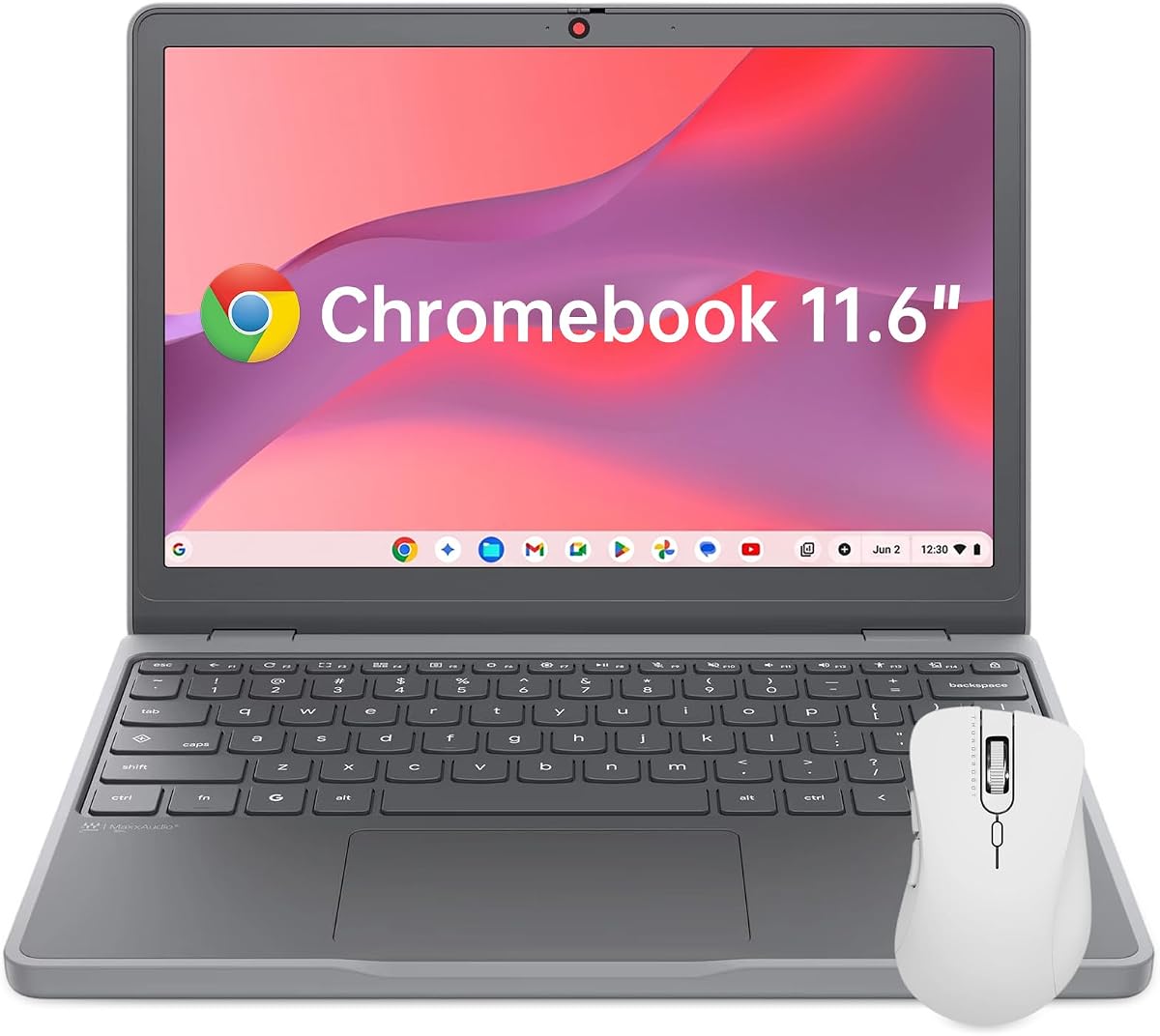
The Lenovo Chromebook 11.6 is the most portable device in this lineup designed specifically for users who need maximum mobility. Weighing just 2.69 pounds it slips easily into small bags making it perfect for travel or commuting.
We may earn a commission when you buy through this link, at no additional cost to you.
Despite its small size it includes essential features like Wi-Fi connectivity and security chip protection. The compact form factor does not compromise durability as it meets military-grade standards for resistance to drops and wear. This makes it robust for frequent transport.
The limited screen resolution and size may cause eye strain during extended viewing sessions. Storage is also minimal requiring reliance on cloud storage for larger files. These trade-offs are acceptable for users who prioritize portability above all else.
This device is ideal for travelers and students needing a secondary device for quick tasks. It provides reliable access to email and documents while minimizing physical burden during daily commutes.
The lightweight design ensures comfort during travel making it an excellent companion for business trips or daily commutes.
Rugged construction protects against physical damage ensuring the device remains functional despite frequent handling and transport.
We may earn a commission when you buy through this link, at no additional cost to you.
Selecting the right Chromebook for AI requires considering several key factors that affect performance usability and long-term value.
The processor is the core component determining how well your Chromebook handles AI tasks. Models with newer Intel Core Ultra or Ryzen processors offer dedicated neural processing units that improve the speed of generative AI features.
Look for at least an Intel Core i3 or equivalent AMD Ryzen for smooth multitasking and AI responsiveness.
AI applications often require substantial memory to run multiple background processes efficiently. 8GB of RAM is recommended to ensure seamless switching between apps without slowdowns.
For storage prioritize devices with 256GB SSD or higher to accommodate large files and offline apps without constant reliance on cloud services.
High-resolution touchscreens enhance interaction with AI tools such as drawing interfaces and handwriting recognition. Look for WUXGA (1920×1200) or better to ensure sharp visuals and accurate touch input.
Anti-glare coatings and brightness levels above 300 nits help maintain visibility in bright environments during outdoor or indoor use.
Check which AI tools are included with your Chromebook such as Google AI Pro trials or pre-installed creative apps. These features significantly enhance productivity for writing design and data analysis tasks.
Prioritize models offering generous cloud storage and advanced AI capabilities to maximize value over the device lifespan.
Since AI tools often run continuously during tasks battery life is critical for portable usage. Aim for devices rated for at least 10 hours of real-world performance to last through workdays or school classes.
Consider fast charging capabilities to minimize downtime when power outlets are limited during travel or commutes.
Fast wireless connectivity is essential for cloud-based AI tools. Ensure the Chromebook supports Wi-Fi 6E or Wi-Fi 7 for reliable speeds and reduced latency in modern networks.
USB-C ports with power delivery and display output add flexibility for connecting peripherals and external monitors efficiently.
Chromebooks are often used in dynamic environments so build quality impacts longevity. Look for MIL-STD 810H certification which indicates resistance to drops and spills.
Durable chassis materials and spill-resistant keyboards protect your investment ensuring consistent performance over years of daily use.
Set a budget that balances performance needs with financial constraints. Entry-level models may lack premium features but still offer essential AI capabilities for basic tasks.
Evaluate total cost of ownership including any subscription requirements for premium AI features to ensure long-term affordability.
Start by setting up your Google Account and ensuring all system updates are installed to access the latest AI features securely.
Explore the built-in AI tools like Gemini and NotebookLM to understand how they can assist with drafting documents summarizing content or organizing research projects efficiently.
Maintain optimal performance by regularly clearing cache and unused apps and keeping the device in a cool dry environment to prevent overheating during intensive tasks.
Yes, many Chromebooks support Android and web versions of applications like Adobe Photoshop. They provide AI-driven editing features directly within the browser or Android app interface.
Not all models include it automatically but many Chromebook Plus models offer a free trial of Google AI Pro for 12 months. Check specific product details for eligibility and duration of access.
Some basic AI features function offline but advanced generative tools typically require an internet connection. Local processing is improving with newer hardware but connectivity remains key for full capabilities.
Intel Core Ultra and AMD Ryzen 7 series processors offer dedicated AI engines that improve performance for machine learning tasks compared to older models.
Chromebooks include built-in security features like Titan C2 chips and verified boot ensuring your data remains protected during AI processing and cloud synchronization.
For basic AI tools 128GB may suffice but 256GB or higher is recommended for storing large projects and offline applications without constant cloud syncing.
Most modern Chromebooks offer 10 to 17 hours of battery life but AI-intensive tasks may reduce runtime. Opt for models with efficient processors and large batteries for best results.
While Chromebooks can run some small models locally most large language models require cloud access due to hardware limitations. Advanced features are optimized for cloud-based AI execution.
The top picks highlight the diversity of AI-capable Chromebooks available today from budget-friendly options to high-performance premium models.
Prioritize your needs by balancing processor power memory and storage requirements to find a device that supports your specific workflow effectively.
Remember to check current prices and promotions regularly as availability and costs change frequently in this fast-evolving market.