
Razer Viper Ultimate
4.6Editor score
Wireless connectivity
Lightweight design
RGB lighting effects
Ergonomic shape
This guide compares the top 10 blue gaming mice for 2026, evaluating design, performance, and value to help you choose the perfect blue mouse for your setup.
A blue gaming mouse offers a unique aesthetic appeal that stands out in any setup. Gamers often seek devices that combine striking visuals with high performance to elevate their gaming experience significantly.
We analyzed ten top-rated blue gaming mice based on user feedback, specifications, and overall build quality. Our comparison focuses on ergonomics, sensor accuracy, and customization options available across different models.
Each pick highlights specific strengths like wireless connectivity or durable switches. Note that prices and availability change frequently, so verify current deals before purchasing to ensure you get the best value today.
4.6Editor score
4.8Editor score

4.7Editor score
This table provides a side-by-side overview of key specifications for each blue gaming mouse selected. It helps you quickly identify which model fits your specific needs regarding size, sensor type, and connectivity.


The Razer Viper Ultimate stands out as a top contender in the blue gaming mouse category. It boasts a wireless design with optical switches for rapid response times. The build quality feels premium despite its light weight.
We may earn a commission when you buy through this link, at no additional cost to you.
Its Focus+ sensor provides exceptional accuracy for FPS games. The ergonomic shape fits well in medium to large hands. RGB lighting adds a customizable aesthetic that enhances your setup.
However, it lacks some programmable side buttons found on heavier mice. The grip texture is smooth which might slip during intense sessions. These trade-offs are acceptable for pure speed and agility.
This mouse is ideal for competitive gamers who prioritize speed and wireless freedom. It balances performance and style effectively. We highly recommend it for those seeking a high-end wireless option.
The HyperSpeed Wireless technology ensures zero latency. This makes it perfect for competitive gaming where milliseconds matter.
Its symmetrical shape accommodates various grip styles comfortably. The lightweight frame reduces hand fatigue during long sessions.
We may earn a commission when you buy through this link, at no additional cost to you.
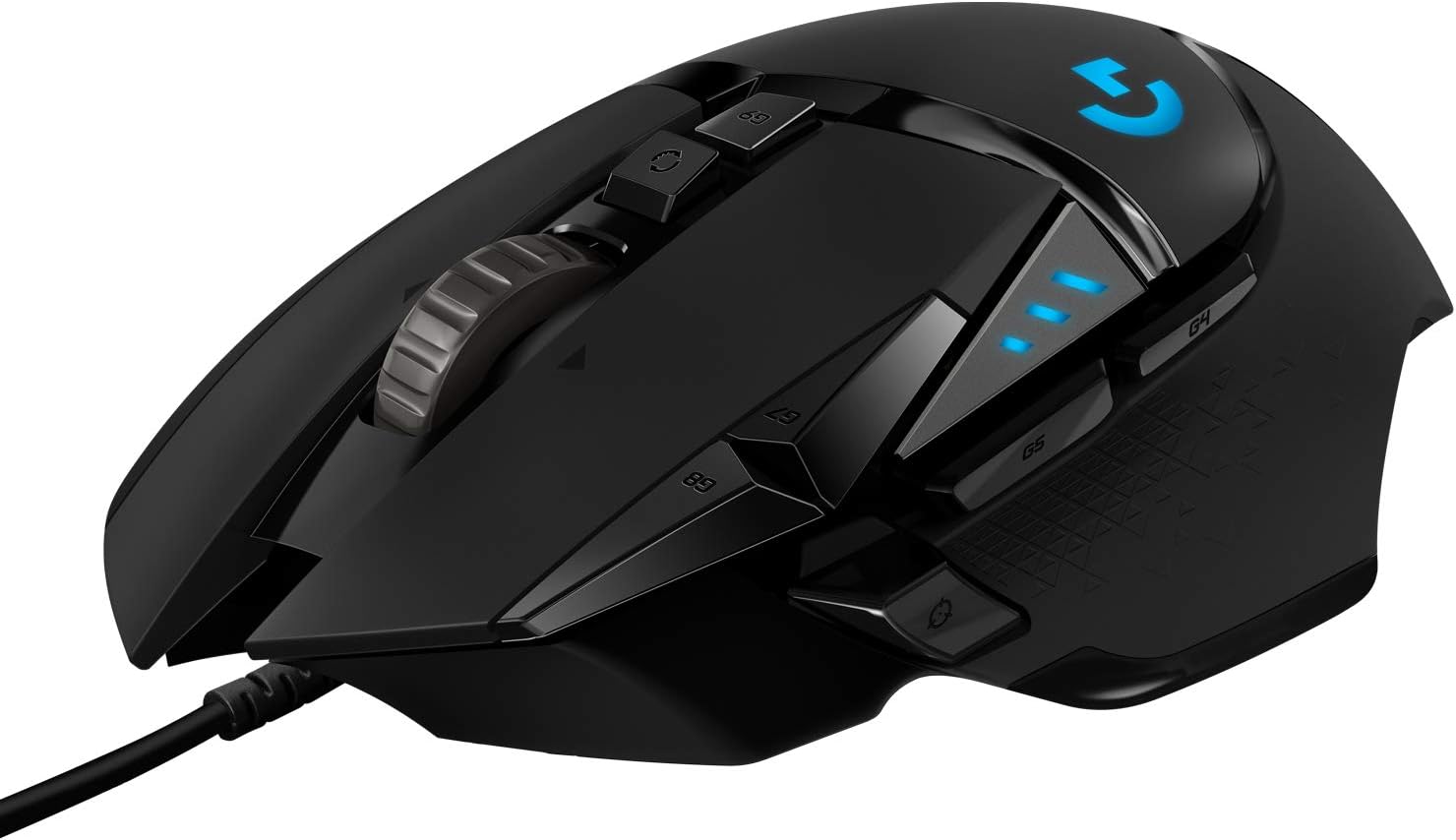
The Logitech G502 Hero is a legendary name in gaming peripherals. It offers a wide array of features that appeal to MMORPG and MOBA players. The adjustable weight system allows for a tailored feel.
We may earn a commission when you buy through this link, at no additional cost to you.
Its Hero sensor is incredibly precise with zero smoothing or acceleration. The side grip provides excellent control. RGB lighting zones are vibrant and customizable through software.
The weight might be too much for fast FPS games. The wired cable can be intrusive for some setups. However, the versatility makes it a strong choice for multi-game use.
We recommend this for users who want maximum control and customization. Its durability ensures longevity. It remains a top choice for those who prefer a heavier, feature-rich mouse.
Includes five 3.6g weights for fine-tuning balance. You can shift the center of gravity to suit your wrist style.
The scroll wheel can switch between ratcheted and free-spin modes. This helps with navigating long documents and in-game maps.
We may earn a commission when you buy through this link, at no additional cost to you.
The SteelSeries Rival 600 introduces a unique dual-sensor system for true tracking. This technology eliminates lift-off issues common in other mice. The build feels solid and robust.
We may earn a commission when you buy through this link, at no additional cost to you.
Its TrueMove3+ sensor offers 1:1 tracking with no jitter. The weight tuning system is easy to adjust. The textured grip ensures your hand stays in place.
Software glitches occasionally affect the RGB customization. The cable is not braided and can snag. Despite this, the sensor performance is unmatched in this price range.
Ideal for competitive FPS players who need absolute accuracy. The lift-off detection works perfectly. We suggest it for those who value precision over extra features.
A secondary sensor detects depth. This prevents false movement when you lift the mouse slightly to reposition.
Adjust weights to match your playstyle. The base weight is light but can be increased for more control.
We may earn a commission when you buy through this link, at no additional cost to you.
The Corsair Dark Core RGB Pro combines convenience with performance. Its Qi wireless charging is a standout feature that eliminates cables completely. The shape is designed for palm grip comfort.
We may earn a commission when you buy through this link, at no additional cost to you.
It supports both 2.4GHz wireless and Bluetooth. The sensor is accurate enough for most gaming genres. The side buttons are positioned well for thumb access.
Its weight makes it less suitable for high-speed gaming. The size might be too large for small hands. For casual or MMO gamers, it is an excellent choice.
This mouse is perfect for those who want wireless freedom with charging ease. It feels premium and reliable. We recommend it for users who prioritize comfort and connectivity.
Simply place the mouse on a Qi charging mat. This keeps your device ready without needing a cable.
Switch seamlessly between Bluetooth and 2.4GHz wireless. This adds flexibility for multi-device setups.
We may earn a commission when you buy through this link, at no additional cost to you.
The HyperX Pulsefire Haste focuses on speed and agility. Its honeycomb shell reduces weight significantly. The build feels sturdy despite the holes in the shell.
We may earn a commission when you buy through this link, at no additional cost to you.
The PixArt sensor is reliable and performs well. The feet glide smoothly on any surface. The cable is flexible and does not drag.
The holes can trap dust requiring regular cleaning. RGB lighting is minimal compared to others. However, the price point is very competitive for performance.
Best for FPS players needing fast movements. The weight allows for quick flicks. We suggest it for budget-conscious gamers seeking high performance.
Removes excess material to reduce weight. The hexagonal pattern maintains structural integrity.
Virgin-grade PTFE ensures a smooth glide. They are low friction and durable for long-term use.
We may earn a commission when you buy through this link, at no additional cost to you.
The Glorious Model O is famous for its stylish honeycomb design. It offers a balanced weight and great performance. The RGB lighting adds a cool touch.
We may earn a commission when you buy through this link, at no additional cost to you.
It features a symmetrical shape for ambidextrous use. The glide is smooth thanks to the PTFE feet. The braided cable is durable and flexible.
The coating may wear down with heavy use. Lack of software limits macro customization. For those who value looks and weight, it is a great pick.
Ideal for gamers who want a sleek look. It performs well in competitive settings. We recommend it for style-focused users on a budget.
Features RGB underglow and a cable with lighting. This enhances the visual appeal of your setup.
The shape works for both left and right hands. This allows shared use in a family or office setting.
We may earn a commission when you buy through this link, at no additional cost to you.
The Roccat Kone AIMO shines with its advanced RGB lighting system. It offers a unique light effect that adapts to your activity. The ergonomics are excellent for long use.
We may earn a commission when you buy through this link, at no additional cost to you.
Its sensor is precise and reliable. The extra side buttons are easy to press. The build feels solid and well-made.
The software suite can be overwhelming for new users. The weight might be too high for some FPS games. However, the visual experience is top-notch.
Perfect for streamers and those who love RGB. The lighting adds significant flair. We recommend it for users prioritizing aesthetics.
The lighting changes based on system events. This creates a dynamic effect that is visually engaging.
The shape supports palm grip effectively. It reduces strain during long gaming marathons.
We may earn a commission when you buy through this link, at no additional cost to you.
The BenQ Zowie EC2 is designed for simplicity and performance. It works right out of the box without software. The shape is widely praised for comfort.
We may earn a commission when you buy through this link, at no additional cost to you.
Its sensor is tuned for FPS gaming. The build quality is excellent with smooth switches. It focuses purely on gameplay performance.
Lack of software limits customization options. No RGB means it looks plain. For competitive players, this simplicity is a huge plus.
Best for eSports players needing reliability. It avoids unnecessary features. We recommend it for those who want a straightforward, reliable mouse.
Simply plug it in and it works. No software downloads are required for basic functionality.
The curve fits the palm perfectly. This design helps prevent wrist strain during extended use.
We may earn a commission when you buy through this link, at no additional cost to you.
The Cooler Master MM720 offers great value for its price. It is lightweight and features a strong sensor. The textured grip areas improve control.
We may earn a commission when you buy through this link, at no additional cost to you.
Its design is simple but functional. The cable is braided for durability. Performance matches more expensive options.
The build feels less premium than others. RGB is basic and unimpressive. For the price, it is a solid entry-level choice.
Ideal for new gamers or budget builds. It performs well for FPS games. We recommend it for those seeking affordability.
Side panels have textured rubber. This ensures your hand stays secure during fast movements.
Uses a PMW3389 sensor. This provides accurate tracking up to 16,000 DPI.
We may earn a commission when you buy through this link, at no additional cost to you.
The Finalmouse Starlight represents the pinnacle of lightweight design. It uses magnesium alloy for strength and low weight. The sensor is top-tier for competitive play.
We may earn a commission when you buy through this link, at no additional cost to you.
Its build quality feels unique and durable. The design is striking and stands out. It is a status symbol in the gaming community.
The price is significantly higher than others. Finding one in stock is difficult. Only buy if you want the absolute best.
Best for enthusiasts with a high budget. It offers unmatched performance and quality. We recommend it for those seeking the ultimate mouse.
The magnesium alloy makes it light and strong. This material is rare in consumer peripherals.
Uses the PAW3370 for flawless tracking. It has no smoothing and delivers raw precision.
We may earn a commission when you buy through this link, at no additional cost to you.
Selecting the right blue gaming mouse involves evaluating several technical aspects. This guide breaks down the key factors to ensure you make an informed decision.
The sensor is the heart of any gaming mouse. Look for models with high-quality optical sensors that offer zero acceleration. A good sensor ensures that your movements are translated accurately.
Prioritize sensors with high DPI and IPS ratings. This ensures performance across different surfaces and speeds.
Weight affects how you feel the mouse. Lighter mice are better for fast-paced FPS games. Heavier mice provide stability for strategy games. Choose based on your playstyle.
Shape determines comfort. Ensure the mouse fits your hand size and grip style for best results.
Wired mice offer consistent latency without battery concerns. Wireless mice provide freedom from cables. Modern wireless tech is now comparable to wired for most users.
Decide if you prefer the freedom of wireless or the reliability of wired. Both are viable options in 2026.
More buttons allow for complex macros and actions. MMO players often need more programmable buttons. FPS players might prefer fewer to reduce accidental clicks.
Match the button count to the genres you play. Extra buttons should be easily accessible.
Ergonomics prevent wrist strain during long sessions. The shape should support your grip comfortably. Look for textured grips to prevent slipping.
Try to test the mouse in person if possible. If not, read reviews regarding comfort for your hand size.
RGB lighting enhances the visual look of your setup. Blue lighting is a great choice for a cool vibe. Ensure the RGB zones are customizable to your liking.
Lighting does not affect performance but adds personal flair. Choose a model that matches your setup aesthetic.
Durability is key for long-term use. Look for mice with high-quality materials and reliable switches. A sturdy shell will withstand heavy gaming sessions.
Check the warranty offered by the manufacturer. A good warranty indicates confidence in build quality.
Prices vary widely for gaming mice. High-end models offer more features and better sensors. Budget models can still provide excellent performance.
Set a budget before shopping. Focus on the features that matter most to you.
Keep the surface of the mouse clean by wiping it with a dry cloth. This removes sweat and dust that can affect grip. A clean surface ensures consistent tracking on your mousepad.
Adjust the DPI settings to match your sensitivity preferences. Most software allows you to create profiles for different games. This helps you maintain accuracy across various genres.
Store the mouse in a safe place when not in use. Avoid exposing it to extreme temperatures or humidity. Proper storage extends the lifespan of the internal components.
A blue gaming mouse typically features specific design aesthetics like blue LEDs. It also includes performance features such as high-speed sensors and programmable buttons. These elements cater to gamers who want both style and function.
Yes, modern wireless blue mice have low latency. They use 2.4GHz technology to match wired performance. Many pros use wireless mice without issue.
Most manufacturers provide a software suite for lighting. You can select colors and effects within the app. Check the manual for specific software download links.
Higher DPI allows for faster cursor movement. This is useful for fast-paced games. However, accuracy matters more than raw numbers for most players.
Clean it at least once a month. Regular cleaning prevents buildup. This maintains smooth movement and hygiene.
Yes, gaming mice are versatile. They offer extra buttons for productivity. Many professionals use them for efficient workflows.
We reviewed ten excellent blue gaming mice ranging from budget to premium. Each model offers unique strengths suitable for different gaming styles.
Prioritize features that align with your specific needs. Whether it is sensor accuracy or wireless freedom, choose what fits your setup.
Prices and stock fluctuate frequently. Always check current listings before buying to ensure you get the best deal.