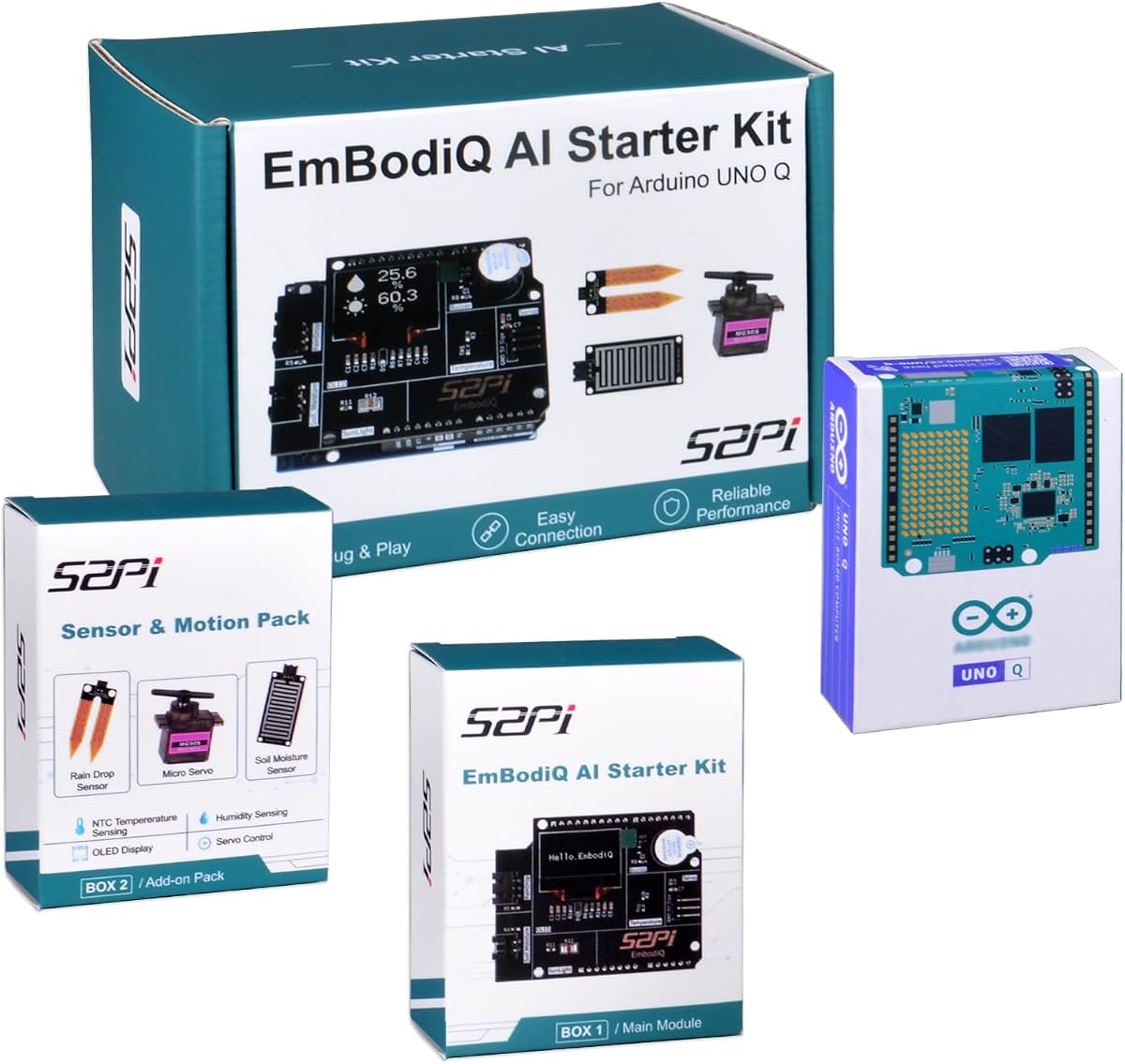
GeeekPi EmbodiQ AI Starter Kit
3.7Editor score
Natural Language Control
EmbodiQ AI Agent HAT
Versatile Sensor Suite
Compare the top Arduino Uno Q boards and kits for AI and robotics. This guide reviews hybrid processors, Linux support, and expansion options for makers.
The Arduino Uno Q represents a major leap in embedded development by combining a powerful Qualcomm processor with a real-time microcontroller. This hybrid approach allows developers to run complex AI models and Linux operating systems alongside traditional low-level control tasks on a single board.
To create this comprehensive guide, we analyzed the specifications, capabilities, and ecosystem support for the latest Arduino Uno Q products available on the market. We evaluated performance metrics, connectivity options, and the range of accessories offered to help you find the right hardware for your next project.
Each selection in this list highlights different strengths, from pure processing power to complete starter kits designed for immediate deployment. Keep in mind that availability and specific bundle contents can change over time, so always verify the current configuration before making your final purchase decision.
3.7Editor score

4.4Editor score

4.8Editor score
The following table provides a side-by-side comparison of the top ten products in this category. It highlights key specifications such as memory capacity, processor type, and included accessories to help you quickly identify the best fit for your specific development needs.


The Arduino® UNO™ Q 4GB stands out as the premier choice for developers needing both edge AI capabilities and real-time control. With a 4.4 rating, it offers a unique dual-arch architecture that bridges the gap between high-level computing and low-level embedded tasks.
We may earn a commission when you buy through this link, at no additional cost to you.
This board features a Qualcomm Dragonwing QRB2210 processor for AI tasks like object recognition and voice commands, paired with an STM32U585 microcontroller for precise motion control. It runs Debian Linux, enabling Python coding and access to a vast software ecosystem while maintaining full Arduino library compatibility.
While the performance is exceptional, users should note that this board requires a specific USB-C power connection and may be overkill for simple LED blink projects. The complexity of managing two different processing environments can also pose a learning curve for beginners.
It is best suited for robotics engineers and IoT developers who need to run machine learning models locally without cloud dependency. For those building advanced prototypes that require vision processing alongside motor control, this is the top recommendation.
The ability to run Debian Linux opens up possibilities for complex applications like web servers and database storage directly on the board.
The classic UNO form factor ensures compatibility with existing shields, while the Qwiic connector simplifies sensor connections.
We may earn a commission when you buy through this link, at no additional cost to you.
This bundle offers the powerful Arduino UNO Q 4GB board paired with a dedicated 45W USB-C power supply to ensure stable operation. Although it lacks user ratings, the product description highlights its focus on advanced robotics and industrial IoT applications requiring robust energy delivery.
We may earn a commission when you buy through this link, at no additional cost to you.
The inclusion of a high-wattage power supply addresses a common pain point for developers running intensive AI models that can draw significant power. The board itself supports complex multitasking and edge AI applications thanks to its 4GB RAM and hybrid processing architecture.
Potential buyers should be aware that this kit focuses on core hardware rather than extensive peripherals or educational materials. It is designed for engineers who already have the necessary knowledge to configure the board for specific industrial use cases.
If you need a reliable power source for continuous heavy workloads, this kit provides the necessary infrastructure. It is ideal for scaling prototypes into production environments where power stability is critical for uninterrupted operation.
The included 45W supply ensures the board remains stable even when driving multiple high-power peripherals or running intensive computing tasks.
Designed for scalable systems, this kit supports the rigorous demands of industrial IoT and automation projects.
We may earn a commission when you buy through this link, at no additional cost to you.
The GeeekPi Starter Kit provides a fully equipped environment for developing with the Arduino UNO Q. With a 4.6 rating, it is highly valued for its inclusion of a protective aluminum case, a USB-C hub with Ethernet, and all necessary cables for immediate setup.
We may earn a commission when you buy through this link, at no additional cost to you.
This kit transforms the board into a standalone single-board computer (SBC) with HDMI and Ethernet support, making it easy to use without a connected PC. The aluminum case protects against dust and static while ensuring efficient heat dissipation during long development sessions.
While it offers less RAM than the premium 4GB versions, the 2GB configuration is sufficient for most embedded and AI development tasks. The main trade-off is that the included accessories are tailored to this specific bundle and may not match other setups.
This is an excellent choice for educators and hobbyists who want a plug-and-play experience. If you need a robust hardware foundation that includes necessary connectivity and protection, this kit simplifies the initial setup process significantly.
The included USB-C hub adds Ethernet and additional USB ports, allowing you to connect to wired networks and external storage easily.
The rugged aluminum case safeguards the board from physical damage and static electricity, extending the lifespan of your investment.
We may earn a commission when you buy through this link, at no additional cost to you.
The Arduino Uno REV3 remains a cornerstone of the maker community with a 4.8 rating for its simplicity and reliability. It uses the classic ATmega328P microcontroller, offering a straightforward environment for learning electronics and programming without the complexity of Linux or AI features.
We may earn a commission when you buy through this link, at no additional cost to you.
With 32KB of flash memory and 14 digital I/O pins, it handles standard DIY projects, robotics, and prototyping efficiently. Its full compatibility with the Arduino IDE means access to a vast library of community-driven code and tutorials, making it easy to find help when needed.
While it lacks the wireless connectivity and processing power of newer boards, its stability and cost-effectiveness make it ideal for basic applications. The main limitation is that it cannot run complex AI models or network protocols directly without additional hardware.
This board is best for students and hobbyists starting their journey or those who need a simple controller for sensors and motors. If you require reliable performance for standard tasks without the overhead of advanced features, the Uno REV3 is the standard choice.
Widely used in schools, this board provides a consistent platform for learning the fundamentals of coding and circuit design.
Its standard pinout allows you to stack various shields to add functionalities like GPS, displays, or additional communication ports.
We may earn a commission when you buy through this link, at no additional cost to you.
The GeeekPi EmbodiQ AI Starter Kit enables control of hardware using natural language commands rather than traditional code. With a 3.7 rating, it aims to make AI integration more accessible by allowing users to tell the system what to do in plain text.
We may earn a commission when you buy through this link, at no additional cost to you.
It includes an AI Agent HAT that handles reasoning and multi-step task execution, paired with soil moisture and raindrop sensors for smart gardening or weather projects. The kit supports various AI providers, giving you the flexibility to choose the language model that fits your needs.
However, the relatively low rating suggests potential issues with software stability or setup complexity. Users may need to configure API keys and manage external connections, which could be a barrier for those expecting a completely offline or plug-and-play experience.
This kit is suitable for experimenters who want to explore voice or text-based control systems. If you are interested in building a smart garden or interactive automation project with minimal coding, this kit provides the necessary hardware to get started.
You can control sensors and motors by sending text instructions to the AI agent, reducing the need for writing complex conditional logic.
The included soil moisture and raindrop sensors allow for immediate testing of environmental monitoring applications.
We may earn a commission when you buy through this link, at no additional cost to you.
The Arduino UNO R4 WiFi is designed for modern IoT projects requiring reliable wireless communication. With a 4.7 rating, it features a powerful Renesas microcontroller combined with an ESP32-S3 for seamless Wi-Fi and Bluetooth connectivity.
We may earn a commission when you buy through this link, at no additional cost to you.
Its unique features include support for CAN bus for industrial applications, a 12-bit DAC for precise analog signal generation, and a built-in LED matrix for visual feedback without external screens. The USB-C port also improves power delivery and ease of use compared to older USB standards.
While it offers significant upgrades over previous models, the new processor architecture may require adjusting to a slightly different development environment. Users transitioning from older Arduino boards might need to review documentation to fully utilize features like CAN bus.
This board is ideal for smart home devices, connected sensors, and projects that need direct internet access. If you need a microcontroller that handles wireless tasks natively without extra shields, the UNO R4 WiFi is a robust and highly rated option.
Integrated Wi-Fi and Bluetooth allow you to connect directly to networks or control devices via smartphones and tablets easily.
The 12-bit DAC and OP-AMP provide high-quality signal generation for projects involving audio or precise motor control.
We may earn a commission when you buy through this link, at no additional cost to you.
The ELEGOO UNO R3 Project Super Starter Kit is a comprehensive package designed to teach the fundamentals of electronics. With a 4.7 rating, it includes over 20 guided lessons and a vast array of components like sensors, motors, and an LCD screen.
We may earn a commission when you buy through this link, at no additional cost to you.
The kit focuses on a solderless setup using breadboards and pre-soldered headers, making it accessible for beginners. You will learn to control servos, read sensors, and manage displays through detailed instructions that guide you through each step.
While it does not include high-performance features like AI processors, it excels at teaching the logical and practical skills needed for any electronics project. The breadth of components ensures you can complete a wide range of experiments without needing extra purchases.
This is the perfect choice for families, students, or anyone new to DIY electronics. If your goal is to learn how circuits and code interact, this kit provides a structured path to gaining hands-on experience and confidence.
The included tutorial breaks down complex concepts into simple, achievable tasks that build your skills progressively.
You get a wide selection of sensors and actuators to experiment with different types of inputs and outputs.
We may earn a commission when you buy through this link, at no additional cost to you.
This ELEGOO UNO R3 Microcontroller Board offers a cost-effective way to access the classic Arduino platform. With a 4.7 rating, it provides the same core functionality as the official board but at a lower price point, making it accessible for multiple projects.
We may earn a commission when you buy through this link, at no additional cost to you.
The board features the reliable ATmega328P microcontroller and includes a USB cable for easy connection to your computer. It supports all standard Arduino libraries, so you can use existing code and resources without any modifications to your workflow.
Since it is a bare board without extra sensors or modules, you will need to source your own components for specific projects. This is a trade-off that keeps the price down but requires a bit more effort to prepare a full development environment.
It is an excellent option for students or makers who need a backup board or want to build multiple controllers for different parts of a system. If budget is a concern and you are familiar with sourcing components, this board is a smart investment.
You get the same performance and reliability as standard boards but at a more accessible price point for bulk buys.
Clearly labeled headers and a included USB cable make it simple to connect and start programming immediately.
We may earn a commission when you buy through this link, at no additional cost to you.
The Arduino UNO R3 Board is a standard development tool that provides the foundational capabilities needed for basic electronics projects. It operates at a 16MHz clock speed and includes 32KB of flash memory for storing your programs.
We may earn a commission when you buy through this link, at no additional cost to you.
With 14 digital I/O pins and support for PWM, you can control motors and lights effectively. The board is compatible with the Arduino IDE and works well with Raspberry Pi and other systems for hybrid projects requiring both computing and control.
While it is a solid choice for general use, the user rating suggests that some buyers may encounter issues with quality or support compared to branded versions. It is essential to verify the condition and functionality upon arrival since quality control can vary with third-party boards.
This board is suitable for users who need a simple, standard microcontroller for learning or prototyping. If you need a basic controller to test ideas or run simple scripts without extra features, this board serves the purpose well.
It provides all the standard inputs and outputs required for most beginner and intermediate electronics projects.
Works seamlessly with various Arduino shields and is compatible with Raspberry Pi for combined system designs.
We may earn a commission when you buy through this link, at no additional cost to you.
This UNO R3 Board offers a compatible microcontroller solution that works well with standard Arduino code and various systems. It features the ATmega328P controller and comes with a USB cable to facilitate immediate connection to your development computer.
We may earn a commission when you buy through this link, at no additional cost to you.
Its compatibility with Raspberry Pi models makes it a versatile choice for projects that require both high-level computing and precise hardware control. You can use it to manage sensors or motors while a larger system handles the display or network communication.
The main limitation is that it lacks built-in wireless or AI capabilities, meaning you will need external modules for those features. This keeps the cost low but requires more wiring and setup for complex networked projects.
For hobbyists looking for a flexible and affordable controller, this board is a reliable option. If you are building a system that pairs a Raspberry Pi with local control, this board provides the necessary interface to manage those interactions effectively.
Works well alongside Raspberry Pi boards, allowing you to split tasks between high-level logic and real-time control.
Provides standard Arduino compatibility without the higher cost of advanced boards, making it ideal for bulk usage.
We may earn a commission when you buy through this link, at no additional cost to you.
Selecting the right board depends on your project complexity and whether you need AI capabilities or standard control.
If you plan to run complex algorithms, image recognition, or natural language processing, choose a board with a high-performance processor and ample RAM. Standard boards are sufficient for simple sensor reading and motor control tasks.
Prioritize hybrid architectures if you need both fast AI processing and real-time control in a single package.
Some advanced boards support full Linux operating systems like Debian. This allows you to run standard software applications and scripts directly on the board. Ensure you have the technical skills to manage an OS environment if you choose this path.
If you prefer simpler management, stick to boards that run embedded firmware without a full OS layer.
Evaluate your need for wireless communication. Boards with built-in Wi-Fi and Bluetooth simplify remote access and IoT integration. Look for options that support multiple protocols if you plan to connect to various devices.
Ensure the board has the necessary ports for your sensors and displays, such as HDMI or Ethernet, if required.
Check the amount of RAM and storage included. More memory allows for larger applications and data logging. If you plan to store images or large datasets locally, look for boards with ample eMMC or flash storage.
Aim for at least 2GB RAM for AI projects to ensure smooth performance without bottlenecks.
Consider how the board will be powered. Some kits include a dedicated power supply to ensure stability during heavy use. Always verify the voltage and wattage requirements before purchasing to avoid hardware damage.
A high-quality power supply can prevent unexpected shutdowns during critical operations.
Verify that the board is compatible with your existing tools. If you rely on the Arduino IDE, ensure the board is supported. For advanced users, check for Python or container support if you need to deploy machine learning models.
Choose a board that integrates well with your current workflow to save development time.
The physical size and shape of the board matter for your project enclosure. If you need to use existing shields or housings, look for boards that maintain standard UNO form factors. Custom shapes may require special mounting solutions.
Standard form factors simplify prototyping and allow for easier hardware swaps.
High-quality documentation and active community support are vital for troubleshooting. Look for products that provide clear setup guides and access to tutorials. A strong user base can help resolve issues quickly.
Prioritize brands known for reliable support and comprehensive technical resources.
Always connect the board via the provided USB-C cable or a certified high-quality cable to ensure stable power. Avoid using unregulated power sources that could damage the internal circuits during operation.
Keep the board in a dry and static-free environment to protect the sensitive microprocessor and memory chips. If you are working in a lab, use an anti-static mat when handling the board directly.
Regularly update the firmware and operating system to maintain security and performance. Follow the official documentation for the correct update procedures to avoid bricking the device during the process.
Most boards maintain the classic UNO form factor, allowing compatibility with standard shields. Always check the pinout diagrams to ensure that the new processor does not conflict with existing shield pins or power requirements before attaching them.
While you typically need a computer to upload code initially, advanced boards can run standalone as single-board computers. Once configured, they can operate independently or through web interfaces connected to a local network without a PC.
No, only the specific hybrid models with high-performance processors support full Linux operating systems. Standard microcontroller boards use embedded firmware and do not have the resources to run a general-purpose OS like Debian.
You can use C++ and the standard Arduino Sketch language on all boards. Advanced models that support Linux also allow Python and other high-level languages, giving you more flexibility for complex applications and data processing.
Boards with built-in Wi-Fi use standard Arduino libraries to manage the connection. You will need to input your network credentials in the setup code or use a configuration portal provided by the board manufacturer to link to your router.
Yes, models with high-performance processors and ample RAM can run machine learning models locally. These boards often include specific libraries to facilitate the deployment and execution of AI tasks such as image classification or speech recognition.
Most boards require a regulated power supply via USB-C to ensure stable operation. Always refer to the specific documentation for your model to confirm the exact voltage and current limits to avoid damaging the power management circuit.
Official boards guarantee compatibility with the Arduino IDE and ecosystem standards. Third-party boards may work well but could have variations in quality, support, or software compatibility that you should verify before purchasing.
We have reviewed the top ten boards available today, highlighting the powerful hybrid capabilities of the Arduino® UNO™ Q 4GB and the cost-effective standard options like the Uno REV3. Each choice offers unique strengths depending on your need for AI, connectivity, or simplicity.
If you are building advanced robotics or IoT systems, prioritize models with high RAM and hybrid processors. For educational or basic prototyping needs, the classic Uno boards provide a reliable and affordable platform with extensive community support.
Always check the current availability and configuration of your chosen board before finalizing your order. Prices and bundle contents can change, so verifying the details on the product page ensures you get the exact hardware you need for your project.