
HP Smart Tank 5003
4.1Editor score
High ink capacity
Mess-free refilling
Low-cost printing
This guide compares the best AI printers for home and office, evaluating smart features, print quality, and efficiency to help you choose the right model.
Modern AI printers are revolutionizing how we produce documents by integrating smart technology that optimizes layout and reduces waste. These devices offer seamless connectivity and intuitive interfaces that simplify everyday printing tasks for users at any skill level.
We have evaluated ten top models based on their artificial intelligence capabilities, print speed, and overall value. Our analysis focuses on how well each device handles smart formatting, wireless connectivity, and long-term operational costs for home and office environments.
Each selection highlights specific strengths such as ink efficiency, scanning quality, or specialized functions like 3D printing. Keep in mind that pricing and availability can fluctuate over time, so verify current details before making your final purchasing decision today.
4.1Editor score

3.9Editor score

4.7Editor score
This side-by-side comparison highlights the unique strengths of each AI printer to help you match features with your specific printing needs and budget requirements.



The HP OfficeJet Pro 8125 stands out as a reliable choice for home offices needing professional quality documents. It features AI tools that optimize formatting to reduce waste and ensure clean layouts from emails and web pages.
We may earn a commission when you buy through this link, at no additional cost to you.
This model includes wireless dual-band Wi-Fi that resolves connection issues automatically while the large touchscreen simplifies navigation. The included Instant Ink trial helps manage consumables efficiently so you spend less time refilling cartridges during busy periods.
Users may find standard ink costs add up over time without the subscription service and paper capacity is modest for heavy daily use. However the smart features and consistent output quality make it a strong value for general home office workflows.
Choose this printer if you prioritize reliable performance and smart document formatting for everyday business needs. It delivers a balanced mix of speed, connectivity, and ease of use that suits most home environments.
HP AI removes unwanted content from web pages and emails to save paper and improve layout precision.
HP Wolf Essential Security bolsters protection against cyber threats to keep your network safe.
We may earn a commission when you buy through this link, at no additional cost to you.
The HP Smart Tank 5003 offers exceptional value for users needing high-volume printing without frequent cartridge replacements. It comes with enough ink to last up to three years which significantly lowers the cost per page over time.
We may earn a commission when you buy through this link, at no additional cost to you.
Its mess-free refill system lets you plug in ink bottles that drain automatically without spilling or squeezing. This design eliminates the hassle of traditional cartridges and supports reliable output for both color and black documents.
While print speeds are slower than laser models and the unit takes up more desk space the savings on ink make it a practical long-term investment. The wireless capabilities ensure you can print from any device in the home.
Select this printer if budget and ink efficiency are your primary concerns for home printing. It provides a robust solution for families and home offices needing steady output without ongoing consumable costs.
Includes up to three years of ink to save money and reduce frequent refills.
Easy-access refill system allows bottles to drain automatically without spills.
We may earn a commission when you buy through this link, at no additional cost to you.
The Bambu Lab P2S Combo delivers advanced 3D printing with AI-driven reliability and multi-color options. It sets up quickly and uses active flowrate compensation to ensure every layer stays sharp and consistent.
We may earn a commission when you buy through this link, at no additional cost to you.
With AI failure detection and quick-swap nozzles even beginners can achieve professional-grade results. The AMS 2 Pro adds seamless multi-material printing while keeping filament dry for optimal print quality.
The investment is higher than standard printers and mastering 3D design takes time. Yet the speed and flexibility make it ideal for creators who need detailed models or prototypes without external support.
Choose this model if you seek top-tier performance for 3D printing projects at home. It combines speed precision and smart features to streamline complex designs into finished objects effortlessly.
Built-in AI identifies print issues early to prevent waste and ensure success.
AMS 2 Pro enables multi-color or multi-material prints with built-in filament drying.
We may earn a commission when you buy through this link, at no additional cost to you.
The HP Envy 6155 excels at home photo printing with True-to-Screen technology that matches vibrant colors. Its compact size fits easily on smaller desks while the wireless options keep connectivity seamless for all devices.
We may earn a commission when you buy through this link, at no additional cost to you.
AI formatting helps remove unwanted content from web pages and emails to save paper during everyday tasks. The touchscreen interface is intuitive for navigating settings and the included Instant Ink trial supports efficient ink management.
Print speeds are slower for large text jobs and the input tray holds fewer sheets than larger models. Still the photo quality and space-saving design make it a great fit for households focused on visuals.
Pick this printer if you need a compact solution for high-quality photos and casual documents. It balances style and functionality for users who value accurate colors and easy operation at home.
Print documents and photos that look as vibrant as they do on your screen.
Made with at least 60 percent recycled plastic to support eco-friendly manufacturing.
We may earn a commission when you buy through this link, at no additional cost to you.
The HP OfficeJet Pro 9135 is built for busy offices needing fast reliable printing and scanning. It delivers up to 25 pages per minute and includes two large paper trays to reduce interruptions during heavy workloads.
We may earn a commission when you buy through this link, at no additional cost to you.
Its large touchscreen offers a phone-like interface that simplifies navigation while Wolf Pro Security protects sensitive data. AI formatting tools ensure emails and web pages print cleanly without wasted sheets or awkward layouts.
The unit is larger than home models and costs more upfront but the speed and capacity justify the investment. Fax features add versatility for traditional communication needs without extra hardware.
Choose this printer for small to mid-size offices requiring robust performance and security. It balances speed capacity and safety features to keep professional workflows running smoothly.
Two large trays hold enough paper to minimize refills during busy workdays.
Bolsters security to help keep your network protected from cyber threats.
We may earn a commission when you buy through this link, at no additional cost to you.
The HP Smart Tank 7603 supports high-volume printing with enough ink for thousands of pages upfront. Its mess-free refill system keeps maintenance simple and wireless options allow printing from any device in the office.
We may earn a commission when you buy through this link, at no additional cost to you.
Features like fax and borderless printing add versatility while the magic touch panel provides intuitive control. The cartridge-free design ensures long-term savings and reduces waste compared to traditional inkjet systems.
Its size is substantial and touch-only controls may take adjustment for some users. However the low cost per page and durability make it a strong choice for frequent printing needs.
Select this model if you need a cost-effective solution for large document volumes at home or office. It delivers reliable output and easy maintenance for users prioritizing value over compact design.
Includes enough ink for up to 8000 color or 6000 black pages right out of the box.
Integrated fax capability lets you send and receive documents without separate hardware.
We may earn a commission when you buy through this link, at no additional cost to you.
The HP OfficeJet Pro 8139 is designed for home offices needing fax and scan features alongside standard printing. It includes a one-year Instant Ink trial and an ADF for efficient document management and workflow.
We may earn a commission when you buy through this link, at no additional cost to you.
AI tools optimize formatting for clean outputs while the touchscreen interface simplifies daily tasks. Wolf Essential Security protects your network ensuring safe operation within connected home environments.
Speed is moderate compared to top-tier office models and the upfront cost is higher than basic inkjets. Yet the fax and ink trial benefits justify the price for users needing comprehensive communication tools.
Choose this printer for home offices requiring reliable faxing and strong ink support. It offers a balanced mix of features that cater to professional tasks and home efficiency.
Includes one year of Instant Ink trial to help manage ink costs effectively.
Bolsters security to help keep your network protected from cyber threats.
We may earn a commission when you buy through this link, at no additional cost to you.
The HP Smart Tank 7603 offers robust performance for high-volume printing tasks with minimal cost per page. Its cartridge-free design and mess-free refill system ensure convenient maintenance while supporting both fax and scan needs.
We may earn a commission when you buy through this link, at no additional cost to you.
Magic touch controls simplify navigation and the wireless options keep connectivity flexible across devices. The large page capacity reduces interruptions and supports steady output for busy home offices or families.
Its physical footprint is large and setup requires ample space on a desk or shelf. However the efficiency and savings on consumables make it a worthwhile choice for frequent printing users.
Select this model if you need a reliable workhorse for substantial document volumes. It combines high capacity and low operational costs to meet demanding printing schedules effortlessly.
Designed for low-cost high-volume printing to reduce downtime and costs.
Mess-free refill system lets bottles drain automatically without squeezing or spills.
We may earn a commission when you buy through this link, at no additional cost to you.
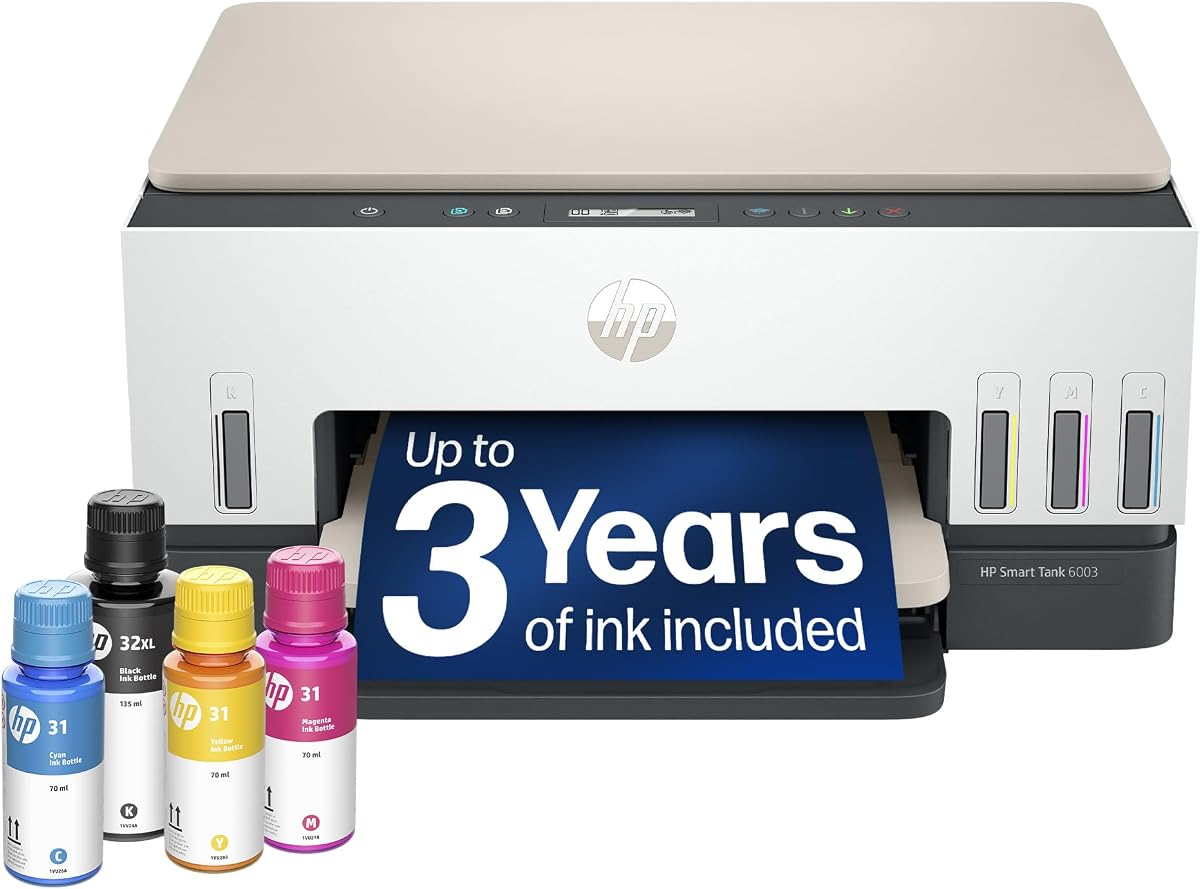
The HP Smart Tank 6003 provides reliable printing for home users with high yield capacity and low costs. Its mess-free refill system simplifies maintenance while wireless options support printing from any smartphone or tablet.
We may earn a commission when you buy through this link, at no additional cost to you.
The borderless printing capability ensures photos and documents look professional without white margins. Setup is straightforward and the cartridge-free design eliminates the hassle of traditional ink replacements.
It lacks fax functionality and print speeds are slower compared to office models. Still the value and ease of use make it a smart choice for general home document needs.
Choose this printer for budget-conscious households needing steady output and easy ink management. It balances affordability and functionality for everyday printing tasks without hidden costs.
Low-cost high-volume printing reduces ongoing expenses for regular use.
Create professional-looking photos and documents without unwanted white margins.
We may earn a commission when you buy through this link, at no additional cost to you.
The Liene PixCut S1 specializes in custom stickers with integrated printing and cutting for DIY projects. AI image extraction automatically identifies subjects from photos to streamline the creation process effortlessly.
We may earn a commission when you buy through this link, at no additional cost to you.
Thermal dye-sublimation technology ensures vibrant high-resolution outputs with durable waterproof stickers ready for use. The Liene Photo App offers templates and free assets to unlock creativity without subscription costs.
It is designed for niche craft use rather than general document printing and has size limitations. Yet for personalized gifts and labels it offers unmatched convenience and professional finish at home.
Pick this printer if you want to create custom stickers and labels without separate machines. It combines AI tools and thermal printing to simplify creative projects into finished products quickly.
AI technology recognizes and extracts subjects from photos to create precise stickers.
Print and cut in one step to save time and effort on craft projects.
We may earn a commission when you buy through this link, at no additional cost to you.
Selecting the right AI printer requires evaluating print speed ink costs smart features and connectivity to match your specific home or office needs.
Print speed affects how quickly documents output which matters for busy environments. Faster models handle high volumes efficiently while slower units suit casual use where time is less critical.
Prioritize higher ppm for office work and accept lower speeds for home tasks to balance performance and cost effectively.
Ink costs often exceed the initial price of the printer so consider models with tank systems or subscription plans. These options reduce the cost per page and provide consistent supplies for regular use.
Choose ink tanks for high-volume needs and subscriptions for convenience to keep ongoing expenses low over time.
Wireless connectivity enables printing from smartphones and laptops without cables. Dual-band Wi-Fi reduces connection issues while mobile apps simplify scanning and printing tasks directly from devices.
Ensure the printer supports your preferred devices and networks to maintain smooth integration with your workflow.
AI capabilities optimize layouts and remove unwanted content to save paper and improve output quality. These features automate formatting tasks reducing manual adjustments and ensuring professional results consistently.
Look for models with AI formatting tools if you frequently print web pages or emails to maximize efficiency.
Input tray size determines how often you need to refill paper during operations. Larger capacities suit offices with high volume while smaller trays fit compact home desks without waste.
Select a tray size that matches your typical workload to minimize interruptions and maintain productivity.
Most printers include scanning copying and fax functions to reduce the need for separate devices. Consider which tools are essential for your tasks before adding extra features that may go unused.
Choose a multifunction model if you need to digitize documents or send faxes regularly at home.
Security features protect sensitive data and networks from cyber threats during printing operations. Built-in tools ensure private documents remain safe and your network is not compromised by vulnerabilities.
Prioritize models with robust security if you handle confidential information to maintain safety standards.
Eco-friendly designs use recycled materials and energy-efficient processes to reduce environmental impact. These options support green initiatives while often lowering long-term costs for users.
Choose models with recycled content and efficient cycles to align with sustainable printing practices.
Begin by connecting the printer to your home Wi-Fi network and installing the manufacturer app. This setup enables mobile printing and remote access to features like scanning and AI formatting tools.
Use recommended ink or refill tanks to prevent nozzle clogs and maintain consistent print quality. Regularly clean the print heads through the device settings to avoid streaks or faded text.
Monitor ink levels and paper trays to avoid unexpected interruptions during important tasks. Keep the printer in a cool dry place away from direct sunlight to ensure optimal longevity.
AI printers integrate artificial intelligence to optimize layout and formatting automatically. They adjust web pages and emails to reduce waste and ensure professional output without manual editing efforts.
Many models include Instant Ink plans or tank systems that significantly lower cost per page. Subscriptions deliver ink before you run out while tanks offer bulk capacity for frequent printing.
Yes most modern AI printers support wireless mobile apps for seamless smartphone printing. This allows you to send documents and photos directly from your device without a computer.
Several models in this guide include fax features alongside scanning and copying. Look for All-in-One titles to confirm fax support if you need traditional document communication.
Many designs use recycled plastic content and energy-efficient modes to reduce environmental impact. Check sustainability specs to find models aligning with your green printing preferences.
Use dual-band Wi-Fi and the printer app to automatically detect and resolve network problems. Restarting the router or resetting printer settings often restores stable connectivity quickly.
This guide highlights top AI printers ranging from budget ink tanks to high-end models and specialized cutters. Each option offers unique smart features tailored for different home and office needs.
Prioritize ink efficiency and AI tools for long-term savings while ensuring connectivity matches your devices. Consider specific requirements like fax or high volume to narrow down the best fit.
Verify current prices and stock levels before purchasing since availability can vary over time. Use this analysis to make an informed choice that meets your daily printing demands.