
chenyang SATA Male to Female
4.4Editor score
Affordable pricing
Up angled connector
Supports 5V power
When building or upgrading a computer, cable management is crucial for airflow and aesthetics. A 90 Degree SATA Adapter helps route cables efficiently in tight spaces.
We evaluated ten top-rated adapters based on build quality, compatibility, and user feedback. Our list covers various angles and configurations to suit different needs.
Each pick highlights specific strengths like durability and ease of use. Remember that availability and stock can change quickly, so check current listings before buying.
4.4Editor score

4.6Editor score

5.0Editor score
As an Amazon Associate we earn from qualifying purchases.
The following table provides a side-by-side comparison of the ten selected adapters. It highlights key specifications to help you identify the right fit for your system.


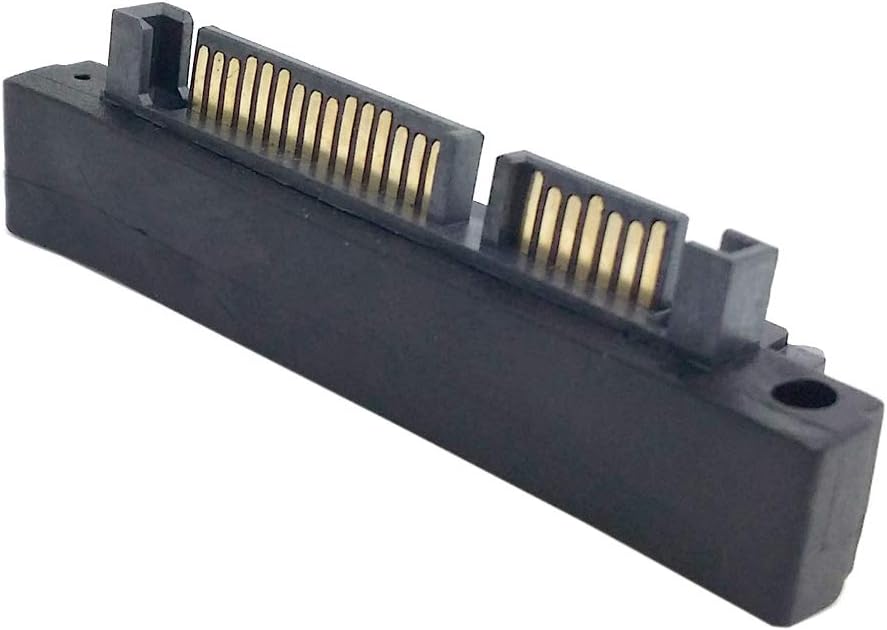


This adapter is designed to solve the problem of SATA cables not fitting into chassis due to tight angles. It has a high rating for its ability to convert vertical cables to horizontal efficiently.
We may earn a commission when you buy through this link, at no additional cost to you.
The up angle design allows for better cable management in situations where the vertical SATA interface faces inward. This ensures cables do not bend too much, which can damage them over time.
While it is fully compliant with SATA III for speeds up to 6 Gbit/s, users should note that it does not provide power. The drive needs to be powered separately via a power cable.
If you need a reliable solution for limited height chassis or tight spaces, this adapter is a solid choice. The two pack provides a spare which is convenient for future upgrades.
The angled design reduces strain on cables by allowing a natural flow from the motherboard to the drive.
Supports SATA III speeds up to 600 MB/s ensuring fast data access for SSDs and HDDs.
We may earn a commission when you buy through this link, at no additional cost to you.
This unique adapter allows you to split one SATA port into two connections. It is highly rated for users who need to manage multiple drives in a tight space.
We may earn a commission when you buy through this link, at no additional cost to you.
The right angle design ensures better cable management in certain situations. It helps solve the problem of cables bending too much due to lack of space in the computer case.
Keep in mind that you must check your case to see which way you need the adapter angled. It is designed for low profile motherboards but might not fit all builds.
This is a cost effective way to provide replacement or spares for different SATA systems. It is ideal if you want to reduce the number of cables running from the motherboard.
Connect two drives to a single SATA port on your motherboard with this dual female adapter.
The angled design keeps connections close to the board reducing cable clutter inside the case.
We may earn a commission when you buy through this link, at no additional cost to you.
This adapter is a straightforward solution for changing the connection direction of a hard drive. It is popular due to its low cost and ability to handle power and data.
We may earn a commission when you buy through this link, at no additional cost to you.
The connector changes the direction to allow you to connect to a female port even if space around the port is limited. It supports 5V and 12V power which is essential for drives.
While it does not change transmission speed, it works well for standard SATA drives. The design is compact making it easy to fit into tight spots near the motherboard.
For users on a tight budget who need a simple angled connector this is a great option. It allows for better cable management and more aesthetically pleasing wiring in your PC.
Unlike some data only cables this adapter supports the transfer of power to the connected drive.
Simply plug it in between the cable and the drive for an instant angled connection without tools.
We may earn a commission when you buy through this link, at no additional cost to you.
This adapter is designed for those who need to route both power and data through an angled connector. It features a down angled design which is useful in many cases.
We may earn a commission when you buy through this link, at no additional cost to you.
The 22pin connector supports both power and data transfer. It can work for SATA 2.5 inch and 3.5 inch disk drives which makes it versatile for different hardware.
One thing to note is that while it transfers power it still requires a power source. The end is a male connector and the other end is a female connector.
If you have limited space around the port this adapter allows you to connect to a female port easily. It is a practical choice for extending connections in tight areas.
The 22pin design allows for power transfer which simplifies cable routing for drives.
A downward bend helps direct cables away from the motherboard to avoid obstruction.
We may earn a commission when you buy through this link, at no additional cost to you.
This adapter is a simple and effective solution for extending a SATA connection. It features a right angled type connector which helps in routing cables neatly.
We may earn a commission when you buy through this link, at no additional cost to you.
The black color matches well with many internal PC components. It is a 22pin male to female adapter which supports both data and power lines.
While it does not add significant length it provides the necessary angle to connect in tight spaces. The build is sturdy enough for long term use in a desktop case.
If you need a basic extension that handles data and power this adapter is a good choice. It is reliable and easy to install without any additional tools.
The black finish ensures the adapter blends in with other internal components for a clean look.
Standard 22pin connectors make this compatible with most SATA drives and motherboards.
We may earn a commission when you buy through this link, at no additional cost to you.
This package includes two adapters that allow you to choose the best orientation for your build. One is up angled and the other is down angled for flexibility.
We may earn a commission when you buy through this link, at no additional cost to you.
It is designed for changing the SATA 7pin disk cable installation direction. You can install the cable from vertical to horizontal direction with this adapter easily.
The main benefit is solving installation issues for limited height chassis. It helps keep cables flat against the case wall which improves airflow and looks.
This is a convenient option if you are not sure which angle you need before buying. It covers both up and down angles so you have a spare or alternative.
Having both up and down angled adapters in one pack covers most installation scenarios.
Routing cables horizontally reduces clutter and helps with air circulation in the case.
We may earn a commission when you buy through this link, at no additional cost to you.
This adapter provides a down angled connection which is useful for routing cables towards the bottom of a case. It works for 2.5 inch and 3.5 inch SATA drives.
We may earn a commission when you buy through this link, at no additional cost to you.
It transfers 5V and 12V power along with data. This ensures that your drive gets the necessary power while maintaining a clean cable path.
The connector allows you to connect to a female port even if space around the port is limited. It is compact and does not add unnecessary bulk to the system.
If you need a specific down angle connection this adapter is a reliable choice. It allows for better cable management and more aesthetically pleasing wiring.
The down angle helps direct cables away from components at the top of the motherboard.
Its small size ensures it fits in tight spots without blocking other ports or components.
We may earn a commission when you buy through this link, at no additional cost to you.
This adapter stands out for its high build quality and perfect rating. It features gold plated contacts which ensure reliable signal transmission over time.
We may earn a commission when you buy through this link, at no additional cost to you.
The 90 degree angled connector allows for flexible cable routing in compact PC cases. It reduces cable strain and improves airflow management significantly.
While it does not transfer power it is designed for data transfer up to 6Gb/s. It works with all standard SATA devices including HDDs and SSDs.
If you value durability and performance this adapter is a top choice. The durable construction and RoHS compliant materials make it safe and long lasting.
Gold plated contacts resist corrosion and ensure a strong connection with the motherboard.
The compact design saves space in tight cases allowing for better overall airflow.
We may earn a commission when you buy through this link, at no additional cost to you.
This package offers four adapters with two up angle and two down angle options. It is ideal for users who need multiple adapters for a large build.
We may earn a commission when you buy through this link, at no additional cost to you.
The compact design provides convenience and reduces cable bending and interference. It keeps the wiring tidy and organized inside the computer case.
Made of high quality material it has good electrical properties. The adapters are small and light weight which makes them durable and easy to install.
If you want a versatile pack that covers multiple needs this is a great option. It is a cost effective way to have spares for different systems.
Getting four adapters in one pack is a smart investment for complex or multi system builds.
Having both up and down options ensures you can adapt to any mounting orientation.
We may earn a commission when you buy through this link, at no additional cost to you.
This adapter is designed for changing the SATA 7pin disk cable installation direction. It includes two down angled adapters which are useful for specific mounting needs.
We may earn a commission when you buy through this link, at no additional cost to you.
You can install the 7pin cable from vertical to horizontal direction with this adapter. This helps solve the installation for limited height chassis effectively.
The package includes two same adapters which is convenient for having a spare. It allows for better cable management and a cleaner look inside the case.
If you need a simple down angle extension this adapter is a reliable choice. It is easy to install and provides a solid connection for your drives.
The down angle helps route cables to the lower part of the case for better organization.
Having two adapters allows you to replace one later without needing to order a new one.
We may earn a commission when you buy through this link, at no additional cost to you.
Choosing the right adapter requires considering the specific needs of your build. These factors will help you make an informed decision.
The first thing to consider is whether you need an up angle or down angle adapter. This depends on the position of the motherboard port and the drive bay.
Always check the direction of the ports before buying to ensure the adapter bends the cable correctly.
Most adapters are 7Pin data only but some are 22Pin which includes power. Data only adapters are sufficient if your drive has a separate power cable.
Power adapters are useful if you want to reduce the number of cables running to the drive.
Look for adapters made from durable materials like high quality plastic or metal. Gold plated contacts can also improve longevity and signal quality.
A sturdy build ensures that the connection remains secure even if the case is moved frequently.
Some adapters come in packs of two or four which can be more convenient. Having a spare allows you to replace a damaged one without buying a new adapter.
Consider how many drives you have and if you need multiple adapters for your build.
Ensure the adapter is compatible with your SATA version. Most adapters support SATA III which is backward compatible with older versions.
Check that the adapter fits your specific motherboard and drive type whether 2.5 or 3.5 inches.
The adapter itself is short but consider the overall cable length after adding it. In tight spaces a longer cable may be needed to reach the drive.
Make sure the adapter does not add so much length that it blocks other components.
Prices vary slightly between brands and pack sizes. Generally they are affordable so you can buy a few to have on hand.
Don't pay extra for unnecessary features if a basic adapter meets your needs.
Reading user reviews can provide insight into real world performance. Look for feedback on fit and ease of installation.
High ratings usually indicate a reliable product that works as described.
To install the adapter start by turning off your computer and unplugging it from power. This ensures safety while working inside the case.
Identify the SATA port on your motherboard and the port on your drive. Connect the male side of the adapter to the motherboard port.
Plug the SATA cable into the female side of the adapter and secure it to the drive. Ensure the cable is not bent sharply to prevent damage.
Most data only adapters do not support power. You will need a separate power cable for your drive. Some 22Pin models do support power however.
No. A quality adapter supports SATA III speeds up to 6 Gbps. It should not impact the performance of your SSD or HDD.
It depends on your motherboard layout. Check if the port faces up or down. Ideally choose the angle that aligns with the drive bay.
Yes. They work with any motherboard that has standard SATA ports. Ensure the connector fits the specific port size on your board.
Measure the space around the port. The adapter is small but ensure there is room for the bend. Check the dimensions if available.
Yes. You can use one adapter per drive. Some models allow splitting one port to two drives but check specs first.
In this guide we reviewed ten adapters that offer reliable solutions for angled cable management. The CERRXIAN 90 Degree SATA Adapter stands out for its balance of quality and features.
When choosing prioritize the angle orientation and build quality. Make sure the adapter matches your specific needs regarding power and speed.
Remember that prices and availability change. Check the current listings before making a purchase to ensure you get the best deal available today.