
SCRIB3D P1 3D Printing Pen with Display
4.4Editor score
Stepless speed function
Temperature adjustable
Includes stencil guide
This guide compares the top 3D printing pens for kids based on safety, ease of use, and creative features to help parents choose the right model for their
Finding the right 3D printing pen for kids can transform screen time into creative play. These tools allow children to build three-dimensional objects from plastic filament, fostering STEM skills and artistic expression in a tangible way.
We evaluated ten leading models based on safety features, ease of use, and included accessories. Our analysis focuses on pens designed specifically for young users as well as advanced options for older children who want more control over their creations.
Each pick highlights key strengths and potential trade-offs to help you decide. Prices and availability change frequently, so please check the current listings before purchasing to ensure you get the best deal for your family's needs.
4.4Editor score
4.4Editor score

4.4Editor score
This side-by-side comparison highlights the key specifications and unique features of each pen to help you find the perfect match for your child's age and skill level.




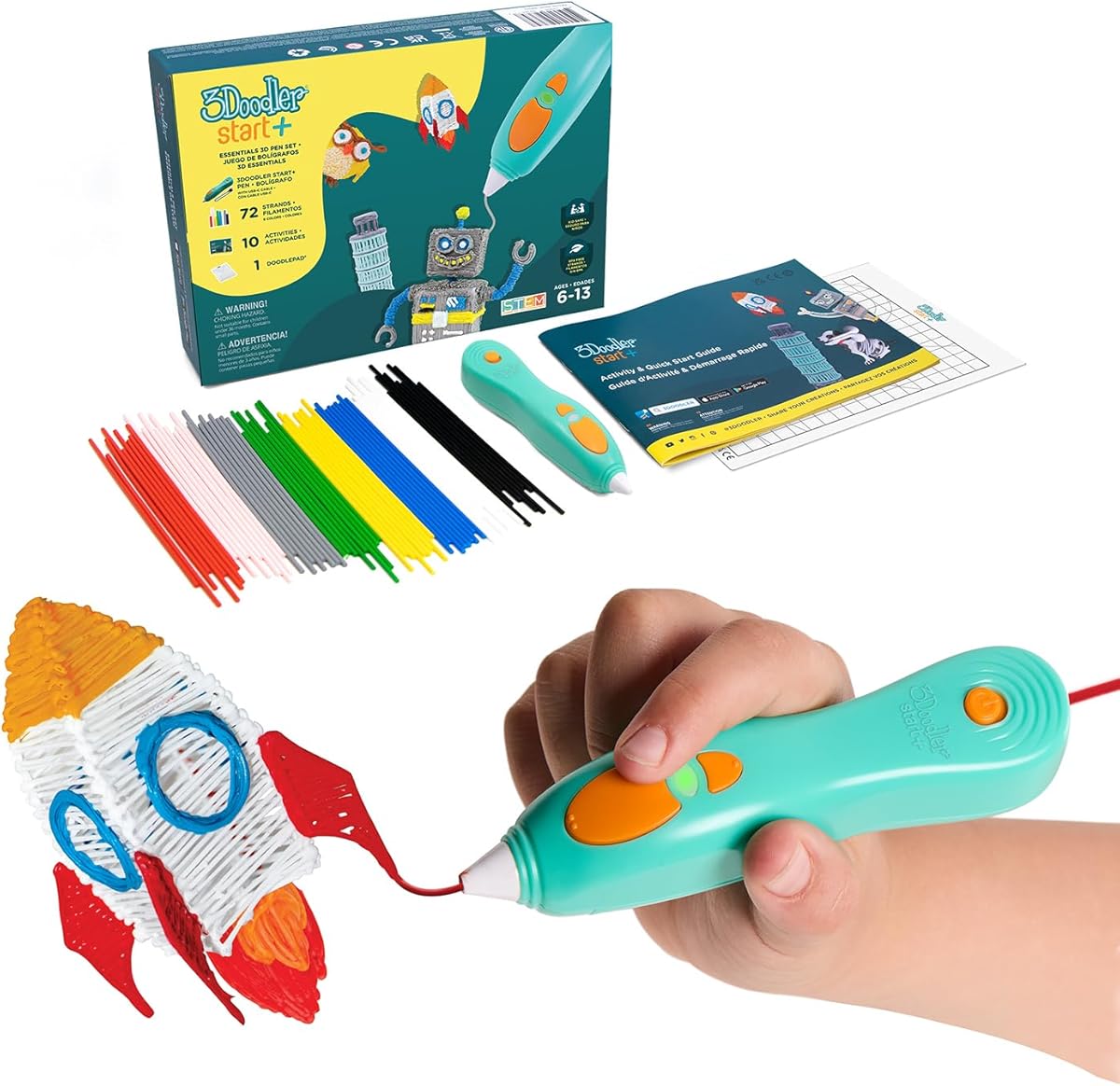
The 3Doodler Start+ Essentials set is designed with safety as the top priority, making it an ideal choice for younger children. It features no hot parts and uses safe plastic filaments that can be touched without burn risks, which gives parents peace of mind.
We may earn a commission when you buy through this link, at no additional cost to you.
This kit includes everything needed to start creating immediately, from the pen itself to a DoodlePad and 72 mixed-color strands. The upgraded experience offers faster charging and more accessories compared to previous versions, ensuring hours of uninterrupted creative play.
While it offers a safe entry point into 3D printing, the proprietary filament system means users cannot easily switch to other materials. Additionally, the design is optimized for simple projects rather than complex engineering tasks.
Parents looking for a screen-free STEM toy that prioritizes safety will find this set invaluable. It effectively bridges the gap between digital design and physical creation for children aged six and up.
The pen nozzle and plastic can be touched with no burn risks, ensuring safety during use.
This tool helps children make real-world connections to STEM concepts through hands-on play.
We may earn a commission when you buy through this link, at no additional cost to you.
The SCRIB3D P1 is a highly accessible option that does not compromise on essential features for young creators. It comes with a display to monitor temperature and a stepless speed slider for optimal control, making it versatile for various project types.
We may earn a commission when you buy through this link, at no additional cost to you.
Its readiness to use out of the box is a major plus, including starter plastic and a free stencil guide. The pen supports both PLA and ABS filaments, offering flexibility as children grow more skilled with the tool.
Users should note that this pen requires a power adapter and does not have a built-in battery, which limits portability. However, the safety features like auto sleep function mitigate concerns about leaving it unattended.
For families on a budget who still want a quality tool for improving spatial thinking and artistic skills, this model delivers excellent value and reliability for everyday use.
The stepless speed function allows for optimal control whether working on intricate projects or infill work.
Equipped with a 2 minute auto sleep function and anti-clogging features for a seamless experience.
We may earn a commission when you buy through this link, at no additional cost to you.
The MYNT3D Professional Pen stands out with its large OLED display, allowing users to monitor material temperature with precision. This level of control is exceptional for children who are ready to experiment with different effects and materials.
We may earn a commission when you buy through this link, at no additional cost to you.
Its temperature adjustment in 1-degree increments ensures fine-tuning capabilities that other pens lack. The adjustable feed rate adds another layer of control, enabling users to regulate flow for optimal material usage while drawing.
While it offers professional-grade features, the price is higher than basic models, and the pen requires a steady hand to utilize its full potential. However, the included PLA plastic and adapter make it ready to use immediately.
This pen is ideal for advanced young creators or those interested in engineering concepts who need accurate temperature and speed management to achieve specific artistic or structural goals.
The large OLED display lets you monitor temperature of material to help you achieve a wide variety of effects.
Temperature is adjustable in 1 degree increments from 140 to 230 C for optimal control.
We may earn a commission when you buy through this link, at no additional cost to you.
The MYNT3D Super 3D Pen is engineered for durability, featuring an ultrasonic sealed nozzle that resists clogging. This makes it a reliable choice for regular use where consistency is key to maintaining creative flow.
We may earn a commission when you buy through this link, at no additional cost to you.
It supports both ABS and PLA filaments, offering versatility for various projects. The stepless speed slider allows users to regulate flow easily, ensuring optimal control of material while drawing complex shapes.
Despite its robust build, the pen may require some time to master compared to simpler models. However, the ergonomic touch pen design ensures comfort during extended sessions, which is crucial for young artists.
This model is recommended for kids who are ready to transition to more serious 3D pen use and need a tool that can withstand frequent handling without losing performance.
The ultrasonic sealed nozzle is nearly clog-proof and provides market leading durability for long-term use.
A slim ergonomic touch pen ensures comfort while drawing 3D works of art.
We may earn a commission when you buy through this link, at no additional cost to you.
The SCRIB3D Advanced 3D Pen offers an impressive array of controls designed to make accurate and creative models. With a large LCD screen to monitor heat and 8 different speed options, it provides precision that suits growing skills.
We may earn a commission when you buy through this link, at no additional cost to you.
Its ergonomic design features a soft touch surface intended for optimal comfort during long sessions. The kit includes 5 colors of filament and a stencil book, ensuring you have plenty of materials to start creating right out of the box.
While the controls are intuitive, there is a learning curve for beginners compared to simpler pens. However, the safety features and responsive customer service provide confidence in the purchase and usability.
This pen is perfect for kids who want to build like a pro and need the flexibility to adjust temperature and speed independently to achieve specific design outcomes.
Sleek and ergonomic design with curvature intended to fit your hand for the most comfortable 3D drawing experience.
Features 8 different speed options so you can regulate speed and flow for optimal control of line thickness.
We may earn a commission when you buy through this link, at no additional cost to you.
This bundle includes everything you need to create like a pro, making it a comprehensive solution for serious young creators. The Pro pen features stepless speed control and replaceable sealed nozzle design for reliable, long-lasting operation.
We may earn a commission when you buy through this link, at no additional cost to you.
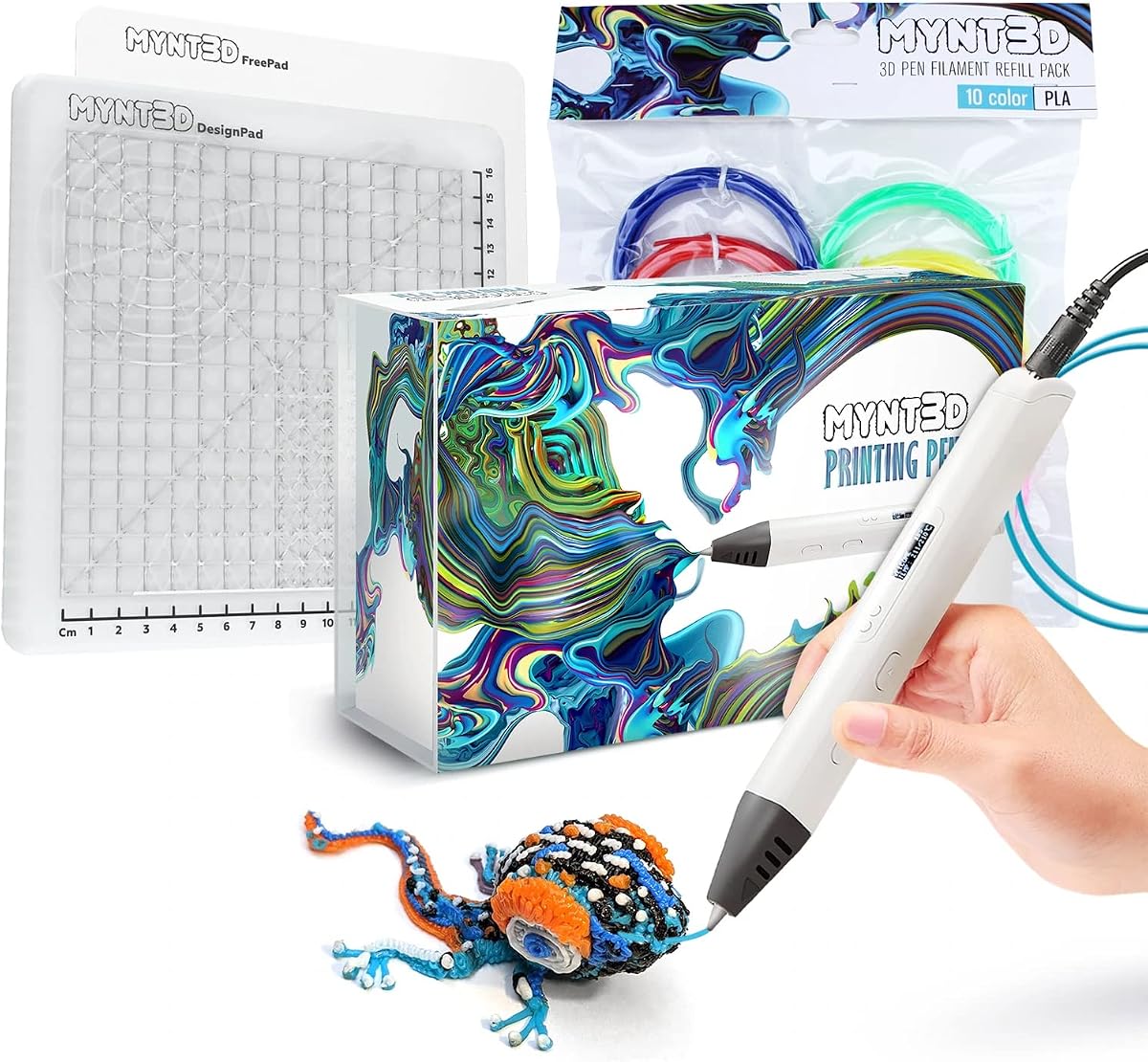
It comes with 10 colors of high-quality vacuum sealed PLA filament, ensuring a wide palette for creative projects. The included DesignPad mat kit provides a double-sided silicone surface with channels to help design perfect geometric shapes.
While the extensive kit is valuable, the higher cost might be a consideration for casual users. However, the unlimited customer service access and troubleshooting tips provide significant support for mastering the tools.
For kids who want a full suite of tools and materials to start creating immediately without needing to buy extra accessories, this bundle offers exceptional value and convenience.
Double sided silicone drawing surface with channels let you design and create perfect geometric shapes easily.
Highest quality vacuum sealed PLA in multiple colors ensures smooth and consistent 3D printing results.
We may earn a commission when you buy through this link, at no additional cost to you.
The MYNT3D Super Bundle offers a robust set of tools for creative 3D pen use. The Super pen features stepless speed control and temperature adjustability, allowing for flexibility with both ABS and PLA filaments.
We may earn a commission when you buy through this link, at no additional cost to you.
Included in the kit are 10 colors of high-quality filament and both DesignPad and FreePad mats. The FreePad surface is custom formulated for ideal adhesion, making it easy to trace favorite patterns or create original designs.
Managing multiple components might require some organization for younger kids, but the quality of materials ensures a smooth creative experience. The sealed nozzle design helps avoid clogs, which is a common frustration in this category.
This bundle is ideal for children who want to explore a wide range of colors and techniques without needing to purchase additional accessories separately.
Custom formulated transparent drawing surface with ideal adhesion so you can trace your favorite patterns.
Stepless speed control for enhanced flow regulation ensures consistent line thickness during drawing.
We may earn a commission when you buy through this link, at no additional cost to you.
The 3Doodler Flow is designed for creators looking for a reliable tool that works with multiple types of plastic. It is compatible with 1.75 plastic filaments such as PLA, ABS, and wood, offering significant versatility for projects.
We may earn a commission when you buy through this link, at no additional cost to you.
An integrated LCD provides real-time temperature monitoring to ensure smooth 3D printing, eliminating the guesswork for users. The kit includes 8 different colors of plastic spools, totaling 80 feet, so you can start creating right away.
While it is marketed towards teens and adults, advanced younger users may still find it useful. The compact and light-weight design makes it easy to take on the go for creative sessions away from home.
This pen is a great choice for those who want a reliable, versatile tool that can handle various materials without needing to purchase different pens for different filaments.
Compatible with 1.75 plastic filaments such as PLA, ABS, and wood for diverse project capabilities.
The integrated LCD provides real-time temperature monitoring to ensure smooth 3D printing without errors.
We may earn a commission when you buy through this link, at no additional cost to you.
This bundle combines the popular SCRIB3D P1 pen with a practical silicone mat to facilitate better creative work. The two-sided silicone mat helps with tracing and cleaner projects, which is essential for beginners learning to control the pen.
We may earn a commission when you buy through this link, at no additional cost to you.
The flexible practice surface features built-in shapes and patterns to guide designs, helping children learn consistency. It is durable and heat-resistant, designed to handle repeated use during drawing and everyday creative sessions.
While the mat is a great addition, it is a fixed size, which might limit larger projects. However, the pen included is known for being beginner-friendly, making the entire package a coherent starting point.
For parents looking to provide a structured environment for their child's 3D pen use, this bundle ensures they have the necessary tools to practice effectively from the start.
Smooth silicone mat features built-in shapes and patterns to help guide designs and support more consistent work.
Comes with starter PLA filament, stencil book, project guide, and power adapter so you can begin creating right away.
We may earn a commission when you buy through this link, at no additional cost to you.
This bundle offers an extensive supply of materials to ensure long-term usage without needing frequent refills. It includes over 1250 feet of additional plastic filament, making it an excellent choice for families wanting to support extensive creative play.
We may earn a commission when you buy through this link, at no additional cost to you.
The set features the same safe design as the standard Start+ model, ensuring no burn risks for kids aged 6 and up. It also includes the 3Doodler app which provides stencils and step-by-step instructions to aid learning.
While the upfront investment is higher, the volume of included filament ensures years of use. The focus on screen-free play and STEM skills adds value beyond just the hardware itself.
For households seeking a comprehensive solution that minimizes the need for additional purchases, this bundle provides unmatched value and convenience for young creators.
Over 1250 ft of additional plastic filament in this bundle for more 3D doodling fun and creativity.
Compatible with the free 3Doodler app which provides stencils, templates, step-by-step instructions and more.
We may earn a commission when you buy through this link, at no additional cost to you.
Selecting the right 3D pen requires balancing safety, features, and ease of use to match your child's skill level.
Safety should always be the top priority when buying a 3D pen for kids. Look for models with no hot parts or adjustable temperatures to prevent burns, as these features are crucial for younger users.
Choose pens that offer safe operating temperatures and automatic sleep functions to ensure security during use.
Different pens work with specific types of plastic filament. Some use proprietary cartridges, while others support standard 1.75mm PLA or ABS filaments. Understanding this difference helps avoid future costs.
Standard filament options are generally more affordable and flexible for expanding creative possibilities.
Beginner-friendly pens often feature simple buttons and preset speeds, while advanced models offer adjustable speed and temperature sliders. Match the control complexity to your child's experience level.
Simpler controls ensure the child can focus on creativity rather than troubleshooting technical issues.
Pens with OLED or LCD displays allow users to monitor temperature and status, which can be helpful for precise work. However, these features add to the cost and complexity.
A display is a useful bonus for older kids but not essential for younger beginners.
Most kits come with starter plastic, stencils, and guides. Bundles that include mats or additional filament provide more value and help you get started without extra purchases.
More accessories generally mean a better experience and less setup time for parents.
Some pens are battery-operated or have USB charging, while others require a power adapter. Consider where your child will use the pen to decide if portability is important.
Battery or USB power allows for flexible use locations, while adapters ensure consistent power for detailed projects.
Prices vary significantly based on features and included accessories. While cheaper pens are good for testing interest, bundles with more filament may offer better value for dedicated creators.
Consider the cost of replacement filament when budgeting for long-term use of the pen.
Many pens are designed with STEM learning in mind, offering guides and activities that teach spatial reasoning. These educational aspects can turn play into a productive learning experience.
Look for pens that include activity guides or app support to maximize educational benefits.
Start by reading the manual to understand how to load filament. Typically, you plug in the pen, wait for it to heat up, and push the filament through the back until it comes out of the nozzle.
When drawing, move the pen slowly and steadily to allow the plastic to build up. Practice making simple shapes like squares or lines on paper before moving to more complex 3D projects.
After each session, clean the pen by pulling out unused filament and wiping the nozzle with a cloth. Store the pen and filament in a dry place to prevent melting or clogging.
Many modern pens are designed specifically for kids with safety features like no hot parts or temperature controls. Always check the age recommendation and supervise use to ensure safety.
The amount of included filament varies by product, with most kits offering starter packs of a few colors. Bundles often include significantly more plastic to support longer creative sessions.
Some pens are designed to work with standard 1.75mm PLA or ABS filaments, while others use proprietary cartridges. Check the product specs to ensure compatibility with available supplies.
Yes, 3D pens can be used for quick household repairs like fixing broken plastic items. However, for structural repairs, standard glue or adhesives might be more effective.
No, 3D pens are manual tools that do not require coding or software skills. They are designed for hands-on creative use similar to drawing with a marker.
The learning curve is relatively short, typically requiring only a few minutes to heat up and begin basic drawing. Mastering complex 3D shapes takes practice and patience.
Most pens are optimized for PLA or ABS plastics. Using incompatible filaments can lead to clogs or poor performance, so it is best to stick to recommended materials.
Choosing the right 3D printing pen depends on balancing safety, features, and your child's age. The top picks offer excellent options for both beginners and advanced young creators.
Prioritize models with intuitive controls and safety features like automatic sleep functions to ensure a smooth experience. Bundles with extra filament often provide the best value for long-term creativity.
Remember to check current prices and availability as stock changes frequently. With the right tool, you can encourage screen-free play and valuable STEM skills in a fun way.