
10Gtek 10Gb Dual RJ45 Port Network Card
4.1Editor score
Equipped with Intel X540 controller
Dual RJ45 ports for flexibility
Includes low profile bracket
This guide compares the top 10GB Ethernet Card options for high-speed networking, featuring detailed specs and expert insights for 2026.
Upgrading your network requires a reliable 10GB Ethernet Card to handle modern bandwidth demands. These adapters enable rapid data transfers for gaming, streaming, and large file movements across your local network infrastructure.
We analyzed performance specs, compatibility, and user feedback to identify the top contenders. Each card offers unique benefits whether you need dual ports, low-profile brackets, or specific chipset stability for servers.
Our picks highlight standout features and potential trade-offs to help you decide. Prices fluctuate frequently so check current listings before purchasing to ensure you get the best value for your specific setup needs today.
4.1Editor score

4.2Editor score

4.6Editor score
The following table presents a side-by-side comparison of all ten products. It highlights key specifications and features to help you quickly identify the right adapter for your specific hardware and performance requirements.




The TP-Link TX401 stands out as a top choice for users needing a reliable 10GB Ethernet Card. It offers speeds up to 10 Gbps and includes a free CAT6A cable to ensure you get full performance without extra costs.
We may earn a commission when you buy through this link, at no additional cost to you.
Its versatility is a major strength. The card supports multiple data rates including 5 Gbps and 2.5 Gbps. This auto-negotiation ensures compatibility with various routers and switches. It also features QoS technology to prioritize gaming traffic effectively.
However, the single port design might limit redundancy for server use. Some users have noted occasional driver conflicts on older Linux kernels. These issues are generally resolved with updates but require attention during setup.
If you need a straightforward upgrade for a desktop or home server this card is excellent. It balances performance and value well. The included cable and bracket options make installation easy for most setups today.
The TX401 delivers consistent 10 Gbps speeds for local file transfers and heavy data tasks.
Inclusion of a low-profile bracket ensures fit in small form factor desktops.
We may earn a commission when you buy through this link, at no additional cost to you.
The VIMIN card offers a robust solution with its Intel X540-T2 chipset. This chipset is well-regarded for stability in server environments. The dual RJ45 ports allow for link aggregation or network redundancy if your switch supports it.
We may earn a commission when you buy through this link, at no additional cost to you.
Compatibility is broad with support for Windows Server and Linux. The card fits both PCIe x8 and x16 slots which adds flexibility. Heat dissipation is managed well with a dedicated heat sink during heavy usage periods.
A limitation is the lack of support for 2.5Gbps or 5Gbps speeds. If your network relies on intermediate speeds this card might default to 1 Gbps. Ensure your infrastructure matches the 10Gbps requirement before purchasing.
This card is ideal for advanced users needing dual connections. It provides enterprise-level features at a reasonable price point. The slim bracket option ensures it fits in various tower configurations effectively.
Two ports allow for load balancing or failover connections in home labs.
The Intel chipset is trusted for stable operation in virtualized environments.
We may earn a commission when you buy through this link, at no additional cost to you.
Asus NADACA0140 simplifies upgrading your desktop to 10Gbps networking. It uses a standard RJ45 port which means you can use existing cabling if it supports the speed. The QoS feature helps prioritize critical data like video streams.
We may earn a commission when you buy through this link, at no additional cost to you.
System compatibility is strong across both Windows and Linux kernels. This flexibility makes it a good choice for dual-boot systems or mixed OS environments. The card is designed to be plug-and-play on modern installations.
Some users find driver updates less frequent than with larger brands. This can occasionally lead to hiccups on very new OS versions. Checking the manufacturer site before installation is recommended to avoid delays.
If you are looking for a straightforward upgrade this card works well. It offers solid performance without complex configuration. The design fits most standard cases without requiring excessive clearance space.
Built-in QoS ensures your gaming traffic gets bandwidth priority automatically.
Compatible with older Linux kernels making it accessible for varied setups.
We may earn a commission when you buy through this link, at no additional cost to you.
The 10Gtek card provides enterprise features at a budget-friendly price. It uses the original Intel X540 controller which is known for stability. The dual ports are ideal for connecting to different switches or for failover setups.
We may earn a commission when you buy through this link, at no additional cost to you.
Support extends to Windows Server versions and Linux. It also supports storage protocols like iSCSI and FCoE making it versatile for storage networks. The card fits both PCIe x8 and x16 slots easily.
Windows 11 users might need to contact support for installation guides as manual setup is sometimes required. The lack of hot swapping means you must power down to install it. These are minor trade-offs for the cost.
This card is perfect for users needing server capability on a budget. It offers reliable connectivity without breaking the bank. The inclusion of a low-profile bracket adds value for small form factor builds.
Dual ports allow for network redundancy at a fraction of typical server card prices.
Compatible with iSCSI and FCoE protocols for advanced storage configurations.
We may earn a commission when you buy through this link, at no additional cost to you.
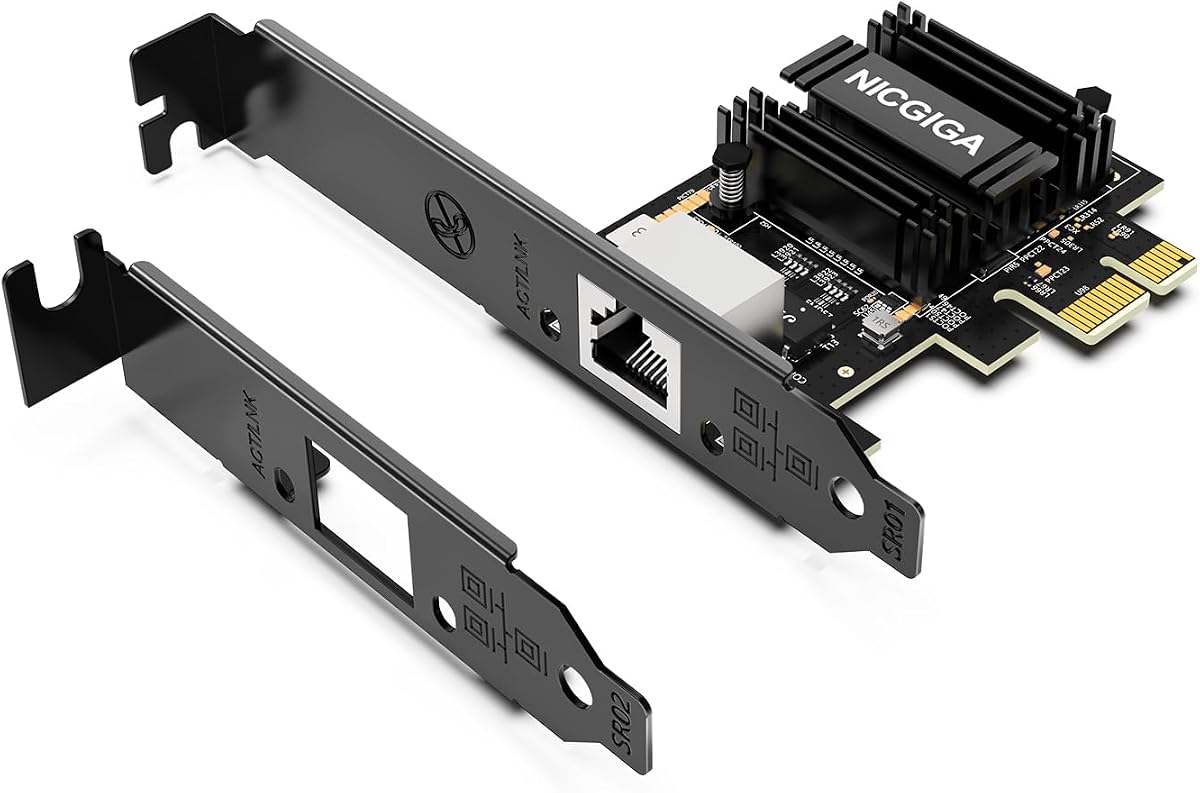
The NICGIGA card is designed for modern compact builds. Its PCIe 4.0 x1 interface allows it to fit into x1 slots without blocking GPU lanes. This makes it ideal for Mini PCs and ITX builds where space is scarce.
We may earn a commission when you buy through this link, at no additional cost to you.
The Realtek RTL8127 controller is efficient and runs cooler than older chips. This ensures stability during long gaming sessions or media editing tasks. It also supports Wake-on-LAN for power management needs.
You must ensure your system has a PCIe 4.0 x1 slot for best performance. Older PCIe 2.0 slots might work but could limit bandwidth. Additionally some older Linux kernels require specific driver installation.
This card is the top pick for small form factor enthusiasts. It brings 10Gbps speeds to tiny cases without overheating. The included brackets ensure it fits into any desktop case you own.
Fits into PCIe x1 slots preserving space for graphics cards in compact builds.
Low power consumption ensures stable thermal performance in enclosed cases.
We may earn a commission when you buy through this link, at no additional cost to you.
The VunLink card excels in compatibility with multi-gig networks. It supports speeds from 100Mbps up to 10Gbps. This ensures seamless connection even if your router or switch is not yet fully upgraded to 10G.
We may earn a commission when you buy through this link, at no additional cost to you.
The RTL8127 chipset provides reliable performance with minimal power use. It is designed for stability during heavy file transfers or streaming. This makes it a good candidate for home labs or personal NAS setups.
Installation can vary depending on the OS version. Windows users should have automatic driver detection while Linux might need specific kernel support. It is best to check compatibility before purchasing for older systems.
If your network uses mixed speeds this card adapts well. It ensures you always connect at the highest possible rate. The brackets included make it easy to mount in both large and small towers.
Supports 2.5G and 5G speeds to ensure future-proof connections.
Designed to reduce heat output ensuring stable performance in small enclosures.
We may earn a commission when you buy through this link, at no additional cost to you.
The Asus XG-C100F offers a unique advantage with its SFP+ cage. This allows you to use fiber optic cables which support much longer distances than copper. It is perfect for connecting devices across different floors or rooms.
We may earn a commission when you buy through this link, at no additional cost to you.
It also supports direct-attach copper cables for easier short-range use. The built-in aluminum heatsink keeps the card cool during continuous high-performance tasks. This ensures reliable throughput even during long backups.
Note that fiber modules are sold separately which increases the total cost. If you need only a short connection a copper adapter may be cheaper. But for long runs this card is essential.
Choose this card if you need to exceed standard cable distances. It provides the flexibility to switch between fiber and copper easily. The QoS feature ensures gaming traffic remains smooth despite heavy loads.
Fiber optic support allows connections far beyond the 100 meter copper limit.
Integrated aluminum heatsink ensures consistent performance under high load.
We may earn a commission when you buy through this link, at no additional cost to you.
The Synology E10G30-T2 is designed specifically for Synology NAS systems. It offers dual 10GbE ports that are optimized for high-performance storage apps. This ensures seamless integration and maximum speed for your media or backup workflows.
We may earn a commission when you buy through this link, at no additional cost to you.
Compatibility is guaranteed with supported DSM versions. The card automatically negotiates speeds with your network equipment. It also comes with a five year warranty which reflects Synology confidence in its quality.
The price is higher than generic alternatives but the peace of mind is worth it. You do not need to troubleshoot drivers or compatibility issues. This card simply works with your Synology hardware out of the box.
If you use Synology NAS this is the only logical choice. It simplifies your setup and maximizes throughput. The extra port allows for redundancy or bandwidth aggregation effectively.
Built specifically to work flawlessly with Synology DSM environments.
Five year warranty offers superior long-term protection for hardware investments.
We may earn a commission when you buy through this link, at no additional cost to you.
The TRENDnet TEG-10GECTX meets specific compliance standards for government customers. It is NDAA and TAA compliant which is essential for certain contracts. It offers a standard 10Gbps RJ-45 port for direct Ethernet connectivity.
We may earn a commission when you buy through this link, at no additional cost to you.
It supports 2.5GBase-T speeds for flexibility with existing cabling. This allows you to utilize Cat5e cables for up to 100 meters at 2.5Gbps. The card fits most PCIe Gen 2 or 3.0 x4 slots.
Installation includes both standard and low-profile brackets. This ensures it fits in various tower sizes. The three year warranty provides decent coverage for peace of mind in business environments.
Select this card if you require compliance certifications. It offers solid performance for general desktop or server tasks. The 2.5G support adds value if your network is not fully upgraded to 10G.
Meets NDAA and TAA standards required by government and secure projects.
Supports 2.5G speeds over existing Cat5e cabling for cost savings.
We may earn a commission when you buy through this link, at no additional cost to you.
The Cable Matters adapter offers an external solution for laptops without PCIe slots. It connects via USB-C and delivers speeds up to 10Gbps. This is ideal for mobile workstations needing reliable wired connections without opening the device.
We may earn a commission when you buy through this link, at no additional cost to you.
It uses a Realtek RTL8159 controller for efficient power use. The aluminum housing helps dissipate heat keeping the device cool. A braided cable ensures durability during travel or daily use.
Mac users might see lower throughput depending on the model. Real-world speeds often hover around 5Gbps on macOS. Windows users generally get closer to the theoretical maximum with proper drivers.
Choose this if you need portability over permanent installation. It avoids the risk of internal card incompatibility. The silent operation makes it a great option for office or quiet environments.
USB-C connection allows you to add 10G Ethernet to any compatible laptop.
Aluminum housing and braided cable ensure longevity in travel scenarios.
We may earn a commission when you buy through this link, at no additional cost to you.
Selecting the right 10GB Ethernet Card requires considering your hardware limits and network needs. This guide breaks down key factors to help you make a confident choice for your setup.
Your motherboard must support the PCIe generation and lane count of the card. Most modern cards use PCIe 3.0 or 4.0. Ensure your slot is x4 or higher to achieve full 10Gbps speeds.
Check your motherboard manual for available slots. Mismatches can lead to reduced speeds or installation issues.
Single port cards are sufficient for most users. Dual port cards allow for link aggregation or redundancy. This is useful if you need higher throughput or a backup connection.
Choose dual ports if you run a server or need network failover capabilities.
Most cards use copper RJ45 ports. These are easy to install with standard Ethernet cables. Fiber optic cards use SFP+ ports and allow longer distances but cost more.
Fiber is better for connecting distant rooms while copper fits standard desk setups.
Drivers must work with your OS. Windows usually has better driver support than Linux. Check if the manufacturer provides a Linux kernel version list.
Always verify driver availability before buying for Linux or Server OS.
10Gbps chips generate significant heat. Cards with heatsinks run cooler and are more stable. Passive cooling is preferred to avoid noise.
Look for aluminum heatsinks if you run long workloads like media editing.
A longer warranty period indicates higher confidence in quality. Some brands offer up to five years. Support forums are also valuable if you encounter issues.
Prioritize brands with clear support channels for troubleshooting.
Many cards include both standard and low-profile brackets. This ensures compatibility with mini-towers or desktop cases. Check the physical height limits of your case.
Low-profile brackets are essential for small form factor builds.
Your router or switch must support 10Gbps or multi-gig speeds. If not the card will negotiate to lower speeds. Ensure your infrastructure matches the card capabilities.
Upgrade your switch if you want to utilize full 10Gbps performance.
Install the card in a PCIe x4 or higher slot on your motherboard. Secure it properly to avoid contact issues. Install drivers from the manufacturer before booting into the OS.
Connect the network cable to the port and ensure the other end is linked to a compatible switch. Verify the link speed in your system network settings to confirm full 10Gbps performance.
Keep the area around the card clear for airflow. Dust can accumulate and affect thermal performance. Use a can of compressed air occasionally to clean the heatsink and fans if present.
For full 10Gbps speeds you should use Cat6a or Cat7 cables. Cat6 can work for distances up to 55 meters. Using lower grade cables like Cat5e may limit speeds to 2.5Gbps or less.
Most modern cards support auto-negotiation and will work with 5Gbps switches. The speed will drop to 5Gbps. Ensure your drivers are updated for best compatibility.
Windows often installs drivers automatically. Linux may require manual installation depending on the kernel version. Check the product page for specific driver links before purchase.
Yes many of these cards support storage protocols like iSCSI. Ensure your NAS system is compatible with the card chipset. Synology specific cards offer the easiest integration.
The card will still function but speeds will be limited by the PCIe 2.0 bandwidth. You may not achieve full 10Gbps. Upgrading your motherboard is recommended for full performance.
Dual port cards support link aggregation if your switch allows it. This combines two ports for higher throughput. Single port cards cannot do this. Check switch configuration settings.
We found that the TP-Link TX401 offers the best balance for most users with included cables and QoS. The VIMIN dual port option is ideal for those needing redundancy or link aggregation.
For NAS owners the Synology E10G30-T2 is the clear premium choice. It offers guaranteed compatibility and a five year warranty. For compact builds look to the NICGIGA PCIe 4.0 x1 card.
Prices and availability fluctuate regularly so check current listings before finalizing your purchase. Ensure your switch and cabling support the speeds you need to get the most value from your upgrade.