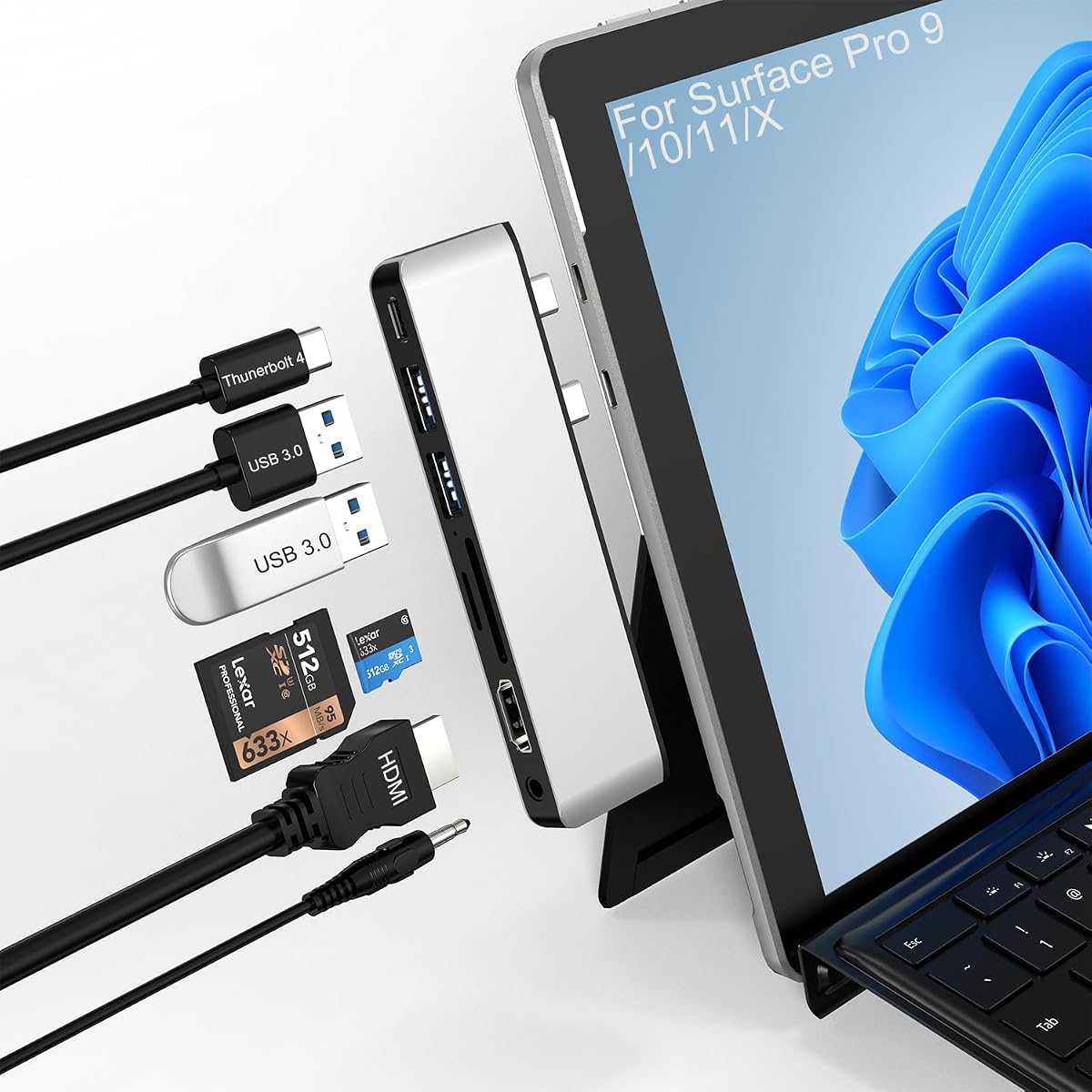
Surface Pro 11 USB Hub
4.2Editor score
Thunderbolt 4 data transfer
Compact aluminum case design
100W PD charging support
Discover the top docking stations for Surface Pro 11 to expand connectivity with HDMI USB and Ethernet ports for enhanced productivity and seamless desktop
Finding the right docking station for Surface Pro 11 is essential for transforming your tablet into a full desktop workstation. A quality hub provides multiple video outputs USB ports and reliable power delivery to support your daily workflow needs.
We compared ten real products based on port variety video support and build quality to help you choose the ideal expansion solution. Each model offers unique features ranging from triple display support to high speed data transfer capabilities for professionals.
This guide shows detailed reviews and specs for every top rated option available today. Prices and availability change frequently so please verify current details on the product pages before making your final purchase decision.
4.2Editor score
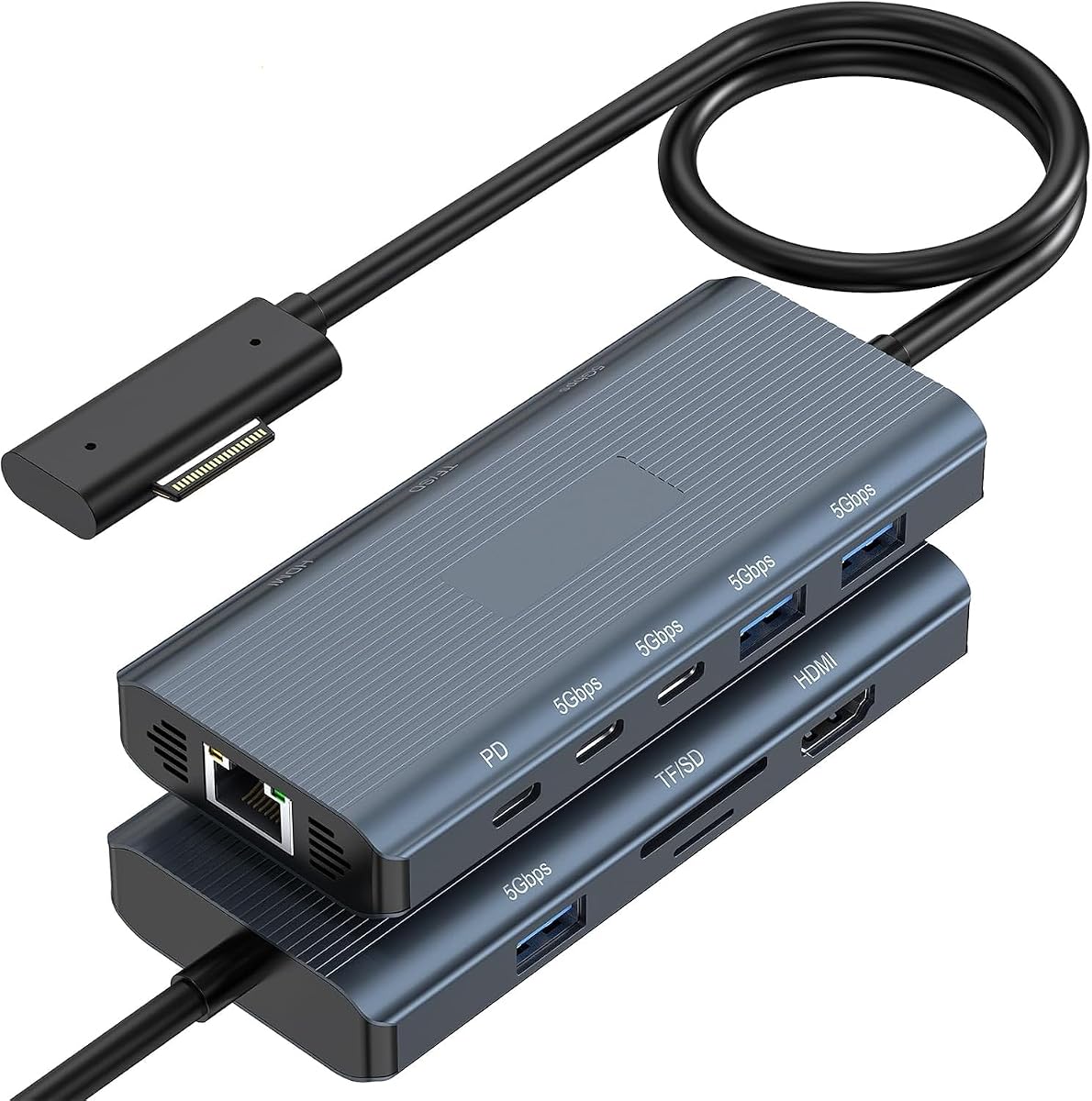
4.8Editor score

4.3Editor score
The following table provides a side by side comparison of all ten top rated docking stations. Review the key specifications to find the perfect match for your specific Surface Pro 11 workflow requirements.



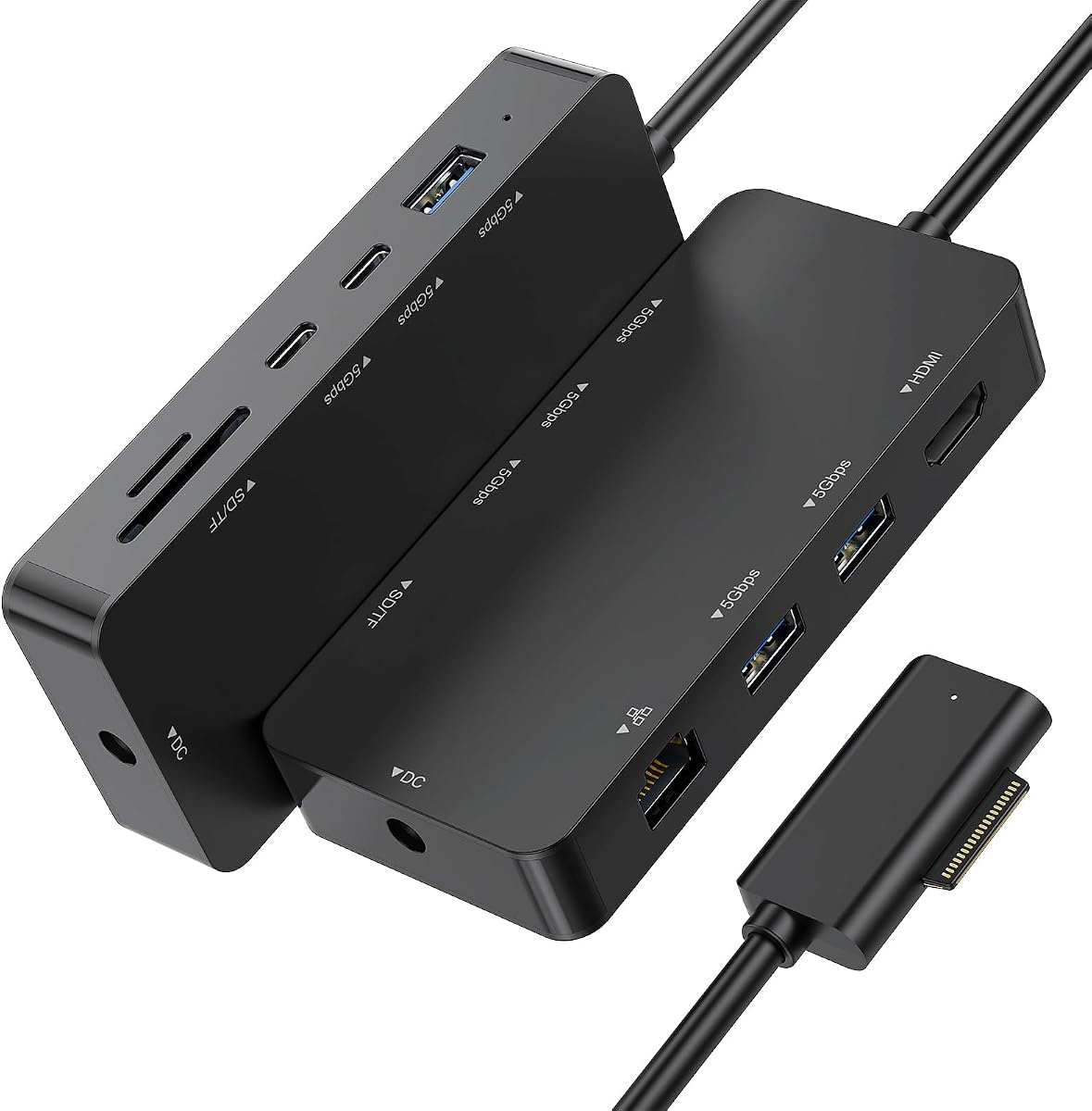
This 11-in-1 docking station leads the pack with a strong 4.8 rating and excellent connectivity for Surface Pro 11 users. It transforms your tablet into a powerful desktop workstation with robust video and data capabilities.
We may earn a commission when you buy through this link, at no additional cost to you.
The standout feature is the 4K HDMI port supporting 60Hz refresh rates for smooth visuals. You also get a Gigabit Ethernet port for stable wired internet and enough USB ports to connect all your peripherals simultaneously.
The main trade-off is the requirement for a separate 45W power adapter which adds to desk clutter. However this ensures stable performance under load and faster charging speeds for your device without draining the battery.
If you need a reliable hub for professional work this model is the top choice. It offers the best balance of video quality data speed and power delivery for any Surface Pro 11 setup.
The 4K 60Hz HDMI output ensures fluid motion for video editing and presentations without screen tearing or lag.
The Gigabit Ethernet port provides a stable connection for large file transfers and video calls without Wi-Fi interference.
We may earn a commission when you buy through this link, at no additional cost to you.
This 12-in-1 dock offers extensive connectivity including the ability to drive three external monitors using two HDMI ports and one VGA port. It is a solid option for users who prioritize screen real estate above all else.
We may earn a commission when you buy through this link, at no additional cost to you.
The triple display mode allows you to expand your workspace significantly for multitasking or complex workflows. It also includes standard USB data ports and card slots which are convenient for photographers or general office tasks.
However the VGA port supports up to 1080p which can limit total resolution when used alongside HDMI. Also the lower rating compared to other options suggests some users experience connectivity or build quality inconsistencies.
Consider this dock if you specifically need three screens and want an all-in-one solution. Ensure your workflow can tolerate the VGA resolution limitation before making the purchase.
Connect three monitors to view code documents and reference materials simultaneously without switching windows constantly.
The built-in SD and TF slots let you import media directly from cameras without needing external adapters.
We may earn a commission when you buy through this link, at no additional cost to you.
This hub stands out as the most affordable option while still delivering Thunderbolt 4 performance for data and video. It is ideal for budget conscious users who do not want to sacrifice connectivity speed.
We may earn a commission when you buy through this link, at no additional cost to you.
The Thunderbolt 4 port supports data transfer up to 40Gbps and 100W charging which is excellent for fast workflows. The aluminum case is compact and protects the device while helping dissipate heat during heavy use.
Note that this model relies on the host device for power rather than including an external adapter. While convenient for portability it may limit sustained performance under heavy load compared to dedicated docking stations.
Buy this hub if you need a compact and cheap solution for quick connectivity on the go. It is perfect for travelers or those who mostly use their Surface Pro on the move.
The Thunderbolt 4 port allows you to move large 4K video files in seconds without bottlenecks.
The slim aluminum profile slips easily into a laptop bag making it perfect for business trips.
We may earn a commission when you buy through this link, at no additional cost to you.
This model offers a comprehensive 12-in-1 solution with a high rating for reliability and performance. It supports dual 4K HDMI ports and VGA for flexible display setups and includes a dedicated power adapter.
We may earn a commission when you buy through this link, at no additional cost to you.
The included 72W adapter ensures your device stays charged while running multiple displays and peripherals. This eliminates the need to juggle original chargers and improves overall desk organization for a cleaner workspace.
The main limitation is the VGA port which restricts total resolution compared to full digital outputs. Still this remains a strong choice for general office use where triple monitor support is needed without complex setup.
Choose this dock if you want a plug and play experience with high compatibility and solid build quality. It works well for standard office tasks and light creative workflows.
The included 72W adapter handles power needs so you can unplug your original charger from the wall.
Dual HDMI and VGA ports let you connect almost any existing monitor or projector with ease.
We may earn a commission when you buy through this link, at no additional cost to you.
Another top rated option this 12-in-1 dock provides triple screen support and a strong power supply for heavy usage. It is designed for professionals who need extensive connectivity and reliable performance.
We may earn a commission when you buy through this link, at no additional cost to you.
The dual HDMI and VGA setup allows for maximum flexibility in monitor choice and layout. With 72W power delivery you can run your laptop and peripherals simultaneously without worrying about battery drain or throttling.
The high rating indicates consistent satisfaction among users regarding stability and ease of use. It is a good fit for those who work across multiple screens and require stable Ethernet and audio connections.
This dock is recommended if you need a robust workstation setup with multiple displays and standard ports. It simplifies your desk by consolidating all connections into one reliable hub.
The strong power supply ensures your devices stay connected and active even during long work sessions.
A variety of USB types and card readers ensure compatibility with almost all your existing accessories.
We may earn a commission when you buy through this link, at no additional cost to you.
This premium dock offers dual 4K at 60Hz HDMI outputs which is rare and ideal for creative professionals. It supports triple monitor setups and includes a dedicated 100W power adapter for maximum stability.
We may earn a commission when you buy through this link, at no additional cost to you.
The high resolution display support makes it perfect for video editors or designers who need precise color and motion. With 100W charging you can power your laptop and high draw peripherals without interruption.
The price point is higher than average but the performance justifies the cost for those who need top tier visuals and speed. It ensures low latency networking and fast data transfers for demanding workflows.
Invest in this dock if you are a power user who needs the best video and power capabilities. It delivers a desktop-like experience that standard hubs cannot match.
The dual 4K 60Hz ports provide crystal clear visuals and smooth motion for high-end editing tasks.
The 100W adapter ensures your device runs at full speed without battery drain while connected.
We may earn a commission when you buy through this link, at no additional cost to you.
This 10-in-1 dock offers a balanced set of features suitable for everyday office and home use. It supports 4K video and includes a reliable 65W power supply to keep your device charged.
We may earn a commission when you buy through this link, at no additional cost to you.
The Gigabit Ethernet port ensures you have a stable wired connection for video calls and large downloads. This is a key benefit over Wi-Fi which can suffer from interference in busy environments.
While it has fewer ports than some competitors it still covers all the essentials for most users. The rating suggests it works well with most Surface models and provides a stable connection.
Choose this dock if you need a straightforward solution for single monitor setups and standard connectivity. It offers great value for general productivity without unnecessary extra ports.
The Ethernet port ensures you stay connected without lag during important video calls or meetings.
The 65W power supply is enough to run your Surface and keep the battery topped up.
We may earn a commission when you buy through this link, at no additional cost to you.
This dock offers a comprehensive 12-in-1 solution with triple display support and robust data speeds. It is designed to handle high workloads and provides a good balance of video and data options.
We may earn a commission when you buy through this link, at no additional cost to you.
The 72W power supply ensures stable charging while multiple devices are connected. With 5Gbps data speeds you can move files quickly between external drives and your Surface Pro without bottlenecks.
The rating reflects good build quality and reliability among users. It is a solid choice for those who need multiple screens and fast data access in a single device.
Use this dock if you require extensive connectivity and can accommodate the size on your desk. It delivers strong performance for a reasonable price.
The 5Gbps USB ports allow you to transfer large files to external drives in seconds.
The 72W supply keeps your laptop charged even when running multiple screens and peripherals.
We may earn a commission when you buy through this link, at no additional cost to you.
This model offers unique display flexibility with HDMI DisplayPort and Thunderbolt 4 ports. It provides exceptional versatility for different monitor types and ensures high performance for complex setups.
We may earn a commission when you buy through this link, at no additional cost to you.
The 120W power supply is one of the strongest available ensuring your device stays charged under any load. Thunderbolt 4 support adds to the speed and future proofing of your workstation.
It requires careful cable management due to the number of ports and power needs. However the flexibility and performance make it worth the effort for those who need specific display configurations.
Choose this dock if you need multiple display types and maximum power output. It is an excellent choice for specialized workflows and professional environments.
Multiple video ports let you connect different types of monitors without needing extra adapters.
The 120W supply ensures you can run your laptop and accessories without power constraints.
We may earn a commission when you buy through this link, at no additional cost to you.
This dock features a magnetic connector that makes connecting and disconnecting easy and secure. It is designed for convenience and offers a clean connection without worrying about port alignment.
We may earn a commission when you buy through this link, at no additional cost to you.
The 50cm magnetic cable provides flexibility in desk layout and allows easy access to other ports. It supports 4K at 60Hz and includes Ethernet for stable performance for office or home use.
The high rating suggests users appreciate the design and reliability of the magnetic interface. It is a great solution for those who want a hassle free connection experience daily.
Select this dock if you prioritize ease of use and a secure connection. It simplifies your daily routine and keeps your desk tidy.
The magnetic connector ensures you never fumble with plugs and keeps your desk cable free.
The 50cm cable lets you place the dock where it is most accessible to you.
We may earn a commission when you buy through this link, at no additional cost to you.
Choosing the right docking station involves matching your specific connectivity and display needs with the available ports. The following factors will help you make an informed decision for your setup.
Consider how many screens you need and what resolution they support. High performance docks offer 4K at 60Hz which is essential for smooth video editing and large displays.
Look for multiple HDMI or DisplayPort outputs if you plan to run dual or triple monitors.
Ensure the dock supports enough wattage to charge your Surface Pro while running peripherals. Models with 65W to 100W delivery are ideal to keep your laptop charged under load.
A dedicated power adapter is preferred over bus powered hubs for stability.
Check for USB 3.0 or Thunderbolt support if you transfer large files often. Faster ports reduce wait times when moving videos or images to external drives.
Thunderbolt 4 is the fastest option for future proofing your data speeds.
A Gigabit Ethernet port provides a stable wired connection for calls and downloads. It is more reliable than Wi-Fi for consistent performance in busy networks.
Choose a dock with Ethernet if you work from a static location.
Count the USB ports and card slots you need for peripherals like mice keyboards and drives. A 10-in-1 or 12-in-1 hub covers most common needs for a home office.
Ensure there are enough ports to avoid daisy chaining.
Metal builds like aluminum help dissipate heat which protects your device and the dock. Durability is key for a device that will be used daily.
Check reviews for feedback on heat management and durability.
Verify that the dock explicitly supports Surface Pro 11 and your other devices. Most docks use standard USB-C but specific connectors may vary.
Read the product details to ensure full functionality with your model.
The length of the included cable affects how tidy your desk stays. Longer cables offer more flexibility for dock placement.
Magnetic connectors can simplify connecting and disconnecting your devices.
Begin by connecting the power adapter to the dock and your power outlet before attaching your Surface. This ensures the dock receives enough power to handle all connected peripherals without draining your laptop battery.
Plug in your monitor cables to the HDMI or DisplayPort ports and then connect USB devices. Windows usually recognizes the screens automatically but you may need to arrange them in display settings.
To maintain performance keep the dock in a well ventilated area and avoid blocking air vents. Regularly check connections for dust and clean ports gently to prevent interference over time.
Yes most high performance docks require a dedicated power adapter to run all ports and charge your device simultaneously. Using a dock without adequate power may cause peripherals to disconnect or slow down your system.
Yes many top rated docks support triple monitor setups using HDMI and VGA ports. Ensure your chosen dock explicitly states triple display support to avoid issues with resolution or refresh rates.
A quality dock with high wattage charging will keep your laptop charged while in use. Without enough power delivery the battery may drain faster depending on connected peripherals and workload.
Connect your monitor cable to the HDMI port on the dock and plug the dock into your Surface. Go to Display Settings in Windows to arrange your screens in extend or mirror mode.
No some ports may be slower depending on the hub specifications. Look for USB 3.0 or Thunderbolt ports for high speed data transfer to external drives or cameras.
Yes most docks include a Gigabit Ethernet port for a stable wired internet connection. This is useful for avoiding Wi-Fi lag during video calls or large downloads.
Most modern docks are plug and play and do not require extra drivers. If you face issues check the manufacturer support site for firmware or driver updates to resolve bugs.
Try unplugging and replugging the dock to reset the connection. Also restart your Surface Pro 11 to clear any glitches that may prevent the dock from initializing properly.
We recommend the 11-in-1 Surface Pro Docking Station as the top choice for its strong 4K output and reliable performance. For budget conscious buyers the Surface Pro 11 USB Hub offers excellent value with Thunderbolt support.
Prioritize docks that match your power needs and video requirements for the best daily experience. A stable power supply and proper resolution support make the difference between a good and a great hub.
Please check current prices and availability on the product pages since offers can change over time. Choosing the right dock today will ensure your Surface Pro 11 setup runs smoothly for years to come.