
Creality Falcon2 Pro 60W Laser Engraver
4.5Editor score
Class 1 Fully Enclosed Safety
60W Adjustable Laser Power
HD Camera Alignment System
Finding the right 60W laser engraver requires balancing power speed and safety features for your specific projects. These machines offer exceptional versatility for cutting wood acrylic and even metal with professional grade results in minutes.
We evaluated ten leading models based on output power safety certifications software compatibility and ease of use. Our analysis highlights performance differences between diode CO2 and fiber laser technologies to help you choose wisely.
Each pick showcases unique strengths from budget friendly options to premium industrial workhorses. Prices and availability fluctuate so verify current deals before purchasing to ensure you get the best value for your investment.
4.5Editor score

4.7Editor score

4.2Editor score
As an Amazon Associate we earn from qualifying purchases.
This side by side comparison reviews all ten selected 60W laser engraver models highlighting their unique technologies and intended use cases.




The Creality Falcon2 Pro 60W Laser Engraver stands out as a top tier machine for serious makers. With a 60W power output and dual laser system it delivers professional results across diverse materials.
We may earn a commission when you buy through this link, at no additional cost to you.
Its fully enclosed Class 1 design ensures safety while the integrated HD camera simplifies positioning and alignment. Users appreciate the adjustable power settings which allow precise control for different engraving tasks.
Although the initial cost is significant the performance gains justify the investment. The machine handles demanding projects with ease reducing production time significantly compared to lower powered units.
This model is ideal for small businesses needing reliability and speed. If you prioritize safety and professional quality this engraver delivers consistent results for any creative endeavor.
The Class 1 enclosure protects users from laser exposure and contains smoke effectively for a safer workspace.
The built-in HD camera provides live previews enabling accurate batch production without manual alignment.
We may earn a commission when you buy through this link, at no additional cost to you.
This model offers powerful diode laser capabilities suitable for rapid production runs. The 240000mW output enables cutting thick materials in single passes while the integrated enclosure maintains a safe working environment.
We may earn a commission when you buy through this link, at no additional cost to you.
Users benefit from intelligent camera focus which reduces setup time. The machine is largely pre-assembled requiring minimal setup before operation. Air assist systems help reduce burn marks during cutting.
However some users report inconsistent software experiences which may impact workflow efficiency. While fast the learning curve for optimizing settings can be steep for beginners.
For sole traders focused on speed this machine offers value. It balances performance with safety features essential for commercial environments.
Pre-assembled design allows operation within minutes reducing downtime for urgent production needs.
Native 60W output cuts through tough materials like stainless steel and acrylic quickly.
We may earn a commission when you buy through this link, at no additional cost to you.
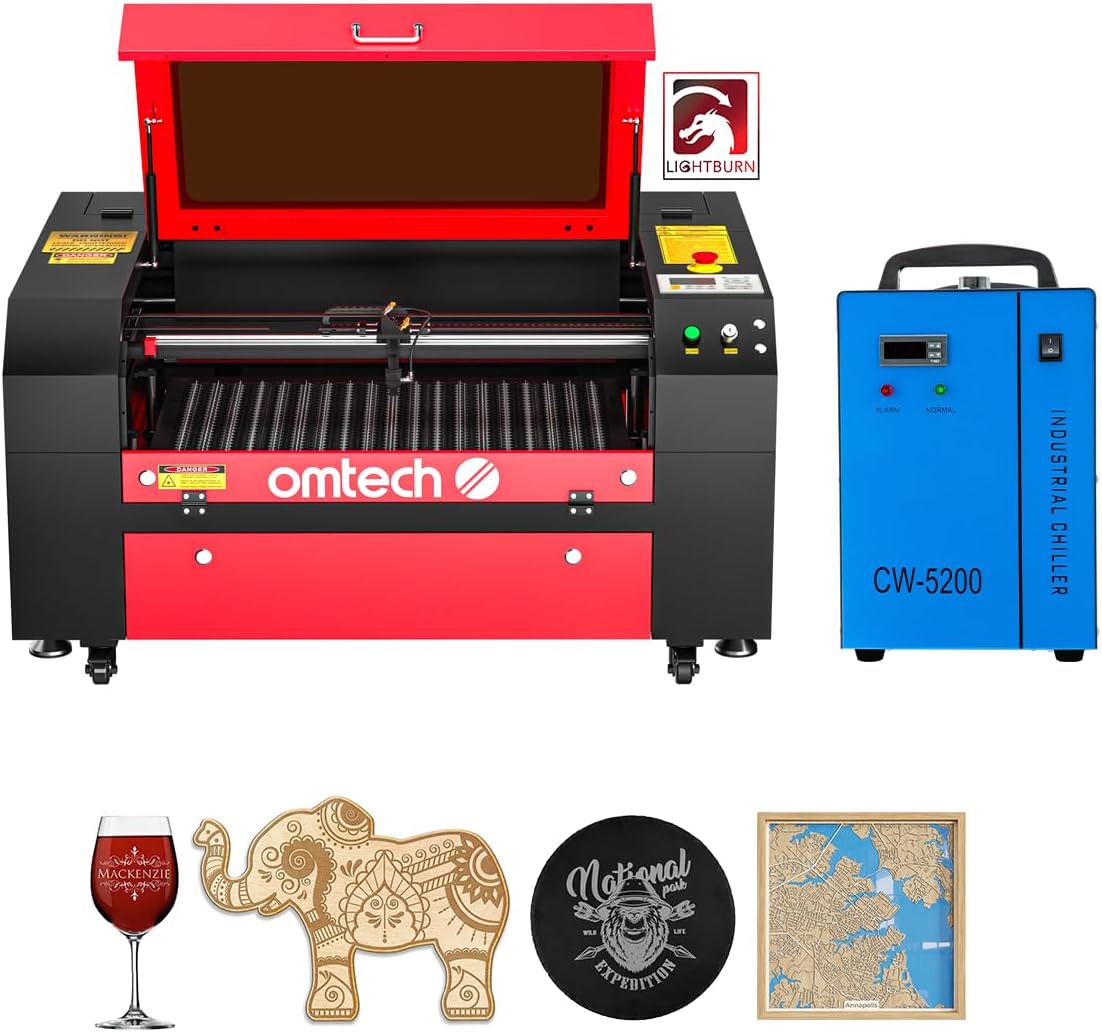
The OMTech Maker 60W CO2 Laser Engraver excels in versatility with its CO2 laser tube. It handles a wide range of non-metal materials effortlessly making it perfect for creative professionals.
We may earn a commission when you buy through this link, at no additional cost to you.
The autofocus system simplifies setup ensuring accurate depth without manual adjustments. The included water chiller maintains tube temperature prolonging lifespan during extended use. Its large bed accommodates bulky items easily.
Users love the integration with LightBurn software for seamless design. However the machine requires dedicated space and regular maintenance to keep the optics clean.
This is a robust choice for woodworkers and artists. The reliability and large workspace make it a staple in professional studios.
CO2 lasers excel on organic materials like wood acrylic and leather with clean edges.
One touch autofocus ensures correct focal distance for sharp results every time.
We may earn a commission when you buy through this link, at no additional cost to you.
Designed for accessibility the Creality Falcon2 Pro 60W balances power with ease of use. The Class 1 safety certification makes it suitable for home studios and educational settings.
We may earn a commission when you buy through this link, at no additional cost to you.
Its built-in HD camera aids in positioning but requires a computer connection for full features. Free software options lower the barrier to entry for new users. Air assist helps prevent burn marks.
While effective for basic materials the machine struggles with complex metal marking. The enclosure design reduces noise which is a benefit for shared workspaces.
This model suits hobbyists upgrading to professional tools. It offers a safe and straightforward introduction to desktop laser engraving.
Safe enclosure allows use in schools or home offices without strict safety protocols.
Integrated exhaust and air assist reduce smoke and debris during engraving.
We may earn a commission when you buy through this link, at no additional cost to you.
The xTool F2 Ultra redefines desktop laser capabilities with its MOPA fiber technology. It uniquely delivers vibrant color engraving on metals without chemicals or paint.
We may earn a commission when you buy through this link, at no additional cost to you.
The dual laser system handles metals and organic materials separately for optimized results. AI cameras ensure precise positioning reducing waste on expensive metals. Speeds reach industrial levels for fast turnaround.
Cost is the main drawback as this unit is a significant investment. The work area is smaller compared to CO2 machines limiting large format cutting.
This is the top choice for metal crafters needing branding or color. It justifies its price with unmatched color metal engraving technology.
MOPA lasers heat metal surfaces differently to create over 100 unique colors.
15000mm per second speeds reduce production time for batch metal orders.
We may earn a commission when you buy through this link, at no additional cost to you.
Monport delivers a compact fiber laser solution ideal for detailed metal marking. The 100000 hour lifespan ensures reliability for long term production needs.
We may earn a commission when you buy through this link, at no additional cost to you.
Its galvanometer system allows for fast speeds and high accuracy. While the work area is small it suffices for jewelry and small parts. LightBurn support offers flexibility for custom designs.
The machine focuses solely on metals limiting versatility for wood or acrylic. However its speed makes it efficient for serial number marking.
This unit is perfect for jewelers or tooling shops. It provides professional quality marking in a space efficient package.
0.01mm accuracy allows intricate text and logos on small metal parts.
Extended lifespan reduces maintenance costs over years of operation.
We may earn a commission when you buy through this link, at no additional cost to you.
VEVOR offers a cost effective CO2 laser solution for budget conscious makers. The 24×16 inch bed accommodates medium sized projects without breaking the bank.
We may earn a commission when you buy through this link, at no additional cost to you.
Four way pass through allows handling longer materials easily. The cooling system maintains stability during operation. Manual focus provides reliability though it requires attention.
As a Class 4 machine users need protective eyewear during use. However the performance rivals pricier models in cutting speed.
This machine is perfect for startups entering the market. It balances cost and performance effectively for small scale production.
Entry level price point makes CO2 technology accessible for home businesses.
600mm per second speeds reduce production times for high volume orders.
We may earn a commission when you buy through this link, at no additional cost to you.
OMTech provides a robust commercial solution with its 60W CO2 model. The 28×20 inch area fits large formats for professional signage and decor.
We may earn a commission when you buy through this link, at no additional cost to you.
The motorized autolift bed simplifies height adjustments ensuring precise focus. Water chiller included extends tube life significantly. Air assist keeps lenses clean for consistent quality.
The machine demands space and time to set up properly. However once running it offers stability for long production runs.
Ideal for established workshops needing reliability. The features justify the investment for businesses running daily.
28×20 inch area enables cutting large panels without needing to cut in pieces.
Motorized lift reduces manual effort and improves repeatability.
We may earn a commission when you buy through this link, at no additional cost to you.
Aliencell focuses on precision with its photo quality engraving capabilities. The 20kHz frequency ensures smooth gradients suitable for detailed images on wood and leather.
We may earn a commission when you buy through this link, at no additional cost to you.
A massive bed size supports large scale art projects. The enclosed design ensures Class 1 safety for home use. Preview software minimizes material waste by simulating results.
While the high frequency is great for detail it requires compatible software. The price reflects its specialized high precision capabilities.
Best suited for artists requiring fine detail. The preview feature reduces errors on expensive projects.
20kHz frequency density produces smoother gradients for photographic engraving.
Real time preview reduces material waste by simulating results before cutting.
We may earn a commission when you buy through this link, at no additional cost to you.
Cloudray offers a portable solution for high end metal marking. The JPT MOPA source ensures stable color marking without oxidizing the metal.
We may earn a commission when you buy through this link, at no additional cost to you.
The manual lift column provides flexibility for different material heights. Accuracy is exceptional for intricate designs on jewelry or tools. The unit is lightweight for transport.
Work area is limited to small parts though accessories can expand this. The cost is high but matches the quality of the JPT source.
Perfect for mobile engravers needing color capability. It delivers professional results in a portable format.
JPT source ensures stable color marking for consistent results.
Lightweight chassis allows easy transport to job sites or fairs.
We may earn a commission when you buy through this link, at no additional cost to you.
Selecting the right 60W laser engraver involves understanding the technology and your specific needs.
60W engravers come in Diode CO2 and Fiber variants. Diode units are budget friendly and versatile for non-metals. CO2 lasers excel on wood and acrylic. Fiber lasers specialize in metal marking.
Choose the technology that matches your primary material. If you cut mostly plastic go Diode or CO2. For metal work Fiber is essential.
Safety Class 1 machines are fully enclosed making them safe for home use without eyewear. Class 4 units require protective gear and are best for commercial shops.
Prioritize Class 1 enclosures if you have children or limited space. This ensures maximum safety compliance.
Most modern engravers support LightBurn which offers advanced control. Check if the machine includes free software or requires a paid license.
Ensure the software supports your OS. Open support gives you better long term value than proprietary systems.
Consider the bed size relative to your projects. A 20×28 inch bed fits most crafts while 6×6 is for jewelry.
If you cut large sheets choose a bigger area. Small beds save space but limit versatility.
Look for fire detectors air assist and exhaust systems. These reduce smoke and fire risks significantly during operation.
Air assist improves edge quality and safety. Ensure the system includes all necessary safety stops.
60W power refers to the output wattage. Higher wattage cuts thicker materials. Check if the power is adjustable for fine tuning.
Adjustable power allows precision on thin materials. It extends the machine versatility for different jobs.
CO2 lasers require tube cooling and mirror cleaning. Fiber lasers are low maintenance but expensive. Diodes need lens cleaning.
Plan for maintenance costs. CO2 tubes have limited life. Fiber sources are more durable.
Prices range from entry level to industrial. Determine your max spend including software and accessories.
A higher initial cost often means better durability. Balance your budget with your production needs.
Start by securing the material on the bed and aligning the laser head. Use the autofocus or manual focus to set the correct height.
Run a test on scrap material to check the settings. Adjust power and speed to achieve clean cuts without charring.
Clean lenses and mirrors weekly to maintain performance. Run the exhaust fan after use to clear residual smoke.
Yes but it depends on the type. Fiber lasers can cut thin stainless steel and aluminum. Diode and CO2 models usually mark or etch metal instead of cutting. For cutting metal you need a fiber source.
Yes if it is Class 1 enclosed. These units block laser beams from escaping. Class 4 models require strict safety protocols and eyewear. Always check safety certifications before buying.
CO2 tubes last 3500 to 10000 hours depending on usage. Fiber sources last 100000 hours. Diodes vary based on cooling. Proper maintenance extends tube life significantly.
Most require a PC for design transfer. Some offer WiFi or SD card options for standalone use. Ensure your computer meets the software requirements for smooth operation.
Wood acrylic leather and fabric are standard. CO2 handles glass and some plastics. Fiber targets metals. Avoid PVC and vinyl as they release toxic gases.
Desktop units need a sturdy table and ventilation. Larger machines require a dedicated room. Ensure adequate clearance for air flow and safety zones around the device.
Yes with a rotary attachment. Many 60W models support rotary axes for cylinders and rings. This expands the machine versatility for personalized gifts.
We highlighted the Creality Falcon2 Pro OMTech Maker and xTool F2 Ultra as top picks for different needs.
Prioritize safety class and material compatibility when making your final choice.
Remember to check current availability and warranty terms before purchasing.