
M.2 Heatsink Cooler 2280 SSD
4.6Editor score
Aluminum alloy construction
Thermal silicone pads included
Double-sided clip design
This guide compares the top M2 2280 SSD Heatsink models for cooling performance and compatibility with PS5 and desktop PCs in October 2026.
Modern M.2 NVMe SSDs deliver incredible speeds but often suffer from thermal throttling without adequate cooling solutions. A quality heatsink ensures your drive maintains peak performance during intense workloads and gaming sessions.
We evaluated ten top-rated M2 2280 SSD Heatsink options based on build quality, thermal efficiency, and ease of installation. Our analysis covers budget-friendly picks and premium models designed for demanding environments.
Each selection highlights specific strengths like material composition, pad quality, and compatibility with various system types. Keep in mind that pricing fluctuates frequently so verify current deals before purchasing.
4.6Editor score

4.7Editor score

4.7Editor score
The following table provides a quick overview of specifications and key features for each reviewed heatsink model to help you make an informed decision.


The be quiet! MC1 Pro stands out as a top-tier solution for keeping your M.2 drive cool. It combines advanced materials with a refined design to deliver consistent performance under heavy loads.
We may earn a commission when you buy through this link, at no additional cost to you.
Its integrated heatpipe technology ensures efficient heat transfer away from the SSD surface. This prevents thermal throttling and allows your drive to maintain maximum read and write speeds over extended periods.
While it comes at a premium price compared to basic aluminum blocks, the performance gain justifies the cost for power users. The matte black finish also complements modern PC builds without drawing unnecessary attention.
If you value reliability and aesthetics in equal measure, this cooler is the ideal choice. It offers peace of mind during intensive tasks like video editing or large file transfers.
The built-in heatpipe actively moves heat away from hotspots ensuring consistent performance.
High-grade aluminum and thoughtful engineering result in a durable and attractive accessory.
We may earn a commission when you buy through this link, at no additional cost to you.
This model offers excellent value for anyone needing effective cooling without breaking the bank. It is specifically designed to fit standard 2280 drives and works well with console upgrades.
We may earn a commission when you buy through this link, at no additional cost to you.
The double-sided clip design ensures a secure fit without requiring screws. This makes installation quick and reduces the risk of damaging the drive during setup in tight spaces.
While it lacks the premium finish of higher-end models, its thermal performance remains impressive. Users report significant temperature drops that prevent overheating during daily use.
For budget-conscious builders or PS5 users, this heatsink delivers reliable protection. It is a straightforward solution that gets the job done effectively.
You get reliable thermal management at a price point accessible to all users.
Its dimensions and mounting style are optimized for PlayStation 5 internal storage slots.
We may earn a commission when you buy through this link, at no additional cost to you.
The HR09 boasts an impressive 4500mm² heat dissipation area which is among the largest available. This massive surface area allows for passive cooling that rivals active fan solutions.
We may earn a commission when you buy through this link, at no additional cost to you.
Its second-generation nano thermal pad ensures optimal contact between the drive and the cooler. This minimizes thermal resistance and facilitates rapid heat transfer even during peak operations.
The adjustable screws accommodate drives of varying heights including those with onboard heatsinks. However, its larger size might not fit in every case so check clearance before buying.
Enthusiasts seeking maximum passive cooling will appreciate this model. It represents the pinnacle of thermal design for standard M.2 drives.
The extensive fin array maximizes airflow efficiency for superior passive cooling results.
Nano silicon grease material adapts to uneven surfaces for better heat transfer.
We may earn a commission when you buy through this link, at no additional cost to you.
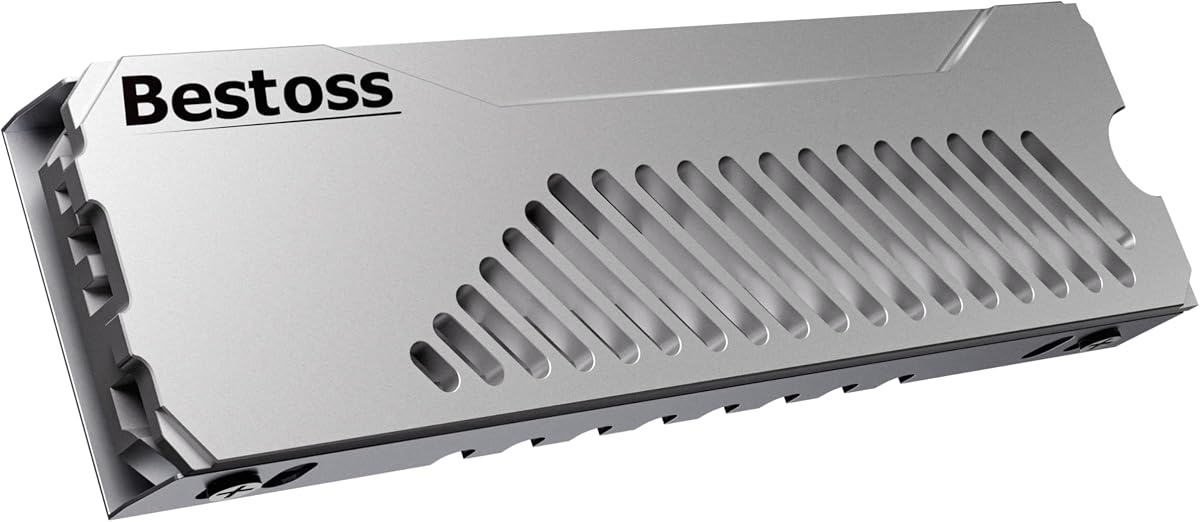
This heatsink features a distinctive hollowed-out design that helps reduce weight while maintaining structural integrity. Its minimalist look appeals to users who prefer clean and uncluttered builds.
We may earn a commission when you buy through this link, at no additional cost to you.
The three-sided hollowed-out structure promotes better airflow around the SSD. This design choice helps move heat away from the chip more effectively than solid blocks.
While not as highly rated as premium options it still offers a significant temperature drop. It is a solid middle-ground option for those wanting style and function.
Content creators on a budget might find this model particularly appealing. It provides reliable cooling without adding bulk to your system.
The matte texture and hollow design create a modern look for your PC build.
Hollow sections facilitate better air movement for more efficient cooling.
We may earn a commission when you buy through this link, at no additional cost to you.
As an accessory from a known storage brand this heatsink offers reliable quality assurance. It is designed specifically for desktop environments where space is less constrained than laptops.
We may earn a commission when you buy through this link, at no additional cost to you.
The combination of copper and aluminum maximizes heat transfer and dissipation. This hybrid approach ensures that heat is moved quickly and spread effectively across the fins.
It comes with all necessary screws and tools to make setup hassle-free. This convenience is appreciated by users who do not want to hunt for additional hardware.
If you need a no-nonsense cooler for your desktop PC this is a strong contender. It delivers on performance without unnecessary complexity.
All mounting hardware is included ensuring you can install it immediately.
Copper conducts heat efficiently while aluminum dissipates it across a larger area.
We may earn a commission when you buy through this link, at no additional cost to you.
Buying in bulk makes this option ideal for IT departments or users with multiple drives. The set includes five units along with necessary mounting accessories for immediate use.
We may earn a commission when you buy through this link, at no additional cost to you.
The silicone elastic bands allow for tool-free installation which speeds up deployment. This is particularly useful when managing large numbers of drives in a workstation environment.
While the build is simple it provides adequate protection against overheating. It is a practical choice for systems where aesthetics are secondary to functionality.
If you are managing a multi-drive setup this kit offers excellent value. It ensures all your drives stay cool without individual costs.
Ideal for servers or workstations with multiple M.2 slots needing cooling.
Elastic bands simplify the mounting process significantly for rapid deployment.
We may earn a commission when you buy through this link, at no additional cost to you.
ARCTIC is renowned for thermal solutions and this heatsink delivers on that reputation. It focuses on reliable performance using high-quality pads and a robust design.
We may earn a commission when you buy through this link, at no additional cost to you.
The included TP-3 thermal pads adapt perfectly to height differences across components. This ensures consistent contact pressure for optimal heat transfer without manual adjustments.
It meets Sony specifications making it a safe choice for PlayStation 5 upgrades. The click mechanism allows for secure attachment without the need for screws or bands.
For those looking for a set-it-and-forget-it solution this model works well. It provides steady cooling for gaming and everyday tasks.
Custom shaped pads ensure maximum contact for efficient thermal transfer.
Simple click-in mechanism ensures a tight fit without extra tools.
We may earn a commission when you buy through this link, at no additional cost to you.
Thermalright brings decades of cooling expertise to this affordable aluminum model. The anodized surface treatment enhances durability and heat dissipation efficiency significantly.
We may earn a commission when you buy through this link, at no additional cost to you.
Double-sided clips ensure the SSD is held firmly in place. This prevents movement which could damage contacts or reduce thermal contact over time.
It offers a temperature drop of up to 30 degrees which is highly effective. This level of cooling is sufficient for most gaming and productivity scenarios.
For standard desktop users this provides a reliable upgrade over stock solutions. It is simple effective and built to last.
Anodizing increases surface area for better heat exchange with the air.
Clips maintain consistent pressure without requiring complex mounting hardware.
We may earn a commission when you buy through this link, at no additional cost to you.
This model incorporates an 8mm pure copper heat pipe for rapid heat removal. The addition of copper significantly improves conductivity over pure aluminum alternatives.
We may earn a commission when you buy through this link, at no additional cost to you.
The double layer silicone sheets ensure full coverage of the controller and memory chips. This comprehensive contact prevents localized hotspots that could lead to throttling.
It maintains a relatively compact profile making it suitable for smaller cases. The silver gray finish is neutral and fits most build themes easily.
Users seeking a balance between price and advanced cooling features should consider this. It bridges the gap between basic blocks and premium coolers.
Pure copper piping moves heat away from the chip faster than aluminum.
Double layer sheets ensure all heat generating components stay cool.
We may earn a commission when you buy through this link, at no additional cost to you.
Unlike passive options this model includes a micro blower fan for active cooling. This ensures air is actively pushed across the fins for maximum thermal management.
We may earn a commission when you buy through this link, at no additional cost to you.
The fan spins at 8000 RPM providing aggressive airflow. This is ideal for extreme workloads where passive cooling might not be enough.
The steel reinforced backplate adds rigidity to the system. However the fan adds a level of noise that might be noticeable in quiet environments.
For silent enthusiasts this might not be the choice. But for maximum performance it offers a unique approach to storage cooling.
The fan forces air through the heatsink to actively remove heat.
Stainless steel backplate ensures stability during high-speed operation.
We may earn a commission when you buy through this link, at no additional cost to you.
Selecting the right heatsink requires balancing performance needs with physical constraints and budget. Understanding key factors ensures your storage investment remains stable.
Aluminum is the standard for its balance of cost and thermal performance. Copper offers better conductivity but costs more. Look for anodized finishes to prevent corrosion and static buildup.
Prioritize models with solid aluminum or copper cores for the best heat transfer.
The pad acts as the bridge between the drive and the sink. Higher conductivity values like 3W/mK transfer heat more effectively. Ensure they are non-conductive to prevent short circuits.
Check that included pads are of high quality to avoid air gaps.
Some coolers use screws for a permanent secure fit while others use clips or bands. Screws offer stability but require tools. Clips allow for quick installation without extra hardware.
Choose a mechanism that fits your comfort level and case access.
Drives vary in thickness due to extra chips or existing thermal layers. A cooler must accommodate double-sided drives without interfering with the case. Adjustable options are versatile for different hardware.
Measure your drive height before purchasing to ensure a fit.
A heatsink relies on airflow to function. If your case has poor ventilation even a large sink will underperform. Consider your case fans when choosing a passive cooler.
Ensure there is sufficient air movement across the fins.
Casual users may not need high-end cooling but gamers and editors do. Sustained heavy loads generate significant heat that requires robust solutions. Match the cooler to your workload intensity.
Invest more in cooling for heavy daily usage scenarios.
The length of the drive matters as not all cases support 2280 fully. Measure your available space carefully to avoid conflicts with graphics cards or other components.
Check clearance near the M.2 slot before buying.
While function is paramount looks matter for custom builds. Some models feature matte black finishes or sleek designs that blend into the system. Others are purely functional.
Select a finish that matches your system components.
Before installation ensure your system is powered off and unplugged to prevent electrical damage. Ground yourself to avoid static electricity which could harm sensitive electronics.
Place the thermal pad carefully on the drive components ensuring no air bubbles remain. Press firmly to achieve a strong bond for optimal heat transfer to the cooler.
Secure the heatsink according to the manufacturer instructions. Periodically check that it remains attached and clean dust from the fins to maintain cooling efficiency.
If you use your drive for heavy tasks like gaming or video editing yes. High-speed drives generate significant heat that can slow performance without cooling. Basic tasks may not need one.
Yes but it must fit within Sony's specific size limits. Ensure the cooler is designed for consoles to avoid blocking ventilation. Check measurements before buying.
It is designed to stay put but may wear over years of use. If you remove it ensure you have a replacement ready. Reusing old pads reduces effectiveness.
The drive will slow down to protect itself from damage. This reduces transfer speeds and system responsiveness. Cooling prevents this throttling to maintain performance.
Proper installation using non-conductive materials typically does not void warranty. Avoid using metal that touches circuitry. Follow guidelines provided with the drive.
Use compressed air to blow dust out of the fins. Avoid liquids directly on the electronics. Clean every few months for optimal airflow.
No they vary in material shape and mounting style. Some fit only single-sided drives while others fit both. Compatibility is key.
Quality models can drop temperatures by 10 to 30 degrees. This depends on case airflow and usage load. Expect consistent results with proper setup.
Whether you prioritize budget or performance there is a solution for every setup. The be quiet! MC1 Pro stands out for advanced users needing top performance.
For most people the M.2 Heatsink Cooler offers a reliable balance of price and cooling. Ensure your choice fits your specific hardware constraints.
Always verify current pricing and availability before purchasing. Deals change frequently so take advantage of promotions to get the best value.