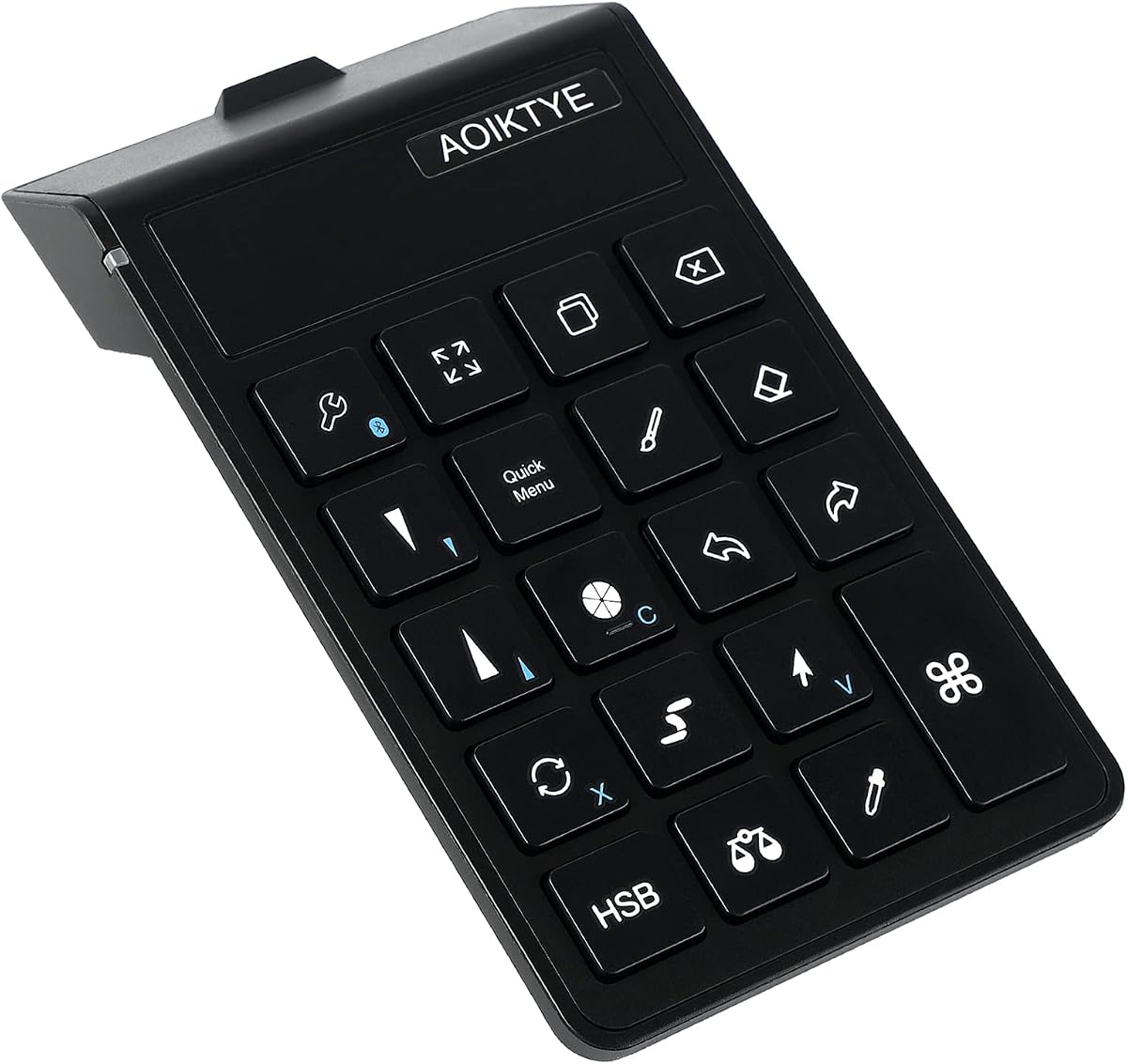
AOIKTYE 22 Shortcut Keyboard
4.5Editor score
22 shortcut keys for Procreate
84 hour battery life
Ergonomic one hand design
This guide compares ten top iPad drawing Bluetooth controllers featuring shortcut keys and dials for efficient digital art workflows and creative productivity.
Finding the right iPad drawing Bluetooth controller can transform your digital art workflow. These devices offer programmable shortcuts and dials that let you focus on creativity instead of menu navigation.
We compared ten leading models based on connectivity, customization options, and ergonomic design. Our analysis highlights how each controller integrates with popular creative apps and supports diverse drawing styles.
Each pick below showcases unique strengths for different budgets and needs. Keep in mind that product availability and pricing may change, so verify details before purchasing your ideal controller.
4.5Editor score

4.2Editor score

5.0Editor score
Below is a side by side comparison of all ten controllers. Each entry highlights key specifications to help you choose the model that fits your artistic workflow and device ecosystem.


The HUION Keydial Mini offers a robust set of features for artists seeking efficient control. With a 4.2 star rating it stands out for its balance of functionality and portability.
We may earn a commission when you buy through this link, at no additional cost to you.
Its 18 programmable keys and customizable dial allow you to map complex shortcuts easily. The anti ghosting technology ensures reliable input even during rapid multi key presses.
While it requires driver installation to unlock full potential the setup process is straightforward. Some users may find the initial configuration slightly time consuming but results are rewarding.
This controller suits digital painters and video editors needing reliable access to shortcuts without leaving the canvas. We recommend it for professionals prioritizing workflow efficiency.
Mapping frequently used actions like brush resizing or layer switching keeps your focus on the artwork.
Bluetooth 5.0 provides stable connectivity up to 10 meters allowing flexible workspace arrangements.
We may earn a commission when you buy through this link, at no additional cost to you.
This keyboard delivers strong value for Procreate artists looking to speed up their workflow. A 4.5 star rating reflects its popularity among budget conscious creatives.
We may earn a commission when you buy through this link, at no additional cost to you.
With 22 shortcut keys specifically mapped for drawing tasks it simplifies common actions like undo or color adjustment. The 84 hour battery ensures you rarely need to recharge during projects.
Though it focuses heavily on Procreate compatibility it supports other apps too. However advanced users may find the customization options limited compared to higher end controllers.
Ideal for hobbyists and students this controller provides essential shortcuts without breaking the bank. We suggest it for iPad artists needing reliable basic enhancements.
Extended battery life means uninterrupted creative sessions without worrying about running out of power mid session.
Key layouts prioritize frequently used Procreate tools streamlining digital illustration workflows effectively.
We may earn a commission when you buy through this link, at no additional cost to you.
The DIGIDRAW K30 represents top tier performance with its unique dual dial system and perfect user rating. It excels at providing tactile feedback and precision adjustments.
We may earn a commission when you buy through this link, at no additional cost to you.
Two dials allow simultaneous control over zoom and brush size while 11 custom keys handle other shortcuts. Tactile markers let you operate without looking away from your canvas.
Its higher cost reflects premium build quality and advanced features. While key count is lower the efficiency gain from dials often outweighs this limitation for pros.
Artists valuing fine control and premium ergonomics will appreciate this device. We recommend it for professionals seeking ultimate workflow optimization.
Independent dial control enables rapid parameter adjustments without menu diving or keyboard reliance.
Raised markers ensure you can locate keys by touch maintaining visual focus on your artwork.
We may earn a commission when you buy through this link, at no additional cost to you.
This controller offers versatility by supporting multiple platforms including iPad for creative control. Its 3.4 star rating suggests mixed experiences among users.
We may earn a commission when you buy through this link, at no additional cost to you.
Designed originally for gaming its analog sticks can be mapped for drawing tasks. The ergonomic design ensures comfort during extended sessions.
However it lacks dedicated creative app integration. Users may need to configure settings manually for optimal performance in art software.
Suitable for artists who also game on the same device. Consider it if you need a hybrid solution for entertainment and creativity.
Support for various platforms allows seamless switching between gaming and creative work without extra hardware.
We may earn a commission when you buy through this link, at no additional cost to you.
This remote offers a trackpad and media controls useful for general iPad navigation. Its 3.6 star rating reflects utility beyond drawing.
We may earn a commission when you buy through this link, at no additional cost to you.
You can move cursors or switch apps easily without touching the screen. However it lacks dedicated art shortcuts.
Best suited for presentation or media tasks rather than active drawing. Consider it if general control is your priority.
Built-in trackpad allows precise cursor movement for non-drawing tasks efficiently.
We may earn a commission when you buy through this link, at no additional cost to you.
XPPen provides a lightweight wireless remote with strong battery performance. Its 4.3 star rating indicates reliable performance for creatives.
We may earn a commission when you buy through this link, at no additional cost to you.
Ten keys and a dial offer essential shortcuts. The 300 hour battery ensures minimal charging needs.
Customization needs driver software which may limit iOS users. Still it offers solid value for desk-based artists.
300 hour capacity ensures months of use on a single charge for consistent workflow.
We may earn a commission when you buy through this link, at no additional cost to you.
TourBox Lite simplifies creative control with an intuitive layout. Its 4.4 star rating highlights user friendliness.
We may earn a commission when you buy through this link, at no additional cost to you.
Eight keys and a wheel cover essential functions. Presets reduce setup time significantly.
Ideal for those preferring simplicity over complex mapping. Consider it for light to medium creative tasks.
Auto detection of active apps switches presets automatically for uninterrupted workflows.
We may earn a commission when you buy through this link, at no additional cost to you.
This modded controller delivers high quality gaming and drawing features. Its 5.0 rating confirms strong user satisfaction.
We may earn a commission when you buy through this link, at no additional cost to you.
Hall Effect sticks ensure durability while motion sensing adds precision. Adjustable fit supports multiple tablets.
Best for gamers also doing digital art. Note that extra holders may be needed for smaller devices.
Hall Effect technology guarantees consistent stick performance over long-term usage without degradation.
We may earn a commission when you buy through this link, at no additional cost to you.
Tailored for Clip Studio Paint users this tablet speeds up workflow. Its 4.0 rating reflects targeted utility.
We may earn a commission when you buy through this link, at no additional cost to you.
Assign common operations to buttons for faster creation. A software license adds extra value.
Relies on AA batteries which may inconvenience some users. Ideal for dedicated Clip Studio artists.
Direct support for Clip Studio Paint ensures reliable button mapping for complex illustration workflows.
We may earn a commission when you buy through this link, at no additional cost to you.
This is a full drawing tablet offering pen precision. Its 4.4 star rating validates Wacom quality.
We may earn a commission when you buy through this link, at no additional cost to you.
Battery free pen provides natural feel. Connectivity works across many creative software.
Requires separate workspace setup. Best for artists wanting full tablet experience alongside controllers.
EMR technology delivers pressure sensitive drawing without batteries or charging interruptions.
We may earn a commission when you buy through this link, at no additional cost to you.
Selecting the right controller depends on your specific artistic needs and workflow preferences. Below are key factors to consider.
Ensure the controller supports your iPadOS version and creative apps like Procreate or Clip Studio Paint. Check driver availability and iOS compatibility.
Prioritize devices with proven app support for seamless integration and fewer setup issues.
Bluetooth 5.0 offers stable low-latency connections essential for drawing. Look for devices with strong range to avoid drop-offs.
Wireless freedom enhances mobility but ensure reliable signal strength for uninterrupted creative work.
Programmable keys and dials allow tailored workflows. More customization options mean greater control over complex tasks.
Choose controllers with driver support to map shortcuts according to your personal preferences.
Comfort is critical during long sessions. Lightweight one-hand designs reduce fatigue and keep focus on the canvas.
Look for tactile markers or intuitive layouts that minimize strain and accidental inputs.
Long battery life ensures uninterrupted work. Models with USB-C charging offer convenience and quick top-ups.
Prioritize controllers with multi-day battery to avoid mid-project interruptions for charging.
Dual dials or touchpads add precision beyond basic shortcuts. These enhance navigation and parameter adjustments.
Consider additional features if your workflow benefits from simultaneous control of multiple parameters.
Some controllers include software licenses or presets. This adds value especially for artists using niche applications.
Verify included software matches your needs to maximize the controller's utility from day one.
Durable construction ensures longevity. Hall Effect components or high-quality materials prevent wear over time.
Invest in well-built devices to maintain consistent performance across years of creative use.
Begin by pairing your controller with your iPad via Bluetooth settings. Download any necessary companion apps or drivers to enable full functionality and customization.
Customize shortcuts according to your most frequent tasks. Test mappings thoroughly before starting serious projects to ensure accuracy and comfort during drawing.
Keep the controller clean by wiping gently with a dry cloth. Store in a protective case when not in use to prevent physical damage or button misalignment.
Most controllers work with standard apps but drivers or companion apps enhance customization. Check manufacturer details to confirm compatibility with your iPadOS version.
Typically only one controller connects at a time to avoid input conflicts. However some systems may allow simultaneous devices with specific software settings.
With proper care controllers can last years. Build quality and usage frequency impact lifespan significantly over time.
Many support Android tablets or PCs. Verify specific device compatibility with manufacturers before purchase.
You can reset or remap keys through the driver software or app. Most devices allow easy customization adjustments.
Yes controllers operate locally after pairing. Internet is only needed for initial setup or driver downloads.
Many models support Windows and Android systems alongside iPads. Confirm cross-platform support before buying.
We reviewed ten top controllers ranging from budget-friendly to premium options. Each offers unique strengths tailored to different creative workflows and needs.
Prioritize compatibility ergonomics and customization features to find a device that enhances productivity. Your artistic habits should guide the final choice.
Prices and availability may change so always verify current details before purchasing. Invest in a controller that aligns with your long-term creative goals.