
MAYFLASH Arcade Stick F700
4.5Editor score
Wireless Bluetooth support
Compatible with multiple platforms
Turbo functions included
Explore our expert comparison of the top arcade sticks for PS5 to find the perfect fightstick for competitive play and customization needs.
Finding the right arcade stick for PS5 can transform your fighting game experience into something truly immersive and responsive. Players need precise inputs, durable components, and reliable connectivity to compete at high levels across various titles like Street Fighter and Tekken.
We compared ten top-rated fightsticks based on build quality, compatibility, and user feedback to help you make an informed decision. Our list covers official licensed peripherals and third-party options that support the latest console firmware and online features.
Each pick highlights specific strengths such as customization options, button layout, and overall value for money. Please note that prices and availability fluctuate frequently so check current listings before making your final purchase decision today.
4.5Editor score

4.6Editor score

4.2Editor score
This side-by-side comparison breaks down the key specifications and features of each fightstick to help you quickly identify the best match for your gaming style and budget requirements.




The HORI PlayStation 5 Fighting Stick Alpha stands out as the top choice for serious fighters seeking a reliable tournament grade controller. It holds an impressive 4.6 star rating from users who praise its sturdy construction and responsive inputs.
We may earn a commission when you buy through this link, at no additional cost to you.
This fightstick features HORI proprietary Hayabusa buttons and joystick which are renowned for their speed and precision. The design opens up for easy customization and maintenance allowing players to swap parts or replace artwork without much hassle.
While it comes at a premium price compared to third-party options the official licensing ensures full compatibility with PS5 systems and online features. Some users may find the included top-panel artwork less customizable than fully open source boards.
If you are looking for a plug-and-play experience that delivers tournament level performance right out of the box this is the recommended pick. It balances official support with pro-level durability for a wide range of fighting game fans.
The Hayabusa joystick and buttons offer faster actuation and a lighter touch that competitive players prefer for quick inputs.
Being officially licensed by Sony guarantees seamless integration with PS5 firmware and access to all online multiplayer features.
We may earn a commission when you buy through this link, at no additional cost to you.
The Nacon Daija Arcade Fight Stick is designed with input collaboration from professional gamers to ensure high performance. It has a 4.2 star rating reflecting satisfaction with its Sanwa components and comfort features during long play sessions.
We may earn a commission when you buy through this link, at no additional cost to you.
One of its standout features is the full button mapping capability when connected to a PC or Mac via the included software. Players can create specific game profiles and easily switch between them using the intuitive user-friendly interface provided.
The textured palm rest offers sturdy support which helps maintain precision during intense matches. However the unit is somewhat heavy which might make it less portable for tournament travel compared to lighter models on the market.
This stick is ideal for players who want deep customization and the ability to tune their controls digitally. If you need a setup that adapts to multiple games and platforms the Nacon Daija delivers strong versatility and value.
Textured palm rest and two joystick heads allow you to choose the best solution for perfect control and comfort during play.
A dedicated 3.5mm audio jack lets you connect a RIG competition-grade headset for clear communication during online matches.
We may earn a commission when you buy through this link, at no additional cost to you.
The MAYFLASH Arcade Stick F700 offers an affordable entry point into fighting games without sacrificing essential features. With a 4.5 star rating it appeals to budget conscious gamers who still want wireless options and broad compatibility across platforms.
We may earn a commission when you buy through this link, at no additional cost to you.
It supports three connection methods including Bluetooth 2.4G and wired USB giving you flexibility based on your console and setup needs. The included 2.4G receiver has a special hidden compartment to store it safely when not in use.
While it does not support other types of games besides fighting titles it excels in its intended purpose with responsive inputs and turbo functions. The lack of Xbox compatibility is a limitation but for PS5 users it is a strong option.
This stick is perfect for casual to intermediate players who want a versatile controller that works across PS5 Switch and PC. Its balance of price and performance makes it a top contender in the budget category.
Bluetooth 2.4G and wired USB connections ensure you can play on almost any device without compatibility issues.
A special hidden compartment keeps the 2.4G receiver safe and organized so you do not lose it between sessions.
We may earn a commission when you buy through this link, at no additional cost to you.
The Qanba N3 Drone 2 provides a reliable and officially licensed experience for PS5 and PS4 users. It holds a 4.5 star rating which speaks to its consistent performance and quality build that meets Sony standards for peripherals.
We may earn a commission when you buy through this link, at no additional cost to you.
It features authentic Qanba buttons and a lever that deliver a satisfying tactile response during gameplay. The full control panel includes a touch pad and Qanba OV7 OMRON switch joystick which ensures smooth and accurate directional inputs.
A 3.5mm microphone input with mute button control adds convenience for online communication. However since it is wired only you may face cable management challenges if you prefer to sit further from your console.
For players seeking an official peripheral without breaking the bank this model offers strong value and reliability. It is a solid choice for those who prioritize compatibility and build quality over extensive customization features.
Qanba 30mm B30 buttons and OV7 OMRON switch joystick ensure high durability and precise input registration.
As an officially licensed peripheral it guarantees full compatibility with PS5 system features and online services.
We may earn a commission when you buy through this link, at no additional cost to you.
The MAYFLASH Arcade Stick F700 Elite builds on the standard model with premium Sanwa components for enhanced performance. It has a 4.6 star rating and is favored by users who want high-end parts without the high price of official sticks.
We may earn a commission when you buy through this link, at no additional cost to you.
Using premium quality Sanwa components allows you to strike instantly and surely maintaining peak performance game after game. A full size anti-slip rubber mat helps hold the fighting stick firmly in place on any surfaces during intense play.
It supports wired headsets for background music and online chat on PS5 PS4 and PC Xinput. The turbo functions with different speed settings give you extra control over your combos and special moves.
This stick is ideal for players who want the feel of tournament grade Sanwa parts with the flexibility of wireless connection. If you need a versatile setup for multiple platforms the F700 Elite delivers strong reliability and comfort.
Eight highly responsive buttons and a precision 4-way joystick provide fast and reliable input registration.
A full size anti-slip rubber mat keeps the stick firmly in place so your movements stay accurate.
We may earn a commission when you buy through this link, at no additional cost to you.
The MAYFLASH F500 Arcade FightStick comes with MAGICBOOTS-S5 bundle to simplify setup on PS5 and PS4. It holds a 4.0 star rating and is valued for its broad compatibility including Xbox Series S/X and Switch systems.
We may earn a commission when you buy through this link, at no additional cost to you.
Plug and play is possible using the Magic Boots which eliminate the need for an original controller when on PS4 or PS5. For Xbox consoles a wired Microsoft Xbox 360 or Xbox One Controller is required which adds a bit of complexity.
It supports the turbo functions with different speed settings to help manage combos efficiently. The X input and D input support makes it flexible for PC gaming setups that require different input modes.
If you play on multiple consoles and want one stick that works across them the F500 offers a strong solution. While build quality is basic the convenience of universal compatibility makes it a useful tool for diverse gamers.
The Magic Boots allow plug and play on PS5 and PS4 without needing the original controller plugged in.
Works with PS5 Xbox Series S/X Switch and PC making it a great choice for multi-platform players.
We may earn a commission when you buy through this link, at no additional cost to you.
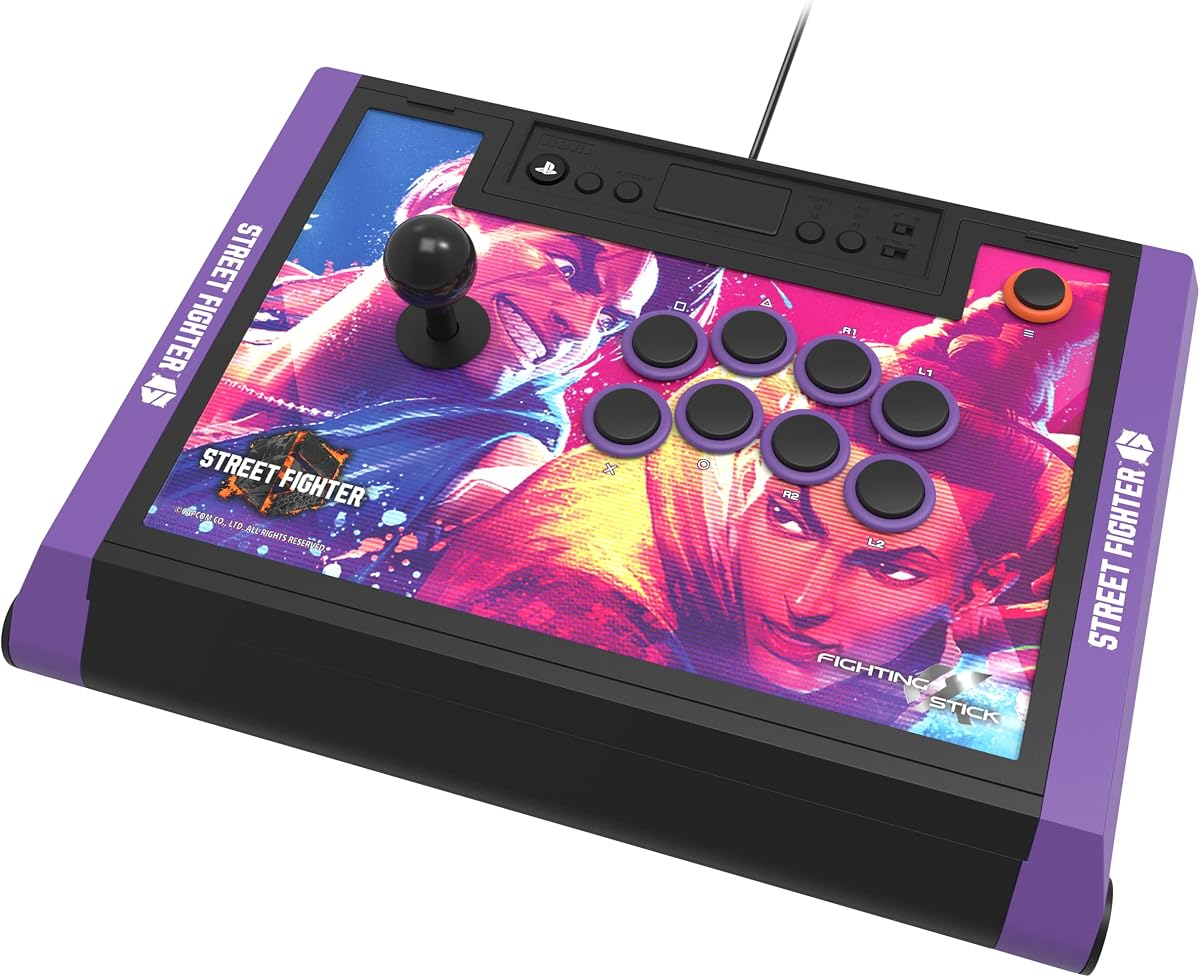
The HORI PlayStation 5 Fighting Stick Alpha Street Fighter 6 Edition brings a unique aesthetic to the standard high-end model. With a 4.5 star rating it appeals to fans of the franchise who want a tournament ready stick with official artwork.
We may earn a commission when you buy through this link, at no additional cost to you.
It includes a link to 18 downloadable hi-res images of favorite Street Fighter 6 characters for top panel customization. This allows you to personalize the look of your stick while keeping the core performance features intact.
The Hayabusa buttons and joystick provide the same speed and precision as the standard version. Official licensing by Sony and Capcom ensures that all system features are fully supported without any compatibility issues.
If you love Street Fighter 6 this edition adds a special touch to your setup without sacrificing functionality. It is a great pick for collectors and competitive players who want to show their game passion.
Access 18 downloadable hi-res images to customize the top panel with your favorite characters.
Features proprietary HAYABUSA buttons and joystick for tournament-grade speed and precision.
We may earn a commission when you buy through this link, at no additional cost to you.
The Qanba Q7 Obsidian 2 offers a blend of official certification and flexibility for modern fighting game needs. It holds a 4.3 star rating reflecting its build quality and utility for users who want to switch between modes easily.
We may earn a commission when you buy through this link, at no additional cost to you.
It features a switch to change between PS5 PS4 and PC which simplifies connectivity across systems. The full control panel includes a touch pad and swappable Sanwa JLF joystick tops to let you tailor the feel to your preference.
As an officially licensed Sony peripheral it guarantees full compatibility with system features. The 3.5mm microphone input with mute button control supports online communication for those who play frequently with friends.
This stick is ideal for players who want official support but still value some hardware customization. If you need a reliable wired option with easy mode switching the Qanba Q7 delivers strong versatility and quality.
A dedicated switch lets you change between PS5 PS4 and PC modes instantly for easy setup changes.
Sanwa JLF joystick tops are swappable to adjust the control feel to your personal preference.
We may earn a commission when you buy through this link, at no additional cost to you.
The HORI PlayStation 5 Fighting Stick Alpha TEKKEN 8 Edition is tailored for fans of the series seeking a dedicated setup. It has a 4.6 star rating and offers tournament grade performance with official artwork that celebrates the game.
We may earn a commission when you buy through this link, at no additional cost to you.
Features include TEKKEN 8 top panel artwork and downloadable alternate artwork to print for further customization. This ensures you can match your stick to your personal style while maintaining a professional look for tournaments.
The proprietary HAYABUSA buttons and HAYABUSA joystick ensure top-tier response and durability. Official licensing by Sony and Bandai Namco Entertainment means full feature support for online and offline play.
If you are a dedicated Tekken player this edition provides a unique and high-quality experience. It combines the best performance features with themed aesthetics to make it a standout option for enthusiasts.
Includes TEKKEN 8 top panel artwork and downloadable alternate designs for a personalized look.
Features proprietary HAYABUSA buttons and joystick for tournament-grade speed and precision.
We may earn a commission when you buy through this link, at no additional cost to you.
The GuileKeys GK-18 Leverless Arcade Stick offers an all-button layout that reduces input errors for precise movements. It has a 4.3 star rating and is praised by players who prefer keys over traditional joysticks for competitive play.
We may earn a commission when you buy through this link, at no additional cost to you.
It supports hot-swappable switches and keycaps which allows easy replacement without soldering. The integrated OLED screen clearly displays your current input mode and button layout helping you stay in control at all times.
Input latency is less than 1ms thanks to the RP2040 controller chip and firmware GP2040-CE. You can adjust light colors modes and brightness to create cool gaming scenes and immerse yourself in the gaming world.
This stick is ideal for players seeking a unique layout and deep customization options. While it requires an additional converter for PS5 compatibility the performance and flexibility make it a standout for innovators.
Input latency is less than 1ms in all modes for smooth and precise button actions.
The integrated OLED screen shows current input mode and button layout for easy monitoring.
We may earn a commission when you buy through this link, at no additional cost to you.
Choosing the right fightstick involves considering compatibility build quality and personal play style preferences.
Ensure the stick is compatible with PS5 and official licensing guarantees seamless integration with system features.
Look for models that list PS5 support explicitly to avoid connection issues during gameplay.
High quality buttons and joystick parts like Sanwa or Hayabusa enhance responsiveness and durability.
Choose sticks that use proven components to ensure consistent performance over time.
Some sticks allow you to open the case for internal upgrades or panel changes.
Pick a model with accessible design if you plan to modify your stick later.
Wired sticks often provide lower latency while wireless options offer convenience for longer sessions.
Decide based on whether you prefer cable management or cable-free setups.
Advanced software allows for custom button mapping on PC which can be useful for multi-platform users.
Check if the product supports mapping tools before buying if you plan to use it on PC.
A textured palm rest or ergonomic design can reduce fatigue during long play sessions.
Consider the weight and size of the unit to ensure it fits your play space comfortably.
Official sticks often cost more but offer guaranteed support and quality.
Third-party options may offer similar performance at lower prices with fewer guarantees.
Audio jacks turbo functions and OLED screens can enhance the overall experience.
Identify which extras matter most to you before comparing models.
Connect your fightstick to the PS5 USB port or enable Bluetooth mode if wireless support is available.
Use the provided software or system settings to map buttons according to your preferred game configuration.
Keep the unit clean and avoid dropping or applying excess pressure to ensure long-term durability.
Arcade sticks work best with fighting games that support gamepad input. Most fighting titles recognize the stick automatically but general games may require controller mapping.
Yes many sticks allow you to plug the original controller into the unit for features like chat and audio while using the stick for gameplay.
Sanwa is a traditional brand known for durability while Hayabusa is HORI proprietary brand known for speed. Both are excellent choices for high-level play.
Most modern PS5 sticks do not require a converter. However some models without official PS5 support may need a Magic Boot or adapter to work properly.
Many sticks feature removable top panels that allow you to replace or print custom artwork to personalize your setup.
Firmware updates are usually done via USB connection to a PC using the manufacturer software. Always check the product page for specific instructions.
We explored ten top-rated fightsticks that offer a range of options from budget models to official licensed pro gear.
Prioritize compatibility build quality and your preferred control layout to find a stick that suits your style.
Remember to check current prices and availability before purchasing as offerings may change over time.