
XIAOWTEK Wireless Earbuds
4.9Editor score
Bluetooth 5.4 connectivity
50 hours total playtime
Four ENC noise cancelling mics
Discover the top earbuds for laptop conference calls in October 2026. We compare battery, mic quality, and comfort for remote work professionals.
Remote work has become the norm, making clear audio essential for daily meetings. Choosing the right earbuds ensures your voice is heard without distracting background noise.
We evaluated ten top-rated models based on microphone clarity, battery life, and connection stability. Each product was assessed for its ability to perform during long conference sessions.
This guide highlights the best options for every budget and usage style. Prices and availability may change, so check current listings before making your final purchase decision.
4.9Editor score

4.3Editor score

4.1Editor score
The following table provides a side-by-side comparison of all ten selected products. It highlights key specifications to help you quickly identify the best fit for your specific laptop setup and meeting needs.



The XIAOWTEK Wireless Earbuds stand out as an exceptional value option for professionals seeking reliable audio for laptop meetings. With a high customer rating and impressive battery specifications, these buds ensure you stay connected throughout your workday without frequent recharging needs.
We may earn a commission when you buy through this link, at no additional cost to you.
These earbuds leverage the latest Bluetooth 5.4 technology to deliver a stable connection with low latency, which is critical for real-time conference calls. The inclusion of four environmental noise cancellation microphones effectively isolates your voice from background disturbances, ensuring colleagues hear you clearly even in noisy environments.
While the build quality is robust with IPX7 waterproofing, the lack of advanced app features means you miss out on customizable equalizer settings. However, for users who prioritize core functionality over extra customization, this trade-off is acceptable given the competitive price point.
If you need a dependable pair of earbuds that deliver clear audio and long battery life without breaking the bank, the XIAOWTEK model is a strong recommendation. It is particularly suitable for remote workers who value practicality and reliability over premium aesthetic features.
With up to 50 hours of total playtime via the charging case, you can work for an entire week on a single case charge.
The four ENC microphones use advanced algorithms to filter out background noise so your voice remains the primary focus during calls.
We may earn a commission when you buy through this link, at no additional cost to you.
This wireless earbud model offers a balance of modern connectivity features and practical design elements suitable for daily conference use. The upgrade to Bluetooth 5.4 ensures that you maintain a consistent link to your laptop even when moving around your home office space.
We may earn a commission when you buy through this link, at no additional cost to you.
Performance-wise, the dual ENC microphones provide adequate noise isolation for voice clarity. The IPX7 rating adds durability against sweat or accidental spills, making these versatile for users who might multitask between calls and light physical activity during the day.
The total battery life of 36 hours is respectable but falls short of the leading budget model. For those on short workdays, this is sufficient, but heavy users might need to recharge mid-week. The ergonomic tips ensure a secure fit which helps maintain audio consistency during movement.
This option serves well for users who want a no-fuss device that pairs quickly and delivers consistent performance. It is an attractive choice for those who need reliable audio hardware without navigating complex setup procedures.
With a range of up to 15 meters, you can move freely around your room without worrying about disconnections during meetings.
The Type-C fast charging design ensures you can quickly replenish power when you need to get back to work immediately.
We may earn a commission when you buy through this link, at no additional cost to you.
The Soundcore P30i offers a robust feature set that addresses many pain points for remote workers, particularly regarding noise control. Its advanced active noise cancelling system significantly reduces external disturbances, allowing you to focus entirely on the content of the conference.
We may earn a commission when you buy through this link, at no additional cost to you.
Beyond noise cancellation, the inclusion of AI enhanced call technology ensures your voice is transmitted clearly. The Soundcore app provides additional customization options for sound and noise settings, giving you control over your audio experience to suit different meeting environments.
The charging case doubles as a phone stand, which is a unique convenience for video calls where you need to view your laptop screen while wearing earbuds. However, using active noise cancelling does reduce the overall battery life compared to when it is turned off, requiring more frequent recharging.
For professionals who prioritize a quiet listening environment and call clarity, these earbuds deliver excellent value. The ability to personalize settings through the app makes them adaptable to various acoustic conditions found in home offices or coworking spaces.
The system detects external sound automatically and selects the optimal noise cancelling level tailored specifically for your ears.
The case features a built-in stand that allows you to position your phone for video calls without needing extra equipment.
We may earn a commission when you buy through this link, at no additional cost to you.
The Panasonic ErgoFit Wired Earbuds provide a simple yet effective solution for users who prefer a physical connection for their audio. By eliminating the need for Bluetooth pairing and battery charging, these earbuds guarantee uninterrupted usage as long as they are plugged in.
We may earn a commission when you buy through this link, at no additional cost to you.
The ergonomic design comes with three sizes of earpads to ensure a secure fit that reduces outside noise passively. The built-in call controller allows you to manage calls directly from the cable, which is convenient if you frequently need to answer or end meetings quickly without reaching for the laptop.
While the wired connection restricts movement to the length of the cable, it also eliminates any potential for signal interference or dropouts common in wireless models. The audio quality is balanced with crisp highs and deep low notes, delivering a professional sound profile suitable for voice clarity.
This option is ideal for users who sit primarily at a desk and want a straightforward device without the overhead of maintaining a charging routine. It remains a solid choice for basic conference needs where mobility is not a priority.
A direct wired connection ensures there is absolutely no delay between your voice being sent and received by your team.
Included S, M, and L earpads allow you to find the perfect seal that ensures comfort during long meeting durations.
We may earn a commission when you buy through this link, at no additional cost to you.
Antool offers a practical 2-pack of wired earbuds that ensures you always have a backup ready for your daily conference calls. The ultra-lightweight design makes these earbuds comfortable for extended wear, reducing ear fatigue during long meetings or training sessions.
We may earn a commission when you buy through this link, at no additional cost to you.
The microphone system is designed to filter out noise effectively, providing clear voice transmission even if you are in a moderately noisy room. The multifunction remote control gives you full command over calls and media playback without interrupting your workflow to touch the laptop.
Constructed with high-quality TPE material, these cables are resistant to tangling and bending, ensuring durability over time. This construction detail is particularly useful for users who frequently pack and unpack their devices for travel or moving between workstations.
Buying in a 2-pack provides excellent value and peace of mind regarding equipment availability. If you want a simple plug-and-play solution that includes a spare pair, this option delivers reliable performance at an accessible price point.
Weighing only 3 grams per earbud, these are designed to minimize discomfort during hours of continuous usage.
The TPE material and wear-resistant copper foil ensure the cable withstands repeated bending and daily handling.
We may earn a commission when you buy through this link, at no additional cost to you.
The JLab Work Buds are designed with the professional in mind, featuring a unique detachable boom microphone that enhances voice clarity significantly. This design allows you to switch between music listening and focused calls by adjusting the mic, providing versatility during your workday.
We may earn a commission when you buy through this link, at no additional cost to you.
With Bluetooth multipoint support, you can connect to both your laptop and phone simultaneously. This ensures you never miss an incoming call while on a conference meeting, as the device manages audio sources automatically without manual switching steps.
The USB-C charging dock adds a level of convenience for desk organization, keeping your earbuds and mic neatly stored and powered. The total playtime exceeds 55 hours which is ideal for users who travel or work long shifts without easy access to a power source.
While the boom mic adds some bulk to the design, it provides superior audio quality compared to standard in-ear microphones. This model is recommended for users who require high-performance call clarity and the flexibility to connect to multiple devices.
Connect to two devices at once and switch between them effortlessly to maintain productivity across your devices.
The compact dock keeps your earbuds and mic organized on your desk while ensuring they are always ready for use.
We may earn a commission when you buy through this link, at no additional cost to you.
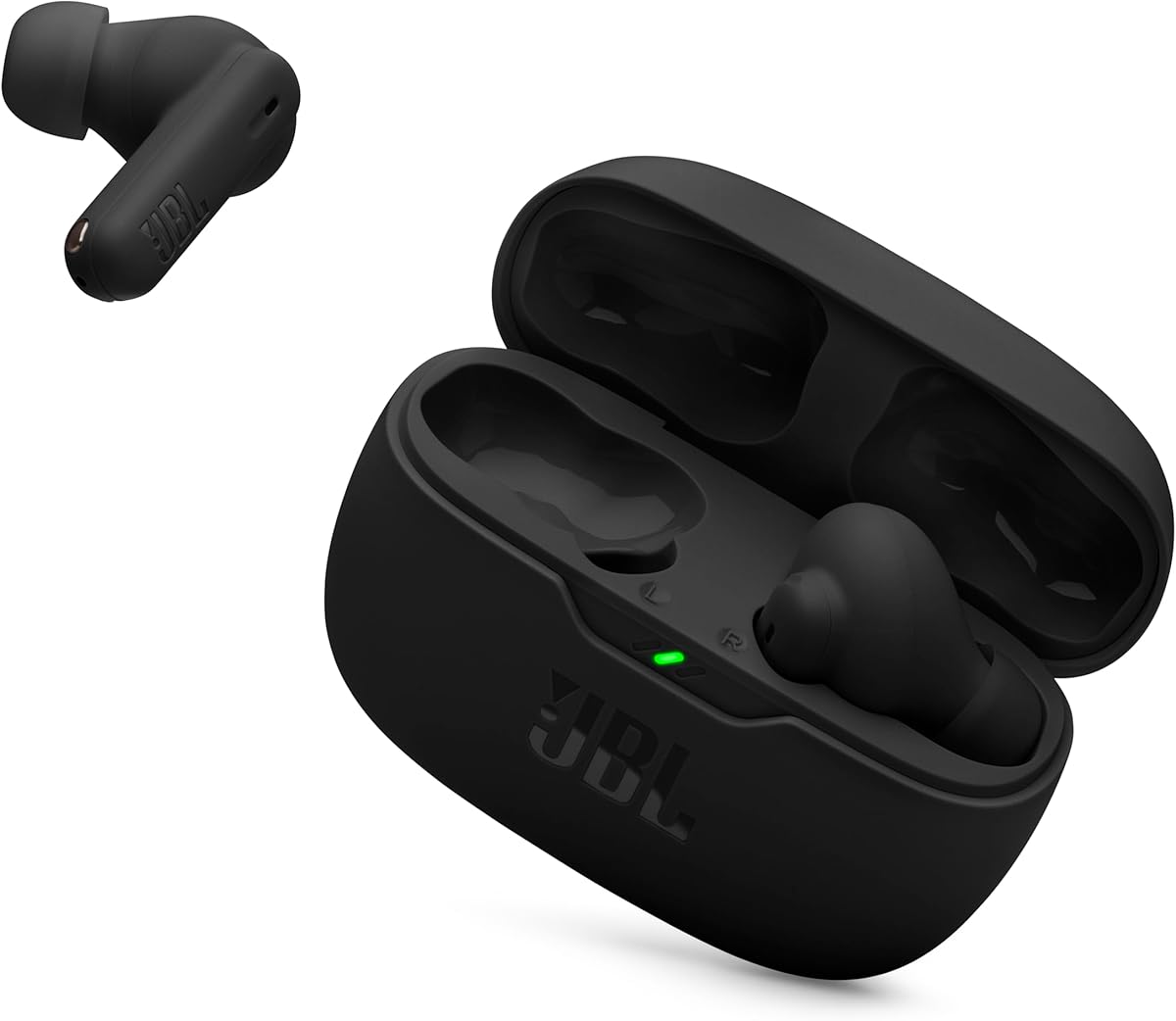
The JBL Vibe Beam 2 leverages the brand's reputation for high-quality audio to deliver a strong performance for conference calls. The active noise cancelling feature helps block out ambient noise, ensuring that your focus remains on the discussion rather than external distractions.
We may earn a commission when you buy through this link, at no additional cost to you.
With four microphones dedicated to call clarity, the device ensures your voice is transmitted cleanly. The smart ambient mode allows you to hear your surroundings when necessary, which is useful for brief interactions with colleagues without removing the earbuds.
Battery life is solid with up to 40 hours of total playtime, and the fast charging feature provides hours of listening from a short charge. The JBL Headphones app adds value by allowing you to customize EQ settings to suit your personal listening preferences.
This model is a strong choice for users who want brand reliability and rich sound quality alongside functional call features. It offers a balanced mix of entertainment and utility that appeals to professionals who also listen to music during breaks.
The 8mm dynamic drivers deliver the signature JBL bass that makes audio content rich and engaging.
Control how much of the outside world you hear to stay aware of your surroundings when needed.
We may earn a commission when you buy through this link, at no additional cost to you.
The Dell Pro Plus Earbuds are engineered specifically for business professionals, featuring an AI-based noise-cancelling microphone that intelligently filters out background noise. This technology ensures that your voice is heard loud and clear, making it ideal for high-stakes conference calls.
We may earn a commission when you buy through this link, at no additional cost to you.
Adaptive ANC allows you to switch between deep focus and heightened awareness easily with a pinch control. This flexibility helps you manage your environment effectively, whether you are in a quiet home office or a busy workspace.
While the price point is higher than other models, the investment pays off in terms of call reliability and professional integration. The design prioritizes function over flair, offering a comfortable fit and controls that are intuitive for users focused on productivity.
This is the top recommendation for users who need the best possible call quality and are willing to pay a premium for professional-grade reliability. It excels in scenarios where clear communication is critical to business success.
The mic uses advanced AI to recognize your voice and filter out background noise for best-in-class call quality.
Easily switch between deep focus and enhanced transparency modes to match your current environment needs.
We may earn a commission when you buy through this link, at no additional cost to you.
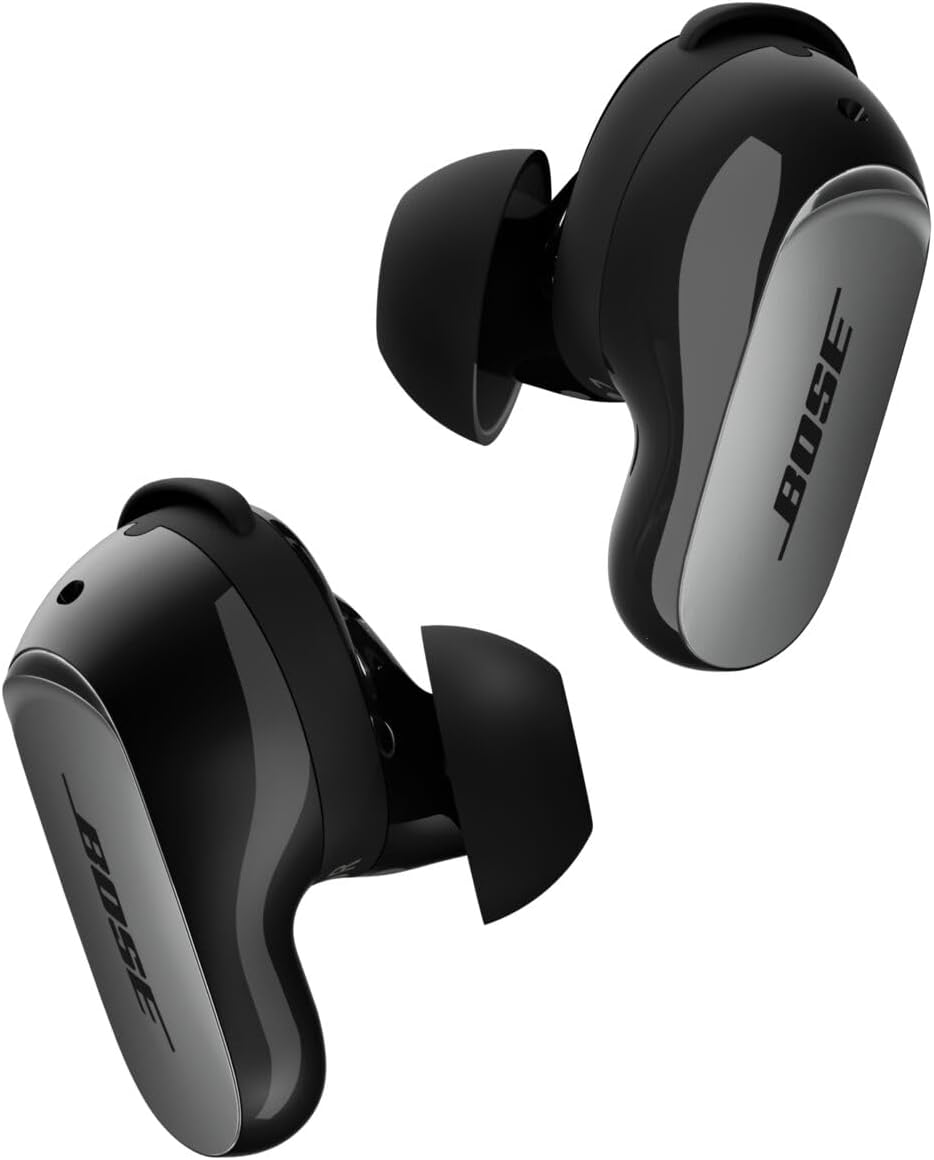
The Bose QuietComfort Ultra offers world-class noise cancellation that creates a focused environment for your conference calls. The CustomTune technology adapts the sound to your specific ear shape, ensuring a perfect fit and consistent audio quality every time.
We may earn a commission when you buy through this link, at no additional cost to you.
Immersive Audio creates a spatial listening experience that can make video content feel more engaging. This feature, while more suited for media, adds a high level of audio fidelity that benefits voice clarity and detail during meetings.
However, the battery life is shorter at around 6 hours which may require frequent recharging for long workdays. The wireless charging case adds convenience but comes at a high price point that places this model firmly in the premium category.
This option is best for users who demand the absolute best noise cancellation and sound quality regardless of cost. If you value comfort and isolation above battery longevity, these earbuds provide a top-tier experience.
Your earbuds analyze your ears and adapt the sound and noise cancellation specifically for your unique ear shape.
This mode spatializes audio to create a theater-like experience that balances background sounds and effects.
We may earn a commission when you buy through this link, at no additional cost to you.
The Soundcore Liberty 5 Pro Max stands out with its unique AI Note-Taker feature that can transcribe and summarize meetings directly via the case. This functionality is designed to streamline workflow by capturing key points and action items automatically.
We may earn a commission when you buy through this link, at no additional cost to you.
Certified for the highest speech quality score, these earbuds ensure your voice is heard with extreme clarity. The business-grade privacy features including local encryption ensure that sensitive conversation data remains secure and is not retained unnecessarily.
While the advanced AI features add significant value for productivity, they may require a subscription for full use. The case itself features a large AMOLED display which allows for easy settings management but adds bulk to the device.
This model is recommended for professionals who want cutting-edge technology to enhance their note-taking and meeting efficiency. If you need a device that actively helps you manage information during calls, this is a top contender.
The case records and transcribes meetings to generate summaries with key points and action items automatically.
Local AES-256 encryption and HIPAA compliance ensure your confidential conversations remain secure.
We may earn a commission when you buy through this link, at no additional cost to you.
Selecting the right earbuds requires evaluating several key factors to ensure they meet your professional needs. This guide breaks down the essential elements to consider before making your purchase.
The microphone is the most critical component for conference calls. Look for models with dedicated noise-cancelling microphones that isolate your voice from background noise. Advanced models use AI processing to enhance speech clarity ensuring that your colleagues hear you clearly even in noisy environments.
Prioritize earbuds with multiple microphones and noise cancellation technology to ensure consistent communication quality.
Conference calls can be lengthy, so sufficient battery life is necessary to avoid interruptions. Aim for earbuds that offer at least 5 hours of continuous playback on a single charge. The charging case should provide multiple additional charges to extend total usage time throughout the workday.
Check total playtime specifications to ensure the device can last through your busiest days without needing a recharge.
A stable connection is vital for real-time communication. Bluetooth 5.3 or 5.4 provides better range and stability compared to older versions. Multipoint connectivity is also a valuable feature allowing you to switch between your laptop and phone seamlessly during calls.
Choose models with the latest Bluetooth standards to minimize latency and dropouts during meetings.
Wearing earbuds for hours requires a comfortable fit that does not cause fatigue. Ergonomic designs and multiple ear tip sizes help secure the buds comfortably. Lightweight materials also contribute to long-term wearability during extended conference sessions.
Test different tip sizes and designs to find a secure and comfortable fit for your ear shape.
In addition to microphone quality, you need to hear the conference without distraction. Active noise cancellation helps block out ambient noise like traffic or household sounds. Transparency mode allows you to hear important surroundings when necessary during your workday.
Select earbuds with effective noise cancellation or passive isolation features to maintain focus.
Ease of use is important for productivity. Touch controls or physical buttons should be intuitive for answering calls or muting. Apps that allow customization of sound and noise settings can tailor the experience to your preferences.
Opt for models that offer user-friendly controls and companion apps for enhanced functionality.
Your devices should withstand daily use and environmental factors. An IPX7 waterproof rating protects against sweat and accidental spills. High-quality materials ensure the earbuds last through long periods of daily usage.
Look for water resistance ratings and robust build quality to ensure longevity.
Ensure the earbuds work seamlessly with your operating system. Most models support both Windows and macOS via Bluetooth. Wired options should include necessary adapters if your laptop lacks a standard jack.
Verify device compatibility before buying to avoid connection issues with your specific laptop.
Pair your earbuds with your laptop by enabling Bluetooth in system settings. Open the charging case and press the pairing button if required. Select the device from the available list and confirm the connection.
Position the microphones correctly to ensure they are not covered by your skin or hair. Adjust the volume and mic levels in your system settings to optimize audio capture during calls.
Clean the earbuds regularly with a soft dry cloth to prevent earwax buildup. Keep the charging ports clean and store them in a dry place when not in use to prolong their lifespan.
The Soundcore P30i and JLab Work Buds are excellent choices for both Zoom and Teams. They offer strong noise cancellation and reliable Bluetooth connections that integrate well with these platforms without extra drivers.
While older versions work, Bluetooth 5.3 or 5.4 is recommended. These versions provide better stability and lower latency which is critical for real-time conversations during conferences.
Most quality models offer 5 to 10 hours of battery life. If you have long daily meetings, check for models with quick charging or high total playtime from the case.
Wired earbuds eliminate latency and battery concerns. However, modern wireless models have closed the gap and offer better mobility. Choose based on your preference for convenience versus simplicity.
Ensure a proper seal in your ears and position the microphones correctly. Use software like Zoom to manage audio levels and enable background noise suppression settings within the app.
The XIAOWTEK Wireless Earbuds are a top pick under $30. They offer impressive battery life and clear call microphones at a very affordable price point.
Yes, most modern earbuds connect to laptops via Bluetooth. Ensure your laptop has Bluetooth enabled and that the earbuds support cross-device pairing for seamless switching.
Use a soft dry cloth to wipe the exterior. Avoid using liquids directly on the buds. For the charging case, a dry brush can help remove dust from the contacts.
Our top picks include the XIAOWTEK for budget value, the Soundcore P30i for overall performance, and the Dell Pro Plus for premium business features. Each model brings unique strengths to the table depending on your specific needs.
Prioritize microphone clarity and battery life when making your choice. These two factors will have the biggest impact on your ability to communicate effectively during daily meetings.
Always check current prices and availability as they may fluctuate frequently. The right earbuds can significantly improve your work-from-home setup and ensure you stay connected.