
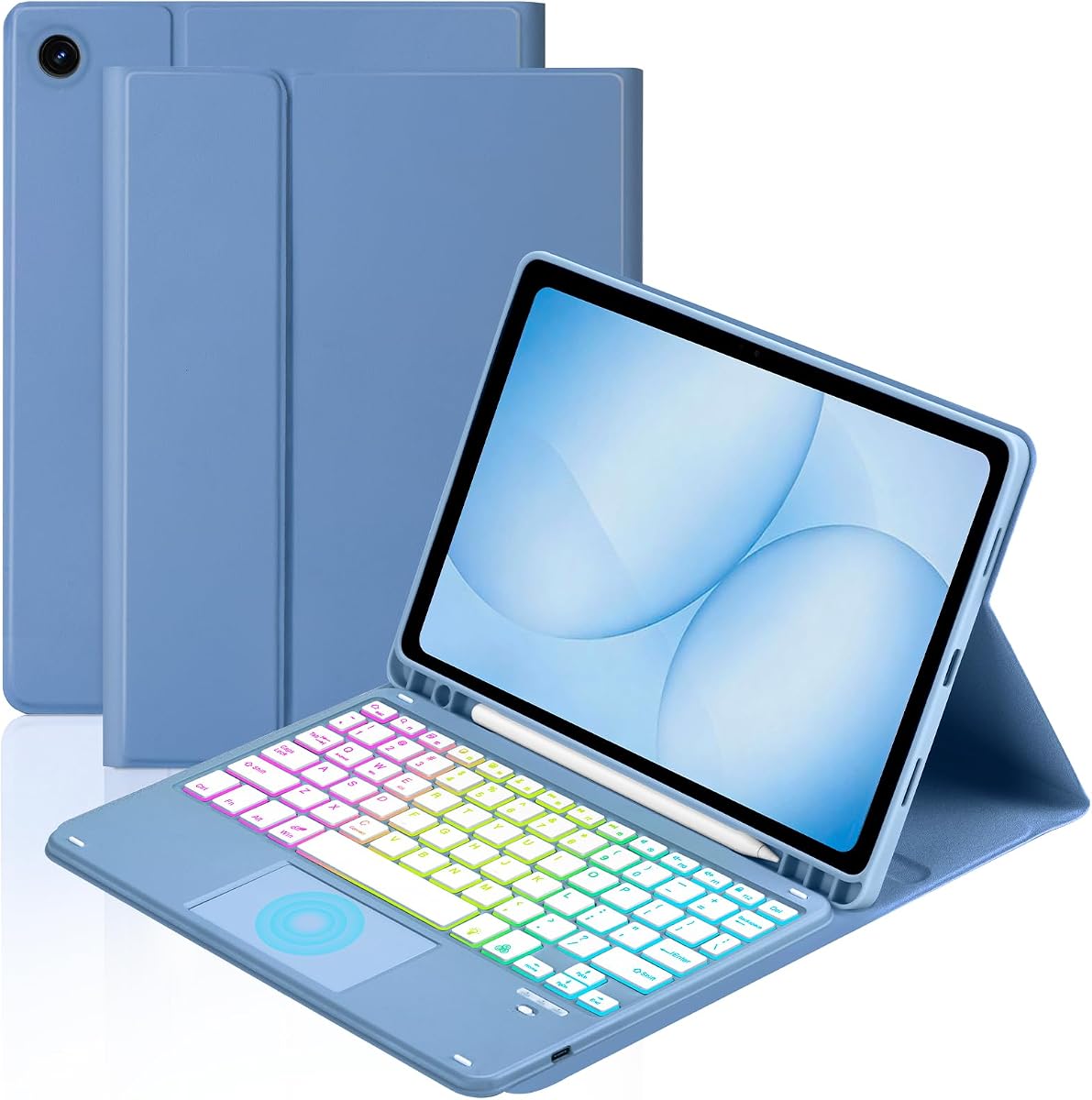
YBING Keyboard Case for Samsung Galaxy Tab A11 Plus & Galaxy Tab A9 Plus
4.5Editor score
360 degree rotation stand
7-color rainbow backlight
Strong 16 magnet adsorption
Find the perfect keyboard for Samsung A11 tablet with our expert guide comparing top models for typing, protection, and productivity features.
Transform your Samsung Galaxy Tab A11 into a productive workstation with the right keyboard case. These accessories offer laptop-like typing, trackpads, and protection in one sleek package for work or school.
We evaluated ten top-rated keyboard cases based on compatibility, battery life, typing comfort, and build quality. Each model was assessed for its magnetic connection, backlight options, and overall value for Galaxy Tab A11 users.
Each pick below highlights key features, pros, and cons to help you decide. Note that product availability and pricing may change frequently, so check current listings before making your final purchase decision.
4.5Editor score

4.3Editor score

4.6Editor score
Compare all ten keyboard cases side by side to see which offers the best typing experience, battery life, and protective features for your Samsung Galaxy Tab A11.




This Dexnor keyboard case transforms your Galaxy Tab A11 into a laptop-like workstation with a built-in multi-touch trackpad and scissor-switch keys. It holds a strong rating of 4.3 stars and offers 720 hours of standby time.
We may earn a commission when you buy through this link, at no additional cost to you.
The trackpad supports multi-finger gestures for smooth navigation, while the full row of function keys lets you control brightness and volume quickly. The keyboard wakes up automatically when you open the case and sleeps when closed.
While it is not a floating cantilever design and the tablet sits directly on the keyboard base, the magnetic slot ensures a rock-solid connection. The keyboard cannot fold around to the back of the case, limiting portability slightly.
Buy this if you want laptop-style productivity with a trackpad and long battery life. It is an excellent all-around choice for students and professionals who need a reliable typing solution.
The responsive scissor-switch keys and full shortcut row let you type faster and access screen controls without reaching for the screen.
With a 650mAh battery, this keyboard provides up to 10 hours of continuous use with backlight on, and standby lasts for weeks.
We may earn a commission when you buy through this link, at no additional cost to you.
TUNKARMOR offers a slim case with a detachable magnetic keyboard that turns your tablet into a mini laptop instantly. It has a 4.3-star rating and is designed for the Samsung Galaxy Tab A9+ and A11+ models.
We may earn a commission when you buy through this link, at no additional cost to you.
The keyboard can be repositioned or removed as needed, and the case supports three viewing angles with anti-slip slots for stability. The honeycomb grid pattern inside the case adds protection and helps prevent overheating.
The case includes a built-in S Pen holder to keep your stylus organized, though the pen itself is not included. The auto sleep/wake function helps extend your tablet's battery life effectively.
This is a great pick for users who want flexibility to remove the keyboard when not typing. Its protective design and multiple angles make it suitable for travel and daily use.
Move the tablet forward or backward along the case to find your perfect angle for writing, reading, or drawing.
The inner honeycomb grid provides cushioning against bumps and helps protect your tablet from overheating during long sessions.
We may earn a commission when you buy through this link, at no additional cost to you.
This tablet case comes with both a rechargeable Bluetooth mouse and a built-in smart trackpad, giving you dual input options. It rates 4.4 stars and features a 7-color rainbow backlight for typing in any lighting.
We may earn a commission when you buy through this link, at no additional cost to you.
The trackpad supports one to three-finger gestures for precise navigation, and the mouse allows for desktop-like accuracy. The case has three non-slip grooves to adjust the viewing angle for different tasks.
You can switch between constant on, breathing, and off modes for the backlight, adding a fun touch to your setup. The keyboard is detachable and uses a Type-C cable for charging.
If you need both a mouse and a trackpad for multitasking, this is an affordable option. The rainbow backlight and included mouse make it a standout value pick.
Use the built-in trackpad for quick gestures or the included Bluetooth mouse for detailed editing and navigation.
Seven colors and breathing modes make typing in the dark visually engaging without distracting from your work.
We may earn a commission when you buy through this link, at no additional cost to you.
Soke provides a rechargeable magnetic wireless keyboard that connects via Bluetooth with a 10-meter range, rated 4.6 stars. It features 7 backlight colors and supports multiple systems including IOS, Android, and Windows.
We may earn a commission when you buy through this link, at no additional cost to you.
The case has two non-slip grooves for stable tablet viewing at 120 or 130 degrees. The auto sleep/wake function helps save battery life when you are not actively using the device.
Switching between operating systems is easy, which is helpful if you use the tablet with different devices. The keyboard charges fully in about 3 to 4 hours via Type-C.
Choose this if you value wireless freedom and multi-system compatibility. Its strong rating and backlight options make it a reliable choice for various environments.
Switch between IOS, Android, and Windows systems effortlessly to use your keyboard with different devices.
Seven colors and a corresponding button let you quickly switch to your favorite lighting for comfortable typing in dark spaces.
We may earn a commission when you buy through this link, at no additional cost to you.
YBING offers a budget-friendly keyboard case with a 360-degree rotatable stand and 16 built-in magnets for strong adsorption. It has a 4.5-star rating and features a 7-color rainbow backlight with breathing mode options.
We may earn a commission when you buy through this link, at no additional cost to you.
The case supports multiple angles with anti-slip grooves and includes a pencil holder to store your stylus securely. The keyboard is detachable and can be stored away when not needed for portability.
With up to 5 hours of use when the backlight is on and 80 hours when off, battery life is decent for the price. The PU leather material adds durability and full-body protection.
This is the top budget pick for those who want rotation flexibility and good protection. It is perfect for users who prioritize value and need a reliable stand.
The 360-degree rotatable back cover lets you use the tablet horizontally or vertically for videos or reading.
Sixteen built-in magnets ensure the keyboard stays firmly in place, preventing it from moving or falling during typing.
We may earn a commission when you buy through this link, at no additional cost to you.
Harvopu includes a wireless mouse with 3-Level DPI adjustment for precise control, rated 4.3 stars. The keyboard offers up to 180 hours of continuous use after a single two-hour charge.
We may earn a commission when you buy through this link, at no additional cost to you.
The detachable keyboard has single-color and three-color backlight modes for flexibility in dim environments. The case is made to be easy to clean and repels stains like coffee spills.
This setup is ideal for a desktop-like experience with desktop-grade accuracy. The keyboard automatically enters sleep mode to save power when not in use.
If you need a complete workstation with mouse support and endurance, this case is a strong contender. The stain-resistant material makes it practical for daily work.
Instantly switch DPI settings for detailed graphic editing or fast browsing to match your current task.
Up to 180 hours of continuous use means the keyboard stays ready for months without needing a recharge.
We may earn a commission when you buy through this link, at no additional cost to you.
TiMOVO features a built-in 420mAh battery that offers more than 90 hours of work time and up to 90 days of standby. It has a 4.4 rating and comes with 7 vibrant backlight colors.
We may earn a commission when you buy through this link, at no additional cost to you.
The case has three adjustable viewing angles for comfortable use and anti-slide design to protect from drops and scratches. The detachable keyboard can be stored away to reduce weight.
Note that the keyboard enters sleep mode after 10 minutes of inactivity, which saves power but might disconnect occasionally. A key press wakes it up instantly.
This is ideal for users who need long standby time and frequent portability. The battery efficiency and protection features make it a strong daily driver.
Standby for up to 90 days means the keyboard stays ready to connect whenever you need to work.
Three adjustable angles allow you to set the tablet at a comfortable tilt for typing or viewing content.
We may earn a commission when you buy through this link, at no additional cost to you.
MePadKey features a smart touchpad with multi-touch functions supporting one to four-finger gestures for navigation. It has a 4.2-star rating and a rainbow backlight for typing in low light.
We may earn a commission when you buy through this link, at no additional cost to you.
The touchpad allows scrolling and switching applications with multi-finger gestures. The keyboard has shortcut keys on the first row for quick access to functions like copy and paste.
The case uses strong magnets to hold the keyboard in place and has anti-slip grooves for angle adjustment. It is detachable for easy carrying when not needed.
This is a solid option for those who want advanced gesture controls. The multi-touch support improves productivity for users familiar with trackpad gestures.
Use one to four-finger gestures to scroll, zoom, and switch apps without lifting your hands from the keyboard.
The first row includes shortcut keys to quickly select all, copy, paste, and control playback functions.
We may earn a commission when you buy through this link, at no additional cost to you.
This MePadKey model offers 360-degree rotation with thickened convex edges for superior protection. It has a 4.3 rating and includes a touchpad with multi-finger gesture support.
We may earn a commission when you buy through this link, at no additional cost to you.
The keyboard supports three systems and allows switching via FN+(Q W E). The first line has multi-function shortcut keys to improve efficiency during use.
The pen holder on the case ensures your stylus stays secure and accessible. The protective case design prevents scraping or falling effectively.
If you want maximum protection with rotation and gesture support, this is a good choice. The built-in pen holder adds convenience for note-taking tasks.
Thickened convex edges on the case provide solid protection for the tablet corners against accidental drops.
Switch between operating systems by pressing FN plus specific keys to use your keyboard with different devices.
We may earn a commission when you buy through this link, at no additional cost to you.
Supveco uses flexible silicone back and TPU cover for shock protection, rated 4.6 stars. The keyboard features automatic color change with seven colors and an auto sleep/wake function.
We may earn a commission when you buy through this link, at no additional cost to you.
The case includes a honeycomb grid pattern to prevent overheating and extend tablet lifespan. The keyboard has a large battery that charges in about 3.5 hours via the provided cable.
Built-in pencil holders help protect your stylus when carrying the device. The magnetic closure ensures the case snaps on and off easily.
Choose this if you prioritize material quality and protection features. Its high rating and flexible design make it a durable option for active use.
Flexible silicone and TPU materials absorb shocks and scratches to keep your tablet safe from daily wear.
The backlit keys change colors automatically, bringing visual enjoyment and variety to your typing experience.
We may earn a commission when you buy through this link, at no additional cost to you.
Selecting the right keyboard case for your Samsung Galaxy Tab A11 involves considering compatibility, typing experience, battery life, and additional features.
Ensure the keyboard case is specifically designed for your exact model number, such as SM-X230 or SM-X210. Most cases are tailored to A11+ and A9+ models and will not fit older tablets.
Always check the model number in your tablet settings before purchasing to avoid return issues and ensure a perfect fit for your device.
Look for scissor-switch keys or responsive keys that mimic a laptop keyboard. This improves comfort during long typing sessions and reduces finger fatigue.
Prioritize keyboards with full rows of function keys so you can control brightness and volume without reaching for the touch screen.
Some cases include a built-in trackpad or an external Bluetooth mouse. These are essential if you want to use your tablet like a laptop for navigation.
Multi-touch support on trackpads allows for gestures like scrolling and switching apps, which significantly boosts productivity and ease of use.
Check the battery capacity and expected runtime. Look for options with at least 10 hours of use with backlight on or long standby times to reduce charging frequency.
USB-C charging is common and ensures the keyboard charges quickly and is easy to integrate with your existing charging setup.
A backlight is crucial for typing in low-light conditions. Many options offer multiple colors or breathing modes to suit your preference and environment.
Consider if the backlight is adjustable or has multiple modes, as this adds flexibility for both work and leisure typing scenarios.
A good case should offer full-body protection with reinforced corners or honeycomb patterns to guard against drops and scratches.
Look for features like auto sleep/wake to preserve tablet battery life and pencil holders to keep your stylus safe and accessible.
If you travel often, choose a lightweight and detachable design. Removable keyboards allow you to carry just the tablet when typing is not needed.
Consider the overall weight including the keyboard and case to ensure it remains easy to carry for long periods or during commutes.
If you use your tablet with different devices, select a keyboard that supports multiple operating systems like IOS, Android, and Windows.
Easy switching between systems via function keys allows the keyboard to be versatile across your various gadgets and work environments.
To set up your keyboard, ensure the tablet is charged and connect it via Bluetooth if required. Follow the manufacturer instructions to pair devices and enable trackpad features.
Keep your keyboard clean by wiping the keys with a dry cloth. Avoid liquids and use a soft brush to remove dust from the gaps between keys.
Charge your keyboard regularly and avoid leaving it uncharged for long periods to maintain battery health. Store it in the case when not in use to prevent dust accumulation.
Most cases are designed specifically for A11+ and A9+ models with specific model numbers like SM-X230 or SM-X210. Always verify the model number in your settings before buying to ensure compatibility with your exact tablet.
Several options like Dexnor include a built-in multi-touch trackpad for laptop-like navigation. Others offer a detachable Bluetooth mouse as an alternative for precise cursor control.
Battery life varies by model but ranges from 5 hours with backlight on to over 10 hours. Standby time can be as long as 720 hours on some models with power-saving features.
Many keyboards are detachable and can connect via Bluetooth independently. However, they are designed for use with the tablet and may have limitations when used separately.
No, the S Pen or stylus is not included in most packages. Cases usually have a built-in holder to store the pen separately when it is not in use.
Many models support multiple systems including IOS, Android, and Windows. You can switch modes using function keys on the keyboard to match your specific device setup.
Most keyboards use USB Type-C cables for charging. They typically take 2 to 4 hours to fully charge depending on the battery capacity and model.
Yes, most cases feature an auto sleep/wake function. Opening the case wakes the tablet and keyboard, while closing it puts them to sleep to save battery life.
Whether you need a trackpad or a detachable option, these ten keyboard cases offer reliable ways to transform your Samsung Galaxy Tab A11 into a productive workstation.
Prioritize battery life and typing comfort if you plan to use the keyboard for long work sessions or school tasks on the go.
Always check current product details and availability before purchasing as models and prices can vary over time.