
ASRock Intel Arc A580 Challenger 8GB OC Graphics Card
4.6Editor score
8GB GDDR6 VRAM
Dual Fan Cooling
DirectX 12 Ultimate
Compare the best Intel Arc GPU options for gaming and AI workloads. This guide reviews top models from ASRock, Sparkle, and more to help you choose.
The Intel Arc GPU lineup has evolved significantly, offering robust options for both gamers and professionals. Whether you need raw power for rendering or efficiency for gaming, there is a model suited to your needs.
We analyzed technical specifications, architecture features, and real-world performance data to compile this list. Each product was evaluated based on memory capacity, cooling solutions, and software support capabilities.
Every pick highlights key strengths and potential limitations to guide your decision. Prices and availability fluctuate regularly, so verify current details before making your final purchase decision today.
4.6Editor score

3.9Editor score

This table provides a side-by-side comparison of all ten selected Intel Arc GPU models. Review the core specifications to find the right fit for your system.



This workstation-focused card leads the pack with its massive memory capacity and professional validation. It is designed for heavy AI and rendering tasks rather than pure gaming.
We may earn a commission when you buy through this link, at no additional cost to you.
The Xe2-HPG architecture delivers strong compute performance, making it ideal for local LLMs and complex design software. The 24GB VRAM ensures large datasets fit comfortably on the card.
While the blower cooler can be loud under load, it allows for better airflow in multi-card configurations. The 0dB silent mode helps during lighter creative work.
Buy this if you need a dedicated Intel Arc GPU for professional AI inference or multi-monitor workstation setups. It excels where memory capacity matters most.
The 24GB memory and XMX engines are optimized for running large language models locally without cloud dependency.
Four DisplayPort 2.1 outputs allow for expansive multi-monitor setups required in video editing and CAD workflows.
We may earn a commission when you buy through this link, at no additional cost to you.
This Challenger model balances performance and cost exceptionally well. It brings next-gen features to a reasonable price point for mainstream users.
We may earn a commission when you buy through this link, at no additional cost to you.
The high clock speeds and XeSS 2 technology ensure smooth gaming at 1440p. The dual fan cooling keeps thermal noise low during extended sessions.
While driver support is improving, occasional game-specific tweaks may be needed. However, the hardware itself is robust and future-proof.
Choose this for an affordable entry into high-quality gaming and content creation. It offers strong specs that compete with mid-range rivals.
XeSS 2 upscaling technology enhances frame rates significantly while maintaining sharp image quality at high resolutions.
The 0dB silent cooling allows fans to stop completely when idle, ensuring a quiet workspace during light tasks.
We may earn a commission when you buy through this link, at no additional cost to you.
This dual-GPU powerhouse is built for serious AI workloads. It consolidates what usually requires two cards into one package.
We may earn a commission when you buy through this link, at no additional cost to you.
The 48GB VRAM allows running large quantized models entirely on a single card. This eliminates the need for expensive multi-GPU setups or cloud fees.
Power requirements are significant, and the turbo cooler demands good case airflow. However, the performance per watt is impressive for AI tasks.
Invest in this if you need local AI inference or complex machine learning pipelines. It is a specialized tool for developers and researchers.
Native compatibility with open-source models like Qwen3 and DeepSeek ensures seamless integration with existing workflows.
Each GPU is recognized separately by the system, allowing flexible task assignment across different compute cores.
We may earn a commission when you buy through this link, at no additional cost to you.
This A580 model offers a reliable balance of performance and price. It serves as a solid option for users needing more power than entry-level cards.
We may earn a commission when you buy through this link, at no additional cost to you.
The 256-bit bus provides excellent bandwidth for textures and rendering tasks. The metal backplate adds structural rigidity to the card.
It requires two power connectors and a decent PSU. While the architecture is slightly older, it remains effective for many current workloads.
Buy this for consistent 1440p gaming and creative tasks. It is a dependable choice for systems needing a robust upgrade.
The 16 Gbps memory speed ensures data moves quickly, reducing bottlenecks during high-resolution gaming sessions.
Support for four simultaneous displays makes this card versatile for multi-screen productivity setups.
We may earn a commission when you buy through this link, at no additional cost to you.
This Titan OC version brings extra speed and style to the B580 lineup. It appeals to users wanting performance with a unique look.
We may earn a commission when you buy through this link, at no additional cost to you.
The high clock speed enhances gaming FPS significantly compared to standard models. The cooling solution keeps temperatures manageable during intense use.
The lighting is fixed, which may not suit all build aesthetics. However, the performance potential is strong for the price category.
Select this for a stylish upgrade that delivers high clock speeds. It is a good fit for enthusiasts seeking distinct visuals.
Factory overclocking provides immediate performance gains without requiring manual user tuning or BIOS access.
The metal backplate prevents sagging and protects internal components during transport or heavy system use.
We may earn a commission when you buy through this link, at no additional cost to you.
This variant focuses on professional compute power within a standard form factor. It is designed for continuous heavy processing tasks.
We may earn a commission when you buy through this link, at no additional cost to you.
The turbo fan ensures consistent performance during long rendering or AI jobs. The dual-slot design makes it easier to install than bulkier workstations.
Power demands are high, so system verification is crucial. It is not targeted at casual users but at those needing raw compute.
Purchase this for enterprise AI or complex visual computing tasks. It offers high bandwidth for professional workflows.
The large-diameter turbo fan exhausts heat directly out of the chassis, preventing internal heat buildup.
48GB of VRAM allows handling massive datasets without swapping to slower system memory.
We may earn a commission when you buy through this link, at no additional cost to you.
This bundle offers a convenient entry point for new PC builds. It combines a capable GPU with a reliable power supply.
We may earn a commission when you buy through this link, at no additional cost to you.
The 80+ Gold PSU ensures clean power delivery for stable performance. The bundle simplifies shopping by including the necessary power component.
While you lose flexibility on PSU choice, the convenience and value are notable. It targets users seeking a quick upgrade path.
Opt for this when building a new system from scratch. It ensures power compatibility and cost efficiency.
The ATX 3.1 ready design prepares the system for future hardware requirements while ensuring current stability.
The bundled GPU configuration is tuned specifically for 1440p gaming performance.
We may earn a commission when you buy through this link, at no additional cost to you.
This low-profile card solves space constraints while maintaining professional power. It fits cases where standard cards cannot go.
We may earn a commission when you buy through this link, at no additional cost to you.
The 16GB memory is surprisingly generous for such a small form factor. It handles complex 3D scenes without external power connectors.
Heat dissipation depends heavily on chassis airflow. It is best used in cases with good ventilation to maintain stable performance.
Choose this for small form factor workstation upgrades. It delivers professional capability in a tiny footprint.
The 167mm length allows installation in mini-towers and compact workstations that standard GPUs cannot fit.
Despite the size, it supports full-speed memory bandwidth for heavy compute tasks.
We may earn a commission when you buy through this link, at no additional cost to you.
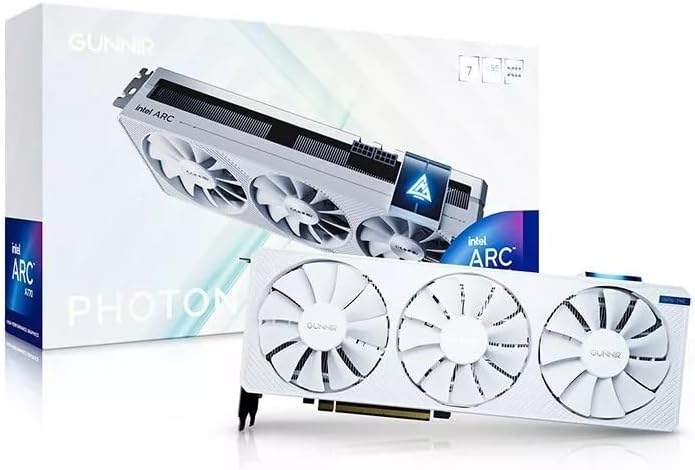
This white aesthetic card combines visual appeal with practical performance. It is perfect for builds requiring a specific color theme.
We may earn a commission when you buy through this link, at no additional cost to you.
The triple fan design ensures heat is managed effectively during gaming. The cooling system helps maintain higher clock speeds over time.
Maintenance is needed to keep the white finish looking clean. It remains a strong option for those prioritizing aesthetics without sacrificing quality.
Buy this for a visually distinct gaming setup. It offers reliable performance with a striking design.
Three fans distribute airflow evenly across the heatsink, reducing hotspots during long sessions.
The white casing blends seamlessly with light-themed builds, creating a cohesive look.
We may earn a commission when you buy through this link, at no additional cost to you.
This entry card is designed for efficiency and multi-screen utility rather than heavy gaming. It brings value to office and home theater systems.
We may earn a commission when you buy through this link, at no additional cost to you.
The four HDMI ports allow for a clean multi-monitor setup. The low power draw ensures it runs quietly without stressing the power supply.
Gaming performance is limited to older or less demanding titles. It shines as a display output provider for productivity setups.
Select this for a low-power media or office PC. It provides excellent connectivity without needing extra power.
Four HDMI ports enable direct connection to multiple displays without needing adapters or hubs.
The 50W power draw allows operation without external power connectors, simplifying cable management.
We may earn a commission when you buy through this link, at no additional cost to you.
Selecting the right Intel Arc GPU depends on understanding your workload. This guide covers the key factors to consider.
VRAM determines how large textures and datasets you can handle. 8GB is minimal for modern gaming, while 24GB or more is needed for AI models.
Prioritize cards with more memory if you plan to run complex creative work or local AI.
Newer architectures like Xe2-HPG offer better efficiency and features. They often include improved AI upscaling and media engines.
Always check the architecture name to ensure you are getting the latest technology for better longevity.
Cooling styles impact noise and airflow. Dual fans are quiet but take space, while blowers fit in multi-card setups better.
Choose your cooling style based on your case size and noise tolerance.
Check the TDP and power connectors needed. High-performance cards require robust power supplies to ensure stable operation.
Ensure your PSU has enough wattage and correct connectors before buying.
Size matters for compatibility. Large cards may not fit compact cases, so check dimensions carefully.
Measure your case clearance to avoid installation issues.
Driver maturity varies across game and application support. Professional cards have ISV certification for stability.
Verify software compatibility for your specific use case.
Check the available ports to match your monitors. DP 2.1 offers higher bandwidth than older HDMI standards.
Ensure the card supports your resolution and refresh rate.
Balance performance against cost. Entry-level cards offer good value for basic tasks, while premium ones excel at AI.
Calculate your return on investment based on your daily work.
Always install the latest drivers from the official Intel website for optimal performance and bug fixes.
Monitor temperatures regularly to ensure the cooling system is functioning correctly and avoid thermal throttling.
Avoid physical shock during transport or cleaning to protect the delicate internal components of the card.
Yes, many models like the Pro B60 are optimized for AI inference with high memory capacity. They support frameworks like PyTorch and vLLM effectively.
Most modern games run well, though older titles may need tweaks. The driver ecosystem is improving rapidly with new releases.
Absolutely. Higher VRAM allows for better textures and future-proofing. Aim for at least 8GB or 10GB for 1440p gaming.
Yes, cards with AV1 encoding and large VRAM are excellent for video workflows. They speed up export times significantly.
Yes, models like the Pro B60 offer ISV certification and optimized drivers for professional applications.
Use the Intel Arc Control panel to easily check for and install new drivers for your system.
The Intel Arc lineup offers diverse options from compact low-power cards to massive workstation GPUs. Choose based on your specific needs.
Prioritize VRAM and architecture for future-proofing. A balance of power and efficiency will serve you best long term.
Prices shift frequently. Check current deals before committing to ensure you get the best value available today.