
Handheld Inkjet Printer Portable Batch Code
4.7Editor score
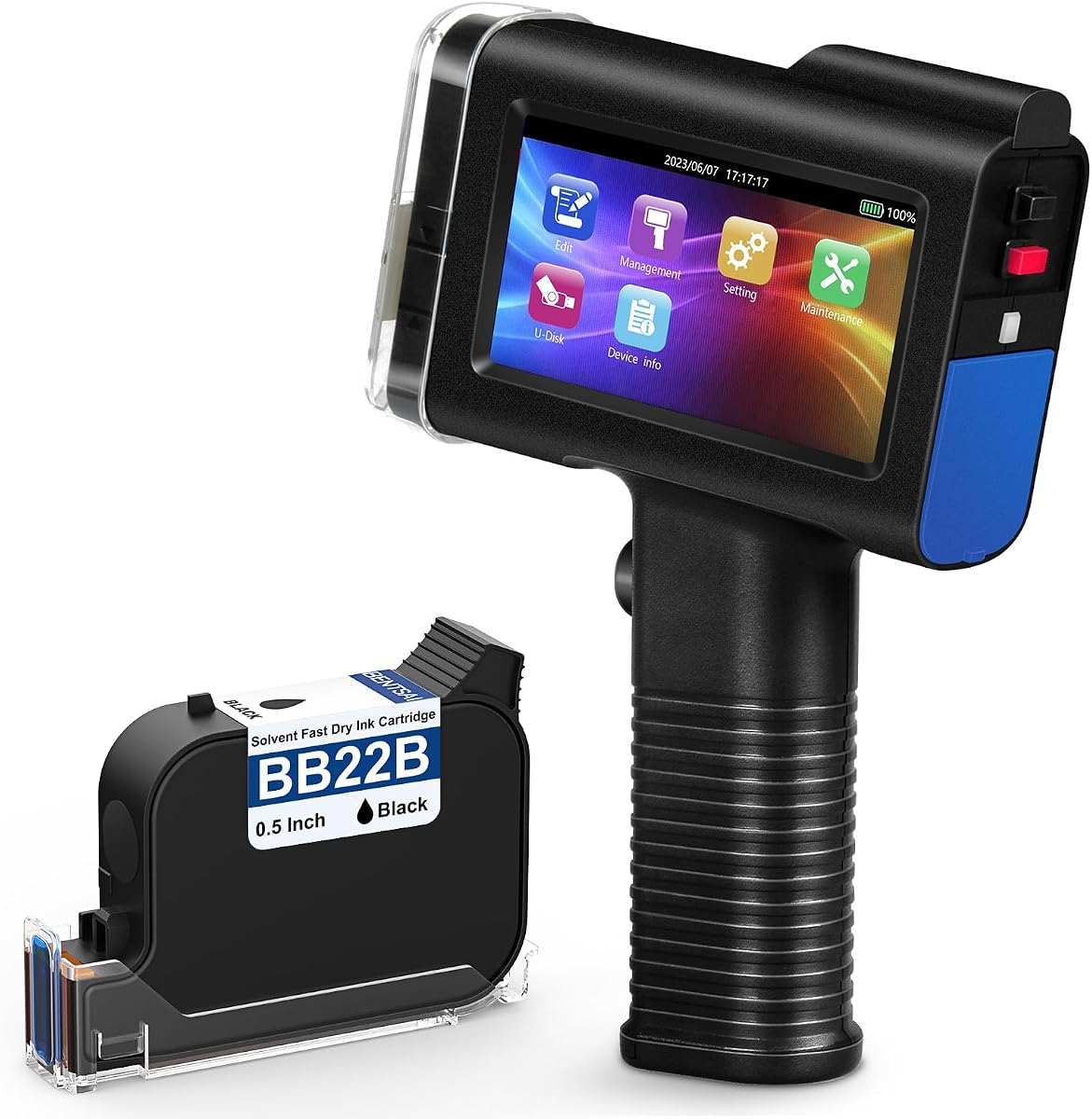
Up to 16 hours operation
42ml fast-dry ink included
4.3 inch HD touchscreen
This comprehensive guide compares the top 10 handheld inkjet printers for 2026, analyzing print height, battery life, ink capacity, and surface compatibility
Handheld inkjet printers have revolutionized how businesses mark products, boxes, and surfaces. These portable devices allow for quick, customizable coding without the need for expensive fixed systems. They are ideal for small businesses, warehouses, and manufacturing lines needing flexibility.
We evaluated ten leading models based on print quality, battery endurance, interface usability, and surface compatibility. Our analysis focuses on real-world performance metrics like drying time, character yield, and ease of template creation to ensure you get reliable value.
Each product pick highlights specific strengths and ideal use cases for different industries. While prices may fluctuate due to market demand or promotions, the core specifications and performance characteristics remain consistent for informed decision-making today.
4.7Editor score
4.4Editor score

4.3Editor score
The following table provides a side-by-side comparison of the top ten models, highlighting key specifications such as print height, battery life, and included accessories to help you quickly identify the best fit for your needs.


This handheld inkjet printer stands out as a budget-friendly option for small businesses and warehouse operations needing reliable batch coding. With a high rating of 4.7 stars, users praise its ease of use and consistent print quality on various materials like cardboard and metal.
We may earn a commission when you buy through this link, at no additional cost to you.
The device features a 4.3 inch HD capacitive touchscreen that simplifies template creation and editing directly on the unit. It comes with a 42ml fast-drying ink cartridge capable of printing over 1,140,000 characters, ensuring you rarely need to replace ink during standard shifts.
While it supports a maximum print height of 0.5 inches, this limitation is acceptable for most date and batch number applications. The inclusion of a wrist strap and alignment plate helps maintain accuracy during handheld use without requiring additional accessories.
Ideal for retail and logistics teams, this model offers the best balance of cost and performance. Its quick-dry ink ensures waterproof markings on plastic and glass, making it a practical choice for inventory management and product identification tasks.
The advanced power management system delivers up to 16 hours of continuous operation, allowing workers to complete full shifts without needing to recharge the device midway through tasks.
Users can import JPG, PNG, and BMP files via the USB port to instantly print corporate logos or custom designs, enhancing brand visibility on shipped products without needing a computer connection.
We may earn a commission when you buy through this link, at no additional cost to you.
The JC01 Handheld Inkjet Printer is engineered for high-paced environments where weight and durability are paramount. Weighing just 390 grams, it reduces hand fatigue during extended use and comes standard with a wrist strap to prevent accidental drops.
We may earn a commission when you buy through this link, at no additional cost to you.
Equipped with a 300-nozzle system, this printer ensures crisp output on materials like foam, aluminum, and wood. The solvent-based ink dries in 2 to 5 seconds, providing water-resistant markings that withstand handling and transport conditions effectively.
Although the print height is fixed at 0.5 inches, the interface supports 25 languages and allows for USB file imports. This makes it suitable for global operations where multilingual support is necessary for shipping labels and product codes.
For teams needing a lightweight solution for packaging and warehousing, this model offers a practical balance of portability and performance. The included protective suitcase ensures the device remains safe during transport between different work locations.
Redesigned for portability, the JC01 features a drop-resistant body and lightweight construction, making it ideal for workers who need to move frequently around large industrial sites.
The advanced nozzle technology handles semi-porous and non-porous surfaces well, ensuring consistent adhesion on curved and flat surfaces alike without smearing.
We may earn a commission when you buy through this link, at no additional cost to you.
The BENTSAI BT-HH6105B2 earns our Editor's Choice award for its superior 600 DPI resolution and exceptional surface compatibility. Users appreciate its ability to print clear logos and codes on challenging materials like cement, leather, and curved containers.
We may earn a commission when you buy through this link, at no additional cost to you.
It features a 4.3 inch high-resolution touch screen with an intuitive interface that simplifies coding tasks. The 42ml ink cartridge offers strong adhesion and prints over 2,000,000 characters, ensuring cost efficiency over long periods of use.
While the battery life is rated at over 8 hours, this is sufficient for most single-shift applications. The printer also supports automatic conveyor mounting, making it versatile for both handheld and semi-automated production line integration.
For businesses requiring high-detail branding or coding on irregular surfaces, this model delivers premium performance. Its user-friendly design and robust capabilities justify the higher investment for demanding industrial labeling needs.
With 600 DPI resolution, this printer produces sharp, scannable barcodes and QR codes even on rough textures, ensuring reliable reading by inventory systems.
The nozzle system adapts to porous and non-porous materials seamlessly, allowing operators to switch between cardboard and metal without adjusting settings.
We may earn a commission when you buy through this link, at no additional cost to you.
The BENTSAI BT-HH6205BL is a premium solution designed for applications requiring large, visible markings. With an adjustable print height up to 1 inch, it excels at creating bold batch numbers and logos that are easy to read from a distance.
We may earn a commission when you buy through this link, at no additional cost to you.
Its upgraded 5-roller system ensures smoother and more stable printing compared to standard 3-roller models, reducing user fatigue during prolonged operation. The device weighs only 410 grams, combining precision with portability for ergonomic handling.
The unique motherboard technology extends operation time to over 16 hours, supporting continuous workflow without frequent recharging. This reliability is backed by advanced in-house R&D and over 100 global patents, ensuring robust performance.
Best suited for large-scale manufacturing or logistics where visibility is key, this model offers unmatched height flexibility. Its industry-leading uptime and ergonomic design make it a top choice for operations prioritizing long-term reliability.
The advanced motherboard reduces recharge frequency, allowing for uninterrupted printing during long production runs or overnight warehouse sorting tasks.
The 5-roller system provides superior tracking on uneven surfaces, ensuring straight lines and consistent spacing for professional-looking codes.
We may earn a commission when you buy through this link, at no additional cost to you.
The Phezer P15 distinguishes itself by operating independently without needing a computer or mobile app connection. This standalone functionality streamlines workflow for teams that prefer direct input on the device to avoid connectivity issues.
We may earn a commission when you buy through this link, at no additional cost to you.
Powered by an upgraded Cortex-A9 quad core CPU, the device guarantees smooth and stable operation even during hours of continuous use. The 4.3 inch LCD screen supports direct input and editing, simplifying data management for complex labeling tasks.
It comes with a 42ml quick-drying ink cartridge and supports a variety of ink colors including UV and invisible options. This versatility allows for security markings or special product branding that standard black ink cannot achieve.
Ideal for environments with limited internet access or strict data security policies, this model offers reliable offline performance. Its robust CPU and direct editing features ensure efficient coding for inventory and retail management applications.
The built-in storage and independent system eliminate the need for external devices, reducing setup time and potential connectivity errors during use.
Available ink colors range from standard black to specialized UV and invisible options, expanding possibilities for security and brand differentiation.
We may earn a commission when you buy through this link, at no additional cost to you.
The MS-Z10 Handheld Inkjet Printer offers versatile performance with support for 300, 400, and 600 DPI settings. This flexibility allows users to balance print speed with quality based on the specific surface and coding requirements of their project.
We may earn a commission when you buy through this link, at no additional cost to you.
With a print height range from 0.078 inches to 0.5 inches, it handles text, barcodes, and logos across various industries. The package includes essential accessories and exquisite suitcase packing, making it easy to transport between job sites.
Although user ratings are slightly lower, the technical specifications remain competitive for small shops and DIY workshops. The auxiliary positioning plate helps maintain accuracy on curved surfaces, ensuring straight lines without requiring expensive fixtures.
For users seeking a customizable printing height and DPI options without breaking the budget, this model is a solid contender. Its portability and multi-language support make it suitable for small businesses and retail labeling needs.
The ability to switch between DPI settings allows users to optimize battery usage and ink consumption while maintaining acceptable print clarity for their needs.
The included suitcase ensures the printer and accessories are organized and protected during transport, ideal for mobile service technicians.
We may earn a commission when you buy through this link, at no additional cost to you.
This 1 Inch Handheld Inkjet Printer simplifies the labeling process for beginners with its user manual and intuitive interface. The infrared aiming assist helps improve print positioning accuracy, reducing waste caused by misaligned codes on packaging materials.
We may earn a commission when you buy through this link, at no additional cost to you.
With a maximum print height of 1 inch, it is well-suited for creating highly visible expiration dates and batch numbers. The 42ml quick-drying ink dries in less than 2 seconds, offering waterproof and fade-resistant results for durable markings.
The leak-proof self-locking ink cartridge mechanism prevents messes and ensures reliable operation during daily use. It supports continuous operation up to 16 hours, making it suitable for commercial, warehouse, and packaging environments alike.
For new users who need a reliable and straightforward device, this model offers a gentle learning curve. Its large print height and aiming assist features make it an excellent choice for teams prioritizing accuracy and visibility.
The infrared aiming assist guides the operator to align the print head correctly, reducing errors when marking irregular or curved surfaces.
The waterproof and fade-resistant ink ensures that critical product information remains legible throughout the supply chain lifecycle.
We may earn a commission when you buy through this link, at no additional cost to you.
The XMINI Handheld Inkjet Printer is designed for extreme portability, weighing only 0.54 pounds. Its compact size makes it easy to carry in a pocket or bag, ideal for workers who move constantly between different locations in a facility.
We may earn a commission when you buy through this link, at no additional cost to you.
It features a 2.4 inch resistive touch screen that is durable and anti-interference. The device supports 7 different ink colors, allowing for flexible branding or color-coded inventory management systems without needing multiple devices.
The included touch pen helps avoid accidental touches on the screen, ensuring accurate input during fast-paced operations. It supports 28 languages and direct PC connection for customized content import if needed.
For businesses prioritizing weight and color options, this model offers a unique value proposition. Its ease of carry and specialized ink availability make it a strong candidate for retail tagging and specialized inventory sorting tasks.
The availability of seven ink colors allows for visual categorization of products, improving warehouse organization and retrieval speed.
The included touch pen ensures accurate data entry on the resistive screen, preventing input errors caused by accidental finger touches.
We may earn a commission when you buy through this link, at no additional cost to you.
The E12 Mini Handheld Inkjet Printer offers a unique dual-use design with a detachable handle that converts into compact mini mode. This versatility allows for true pocket-sized portability, perfect for warehouse ladders and outdoor coding tasks.
We may earn a commission when you buy through this link, at no additional cost to you.
Weighing only 1.1 lbs, it is engineered for challenging surfaces like corrugated cardboard and metal components. The proprietary quick-dry formula achieves waterproof adhesion in less than 3 seconds, ensuring consistent print quality during rapid operations.
Its ability to print 360 degrees on uneven or curved surfaces makes it ideal for bottles and tubes. The precision stylus and positioning board included in the kit help ensure accuracy even when printing in tight spaces.
For teams working in confined areas or needing a portable solution for spot checks, this mini printer is highly effective. Its high rating reflects its reliability and ease of use for quick inventory verification and labeling.
The detachable handle allows users to switch between a full grip for stability and a mini mode for tight spaces, adapting to various task requirements.
The proprietary ink formula dries rapidly, allowing operators to stack or ship items immediately without waiting for the ink to set.
We may earn a commission when you buy through this link, at no additional cost to you.
The 0.5 Inch Nozzle Handheld Inkjet Printer simplifies batch coding with direct USB data upload capabilities. Users can plug in a drive and print TXT, JPG, JPEG, or BMP files without needing extra software or complex setup procedures.
We may earn a commission when you buy through this link, at no additional cost to you.
With a print height range from 0.03 to 0.5 inches, it handles a variety of coding needs from small serial numbers to larger batch codes. The ergonomic grip and built-in wrist strap ensure comfortable handling during extended daily use.
The printer offers over 16 hours of continuous operation, standing ready to address sudden printing needs at any moment. This long-lasting power ensures that unexpected labeling requirements can be handled without workflow interruptions.
For small businesses needing a straightforward tool for variable data, this model is an efficient choice. Its simple plug-and-play file import and long battery life make it a reliable assistant for daily production tasks.
Direct USB upload eliminates the need for drivers or computer connectivity, allowing operators to quickly update print data on the spot.
The lightweight body and wrist strap reduce physical strain, making it comfortable for repeated use throughout long work shifts.
We may earn a commission when you buy through this link, at no additional cost to you.
Selecting the right handheld inkjet printer requires evaluating specific technical factors to ensure it meets your operational demands. Consider these key aspects to find a model that balances performance, cost, and reliability.
The maximum print height determines the size of characters you can create. Standard models offer 0.5 inches, while premium units reach up to 1 inch for larger labels. Additionally, higher DPI (dots per inch) ensures sharper graphics and scannable barcodes.
Prioritize a model that offers at least 0.5 inch height and 300 DPI for clear, professional markings on most surfaces.
Battery endurance is crucial for uninterrupted workflow in warehouses and factories. Most models offer between 8 to 16 hours of continuous operation. Look for features like advanced power management to maximize uptime.
Choose a printer with at least 10 hours of battery life to avoid interruptions during standard work shifts.
Ink cartridges typically hold around 42ml, but drying time varies. Quick-drying inks that set in 2-5 seconds prevent smudging on fast-moving conveyor belts. Waterproof and fade-resistant ink ensures durability on products exposed to handling or weather.
Select printers with fast-drying, solvent-based ink to ensure clear, durable codes on various materials.
Touchscreens simplify template creation and editing. A 4.3 inch HD capacitive screen is preferable to smaller resistive ones for ease of use. Check if the interface supports your languages and allows for USB file imports for convenience.
Ensure the device has an intuitive interface and sufficient language support for your team members.
Different models handle surfaces like cardboard, metal, glass, and curved containers differently. Advanced nozzle systems are better suited for rough or semi-porous materials like wood and cement. Verify the printer's adhesion capabilities before purchase.
Pick a printer specifically tested for your primary materials to ensure ink adhesion and print clarity.
Handheld printers should be lightweight to reduce fatigue. Units weighing under 400 grams are ideal for workers who move frequently. Features like wrist straps and protective cases further enhance portability and safety.
Opt for a lightweight model with ergonomic features if mobility is a priority in your workspace.
While many printers work independently, some offer Bluetooth or Wi-Fi capabilities for remote management. However, standalone models with USB ports are often sufficient for basic coding. Look for support for custom file formats like JPG or PNG.
Evaluate whether you need standalone operation or advanced connectivity based on your facility's infrastructure.
Technical support can save time when issues arise. Look for manufacturers offering at least a 1-year warranty and prompt customer service. Training resources like videos or manuals also contribute to a smooth setup experience.
Choose brands with strong support networks to ensure quick resolution of any operational issues.
Before first use, charge the battery fully and install the ink cartridge carefully to avoid spills. Calibrate the screen using the provided stylus if necessary to ensure accurate touch responses and correct positioning during operation.
When printing, hold the device steady at the recommended distance from the surface. Use the alignment plates or infrared aiming assist to ensure straight lines. For curved surfaces, rotate the printer slowly to maintain even coverage.
After use, replace the protective cap on the print head immediately to prevent the ink from drying out and clogging the nozzles. Store the printer in a cool, dry place and charge the battery periodically to maintain health.
Most cartridges hold 42ml of ink and can print over 1 million characters depending on font size. This typically lasts several weeks or months depending on the volume of daily use.
Yes, many models are designed to handle curved surfaces with the help of alignment plates. Ensure you hold the printer steady and rotate it slowly for consistent results.
No, most handheld models are standalone devices with internal memory. You can edit templates directly on the device or import files via USB without needing a computer.
Standard black is common, but some models offer white, yellow, red, blue, green, invisible, or UV options. Availability depends on the specific manufacturer and model chosen.
Professional quick-drying inks typically dry in 2 to 5 seconds. This ensures prints are water-resistant and ready for handling almost immediately after printing.
Most manufacturers offer a 1-year warranty covering defects. Check the product page for details on technical support and return policies specific to the brand.
Yes, all reviewed models support standard barcode and QR code formats. Ensure the print resolution is sufficient for your scanner to read the codes accurately.
The best handheld inkjet printer depends on your specific needs. Our top picks cover budget, resolution, and premium height options to suit various operational requirements effectively.
Prioritize battery life and surface compatibility to ensure the device works reliably in your environment. High-resolution models are ideal for branding while budget options serve general inventory coding.
Remember that prices and availability can change over time. Always check current listings and verify warranty details before making your final purchase decision today.