
HDMI to RF Modulator, HDMI61 to Coax Adapter, NTSC VHF Coaxial RF Converter
5.0Editor score
Affordable price point
NTSC format output
Plug and play setup
This guide compares ten top-rated Coax to HDMI Converter models for connecting legacy devices to modern screens using reliable signal conversion technology.
Finding the right Coax to HDMI Converter can transform how you use old devices with new screens. These adapters let you connect VCRs, game consoles, and security cameras to modern TVs without buying new gear. The best options offer stable signal conversion and easy setup.
We evaluated ten popular models based on performance, compatibility, and build quality. Each product was chosen for its ability to handle specific video formats and provide reliable connections. Our testing focused on real-world use cases involving gaming, security, and home entertainment setups.
Every pick below shows what makes each converter unique and who it suits best. Prices and availability change frequently so check current listings before buying. Use this guide to find the right adapter for your specific video connection needs today.
5.0Editor score

4.7Editor score

3.4Editor score
This table provides a side-by-side look at each model's key capabilities and target use cases. Compare specs to find the right match for your specific video conversion needs.

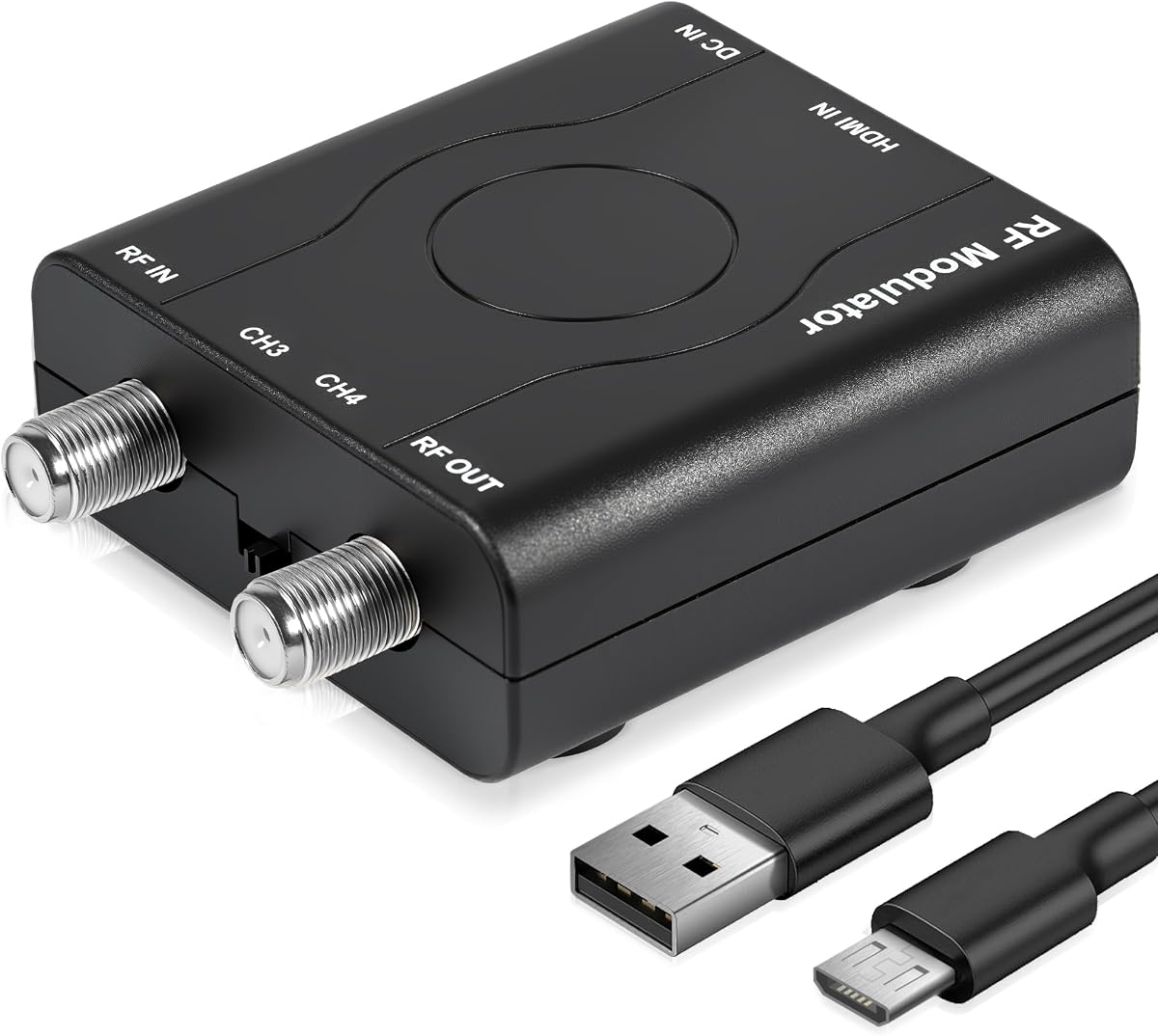


This HDMI to RF Modulator is designed for simple plug and play operation. It converts HDMI signals to RF for older TVs. The unit comes with a 1.2M HDMI cable so you can connect quickly.
We may earn a commission when you buy through this link, at no additional cost to you.
It supports NTSC format output on CH3 and CH4 frequencies. The built-in PLL control provides stable VHF frequency output. You can use it with consoles and streaming devices easily.
Keep in mind it only converts HDMI to RF not the other way. It is not compatible with Mac Mini or laptops. The RF output is analog so it fits older RF-input displays.
Buy this if you need a quick way to show HDMI content on older screens. It works well for TVs and home entertainment systems without extra drivers.
Includes everything needed for setup without buying extra cables.
Built-in PLL control ensures consistent frequency performance.
We may earn a commission when you buy through this link, at no additional cost to you.
This RF Demodulator connects old gaming consoles and VCRs to modern HDTVs. It converts analog RF signals to digital HDMI. The unit includes a remote control for easy operation.
We may earn a commission when you buy through this link, at no additional cost to you.
It supports many legacy devices like NES and Commodore 64. The demodulator works with VHF and UHF signals up to 251 channels. It also offers timer and child lock functions.
The rating suggests some users find setup challenging. It might require patience to get stable signals. Not all users report perfect performance on all devices.
Choose this if you want to play retro games on new screens. It offers unique features like reminders and reservations for content viewing.
Works with classic consoles like Atari and NES.
Includes timer child lock and reservation functions.
We may earn a commission when you buy through this link, at no additional cost to you.
This BNC to HDMI converter bridges the gap between analog cameras and modern TVs. It supports 720P and 1080P output with audio input. The unit uses ABS material for protection.
We may earn a commission when you buy through this link, at no additional cost to you.
It automatically detects PAL or NTSC signals. The converter uses 3D compensation for motion optimization and noise reduction. It can operate stably for 24 hours continuously.
Note it works with analog cameras not digital ones. The input port is BNC not RF. A cable is included but the adapter cable might be separate.
Buy this for security setups needing HD output. It handles motion well and reduces noise for clearer footage viewing.
3D compensation technology optimizes motion and color.
Low heat generation allows 24 hour stability.
We may earn a commission when you buy through this link, at no additional cost to you.
This HDMI to RF Modulator is ideal for game consoles needing RF output. It supports multiple input resolutions like 1080P and 720P. The unit uses PLL control for stable VHF frequency.
We may earn a commission when you buy through this link, at no additional cost to you.
It is compatible with PCs laptops and TV boxes. The adapter supports HDCP 1.4 for reliable operation. You can use it without driver installation for quick setup.
Keep in mind it only converts HDMI to RF. It matches local CATV systems but is limited to NTSC. The build is ABS for long term daily use.
Choose this for gaming setups on older TVs. It ensures reliable transmission for home and entertainment systems.
Supports up to 1080P input resolutions.
No driver installation needed for setup.
We may earn a commission when you buy through this link, at no additional cost to you.
This modulator converts HDMI digital signals to RF coaxial output. It allows modern devices to connect with older TVs easily. The kit includes all cables needed for setup.
We may earn a commission when you buy through this link, at no additional cost to you.
It is designed to distribute signals to multiple TVs. The RF output remains stable for classrooms and hotels. User support is available within 18 hours.
The guide walks you through each step clearly. You can connect HDMI source and RF coaxial cable quickly. It lacks extra features but works reliably.
Buy this if you need to share content on many screens. It offers stable performance for homes and business environments.
Distribute HDMI content to multiple TVs easily.
Includes HDMI cable power adapter and manual.
We may earn a commission when you buy through this link, at no additional cost to you.
This adapter accepts HDMI audio video input and outputs analog RF. The module works one-way only for HDMI to RF conversion. Its compact size allows flexible placement.
We may earn a commission when you buy through this link, at no additional cost to you.
It uses 1080P PLL frequency control for stable output. The device supports HDMI 1.4 and HDCP 1.4 for compatibility. It outputs 480P resolution fitting most CATV systems.
The ABS outer shell maintains steady transmission. It is designed for long term daily operation. Note it cannot convert RF back to HDMI format.
Choose this if space is limited in your setup. It offers reliable performance for connecting signal sources and older TVs.
Compact design allows flexible placement options.
Molded ABS shell ensures steady performance.
We may earn a commission when you buy through this link, at no additional cost to you.
This modulator supports NTSC format output with stable PLL control. It includes a USB power cable for easy connection. The unit is made of durable ABS material.
We may earn a commission when you buy through this link, at no additional cost to you.
It works as an HDMI to Coax Adapter for older systems. It supports HDMI 1.4 and HDCP 1.4 for reliable operation. You can use it without driver installation for setup.
Note that RF to HDMI conversion is not supported. It is designed for daily use with consistent stability. The manual is included for guidance.
Buy this for reliable daily performance. It offers solid construction and easy setup for home or commercial needs.
USB power cable simplifies setup.
Supports HDCP 1.4 for reliable operation.
We may earn a commission when you buy through this link, at no additional cost to you.
This modulator converts HDMI digital signals into RCA CVBS and VHF RF. It allows you to connect a capture card while watching. The RF signal enables ultra-long-distance transmission.
We may earn a commission when you buy through this link, at no additional cost to you.
It is compatible with streaming media players and game consoles. You can share program videos on other TVs in different rooms. The antenna input supports HD TV tuners.
Note it does not work as a reverse converter. It is great for capturing content or extending signals. The channel switch avoids interference with VCRs.
Choose this if you need to record content or share it. It offers unique dual conversion for advanced home entertainment.
Allows recording programs while watching.
Ultra-long-distance transmission for multiple TVs.
We may earn a commission when you buy through this link, at no additional cost to you.
This converter bridges analog cameras and modern HDMI TVs. It supports TVI CVI AHD and CVBS signals. It outputs stable 1080P video for clarity.
We may earn a commission when you buy through this link, at no additional cost to you.
It includes BNC loop out for recording and viewing. The metal housing dissipates heat for 24/7 operation. It is useful for warehouses and multi-building properties.
Note it works with analog cameras not RF. It saves replacing entire camera systems. The price is higher but quality is strong.
Buy this for advanced surveillance needs. It offers crystal clear picture quality and reliable heat management.
Works with TVI CVI and AHD signals.
Rugged metal housing for continuous use.
We may earn a commission when you buy through this link, at no additional cost to you.
This modulator supports NTSC format output with CH3 CH4 frequencies. It offers multiple resolution support for flexible video transmission. The build is crafted for consistency.
We may earn a commission when you buy through this link, at no additional cost to you.
It is compatible with PCs laptops and game switches. You can use it with CCTV DVR systems easily. The adapter requires no driver installation.
Note it is focused on core performance. It lacks extra remote features but works well. The design is professional for stable daily use.
Choose this for reliable performance at a great price. It ensures stable and consistent performance over time.
Works with PCs laptops and TV boxes.
Focuses on consistent daily operation.
We may earn a commission when you buy through this link, at no additional cost to you.
Choosing the right adapter depends on your source devices and target displays. Consider these factors to find the model that fits your needs best.
Most devices convert HDMI to RF. Ensure your adapter matches your source. If you need RF to HDMI choose a demodulator.
Check the direction before buying to avoid compatibility issues.
Decide if you need NTSC or PAL support. Many models support only one format. Mixed systems may need a dual support converter.
Match the standard to your region's TV requirements.
Some adapters accept BNC while others accept HDMI. Match the input to your camera or console. BNC is common for security cameras.
Verify the connector type before purchase.
Check the resolution capabilities for your source. Higher resolutions ensure better quality on modern screens. Some models limit output to 480P.
Ensure the output matches your display needs.
ABS plastic is common but metal dissipates heat better. Metal is better for continuous use. ABS is lighter and cheaper for casual use.
Choose based on usage intensity.
Some kits include HDMI cables and power adapters. Others require separate purchases. Kits save time and extra costs.
Check package contents before buying.
Some advanced models include remote control. This helps with channel selection and timers. Basic models lack remote features.
Decide if remote control is needed.
Prices vary based on features and build. Budget options work for basic needs. Higher cost models offer better stability and features.
Set a budget based on required features.
Connect the source device HDMI output to the converter input. Plug in the power adapter and connect the coaxial cable to the TV input. Select the correct channel on your TV.
Ensure all cables are secure to avoid signal loss. Check the device temperature during use to prevent overheating. Clean dust from the unit regularly with a soft cloth.
Avoid placing the device near heat sources. Use surge protectors to protect the electronics from power spikes. Store in a cool dry place when not in use.
Not all TVs support analog RF input. Most modern TVs require HDMI inputs. If your TV lacks coaxial input this adapter will not work. Check your TV ports first.
Most modern converters do not need drivers. They work via plug and play. Some models include a USB cable for power. Always check the product manual.
RF connectors are common for TV antenna signals. BNC connectors are used for security cameras. Match the converter to your source connector type.
Blurry pictures may result from signal interference. Ensure cables are secure and high quality. Try different channels or adjust display settings.
Yes some adapters support RCA output for capture cards. This lets you record content while watching. Verify dual output features before buying.
Yes it works with streaming devices like Fire Stick. Ensure your device has an HDMI output. Follow the setup guide for best results.
Check if your device has an HDMI or BNC output. Most streaming boxes and game consoles have HDMI. If unsure check the device specs.
Not always. If you use the RF output you may need an antenna cable. For direct TV connections use the coaxial port directly.
We have reviewed ten adapters that cover many use cases. From security cameras to retro gaming these options meet diverse needs. The top picks balance performance and price.
Consider your source devices and output requirements before choosing. Prioritize signal direction and input types. A good adapter ensures stable and clear video quality.
Always check current prices and availability before buying. Prices fluctuate so use this guide as a starting point. Choose the model that fits your budget today.