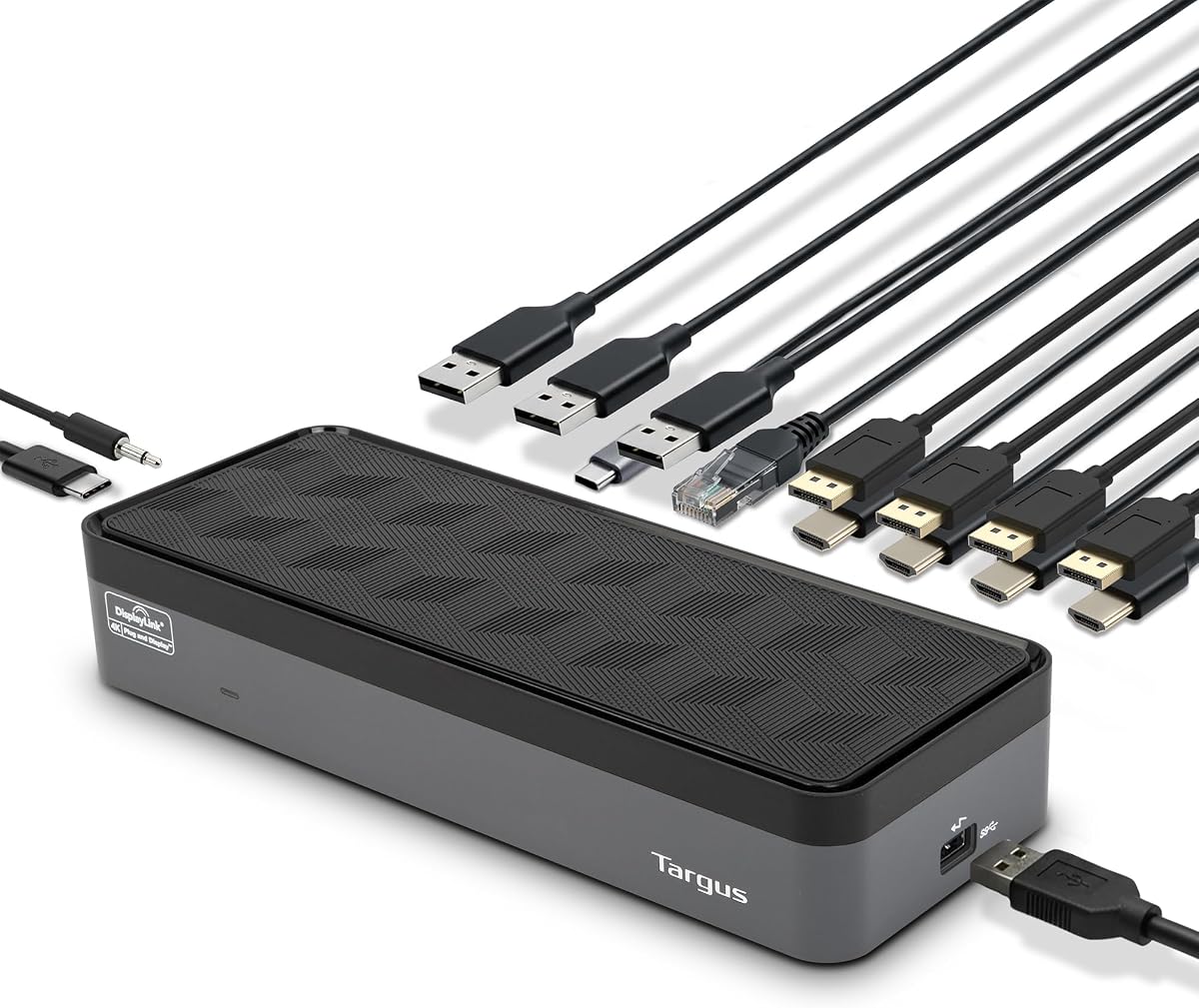
Targus USB-C Universal Quad 4K Docking Station
4.4Editor score
Four 4K UHD displays
100W power delivery
Multiple USB ports
This guide compares the top 10 docking stations with quad monitor support for Mac and Windows, highlighting display limits, power delivery, and port selection
Finding a docking station with quad monitor support is essential for modern professionals who need expansive screen real estate. Whether you are a developer, trader, or creative, four screens can transform your workflow significantly.
We evaluated ten top models based on display capabilities, power delivery, port variety, and overall compatibility. Our analysis focuses on real-world performance for multi-monitor setups across different operating systems.
Each pick includes detailed specs, pros, cons, and ideal use cases to help you choose. Prices and availability change frequently, so please verify current details before purchasing any product listed here.
4.4Editor score

4.7Editor score

4.5Editor score
This table compares all ten top docking stations side by side, highlighting key specifications like display output, power delivery, port count, and compatibility to help you find the perfect match for your workstation.

This Thunderbolt 5 dock stands out as the top choice for Apple Silicon users needing quad monitor support with maximum performance. Its driverless operation simplifies setup for IT departments while delivering robust power delivery for high-end laptops.
We may earn a commission when you buy through this link, at no additional cost to you.
The dock supports dual 6K displays on MacBook Pro/Max models and quad 4K setups on Windows. This capability ensures your workflow remains smooth even with multiple high-resolution monitors connected simultaneously for demanding tasks.
While the price is higher than many DisplayLink alternatives, the performance and compatibility justify the investment for professionals who cannot tolerate latency or compatibility issues during critical work hours daily.
Buy this if you need future-proof Thunderbolt connectivity and seamless macOS support. It is ideal for high-end workstations where reliability and speed are more important than saving a few dollars on hardware.
True driverless plug-and-play performance reduces help desk tickets and ensures consistent behavior across shared workspaces.
Support for dual 6K and quad 4K setups ensures Apple M-series chips get the most out of their display capabilities.
We may earn a commission when you buy through this link, at no additional cost to you.
The Targus QV4K is a versatile universal dock capable of supporting single 5K or four 4K UHD displays. It is designed to work with virtually any laptop, including legacy models that might struggle with newer standard docks.
We may earn a commission when you buy through this link, at no additional cost to you.
Its inclusion of power tips for brands like Dell, HP, and Lenovo makes it uniquely adaptable for mixed environments. You can expand your workstation without needing specific adapters for each different laptop model on your desk.
Note that HDMI is limited to 50Hz, which might affect refresh rates on gaming monitors. However, DisplayPort supports 60Hz, ensuring high-quality visuals for productivity and professional creative work environments effectively.
This dock is perfect for offices needing a single solution for diverse hardware. If you manage multiple laptop brands or have older models, the universal support tips are a significant convenience for IT teams.
The dock is compatible with Alt Mode hosts and includes power tips for legacy hosts like Acer, ASUS, and Dell.
Supports single 5K and four 4K UHD displays via DisplayPort or HDMI ports for clear professional visuals.
We may earn a commission when you buy through this link, at no additional cost to you.
Offering 18 ports and four HDMI outputs, this TobenONE dock provides exceptional value for users needing extensive connectivity. It supports quad 4K displays on Windows and triple on Mac, making it a versatile choice.
We may earn a commission when you buy through this link, at no additional cost to you.
The included 120W power adapter ensures your laptop and dock are charged fully without extra cables. This simplifies your desk setup significantly and keeps your workspace tidy while maintaining high-performance output.
The main trade-off is the requirement to install DisplayLink drivers, which adds a setup step. However, once installed, performance is stable and the port selection covers virtually all your peripheral needs effectively.
Buy this if you need maximum ports and budget-friendly quad monitor support. It is ideal for home offices or workstations where you have many devices to connect and want to avoid buying separate hubs.
With 18 ports including 4 HDMI, USB 3.2, and card readers, this dock handles diverse connection needs easily.
The 120W adapter provides up to 100W to the laptop and charges phones via front USB-C ports.
We may earn a commission when you buy through this link, at no additional cost to you.
This product listing lacks specific details in our current data, so please verify its actual specs on Amazon. It may be a generic model requiring careful review before purchase to ensure it fits your needs.
We may earn a commission when you buy through this link, at no additional cost to you.
Check the product page for display support details like 4K capability and power delivery ratings. Ensure the port count matches your requirements since data is not explicitly confirmed here.
Many generic docks offer similar features to branded ones but vary in build quality. Reading customer reviews is essential to confirm reliability and compatibility with your specific laptop and monitors.
Buy this only if the verified specs match your needs. It might be an option if you find a deal that fits your budget, but prioritize detailed product information for critical workstations.
Please check the Amazon listing for exact specifications before purchasing to ensure compatibility with your setup.
We may earn a commission when you buy through this link, at no additional cost to you.
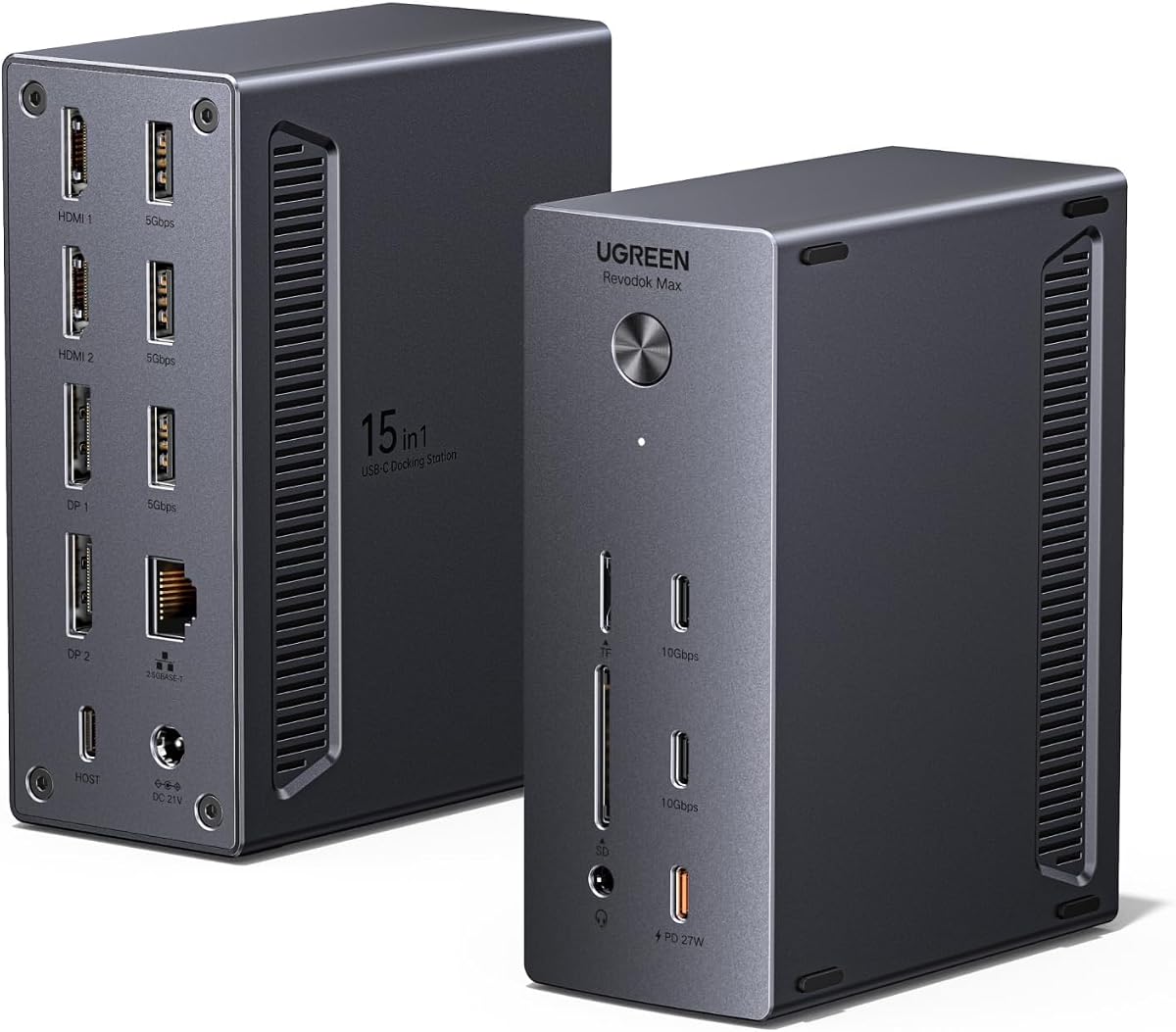
The UGREEN dock offers robust performance with 2.5GbE networking and dual USB-C data ports. Its 150W adapter ensures sufficient power for laptops and peripheral charging, making it a strong choice for heavy data transfer.
We may earn a commission when you buy through this link, at no additional cost to you.
It supports up to four 4K displays and even 8K on specific ports, delivering high-resolution visuals for professional work. The dynamic power sharing allows you to charge both your laptop and phone efficiently.
Be aware that installing drivers is necessary, and if you use the dedicated phone port for high power, the laptop charging speed may adjust accordingly. This trade-off is minor for most setups.
Buy this if you need fast networking and reliable power. It is perfect for data-heavy workstations where file transfer speeds and consistent charging are top priorities for your daily productivity.
Dual USB-C 10Gbps ports and 2.5GbE Ethernet provide fast, stable connections for workstations and home offices.
The 150W adapter delivers up to 100W to laptops and 27W via PD-out for simultaneous charging of devices.
We may earn a commission when you buy through this link, at no additional cost to you.
This TobenONE dock is optimized for triple 4K displays on Mac and quad on Windows, ideal for stock traders and developers. The 120W adapter ensures your laptop is fully powered without needing an extra brick.
We may earn a commission when you buy through this link, at no additional cost to you.
It features 18 ports including HDMI, DP, and USB, covering all your connection needs. Data transfer speeds reach 10Gbps for rapid file movement between external drives and your laptop seamlessly.
Mac users should note the display limit compared to Windows. However, for most creative workflows, three 4K screens provide ample space. The driver support is robust for macOS and Windows systems.
Buy this if you need reliable triple or quad monitor setups. It is great for financial analysis or content creation where multiple screens help organize complex information effectively on one desk.
Supports up to 4 monitors on Windows and 3 on Mac for extended visual productivity and multitasking.
The 120W power adapter charges laptops with up to 100W and phones with 18W for convenience.
We may earn a commission when you buy through this link, at no additional cost to you.
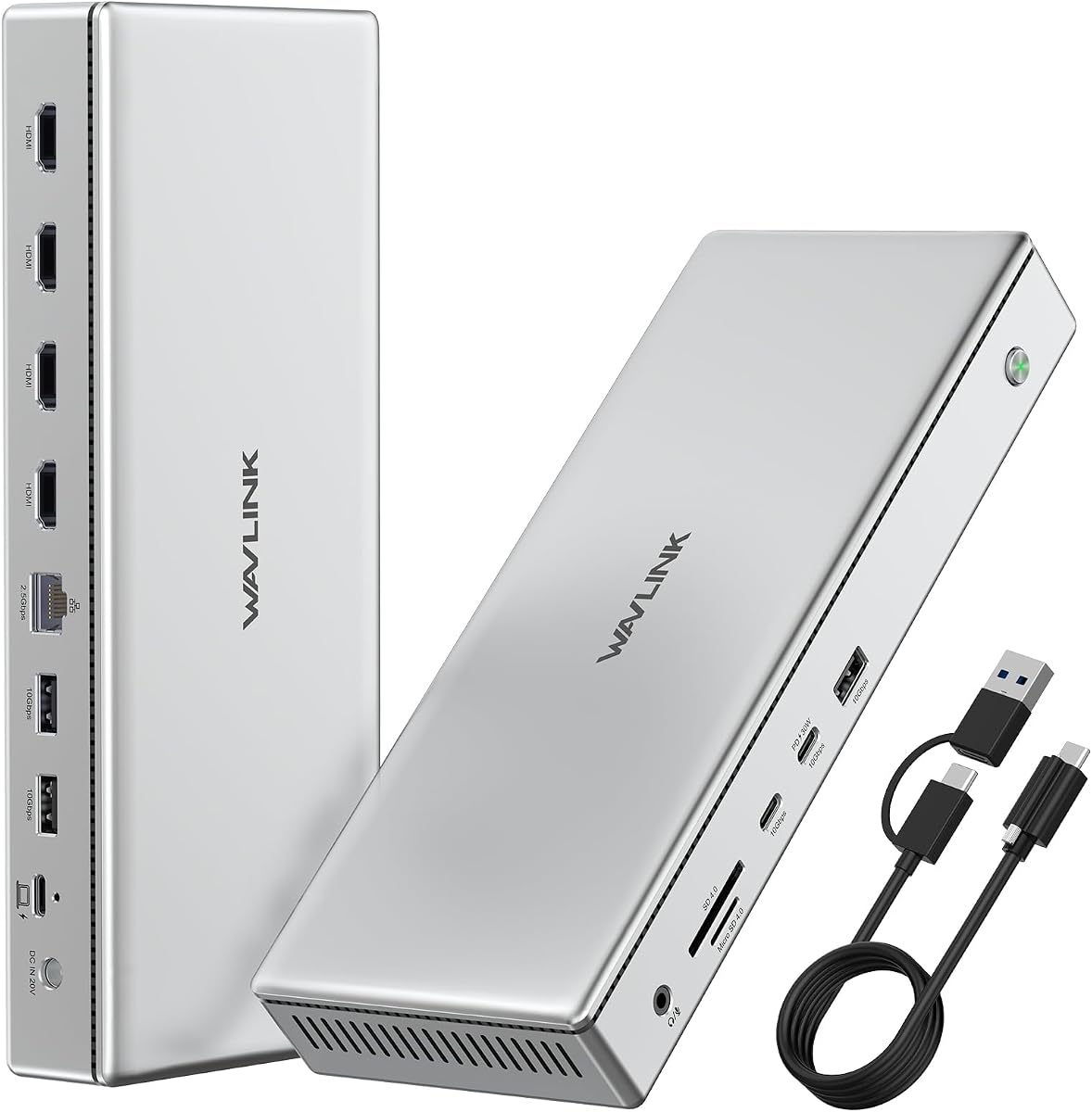
The WAVLINK Pro dock breaks the Mac display limit with four 4K HDMI outputs via DisplayLink. It also includes a 160W adapter for powerful charging, ensuring your laptop stays on for long work sessions.
We may earn a commission when you buy through this link, at no additional cost to you.
With 2.5G Ethernet, this dock is excellent for high-bandwidth network tasks. The aluminum build helps with heat dissipation, keeping the dock cool even under heavy load with multiple monitors connected.
Note that macOS limits displays to three unless using specific workarounds, but Windows users get full quad support. The 10Gbps USB ports ensure fast data speeds for large file transfers efficiently.
Buy this if you need fast networking and quad 4K on Windows. It is great for creators who need high-speed storage access and a stable, fast internet connection for their workstation setup.
2.5G Ethernet ensures fast, stable wired networking for workstations and home offices needing high bandwidth.
The 160W adapter supports 10Gbps USB transfers and charges laptops up to 100W simultaneously.
We may earn a commission when you buy through this link, at no additional cost to you.
Choosing the right quad monitor dock requires balancing display support, power delivery, and port needs. This guide walks you through the key factors to ensure your new dock enhances your workflow.
Ensure the dock supports four displays at your desired resolution. Some docks only support triple monitors on Mac due to OS limitations. Check if the dock supports 4K 60Hz or if it requires 50Hz for HDMI outputs.
Select a dock that matches your monitor's resolution requirements for smooth performance.
Look for at least 100W power delivery to charge high-end laptops while using external peripherals. Docks with 120W or higher can often power both the laptop and a mobile device simultaneously. Verify the wattage is sufficient for your specific laptop model.
Higher wattage ensures your device stays charged during long work sessions.
Confirm the dock supports your laptop's connection type, such as Thunderbolt 5, USB4, or standard USB-C. Thunderbolt docks are generally faster and offer higher display bandwidth than standard USB-C ones. Check your laptop's port specifications before purchasing.
Matching the connection type ensures maximum performance and compatibility with your devices.
Count the USB ports, Ethernet speed, and card readers you need for your workflow. Some docks offer 2.5G Ethernet while others stick to standard Gigabit. Also check for audio jacks if you use external speakers or microphones often.
Adequate ports prevent the need for additional hubs and keep your desk organized efficiently.
Docks using DisplayLink require driver installation which adds setup time but enables quad 4K on standard USB-C ports. Native Thunderbolt docks offer driverless plug-and-play convenience which is better for IT environments. Check system requirements before buying.
Driverless is ideal for ease of use while DisplayLink offers more flexibility for display count.
Verify compatibility with your specific OS version. Windows often supports more display modes than macOS due to hardware limitations. Some docks explicitly state support for Windows 10 or later and macOS 11+.
Check OS compatibility to avoid display limitations that might affect your intended multi-monitor setup.
Aluminum chassis offer better heat dissipation than plastic models during extended use. Look for features like integrated security lock slots for physical protection in shared workspaces. A sturdy build extends the lifespan of the hardware over time.
Better build quality ensures reliability and longevity for your daily professional workflow needs.
Reliable technical support is crucial when setting up complex multi-monitor configurations. Choose brands that offer lifetime support and compatibility guarantees. Good support saves time troubleshooting issues that may arise after purchase.
Strong customer support ensures you can resolve setup issues quickly and maintain productivity.
Connect the dock to your laptop using a high-quality USB-C or Thunderbolt cable. Ensure the power adapter is plugged in before connecting any monitors to provide stable power delivery during setup.
Install the latest drivers if required for DisplayLink docks. Restart your computer after installation to ensure all displays are recognized correctly by your operating system for optimal performance.
Keep the dock in a well-ventilated area to prevent overheating during extended sessions. Clean dust from the ports regularly using compressed air to maintain reliable connectivity over time.
Not all laptops support four external monitors natively. Thunderbolt 4 or USB4 laptops typically support quad displays, while standard USB-C laptops often require DisplayLink technology. Check your laptop's manual to confirm maximum supported displays.
Yes, high-quality DisplayPort 1.4 or HDMI 2.0 cables are recommended for 4K 60Hz output. Ensure the dock supports the cable standard to avoid flickering or resolution drops on your screens.
MacOS has hardware display limits that restrict the number of external displays. Some docks use DisplayLink to bypass this, but native support varies. Always check Mac compatibility notes before buying.
Most business laptops can run and charge on 100W. However, high-performance gaming laptops may require more. Check your laptop's power requirements to ensure the dock provides enough wattage for your setup.
Thunderbolt docks typically do not require drivers as they use native OS support. DisplayLink docks require driver installation to enable multiple displays on standard USB-C ports. Check the product specs to confirm.
Daisy chaining depends on your monitor's support for DisplayPort MST. Some docks allow this to reduce cable clutter. Check both your dock and monitor specs to confirm if daisy chaining is supported.
Flickering is often caused by insufficient bandwidth or driver issues. Update your dock's drivers and ensure cables are properly connected. Reducing resolution or refresh rate may also help stabilize the display.
Thunderbolt is a subset of USB-C offering higher speed and display bandwidth. Thunderbolt docks support more displays and faster data transfer. Ensure your laptop has the correct port for the dock you choose.
We reviewed ten top docking stations that offer quad monitor support for both Mac and Windows users. The StarTech Thunderbolt 5 dock leads with its driverless support and high performance for Apple Silicon devices.
Prioritize your needs: choose DisplayLink for cost-effective expansion on standard USB-C, or Thunderbolt for native performance. Consider power delivery and port selection to match your specific devices and workflow requirements effectively.
Prices and availability change frequently so verify current details on Amazon before buying. Check current prices to ensure you get the best deal for your specific setup today.