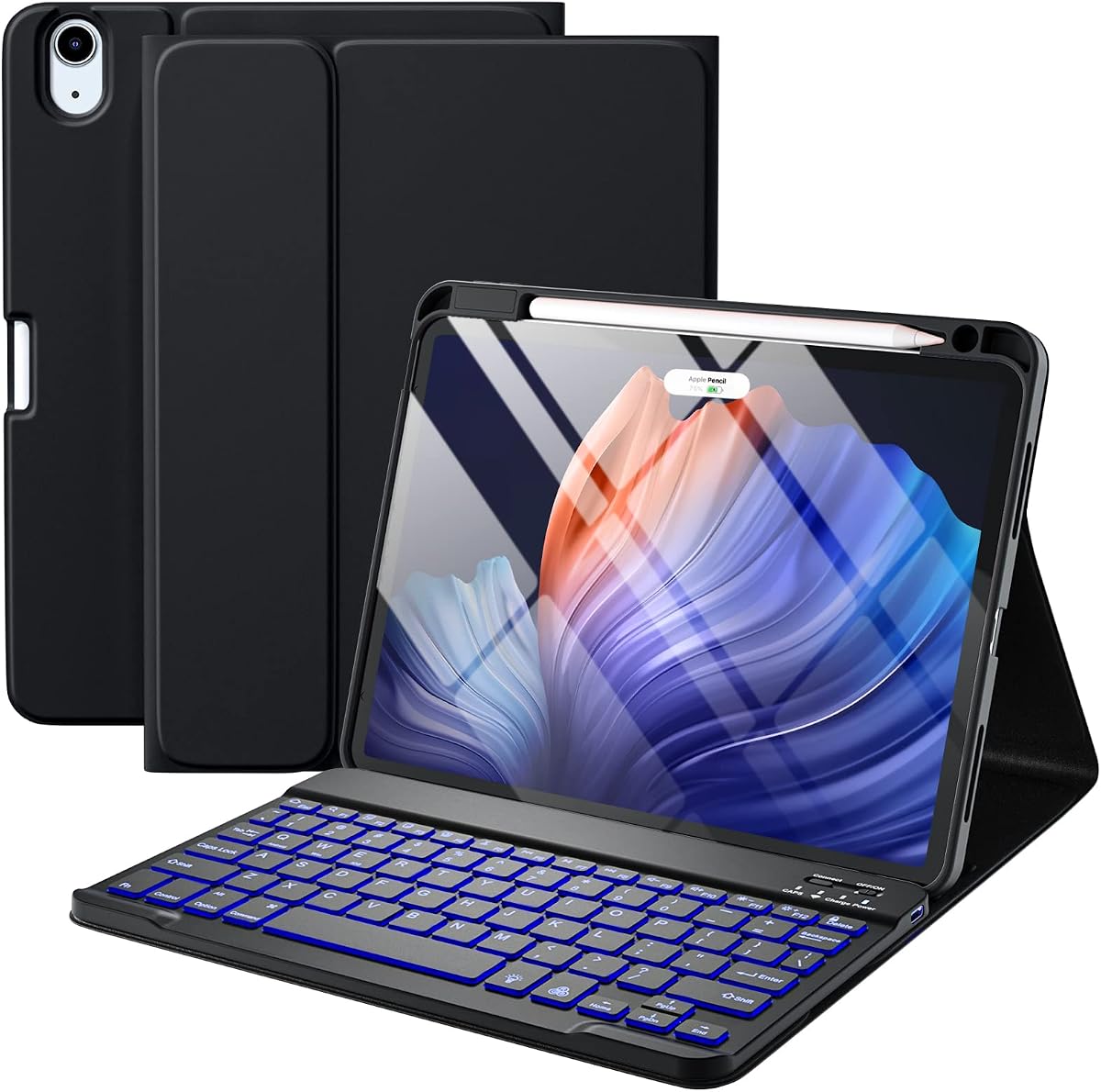
Harvopu Case with Keyboard
4.3Editor score
Detachable backlit keyboard
Supports pencil charging
Multiple viewing angles
This guide compares the top iPad Air Folio Case with Keyboard options for productivity, protection, and typing comfort across multiple iPad Air generations.
Finding the right iPad Air Folio Case with Keyboard can transform your tablet into a powerful workstation. A good case offers protection while the keyboard adds essential typing capabilities for work and creativity.
We evaluated ten top-rated models based on build quality, typing experience, trackpad performance, and compatibility. Each option provides unique features to suit different needs and budgets for iPad Air users.
Each review highlights key strengths, weaknesses, and ideal use cases to help you decide. Prices may vary so check current listings before purchasing to ensure you get the best value available today.
4.3Editor score

4.5Editor score

4.5Editor score
This side-by-side comparison helps you quickly identify key differences between the top ten models available for iPad Air users seeking a folio keyboard solution.




This Logitech Flip Folio ranks highly among top contenders for its seamless integration and robust features. It holds a 4.5 rating reflecting consistent satisfaction among users seeking productivity enhancements.
We may earn a commission when you buy through this link, at no additional cost to you.
The Smart Connector ensures reliable pairing without batteries while backlit keys adapt to lighting conditions. The high-precision trackpad supports multi-touch gestures for intuitive navigation and efficient multitasking.
While the price is premium, the build quality and MIL STD 810G protection justify the investment for frequent travelers. The adjustable kickstand offers useful viewing modes though the range is moderate.
Ideal for professionals needing a laptop-like experience on the go. This case balances performance and protection effectively making it a top choice for serious iPad Air users.
Connects directly to iPad via Smart Connector for instant pairing and power from the tablet itself.
Multi-touch trackpad allows swipe and pinch gestures to navigate iPad Air quickly without touching the screen.
We may earn a commission when you buy through this link, at no additional cost to you.
The Harvopu case stands out as a budget-friendly option without sacrificing essential typing features. Users rate it 4.3 stars for its compatibility across multiple iPad Air models including newer releases.
We may earn a commission when you buy through this link, at no additional cost to you.
Its detachable keyboard connects via Bluetooth with a rechargeable battery. The 7-color backlight adds style and utility for dim environments. The built-in pencil tray supports charging without removing the case.
Some users note lighter build materials compared to premium models but it remains durable for daily use. Bluetooth connectivity requires pairing steps but offers flexibility when detaching the keyboard for tablet mode.
Great value for students and casual users needing typing support. This case delivers core functions at a lower cost while maintaining wide model compatibility.
Magnetic keyboard detaches for pure tablet mode allowing flexible transitions between typing and reading tasks.
Seven breathing colors with brightness control enhance typing experience in low light conditions effectively.
We may earn a commission when you buy through this link, at no additional cost to you.
Apple's Magic Keyboard offers the most polished typing experience for iPad Air users. With a 4.5 rating it delivers seamless integration unmatched by third party options in many aspects.
We may earn a commission when you buy through this link, at no additional cost to you.
The floating cantilever design allows smooth angle adjustments while scissor keys provide tactile feedback. The built-in trackpad and function row support advanced shortcuts for enhanced productivity.
Charging passes through USB-C so no separate keyboard battery is needed. While expensive the premium materials and seamless pairing justify the cost for Apple ecosystem users.
Top pick for professionals wanting the best laptop experience on iPad. This keyboard delivers premium quality and reliable performance worth the investment.
Cantilever hinge allows adjustable viewing angles for comfortable typing and viewing without adding bulk to case.
Full function row enables quick shortcuts for brightness and media controls directly from keyboard layout.
We may earn a commission when you buy through this link, at no additional cost to you.
The ESR Ultra-Light Case is designed for those prioritizing portability. Rated 4.4 it offers a slim profile without sacrificing trackpad functionality and typing accuracy.
We may earn a commission when you buy through this link, at no additional cost to you.
The keyboard is ultra-thin at 6.9 mm and detaches magnetically for flexible use. The extra-large precision trackpad enhances navigation with multi-touch gestures making workflow smoother.
Lack of backlight is a trade-off for the slim design. Angles are limited to two positions but offer enough variety for most desktop and travel scenarios.
Perfect for users seeking minimal bulk with strong performance. This case balances weight and features well for frequent iPad Air travelers.
At just 6.9 mm thick the keyboard adds minimal bulk to your daily carry routine.
Larger touchpad offers more surface area for intuitive gestures like dragging and scrolling.
We may earn a commission when you buy through this link, at no additional cost to you.
This keyboard case stands out with full multi-touch trackpad support enabling advanced navigation. Rated 4.3 it offers versatile compatibility across many iPad Air and Pro models.
We may earn a commission when you buy through this link, at no additional cost to you.
The 750mAh battery supports long sessions while three brightness levels ensure comfortable typing in any light. Vegan leather case provides stylish protection and premium feel.
The magnetic stand transforms iPad quickly but setup can be complex for new users. Battery life is excellent but weight may be a factor for travelers.
Great for users wanting advanced gestures and long battery life. This model blends features and style for varied productivity needs.
Full multi-touch gestures allow quick navigation and app switching without touching the screen.
High capacity battery supports weeks of nightly use on a single charge for consistent performance.
We may earn a commission when you buy through this link, at no additional cost to you.
This case delivers impressive angle adjustability with 160 degree support for versatile positioning. Rated 4.5 it combines slim profile with advanced trackpad and typing features.
We may earn a commission when you buy through this link, at no additional cost to you.
Bluetooth 5.3 ensures stable connection and quick pairing. Backlit keys support comfortable typing at night while slim design keeps the iPad portable for daily carry.
Palm rejection works well on the trackpad improving gesture accuracy. Setup steps vary across models but overall usability is smooth for most users.
Best for users needing flexible viewing angles and modern connectivity. This case offers strong performance with minimal bulk for diverse tasks.
Supports both vertical and horizontal placement with 160 degree adjustment for optimal viewing.
Smart palm rejection prevents accidental touches enabling precise navigation while typing.
We may earn a commission when you buy through this link, at no additional cost to you.
The Apple Smart Keyboard is a classic choice for users who prefer simplicity. With a 4.6 rating it delivers reliable typing without extra power requirements.
We may earn a commission when you buy through this link, at no additional cost to you.
No pairing or charging needed as Smart Connector handles connectivity. Full-size keyboard doubles as cover and folds into stand offering basic protection and viewing support.
Lack of trackpad means using screen for navigation but many find this acceptable. The lightweight design makes it easy to carry though protection is minimal.
Ideal for users seeking basic typing with no complexity. This case provides essential functions reliably without extra bulk or setup.
Smart Connector draws power from iPad so no battery or charging is required.
Keyboard folds into stand for stable viewing while keeping iPad covered when closed.
We may earn a commission when you buy through this link, at no additional cost to you.
The Logitech Folio Touch Renewed option offers premium features at lower cost. Rated 4.1 it keeps core functions like trackpad and Smart Connector intact.
We may earn a commission when you buy through this link, at no additional cost to you.
Backlit keys auto-adjust brightness adapting to environments. Four use modes support typing and sketching while kickstand provides adjustable angles for comfort.
Renewed condition may vary but functionality remains reliable. Pencil storage adds convenience. Angles are moderate but adequate for most work scenarios.
Best for budget-conscious users wanting premium features. This case maintains strong performance with added flexibility for varied tasks.
Backlit keys automatically adjust to lighting reducing eye strain in dim or bright settings.
Choose between type sketch view and read modes for optimized workflows on iPad Air.
We may earn a commission when you buy through this link, at no additional cost to you.
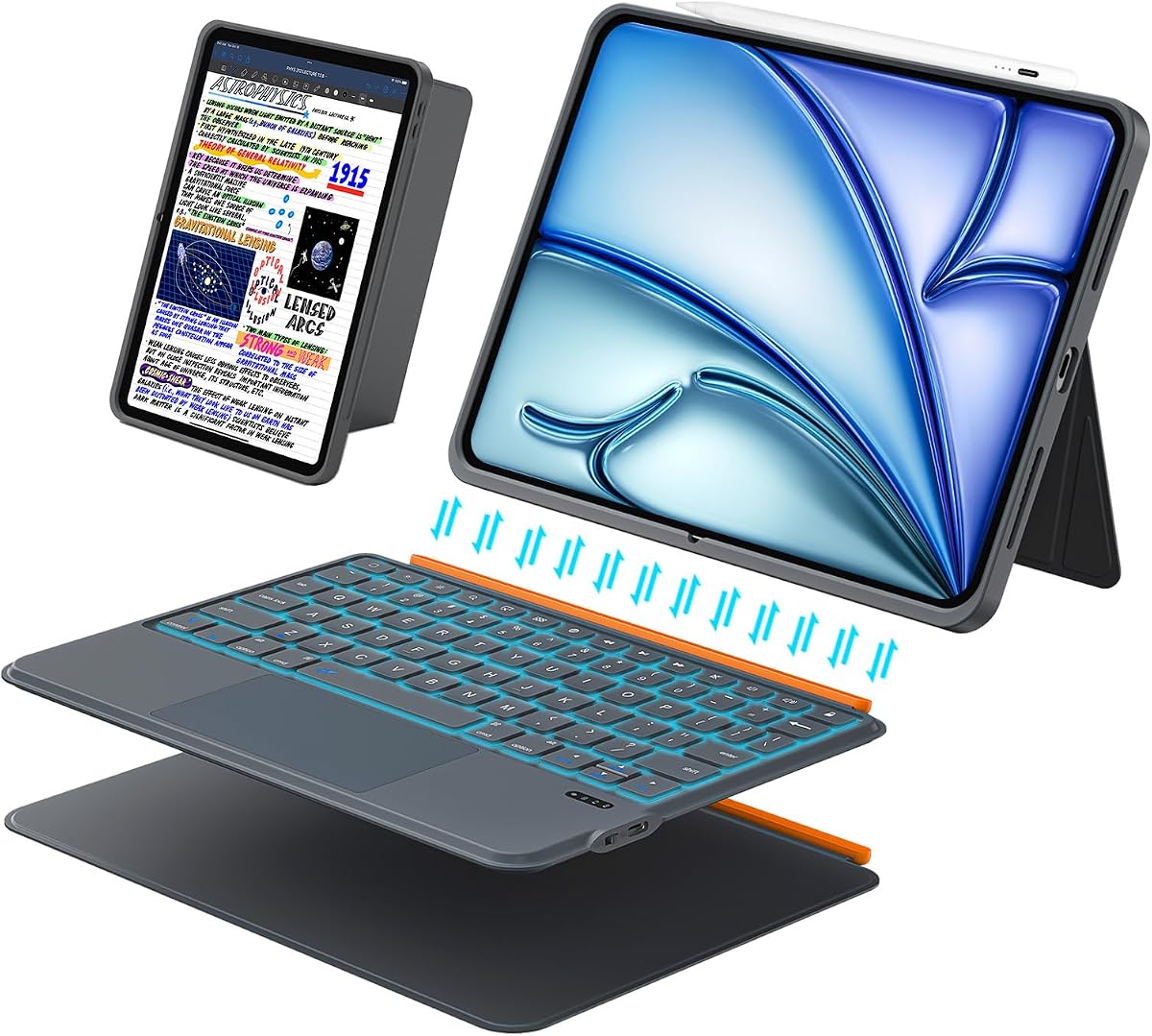
This Harvopu case combines trackpad utility with colorful backlighting. Rated 4.3 it offers strong compatibility across recent iPad Air generations for versatile use.
We may earn a commission when you buy through this link, at no additional cost to you.
Magnetic detachable design allows switching between typing and tablet modes easily. Multi-touch trackpad supports gestures for navigation enhancing productivity beyond keyboard input.
Seven color backlight adds customization for different environments. Angles adjust for comfort though setup steps may take time initially.
Excellent for users needing gestures and lighting options. This model balances affordability with useful features for diverse needs.
High sensitive touchpad enables navigation and editing without touching screen for better workflow.
Seven vibrant colors and three brightness levels customize typing experience to match environment.
We may earn a commission when you buy through this link, at no additional cost to you.
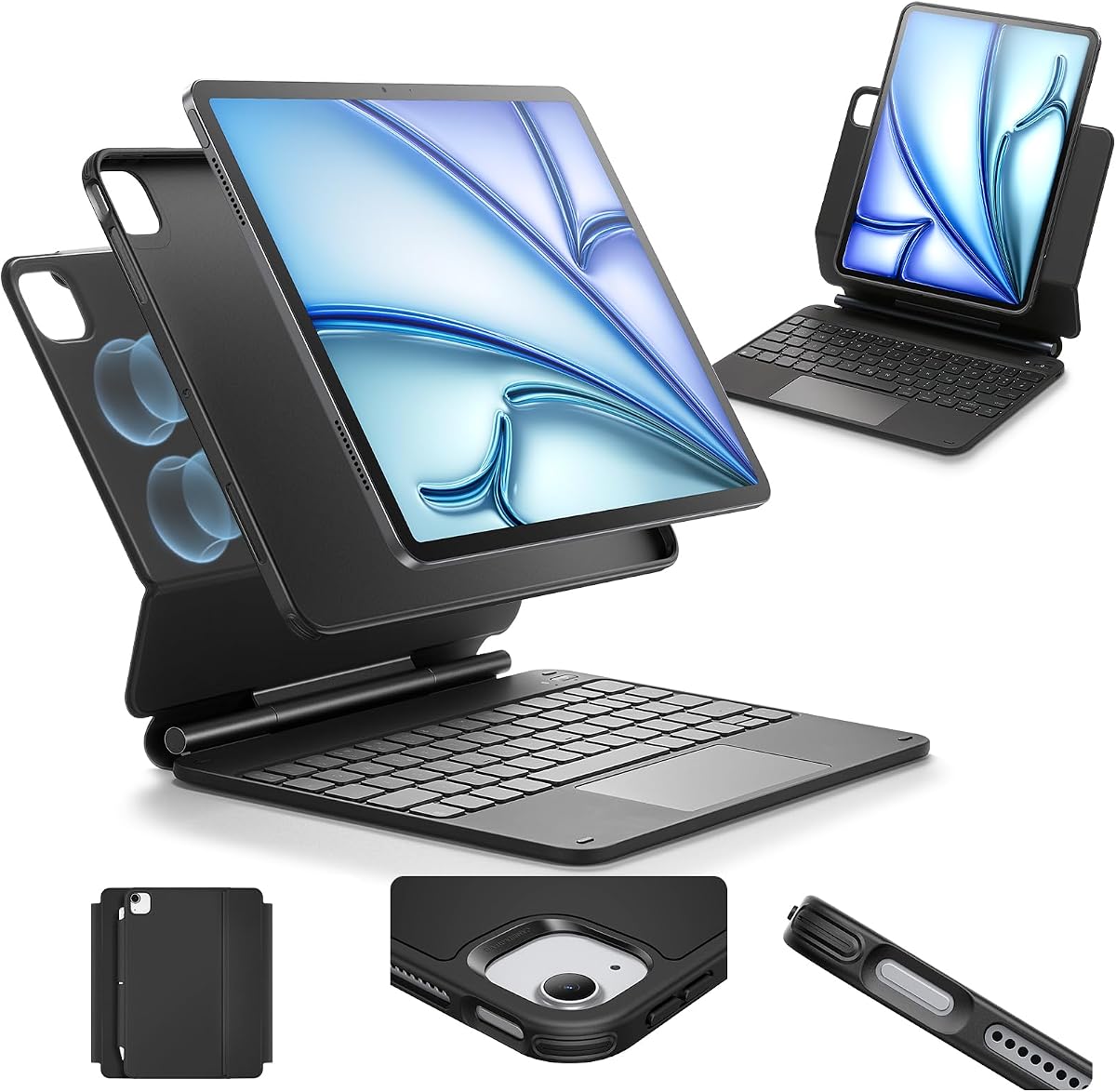
The ESR Multi-Mode Stand case offers robust protection with flexible viewing options. Rated 4.2 it combines keyboard typing with durable case features for iPad Air.
We may earn a commission when you buy through this link, at no additional cost to you.
Floating cantilever stand sets up quickly for comfortable typing. Extended trackpad provides precise navigation while case offers full-body protection against drops.
Lack of backlight simplifies design but reduces night use options. Stand stability is strong for steady productivity on desks or tables.
Great for users prioritizing protection and stability. This case delivers essential features with reliable build quality.
Ultra-strong magnets combine case and tablet for easy stand adjustment.
Case covers whole device protecting against drops and scratches while keyboard stays attached.
We may earn a commission when you buy through this link, at no additional cost to you.
Selecting the right folio case with keyboard involves weighing compatibility features and durability to match your workflow needs.
Check model numbers carefully because not all keyboards fit every iPad Air generation. Newer M series models may have different connectors or dimensions than older ones.
Verify your model number against the product page to ensure full functionality before purchasing any case or keyboard combo.
Smart Connector models pair without batteries and use iPad power while Bluetooth ones need charging but allow detachment. Choose based on whether you want simplicity or flexibility.
Smart Connector offers reliability while Bluetooth gives you the option to remove the keyboard for pure tablet use.
Trackpads with multi-touch gestures let you navigate efficiently without touching the screen. Larger trackpads generally improve accuracy and ease of use for complex tasks.
Look for full multi-touch support to unlock iPadOS gestures that boost productivity and streamline navigation.
Backlit keys with adjustable brightness help typing in low light without straining eyes. Some offer color options while others focus on auto-adjustment based on environment.
If you work at night or in variable lighting choose a model with reliable auto-brightness or manual controls.
Adjustable stands allow you to find comfortable viewing angles for typing or reading. Some cases offer limited positions while others provide a wide range for flexibility.
Look for cases that offer multiple stable angles so you can switch between work and media consumption easily.
Cases vary in materials and coverage so some offer full-body protection while others focus on the keyboard. MIL-grade ratings indicate stronger drop and scratch resistance for travelers.
Prioritize reinforced corners or durable materials if you travel often or handle your iPad in rugged environments.
Built-in pencil storage or charging compatibility keeps your stylus accessible and charged. Ensure the design holds your specific Pencil model securely.
Check if the case allows charging while attached and offers a secure place to store your pencil when not in use.
Weight and thickness matter if you carry your iPad daily. Ultra-thin keyboards save space but might sacrifice battery life or extra features.
Weigh portability against features like trackpads and backlighting to match your daily carry needs.
Install the case by aligning the iPad edges carefully to ensure ports and buttons remain accessible. For magnetic models gently slide the keyboard into place until it clicks or adheres securely.
Use Bluetooth pairing by enabling Bluetooth on iPad and pressing connect keys on keyboard. Smart Connector models pair instantly without extra steps just ensure the connector is clean.
Clean the keyboard with soft dry cloth to avoid residue buildup. Avoid liquids and remove the keyboard periodically to wipe beneath keys for better hygiene.
Not all keyboards work with every iPad Air generation. Always check compatibility lists and model numbers before purchasing to ensure your tablet will pair correctly.
Many modern folio cases include pencil holders with wireless charging while others lack this feature. Verify product details to confirm if your model supports charging while attached.
Newer iPad Air models use Smart Connector or standard USB-C while others may use Bluetooth. Check your iPad specs to match the correct keyboard technology.
Most cases support both landscape and portrait orientations for typing. Adjustable stands help achieve optimal viewing angles regardless of mode.
Most keyboards are not fully waterproof but some spill-resistant designs exist. Avoid liquids and clean with dry cloth to maintain longevity.
Typical lifespan is several years depending on usage. If keys become unresponsive or battery fails you may need a replacement or upgrade.
Most cases add minimal weight but some premium models are heavier. Consider total weight when selecting for daily travel needs.
Designed for iPad Air they may not fit other tablets. Always confirm device compatibility to avoid fit issues and pairing problems.
The Apple Magic Keyboard and Logitech Flip Folio lead with premium features while budget options like Harvopu offer value without sacrificing core typing needs.
Prioritize compatibility trackpad quality and stand flexibility to find the right match for your workflow. Consider whether Smart Connector or Bluetooth better suits your setup.
Prices vary so check current listings before buying to confirm you get the best deal. Regular updates ensure models meet latest iPad generations and standards.