
X99 PR9-H White
3.9Editor score
Supports Xeon E5 V3 V4
Dual Channel DDR4 Up to 128GB
NVME M.2 Slot PCIe 3.0
This guide compares the top Lga 3 X99 Motherboard options for Xeon and Core i7 processors, focusing on features, performance, and reliability for your build.
Finding the right Lga 3 X99 Motherboard can transform your computing experience by enabling powerful multi-core performance and robust expandability for demanding workloads.
We evaluated ten top models based on socket compatibility, memory support, expansion slots, and build quality to help you choose the best fit for your specific needs.
Each pick highlights key strengths and trade-offs so you can make an informed decision while keeping in mind that prices and availability may change over time.
3.9Editor score

4.1Editor score

3.9Editor score
This side-by-side comparison breaks down the essential specifications of each model to highlight differences in form factor, connectivity, and memory capabilities.



The MACHINIST X99 V9S is a solid choice for builders looking to leverage high-core count Xeon processors without breaking the bank, offering support for both V3 and V4 series chips.
We may earn a commission when you buy through this link, at no additional cost to you.
Its standout feature is the inclusion of three NVME M.2 slots alongside a robust 6-phase power delivery system designed to maintain stability during heavy computational tasks.
While the lack of an included manual and battery may require some extra effort during setup, the comprehensive I/O options and cooling solutions make it a reliable platform for budget workstations.
This motherboard is ideal for users who prioritize core count and memory capacity over brand prestige, making it a strong contender for virtualization and rendering builds.
Three NVME slots allow for fast primary storage and rapid data scratch disks without needing additional expansion cards.
The included cooling fan helps dissipate heat from the power delivery components ensuring longevity under load.
We may earn a commission when you buy through this link, at no additional cost to you.
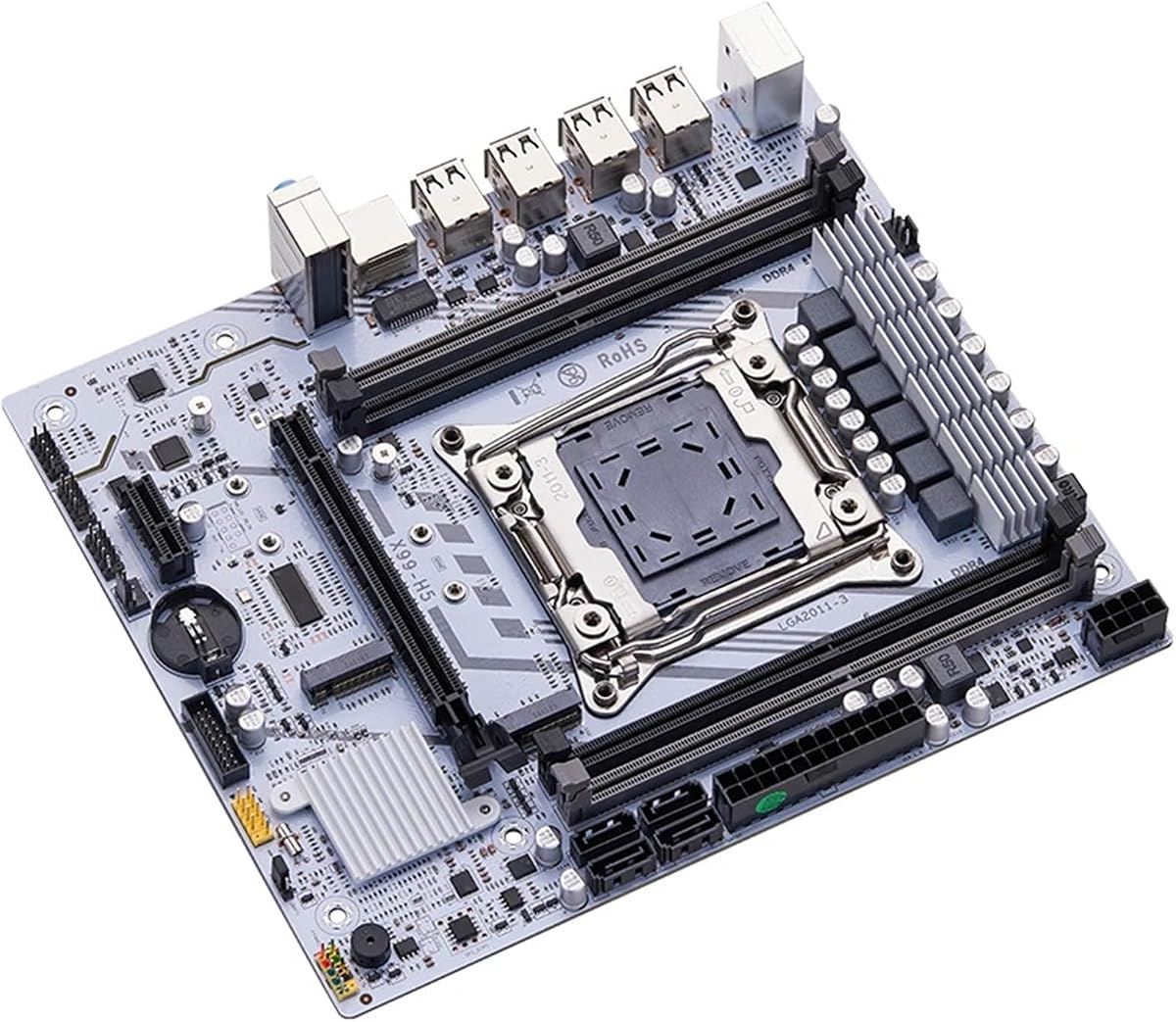
The X99 PR9-H White offers a distinct aesthetic appeal with its white PCB while maintaining robust server-grade features for those needing a smaller footprint.
We may earn a commission when you buy through this link, at no additional cost to you.
It supports up to 128GB of DDR4 memory and includes a high-speed NVME slot suitable for OS drives or caching in a small form factor chassis.
The 6-layer PCB and optimized circuit layouts provide a stable power environment which is crucial for long-term server uptime in compact cases.
This model is perfect for enthusiasts who want a clean look in their HTPC or mini-workstation without sacrificing core X99 performance capabilities.
The M-ATX layout fits into smaller cases while still offering essential expansion and connectivity options.
Full solid capacitors ensure consistent power delivery reducing the risk of system instability during peak usage.
We may earn a commission when you buy through this link, at no additional cost to you.
The ASUS X99-E WS stands out as a professional workstation board designed to handle multiple GPUs and high-speed storage requirements seamlessly.
We may earn a commission when you buy through this link, at no additional cost to you.
With 4-Way PCI-E Gen3 x16 support it enables serious rendering or machine learning tasks while the integrated USB 3.1 provides future-proof peripheral connectivity.
Its Supreme Power Solution ensures industry-leading efficiency which helps maintain lower operating temperatures during extended rendering sessions.
This board is ideal for professionals who need maximum expansion and reliability and are willing to invest in a larger chassis to accommodate its size.
The board supports both SLI and CrossFireX configurations allowing for significant graphical compute power scaling.
Onboard M.2 x4 and Thunderbolt II support offer versatile high-speed storage solutions for creative professionals.
We may earn a commission when you buy through this link, at no additional cost to you.
The ASUS X99-A brings enthusiast features to the X99 platform with specific tools designed to push CPUs and memory beyond standard limits.
We may earn a commission when you buy through this link, at no additional cost to you.
Its OC Socket provides additional pins for enhanced stability which is crucial when attempting aggressive overclocking on high-end Core i7 processors.
The 5-Way Optimization simplifies system tuning by allowing users to optimize performance cooling and power in a single click.
This board is a great fit for gamers and power users who want a balance of gaming audio features and raw CPU performance without needing multi-GPU support.
Extra pins on the socket improve voltage control and signal integrity for stable overclocking performance.
Crystal Sound 2 delivers immersive audio experiences directly from the motherboard without needing a dedicated sound card.
We may earn a commission when you buy through this link, at no additional cost to you.
This specialized board allows for dual CPU installations making it a powerful option for rendering farms or virtualization servers requiring massive parallel processing.
We may earn a commission when you buy through this link, at no additional cost to you.
With eight DDR4 slots it offers extensive memory capacity which is essential for handling large datasets or running multiple virtual machines simultaneously.
The inclusion of two PCIe X16 slots ensures you can install dedicated GPUs or high-speed capture cards alongside your dual processor setup.
It is best suited for technical users who need maximum core counts and RAM capacity and have experience configuring complex multi-socket systems.
Supporting two CPUs doubles the available cores enabling significantly faster processing for multi-threaded workloads.
Eight slots allow you to scale RAM up to 256GB or more depending on module availability and capacity.
We may earn a commission when you buy through this link, at no additional cost to you.
The Tangxi X99 Gaming board is positioned for those who want to run high-frequency DDR4 memory on a budget while maintaining a compact case profile.
We may earn a commission when you buy through this link, at no additional cost to you.
Its support for both NVME and NGFF SSDs provides flexibility for choosing storage devices based on speed or cost requirements.
The 8-layer PCB design aims to enhance durability and signal integrity which is important for maintaining stability during long gaming sessions.
This board is suitable for gamers who prioritize performance per dollar and are comfortable troubleshooting potential hardware quirks themselves.
Support for up to 3200MHz DDR4 allows for improved system responsiveness in gaming and productivity tasks.
Dual M.2 interface types mean you can use either modern NVME drives or older SATA-based M.2 drives easily.
We may earn a commission when you buy through this link, at no additional cost to you.
This generic X99 board offers a pathway to dual CPU configurations at a low entry point though reliability data suggests caution for critical workloads.
We may earn a commission when you buy through this link, at no additional cost to you.
The eight DDR4 slots provide significant capacity potential for virtualization or database testing on a budget-friendly hardware platform.
While it includes standard headers and slots its lower rating indicates users should expect potential compatibility challenges or shorter lifespans.
It may be a viable option for experimental test labs or temporary projects where extreme reliability is not the primary concern.
Pricing is significantly lower than branded options making it accessible for large scale test environments.
Two X16 slots allow for multiple high-bandwidth cards to be installed alongside the dual CPUs.
We may earn a commission when you buy through this link, at no additional cost to you.
This board offers a unique flexibility by supporting both DDR3 and DDR4 memory which can be a huge cost saver if you have existing compatible sticks.
We may earn a commission when you buy through this link, at no additional cost to you.
The dual M.2 NVME slots provide fast storage options ensuring your system benefits from modern SSD speeds regardless of memory choice.
Optimized power design and passive heatsinks help maintain stability and lower noise levels which is beneficial for quiet office or home setups.
It is an interesting choice for users who need legacy memory support without losing access to modern high-speed storage technologies.
Support for DDR3 allows users to reuse existing memory reducing the total cost of building a new system.
Passive heatsinks on the chipset reduce fan noise helping to keep the system quiet during operation.
We may earn a commission when you buy through this link, at no additional cost to you.
This M-ATX board brings E5 V3 and V4 support into smaller cases making it a strong candidate for compact NAS or mini-server builds.
We may earn a commission when you buy through this link, at no additional cost to you.
It includes multiple SATA ports which are valuable for connecting multiple hard drives in a storage array without needing port multipliers.
The NVME integration ensures you can boot from a fast drive while maintaining a small physical footprint for space-constrained environments.
It is a practical choice for those needing Xeon power in a small footprint and who prioritize storage connectivity over extensive PCIe expansion.
Multiple SATA 3.0 ports allow for direct connection of multiple HDDs or SSDs for large storage arrays.
The M-ATX size ensures it fits in small cases while retaining essential X99 functionality.
We may earn a commission when you buy through this link, at no additional cost to you.
This ATX board provides a standard form factor with NVME and USB3.0 support making it a reliable general-purpose option for Xeon builds.
We may earn a commission when you buy through this link, at no additional cost to you.
Solid power supply and cooling mechanisms ensure stable performance under load which is vital for office or gaming machines using high-core CPUs.
The support for high-frequency memory helps maximize the performance potential of both E5 processors and the system overall.
It is a safe choice for users who want a standard size board with modern connectivity features without specific workstation or gaming marketing branding.
ATX size ensures compatibility with most cases and cooling solutions available in the market.
USB 3.0 and NVME support ensure fast peripheral and storage performance for daily tasks.
We may earn a commission when you buy through this link, at no additional cost to you.
Selecting the right X99 motherboard requires understanding specific technical needs such as CPU compatibility memory type and expansion capabilities to ensure system stability.
Ensure the board explicitly supports the LGA 2011-3 socket and matches your specific CPU generation such as E5 V3 or V4 series.
Always verify processor lists on the product page before buying to avoid incompatibility issues with your chosen CPU.
Determine if you need standard DDR4 or ECC RECC memory as many X99 boards support both but cannot mix them on the same system.
Check the maximum RAM capacity and number of slots to ensure future scalability for your specific workload needs.
Choose between ATX M-ATX or EATX based on your case size and required number of PCIe slots for graphics cards or capture devices.
Smaller M-ATX boards save space but limit expansion while EATX boards support maximum hardware configurations in larger cases.
Review the number and type of PCIe slots to ensure you can install all required GPUs or expansion cards without bandwidth throttling.
For multi-GPU setups verify that the board supports SLI or CrossFireX and provides enough x16 lanes for optimal performance.
Look for NVME M.2 slots if you want fast boot drives since SATA ports alone may not be sufficient for modern high-speed storage.
Check for SATA port count to ensure you can connect all hard drives or SSDs needed for your data storage requirements.
Adequate VRM cooling and phases are essential for stability especially if you plan to run high-core Xeon processors under heavy load.
Look for solid capacitors and heat sinks on the board to ensure longevity and consistent performance over time.
Branded boards like ASUS often come with better BIOS support and manuals compared to generic brands which might require manual troubleshooting.
Check user reviews regarding BIOS updates and driver support to ensure long-term software compatibility and security.
Compare features against the price to find the best value since expensive boards may offer features you do not need like Thunderbolt support.
Budget models can be excellent for server builds but ensure they include essential components like I/O shields and necessary cables.
Always handle the motherboard by the edges and avoid touching the circuits to prevent static discharge damage during installation into a case.
Regularly check that all PCIe cards and memory modules are firmly seated to prevent connection errors that can occur from vibration or movement over time.
Keep the system clean by using compressed air to dust off heatsinks and fans every few months to maintain optimal cooling performance.
Generally you cannot mix DDR3 and DDR4 memory because the physical slots and electrical requirements differ significantly between standards. However a few specific models support both types separately but only one type at a time per system. Always check the manual to ensure you install matching memory kits.
Most X99 boards support both V3 and V4 chips but BIOS updates may be required for newer V4 versions. Some budget boards might have locked BIOS versions that restrict official support lists to specific models. You may need to flash the BIOS manually to gain V4 support.
It is safe to use a board without a physical manual as long as you consult online resources or the manufacturer website for wiring diagrams. Many X99 models include online manuals that provide detailed pinout information and BIOS settings guides. Always verify pinouts before connecting headers.
You can use standard non-ECC desktop RAM with consumer Core i7 CPUs but E5 processors often require or benefit from ECC memory. Always verify compatibility as some CPUs may not boot with non-ECC modules. Server grade RAM usually offers better stability.
Check your case specifications for maximum motherboard support since EATX boards are larger than standard ATX models. Most mid-tower cases only support ATX while full-tower cases are needed for EATX. Measure the mounting points before purchasing to avoid fit issues.
Multiple M.2 slots allow you to install fast storage for the operating system and applications while using separate drives for data. It eliminates the need for PCIe adapter cards and keeps internal cable management cleaner. This setup improves overall system responsiveness.
We recommend the ASUS X99-E WS for professional needs and the X99 PR9-H White for budget-friendly server projects with a clean design.
Prioritize memory capacity and PCIe lane availability to ensure your system grows with your needs without requiring a full platform upgrade.
Remember that prices and availability fluctuate so check current listings on Amazon to confirm the best deal for your specific configuration today.