
RDS – Licensed Nintendo Action Grip NES Classic Controller
4.5Editor score
Licensed Nintendo accessory
Textured silicone material
Comfortable grip design
This guide compares the top classic NES controller replacement options for retro gaming enthusiasts seeking reliable controllers for modern systems and
Finding the right classic NES controller replacement can transform your retro gaming experience. Whether you need a durable wired option or a wireless solution for modern setups, choosing wisely ensures smooth gameplay and comfort during long sessions.
We evaluated ten top-rated products based on compatibility, build quality, cable length, and user feedback. Each entry was reviewed for its ability to mimic the authentic feel of the original hardware while supporting contemporary operating systems and emulators.
Every pick highlights specific strengths like extended cables, turbo functions, or licensed branding. Please note that availability and pricing may fluctuate over time, so checking current listings before purchase is always recommended for the best deal.
4.5Editor score

3.7Editor score

4.4Editor score
The following table offers a side-by-side comparison of all ten products featured in this guide. Each entry lists key specifications to help you quickly identify the model that best suits your specific gaming needs and setup requirements.


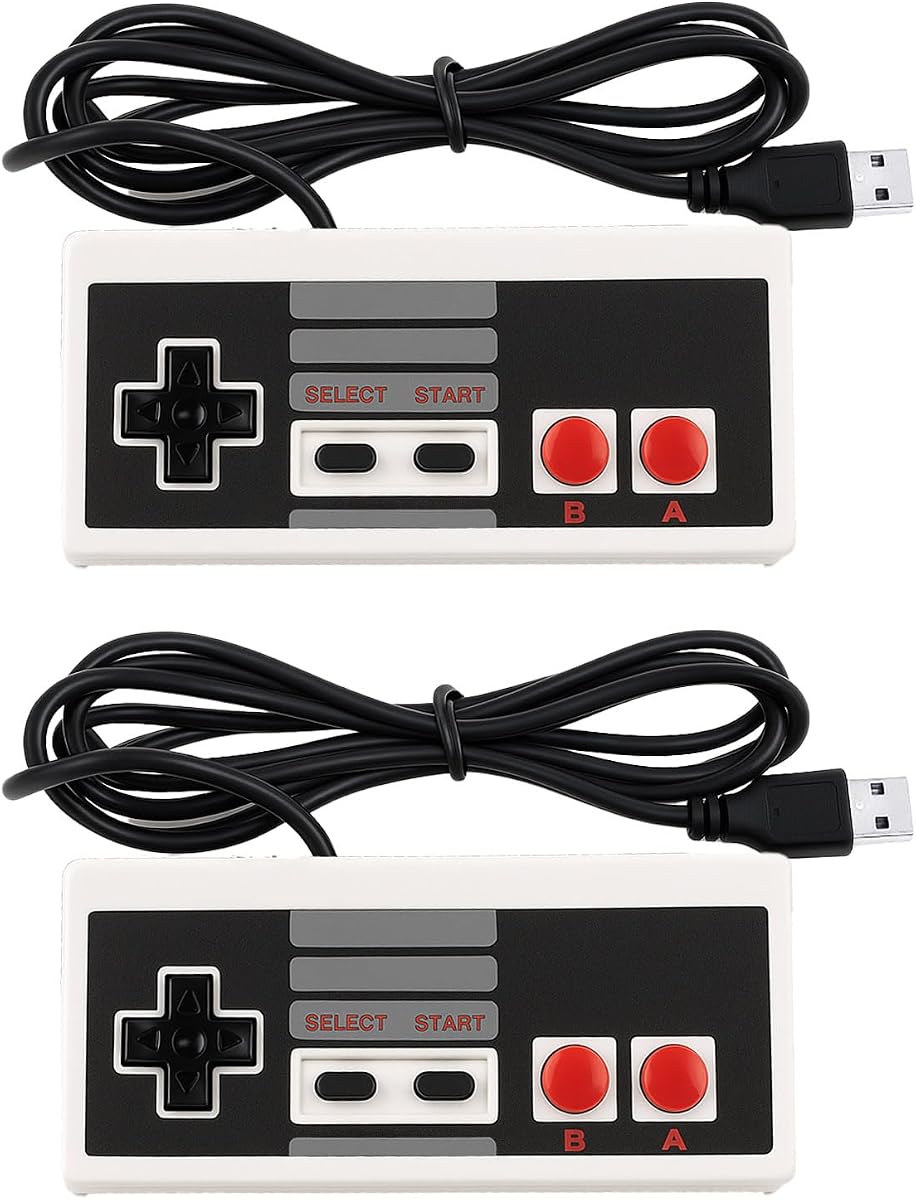


The NGHTMRE controller set offers a practical solution for those needing replacements for their NES Classic Edition. With a rating of 3.7 stars, it balances affordability with essential features like long cables and sensitive buttons. This set is ideal for users who want immediate functionality without complex setup procedures.
We may earn a commission when you buy through this link, at no additional cost to you.
Key strengths include the extended 10ft cables that allow players to sit further from the screen. The buttons are designed to be delay-free, ensuring precision during fast-paced retro games. The 2-pack format means both players can enjoy sessions simultaneously without swapping hardware.
While it performs well, it lacks the authentic weight of original Nintendo hardware. Users should also note compatibility is strictly for the 2016 HDMI model, not the original 1985 console. These trade-offs are acceptable given the price point and convenience offered.
This pick is best for casual gamers and families looking for a reliable backup set. The combination of length and responsiveness makes it a strong contender for everyday use. We recommend checking current stock before purchasing to ensure availability.
The 10ft cable allows players to sit comfortably away from the TV, reducing eye strain and improving posture during extended gaming sessions.
Sensitive buttons ensure that every press registers quickly, which is crucial for precision platforming games where timing is everything.
We may earn a commission when you buy through this link, at no additional cost to you.
The ZAMPAM 2 Pack offers a wireless alternative for retro gaming on PCs and Macs. Rated at 4.0 stars, these controllers provide convenience through their 2.4GHz connection and rechargeable batteries. They are designed primarily for emulator use on modern computers rather than console hardware.
We may earn a commission when you buy through this link, at no additional cost to you.
Standout features include the turbo function which allows rapid-fire actions with single presses. The wireless range reaches up to 10 meters, giving significant freedom of movement. A single charge lasts around 100 hours, minimizing downtime for extended play sessions.
However, these controllers do not work with the NES Classic Mini or original consoles. Users must download software like joystick mappers to configure keys properly. This setup requirement adds a step before play but offers flexibility for custom layouts.
Ideal for PC enthusiasts using emulators, this set provides modern convenience at a budget-friendly price. The wireless aspect removes cable clutter effectively. Check compatibility with your specific emulator before buying to ensure smooth integration.
The 2.4GHz wireless technology eliminates cable tangles, allowing you to play from anywhere within a 10-meter range without lag.
You can assign turbo settings to specific buttons, giving you an edge in games requiring rapid input sequences without manual button mashing.
We may earn a commission when you buy through this link, at no additional cost to you.
The XYAB Classic USB Controller is designed for straightforward retro gaming on modern computers. Despite a lower rating of 1.0, it promises a plug-and-play experience with a classic design. It targets users who want an affordable wired option for emulators without technical hurdles.
We may earn a commission when you buy through this link, at no additional cost to you.
Key features include a 6-foot cable and ergonomic design intended for comfort during long sessions. The build claims to use premium materials for durability. It supports both Windows and macOS, making it versatile for various desktop setups.
The low rating suggests potential issues with quality control or responsiveness that may affect the experience. Buyers should be cautious and check return policies before committing. It represents a basic option for those who prioritize simplicity over high-end features.
This controller is best for users needing a simple plug-and-play solution for PC gaming. The lack of drivers is a significant plus for quick setup. Consider it only if other options are unavailable or priced higher than this budget choice.
The controller works with major operating systems including Windows and macOS without needing additional driver installations for basic functionality.
Its ergonomic design ensures your hands rest comfortably, reducing fatigue during extended gaming sessions on your computer setup.
We may earn a commission when you buy through this link, at no additional cost to you.
The happymaxplus controller set is tailored for specific retro consoles like the AV 620 and HD 821 models. With an impressive 4.8 rating, it stands out for reliability in niche markets. It uses a 9 Pin DB9 plug design to ensure stable connections with these older systems.
We may earn a commission when you buy through this link, at no additional cost to you.
Features like the 4-button layout and continuous fire function give users an advantage in classic action games. The plug-and-play nature means no configuration is needed before playing. The 2-pack allows multiplayer gaming right out of the box without extra costs.
Buyers should confirm their console model matches the supported list before purchase. These are third-party alternatives, so they may not match the feel of original hardware perfectly. However, the high rating indicates general satisfaction with performance and durability.
This set is perfect for owners of specific retro consoles needing reliable replacements. The continuous fire feature adds utility for modern gaming preferences. Verify your console compatibility to avoid returns and ensure a smooth gaming experience.
Engineered specifically for AV 620 and similar retro consoles, ensuring a perfect fit and reliable connection for your existing hardware.
The continuous fire feature allows for rapid button pressing, giving you a tactical advantage in action-packed retro game scenarios.
We may earn a commission when you buy through this link, at no additional cost to you.
The ZENANBiBi USB wired controller is built for versatility across Windows, Mac, Linux, and RetroPie systems. Rated 3.8 stars, it brings back nostalgic memories by replicating the classic NES controller feel. It connects via USB 2.0 for immediate play without software installation.
We may earn a commission when you buy through this link, at no additional cost to you.
Key strengths include its compatibility with Raspberry Pi setups which are popular for retro gaming. The 5.6ft cable provides a comfortable distance from the screen. The design focuses on authenticity, allowing users to relive the original gaming experience on modern screens.
Compatibility notes specify it does not work with the NES Classic Mini or Switch. Users should verify their emulator requirements to ensure the controller maps correctly. The fixed cable length is standard but not adjustable for different room setups.
This product is ideal for RetroPie enthusiasts needing a reliable dual pack for local multiplayer. Its broad system support makes it a flexible choice for various hobbyist projects. Check your specific system requirements before purchasing to avoid mismatches.
Designed to work seamlessly with RetroPie and other emulator systems, making it a top choice for Raspberry Pi users.
The layout mimics the classic NES design, providing a familiar tactile experience that feels natural to long-time gamers.
We may earn a commission when you buy through this link, at no additional cost to you.
The MAYFLASH adapter allows you to use older NES and SNES controllers on modern systems like the NES Classic and Wii U. With a 3.9 rating, it serves as a bridge for existing hardware enthusiasts. It is an adapter rather than a standalone controller replacement.
We may earn a commission when you buy through this link, at no additional cost to you.
Features include built-in turbo support and the ability to swap D-pad and stick configurations. The plug-n-play design means no drivers are needed. It expands compatibility significantly, allowing collectors to use their vintage controllers with newer consoles.
It requires existing controllers to function so it is not a standalone replacement for broken hardware. Compatibility is specific to NES Classic and Wii U systems. Users should confirm their controller types work before buying to ensure full functionality.
Ideal for collectors who want to preserve original hardware, this adapter is a niche but valuable tool. It extends the life of older controllers effectively. Check supported devices carefully to ensure your specific controllers work with this adapter model.
Allows you to use original NES and SNES controllers with modern consoles, preserving your existing collection of retro hardware.
The built-in turbo feature lets you activate rapid-fire inputs without needing complex software configuration or external adapters.
We may earn a commission when you buy through this link, at no additional cost to you.
The eXtremeRate housing kit allows Switch owners to customize their Joycons with a retro NES style. Rated 4.4 stars, it appeals to collectors wanting a unique look. This product is a replacement shell including buttons but does not include electronic components.
We may earn a commission when you buy through this link, at no additional cost to you.
The ergonomic D-pad is designed to improve function for d-pad intensive games. It features a soft touch finish that is anti-slip and sweat-free. The package includes tools and a video guide to assist with the installation process.
Installation requires moderate electronic experience and patience. Users must watch the guide at half speed to avoid damage. It is not a plug-and-play controller replacement but a cosmetic and ergonomic upgrade for existing Switch hardware.
Best for DIY enthusiasts and Switch players wanting a personalized feel, this kit offers high customization. Ensure you are comfortable with basic disassembly before attempting. Check reviews for tips on safe installation to avoid damaging your console.
The unique NES-style design adds personality to your Switch Joycons, moving away from standard colors to a more retro look.
Ergonomic features and soft grip materials improve comfort during long gaming sessions, reducing hand fatigue significantly.
We may earn a commission when you buy through this link, at no additional cost to you.
The NES Classic Edition Accessory Bundle provides essential components like a controller and extension cables in one package. With a 2.4 rating, it offers convenience but has mixed feedback on quality. It is designed to expand functionality for the NES Classic system directly.
We may earn a commission when you buy through this link, at no additional cost to you.
Key components include a power supply and two 6FT extension cables. This helps position the console and controller more flexibly than the stock setup. It is a straightforward solution for users needing extra power and cable length immediately.
The lower rating suggests potential reliability concerns with the included controller or cables. Buyers should verify if the components meet their durability needs. It is best for those prioritizing convenience over premium hardware quality.
This bundle is useful for beginners setting up their system who need immediate extensions. The inclusion of power and cables saves separate purchases. Expect standard performance and check recent reviews before committing to this specific bundle model.
The bundle simplifies your setup by including power and extension cables, ensuring you have everything needed to start gaming.
With two 6FT extension cables, you can comfortably position your console away from the TV for better cable management.
We may earn a commission when you buy through this link, at no additional cost to you.
The RDS Licensed Action Grip is a highly rated replacement option for the NES Classic. With a 4.5 rating, it is known for quality materials and official licensing. It is designed to enhance comfort without compromising the standard controller layout.
We may earn a commission when you buy through this link, at no additional cost to you.
Key strengths include the textured silicone material that ensures a secure grip during intense gaming. As a licensed accessory, it meets quality standards set by the manufacturer. The design focuses on precision and comfort for long play sessions.
The only limitation is the color which is limited to red for this model. It offers standard performance without extra features like turbo buttons. However, the build quality justifies the price for users seeking reliability.
This controller is the best choice for those wanting an official branded replacement that feels great. The silicone grip provides comfort that standard plastic often lacks. It is a strong value pick for budget-conscious gamers who prioritize quality.
As a licensed product, this controller guarantees compatibility and build quality standards that third-party options may not always meet.
The silicone material provides a non-slip grip that reduces hand fatigue and ensures better control during intense gameplay.
We may earn a commission when you buy through this link, at no additional cost to you.
The KIWITATA controller set is designed for PC gaming and emulation of classic SNES titles. With a 4.3 rating, it offers precise control and ergonomic comfort. It supports multiple operating systems including Windows and Mac for broad usability.
We may earn a commission when you buy through this link, at no additional cost to you.
Features include frosted concave keys for anti-sweat performance and ergonomic shapes that fit hands well. The controller connects via USB 2.0 and supports major emulators like RetroArch. Manual button mapping may be required but allows customization.
It does not work with the original SNES console directly. Users must have an emulator installed to use the controller effectively. The 2-pack provides excellent value for local multiplayer on PC setups without needing multiple purchases.
Ideal for PC emulation enthusiasts, this set delivers precision and value. The ergonomic design ensures comfort during marathon gaming sessions. Check emulator mapping guides to get the most out of the customization features available.
The frosted concave cross key design offers precise directional input and prevents slipping even during long gaming sessions.
Works seamlessly with popular emulators like RetroArch and OpenEmu, making it versatile for various retro gaming libraries.
We may earn a commission when you buy through this link, at no additional cost to you.
Selecting the right controller replacement depends on your specific setup and gaming preferences. This guide explores the key factors to consider when shopping for retro controllers to ensure you make an informed decision.
Always verify the controller supports your exact console or emulator setup. Some options work only with PC and Mac while others are strictly for the NES Classic Mini or vintage hardware. Confusing the model variants can lead to unusable purchases.
Check the product description carefully for mentions of HDMI sockets, original ports, or USB support before buying.
Cable length impacts your comfort and seating arrangement during gameplay. Standard lengths may be too short for larger rooms or sofas. Extended cables of 10 feet allow you to sit back comfortably without straining your arms or eyes.
Consider your viewing distance when choosing between standard and extended cable options for a relaxed experience.
High-quality materials ensure durability and a comfortable grip over time. Look for descriptions mentioning sturdy plastics, silicone grips, or premium construction. Cheap materials may crack or become slippery during long gaming sessions.
Prioritize controllers that mention durability tests or material quality to avoid frequent replacements.
Responsive buttons are critical for accurate gameplay in retro titles that rely on precise timing. Delays or inconsistent clicks can ruin the experience. Look for keywords like sensitive, delay-free, or precision control in product descriptions.
Read reviews to confirm that buttons register quickly and consistently during fast-paced action.
Wireless options offer freedom of movement but require batteries or charging. Wired controllers provide consistent connections without power worries. Consider your preference for convenience versus reliability when deciding between these types.
Wired connections are generally preferred for retro gaming to ensure zero latency during gameplay.
Some products include 2-pack options allowing for multiplayer gaming right away. Others may include extension cables or power supplies as part of a bundle. Check what comes in the box to avoid extra costs later.
Buying a bundle can save money if you need accessories like cables or adapters for your specific setup.
Plug and play functionality eliminates the need for complex drivers or software installations. Some wireless options require mapping software which adds steps before play. Simpler setups are better for casual users who want immediate gameplay.
Verify that drivers are not required unless you are comfortable with system configurations.
Price varies depending on brand and features like wireless tech or custom shells. Budget options often lack premium features but still provide functionality. Assess if the extra cost for a brand or feature is justified by your usage needs.
Compare the value of 2-packs versus single units to maximize your investment for multiplayer needs.
Connect your controller to the console or PC using the provided cable or wireless adapter. Ensure the connection is secure before powering on the device to avoid signal drops during gameplay. Follow any on-screen prompts if driver setup is required.
Test the buttons and directions immediately after connection to confirm functionality. If a wireless controller is used, charge the battery fully before the first use to prevent interruptions. Keep the receiver plugged into an accessible USB port for best signal strength.
To maintain longevity, store the controller in a cool dry place away from direct sunlight. Clean the surface gently with a soft cloth to remove dust and oil buildup. Avoid exposing cables to sharp objects or excessive bending to prevent internal wire damage.
Not all USB controllers work with the NES Classic Mini as it uses a proprietary port. You typically need a specific adapter or a controller designed explicitly for the system. Always check the compatibility list on the product page before purchasing to ensure it fits your setup.
Many third-party controllers are reliable but quality varies significantly between brands. Look for options with high ratings and durable material descriptions. Licensed accessories often offer better consistency, but high-quality third-party alternatives can also perform well with proper care.
You generally need an adapter to use original NES controllers with modern systems like the Wii or PC. Some adapters allow you to connect vintage hardware directly via USB or proprietary ports. Check the adapter support list to ensure it works with your specific console model.
Turbo buttons allow you to hold a single button to trigger rapid inputs automatically. This feature is useful for classic action games that require fast repeated pressing. It reduces finger fatigue during intense gaming sessions or specific game challenges.
Check the battery charge level and ensure the USB receiver is plugged into the correct port. Try resetting the controller by following the manual instructions. If issues persist, reinstall the necessary mapping software or try a different USB port on your computer.
Most modern retro controllers designed for PC work well with popular emulators like RetroArch or OpenEmu. You may need to configure button mappings within the emulator software. Ensure the controller is recognized by your operating system before configuring it in the emulator.
We explored ten top-rated replacement options ranging from wireless modern solutions to authentic wired bundles. Each pick addresses specific needs like budget, system compatibility, or comfort ensuring there is a match for every gamer.
When selecting a controller prioritize system compatibility and build quality to avoid disappointment. Consider whether you need extra features like turbo buttons or extended cables based on your gaming habits and room setup.
Always verify current pricing and availability before purchasing as stock levels change frequently. Checking recent reviews can also help ensure the product matches your expectations for quality and performance.