This guide compares the top 1600W power supplies for high-end gaming and workstations, evaluating efficiency, noise, and compatibility with the latest hardware
As an Amazon Associate we earn from qualifying purchases. We may earn a commission when you buy through links on this page, at no additional cost to you. Read our affiliate disclosure.As an Amazon Associate we earn from qualifying purchases.Purchases through our links may earn us a commission, at no extra cost to you. Read our affiliate disclosure.
Modern high-performance computing demands robust power delivery systems capable of handling extreme loads without failure. A 1600W power supply ensures stability for multi-GPU setups and professional workloads.
We evaluated ten leading models based on efficiency ratings, build quality, and compliance with ATX 3.1 standards. Our analysis focuses on reliability and performance under heavy stress conditions.
Each selection highlights key strengths and potential trade-offs to help you choose wisely. Please note that prices and availability fluctuate frequently, so verify current offers before purchasing.
Top 3 Picks for Best 1600W Power Supplies
Best Budget
ASRock PG 1600G ATX 3.1 1600W Power Supply PCle5.1 10 Years Warranty Fully Modular Japanese Capacitor Phantom Gaming PG-1600G 80 Plus Gold Cybenetics Platinum 12V-2×6 Cables
ASUS ROG Thor 1600W Titanium III Power Supply (80 Plus Titanium Certified, ATX 3.1, GaN MOSFET, Intelligent Voltage Stabilizer, Magnetic OLED Display, Turbo Mode, 10 Year Warranty)
The following table provides a side-by-side comparison of key specifications across all ten selected power supplies. This overview helps you quickly identify which unit meets your specific build requirements and efficiency goals.
The ASRock PG 1600G stands out as an affordable entry into the 1600W power supply market. It holds a 4.4 rating and meets modern standards with ATX 3.1 compliance and full 12V-2×6 connector support.
Pros
High efficiency for price point
Includes native PCIe 5.1 cables
Strong cooling with FDB fan
5V BOOST function available
Cons
Large depth may not fit cases
Sleeving quality varies slightly
We may earn a commission when you buy through this link, at no additional cost to you.
Its standout quality lies in the inclusion of high-quality Japanese capacitors and the TempGuard safety feature that monitors terminal temperatures. The unit delivers 90% efficiency under load and uses a quiet 135mm fan.
Users should note the substantial 180mm depth which requires careful case selection. The iCool mode ensures silent operation at lower loads but physical switches are needed for specific modes.
This unit is ideal for budget-conscious enthusiasts needing extreme power headroom. It balances cost and performance effectively for those prioritizing raw wattage over premium aesthetics.
Enhanced Safety Monitoring
TempGuard technology provides real-time temperature checks at the terminal point to prevent overheating risks during high load operations.
Modern Cable Support
Dual native 12V-2×6 connectors ensure secure connections to next-generation graphics cards without requiring adapter dongles.
The Seasonic Prime TX-1600 Noctua Edition is engineered for silence without compromising power. It carries a 4.7 rating and uses custom Noctua fans to achieve near-inaudible noise levels even under heavy gaming loads.
Pros
Extremely quiet operation under load
Titanium efficiency reduces power waste
Premium cabling matches branding
Excellent voltage regulation
Cons
Higher price point than standard
Limited color options available
We may earn a commission when you buy through this link, at no additional cost to you.
Its primary strength is the Lambda A++ certification which guarantees minimal acoustic disturbance. The unit maintains tight voltage regulation and operates semi-passively to stay completely silent at lower usage thresholds.
Building a system with this unit requires sufficient airflow around the rear exhaust to handle the dense fan grill design. The premium price is justified by the acoustic performance and build quality.
Choose this if silence is your top priority for a high-power workstation or gaming rig. It offers a premium user experience where noise reduction is as critical as wattage capacity.
Silent Operation Guarantee
Custom designed fan grill and optimized fan speed curves keep noise levels below 25 decibels in typical usage scenarios.
Maximum Energy Efficiency
Titanium certification ensures that at 50% load the unit converts 94% of input energy into useful power.
The ASUS ROG Thor 1600W Titanium III brings advanced technology and aesthetics together in a single unit. It scores a 4.3 rating and features a unique OLED display that visualizes real-time power consumption during operation.
Pros
Real-time power usage display
Advanced voltage stabilization
Superior cooling housing design
Premium build materials
Cons
Magnetic display adds complexity
Turbo mode consumes more power
We may earn a commission when you buy through this link, at no additional cost to you.
Its standout feature is the patented intelligent voltage stabilizer which improves delivered voltage to graphics cards significantly. The GaN MOSFET components boost efficiency and reduce internal heat generation compared to standard designs.
While the cooling performance is excellent the magnetic OLED display may require adjustment during installation to ensure visibility. The high cost is justified by these proprietary innovations and robust protection circuits.
This PSU is best for users seeking a statement piece with elite performance capabilities. It suits professional workstations and enthusiast builds where visual feedback and maximum stability are paramount.
Visual Power Monitoring
The OLED screen rotates to fit either side of the unit allowing flexible placement inside your chassis case.
Stabilized Power Delivery
Intelligent voltage stabilization detects GPU needs instantly to smooth out voltage spikes and drops during gaming.
The be quiet! Dark Power Pro 13 delivers exceptional silence paired with high efficiency ratings. It holds a 4.3 rating and utilizes digital control systems to manage power distribution across rails with precision.
Pros
Consistent noise suppression
High voltage stability
Modern digital controls
Optimized airflow intake
Cons
Expensive compared to competitors
Digital switch complexity
We may earn a commission when you buy through this link, at no additional cost to you.
Key strengths include the full bridge LLC technology that ensures unmatched signal stability during transient spikes. The unique front mesh design allows cool air intake which keeps internal components within safe thermal limits.
Users may find the overclocking key switch useful for switching between rail configurations but setup requires careful planning. The premium price reflects the brand reputation and build quality standards.
Select this unit for a quiet workstation where noise is a major constraint. It provides reliable power without introducing acoustic distractions to your environment.
Rail Configuration Control
Overclocking key allows switching between single or multi-rail modes to match specific system safety requirements.
Efficient Airflow Design
The funnel-shaped air inlet reduces turbulence and improves cooling efficiency during sustained high loads.
The Seasonic Prime TX-1600 represents a standard bearer for reliability and efficiency in the high wattage segment. With a 4.5 rating it combines Japanese capacitors with hybrid fan control to balance silence and cooling needs.
Pros
Proven reliability track record
High efficiency at partial load
Supports AI workstation loads
Clean modular cable layout
Cons
No display features
Standard design aesthetics
We may earn a commission when you buy through this link, at no additional cost to you.
Its strength lies in consistent power delivery ideal for AI workstations and rendering tasks. The unit includes dual 12V-2×6 connectors ensuring compatibility with the latest GPU generations without adapters.
While it lacks visual flair or OLED displays it excels in steady performance under load. The hybrid mode keeps the fan silent at idle and ramps up smoothly as demands increase.
This is a smart choice for users who value stability over flashy features. It fits seamlessly into professional builds where uptime and efficiency are the primary concerns.
High Voltage Stability
Digital control architecture ensures minimal ripple voltage to protect sensitive components during power spikes.
Workstation Ready
Designed to handle sustained loads typical of machine learning and 3D rendering workflows.
The CORSAIR HX1500i (2025) offers strong integration with system monitoring software for advanced power management. Rated at 4.5 it allows users to adjust fan curves and protection settings via iCUE easily.
Pros
Extensive software control options
Fan curve customization available
Zero RPM silent mode
Overcurrent protection toggles
Cons
Requires software for full features
Slightly lower wattage than others
We may earn a commission when you buy through this link, at no additional cost to you.
Its key strengths include flexible power protection toggles which let you switch between single or multi-rail modes dynamically. The 140mm FDB fan provides quiet cooling and supports zero RPM mode for silent idle periods.
Dependency on software for some features may inconvenience users preferring plug-and-play simplicity. However the unit remains compliant with ATX 3.1 standards and delivers stable power for high-end GPUs.
Choose this if you already use CORSAIR components and want unified control. It offers great value for those who appreciate software customization and quiet operation.
Unified System Control
iCUE integration allows synchronized fan control across other CORSAIR cooling products.
Flexible Protection
Real-time toggle for overcurrent protection modes ensures safety without needing to power down the system.
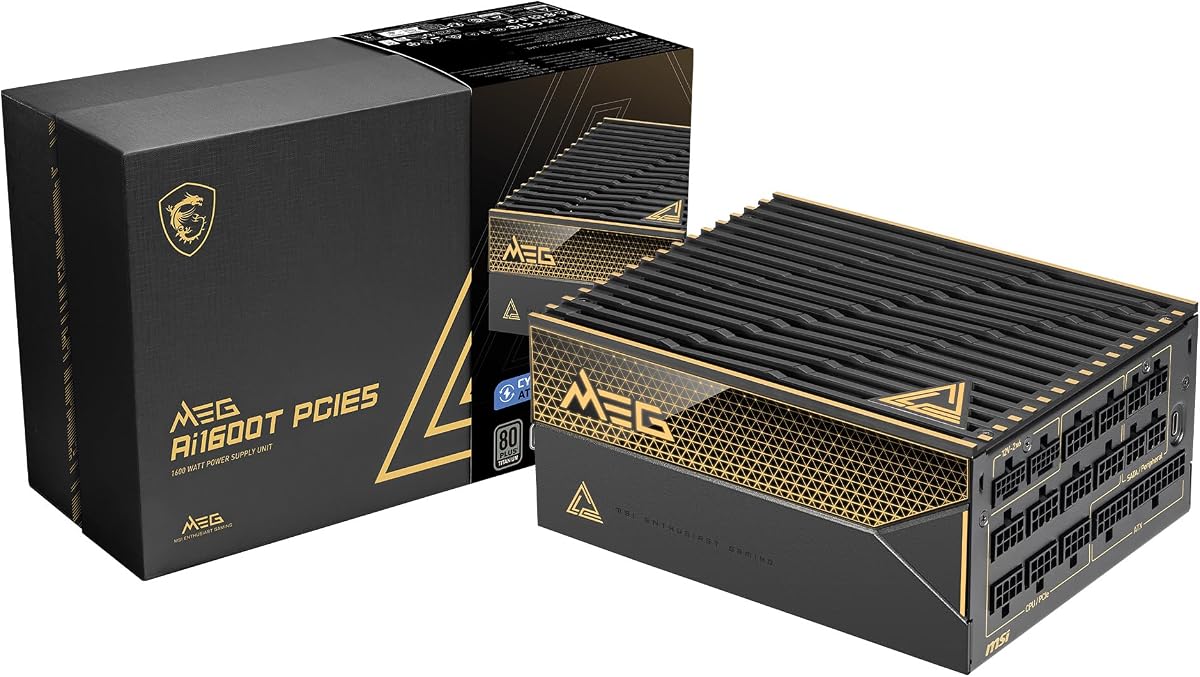
The MSI MEG Ai1600T PCIE5 distinguishes itself with a robust warranty and industrial-grade component selection. It earns a 4.5 rating and features server-grade capacitors designed for long-term reliability in harsh conditions.
Pros
Industry-leading warranty coverage
High durability components
Excellent efficiency ratings
Braided cable quality
Cons
Higher price point
Brand availability varies
We may earn a commission when you buy through this link, at no additional cost to you.
Its primary strength is the 12 year warranty which covers extensive periods of ownership. The unit also benefits from tri-certified titanium ratings ensuring maximum efficiency and minimal heat waste during operation.
Installation is supported by full modular cabling and braided sleeves which manage airflow well. The price reflects the warranty value and component longevity but might deter cost-sensitive buyers.
This PSU is ideal for systems meant to run for many years without replacement. It suits server-like stability needs within desktop builds where long-term security matters.
Long-Term Warranty
Twelve years of coverage provide peace of mind for high-end component investments.
Server-Grade Reliability
Capacitors rated for higher temperatures extend component lifespan and reduce failure risk.
The EVGA SuperNOVA 1600 G2 delivers solid efficiency and reliability for multi-GPU setups. It holds a 4.6 rating and meets high standards with 90% efficiency and double ball bearing fan durability.
Pros
Proven efficiency performance
Strong warranty support
Compatible with legacy GPUs
Reliable voltage regulation
Cons
Older generation design
No native 12V-2×6
We may earn a commission when you buy through this link, at no additional cost to you.
Its strengths include heavy-duty protection circuits that safeguard components against voltage surges and drops. The unit supports SLI and Crossfire configurations making it suitable for older gaming setups needing high power.
It lacks native ATX 3.1 connectors which might require adapters for newer cards. However its price point offers significant savings compared to titanium rated units.
Select this for reliable performance without paying for latest generation features. It remains a strong choice for stable power delivery in demanding gaming scenarios.
Multi-GPU Support
Designed to handle the combined power draw of multiple graphics cards simultaneously.
Durability Features
Double ball bearing fan design increases lifespan significantly compared to standard sleeve bearings.
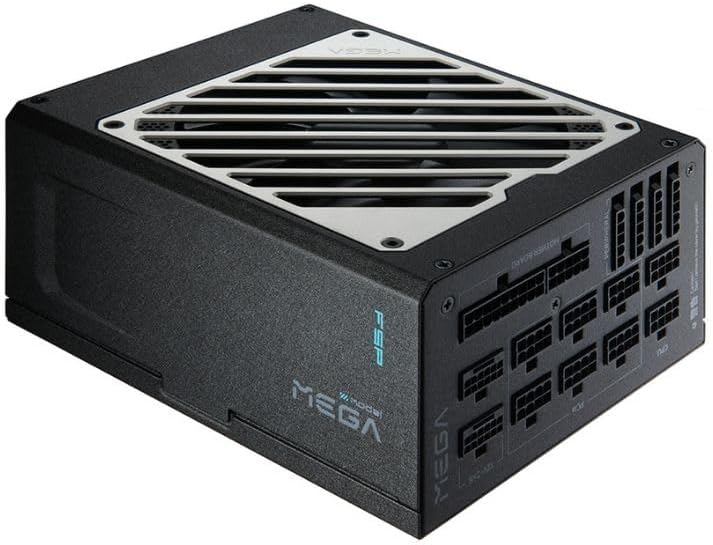
The FSP MEGA TI 1650W achieves a perfect 5.0 rating by combining efficiency with compact design. It supports ATX 3.1 and features dual native 12V-2×6 connectors for seamless compatibility with modern GPUs.
Pros
Highest rating in category
Compact chassis footprint
Eco fanless mode
10-year warranty coverage
Cons
Higher price for extra wattage
Fanless mode limited to low load
We may earn a commission when you buy through this link, at no additional cost to you.
Its strengths include the 135mm fluid dynamic bearing fan which ensures quiet operation. The eco mode stops the fan entirely below 40% load for zero noise during light usage.
The unit is slightly more expensive but justifies cost with titanium efficiency and robust build. The compact size helps in cases with limited rear clearance.
Choose this if you need top-tier efficiency in a smaller footprint. It is an excellent fit for quiet compact high-performance gaming rigs.
Energy Efficient Cooling
Zero RPM mode activates when system load drops below 40% to eliminate noise completely.
Titanium Certification
At least 94% efficiency at typical load ensures minimal energy waste and heat generation.
The EVGA SuperNOVA 1600 P2 offers platinum efficiency and solid build quality for heavy-duty systems. It rates 4.6 and incorporates 100% Japanese capacitors to ensure stability over time.
Pros
High efficiency performance
Long warranty duration
Reliable Japanese parts
Fully modular cabling
Cons
No ATX 3.1 compliance
Heavier than some rivals
We may earn a commission when you buy through this link, at no additional cost to you.
Its strengths include ECO mode which allows silent operation at low loads. The double ball bearing fan provides longevity and consistent cooling performance even during extended gaming sessions.
While it does not support ATX 3.1 standards it remains powerful enough for most current GPU demands. The price reflects its platinum tier positioning in the market.
Select this for a balanced mix of efficiency and reliability. It suits systems that prioritize quiet operation and component safety without needing the latest PCIe 5.1 features.
ECO Mode Silence
The ECO switch can disable the fan entirely at low loads for completely silent operation.
Japanese Component Quality
100% Japanese capacitors provide superior durability and thermal stability.
We may earn a commission when you buy through this link, at no additional cost to you.
Buying Guide – How to Choose the Best 1600W Power Supply
Selecting a 1600W power supply involves evaluating several critical factors beyond just wattage. This section breaks down the key attributes that determine long-term reliability and system stability.
Efficiency Rating
Efficiency ratings such as Gold Platinum and Titanium indicate how much input power is converted into usable energy. Higher ratings mean less wasted heat and lower electricity costs over time.
Look for Cybenetics or 80 Plus certifications to verify claims. Titanium rated units are most efficient but cost more than standard Gold options.
Connector Standards
Modern graphics cards require ATX 3.1 and 12V-2×6 connectors. Ensure your supply has native cables to avoid using adapters which can be unsafe.
Check that the PSU includes enough PCIe connectors for your intended multi-GPU setup. Native support ensures secure connections and better power delivery.
Fan Noise and Control
Noise levels are measured in decibels. Units with hybrid or zero RPM modes stop fans at low loads keeping your build quiet during casual use.
High-quality bearing fans such as FDB or double ball bearings last longer and produce less mechanical noise. Consider Lambda ratings for noise performance.
Warranty and Support
A longer warranty often signals better build quality and manufacturer confidence. Many top models offer 10 to 12 year coverage for peace of mind.
Verify customer support channels and return policies. Reliable brands provide responsive service in case of defects or technical issues.
Internal Components
Japanese capacitors are generally more reliable and heat-resistant than standard alternatives. Check for server-grade components if you plan to use the unit in harsh conditions.
Quality components contribute to stable voltage rails and reduced ripple. This protects sensitive hardware like motherboards and SSDs from electrical stress.
Dimensions and Fit
Some 1600W units are deeper than standard PSUs and may not fit compact cases. Always measure your chassis clearance before purchasing.
Modular designs help reduce clutter but ensure the case supports modular cable routing. Proper fit prevents airflow restrictions and overheating.
Protection Features
Overvoltage and undervoltage protection safeguards your system from electrical spikes. Look for units with comprehensive protection circuits for safety.
Advanced protections like OCP and OPP prevent damage during sudden power surges. These features are essential for expensive high-end builds.
Price and Value
Higher wattage power supplies command premium prices. Balance your budget with the features you actually need such as connectors or displays.
Investing slightly more for better efficiency can save money on electricity bills. Compare costs per watt to find the best value.
How to Use and Care for Your 1600W Power Supply
Install the power supply in a cool ventilated area to prevent overheating. Ensure all connections are secure and that cables are not pinched by case walls.
Run stress tests after installation to confirm stable operation. Monitor temperatures and voltages using software to ensure no irregularities occur under load.
Keep the intake filters clean to maintain proper airflow. Dust accumulation can restrict cooling and reduce the lifespan of internal components over time.
Frequently Asked Questions
Do I really need a 1600W power supply?
Most users do not require 1600W unless they have multiple high-end graphics cards or extreme overclocking setups. Standard high-end gaming PCs usually function well with 850W to 1200W units.
What is the difference between 80 Plus Gold and Titanium?
Titanium units offer higher efficiency ratings reducing power waste and heat output. Gold units are cheaper but slightly less efficient. Choose Titanium if energy savings are a priority.
Can I use a 1600W PSU with older GPUs?
Yes a 1600W unit is backward compatible with older GPUs. The unit will only deliver the power your components need. Ensure it has the correct legacy connectors for your hardware.
Are native 12V-2×6 cables safer than adapters?
Yes native cables are safer because they eliminate connection points where failures can occur. Adapters can overheat under high load so prefer native support whenever possible.
How long should a power supply last?
Quality power supplies with Japanese capacitors often last over a decade. Proper ventilation and stable power input extend their lifespan significantly. Check warranty periods for expected durability.
Do all 1600W PSUs support ATX 3.1?
No not all units comply with ATX 3.1 standards. Look for explicit labeling or product descriptions confirming compliance if you plan to use next-generation GPUs.
What happens if the PSU fan stops working?
If the fan fails the unit may overheat or shut down abruptly. Ensure your case has backup airflow to help dissipate heat until the unit is serviced or replaced.
How do I clean the power supply safely?
Use compressed air to blow dust out of the vents while keeping the unit powered off. Do not open the casing as it contains dangerous voltages even when disconnected.
Final Thoughts on Choosing the Best 1600W Power Supply
Our top picks highlight the Seasonic Noctua Edition for silence and the ASRock PG 1600G for value. Each model offers unique strengths depending on your specific build requirements and budget constraints.
Prioritize efficiency and safety features such as native connectors and strong protection circuits. These attributes ensure your system runs reliably during demanding tasks like gaming or rendering.
Prices fluctuate frequently so verify current listings before finalizing your decision. Checking recent reviews ensures you select a unit that meets your performance expectations.
This guide compares the top Ethernet surge protectors for 2026, evaluating protection levels, PoE support, and durability to help you safeguard your network