
Lenovo V15 Gen 4
4.5Editor score
MIL-SPEC tested build durability
Efficient AMD Ryzen 5 processor
Long battery life for all-day use
Finding a laptop that lasts requires more than just a high price tag. You need durable materials, efficient processors, and strong support. This guide helps you choose a machine that withstands years of daily use without slowing down.
We compared ten top-rated business laptops based on build standards, thermal management, and upgradeability. Our analysis focuses on models designed for reliability, ensuring they remain functional through evolving software demands and physical wear.
Each pick highlights specific strengths like MIL-STD certification or long battery life. Prices fluctuate often so check current deals before buying. These recommendations help you invest in a device that supports your workflow for the long term.
4.5Editor score

4.2Editor score

5.0Editor score
As an Amazon Associate we earn from qualifying purchases.
This table compares key specifications across all ten selected models to help you quickly identify the right fit for your longevity needs based on performance and durability.






This model stands out for its massive 32GB of DDR5 RAM and Intel Core Ultra 7 processor. It is designed to handle heavy workloads without aging quickly. The inclusion of AI capabilities ensures it adapts to future software demands efficiently.
We may earn a commission when you buy through this link, at no additional cost to you.
The build quality uses a sleek Arctic Grey aluminum chassis that resists wear. Connectivity is superb with Thunderbolt 4 support allowing fast data transfer and external display options. The 1TB SSD provides ample space for years of document and media storage.
While the price is higher than budget options, the performance headroom justifies the cost. The weight is noticeable compared to thinner laptops. These trade-offs are acceptable for users prioritizing longevity over portability.
Ideal for professionals managing large datasets or content creators. If you need a machine that remains fast through multiple years of use, this is a top choice. It balances modern features with durable construction.
32GB RAM ensures smooth multitasking even as applications become more demanding over time.
Integrated AI Boost optimizes power usage and performance for better battery longevity.
We may earn a commission when you buy through this link, at no additional cost to you.
The Lenovo V15 Gen 4 offers exceptional value for those seeking a durable device. It is tested to MIL-STD-810H requirements ensuring it withstands harsh conditions. The Ryzen 5 processor provides steady performance for daily business tasks.
We may earn a commission when you buy through this link, at no additional cost to you.
Its 8GB RAM is sufficient for web browsing and office work but might struggle with heavy virtualization. The privacy shutter adds a layer of security often overlooked in budget models. The build quality is robust despite the lower price.
Some users may need to upgrade RAM later for more intensive needs. The plastic chassis is durable but lacks the premium feel of metal. These are minor compromises for the reliability offered.
Perfect for students or remote workers needing a reliable daily driver. It delivers essential features without overspending. Choose this if you need a solid machine that lasts without breaking the bank.
Military grade testing ensures resistance to drops dust and extreme temperatures for longer life.
Made with responsibly sourced materials to reduce environmental impact during production.
We may earn a commission when you buy through this link, at no additional cost to you.
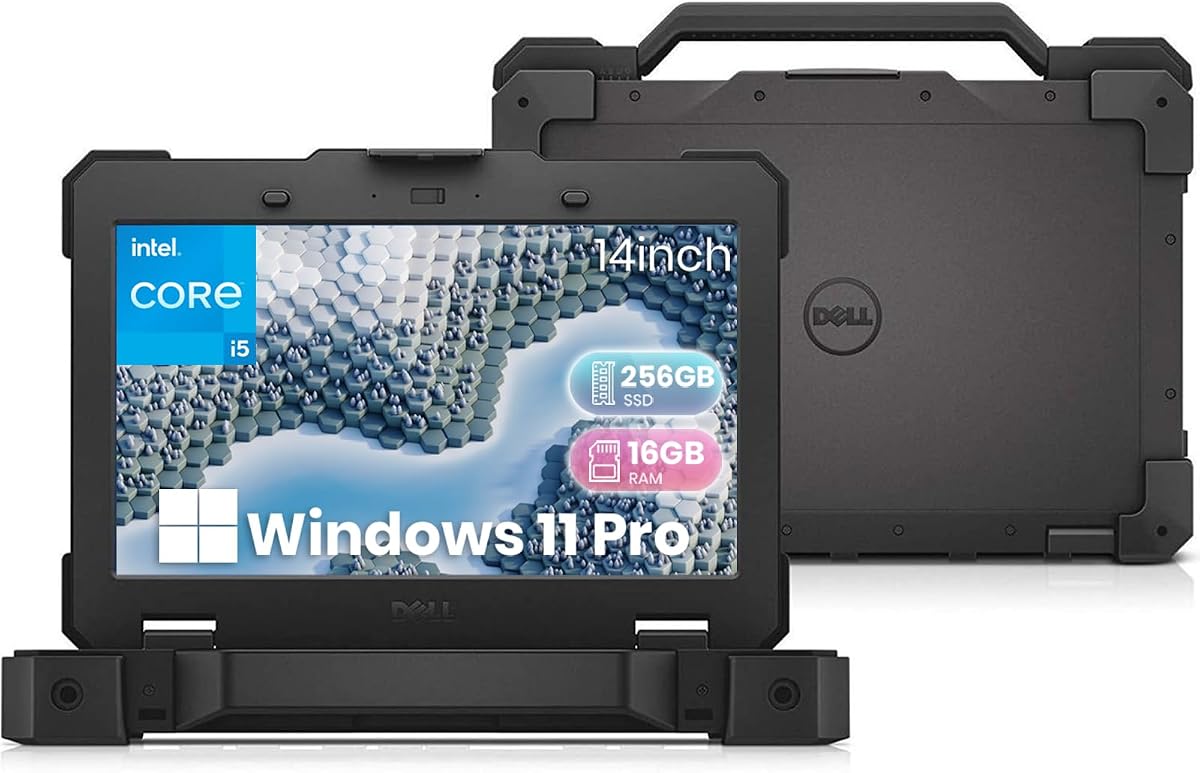
This laptop is engineered for the harshest environments. Its reinforced chassis protects against drops and spills common in industrial settings. The touchscreen is visible even in bright sunlight making it ideal for field work.
We may earn a commission when you buy through this link, at no additional cost to you.
The 16GB RAM handles business apps smoothly. Windows 11 Pro offers advanced security tools. While the processor is older it remains stable for reporting and inspections. The build quality is unmatched for extreme durability.
The weight and bulk make it less portable for travel. The processor may not handle modern heavy tasks efficiently. These issues are irrelevant if the priority is surviving tough conditions.
Best for construction or logistics teams needing a field-tested device. It is built to last in difficult places. If durability is your main concern this model offers peace of mind.
Designed to withstand vibration humidity and temperature extremes found in industrial sites.
High brightness screen ensures clear viewing even under direct sunlight conditions.
We may earn a commission when you buy through this link, at no additional cost to you.
This model focuses on screen real estate for productivity. The 17.3 inch FHD display provides ample space for documents and spreadsheets. It is designed for stationary or desk use where space is available.
We may earn a commission when you buy through this link, at no additional cost to you.
The keyboard includes a numeric keypad which speeds up data entry. Battery life is optimized for long sessions. The processor handles standard business apps well. Windows 11 with Office 365 ensures compatibility with modern tools.
Portability is limited due to size and weight. It is less suitable for frequent travel. These drawbacks are minor if the laptop stays on a desk mostly.
Ideal for office workers needing a large display. It balances performance with usability. Choose this if screen size is a priority for your daily tasks.
Large display allows multiple windows open simultaneously without clutter.
HP Fast Charge technology gets you back to work quickly with less downtime.
We may earn a commission when you buy through this link, at no additional cost to you.
This business laptop delivers steady performance with a capable Intel Core i5 processor. It is designed for professional environments where reliability matters. The 16GB RAM supports smooth multitasking for standard office workloads.
We may earn a commission when you buy through this link, at no additional cost to you.
Windows 11 Pro offers advanced security and management tools. The display is clear and suitable for extended use. Ports like HDMI and RJ45 ensure easy connections to peripherals. The numeric keypad aids data entry efficiency.
Upgrades are limited compared to other models. Build materials are standard rather than premium. These factors are acceptable for general business use.
Good for corporate users needing a solid workstation. It provides essential features without unnecessary complexity. Select this if you need a reliable Pro for daily tasks.
Windows 11 Pro provides enhanced security for business data protection.
Intel Core i5-13420H delivers balanced performance for productivity tasks.
We may earn a commission when you buy through this link, at no additional cost to you.
This model balances speed and durability well. DDR5 RAM ensures faster data access than older generations. The MIL-SPEC rating adds confidence in its physical resilience. It is suitable for demanding daily workflows.
We may earn a commission when you buy through this link, at no additional cost to you.
AMD Ryzen 5 processor provides smooth performance. The privacy shutter protects web cam access. Connectivity includes USB-C and HDMI for versatile setups. The design is simple but functional for business environments.
Graphics performance is not for gaming. The design lacks high-end flair. These limitations are minor for business users prioritizing stability.
Ideal for students or professionals needing reliability. It offers modern tech without excessive cost. Choose this for balanced performance and durability.
DDR5 memory offers faster speeds and better efficiency than DDR4 predecessors.
HD webcam with privacy shutter keeps your visual data secure.
We may earn a commission when you buy through this link, at no additional cost to you.
This Dell model emphasizes visual comfort for long sessions. ComfortView Plus reduces blue light to protect eyes. The 16:10 aspect ratio provides more vertical space for documents. It is built for extended productivity.
We may earn a commission when you buy through this link, at no additional cost to you.
The processor supports efficient multitasking. 16GB RAM is standard for business use. Onsite service adds value for quick repairs. The screen quality is good for media and work.
Windows 11 Home lacks some enterprise features. Build is average compared to premium lines. These are trade-offs for the focus on display quality.
Good for users spending long hours on screen. Prioritize comfort and clarity. Choose this if visual fatigue is a concern.
ComfortView Plus reduces harmful blue light to minimize strain during long use.
16:10 aspect ratio gives more screen height for better document viewing.
We may earn a commission when you buy through this link, at no additional cost to you.
This renewed model offers reliability at a lower cost. It meets military durability standards for tough handling. The refurbishment process ensures it works like new. It is a smart choice for budget-conscious buyers.
We may earn a commission when you buy through this link, at no additional cost to you.
Ports include legacy options like VGA and serial which aid in industrial use. The processor is older but stable. Windows 11 Pro provides security features. The SSD ensures fast boot times.
Storage may fill up quickly. The CPU is not for heavy workloads. These are acceptable for basic business needs.
Ideal for cost-effective durability. Choose if you need legacy ports or budget. It provides longevity through robust design.
Renewed products are inspected and tested to ensure full working condition.
Includes VGA and serial interfaces for connecting older industrial equipment.
We may earn a commission when you buy through this link, at no additional cost to you.
This unit stands out with 40GB of RAM and a Ryzen 7 CPU. It supports heavy multitasking and large datasets. The 1TB SSD offers substantial storage for long term projects. It is built for professional tasks.
We may earn a commission when you buy through this link, at no additional cost to you.
Windows 11 Pro includes essential security tools. The display is standard FHD. Connectivity supports external monitors. The numeric keypad aids quick data entry. It is a strong choice for data analysis.
RAM size may limit future upgrades. Battery life is average for the specs. These are minor issues for performance-focused users.
Best for power users needing headroom. It handles complex apps well. Select this if memory is a priority.
40GB RAM allows smooth running of many browser tabs and apps.
1TB PCIe NVMe SSD ensures quick data access and file storage.
We may earn a commission when you buy through this link, at no additional cost to you.
This ThinkPad model focuses on business needs. It offers configurable memory and storage to suit specific demands. Thunderbolt 4 ports provide high speed data transfer. The design is durable for travel and field work.
We may earn a commission when you buy through this link, at no additional cost to you.
Battery life reaches up to 10 hours with fast charging. Windows 11 Pro supports enterprise security. The display is bright for office use. It balances performance and portability well.
Warranty comes from a third party. Build materials are standard for the line. These are acceptable given the specs and value.
Ideal for enterprise users needing customization. It supports varied workflows. Choose this for a versatile professional laptop.
RAM and storage can be customized to match your specific workflow needs.
Fast charging gets you to 80% in an hour for continuous productivity.
We may earn a commission when you buy through this link, at no additional cost to you.
Selecting a laptop that lasts involves checking several key factors. This guide explains what to look for to ensure your device stays reliable for years.
Look for laptops with reinforced chassis or MIL-STD certification. These standards ensure resistance to drops and environmental stress. Aluminum or high-grade plastics extend physical life.
A sturdy build reduces the risk of damage from daily use.
Choose newer processors that support AI optimization. Efficient chips run cooler and use less power. This reduces heat damage over time.
Modern processors handle future software updates better.
Opt for 16GB RAM or more to avoid slowdowns. Larger SSDs prevent the need for external drives. Upgradable slots allow future enhancements.
Adequate memory and storage keep the system fast longer.
Long battery cycles reduce wear on charging ports. Fast charging ensures productivity during short breaks. Quality batteries degrade slower with proper care.
Reliable power sources mean fewer interruptions in work.
Anti-glare and blue light filters protect eyes. Higher brightness ensures visibility in different lighting. Better panels reduce strain during long sessions.
A durable screen saves on replacement costs.
Hardware encryption and TPM protect data. Privacy shutters add physical protection. Secure login methods keep your work safe.
Security prevents breaches that could shorten device use.
Extended warranties cover unexpected repairs. Onsite service saves time. Manufacturer support ensures parts availability.
Good support ensures the device remains usable for years.
Ports like Thunderbolt ensure fast data transfer. Versatile inputs support various peripherals. Future ports prevent adapter needs.
Rich connectivity extends the laptop's functional lifespan.
Keep your laptop clean by wiping it with a soft cloth. Dust buildup can block vents and cause overheating. Avoid placing it on soft surfaces like beds.
Manage power settings to preserve battery health. Avoid frequent full discharges and keep charge between 20 and 80 percent. Use sleep mode instead of shutting down often.
Update drivers and OS regularly for performance. Install reputable security software to prevent malware. Use a sleeve or case when transporting to protect against physical shock.
Durability comes from solid build quality, efficient components, and proper care. Look for MIL-STD certification, good cooling, and ample RAM. Regular updates and physical protection also extend lifespan.
Refurbished units can be great value if certified. They offer lower prices with tested performance. Check the warranty and condition to ensure reliability.
16GB is the sweet spot for longevity. It handles modern apps and future updates well. 8GB might suffice now but could slow down sooner.
Business models are tested for toughness and have better materials. They focus on reliability and service. This design helps them withstand daily wear better.
Update software monthly for security and performance. Hardware upgrades like RAM can extend life. Consider a new device every four to five years.
Yes, SSDs are faster and more durable than HDDs. They have no moving parts so they resist shocks. This reduces failure risks over time.
We reviewed ten top options including the Lenovo ThinkBook 16 Gen 8 and Dell Latitude Rugged 5420. Each offers unique strengths for different needs and budgets.
Prioritize build quality and specs that match your work. More memory and better materials lead to a longer device life.
Prices change so verify current details before buying. Investing in a reliable laptop saves time and money.