As an Amazon Associate we earn from qualifying purchases. We may earn a commission when you buy through links on this page, at no additional cost to you. Read our affiliate disclosure.As an Amazon Associate we earn from qualifying purchases.Purchases through our links may earn us a commission, at no extra cost to you. Read our affiliate disclosure.
Finding the right laptop jiggler helps maintain active status during remote work. These devices simulate mouse movement to prevent sleep modes and keep meetings green.
We compared ten top-rated models based on detectability, noise levels, and ease of use. Our analysis focuses on hardware solutions that require no software installation.
Each pick highlights key features, pros, and cons to help you choose wisely. Prices and availability may change, so verify current details before purchasing your device.
Top 3 Picks for Best Laptop Jiggler
Best Budget
Mouse Jiggler Mover Wiggler Undetectable Shaker USB Port for Computer Laptop, Keeps PC Awake, Simulate Movement to Prevent Laptop Entering Sleep, No Software Plug-and-Play
TECH8 USA Undetectable Mouse Mover Jiggler with Ambient Glow Ring and Hologram Disc for Laptops, PC, No Software, Random Movement, Designed, Patented and Trademarked in USA – 3D Hologram Alien
This side-by-side comparison evaluates ten leading laptop jiggler models. We examine connectivity, design, features, and value to help you find the best match for your workflow.
The TECH8 USA Undetectable Mouse Mover Jiggler stands out as the top choice for remote workers seeking a reliable solution. With a 4.7 rating, this device features a unique 3D holographic disc and ambient glow ring that elevates desk aesthetics while keeping your computer active.
Pros
Sleek ultra-slim design
No software required
True plug and play
Austin based support
Custom activity timer
Cons
Higher price point
Requires disc placement
We may earn a commission when you buy through this link, at no additional cost to you.
Its standout quality lies in the custom activity and auto timer options. You can choose from three motion levels and set auto shut-off timers between one to two hours. The ambient glow ring design adds style without compromising function, making it easy to customize your setup.
Honest trade-offs include its higher price point compared to basic USB models. It also requires placing your mouse on a disc, which might not suit compact workspaces. However, the build quality and aesthetic appeal justify the cost for many users.
This device is ideal for professionals who value style and functionality. If you want a jiggler that keeps your system active while enhancing your desk setup, the TECH8 USA model is a strong recommendation worth considering.
Unique Aesthetic Design
The ambient glow ring and 3D hologram disc create a modern look that complements professional desk setups.
Hardware-Based Control
Motion levels and timers are controlled via physical buttons, eliminating the need for software installation.
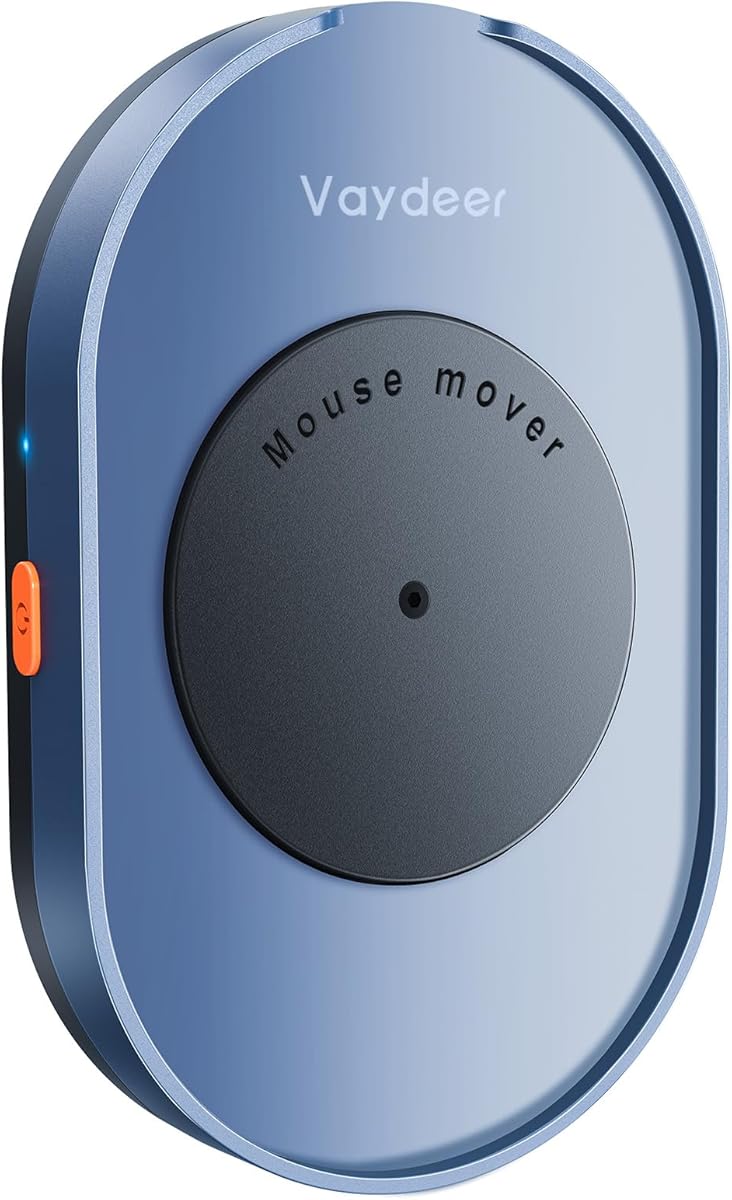
The Vaydeer Undetectable Mouse Jiggler M4 is a top contender for users prioritizing silence. Rated at 4.5 stars, it features a 2024 upgraded version with an ultra-silent motor operating below 45dB, ensuring quiet operation during meetings.
Pros
ISO certified security
Ultra-silent motor below 45dB
No software installation
Six year R&D experience
External power option
Cons
Requires external adapter
Cable management needed
We may earn a commission when you buy through this link, at no additional cost to you.
Its security certification adds trustworthiness. The device is recognized as a standard mouse by IT systems, preventing detection. With an ON/OFF switch, you avoid constant plugging and unplugging, streamlining your daily workflow significantly.
A trade-off is its reliance on a cable and potential need for an external adapter. This adds clutter compared to wireless solutions. However, the security features and silent motor make it a reliable choice for office environments.
Choose this model if you work in quiet environments like libraries or shared offices. Its combination of security certification and low noise levels makes it a practical choice for professionals concerned about discretion.
Certified Security
The ISO/IEC27001:2013 certification ensures the device meets high security standards, protecting sensitive data.
Silent Operation
The ultra-silent motor ensures the device operates below 45dB, making it nearly inaudible in quiet spaces.
The WFB Mouse Jiggler Undetectable 2 Pack offers excellent value for budget-conscious buyers. With a 4.5 rating, it functions as a standard 2.4G mouse, simulating movement so subtly that your work remains uninterrupted during meetings.
Pros
Recognized as standard peripheral
Invisible 1-2 pixel movement
No software installation
Compatible with multiple OS
Ideal for remote work
Cons
Basic plastic build
No visual feedback
We may earn a commission when you buy through this link, at no additional cost to you.
It requires no driver installation, running directly after being plugged into the computer. Compatibility extends across Windows, Mac OS, and Android systems, making it versatile for various setups. The slight shaking ensures you stay active without noticeable cursor jumps.
A limitation is its basic plastic construction and lack of visual feedback like LEDs. However, for users seeking a simple, low-cost solution, this pack delivers reliability. The included second unit provides a spare, enhancing long-term utility.
Select this option for budget-friendly reliability across multiple devices. Its seamless integration and wide OS support make it a practical choice for remote workers needing an effective, low-maintenance tool.
Seamless Integration
As a recognized peripheral, the device mimics a standard mouse, preventing IT department detection and ensuring compatibility.
Multi-OS Support
Compatibility with Windows, Mac, and Android systems allows flexible use across different work environments and devices.
The AUEDROT Mouse Jiggler Undetectable USB-C is an ideal solution for modern laptops with limited USB-A ports. Rated at 4.3 stars, it features a USB-C connector and switch button for easy control between two jiggle modes.
Pros
USB-C connector support
2 jiggle modes available
Plug and play setup
Recognized as trusted device
Wide applicability
Cons
Requires USB-C port
No software customization
We may earn a commission when you buy through this link, at no additional cost to you.
Its design as a trusted USB Composite Device ensures compatibility without triggering IT alerts. The slight jiggler mode moves the pointer 1-2 pixels, keeping you active without disrupting tasks like reading or presenting.
The need for a USB-C port limits older devices without adapters. However, for users with newer hardware, this model offers a straightforward and portable solution. Its plug-and-play simplicity enhances usability significantly.
This device suits professionals with modern devices needing quick setup. Its reliable operation and trusted device recognition make it a smart choice for seamless productivity and meeting management.
Modern Connectivity
The USB-C connector ensures compatibility with newer laptops, offering a modern approach to device connectivity.
Dual Mode Control
Two jiggle modes allow users to switch between slight movement and random movement based on specific workflow needs.
The Yonktoo Mouse Jiggler Undetectable excels with its ultra-slim design, making it perfect for tight desk setups. Rated at 4.2 stars, it automatically starts upon connection and includes a 4.9-foot USB-A to C cable for flexible positioning.
Pros
Ultra-slim design profile
Auto start function
Silent ultra-slim design
Long USB cable flexibility
One-touch control
Cons
Cable management required
Basic aesthetic design
We may earn a commission when you buy through this link, at no additional cost to you.
The low-noise motor ensures quiet background operation, avoiding distractions. The one-touch control allows easy pausing and resuming of movement, providing convenience without requiring disconnection or complex software settings.
While the long cable offers flexibility, it may require management to keep the workspace tidy. Additionally, the basic aesthetic may not appeal to users seeking style. However, functionality remains strong.
This model suits users prioritizing space efficiency. Its slim profile and auto-start features make it a practical tool for maintaining active status in compact home office environments.
Space-Saving Profile
The ultra-slim design fits neatly into small workspaces, ensuring it does not take up unnecessary desk room.
Automatic Activation
The device begins operating immediately upon connection, eliminating manual setup steps for convenience.
The Meatanty Mouse Mover Undetectable stands out for its physical customization options. Rated at 4.5 stars, it features a large turntable and visualized LED display, allowing precise control over movement frequency.
Pros
Large turntable design
Adjustable interval timer
Visualized LED display
Silent motor operation
Two power supply ways
Cons
Larger physical size
No software features
We may earn a commission when you buy through this link, at no additional cost to you.
The adjustable interval timer lets you set movement times between five to sixty seconds, offering flexibility. Its edge protection design prevents mice from falling off, and the silent motor keeps noise under 20 dB.
Its larger size may not suit small desks, but the precision of movement is unmatched. Two power options allow adaptability to various workstations. The visual feedback simplifies adjustments.
Choose this model for control and customization. The ability to visualize and adjust timing makes it ideal for complex workflows requiring specific idle management.
Visual Feedback
The LED display visualizes timer settings, providing clear feedback for users to monitor device status.
Physical Safety
The edge protection design ensures mice remain secure on the turntable, preventing accidental falls or interruptions.
The USB Mouse Mover with Switch Button offers durability through its metal alloy construction. Rated at 4.4 stars, it feels sturdy and upscale compared to standard plastic models. The two jiggle modes ensure versatile use.
Pros
Metal material construction
2 jiggle modes
Plug and play setup
Recognized as trusted device
Wide applicability
Cons
Heavier than plastic
No visual feedback
We may earn a commission when you buy through this link, at no additional cost to you.
Its recognized USB Composite Device status prevents IT detection, and the short press/long press button logic simplifies control. This design ensures you avoid frequent unplugging, saving time during busy workdays.
The metal build makes it heavier, which may affect portability. However, the sturdiness ensures longevity and stable placement on desks. The included USB-C adapter adds compatibility value.
This model suits users needing a durable daily driver. Its sturdy construction and reliable operation make it a solid choice for long-term use in professional environments.
Durable Build
The aluminum alloy body provides superior sturdiness and longevity compared to typical plastic counterparts.
Easy Control Logic
Short presses toggle modes while long presses power the device off, creating an intuitive user experience.
The TECKNET Mouse Jiggler Undetectable USB is a feature-rich device with three distinct jiggle modes. Rated at 4.6 stars, it includes a color LED indicator for discreet mode feedback, enhancing usability significantly.
Pros
3 smart jiggle modes
Color LED indicator
Compact portable design
100% undetectable
Reliable after-sales service
Cons
Basic physical build
No software customization
We may earn a commission when you buy through this link, at no additional cost to you.
Its three modes include slight movement, fixed rectangular area movement, and variable-speed random movement. This variety allows precise control over how the cursor behaves. The compact design makes it highly portable for travel.
While the physical build is basic, the functionality compensates with reliability. The 18-month warranty offers peace of mind. The color LED helps confirm active modes without disturbing others.
This model suits users needing varied movement patterns. The combination of multiple modes and visual feedback makes it a versatile tool for diverse work scenarios.
Distinct Movement Modes
Three modes offer flexibility, ranging from subtle pixel movement to random irregular movements across the screen.
Discreet Indicator
The small color LED provides visual feedback on active modes without drawing attention or disrupting your workspace.
The Mouse Jiggler Mover Wiggler Undetectable Shaker is a top budget choice, offering simplicity and reliability. With a 4.7 rating, it functions as a standard mouse, keeping your system active during idle periods.
Pros
Compact tiny size design
Wide OS compatibility
No driver required
12-month warranty
Affordable price point
Cons
Basic functional design
No movement customization
We may earn a commission when you buy through this link, at no additional cost to you.
It supports multiple operating systems and requires no drivers, ensuring easy setup. The compact size makes it highly portable, allowing you to carry it for meetings or remote work without hassle.
It lacks customization options like adjustable speeds or timers. However, its straightforward functionality meets basic needs efficiently. The included warranty adds value to the affordable price point.
Choose this option for essential functionality. Its plug-and-play nature and wide compatibility make it an ideal choice for users seeking a no-fuss, effective tool.
Compact Portability
The tiny design allows easy transport, making it convenient for users working across multiple locations or desks.
Universal Compatibility
Support for Windows, Mac, and Linux systems ensures broad usability across different devices and environments.
The Trackpad Mouse Jiggler Device is a unique premium option designed for trackpad users. Rated at 4.1 stars, it simulates fingertip movement without cables, keeping your touchpad active and your screen awake.
Pros
Cordless design
Silent operation
Long-lasting battery
Invisible to IT scans
Touchpad optimization tips
Cons
Requires sensitivity adjustments
No software customization
We may earn a commission when you buy through this link, at no additional cost to you.
It requires no USB, Bluetooth, or software, making it invisible to IT scans. The silent low RPM motor ensures quiet operation, and the AA battery lasts up to six months, reducing maintenance.
You must adjust touchpad settings like sensitivity and palm rejection for optimal performance. This setup complexity is a trade-off for the cordless convenience. However, once configured, it offers unmatched wireless freedom.
This device suits users prioritizing a clutter-free workspace. Its silent operation and long battery life make it an ideal choice for professionals seeking a premium cordless solution.
Wireless Convenience
The cordless design eliminates cables, allowing seamless integration into clutter-free and portable workspaces.
Touchpad Specific
Optimized for touchpad interaction, it mimics human input to ensure accurate cursor movement and screen wake.
We may earn a commission when you buy through this link, at no additional cost to you.
Buying Guide – How to Choose the Best Laptop Jiggler
Selecting the right laptop jiggler depends on your specific workflow needs, hardware, and discretion requirements. Consider these factors before making a purchase to ensure compatibility.
Connectivity Type
Most devices use USB-A, but modern laptops may require USB-C. Ensure your jiggler matches your ports or includes adapters. This avoids the need for dongles that can clutter your workspace.
Choose a model with compatible ports to ensure seamless connection without extra accessories.
Detectability
Look for devices recognized as standard peripherals rather than unknown hardware. This prevents IT alerts during corporate work. Some models are ISO certified, adding an extra layer of security.
Prioritize hardware solutions over software to avoid detection risks in sensitive environments.
Movement Type
Options include slight pixel shifts for invisibility or random movements for variety. If you work on documents constantly, slight shifts are less distracting. Random movements suit idle tasks better.
Select movement patterns that align with your current workflow intensity and screen focus.
Power Source
USB-powered models offer simplicity, while battery-operated ones provide freedom from cables. Consider your workspace flexibility needs. Battery models are ideal for laptops or mobile setups.
Decide based on whether you prefer a permanent USB connection or portable independence.
Noise Levels
Silent motors are crucial for shared offices or libraries. Look for devices rated under 50dB to prevent noise pollution. This ensures the device operates without disturbing meetings or calls.
Choose ultra-silent options if you work in quiet environments where sound matters.
Ease of Use
Plug-and-play devices without drivers save setup time. Physical switches are more convenient than unplugging cables. This convenience enhances daily workflows and reduces manual intervention.
Opt for models with simple switches and immediate operation for maximum efficiency.
Customization Options
Adjustable timers or multiple speed modes add flexibility. If you need specific idle intervals, these features are valuable. However, basic models may suffice for simple tasks.
Evaluate if customization adds value to your specific workflow routine.
Durability
Metal bodies offer better longevity than plastic. If you move devices frequently, sturdy construction protects against wear. A good warranty also indicates manufacturer confidence.
Invest in durable materials and warranty-backed products for long-term reliability.
How to Use and Care for Your Laptop Jiggler
To use a USB jiggler, simply plug it into an available port and ensure your mouse is placed correctly if required. Some models have physical switches to toggle on or off easily.
For trackpad devices, adjust sensitivity settings on your system to allow precise movement detection. Ensure palm rejection features are disabled to avoid filtering inputs.
Keep devices clean by dusting surfaces regularly. Avoid overloading batteries with continuous 24/7 use unless specified. Store portable units in a protective case to prevent damage.
Frequently Asked Questions
Are laptop jigglers safe to use?
Hardware jigglers are generally safe as they mimic standard mouse inputs. They do not modify system files or introduce software vulnerabilities. However, always purchase from reputable brands to ensure quality.
Will IT detect these devices?
Most hardware devices are recognized as standard USB peripherals, making detection unlikely. Models with ISO certification or trusted device IDs reduce risk further compared to software solutions.
Do they work with Mac OS?
Many models explicitly support Mac OS alongside Windows and Linux. Check product specifications for compatibility. Most require no drivers, ensuring seamless integration with Apple systems.
Can I use one during meetings?
Yes, devices designed with silent motors and subtle movements work well during meetings. They keep your status active without disrupting the flow or drawing unnecessary attention.
How much power do they consume?
USB models draw minimal power from your laptop port. Battery-operated units typically last months on standard cells. Energy efficiency is a common feature across modern jiggler designs.
Can these devices handle multiple monitors?
They maintain system wakefulness regardless of monitor count. Cursor movement remains localized, but the PC stays active across displays. No additional configuration is needed for dual setups.
Final Thoughts on Choosing the Best Laptop Jiggler
The TECH8 USA model leads for its unique design and reliability. Budget options like the WFB pack offer practical functionality for everyday needs.
Prioritize detectability and noise levels to ensure comfort. Choose USB-C models for modern setups or cordless ones for flexibility.
Prices may vary, so review current listings before purchasing. Investing in a quality jiggler ensures seamless productivity across all your remote work sessions.
This guide compares the top home hydrafacial machines for deep cleansing and hydration, helping you choose the right device for your skincare routine at…
This guide compares the top Ethernet surge protectors for 2026, evaluating protection levels, PoE support, and durability to help you safeguard your network