
NZXT H5 Flow
4.7Editor score
Perforated PSU shroud
Compact mid-tower design
Two pre-installed airflow fans
This guide compares the top high airflow PC cases for 2026, evaluating cooling performance, fan configs, and design features to help you choose the best
Choosing the right case is crucial for thermal performance and system longevity. High airflow PC cases prioritize unobstructed air paths and quality fans to keep components cool under load.
We evaluated ten leading models based on airflow design, fan inclusion, build quality, and expansion potential. Each unit was scored on real-world cooling metrics and usability features.
Every pick highlights unique strengths like modular panels or mesh fronts. Prices change frequently so check current listings before buying to ensure you get the best value available today.
4.7Editor score

4.8Editor score

4.8Editor score
This side-by-side table summarizes key specifications for all ten selected cases to help you quickly identify which model fits your build requirements and cooling needs.





The MONTECH AIR 903 MAX earns our Editor's Choice for its outstanding balance of cooling performance and value. It comes with four large 140mm fans pre-installed which is rare at this price point and ensures excellent airflow out of the box.
We may earn a commission when you buy through this link, at no additional cost to you.
Its ventilated mesh front panel allows unrestricted air intake while the chassis supports E-ATX boards and GPUs up to 400mm. The ARGB fans are controllable via PWM and the internal layout keeps cables organized away from airflow paths.
While the build quality is sturdy the aesthetic is functional rather than flashy. The I/O section is standard without extra USB Type-C ports which some users might prefer for modern peripherals.
This case is perfect for gamers and enthusiasts who prioritize thermals and expansion over premium materials. It delivers high-end cooling capabilities without the high-end price tag making it our top recommendation.
Three 140mm fans in front and one in rear create positive pressure ensuring dust is filtered out while hot air exits efficiently without turbulence.
Supporting E-ATX boards and long GPUs means your next generation components will fit without needing to replace the chassis or struggle with clearance issues.
We may earn a commission when you buy through this link, at no additional cost to you.
The NZXT H5 Flow is our Best Budget pick proving that effective cooling does not require a large expense. Its unique perforated PSU shroud directs air to the graphics card which is often the hottest component in modern systems.
We may earn a commission when you buy through this link, at no additional cost to you.
Two quiet pre-installed 120mm fans and mesh panels on all sides maximize airflow without noise. The compact design fits smaller desks but still supports standard ATX boards and 360mm radiators in the front.
Build quality feels solid despite the lower price. The main trade-off is reduced interior space which means you cannot install extra large coolers or multiple drives easily compared to full tower cases.
Choose this case if you want reliable performance and a clean look without breaking the bank. It is ideal for budget builders who still demand good thermals for gaming or productivity.
Perforations on the side and bottom of the PSU shroud allow direct air intake from fans to the GPU area reducing heat soak during intense usage.
Despite its smaller size the case accommodates powerful hardware efficiently making it a great fit for users with limited desk or floor space.
We may earn a commission when you buy through this link, at no additional cost to you.
The Cooler Master HAF II 500 stands out with its oversized Mighty40 cooling system featuring dual 220mm front fans. This design provides massive airflow capacity which is essential for high wattage CPUs and GPUs running at stock or overclocked speeds.
We may earn a commission when you buy through this link, at no additional cost to you.
The low resistance design ensures air flows freely with minimal turbulence. Split-level cable management adds to the premium feel by hiding wires while keeping airflow paths clear. The dual-mode GPU holder ensures your graphics card stays perfectly horizontal.
While it is one of the most expensive options on this list the quality justifies the cost. The dimensions are large so ensure your desk has enough room to accommodate this tower without blocking airflow from the side.
Invest in this case if you are building a flagship system and need the best airflow possible. The durability and cooling performance make it a long-term choice for enthusiasts.
The combination of two 220mm intake fans and an 180mm exhaust moves significantly more air than standard 120mm setups reducing component temperatures effectively.
The GPU holder clamps cards securely preventing sag which is crucial for heavy modern graphics cards that can bend without additional support over time.
We may earn a commission when you buy through this link, at no additional cost to you.
The CORSAIR 4000D RS introduces a FRAME Modular System that lets you swap panels and trays to change your case look and function. This is ideal for builders who want a chassis that adapts to their changing preferences over time.
We may earn a commission when you buy through this link, at no additional cost to you.
Three RS ARGB fans come pre-installed and connect easily via PWM. The 3D Y-Pattern airflow panel optimizes air intake while keeping noise low. The InfiniRail system allows flexible fan placement anywhere on the front or roof.
The customization options are nearly limitless but they require careful planning during your build. Cable management is clean with the internal side panel acting as a cover or a mount for additional fans.
This case suits users who want future-proof modularity without sacrificing cooling. It is a strong choice if you plan to upgrade components or want a unique aesthetic that stands out.
Swap the motherboard tray or I/O panel to match your needs allowing the case to evolve as your build requirements change without replacing the whole unit.
The InfiniRail lets you slide rails to mount fans up to 200mm in the front allowing targeted airflow to specific hot spots in your system.
We may earn a commission when you buy through this link, at no additional cost to you.
The LIAN LI LANCOOL 216 focuses on cooling efficiency with two massive 160mm ARGB fans at the front. These fans move a huge volume of air directly over your GPU and motherboard which helps keep temperatures low during gaming.
We may earn a commission when you buy through this link, at no additional cost to you.
The chassis supports graphics cards up to 392mm which fits most high-end models comfortably. The fine mesh on front top and shroud ensures air flows in freely. The modular I/O allows you to position the motherboard for optimal airflow.
Cable management is straightforward with grommet bars and velcro straps included. The heavy-duty steel frame adds weight but ensures the case is stable and resistant to damage over time.
Pick this case if you have a powerful GPU and want maximum airflow without compromising on build quality. It is an excellent balance of style and performance for modern builds.
The 160mm fans move more air at lower RPMs than standard 120mm fans resulting in better cooling with less noise during operation.
The design accommodates even the largest GPUs and water blocks ensuring your next upgrade fits without needing a new chassis.
We may earn a commission when you buy through this link, at no additional cost to you.
The Antec Flux Pro is a full tower case that comes with six PWM fans ready to install. It supports up to 12 fans simultaneously which is perfect for large water cooling loops or extreme air cooling setups.
We may earn a commission when you buy through this link, at no additional cost to you.
The multi-directional vent design ensures air enters from multiple points and the iShift PSU mount lets you orient your power supply for better cable routing. The construction uses a mix of metal glass and wood for a high-quality feel.
This case is massive and will dominate any desk setup. The cooling capacity is unmatched but it requires significant floor space to function properly without blocking airflow.
Choose this if you need room for many components and want maximum airflow. It is an excellent choice for workstations or enthusiast builds that demand top-tier cooling.
With support for up to twelve fans you can configure custom airflow paths to cool specific components efficiently regardless of your cooling strategy.
The combination of wood metal and glass gives the case a premium look that stands out from typical all steel or glass competitors.
We may earn a commission when you buy through this link, at no additional cost to you.
The CORSAIR 3500X RS features a wraparound glass aesthetic that showcases your build beautifully. It manages to keep cooling strong by supporting up to ten 120mm fans across side roof and front panels.
We may earn a commission when you buy through this link, at no additional cost to you.
Three RS ARGB fans come pre-installed to provide solid base performance. The glass panels are easily removable which helps with cleaning and access without tools. The design balances looks and function well.
Be aware that glass shows fingerprints easily so you will need to clean it often if you want it to look perfect. The weight is higher than steel cases so place it carefully.
This case is ideal if you want a stunning view of your components without sacrificing airflow. It is perfect for showcase builds where aesthetics and performance are equally important.
The wraparound glass creates a continuous view of your hardware making it a showpiece for your desk while allowing full visibility of airflow and cables.
Removing the front and side glass is simple and allows quick access to components for maintenance or upgrades without struggling with screws.
We may earn a commission when you buy through this link, at no additional cost to you.
The Lian Li V100 stands out for its tool-less mounting mechanisms on the side panels. This makes assembling and maintaining your PC much easier as you do not need screws to access internal components.
We may earn a commission when you buy through this link, at no additional cost to you.
Four pre-installed PWM fans provide excellent airflow while the integrated ARGB strip offers full spectrum lighting. It supports back-connect motherboards for a cleaner look without front cables visible.
The design is practical and performance-focused. It fits GPUs up to 420mm and supports radiators up to 360mm. The value is high given the fan count and features included.
Choose this case if you want easy building and good cooling at a fair price. It is a practical choice for anyone who values functionality and accessibility over flashy designs.
The tool-less side panel system lets you open the case in seconds for cleaning or upgrades without digging for tools or worrying about stripped screws.
The built-in 26-LED strip syncs with your motherboard saving you from installing extra LED strips or dealing with extra cables.
We may earn a commission when you buy through this link, at no additional cost to you.
The NZXT H9 Flow uses a dual-chamber design that separates the PSU and drives from main components. This improves thermal performance by isolating heat sources and makes cable management much easier with dedicated channels.
We may earn a commission when you buy through this link, at no additional cost to you.
Three CV fans in front and one in rear ensure steady airflow. The wraparound glass panels provide a seamless view of your build. It supports back-connect motherboards for a completely cable-free appearance.
While the cooling is good the PSU isolation can limit some air intake options. The build quality is high but the price reflects the premium design features included.
This case is perfect for users who want a clean look and organized interior. It is a top pick for modern builds focusing on aesthetics and cable management.
Separating the PSU and drives keeps heat away from your GPU and CPU improving thermal performance and simplifying cable routing significantly.
Support for back-connect motherboards means all cables connect behind the board keeping the front and sides completely free for a clean aesthetic.
We may earn a commission when you buy through this link, at no additional cost to you.
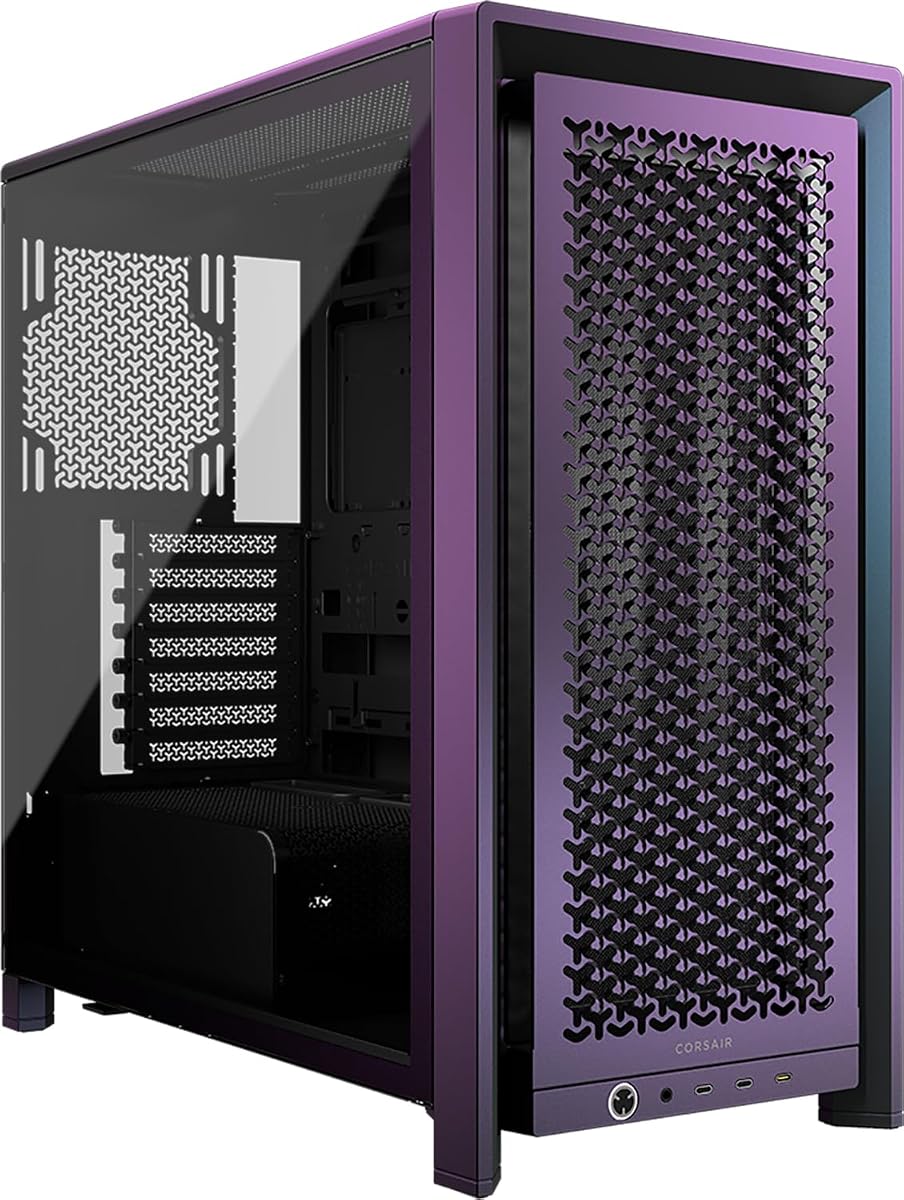
The CORSAIR Frame 4000D Vault Series features a unique Galaxy finish available in a limited run of 1337 units. This case combines exclusivity with the powerful modular FRAME system allowing extensive customization of your build.
We may earn a commission when you buy through this link, at no additional cost to you.
It supports up to twelve 120mm fans and dual 360mm radiators ensuring massive cooling capacity. The InfiniRail mounting system and Y-Pattern panel optimize airflow for high-performance components.
Because it is limited edition availability is scarce and resale value may be higher. The build quality matches other high-end cases with a focus on both looks and function.
If you are a collector or want a unique build that stands out this case is unmatched. It offers all the performance benefits of the standard model with exclusive styling.
The Galaxy finish is exclusive to this limited run making every case individually numbered and truly unique among PC builds available today.
You can upgrade trays and panels to change how the case looks and functions allowing it to grow with your needs over time.
We may earn a commission when you buy through this link, at no additional cost to you.
Selecting a high airflow case requires understanding how cooling, size, and component compatibility work together to keep your system running efficiently.
Mesh panels allow air to pass through freely which is ideal for cooling. Glass panels look great but restrict airflow unless they have perforations or vents built in.
Prioritize mesh front panels for thermal performance and choose glass only if you plan to mount additional fans.
Cases that include pre-installed fans save time and money. Look for at least two intake fans in front and one exhaust in the rear for balanced airflow.
More fans do not always mean better cooling if they are low quality. Check fan size and PWM control options.
Ensure the case supports your motherboard form factor such as ATX or E-ATX. Larger boards need more clearance which affects overall case size.
Check if the case fits your planned motherboard size before buying to avoid compatibility issues.
High-end graphics cards and large CPU coolers need specific dimensions. Always verify the maximum supported GPU length and cooler height.
Measure your components carefully against case specs to ensure they fit without blocking airflow paths.
If you plan liquid cooling check radiator support on front top and rear. A 360mm radiator is common and requires adequate space.
Confirm the case supports your desired radiator size before purchasing to avoid modification needs.
Good cable management keeps cables out of airflow paths. Look for grommets, straps, and separate chambers for cleaner builds.
A well organized interior improves airflow and makes maintenance easier in the long run.
Steel frames are sturdy and heavy while aluminum is lighter. Glass panels add aesthetics but need care to prevent fingerprints or damage.
Choose materials that match your durability needs and aesthetic preferences for your desk setup.
Some cases allow you to swap panels or trays for customization. This adds flexibility to upgrade your setup without buying a new case.
Modular designs are great for users who value adaptability and personalization in their builds.
Ensure all fans are installed with correct airflow direction. Intake fans should push cool air in through mesh panels while exhaust fans remove hot air from the rear.
Regularly clean dust filters and fan grilles to maintain optimal airflow. Use compressed air or a soft brush to remove buildup from mesh panels.
Avoid placing the case in enclosed spaces where air cannot circulate. Keep at least a few inches of space around the case for intake and exhaust.
A high airflow PC case features mesh panels with minimal obstructions, pre-installed fans, and internal layouts designed to move air efficiently. These cases prioritize ventilation over glass aesthetics to keep components cool.
Most modern cases come with PWM fans that connect directly to your motherboard for speed control. You only need a separate controller if you have more fans than motherboard headers support.
Yes, most cases listed support additional fans beyond those pre-installed. Check the maximum fan capacity in the specs to know how many more you can add for extra cooling.
Absolutely, high airflow cases typically support multiple radiators on the front, top, and rear. Just ensure the case supports your radiator size for proper fit.
Mesh panels require more frequent dusting but are easier to clean with filters. Glass panels show fewer dust particles but require polishing to remove fingerprints and smudges.
All cases listed support standard ATX power supplies. Some offer modular mounting or shrouds to hide cables and improve airflow around the PSU unit.
We highlighted ten top cases ranging from budget-friendly to premium options. Each offers unique strengths for cooling, modularity, and style to suit different build needs.
Prioritize airflow design and component compatibility when selecting your case. A good case ensures your hardware runs cool and lasts longer over time.
Prices and stock change frequently so check current listings before finalizing your purchase to get the best deal available today.