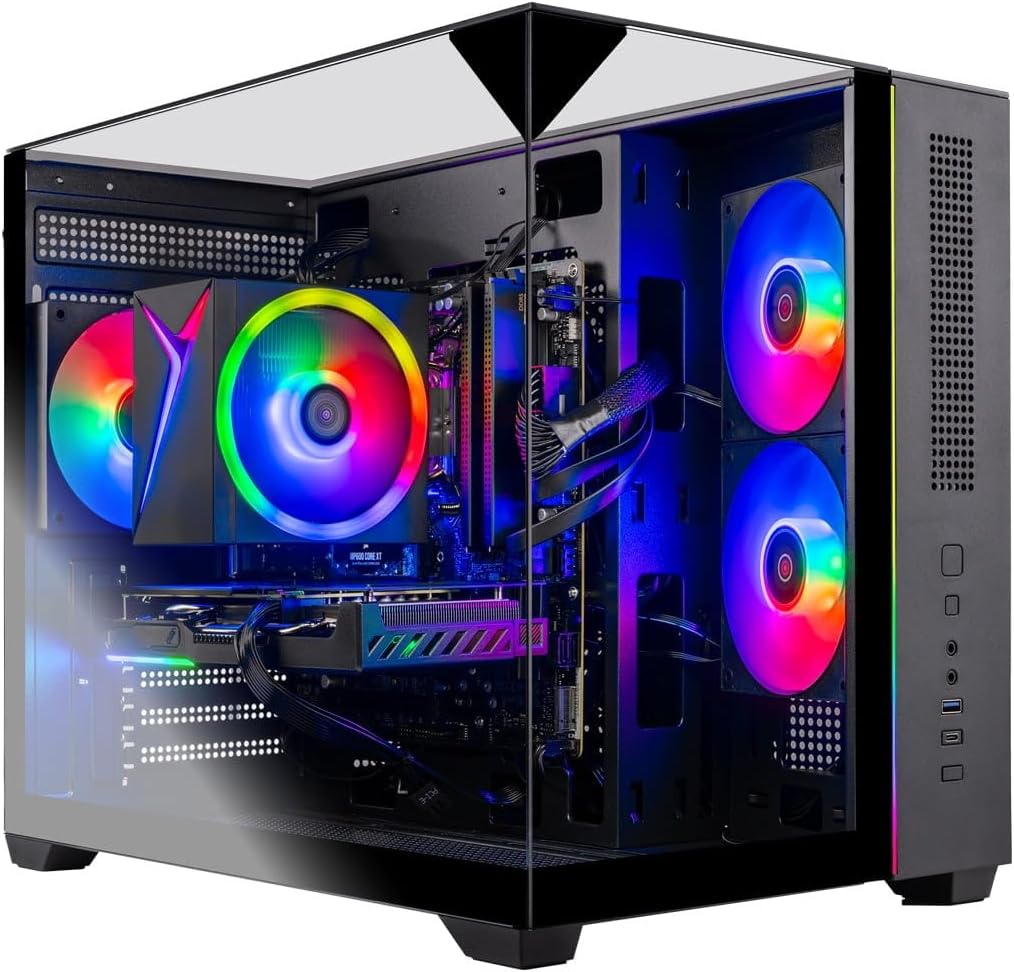
Skytech Gaming PC Desktop
4.5Editor score
Ryzen 7 5700 CPU
RTX 5060 GPU
32GB DDR4 RAM
Find the best Gaming PC for Escape from Tarkov with this guide comparing top prebuilt systems optimized for performance stability and immersive competitive FPS
Escape from Tarkov demands high performance and stability. A dedicated Gaming PC for Escape from Tarkov ensures smooth frame rates and quick load times during intense raids.
We compared ten top prebuilt systems for reliability and speed. This list covers options from budget-friendly picks to high-end rigs designed for serious competitive play and streaming.
Each pick shows key specs and standout features. Prices change often so check the current links before buying to secure the best deal for your budget today.
4.5Editor score

4.3Editor score

4.5Editor score
Here is a side-by-side look at the top ten systems. Compare specs like CPU GPU and RAM to find the perfect machine for your Tarkov setup.


This YAWYORE Gaming PC offers a balanced blend of speed and capacity. With a 4.5-star rating it stands out for handling the CPU demands of Tarkov smoothly.
We may earn a commission when you buy through this link, at no additional cost to you.
The Ryzen 7 5700X delivers solid multi-core power for background tasks while the RTX 5060 ensures stable frame rates in combat zones.
While it uses DDR4 memory which is slightly older it compensates with 32GB capacity which helps prevent stuttering during heavy raids.
If you need a reliable system that handles multitasking well without breaking the bank this is a smart choice for Tarkov players.
The 650W Bronze PSU supports stable performance during long raids without energy waste.
Built-in Bluetooth and WiFi let you connect peripherals without cable clutter on your desk.
We may earn a commission when you buy through this link, at no additional cost to you.
The MSI Codex Z2 packs a next-gen RTX 5070 GPU for superior visual fidelity. It targets enthusiasts who want ray tracing and DLSS for ultra-smooth Tarkov gameplay.
We may earn a commission when you buy through this link, at no additional cost to you.
With an 8-core Ryzen 7 8700F and 32GB DDR5 RAM this system handles streaming and heavy multitasking with ease.
The large 2TB SSD means you can store multiple titles without worrying about space while the RGB lighting adds aesthetic flair.
Players seeking top-tier performance and future-proofing will appreciate this premium desktop despite its higher cost and complex internal design.
The new GPU architecture delivers massive gains in rasterization and ray tracing for sharper visuals.
MSI Center software lets you tailor RGB lighting to match your gaming setup style and mood.
We may earn a commission when you buy through this link, at no additional cost to you.
This Skytech Gaming PC proves you do not need a huge budget for a capable Tarkov machine. It comes fully assembled and ready to play right out of the box.
We may earn a commission when you buy through this link, at no additional cost to you.
The Ryzen 7 5700 combined with 32GB RAM ensures you can run background apps while gaming without frame drops.
While it uses air cooling instead of liquid it still maintains good airflow through the crystal case to keep temps in check.
For budget-conscious gamers who want immediate playability and solid performance this desktop offers the best value for the price.
No assembly required as it arrives fully tested with Windows 11 Home pre-installed and ready.
The system ships without bloatware so you get a clean Windows experience straight away.
We may earn a commission when you buy through this link, at no additional cost to you.
This CyberPowerPC system features the latest 8700F CPU which offers excellent single-core performance for FPS games. It is ideal for players focused on raw speed.
We may earn a commission when you buy through this link, at no additional cost to you.
The inclusion of DDR5 RAM and a PCIe 4.0 SSD ensures quick load times and smooth data transfer during intense skirmishes.
However it ships with only 16GB RAM which might limit background app usage compared to competitors offering 32GB out of the box.
If you prioritize CPU speed over raw memory capacity this unit provides a robust foundation for competitive Tarkov sessions.
Multiple USB-C and USB-A ports allow easy connection of headsets and controllers.
Free lifetime tech support and a one-year warranty provide peace of mind for new builds.
We may earn a commission when you buy through this link, at no additional cost to you.
The KOTIN Prebuilt Gaming PC stands out with a 12GB RTX 5070 which provides ample VRAM for high-resolution textures. This is great for long-term performance.
We may earn a commission when you buy through this link, at no additional cost to you.
Pairing a 9700X CPU with 32GB DDR5 at 6000MHz ensures the system stays responsive even when running Discord or streaming software.
A unique feature is the smart display screen that shows real-time temps and usage which helps monitor system health during raids.
Players who want a premium GPU and modern CPU combo will find this system capable of delivering top-tier visual fidelity and speed.
The integrated screen lets you track CPU temps instantly without opening software overlays.
The 850W 80 Plus Gold supply ensures efficient power delivery for future component upgrades.
We may earn a commission when you buy through this link, at no additional cost to you.
This Skytech Gaming PC features a Ryzen 7 9850X3D which offers incredible cache for gaming. It is the ultimate choice for maxing out settings.
We may earn a commission when you buy through this link, at no additional cost to you.
The 16GB VRAM on the RX 9070 XT ensures that even the heaviest textures load instantly without stuttering during complex scenes.
A 360mm AIO liquid cooler keeps the CPU running at optimal temperatures even during extended sessions of raiding and streaming.
Gamers who want the absolute best performance available and do not mind paying a premium will love this high-end desktop system.
The AIO liquid cooler eliminates thermal throttling for consistent performance over long periods.
With 2TB storage you can install every game in your library without needing external drives.
We may earn a commission when you buy through this link, at no additional cost to you.
This O11 Vision build combines high performance with striking visuals. The RTX 5070 delivers excellent frame rates while the case highlights every internal component.
We may earn a commission when you buy through this link, at no additional cost to you.
With an X670 motherboard and DDR5 RAM it offers a modern platform ready for future CPU upgrades when the time comes.
The Lian Li PC-O11 Vision case ensures that the system looks amazing on your desk while maintaining decent airflow.
Players who value aesthetics as much as performance will find this desktop a stunning addition to any battlestation setup.
The tempered glass case shows off the ARGB fans and internal layout beautifully.
The X670 chipset offers great connectivity options and future upgrade potential for enthusiasts.
We may earn a commission when you buy through this link, at no additional cost to you.
This Gamer Xtreme system is designed for VR readiness and solid 1080p gaming. It offers a strong entry point for players starting their journey.
We may earn a commission when you buy through this link, at no additional cost to you.
The Intel Core i5-13400F provides reliable single-core performance which is critical for maintaining stable frame rates in Tarkov.
However the 16GB RAM limit might require an upgrade if you plan to run heavy background apps alongside your game sessions.
For casual gamers or those transitioning into VR this PC offers a reliable foundation for play and multitasking.
This system meets the VR Ready standards allowing for immersive experiences with headsets.
The PCIe Gen4 SSD ensures fast boot times and quick access to your favorite games.
We may earn a commission when you buy through this link, at no additional cost to you.
This MSI Codex Z2 variant focuses on reliability and VR readiness. The 32GB DDR5 RAM ensures smooth multitasking even while using VR headsets.
We may earn a commission when you buy through this link, at no additional cost to you.
The Ryzen 7 8700F CPU delivers consistent frame rates making it a solid choice for both Tarkov and VR games.
However the RTX 5060 GPU may struggle with high-resolution VR content compared to higher-end models in this list.
If you need a balanced system for mixed usage including VR this desktop provides a stable and responsive environment.
USB Type-C ports offer fast data transfer for peripherals and VR headsets.
Certified VR Ready status ensures compatibility with major headsets out of the box.
We may earn a commission when you buy through this link, at no additional cost to you.
The MSI Codex R2 delivers a balanced mix of GPU power and memory. It is suitable for players who prioritize raw graphics performance over CPU clock speed.
We may earn a commission when you buy through this link, at no additional cost to you.
The RTX 5070 with 12GB VRAM ensures that modern titles run smoothly while Wi-Fi 6E provides a low-latency connection.
With 32GB DDR5 RAM this system handles background tasks effortlessly making it great for streaming your gameplay live.
For users seeking strong graphics and connectivity this desktop offers a scalable platform that grows with your gaming needs.
Wi-Fi 6E delivers low latency on the 6GHz band for lag-free online gaming.
Standard components allow you to upgrade storage or GPU easily when needed.
We may earn a commission when you buy through this link, at no additional cost to you.
Choosing the right Gaming PC for Escape from Tarkov requires balancing CPU power GPU speed and memory capacity.
Escape from Tarkov is CPU-intensive so look for at least an 8-core processor. High clock speeds help maintain stable frame rates during large-scale raids.
Prioritize CPUs with strong single-core performance to avoid stuttering in combat scenarios.
A dedicated GPU with at least 8GB VRAM is essential for high-resolution textures. RTX or RX series cards offer better ray tracing and visual fidelity.
Look for cards supporting DLSS or FSR to boost frame rates without losing visual quality.
At least 16GB of RAM is recommended but 32GB is ideal for smooth multitasking. More memory prevents stuttering when running background apps.
Ensure the RAM is DDR5 if possible for faster data transfer speeds.
A fast SSD is crucial for quick load times into raids. Look for NVMe PCIe 4.0 drives to minimize wait times during gameplay.
At least 1TB of storage is recommended for installing multiple games and updates.
Effective cooling keeps the system stable during long gaming sessions. Look for AIO liquid coolers or high-quality air coolers to prevent throttling.
Good airflow in the case helps maintain lower component temperatures.
Built-in Wi-Fi 6E or Ethernet ports are vital for low-latency connections. Ensure you have enough USB ports for peripherals.
USB-C support is a nice bonus for modern accessories and faster data transfer.
A stable PSU with enough wattage is key for system reliability. Aim for 750W or higher to support GPU spikes and future upgrades.
Gold-certified PSUs offer better efficiency and longevity for your investment.
Choose a system with standard components that allow future upgrades. Avoid proprietary cases that limit component swapping.
Check motherboard slots to ensure you can add more RAM or storage later.
Ensure proper ventilation by placing your PC in a well-ventilated area away from walls.
Use the MSI Center or similar software to monitor temperatures and adjust fan curves if needed.
Regularly update your GPU drivers and BIOS to maintain system stability and security.
Yes it is CPU intensive due to physics and network handling. A modern multi-core processor and dedicated GPU are essential for smooth performance.
16GB is the minimum but 32GB is recommended. More memory prevents stuttering when running background apps like Discord or streaming software.
Yes most prebuilt gaming PCs work well. Ensure they have a dedicated GPU and sufficient RAM to handle the game's demands.
Yes an NVMe SSD drastically reduces load times. Traditional HDDs cause long waits and potential stuttering during raids.
Check your motherboard support for RAM or GPU upgrades. Standard cases make swapping components easier than proprietary ones.
An RTX 5060 or higher is recommended. It balances cost and performance for high frame rates at 1080p or 1440p.
We reviewed ten top systems offering a range of performance levels. Each pick provides solid reliability for competitive Tarkov gameplay.
Prioritize CPU power and memory capacity to ensure stable frame rates during intense raids.
Always check current prices and promotions before making your purchase to secure the best value today.