
SSK Portable SSD 1TB External Solid State
4.5Editor score
1050MB/s read performance
Lightweight 36.6g build
Includes USB-C and USB-A cables
This guide compares the top 10 external SSDs for MacBook Air users, evaluating speed, durability, and compatibility to help you choose the perfect portable
Finding the right external SSD for your MacBook Air is essential for expanding storage and ensuring fast file access. Whether you are editing videos or managing large datasets, a reliable drive makes a significant difference in your daily workflow and productivity levels.
We have carefully evaluated ten top-rated portable SSDs based on real-world performance, build quality, and Mac compatibility. Our comparison focuses on transfer speeds, durability ratings, and ease of use to help you find the best option for your specific needs.
Each product in this list highlights key features and potential trade-offs so you can make an informed decision quickly. Please note that availability and pricing may change over time, so verify the latest details before finalizing your purchase.
4.5Editor score

4.7Editor score

4.6Editor score
The following table provides a side-by-side overview of all ten selected drives, highlighting their key specifications and unique attributes to help you narrow down your choice based on performance and portability.


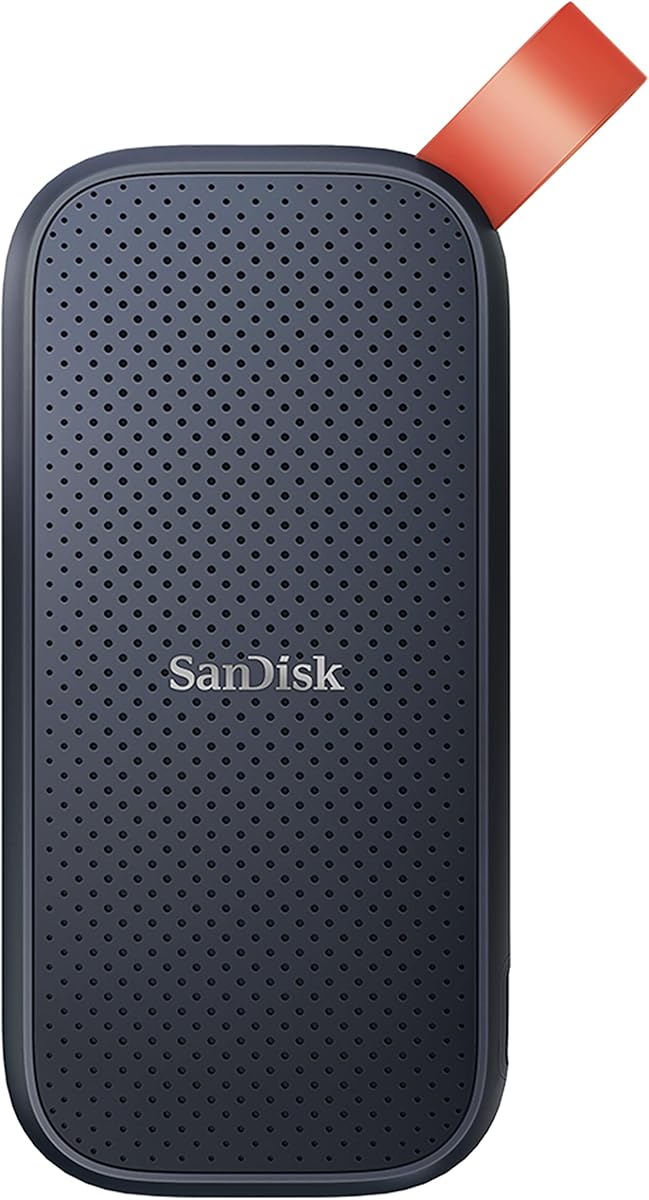




The Samsung T7 Portable SSD stands out as a top choice for MacBook Air users needing reliable and fast external storage. With a high rating of 4.7 stars, it delivers consistent performance for daily tasks and professional workflows alike.
We may earn a commission when you buy through this link, at no additional cost to you.
Its embedded PCIe NVMe technology enables read and write speeds up to 1,050MB/s and 1,000MB/s respectively. This performance ensures smooth playback of high resolution video and quick file transfers between your Mac and the drive.
While the drive is durable with shock resistance up to six feet, users should note that sustained heavy use can cause the aluminum body to warm up slightly. This is typical for high speed portable SSDs and does not impact performance significantly.
For creators and professionals who need a trustworthy drive that balances speed and durability, the T7 is an excellent recommendation. It supports 4K 60fps video recording and works seamlessly across PC, Mac, and mobile platforms.
The T7 works effortlessly with PC, Mac, and mobile devices, making it ideal for users who switch between platforms regularly.
With support for 4K 60fps video recording, this drive handles high bitrate content without dropping frames or causing bottlenecks.
We may earn a commission when you buy through this link, at no additional cost to you.
The SSK Portable SSD offers impressive value for MacBook Air owners seeking high performance without a premium price tag. It holds a solid 4.5 star rating, reflecting user satisfaction with its speed and reliability across various use cases.
We may earn a commission when you buy through this link, at no additional cost to you.
Featuring a 10Gbps interface, this drive achieves read speeds up to 1050MB/s and write speeds up to 1000MB/s. It also employs SLC caching to maintain steady speeds during large file transfers within its cache capacity.
One minor point to note is the capacity display difference on Windows compared to MacOS, which is a standard binary calculation variance. Additionally, it lacks dedicated encryption software, so users may need third-party solutions for sensitive data protection.
If you prioritize speed and portability while managing a strict budget, the SSK drive is a strong contender. Its lightweight design and included cables make it ready to use immediately with your MacBook Air or other compatible devices.
With power consumption under 2.4 Watts, this drive operates seamlessly on mobile devices like iPhones without draining battery quickly.
The 2mm thick aluminum alloy case ensures the drive stays cool even during extended file transfers, preventing overheating issues.
We may earn a commission when you buy through this link, at no additional cost to you.
For users who need the absolute fastest transfer speeds available, the Samsung T9 Portable SSD delivers top-tier performance with a 4.6 star rating. It is designed for creators and power users who cannot afford latency in their workflows.
We may earn a commission when you buy through this link, at no additional cost to you.
This drive supports read and write speeds up to 2,000MB/s when connected to a compatible USB 3.2 Gen 2×2 port. It also includes Samsung Magician Software for firmware updates, encryption, and ongoing drive health monitoring.
The Dynamic Thermal Guard feature helps regulate heat during heavy use, ensuring the drive maintains peak performance without throttling. However, to achieve the maximum advertised speeds, your MacBook Air must support the Gen 2×2 standard.
Investing in the T9 ensures future-proofing for high bandwidth tasks like 8K video editing or rapid game asset transfers. It is an excellent choice for professionals who demand reliability and speed above all else.
The advanced thermal solution allows the drive to withstand heat and keep temperatures ideal even during intensive prolonged usage.
Samsung Magician Software keeps your drive updated and secure, offering tools to monitor health and manage encryption easily.
We may earn a commission when you buy through this link, at no additional cost to you.
The SanDisk 2TB Extreme Portable SSD is built for users who frequently work in challenging environments. With a 4.6 star rating, it combines rugged durability with solid performance suitable for photographers and videographers on the move.
We may earn a commission when you buy through this link, at no additional cost to you.
This drive features IP65 water and dust resistance along with 3-meter drop protection, making it highly resilient against accidental damage. It also includes a handy carabiner loop to secure it to your backpack or belt loop for added safety.
Security is also a priority with included password protection using 256-bit AES hardware encryption. Users can manage files and free up space using the SanDisk Memory Zone app, though this may require installation and setup.
If you need a reliable storage solution that can withstand outdoor conditions and physical shocks, this drive is a smart investment. It provides ample space and robust protection for your valuable media files and projects.
The updated IP65 rating ensures the drive can withstand water flow and dust contact, providing peace of mind in tough conditions.
Built-in hardware encryption keeps your private content secure, requiring a password to access data stored on the drive.
We may earn a commission when you buy through this link, at no additional cost to you.
The Lexar ES3 1TB Portable SSD is designed for users who prioritize sleek design and portability. With a 4.4 star rating, it offers a balance of speed and style that fits comfortably in a pocket or small bag.
We may earn a commission when you buy through this link, at no additional cost to you.
At only 10.5mm thick and weighing 42g, this drive is remarkably thin and light without sacrificing performance. It supports read and write speeds up to 1050MB/s and 1000MB/s respectively for efficient data transfer.
Data safety is addressed with included Lexar DataShield software offering 256-bit AES encryption to protect your files. However, be aware that it is not compatible with older iPhone models and does not support Magsafe features.
For professionals who value a minimalist and stylish external storage option, the ES3 delivers well. It provides quick access to files while maintaining a slim form factor that complements the design of your MacBook Air.
Measuring just 10.5mm in thickness, this drive is smaller than a card and easily fits in your pocket for any outing.
Lexar DataShieldTM ensures your files are protected with strong encryption software included right out of the box.
We may earn a commission when you buy through this link, at no additional cost to you.
The SanDisk 1TB Portable SSD is a reliable option for users who need a proven track record of performance. With a 4.5 star rating, it remains a trusted choice for backing up content and memories on the go.
We may earn a commission when you buy through this link, at no additional cost to you.
This drive offers read speeds up to 800MB/s, which is sufficient for most file transfers and media access. It features a tough rubber hook that allows you to secure it to your belt loop or backpack easily.
Although it is an older model compared to newer high speed alternatives, it still provides solid durability with up to two-meter drop protection. SanDisk is a brand trusted by professional photographers for their assignments.
If you want a dependable and affordable storage solution that works well for general backups, this drive is worth considering. It fits seamlessly into a mobile lifestyle without requiring complex setup or software.
The integrated rubber hook gives you peace of mind by allowing you to secure the drive to your backpack or belt loop.
SanDisk has built a reputation for reliability among professionals who need consistent performance during critical assignments.
We may earn a commission when you buy through this link, at no additional cost to you.
The Lexar 2TB ES3 External SSD provides ample storage for users with large media libraries or project files. With a 4.5 star rating, it combines capacity with performance to handle significant data needs efficiently.
We may earn a commission when you buy through this link, at no additional cost to you.
This drive offers read speeds up to 1050MB/s and features built-in double layer graphite sheets to enhance heat dissipation. It is also drop-resistant up to 2 meters to ensure durability during everyday and office use.
Compatibility is seamless with plug-and-play support across PC, Mac, tablets, and smartphones. The included 2-in-1 USB-C/USB-A cable makes it easy to connect to a wide range of devices without additional adapters.
If you need more space for your data without sacrificing speed, the 2TB version is an excellent choice. It is ideal for archiving backups or storing large datasets for work and personal use.
Built-in double layer graphite sheets conduct heat quickly to keep the drive cool during blazing fast transfers.
Plug-and-play compatibility with a 2-in-1 cable lets you easily use the drive with PC, Mac, tablet, or smartphone.
We may earn a commission when you buy through this link, at no additional cost to you.
The Lexar 1TB Go Portable SSD with Hub offers unique versatility for creative professionals working in the field. With a 4.5 star rating, it is designed to simplify your setup while providing fast and reliable storage.
We may earn a commission when you buy through this link, at no additional cost to you.
This drive includes a built-in hub with four USB Type-C ports, giving you the flexibility to connect multiple peripherals. It supports capturing brilliant Apple ProRes footage and storing it with ease directly onto the drive.
The wireless plug-and-play Type-C connector reduces cable clutter, but you must press firmly to ensure the drive is completely inserted before use. It delivers blazing-fast performance up to 1050MB/s read for seamless 4K recording.
For users who want an all-in-one solution that combines storage and connectivity, this drive stands out. It is perfect for spontaneous creativity and on-the-go workflows where minimizing cable management is a priority.
The portable SSD plus the hub gives you ultimate flexibility to customize your setup to suit the shoot or work session.
Capture brilliant Apple ProRes footage and store it with ease, ensuring seamless 4K recording without dropped frames.
We may earn a commission when you buy through this link, at no additional cost to you.
The SanDisk 1TB Extreme PRO Portable SSD delivers high-end performance for users who need fast read and write speeds. With a 4.5 star rating, it is a capable drive for demanding applications and large file handling.
We may earn a commission when you buy through this link, at no additional cost to you.
Featuring a forged aluminum chassis that acts as a heatsink, this drive sustains high speeds efficiently. It supports read and write speeds up to 2000MB/s and includes IP65 water and dust resistance for rugged use.
Security is handled through 256-bit AES hardware encryption to keep private content private. Users can manage files and free up space using the SanDisk Memory Zone app, though this requires downloading and installing.
If you need a powerful drive for heavy workflows and want a rugged build, this model is a strong choice. It combines speed with durability, making it suitable for professionals who work in varied environments.
The forged aluminum chassis acts as a heatsink to deliver higher sustained speeds in a portable drive.
Up to 3-meter drop protection and IP65 water and dust resistance mean this tough drive can take a beating.
We may earn a commission when you buy through this link, at no additional cost to you.
The SanDisk 2TB Extreme Portable External SSD holds the highest customer rating in this comparison with 4.8 stars. It is a reliable choice for users seeking solid performance and extensive warranty coverage for their data.
We may earn a commission when you buy through this link, at no additional cost to you.
This drive offers read speeds up to 550MB/s, which is adequate for general file transfers and media access. It features a shock-resistant solid state core and IP55 water and dust resistance for everyday durability.
Built by SanDisk, a technology leader, it comes with a 3-year limited manufacturer warranty. The compact and pocket-sized design makes it easy to carry, and it is compatible with both PC and Mac users.
If you want a tried and true option with great customer satisfaction, this drive is worth the consideration. It provides a balance of capacity, protection, and reliability for standard storage needs.
Built by SanDisk to deliver superior performance, this drive has a high satisfaction rating among users.
The shock-resistant solid state core ensures greater durability for everyday use and travel.
We may earn a commission when you buy through this link, at no additional cost to you.
Selecting the right external SSD involves considering several factors to ensure compatibility and performance with your MacBook Air. This guide breaks down the key elements you should evaluate before making your purchase.
Transfer speeds are critical for productivity. Look for drives supporting USB 3.2 Gen 2 or higher to achieve read speeds of at least 1000MB/s. This ensures smooth playback of high-resolution video and faster backups.
Prioritize models with high read and write ratings to avoid bottlenecks during intensive workflows.
Choose a capacity that matches your data needs. 1TB is generally sufficient for most users, but 2TB or more is advisable for video editors or those archiving large media libraries.
Ensure you have enough space for active projects plus backups to avoid running out of room.
Portability often means exposure to physical risks. Look for drives with IP ratings for water and dust resistance and high drop protection ratings. Aluminum builds tend to dissipate heat better.
A rugged drive protects your data from accidental drops and environmental hazards.
Hardware encryption adds a layer of security for sensitive files. Drives with 256-bit AES encryption protect data without requiring third-party software.
Ensure the security features are easy to manage through reliable software or hardware options.
Verify that the drive matches your MacBook Air ports. USB-C and Thunderbolt compatibility are essential. Some drives include both USB-C and USB-A cables for broader device compatibility.
Choose a drive with the right connectors to avoid needing extra adapters.
Quality software helps manage storage and monitor drive health. Features like automatic backups or file management tools can enhance usability.
Look for intuitive software that integrates well with macOS.
Bus-powered drives draw power directly from your MacBook Air. Lower power consumption ensures the drive does not drain your laptop battery quickly during extended use.
Efficient power usage is key for mobile workflows.
A solid warranty protects your investment. Many top drives offer 3-year warranties. Check manufacturer support availability and reliability.
Ensure the brand offers reliable customer service for potential issues.
To get started, connect the SSD to your MacBook Air using the provided USB-C cable. Ensure your Mac has the latest updates to support the drive's full capabilities.
Eject the drive properly through Finder before unplugging it to prevent data corruption. This ensures all pending writes are completed safely.
Keep the drive away from extreme temperatures and moisture to maintain longevity. Regularly check firmware updates to ensure optimal performance and compatibility.
Yes, most modern external SSDs with USB-C or USB-A connections work with all MacBook Air models. Ensure your MacBook Air has the corresponding ports or you have the right adapters. Most drives are plug-and-play on macOS.
Yes, you can install and run macOS on an external SSD if it meets the performance requirements. Ensure the drive has sufficient read write speeds for smooth operation. Check Apple's compatibility guidelines for bootable volumes.
If you plan to use the SSD exclusively with Mac, formatting it as APFS or Mac OS Extended is recommended. Windows drives may come as exFAT which is readable but not optimized for Mac security features.
A quality portable SSD typically lasts several years depending on usage. They have no moving parts, so they are less prone to mechanical failure. Proper care and avoiding extreme conditions extend their lifespan significantly.
Hardware encryption is highly recommended for sensitive data. It protects files even if the drive is lost or stolen without relying on software passwords. Ensure the drive offers strong standards like 256-bit AES encryption.
This difference is due to binary calculations used by operating systems versus decimal marketing numbers. For example 1TB is often shown as 931GB on Windows. This is normal and does not indicate a defect.
Yes, you can connect multiple SSDs using a USB hub with adequate power. Ensure the hub supports high-speed data transfer to avoid bottlenecks. macOS manages multiple volumes easily in Finder.
Most modern SSDs are plug-and-play on macOS and do not require drivers. Some proprietary software may be included for management features but basic functionality works out of the box.
We have reviewed the top 10 external SSDs available for MacBook Air users, ranging from rugged options to high-speed performance drives. The Samsung T7 remains a top choice for balanced performance while the SSK SSD offers excellent budget value.
Prioritize your needs based on capacity speed and durability requirements. For professionals working with video the Samsung T9 provides unmatched speed whereas the SanDisk Extreme Portable is better for those needing rugged protection.
Remember to verify the latest pricing and availability before making your purchase as these details change frequently. With the right external SSD you can expand your MacBook Air storage significantly without compromising on performance or reliability.